The First 48 Hours Decide Everything
When a new member joins your BuddyPress community, you have a narrow window to make them feel welcome, understood, and connected. Research on online communities consistently shows that members who engage meaningfully within their first 48 hours are dramatically more likely to become long-term, active participants.
The problem is that most communities treat new members like they already know the lay of the land. A new member registers, lands on a generic activity feed full of conversations between people they do not know, and is expected to figure things out on their own. Many never come back.
An onboarding survey changes this dynamic entirely. Instead of leaving new members to wander, you greet them with a short questionnaire that accomplishes three things at once: it collects useful information about who they are and what they are interested in, it signals that the community cares about their experience, and it gives you data to personalize their first interactions.
WB Polls, typically known as a polling and voting tool for BuddyPress, has survey capabilities that make it a natural fit for onboarding questionnaires. Because it integrates directly with BuddyPress activity feeds and member profiles, survey responses can immediately inform how a new member experiences the community.
Why Onboarding Surveys Improve Retention
Before diving into the technical setup, it is worth understanding exactly how onboarding surveys drive retention. This is not a feel-good exercise, there are concrete mechanisms at play.
Reducing the “Cold Start” Problem
New members face a cold start problem: they have no connections, no history, and no context. An onboarding survey generates immediate data about the member that can be used to recommend groups, suggest connections with similar members, and surface relevant content. Instead of a blank slate, the new member gets a curated starting point.
Creating a Sense of Investment
When someone takes even two minutes to answer questions about themselves, they have invested in the community. Behavioral psychology tells us that investment increases commitment. A member who has taken the time to tell you about their interests feels more connected than one who just typed in an email address and password.
Gathering Actionable Data
Every response to an onboarding survey is a data point you can act on. If 40 percent of new members say they joined to learn about photography, you know to invest in photography content and groups. If most new members are beginners, you know advanced-only content will alienate your growing base. Without surveys, you are guessing. With surveys, you are making informed decisions about community direction.
Setting Expectations
An onboarding survey is also a chance to set expectations. By asking “How often do you plan to visit?” or “What kind of content are you most interested in?”, you subtly communicate that this is an active community with things to do. You frame the member’s mindset from passive consumer to active participant.
Designing Effective Onboarding Questions
The difference between a survey that gets completed and one that gets abandoned often comes down to question design. Here is how to create questions that new members will actually answer.
Keep It Short: Five to Seven Questions Maximum
Every additional question reduces your completion rate. For an onboarding survey, five to seven questions is the sweet spot. This takes about two minutes to complete, short enough that members do it immediately rather than saying “I will do it later” (which means never).
Start with Easy, Low-Stakes Questions
Lead with questions that are easy and even enjoyable to answer. “What brings you to our community?” or “Which topic interests you most?” are inviting. “Please provide a detailed description of your professional background” is not. Save any harder questions for later in the sequence.
Use Multiple Choice, Not Open Text
Multiple-choice questions are faster to answer and produce structured data you can actually use for automation. Open text responses are harder for members to write and harder for you to process. Save free-text for one optional question at the end, like “Anything else you would like us to know?”
Make Every Question Actionable
Do not ask a question unless you plan to do something with the answer. If you ask about interests, use the response to suggest groups. If you ask about experience level, use it to recommend appropriate content. If you ask how they heard about you, use it to evaluate your marketing channels. Collecting data you never use is a waste of the member’s time and your own.
Sample Onboarding Questions
Here is a set of onboarding questions that works well for most BuddyPress communities:
- What brings you to [Community Name]? (Options: Networking, Learning, Sharing expertise, Finding collaborators, Other)
- Which topics interest you most? (Multiple select from your key topic areas)
- How would you describe your experience level? (Beginner, Intermediate, Advanced, Expert)
- How did you hear about us? (Search engine, Social media, Friend/colleague, Blog post, Other)
- How often do you plan to visit? (Daily, A few times a week, Weekly, A few times a month)
- Would you like to be matched with a community mentor? (Yes, No, Maybe later)
- Anything else you would like to share? (Optional free text)
Using WB Polls for Onboarding Surveys
WB Polls gives you the survey infrastructure you need without requiring a separate plugin. Here is how to set it up for new member onboarding.
Creating Survey-Style Polls
While WB Polls is primarily known for polls, its multi-question and multi-option capabilities make it work well for survey-style data collection. Create a series of polls that function as your onboarding questionnaire.
For each onboarding question, create a poll with the following settings:
- Clear, friendly question text
- Well-defined answer options covering the range of expected responses
- Single-select for questions with mutually exclusive answers, multi-select for interest-based questions
- No time limit (the survey should be available whenever the member is ready)
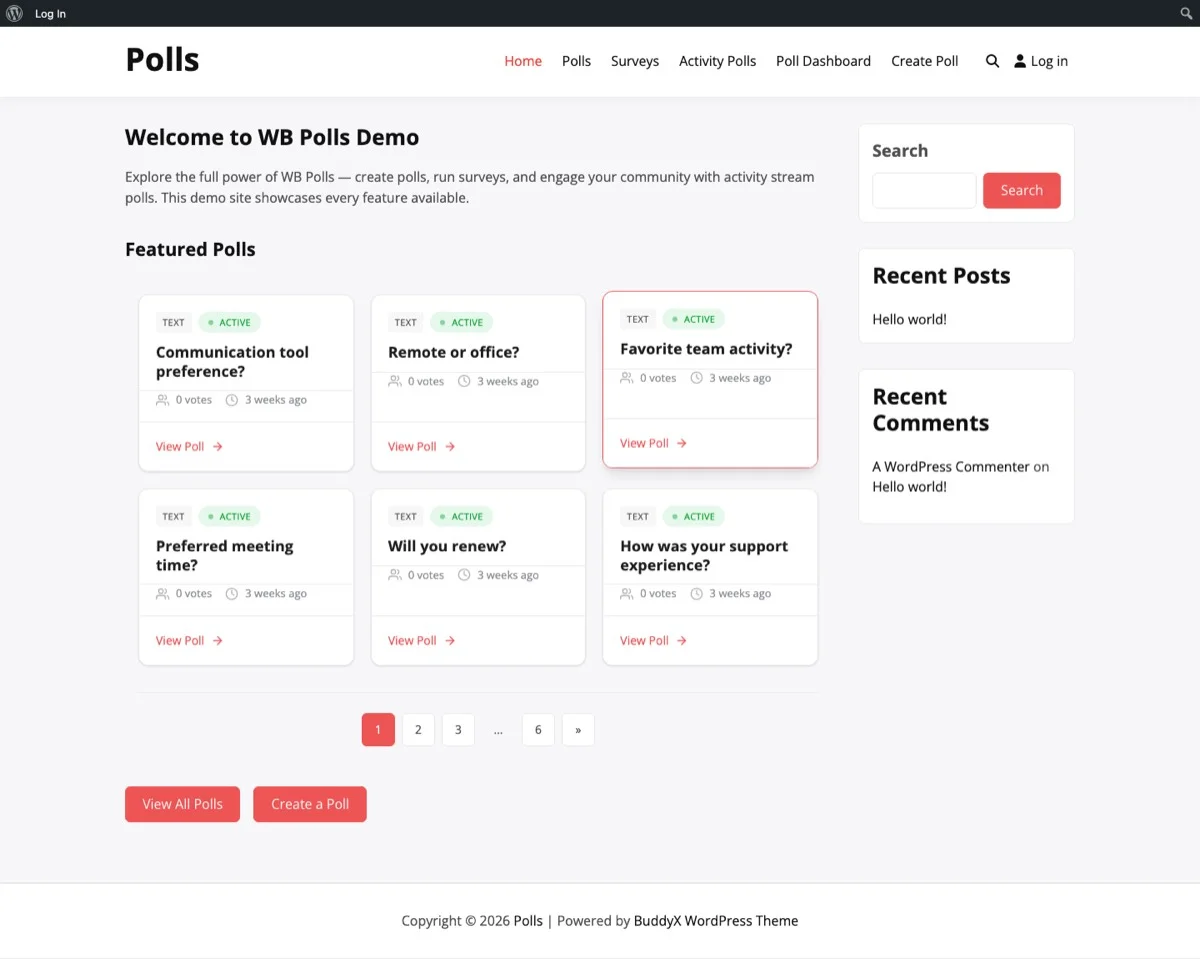
A grid of onboarding survey polls that new members can browse and respond to at their own pace.
Positioning Surveys for New Members
The key to high completion rates is putting the survey where new members will see it immediately. There are several strategies:
- Activity feed placement: Pin the onboarding survey to the top of the activity feed so it is the first thing new members see when they log in.
- Profile prompt: Use a BuddyPress notification to prompt new members to complete their onboarding survey. A message like “Help us personalize your experience, complete your quick onboarding survey” links directly to the polls.
- Welcome group: Create a “Welcome New Members” BuddyPress group that all new members are automatically added to. Post the onboarding survey polls in this group.
Organizing Multiple Questions
If your onboarding survey has five to seven questions, you can present them as individual polls within a dedicated page or group. WB Polls displays polls in a clean grid format that makes it easy for members to work through multiple questions without feeling overwhelmed.
Alternatively, for a more streamlined experience, you can create a single page on your site that embeds all the survey polls in sequence. This gives the new member a clear start-to-finish experience.
Storing and Using Survey Responses
Collecting responses is only valuable if you do something with the data. Here is how to turn onboarding survey responses into actionable community management.
Response Storage
WB Polls stores all responses tied to user accounts. This means you can see exactly how each member answered every survey question. For onboarding purposes, this creates a profile of interests and preferences for every new member.
Analyzing Aggregate Data
Beyond individual responses, the aggregate data from your onboarding survey reveals patterns about your growing community:
- Interest distribution: Which topics are most popular among new members? This tells you where to invest content and group development.
- Experience levels: Is your community attracting mostly beginners, experts, or a mix? This affects how you structure content and discussions.
- Acquisition channels: How are people finding you? Double down on what works and cut what does not.
- Engagement intent: Do new members plan to visit daily or monthly? This sets realistic expectations for engagement metrics.
Using Responses for Personalization
The most powerful use of onboarding survey data is immediate personalization. When a new member tells you they are interested in photography and web design, you can:
- Suggest they join the Photography and Web Design groups
- Highlight recent popular posts in those categories
- Introduce them to other members with similar interests
- Send them a curated welcome message with relevant resources
This level of personalization turns a generic community experience into one that feels tailored. Members who feel the community “gets them” stick around.
Auto-Assigning Groups Based on Survey Answers
One of the most impactful automations you can build with onboarding survey data is automatic group assignment. When a new member indicates interest in specific topics, add them to the corresponding BuddyPress groups automatically.
How It Works
The workflow looks like this:
- New member completes the onboarding survey and selects their interests (e.g., Photography, Hiking, Cooking).
- Based on their selections, they are added to the relevant BuddyPress groups.
- The member’s activity feed immediately starts showing content from those groups.
- The member sees relevant discussions and feels connected from day one.
Setting Up the Mapping
Create a mapping between your survey interest options and your BuddyPress groups:
- “Photography” interest maps to the Photography Enthusiasts group
- “Web Development” interest maps to the Developers group
- “Marketing” interest maps to the Digital Marketing group
- “Beginner” experience level maps to the Getting Started group
This mapping can be implemented through BuddyPress hooks and filters. When a poll response is submitted, a custom function checks the response and uses the BuddyPress groups API to add the member to the appropriate groups.
The Member Experience
From the new member’s perspective, this feels like magic. They answer a few questions about what they are into, and suddenly their community feed is full of relevant discussions from groups that match their interests. They see conversations they want to join, people they want to connect with, and content they actually care about.
This is the difference between a community that feels empty and overwhelming and one that feels alive and relevant from the very first login.
Best Practices for High-Completion Onboarding Surveys
Getting members to actually complete the survey is half the battle. Here are the practices that consistently drive high completion rates.
Explain the “Why” Up Front
Before the first question, tell members why you are asking. A simple sentence like “Help us personalize your experience by answering a few quick questions” frames the survey as beneficial to them, not just data collection for you.
Show a Progress Indicator
If your survey spans multiple polls, let members know how far along they are. “Question 3 of 5” reduces the anxiety of an unknown-length questionnaire. When members can see the finish line, they are more likely to keep going.
Make It Visually Appealing
WB Polls presents options in a clean, clickable format that is more engaging than a traditional form. Lean into this by using clear, concise option text and keeping each question focused on one topic.
Offer an Incentive
Consider offering a small incentive for completing the onboarding survey. This could be:
- Access to a members-only resource or guide
- A profile badge (“Community Pioneer” or “Founding Member”)
- Entry into a welcome giveaway
- Early access to a new feature or content area
The incentive does not need to be valuable in monetary terms. The recognition of completing the survey is often enough.
Follow Up on Incomplete Surveys
If a member starts the survey but does not finish, send a gentle BuddyPress notification after 24 hours. Keep it light: “You are almost done! Just 2 more questions to help us personalize your experience.” Do not send more than one follow-up, being pushy defeats the purpose.
Respect the “No Thanks”
Some members will not want to complete a survey, and that is fine. Never gate essential community features behind survey completion. The survey should enhance the experience, not block it. Members who skip the survey should still be able to use the community fully, they just miss out on the personalization benefits.
Measuring Onboarding Survey Effectiveness
Once your onboarding survey is running, track these metrics to measure its impact:
Completion Rate
What percentage of new members complete the full survey? A rate above 60 percent is strong. Below 40 percent suggests the survey is too long, poorly positioned, or not clearly valuable to members. If your rate is low, experiment with fewer questions, different placement, or a clearer value proposition.
Retention Correlation
Compare 30-day and 90-day retention rates between members who completed the onboarding survey and those who did not. If the survey and subsequent personalization are working, survey completers should show meaningfully higher retention.
Group Engagement
For members who were auto-assigned to groups based on survey responses, track whether they actually engage in those groups. If auto-assigned members are as active as members who found and joined groups organically, your interest mapping is working well.
Time to First Interaction
Measure how quickly new members make their first post, comment, or group contribution. Members who complete the onboarding survey and get personalized group assignments should interact sooner than those who do not.
Evolving Your Survey Over Time
Your onboarding survey should not be static. As your community grows and changes, your survey should evolve with it.
Review Quarterly
Every quarter, look at your survey data and ask:
- Are any questions consistently skipped? Consider removing or rewording them.
- Have new interest areas emerged that should be represented?
- Are any answer options never selected? Consolidate or replace them.
- Has the community’s audience shifted in ways the survey does not reflect?
Add Seasonal or Event-Based Questions
If your community runs regular events, conferences, or challenges, consider adding a temporary question about them to the onboarding survey. This introduces new members to upcoming activities right away.
Test and Iterate
Try different question orders, wordings, and option sets. Track completion rates across variations. Small changes in how you phrase questions can have significant impacts on response quality and completion rates.
Beyond Onboarding: Ongoing Member Surveys
Once you have the onboarding survey running well, consider extending the concept to ongoing member engagement:
- Quarterly check-ins: Ask members about their experience every few months. Are they finding what they need? What would they change?
- Post-event feedback: After community events, run a quick feedback poll to improve future events.
- Feature interest polls: Before developing new community features, survey members about what they actually want.
- Satisfaction surveys: Periodically gauge overall community satisfaction to catch problems before they drive members away.
WB Polls makes all of these easy to create and distribute through the same BuddyPress infrastructure your members already use.
Start Welcoming Members the Right Way
A new member’s first experience in your community sets the tone for their entire journey. An onboarding survey powered by WB Polls turns that first experience from a confusing blank page into a personalized welcome that says, “We care about what you are here for, and we are going to help you find it.”
Start simple. Create five questions that capture the most important information about your new members. Set up the survey in WB Polls, position it where new members will see it, and start collecting the data that lets you personalize every new member’s experience.
The communities that retain members are the ones that make members feel seen from day one. An onboarding survey is the easiest, most effective way to do exactly that.
Ready to create onboarding surveys that boost retention in your BuddyPress community? Get WB Polls here and start turning new signups into engaged, long-term members.