Monetize Your BuddyPress Community Without Annoying Members


Why Traditional Ad Placements Fail on Community Sites
If you run a BuddyPress-powered community, you already know that your site is fundamentally different from a blog or a news portal. Members come back day after day not because they want to consume content passively but because they want to interact, share, and connect. That behavioral difference changes everything about how advertising works on your platform.
Traditional ad placements, the sidebar banners, the leaderboard headers, the interstitial popups, were designed for content consumption sites. A reader lands on a blog post, reads it top to bottom, and leaves. Banners along the edges catch their eye because the content itself is static. On a community site, the experience is the opposite. Members are scrolling feeds, clicking into profiles, replying to threads, and navigating between groups at high speed. Their eyes are trained on the interactive elements, not the static margins.
Here is the uncomfortable truth: slapping Google AdSense on a BuddyPress site does not just fail to generate meaningful revenue. It actively drives members away. Community sites live and die by engagement metrics. If your ad placements create friction in the social experience, members will leave, and they will not come back. A 2024 study by the Interactive Advertising Bureau found that intrusive ads reduce user session time by up to 40% on social platforms compared to content-only sites.
The challenge, then, is clear: how do you generate revenue from a thriving community without undermining the very thing that makes it valuable? If you are still building a private community as users leave big platforms, getting your monetization strategy right from the start is critical.
Understanding the BuddyPress Advertising Landscape
BuddyPress communities present a unique advertising opportunity because they combine high engagement with niche audiences. Unlike generic websites where visitors are anonymous and fleeting, your community members are logged in, profiled, and deeply invested. That level of engagement and identity makes your ad inventory significantly more valuable than generic display ads, if you know how to use it.
The problem is that most WordPress ad plugins were never built for community sites. They understand pages and posts, sidebars and footers. They have no concept of an activity feed, a member profile, a group directory, or a private message thread. When you try to force these tools into a BuddyPress environment, the results are awkward at best and site-breaking at worst.
This is where purpose-built tools like WB Ad Manager Pro change the game. Instead of treating your community like a generic WordPress site, it understands BuddyPress-specific locations and contexts, giving you fine-grained control over where ads appear and who sees them.
Activity Feed Ads That Blend In
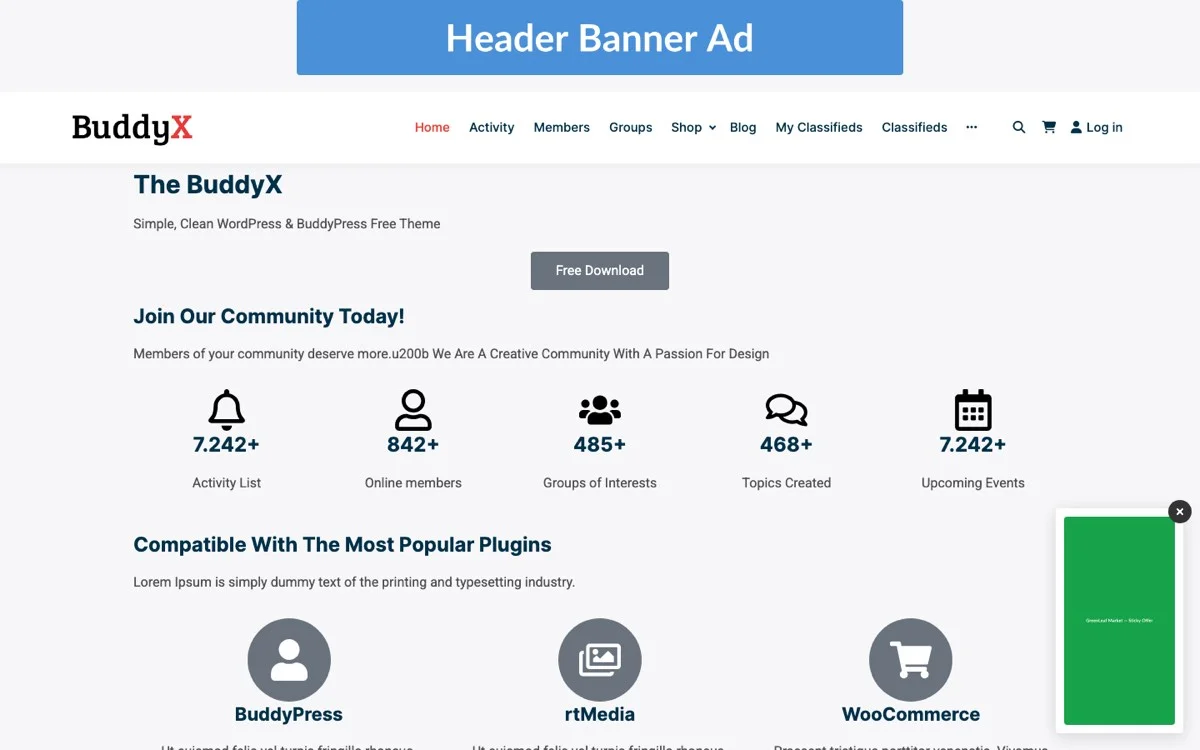
The activity feed is the heartbeat of any BuddyPress community. Members check it multiple times a day. It is where new connections form, discussions start, and content gets shared. It is also the single most valuable piece of ad real estate on your entire site.
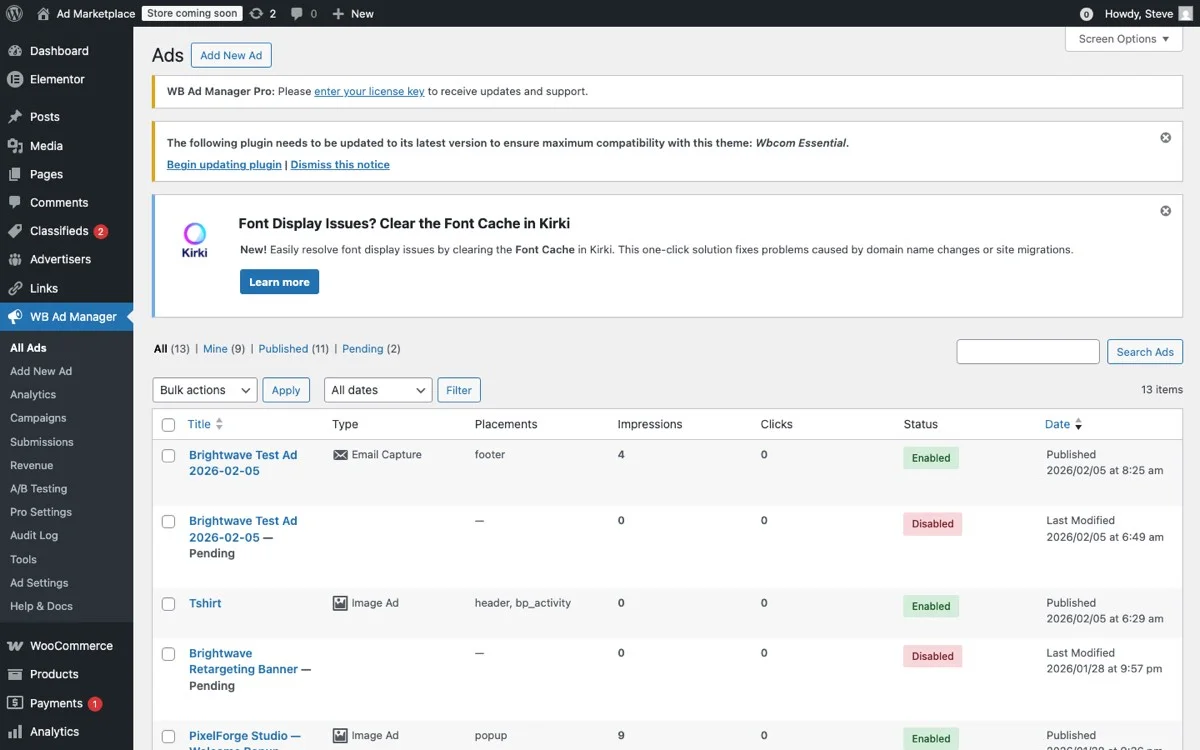
The WB Ad Manager admin ads list lets you manage all your community ad campaigns from a single, organized dashboard.
The key to monetizing the activity feed without alienating members is making ads feel like they belong there. This means matching the visual format of regular activity items, same card layout, same typography, same interaction patterns. The only difference should be a subtle “Sponsored” label that maintains transparency without screaming “advertisement.”
How Feed Ads Work in Practice
With WB Ad Manager Pro, you can insert sponsored content directly into the activity stream at configurable intervals. For example, you might choose to show one sponsored post every 10 activity items. The ad inherits the same styling as organic activity posts, so it looks like a natural part of the conversation.
This approach works because it respects the mental model your members already have. They are scanning a feed of updates from people they know. A sponsored post that uses the same format does not trigger the “ad blindness” reflex that banner ads do. Instead, it gets the same level of attention as any other feed item.
You can further improve relevance by targeting feed ads based on the member’s group memberships, profile data, or activity history. A photography community member who is active in the “Landscape Photography” group sees ads for camera equipment. A coding community member in the “Python Developers” group sees ads for developer tools. The more relevant the ad, the less it feels like an interruption.
Frequency Controls Matter
One of the biggest mistakes community administrators make is showing too many ads too often. Even well-designed native ads become irritating at high frequency. WB Ad Manager Pro gives you granular control over ad density, you can set minimum gaps between ads, daily impression caps per member, and frequency limits per ad campaign. Start conservative (one ad per 15 feed items) and increase gradually based on engagement data.
Member and Group Page Opportunities
Beyond the activity feed, BuddyPress communities offer several high-value ad placement locations that traditional ad plugins simply cannot reach. Ensuring your community is mobile-friendly means these ad placements need to work responsively across all devices.
Member Profile Pages
Profile pages are some of the most visited pages on any community site. Members check their own profiles, browse other members’ profiles, and spend time on profile-related features. Ad placements on profile pages work well because the viewing context is already personal, members are looking at content about specific people, which creates natural opportunities for relevant advertising.
Effective profile page ad positions include:
- Below the profile header: A horizontal banner between the cover image and the profile content. This is prime real estate with high visibility.
- Within the profile activity tab: In-feed ads that appear within a member’s personal activity stream.
- Profile sidebar: If your theme supports a sidebar on profile pages, this is a natural location for vertical ad units.
- Between profile sections: Ads placed between the About section and the Friends list, for example.
Group Directories and Group Pages
Groups are where the most engaged members spend their time. Group directories present an opportunity for larger promotional units, while individual group pages offer contextual targeting based on the group’s topic.
Consider these group-related placements:
- Group directory listings: Promote a group or product between group listings in the directory, styled like a featured group card.
- Group activity feed: The same native feed ad approach used in the main activity stream, but within a specific group’s feed.
- Group header area: A prominent placement below the group’s cover image.
- Group sidebar widgets: Ads in the group sidebar that can be targeted based on the group’s category or topic.
Member Directory
The member directory is often one of the most-trafficked pages on a BuddyPress site. Inserting a promoted member card or a sponsored listing between regular member cards gives advertisers visibility without disrupting the browse experience. This works particularly well for businesses that are also community members and want to highlight their profiles.
Role-Based Display: Free vs. Premium Members
One of the most powerful monetization strategies for BuddyPress communities is using ads as a differentiator between free and premium membership tiers. This approach creates two revenue streams simultaneously: advertising revenue from free members and subscription revenue from premium members who pay to remove ads.
How Role-Based Ad Display Works
WB Ad Manager Pro supports WordPress role-based targeting out of the box. You can configure any ad placement to show only to specific user roles. The typical setup looks like this:
- Free members (Subscriber role): See all ad placements, activity feed ads, profile page ads, group page ads, sidebar ads.
- Premium members (custom role): See zero ads across the entire site. Their experience is completely ad-free.
- Moderators and Admins: See no ads, plus they get access to ad performance dashboards.
This model is well-proven on platforms like YouTube, Spotify, and LinkedIn. Users understand the value exchange: free access supported by ads, or pay a subscription for an ad-free experience. When applied to a BuddyPress community, it creates a natural upgrade path that members actively want to take.
Pricing Your Ad-Free Tier
The key to pricing your premium tier is understanding your ad revenue per user. If your average free member generates $2 per month in ad revenue, your premium subscription needs to exceed that amount, typically $5 to $10 per month for community sites. This way, every premium subscriber is more valuable than a free member, and you win either way.
Use membership plugins like Paid Memberships Pro or MemberPress alongside WB Ad Manager Pro to create this tiered experience. The ad manager handles the display logic based on roles, while the membership plugin handles payments and role assignment. You can even combine this with BuddyPress WooCommerce integration for a full social commerce platform.
Communicating the Value
Be transparent with your members about why ads exist. A simple banner for free members that says “Upgrade to Premium for an ad-free experience” converts surprisingly well when members have been exposed to tasteful but persistent advertising. The ads themselves become your best marketing tool for premium subscriptions.
Letting Members Promote Their Own Content
Here is a monetization angle that most community administrators overlook: your members themselves are potential advertisers. In a BuddyPress community, members often have businesses, products, services, or events they want to promote to the community. Instead of fighting against self-promotion in the activity feed, channel it into a formal promoted content system. For a deep dive on this topic, read our guide on how to build a self-service ad portal for your BuddyPress site.
Member-Submitted Promoted Posts
WB Ad Manager Pro enables a self-service model where members can submit their own content for promotion. The workflow is straightforward:
- A member creates a promoted post through a front-end submission form.
- The post enters a moderation queue for admin review.
- Once approved, the promoted post appears in the activity feed with a “Sponsored” label.
- The member pays for the promotion using the built-in wallet system or a configured payment method.
This model works exceptionally well for community sites because the advertisers are also members. They understand the community culture, speak the community’s language, and create content that resonates with other members. The result is advertising that actually adds value to the community rather than detracting from it.
Pricing Member Promotions
You can price member promotions based on reach (number of impressions), duration (24 hours, 7 days, 30 days), or placement priority (top of feed vs. standard rotation). A simple package structure works well:
- Basic Boost ($10): 1,000 impressions in the activity feed over 7 days.
- Standard Promotion ($25): 5,000 impressions across activity feed and group feeds over 14 days.
- Premium Feature ($50): 10,000 impressions with priority placement and cross-site visibility for 30 days.
Moderation Is Key
The success of member-promoted content depends entirely on quality control. Every promoted post should go through the same moderation process as regular content, with additional scrutiny for advertising claims and relevance. Set clear guidelines about what can be promoted, and do not hesitate to reject submissions that do not meet your community standards.
Measuring Ad Performance in a Community Context
Measuring ad performance on a community site requires different metrics than traditional display advertising. Click-through rates tell only part of the story. On a community site, you also need to measure how ads affect the overall community health. Combining ad analytics with gamification strategies can help you balance revenue with engagement.
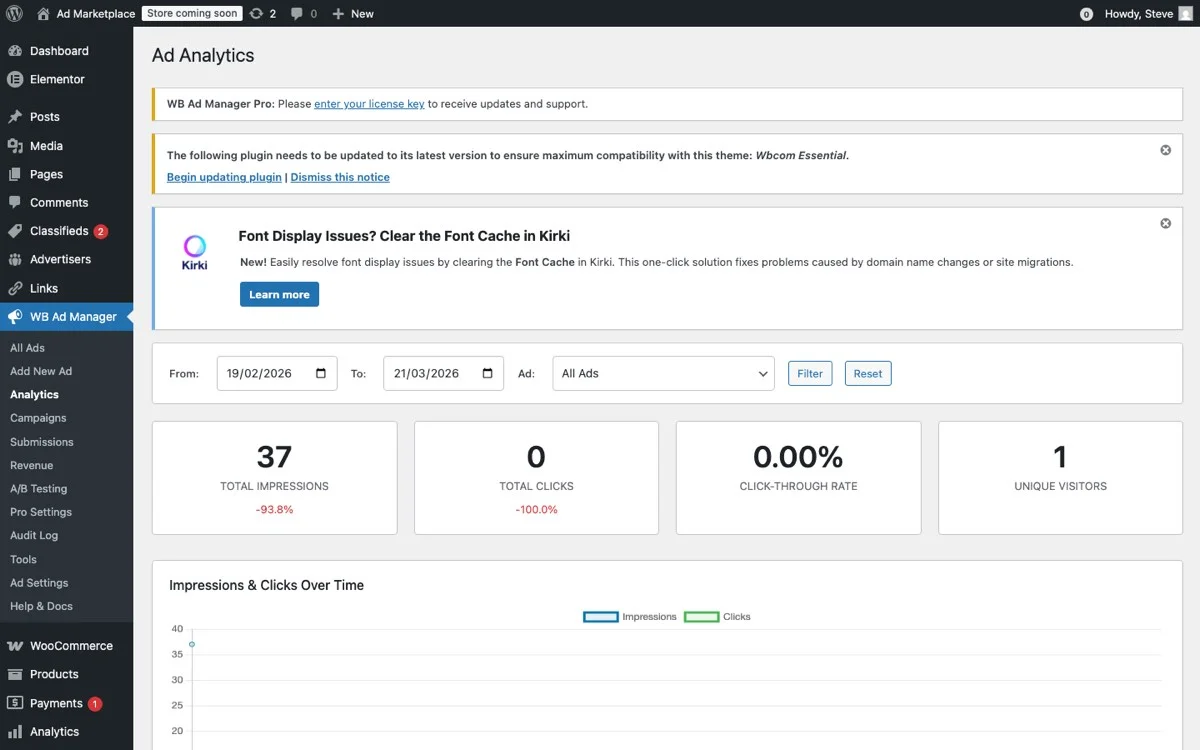
The WB Ad Manager analytics dashboard provides a comprehensive view of ad performance across all your BuddyPress community placements.
Core Advertising Metrics
WB Ad Manager Pro provides a comprehensive analytics dashboard that tracks:
- Impressions: How many times each ad was displayed, broken down by placement location.
- Clicks: Click-through rates for each ad and placement.
- CTR by placement: Which ad positions perform best, activity feed, profile pages, group pages, etc.
- Revenue per placement: If you are running CPM or CPC campaigns, see exactly which placements generate the most revenue.
- Advertiser performance: For self-service advertisers, track which campaigns are performing well and which need optimization.
Community Health Metrics
Beyond standard ad metrics, monitor these community-specific indicators to ensure your ad strategy is not harming engagement:
- Session duration: Are members spending less time on the site after you introduced ads? If session duration drops more than 10%, reduce ad density.
- Activity posting rate: Are members posting less frequently? A drop in user-generated content is an early warning sign of ad fatigue.
- Bounce rate on community pages: Monitor bounce rates specifically on pages with ads versus pages without. A significant difference indicates your ads are too intrusive.
- Premium upgrade rate: If you offer an ad-free premium tier, track how many members upgrade. A healthy upgrade rate (2-5% of active members per month) indicates your ad strategy is motivating upgrades without driving departures.
- Member churn: The ultimate metric. If members are leaving and citing ads as a reason, you have gone too far.
A/B Testing Your Ad Strategy
Do not guess at the right balance. Use A/B testing to find it. Test different ad densities, placements, and formats with different member segments. WB Ad Manager Pro supports campaign-level targeting, which means you can show different ad configurations to different groups of members and compare the results.
For example, show Group A one ad per 10 feed items and Group B one ad per 20 feed items. After two weeks, compare session duration, posting rates, and ad revenue per member. The data will tell you exactly where the sweet spot is for your specific community.
Practical Implementation: Getting Started
Ready to monetize your BuddyPress community the right way? Here is a step-by-step implementation plan:
Week 1: Setup and Configuration
- Install and activate WB Ad Manager Pro on your BuddyPress site.
- Configure your ad placements, start with just the activity feed and one sidebar position.
- Set conservative frequency limits: one ad per 15 feed items, maximum 5 impressions per member per day.
- Create role-based display rules: ads visible to free members only.
Week 2: Launch with Internal Ads
- Create 3-5 internal promotional ads (promote your own premium membership, community events, or partner content).
- Enable the ads and monitor community metrics closely.
- Gather member feedback, add a simple survey or feedback link.
Week 3-4: Optimize and Expand
- Review analytics data. Adjust frequency and placement based on performance.
- Add additional placements: profile pages, group pages, member directory.
- Begin accepting external advertisers or enable member self-service promotions.
Month 2 and Beyond: Scale
- Introduce tiered pricing for advertisers based on targeting options.
- Launch a premium ad-free membership tier if you have not already.
- Continuously A/B test and optimize for the balance between revenue and engagement.
The Bottom Line: Revenue and Respect Can Coexist
Monetizing a BuddyPress community does not have to mean sacrificing the member experience. The key is treating your members with respect, using native ad formats that blend into the community experience, giving members control through premium tiers, and measuring the impact of ads on community health alongside revenue metrics.
Traditional advertising approaches fail on community sites because they ignore the fundamental nature of social interaction. Members are not passive consumers waiting to be marketed to. They are active participants in a shared space. Your advertising strategy needs to honor that difference.
With WB Ad Manager Pro, you get the tools to implement a community-first advertising strategy: native feed ads, role-based display, self-service member promotions, and detailed analytics that track both revenue and community health. The result is a sustainable revenue stream that grows alongside your community rather than at its expense.
Start with small, non-intrusive placements. Measure everything. Listen to your members. And scale gradually based on data, not assumptions. Your community built its value through trust and engagement. Your monetization strategy should protect both.