Jetonomy inherits your theme’s styles automatically through CSS custom properties. Fonts, colors, border radius, and spacing all flow from your theme’s theme.json settings. For most sites, the forum looks great without any customization.
But sometimes you need more control. Maybe you want to add a custom sidebar to the topic listing. Or display additional user fields on hover cards. Or restructure the single topic layout to match your site’s unique design language.
Jetonomy supports full template overrides. Copy any template file from the plugin to your theme, modify it, and the plugin uses your version automatically.
How Template Overrides Work
Jetonomy’s templates live in plugins/jetonomy/templates/. To override any template:
- Create a
jetonomy/directory in your active theme:your-theme/jetonomy/ - Copy the template file you want to override from
plugins/jetonomy/templates/toyour-theme/jetonomy/ - Edit the copied file in your theme directory
- Jetonomy automatically detects and uses your theme’s version
This is the same pattern used by WooCommerce, Easy Digital Downloads, and other major WordPress plugins. It survives plugin updates because your customizations live in your theme, not in the plugin directory.
Available Templates
| Template File | What It Renders |
|---|---|
home.php |
Community home page (categories and spaces) |
space.php |
Space/topic listing page |
single-post.php |
Single topic with replies |
new-post.php |
New topic creation form |
search.php |
Search results page |
leaderboard.php |
Member leaderboard |
user-profile.php |
User profile page |
partials/topic-row.php |
Individual topic row in listings |
partials/reply.php |
Individual reply in topic view |
partials/sidebar.php |
Sidebar with trending and top members |
CSS Custom Properties (No Template Override Needed)
Before overriding templates, check if CSS custom properties can achieve what you want. Jetonomy exposes --jt-* custom properties for every visual element:
--jt-accent, Primary accent color (buttons, links, highlights)--jt-bg, Background color--jt-text, Text color--jt-border, Border color--jt-radius, Border radius--jt-font, Body font family
These properties inherit from your theme’s theme.json values first, then fall back to sensible defaults. You can override any of them in your theme’s CSS without touching template files:
.jt-app {
  --jt-accent: #E91E63;
  --jt-radius: 12px;
}
Theme Compatibility
Jetonomy is tested with major WordPress themes and page builders. The forum uses a self-contained .jt-app wrapper that isolates its styles from theme conflicts. Key compatibility features:
- Block themes (FSE), Works with theme.json-based themes. Reads colors, fonts, and spacing from your theme’s configuration.
- Classic themes, Falls back to CSS inheritance. Reads inherited font-family and color from the parent container.
- Page builders, Elementor, Beaver Builder, and others work alongside the forum. The forum does not use page builder shortcodes, it renders through its own template system.
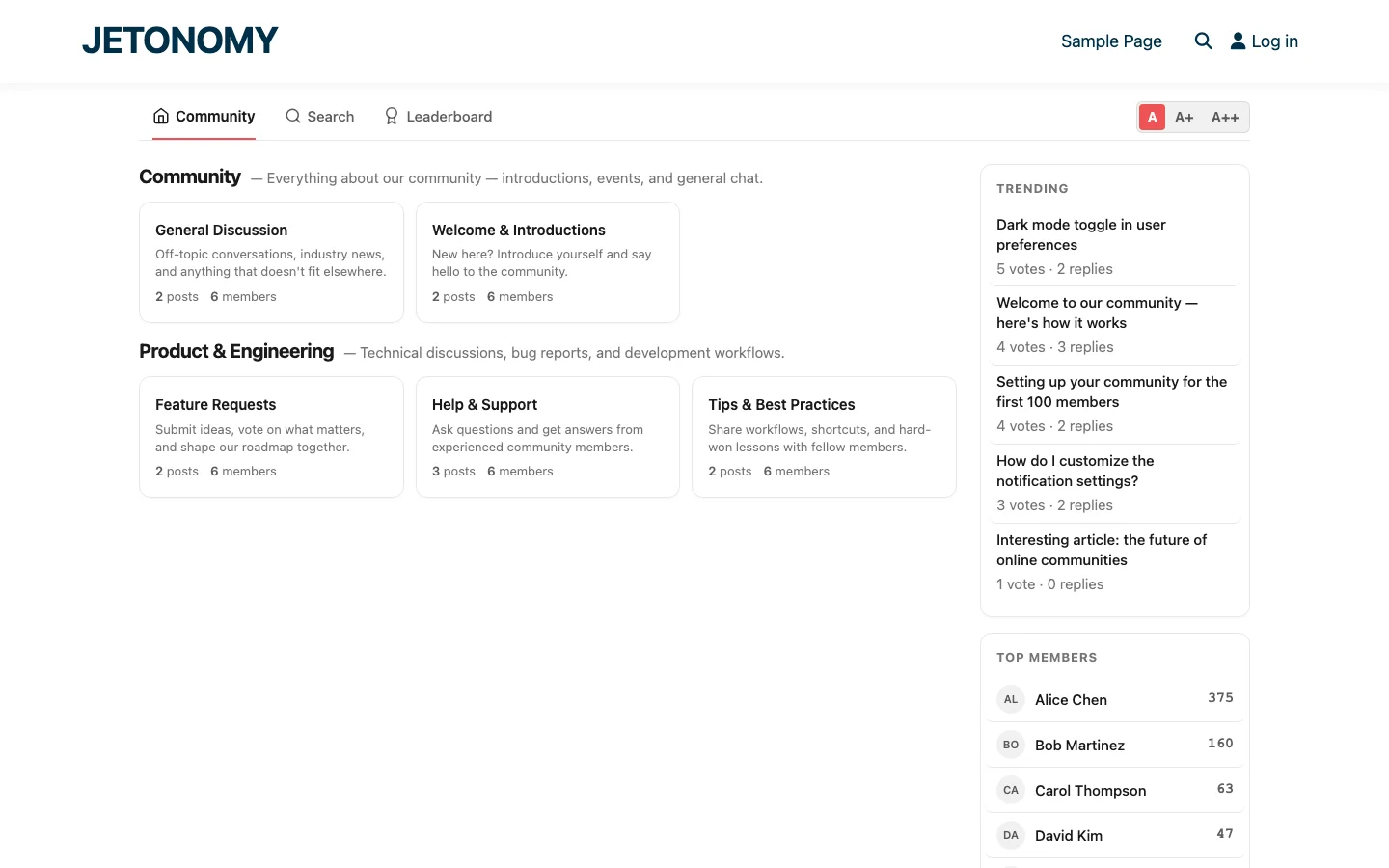
The responsive layout works down to 390px viewport width (iPhone SE size). Text sizing options (A, A+, A++) provide accessibility controls without requiring theme modifications.
Practical Customization Examples
Adding a Custom Sidebar Widget
Copy partials/sidebar.php to your theme. Add your custom widget HTML below the existing trending topics and top members sections. Your widget appears on every community page.
Changing the Topic Row Layout
Copy partials/topic-row.php to your theme. Add or remove elements, show the author’s avatar, add a preview snippet, change the date format. Every topic listing uses your custom row layout.
Adding Custom Fields to User Profiles
Copy user-profile.php to your theme. Add BuddyPress extended profile fields, WooCommerce purchase history, or any custom data to the profile view. See our BuddyPress profile integration guide for how profile data is structured.
Dark Mode
Jetonomy includes built-in dark mode support. All colors are defined as CSS custom properties, so dark mode only requires overriding the root tokens:
.jt-dark .jt-app {
  --jt-bg: #1a1a1a;
  --jt-text: #e0e0e0;
  --jt-border: #333;
}
Individual components automatically adapt because they reference the tokens, not hardcoded colors. If your theme supports dark mode (via BuddyNext, theme.json, or a toggle), Jetonomy follows automatically.
Getting Started
- Install Jetonomy and check how it looks with your theme out of the box (setup guide)
- Adjust CSS custom properties if colors or spacing need tweaking
- Override templates only if you need structural changes to the HTML layout
- Test at 390px width to ensure mobile responsiveness
- Test with dark mode if your theme supports it
Start with the simplest approach (CSS properties) and escalate to template overrides only when needed. Most sites never need to touch templates, the theme inheritance handles everything automatically.
Implementation details that make the rollout smoother
How to Customize Forum Templates in Your WordPress Theme fits into the broader forums category through launch plans, migration steps, and setup choices. That matters because the technical setup is only one part of success. The way you structure spaces, roles, onboarding, and follow-up is what determines whether the forum becomes a searchable asset or just another neglected section of the site.
- Start with one public space and one private operator space so you can test permissions before the wider launch.
- Seed the first discussions yourself using the exact questions customers already ask in email, pre-sales chat, or onboarding calls.
- Define who can create spaces, who can moderate them, and what counts as an accepted answer before the first wave of members arrives.
Why teams evaluating this setup should look at Jetonomy Pro
Jetonomy Pro is useful here because it gives you Q&A, discussion spaces, trust levels, private areas, and a cleaner launch path than stitching together older forum plugins. If you want to know more and try Jetonomy, take a closer look at Jetonomy Pro. It is the most direct next step for teams that want to move from theory to an actual working WordPress community experience.
For articles like this one, the practical question is not only whether the approach works in theory. It is whether your chosen forum stack gives you the moderation depth, user experience, and extensibility to keep the system useful six months after launch. That is where a more complete product decision starts to matter.