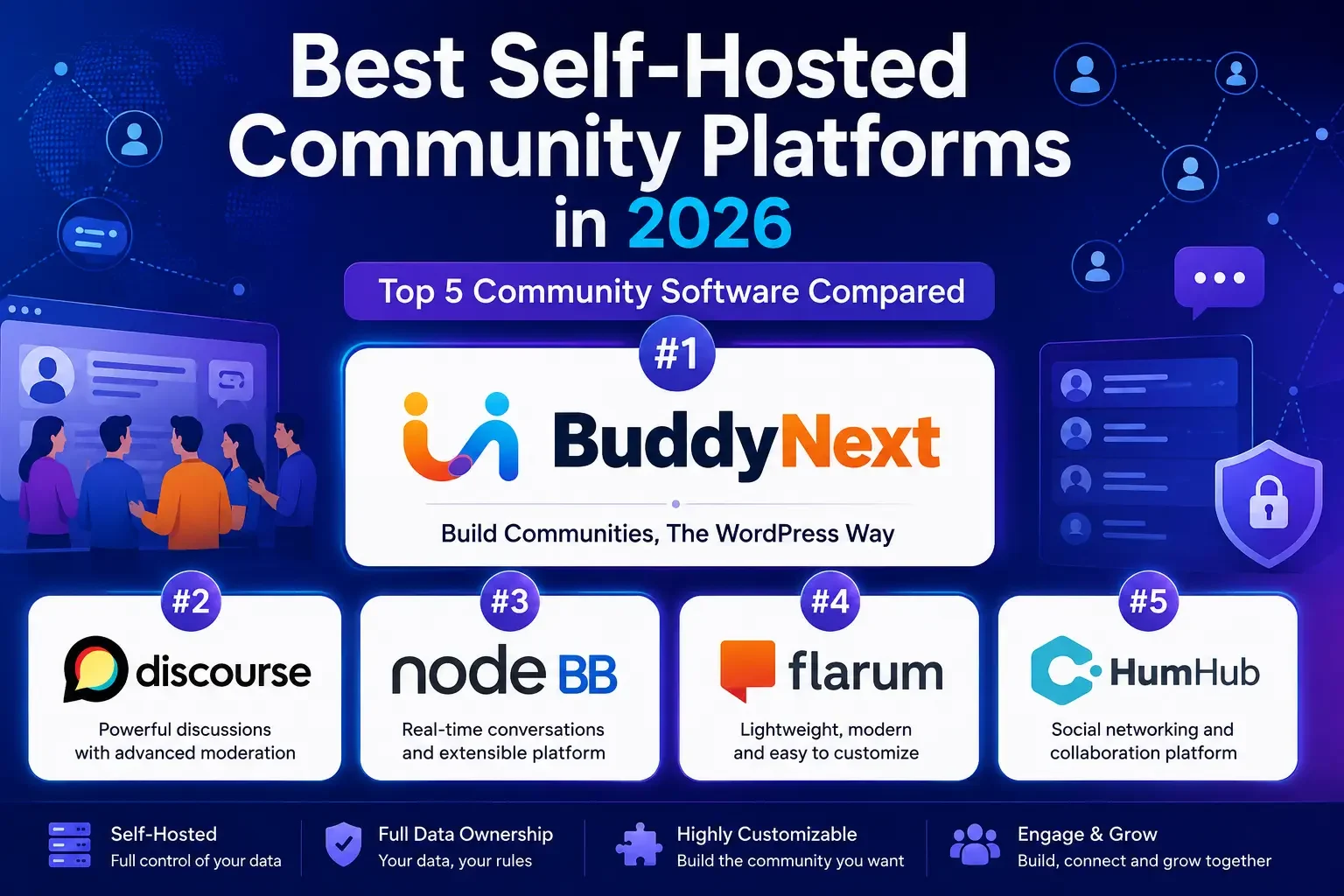
Best Self-Hosted Community Platforms in 2026: Best 5 Community Software Compared
Updated September 2026.
Building an online community is one of the best ways to increase engagement, strengthen customer relationships, and create a space where members actually connect with each other, not just with you. If you want complete control over your platform, branding, and data, a self-hosted community platform is the option worth taking seriously, especially compared to a hosted SaaS tool where your community lives on someone else’s servers under someone else’s rules.
Self-hosting means the software runs on infrastructure you control. Your member data sits in a database you own. Your uptime, your backups, your export options, and your long-term costs are yours to manage rather than dictated by a vendor’s pricing page. The trade-off is that you take on setup and maintenance responsibility that a hosted platform would otherwise handle for you.
In this guide, we compare the best five self-hosted community platforms in 2026 based on features, flexibility, customization, and ideal use cases, so you can match the software to the community you’re actually trying to build.
Watch Our Comparison of the Best Self-Hosted Community Software
Prefer watching over reading? Check out our video comparison of the top self-hosted community platforms and find the right solution for your online community.
1. BuddyNext
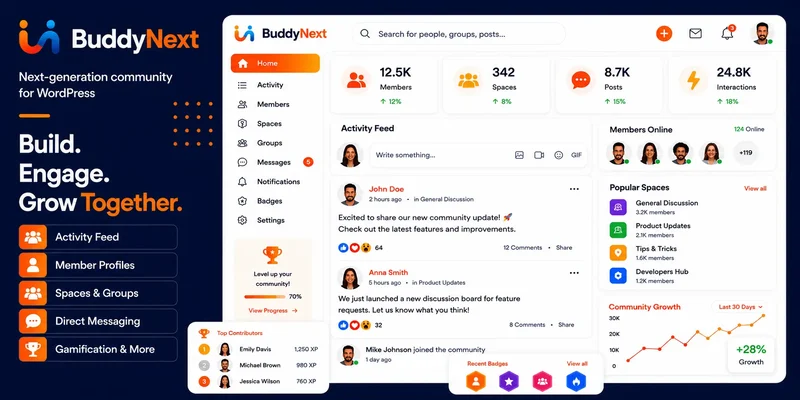
BuddyNext is a complete, self-hosted community platform for WordPress, built for creators, businesses, educators, and membership websites that want the full feature set of a modern community app, feed, groups, memberships, courses, forums, gamification, running on infrastructure they own outright.
Because it runs on WordPress, you get complete ownership of your community, your member data, and your customization options, along with access to the broader WordPress plugin and hosting ecosystem rather than a closed, proprietary stack.
Key Features
- Member profiles and a searchable directory
- Activity feed with Spaces, Following, and Network tabs
- Community Spaces (groups) with open, private, and secret visibility
- Private messaging and photo/video sharing
- Native paid membership tiers with no per-member fees
- Forums and Q&A, courses with certificates, gamification, job boards, and directories
- Deep native community moderation tools
- Custom branding and full design control through a token-based theme layer
- WooCommerce integration and compatibility with popular LMS and membership plugins
Best For
- Membership websites that want a complete platform instead of a stack of point plugins
- Online learning communities
- Creator communities
- Businesses running an internal or customer-facing community
- WordPress users who want to own their community infrastructure outright
Pros
- Complete ownership of your data, with no per-member fees as your community grows
- Highly customizable, with a full design layer for your own branding
- Access to the large WordPress plugin and hosting ecosystem
- No platform lock-in, since everything lives in your own database
- Covers community, memberships, courses, forums, and gamification in one connected platform
Cons
- Requires your own WordPress hosting and a technical setup step
- Initial setup takes more time than signing up for a hosted platform
2. Discourse
Discourse is one of the most popular open-source discussion platforms available today. It’s designed primarily for forums and knowledge-sharing communities, with powerful moderation and engagement features built around long-form discussion rather than a social feed.
Key Features
- Advanced moderation tools
- Trust level system that grants privileges as members prove themselves
- Rich discussion editor
- Real-time notifications
- Powerful search
- Open-source architecture
Best For
- Technical communities
- Support forums
- Open-source projects
- Knowledge bases
Pros
- Excellent discussion experience purpose-built for long threads
- Strong moderation system with trust-level automation
- Active developer community and frequent updates
Cons
- Primarily forum-focused, with limited social-networking features like profiles or activity feeds
- Requires a separate server and more technical setup than a WordPress plugin
3. NodeBB
NodeBB is a modern community platform built with Node.js. It’s known for speed, scalability, and real-time interactions, which makes it a strong pick for communities where instant updates matter more than a broad feature set.
Key Features
- Real-time discussions
- Instant notifications
- Plugin ecosystem
- Social login support
- Responsive design
- API integrations
Best For
- Growing online communities
- Technology forums
- Developer communities
Pros
- Fast performance under real-time load
- Highly extensible via its plugin API
- Modern architecture built from the ground up for speed
Cons
- Requires server knowledge to install and maintain (Node.js, Redis or MongoDB)
- Smaller plugin ecosystem than WordPress
4. Flarum
Flarum is a lightweight, elegant, and easy-to-use forum software. It focuses on simplicity while remaining customizable through its extension marketplace, making it a good fit for smaller communities that don’t need a heavyweight platform.
Key Features
- Clean user interface
- Extension marketplace
- Responsive design
- Fast performance
- Simple administration
Best For
- Small to medium communities
- Discussion forums
- Startup communities
Pros
- Lightweight footprint
- Easy to install
- Modern, minimal interface
Cons
- Fewer built-in features than a full community platform
- Smaller extension ecosystem, so gaps sometimes have no ready-made fix
5. HumHub
HumHub combines social networking with collaboration tools, making it a solid fit for internal communities and organizations that want groups, file sharing, and activity streams more than public-facing discussion.
Key Features
- User profiles
- Activity streams
- Groups and Spaces
- File sharing
- Collaboration tools
- Custom modules
Best For
- Businesses
- Schools
- Nonprofits
- Private organizations
- Internal company communities
Pros
- Strong collaboration features alongside social ones
- Flexible modular system
- Open source
Cons
- More collaboration-focused than discussion-focused, which can feel limiting for a public community
- Some advanced features require paid modules
Comparison Table
Platform | Best For | Open Source | Community Features | Customization |
|---|---|---|---|---|
BuddyNext | WordPress communities, complete platform | No | Excellent | Excellent |
Discourse | Forums | Yes | Excellent (forum-focused) | High |
NodeBB | Real-time discussions | Yes | Excellent (forum-focused) | High |
Flarum | Lightweight forums | Yes | Good | High |
HumHub | Business collaboration | Yes | Excellent (collaboration-focused) | High |
Self-Hosted vs Hosted: What You’re Actually Trading Off
Hosted community platforms like Circle, Skool, and Mighty Networks handle the server, the updates, and the uptime for you, in exchange for a recurring subscription that typically scales with your member count or transaction volume. That trade makes sense for someone who wants to launch this week and never think about infrastructure again.
Self-hosting flips the trade. You take on hosting and updates yourself (or through your existing web host), and in exchange you keep full control of your data, your branding, and your cost structure as the community grows. None of the five platforms above charge you more because your member count doubled; a hosted SaaS platform very well might.
Hosted SaaS platforms | Self-hosted (open source forums) | Self-hosted (BuddyNext) | |
|---|---|---|---|
The deal | Monthly rent, plus fees on what members pay you | Free software, you run the server | One platform you own |
Your data | Lives in their database | Yours, on your server | Yours, in one coherent schema |
Per-member pricing | Often yes | No | No, ever |
Feature breadth | Bundled their way | Usually forum-only, add-ons for more | Modular: community, memberships, courses, forums, gamification |
Branding | Logo and accent color on their layout | Full theme control, developer time needed | Full design layer, brand-ready out of the box |
Setup effort | Low | Moderate to high (server admin skills) | Moderate (WordPress admin skills) |
What Self-Hosting Actually Requires
Before committing to any platform on this list, plan for the real, ongoing responsibilities self-hosting brings:
- Hosting and server resources. WordPress-based platforms like BuddyNext run on standard WordPress hosting; Node.js-based NodeBB and Ruby/database-driven Discourse typically need more specialized hosting or a VPS.
- Updates and security patching. Self-hosted software needs regular updates. WordPress plugins update through the familiar wp-admin flow; standalone platforms like Discourse and NodeBB usually require command-line or Docker-based update processes.
- Backups. You are responsible for backing up your own database and files. Most WordPress hosts include this; standalone platforms need it configured separately.
- Scaling as you grow. A community that goes from 500 to 20,000 members will eventually need caching, a CDN, and possibly a database tuned for the load. Budget for this rather than being surprised by it.
- A person responsible for maintenance. Even the easiest self-hosted platform needs someone checking for updates and responding when something breaks. Factor this into your total cost of ownership, not just the software’s price tag.
How to Evaluate Whether an Open-Source Project Is Still Healthy
Self-hosted software only stays a good choice for as long as the project behind it keeps shipping updates and patching security issues. Before you commit years of community data to any platform, run through a short health check.
Commit and release cadence. Check the project’s GitHub repository or changelog for how recently it shipped a release. A platform that hasn’t been updated in over a year carries more risk, especially for security patches.
Issue response time. Look at open issues and pull requests. Are maintainers responding within days or weeks, or do issues sit untouched for months? This tells you how much support you can expect if something breaks.
Community size around the project itself. A platform with an active support forum, Discord, or Slack full of other site owners means you’re not alone when you hit a wall. Discourse and NodeBB both have long-running communities of their own; smaller or newer projects may not.
Documentation quality. Good docs are a proxy for how much the maintaining team cares about adoption beyond their own use case. If you can’t find clear setup instructions without digging through forum threads, budget more time for your own setup.
Extension or plugin ecosystem depth. WordPress’s plugin ecosystem is the deepest of any platform on this list by a wide margin, which is part of why BuddyNext benefits from sitting on top of it. Discourse, NodeBB, Flarum, and HumHub each have smaller, more specialized extension marketplaces.
Security Hardening Checklist for Self-Hosted Communities
Owning your infrastructure means owning your security posture too. A basic checklist that applies across all five platforms:
- Keep the core platform and every plugin or extension on the latest stable release; most security incidents on self-hosted software trace back to outdated versions with a known, published vulnerability
- Enforce strong password policies and offer two-factor authentication for admin and moderator accounts at minimum
- Run regular automated backups, stored off-server, and actually test restoring from one before you need it in an emergency
- Use a web application firewall or your host’s built-in protection to filter obvious attack traffic before it reaches the application
- Limit admin panel access by IP where practical, and audit admin/moderator account lists periodically to remove anyone who no longer needs access
- Monitor for unusual registration spikes, which often signal a spam or bot attack rather than organic growth
Setup Notes by Platform
Each platform on this list has a different setup path, and knowing this upfront avoids surprises after you’ve already committed.
BuddyNext installs like any WordPress plugin: activate it on a WordPress 6.9+ site running PHP 8.2+, run through its setup wizard, configure your Spaces and membership tiers, and apply your branding through the theme layer. Most WordPress hosts support this without any special configuration.
Discourse ships as a Docker-based install and officially recommends a dedicated server or VPS with at least 2GB of RAM. It is not a typical shared-hosting deployment, and the official install guide assumes basic command-line comfort.
NodeBB requires Node.js, a database (Redis, MongoDB, or PostgreSQL), and a process manager to keep the application running. It’s approachable for a developer but not a drag-and-drop install for a non-technical site owner.
Flarum installs via Composer on a standard PHP/MySQL stack, which makes it more accessible than Discourse or NodeBB for anyone comfortable with basic server administration, though still more hands-on than a WordPress plugin activation.
HumHub also runs on a PHP/MySQL stack and offers both a manual install and Docker-based deployment, putting its setup complexity somewhere between Flarum and Discourse.
Real-World Scenarios: Matching the Platform to the Community
A SaaS company building a customer community for product feedback and peer support benefits most from a platform with strong discussion threading and a trust-level system that rewards helpful members automatically, making Discourse a natural fit if the company doesn’t already run WordPress, or BuddyNext’s forums and Q&A companion capability if it does.
A course creator launching a paid cohort-based community needs native membership billing plus a social layer members actually return to daily, which points toward BuddyNext given its native paid tiers and activity feed, rather than a pure forum tool that would need a separate membership plugin bolted on.
A university alumni association building an internal networking directory cares more about profiles, groups, and structured member data than open discussion, which makes HumHub’s collaboration-first design or BuddyNext’s directory and Spaces features a better match than a forum-first tool like Flarum.
An open-source project running a public support forum wants the trust-level automation and search depth Discourse or NodeBB provide, since the community’s core activity is Q&A at volume rather than paid access or courses.
Total Cost of Ownership: Self-Hosting Over Three Years
The “free” label on open-source software only tells part of the cost story. A realistic three-year total cost of ownership includes hosting fees, developer or agency time for setup and customization, ongoing maintenance hours, and any paid extensions you end up needing to reach feature parity with a complete platform.
For a forum-only tool like Discourse, NodeBB, or Flarum, the software itself carries no license fee, but VPS hosting for Discourse or NodeBB typically costs more than shared WordPress hosting, and you’ll likely pay a developer for setup, theme customization, and ongoing patching unless you have that skill in-house. If your community eventually wants memberships, courses, or gamification, plan to add and integrate separate tools, each with its own learning curve and update cycle.
For a WordPress-based platform like BuddyNext, hosting costs stay in the normal WordPress range, setup is closer to installing and configuring a plugin than standing up a server, and the platform’s own roadmap already covers memberships, courses, forums, and gamification as the community grows, avoiding a second and third tool purchase down the line.
The right lens isn’t “which software is free” but “which total stack costs less time and money by year three, once the community has grown past its launch-day feature set.”
Data Portability: What Happens If You Switch Later
Even a self-hosted platform can become the wrong long-term fit, so it’s worth checking export options before you’re three years and ten thousand posts deep. WordPress-based platforms benefit from the ecosystem’s long history of import/export tools, member data typically lives in standard WordPress user tables, which most migration tools already know how to read. Discourse offers a documented data export format and has been the target of several community migration tools over the years, given its popularity. NodeBB, Flarum, and HumHub each support data export in some form, though the tooling for moving that data into a different platform is less mature and often requires custom scripting.
Practically, this means: don’t assume you can freely bounce between all five options later. Test an export early, while your community is still small enough that a bad surprise doesn’t cost you real data.
Which Self-Hosted Community Platform Should You Choose?
The right platform depends on your goals.
- Choose BuddyNext if you want a complete WordPress-powered community platform with native memberships, social networking, courses, forums, and gamification, all in one system you own.
- Choose Discourse if your focus is discussion forums and knowledge sharing, and you’re comfortable running a dedicated server for it.
- Choose NodeBB if you need real-time conversations and scalability and have the technical skill to manage a Node.js deployment.
- Choose Flarum if you want a lightweight and modern discussion platform for a smaller community.
- Choose HumHub if you’re building an internal business or collaboration community rather than a public-facing one.
Common Mistakes When Choosing Self-Hosted Community Software
- Picking a forum tool when you actually need a full community platform. Discourse, NodeBB, and Flarum are excellent at discussion but don’t natively include memberships, courses, or gamification; you’ll need separate tools to fill those gaps.
- Underestimating server management skill required. A WordPress-based platform is approachable for most site owners; a Node.js or Ruby-based platform often isn’t, without a developer on call.
- Skipping the backup and update plan before launch. Self-hosting means you own these responsibilities from day one, not after the first incident.
- Choosing based on feature checklists alone. A platform with more checkboxes isn’t automatically the right one if your community’s actual behavior (discussion vs. social feed vs. paid content) doesn’t match what the software optimizes for.
Frequently Asked Questions (FAQs)
1. What is a self-hosted community platform?
A self-hosted community platform is software that you install on your own hosting server. Unlike hosted platforms, it gives you full control over your data, branding, customization, and integrations without relying on a third-party service that could change its pricing or shut down.
2. Which is the best self-hosted community platform in 2026?
The best platform depends on your needs. BuddyNext is a strong choice for WordPress users who want a complete community platform with member profiles, activity feeds, groups, native paid memberships, and plugin integrations. Discourse is great for discussion forums, while NodeBB, Flarum, and HumHub are solid alternatives for different community types.
3. Does BuddyNext charge per member?
No. BuddyNext runs on your own WordPress infrastructure, so there is no per-member metering the way some SaaS community platforms apply as your audience grows.
4. What’s the difference between a hosted and a self-hosted community platform?
A hosted platform manages the hosting, maintenance, and updates for you but offers less flexibility and control, and often prices by member count. A self-hosted platform lets you own your data, customize your website, choose your hosting provider, and extend functionality with plugins and integrations.
5. Which self-hosted community platform is best for WordPress?
If you’re using WordPress, BuddyNext is one of the best choices because it integrates with the WordPress ecosystem, including WooCommerce and popular LMS and membership plugins, while adding native community and monetization features of its own.
6. Can I monetize a self-hosted community?
Yes. Most self-hosted community platforms support monetization through memberships, subscriptions, paid groups, online courses, digital products, advertising, donations, or ecommerce integrations. BuddyNext includes native paid membership tiers and also works with popular WordPress membership and ecommerce plugins.
7. Which platform is best for discussion forums?
If your primary goal is a modern discussion forum, Discourse, NodeBB, and Flarum are strong options. They provide powerful discussion tools, moderation features, and active developer communities, though none of them natively include memberships or courses.
8. Which platform is best for businesses and private organizations?
HumHub is a strong choice for businesses, schools, and organizations because it combines social networking features with collaboration tools like groups, activity streams, file sharing, and team communication.
9. Can I migrate my existing community to a self-hosted platform?
Migration is possible in many cases, though rarely a perfect one-click process. The specifics depend heavily on your current platform and the software you’re moving to; plan on exporting member data and manually reconstructing groups or categories on the new system.
10. How do I choose the right self-hosted community platform?
Consider your budget, ease of setup, customization options, community features needed (feed and social vs. pure discussion), plugin and integration support, scalability, data ownership, and who on your team will handle long-term maintenance. Choosing the right platform up front saves a painful migration later.
11. Is self-hosting more secure than a hosted platform?
Not automatically. Self-hosting gives you control over security, which can mean better security if you apply updates promptly and follow good hosting practices, or worse security if the site is neglected. Hosted platforms handle security centrally, but you’re trusting their practices instead of your own.
12. Can a self-hosted community platform scale to thousands of members?
Yes, with the right hosting and caching setup. WordPress-based platforms like BuddyNext scale using standard WordPress performance practices (object caching, a CDN, a capable host); Node.js and Ruby-based platforms scale using their own respective infrastructure patterns.
13. What happens to a self-hosted community if the software project gets abandoned?
Unlike a hosted SaaS platform shutting down, abandoned self-hosted software keeps running exactly as it did on the day support stopped. Your community doesn’t disappear, but you stop receiving security patches and new features. This is why the project health check earlier in this guide matters: picking an actively maintained platform up front reduces the odds you’ll face this scenario at all.
14. Do I need a developer to run a self-hosted community platform?
Not necessarily. WordPress-based platforms like BuddyNext are built for site owners comfortable with the standard wp-admin dashboard, without requiring custom development for a standard setup. Discourse, NodeBB, and to a lesser extent Flarum and HumHub, benefit from at least occasional developer support for installation, updates, and troubleshooting, especially at the server level.
15. Can I run a self-hosted community platform on shared hosting?
WordPress-based platforms generally run fine on standard shared or managed WordPress hosting, though a growing community benefits from a host with good caching and resource limits. Discourse explicitly recommends against shared hosting and expects a dedicated VPS. NodeBB has similar requirements. Flarum and HumHub sit in between, running on standard PHP/MySQL shared hosting for smaller communities but benefiting from more dedicated resources as they grow.
Frequently Overlooked Costs of Self-Hosting
Beyond hosting and developer time, a few smaller costs tend to catch first-time self-hosters off guard. Email deliverability is one: as your community grows, transactional emails (notifications, digests, password resets) need a dedicated sending service rather than your host’s default mail function, or they’ll land in spam and quietly kill engagement. A CDN for media-heavy communities is another, since photo and video sharing at scale needs offloaded storage and delivery rather than serving everything straight from your web server. And staging environments matter more than people expect: testing plugin updates or a design change on a copy of your live site before pushing it to your actual community avoids a surprising number of avoidable outages.
None of these costs are unique to self-hosting, hosted SaaS platforms deal with the same underlying problems, they just hide the cost inside your subscription fee. Budgeting for them upfront on a self-hosted platform keeps your total cost of ownership honest rather than discovering them one at a time as your community scales.
A Short Decision Checklist
- Do you need a full community platform (feed, groups, memberships) or just a discussion forum? This alone eliminates two or three options from this list immediately.
- Are you already running WordPress, or willing to? If yes, BuddyNext removes an entire category of server-management overhead.
- Who on your team, or which contractor, will handle updates and backups going forward?
- Does your community need to charge for access, and if so, do you want that billing native to the platform or bolted on separately?
- Have you tested an export from your shortlisted platform before committing years of member data to it?
Answer these five questions honestly and the right platform on this list usually becomes obvious well before you compare feature checklists line by line.
Final Thoughts
Self-hosted community platforms give you complete control over your branding, data, and user experience. Whether you’re building a membership website, customer community, educational platform, or discussion forum, the five solutions above offer real flexibility and long-term ownership, without a vendor deciding your community’s fate through a pricing change.
If you’re looking for the best all-around self-hosted community platform for WordPress, one that covers the complete feature set of a modern community app rather than just forums or just collaboration, BuddyNext stands out with its social features, native membership tiers, full design control, and integration with the broader WordPress ecosystem.
Whichever platform you choose, treat the first ninety days as an infrastructure project as much as a community-building one. Get backups, updates, and monitoring right before you pour energy into growth, since a self-hosted community that loses data in month two never fully earns back the trust it lost.
And keep the comparison honest as your community evolves. The platform that fit a 200-member launch may not be the platform that fits a 20,000-member community three years from now, so revisit this decision periodically rather than treating it as a one-time, permanent choice.
The common thread across every option on this list is ownership. Whether that ownership matters to you as a cost-control mechanism, a data-privacy requirement, or simply the peace of mind that comes from knowing no vendor can shut off your community with thirty days’ notice, self-hosting is the structural choice that protects it, and the platform you pick from this list should reflect the community you’re actually building, not the one you hope to build someday.