How Can We Display Member Resume in BuddyPress / BuddyBoss Platform
BuddyPress Resume Manager adds a dedicated, structured resume section to member profiles, with field groups, shareable resume URLs, and granular visibility controls. Here's what it includes, how to set it up, and how it pairs with a dedicated job board.
A member profile on a BuddyPress or BuddyBoss site typically shows a bio, an avatar, maybe a cover photo. None of that tells you whether the person behind it can actually do the job you need done. If your community exists around professional networking, freelance work, alumni connections, or any context where “what has this person done” matters more than “what does this person say about themselves,” the default profile falls short. BuddyPress Resume Manager closes that gap by adding a structured, dedicated resume section to member profiles.

Rather than making users format their own work history inside a generic bio field, the plugin gives them predefined fields built specifically for resume content, and gives site admins the ability to extend those fields with recurring entries and custom field groups for anything more complex than a single job title and date range.
It’s a small feature on paper. In practice, it changes what a profile can actually do for a member. A bio field answers “who is this person.” A resume section answers “what has this person actually done,” which is a very different question, and for a lot of community types, it’s the question visitors are actually there to ask.
Why generic profile fields aren’t enough for this
A standard BuddyPress profile field is a single text box. Fine for a location, a website link, a short bio. Terrible for work history, because work history isn’t one piece of information - it’s a repeating structure. Job title, employer, dates, description, repeated for every position someone has held. Cramming that into a plain text field means either a wall of unformatted text or a member giving up and leaving the section blank.
That’s the specific problem this plugin solves. Predefined resume fields already understand that structure, and the plugin’s support for recurring fields and field groups means a member can add as many work history entries, education entries, or certifications as they actually have, each one properly formatted and displayed the same way every other member’s resume is displayed. Consistency across a community’s profiles matters more for credibility than any individual member’s writing skill.
Walking through what the plugin includes
1. Display Resume Functionality. Members get a dedicated section on their profile specifically for resume content, separate from the general bio and profile fields. Anyone visiting the profile with permission to see it gets a clean, purpose-built view of that member’s professional background rather than having to piece it together from scattered bio text.
2. Predefined Fields and Additional Fields. The plugin ships with fields already structured for common resume content, so members aren’t starting from a blank slate. Site admins aren’t locked into that default structure either - additional fields, including recurring ones like a list of personal websites or portfolio links, can be added on top.
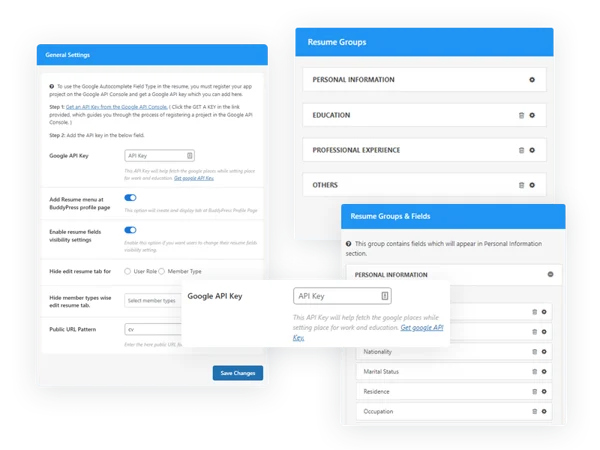
3. Resume Tab Integration. The resume shows up as its own tab in profile navigation and in the BuddyPress admin bar menu, which matters more than it might seem. Burying resume access inside a generic “more” dropdown or a sub-section of the bio tab means most visitors never find it. A dedicated tab puts it at the same level of visibility as Activity or Friends, which is where content this important belongs.
4. Multiple Resume Templates. Members aren’t stuck with one visual layout. Different templates suit different professional contexts - a compact, scannable format for someone in a fast-moving hiring pipeline versus a more detailed layout for someone building a long-term professional presence. Each resume also gets its own shareable URL, meaning a member can send their resume directly to someone outside the community without asking that person to create an account first.
That last part is easy to undervalue. A resume trapped behind a login wall is nearly useless for the actual job of getting hired or landing freelance work, since most recipients - a hiring manager skimming twenty applications, a client evaluating three freelancers - won’t create an account just to view one profile. A direct, shareable link removes that friction entirely.
Visibility and privacy: who actually sees what
5. Profile Field Visibility Settings. Members control who can see their resume information at a granular level - everyone on the site, friends only, or private to themselves. This is the same visibility framework BuddyPress applies to standard profile fields, extended to cover resume content specifically, which means members already familiar with adjusting their profile privacy will find the resume controls in a place they’d expect.
10. Resume Visibility Control. Beyond the field-level settings, members retain ongoing control over who can view their resume as their situation changes. Someone actively job hunting might open their resume to the whole community for a few months, then lock it down to friends-only once they’ve found a position and no longer want to be publicly searchable by employers.
Fields and groups: structuring more complex data
6. Google Places Integration. With a Google API key configured, location fields on the resume can pull from Google’s location data rather than relying on members typing free-text city names that end up inconsistent across profiles - “NYC,” “New York,” “New York City” all meaning the same place but displaying and filtering differently. This matters most on sites where location is actually a filtering or search criterion, such as a freelancer directory or a local professional network.
7. Field Group Creation. Complex resume sections - a work history entry with a title, company, date range, and description all bundled together - get created as field groups rather than as disconnected individual fields. This keeps related information visually and structurally tied together on the resume display, instead of scattering job title, company name, and dates as separate unrelated fields that a visitor has to mentally reassemble.
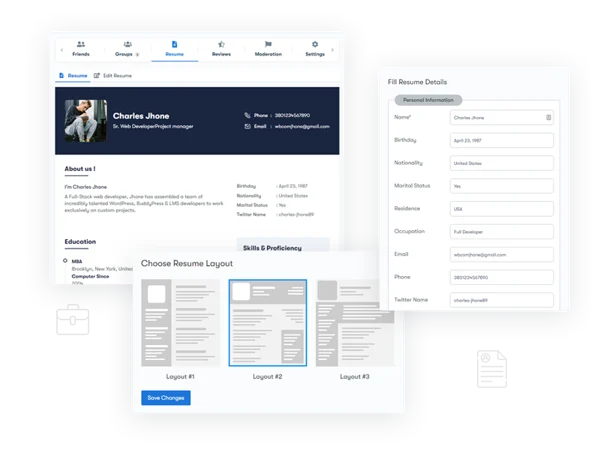
8. Default Groups Customization. The field groups that ship with the plugin by default aren’t fixed. Admins can edit, rename, or delete them entirely to match what their specific community actually needs - a tech-focused community might want a “technical skills” group with different structure than what a general professional network needs by default.
9. Child Theme Compatibility. Developers working on heavily customized sites can override the default resume template file through a child theme, which opens the door to layout changes beyond what the built-in template options provide. This matters for agencies building a client site where the resume section needs to match a specific brand’s visual system exactly.
Setting this up on a new community
Start by deciding what a resume actually needs to contain for your specific community before touching the default field groups. A freelancer marketplace and an alumni networking site need different information - one cares about portfolio links and hourly rates, the other cares about graduation year and current employer. Customize the default groups to match that reality before members start filling in their profiles, since retroactively restructuring fields after members have already entered data is a much messier process.
Next, decide on a default visibility setting rather than leaving it entirely up to each member’s discretion from day one. A site built around active job searching probably wants resumes visible to all members by default, encouraging discovery. A more private professional network might default to friends-only, letting members opt into wider visibility as they choose.
Finally, if location matters to your use case at all, set up the Google Places integration before launch rather than after. Migrating a mix of freely-typed location text to structured location data once dozens of members have already filled in their own version of “somewhere near Chicago” is far more tedious than starting with structured input from the beginning.
Common mistakes worth avoiding
The biggest one is leaving the default field groups untouched when they don’t actually fit the community. A generic “work experience” and “education” pairing works fine for a traditional professional network, but a creative freelancer community might need a “portfolio” and “client testimonials” structure instead. Members will work around a mismatched field structure by cramming information into the wrong fields, which produces messy, inconsistent resumes across the site.
Another common mistake is ignoring the shareable URL feature entirely. Site owners sometimes treat the resume section as purely an in-community feature, forgetting that the real value for many members is being able to send their resume to someone outside the platform entirely. Promoting that capability - even just mentioning it during onboarding - meaningfully increases how much members actually invest in filling their resumes out completely.
A third mistake is defaulting every resume to fully public without explaining that to members first. Someone who assumes their profile information follows the same visibility as a typical social network can be caught off guard to learn their detailed work history was visible to every logged-in member by default. A short note during profile setup about how resume visibility works avoids that surprise.
How different communities put this to use
Alumni networks tend to use the field group system heavily. Graduation year, degree program, and current employer form a natural group that admins customize right out of the gate, and the resume tab becomes the primary way former classmates find each other after years apart. Location integration matters less here than in other use cases, since alumni are often scattered globally and searching by shared program or graduation year matters more than proximity.
Freelancer and consultant communities lean the opposite direction. Portfolio links, hourly rate ranges, and specific skill tags matter more than a traditional chronological work history, so the default field groups usually get restructured almost entirely before launch. The shareable resume URL carries real weight here, since it’s often the exact link a freelancer sends a prospective client during an actual pitch conversation happening outside the platform.
Local service and trade communities - contractors, consultants, tutors operating in a specific geographic area - get the most value out of the Google Places integration specifically. Structured, consistent location data is what makes a “find someone near me” search actually work, and free-text location fields tend to produce enough inconsistency to quietly break that kind of filtering.
Corporate or internal team communities use resumes differently again: less as a hiring or discovery tool and more as an internal reference. New hires can look up a colleague’s background before a first meeting, and cross-department collaboration benefits from knowing what someone actually worked on previously without having to ask directly. Visibility here often defaults to members-only rather than public, since the audience is entirely internal to begin with.
Troubleshooting common issues
Resume tab isn’t showing up in navigation. This is almost always a template or theme compatibility issue rather than a plugin malfunction - confirm the active theme properly supports the BuddyPress navigation hooks the plugin relies on to register its tab. A heavily customized or outdated theme is the most common culprit.
Google Places autocomplete isn’t returning results. Double check the API key is valid and that the relevant Google API service is actually enabled on the Google Cloud project tied to that key. A surprising number of “broken” location field issues turn out to be an API key that was generated for the wrong Google service or one that’s hit its usage quota.
Shared resume link shows nothing to the recipient. Check the visibility setting on that specific resume first. A link that worked when the resume was set to public will stop showing content the moment visibility gets tightened to friends-only or private, and that’s expected behavior rather than a bug, even though it can look like the link itself broke.
Where this fits alongside other community features

Resumes on member profiles work best as one piece of a larger career-oriented feature set rather than an isolated add-on. If your community is starting to lean toward actual hiring activity - members posting openings, other members applying, employers browsing candidate profiles - it’s worth pairing this with a dedicated job board rather than trying to stretch member profiles into doing that job alone. WP Career Board is a free standalone job board and resume database plugin that handles that side specifically. It manages the actual postings and applications, backed by its own searchable resume database, and complements rather than duplicates what’s already happening on individual BuddyPress profiles. Running both together gives you member-level resumes for community credibility and a structured job board for the actual hiring workflow, instead of trying to force one tool to do both jobs.
Frequently asked questions
Can a member have more than one resume?
The plugin is built around a single resume per member profile, structured with as many field groups and entries as needed within that resume, rather than multiple separate resume documents per person.
Does changing the visibility setting affect resumes that are already shared via URL?
Shareable URLs are still subject to the same visibility rules configured on the resume, so tightening visibility after sharing a link can restrict what someone accessing that link is able to see, depending on how the recipient is authenticated relative to the visibility setting chosen.
Is Google Places integration required to use the plugin?
No. It’s an optional enhancement for location fields specifically. Sites that don’t need structured location search can skip the API key setup entirely and use standard text fields instead.
Will resume data transfer if a member changes their display name or username?
Resume data is tied to the member’s account rather than to their display name or username, so it persists through profile detail changes the same way other profile information does.
Can admins see resumes regardless of a member’s visibility setting?
Site administrators typically retain the ability to view profile content for moderation purposes, but this depends on how the specific installation is configured alongside the site’s broader privacy and capability settings rather than being a fixed, universal behavior of the resume plugin alone.
Is there a benefit to structured resume fields over just letting members paste in their own formatted text?
The main one is consistency across the community. When every member’s resume follows the same field structure, visitors can scan and compare profiles the same way they would on any dedicated hiring platform, rather than every profile looking formatted according to whatever that particular member decided worked in a plain text box. That consistency is a big part of why a structured resume section reads as more credible than a generic bio field ever could.
A resume section without a resume anyone actually fills out is just an empty tab. The setup work - matching field groups to what your community actually needs, deciding on default visibility, promoting the shareable link - is what turns this from a checkbox feature into something members genuinely use to represent themselves.
Get that groundwork right before launch, and the resume tab becomes one of the more heavily visited parts of a member profile rather than a section people fill out once during signup and never think about again. Treat it as core to how your community presents itself, not as an optional extra tucked away behind a settings toggle nobody enables.















