Reply-by-Email: Let Customers Respond to Forum Threads from Their Inbox
Not everyone wants to log into your forum to reply. Reply-by-email lets members respond to notifications directly from their inbox, and the reply posts automatically to the forum thread. Here is how it works and why it matters.

You send a notification email: “Alice replied to your question about configuring SMTP settings.” The customer reads Alice’s answer in the email. They want to say thanks and ask a follow-up question. But to do that, they have to click through to the forum, log in, find the thread, and type their reply.
Most people do not bother. The friction between reading the email and replying in the forum is enough to kill the interaction.
Reply-by-email removes that friction entirely. The customer hits Reply in their email client, types their response, and it automatically posts as a reply in the forum thread. No login. No clicking through. No context switching. The forum gets the reply. The community sees it. Everyone benefits.
How Reply-by-Email Works
The technical flow is straightforward:
- Someone replies to a forum topic the customer is subscribed to
- Jetonomy sends a notification email with a unique reply-to address
- The customer hits Reply in Gmail, Outlook, Apple Mail, or any email client
- They type their response and hit Send
- Jetonomy receives the email, matches it to the correct thread using the unique reply-to address, and posts the content as a reply
- The reply appears in the forum thread just like any other reply, attributed to the customer’s account
The reply-to address contains a token that maps to a specific user and thread. This is the same approach used by GitHub issues, Basecamp, and Discourse, proven technology that works reliably across every email client.
Why This Matters for Support Forums
Reply-by-email is especially valuable for support forums. Here is why:
1. It Meets Customers Where They Are
Not everyone is comfortable navigating a forum. Many customers, especially non-technical ones, live in their email inbox. Reply-by-email lets them participate in the forum without knowing (or caring) that they are using a forum. They just reply to an email.
This dramatically increases participation from less tech-savvy customers who would never log into a forum on their own but will happily reply to an email.
2. It Keeps Conversations Moving
Forum threads stall when participants have to context-switch to reply. The notification email interrupts their workflow. If replying requires opening a browser, logging in, and finding the thread, many people defer it, and then forget.
Email replies happen in the moment. The customer reads the notification, types their response, and moves on. The conversation stays alive.
3. It Captures Knowledge That Would Otherwise Be Lost
Without reply-by-email, many follow-up questions and thank-you messages never get posted. The customer reads the answer, applies it, and moves on. The forum thread shows the question and answer but not the confirmation that it worked.
With reply-by-email, quick responses like “That fixed it, thanks!” or “Works for me too, but I also had to change X” get captured in the thread. This additional context makes the thread more valuable for future visitors.
4. It Bridges Email-Based Support Teams
If your support team primarily works in email (Zendesk, Freshdesk, Help Scout), reply-by-email means they can respond to forum threads without changing their workflow. The agent gets the notification email, replies, and the response appears in the forum. The team stays in their email tool while the community gets the benefit of public, searchable answers.
Setting Up Reply-by-Email with Jetonomy
Reply-by-email is available as a Jetonomy Pro extension. Here is how to set it up:
Step 1: Enable the Extension
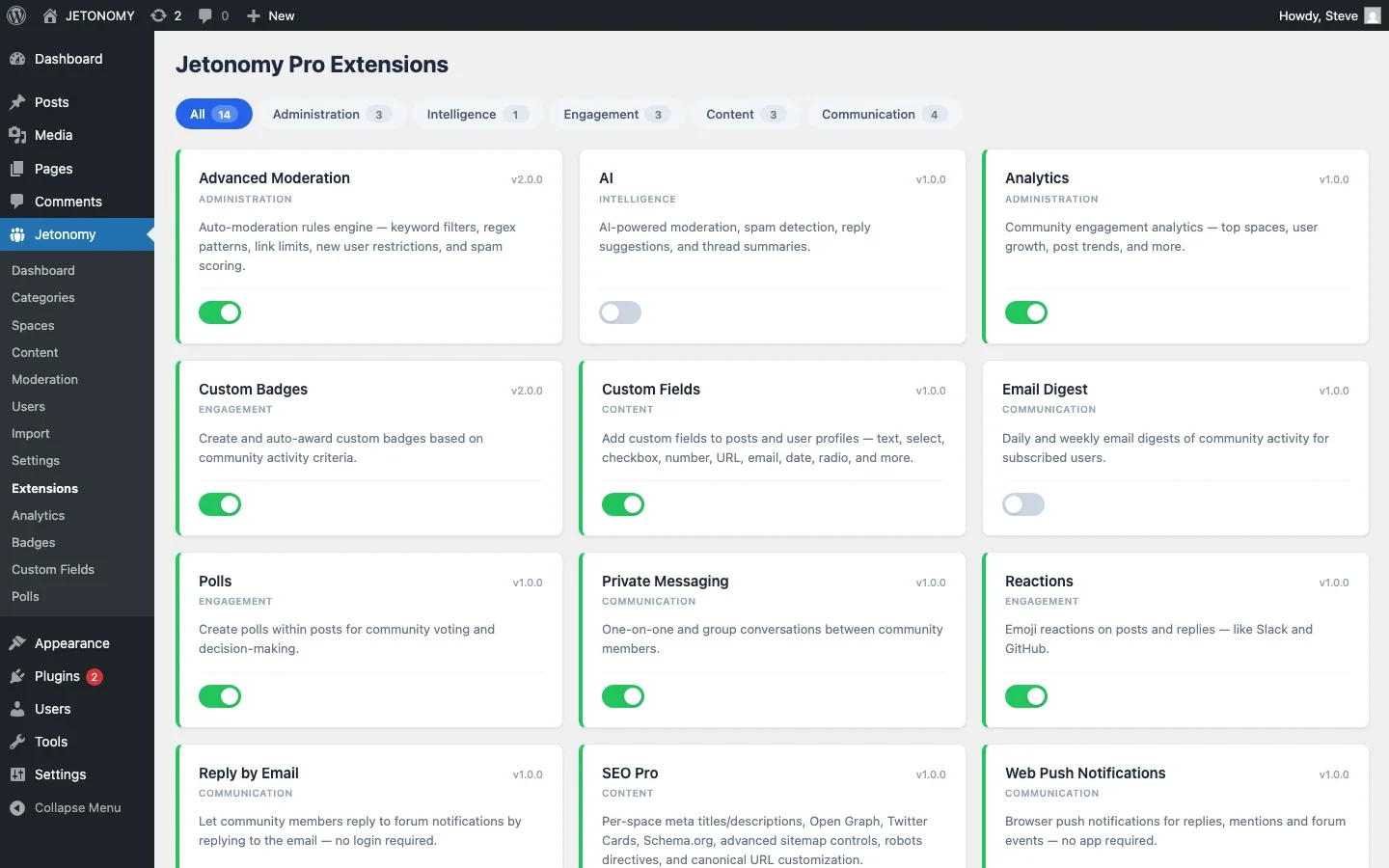
Go to Jetonomy → Extensions and toggle on Reply by Email.
Step 2: Configure Email Receiving
You need an email address that Jetonomy can monitor for incoming replies. The most common approaches:
- IMAP mailbox, Point a dedicated email address (like
reply@community.yoursite.com) at an IMAP mailbox. Jetonomy polls it for new messages on a cron schedule. - Webhook-based, Services like Mailgun, SendGrid, or Amazon SES can forward incoming emails to a webhook URL on your site. This is faster than IMAP polling (near real-time) and more reliable at scale.
Configure the receiving method in Jetonomy → Settings → Reply by Email. Enter your mailbox credentials or webhook endpoint.
Step 3: Test the Flow
Subscribe to a test topic, wait for a notification email, reply to it, and verify the reply appears in the forum thread. Test with different email clients (Gmail, Outlook, mobile) to confirm compatibility.
Handling Edge Cases
Reply-by-email introduces some scenarios you need to plan for:
Email Signatures
Most email clients append signatures to every reply. You do not want “Sent from my iPhone” or a 10-line corporate signature appearing in every forum reply. Jetonomy’s Reply by Email extension strips common signatures automatically. It detects signature markers like --, Sent from, and blocks of text that match known signature patterns.
Quoted Content
When you reply to an email, the original message is typically quoted below your response. The extension strips this quoted content so only the new reply text gets posted to the forum.
Attachments
If a customer attaches an image or file to their email reply, the extension can upload it to the WordPress media library and embed it in the forum reply. This is especially useful for troubleshooting threads where customers need to share screenshots.
Trust Level Enforcement
Reply-by-email respects trust levels. If a user at Trust Level 0 tries to upload an image via email reply, and Level 0 does not have upload permissions, the image is stripped and the text-only reply is posted. The user gets an email back explaining why the attachment was not included.
Spam Prevention
The unique reply-to addresses are cryptographic tokens that cannot be guessed. A spammer would need to know the exact token format to inject content. Additionally, all email replies go through the same moderation pipeline as regular forum posts, auto-moderation rules, keyword filters, and rate limits all apply.
Combining Reply-by-Email with Email Digests
Reply-by-email works best when combined with email digests. Here is the full email integration stack:
Feature | What It Does | Result |
|---|---|---|
Notification emails | Alert users when someone replies to their thread | Users stay informed |
Reply-by-email | Let users respond without visiting the forum | More replies, less friction |
Email digests | Send daily/weekly summaries of top discussions | Users return to the forum regularly |
Web push notifications | Browser notifications for real-time alerts | Instant engagement for active users |
Together, these features create a communication loop where users stay connected to the forum through email, even if they rarely visit the site directly. They read digests, discover interesting threads, reply via email, and contribute to discussions without changing their daily habits.
Measuring Impact
After enabling reply-by-email, track these metrics:
- Reply rate per notification. What percentage of notification emails result in a reply? You should see this increase 20–40% after enabling reply-by-email.
- Replies via email vs. web. Track the ratio. In mature communities, 30–50% of all replies come via email.
- Thread depth. Are conversations going deeper? More replies per thread means more context and better answers.
- User segments. Which users prefer email replies? Often it is your less technical or mobile-first users, exactly the people you might otherwise lose.
When Reply-by-Email Is Not Ideal
Reply-by-email is great for text responses and quick follow-ups. It is less ideal for:
- Code-heavy responses. Email clients mangle code formatting. If your forum is developer-focused and replies frequently contain code blocks, encourage web replies for those.
- Responses that need rich formatting. Bold, italic, lists, and headings are inconsistently supported in email-to-text conversion. Simple text replies work best.
- Initial questions. Reply-by-email is for replying to existing threads, not creating new ones. Members still need to visit the forum to start a new topic.
Getting Started
Reply-by-email is one of those features that seems like a nice-to-have until you enable it and see the participation jump. Members who never posted on the forum start contributing because the barrier dropped from “log in and navigate” to “hit Reply.”
If you are building a support forum, combine reply-by-email with the strategies in our support forum guide for maximum ticket deflection. And if you are letting your community answer questions, the increased reply rate from email integration makes the self-help flywheel spin faster, see our guide on enabling community-powered support.
For the initial forum setup, follow our step-by-step WordPress forum guide. Reply-by-email is one configuration step away from making your forum dramatically more accessible.
What Happens When a Reply Address Goes Stale
Plan for the failure case, not just the happy path. Customers change jobs, switch email providers, or let a reply-to address sit unused for months before finally responding to an old notification. Decide upfront how long a reply-to token stays valid, whether a bounced delivery should retry or fail silently, and what a customer sees if they reply to a thread that has since been closed or deleted. None of this is exotic, but it is exactly the kind of edge case that gets skipped during the initial setup and then surfaces as a confused support ticket six weeks later.
It is also worth deciding, before launch, whether reply-by-email should work for locked or archived threads at all. A customer who replies to a six-month-old notification about a thread the moderators have since closed should get a clear response, either the reply is redirected into a new thread or the sender gets an explanation, not a reply that vanishes with no confirmation either way.
Where Jetonomy Pro Fits
Reply by Email is one part of Jetonomy Pro’s email integration trio, alongside Email Digests and Web Push notifications. The three work together: digests bring lapsed members back to the forum, push notifications catch active members in real time, and reply-by-email removes the last bit of friction once someone is already reading a notification. If you are evaluating Jetonomy Pro, it is worth enabling all three rather than reply-by-email in isolation, since each extension compounds the value of the others by keeping members engaged through whichever channel they actually check.













