How to Set Up a Stack Overflow-Style Q&A on WordPress
Build a Stack Overflow-style Q&A site on WordPress where questions get answers, answers get votes, and the best response rises to the top. Complete setup guide with voting, accepted answers, and reputation.

Stack Overflow changed how developers find answers. Instead of digging through forum threads hoping to find a solution on page three, you search, find a question matching yours, and read the accepted answer at the top. The best answer wins, not the first one posted.
You can build the same experience on WordPress. Not a simplified version. A real Q&A system with voting, accepted answers, reputation scores, and a community that maintains itself.
This guide shows you how to set it up from scratch.
What Makes Stack Overflow Work
Before building, let us understand the mechanics that make Q&A sites effective. Stack Overflow is not just a forum with an upvote button. It is a carefully designed system where every element serves a purpose:
- Questions have a single purpose: get an answer. Not start a discussion, not share an opinion. This focus keeps content useful and searchable.
- Answers are independent: each answer stands alone. You vote on answers individually, not on replies within a thread.
- Voting sorts by quality: the best answer rises to the top regardless of when it was posted. A brilliant answer posted a year later outranks a mediocre one from day one.
- Accepted answers signal resolution: the person who asked the question marks which answer solved their problem. Future visitors see this instantly.
- Reputation rewards contribution: answering questions earns points. Points unlock abilities. This creates a self-sustaining economy of knowledge.
Every one of these mechanics can be replicated on WordPress with the right plugin and configuration.
Step 1: Install and Configure the Q&A Plugin
You need a WordPress forum plugin that supports Q&A format natively. Not all do. Jetonomy has a dedicated Q&A space type that implements the full Stack Overflow model: voting, accepted answers, answer sorting by score, and reputation points.
Install the plugin and run the setup wizard. When it asks for the default community type, select Q&A. You can change individual spaces later, but this sets the right default.
For detailed installation steps, follow our WordPress forum setup guide.
Step 2: Create Your Q&A Spaces
Stack Overflow uses tags to organize questions. You can use tags too, but combining them with spaces gives you better organization for WordPress sites.
Create spaces that map to your content areas:
Space | Type | Example Questions |
|---|---|---|
General Q&A | Q&A | Broad questions about your topic |
Getting Started | Q&A | Setup, installation, first steps |
Troubleshooting | Q&A | Error messages, bugs, conflicts |
How-To | Q&A | Step-by-step procedures |
Best Practices | Q&A | Optimization, workflow, recommendations |
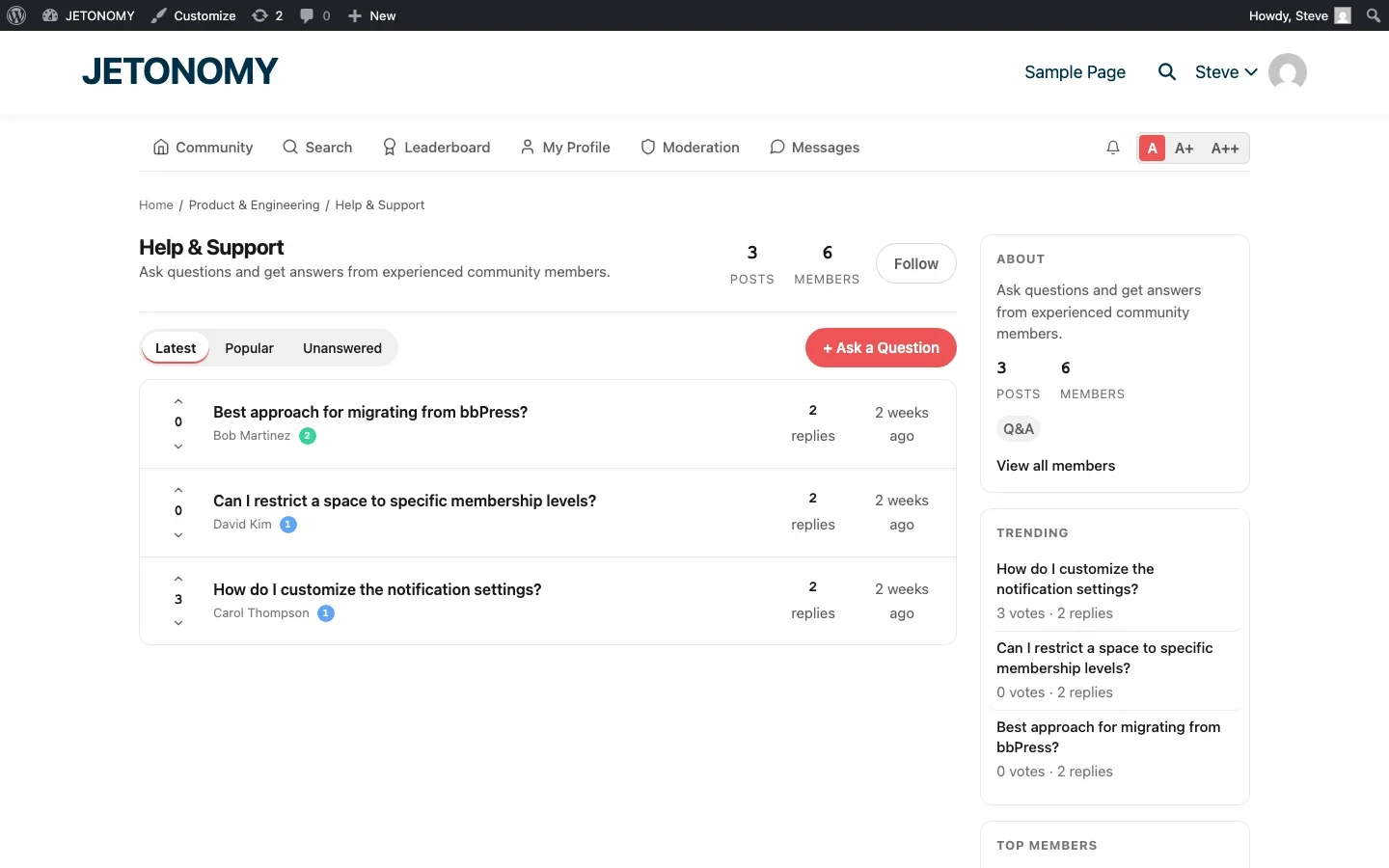
Each space should be set to Q&A type. This enables the voting interface, accepted answer marking, and sorting by vote score rather than chronological order.
Step 3: Configure Voting
Voting is the engine that makes Q&A work. Without it, you just have a forum with fancy labels.
In a Q&A space, every question and answer has upvote and downvote arrows. When a user upvotes an answer, two things happen:
- The answer’s score increases, pushing it higher in the sort order
- The answer author earns reputation points
Jetonomy handles voting automatically in Q&A spaces. The default reputation rewards are:
- Question upvote: +5 reputation for the asker
- Answer upvote: +10 reputation for the answerer
- Accepted answer: +15 reputation for the answerer
These defaults incentivize answering questions (higher reward) over asking them, which mirrors Stack Overflow’s approach. You can adjust the values in Jetonomy → Settings → Reputation.
Step 4: Set Up Accepted Answers
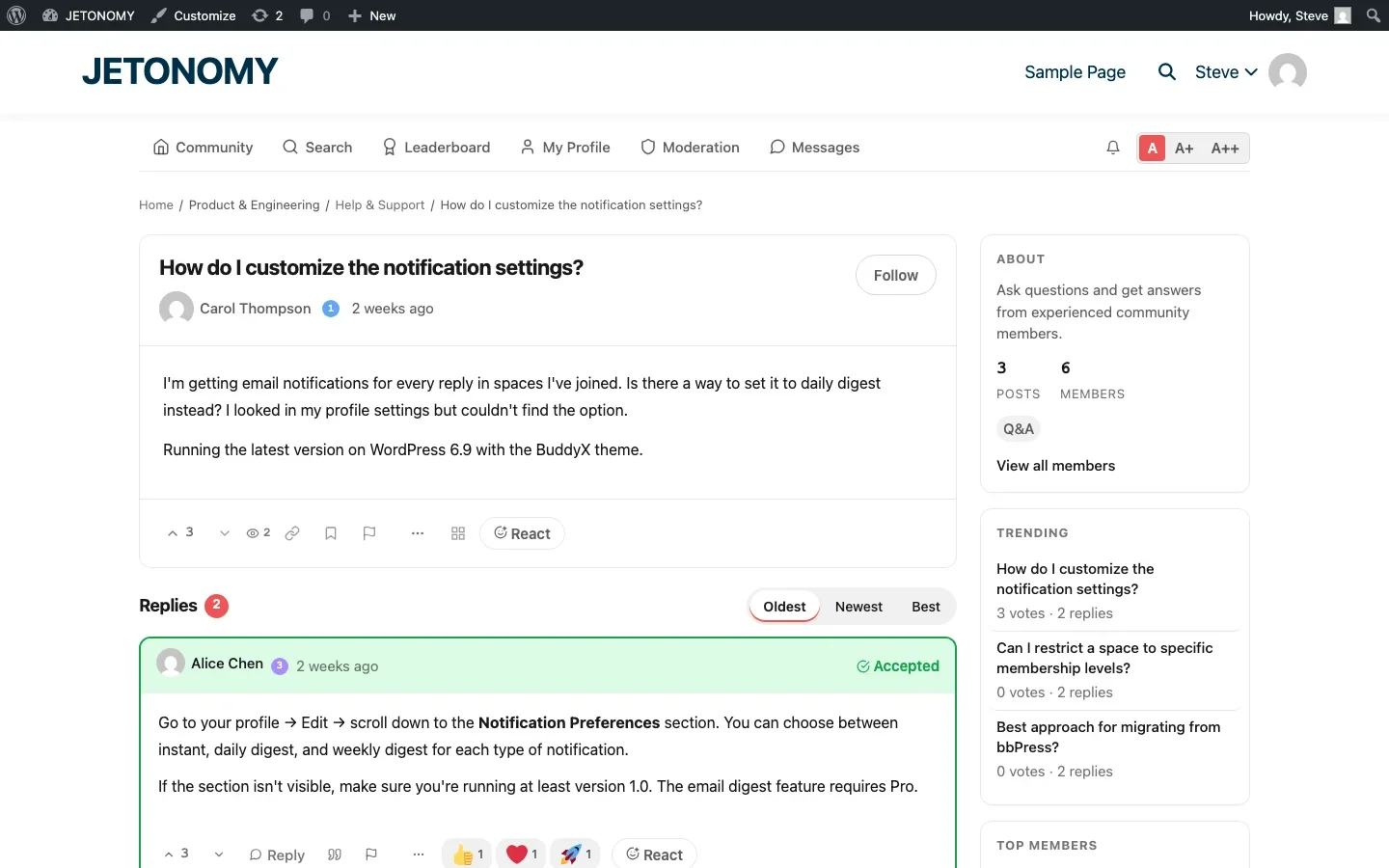
The accepted answer is the green checkmark that tells everyone: this is the solution. In Jetonomy, the person who asked the question can click “Accept” on any answer. Moderators and admins can also accept answers.
When an answer is accepted:
- It gets pinned to the top of the answer list with a green “Accepted” badge
- The answerer earns bonus reputation
- The question is marked as resolved in listings
- Search results show the accepted answer snippet
Step 5: Configure Reputation and Trust Levels
Stack Overflow’s genius is not just voting, it is the reputation system that gates abilities. New users can ask and answer. As they earn reputation, they unlock more abilities: commenting, editing, flagging, closing questions.
Jetonomy replicates this with trust levels (0–5):
Trust Level | Requirements | Abilities Unlocked |
|---|---|---|
Level 0 (New) | Just registered | Ask questions, post answers (rate limited) |
Level 1 (Basic) | ~5 posts, ~1 week active | Upload images, send messages, no rate limits |
Level 2 (Member) | ~20 posts, upvotes received | Edit own posts, flag content, create tags |
Level 3 (Regular) | Sustained activity + reputation | Recategorize topics, close duplicates |
Level 4–5 (Leader) | Manually granted | Full moderation abilities |
Configure the thresholds in Jetonomy → Settings → Trust Levels. For a Q&A site, we recommend tighter thresholds than a general forum, you want quality contributions to be rewarded faster.
For a deeper look at trust levels, read our guide on building a self-moderating forum with trust levels.
Step 6: Prevent Duplicates
Duplicate questions are the biggest quality problem on Q&A sites. If the same question exists in five variations, the answers are fragmented and none of them rank well in search.
Jetonomy’s Similar Topics feature helps prevent duplicates at the source. When a user starts typing a question title, the system shows related existing questions in real time. Many users find their answer before posting.
For duplicates that slip through:
- Trust Level 3+ users can close questions as duplicates, linking to the original
- Moderators can merge duplicate questions, combining their answers
- Tags help users find existing questions before asking new ones
Step 7: Optimize for Search
The long-term value of a Q&A site is search traffic. Every question-and-answer pair is a page that can rank for a natural language query.
To maximize search value:
- Use clean URLs. Jetonomy uses the pattern
/community/s/space-slug/t/question-slug/which is readable and keyword-rich. - Encourage descriptive titles. “How do I configure SMTP on WordPress 6.9?” ranks better than “Help needed!!!”
- Accept answers quickly. Pages with accepted answers have better engagement signals, which helps with ranking.
- Use tags consistently. Tags create category pages that aggregate related questions, giving search engines thematic signals.
Step 8: Seed Your Q&A with Content
An empty Q&A site is worse than no Q&A site. Nobody wants to be the first person to ask a question in an empty room.
Before launching, seed your Q&A with 15–20 questions and answers. The best source? Your existing support tickets and email inbox. Take your most frequently asked questions, post them as Q&A topics, and answer them thoroughly.
This serves double duty: it populates your Q&A with useful content and it creates pages that start ranking in search immediately.
Step 9: Add a Leaderboard
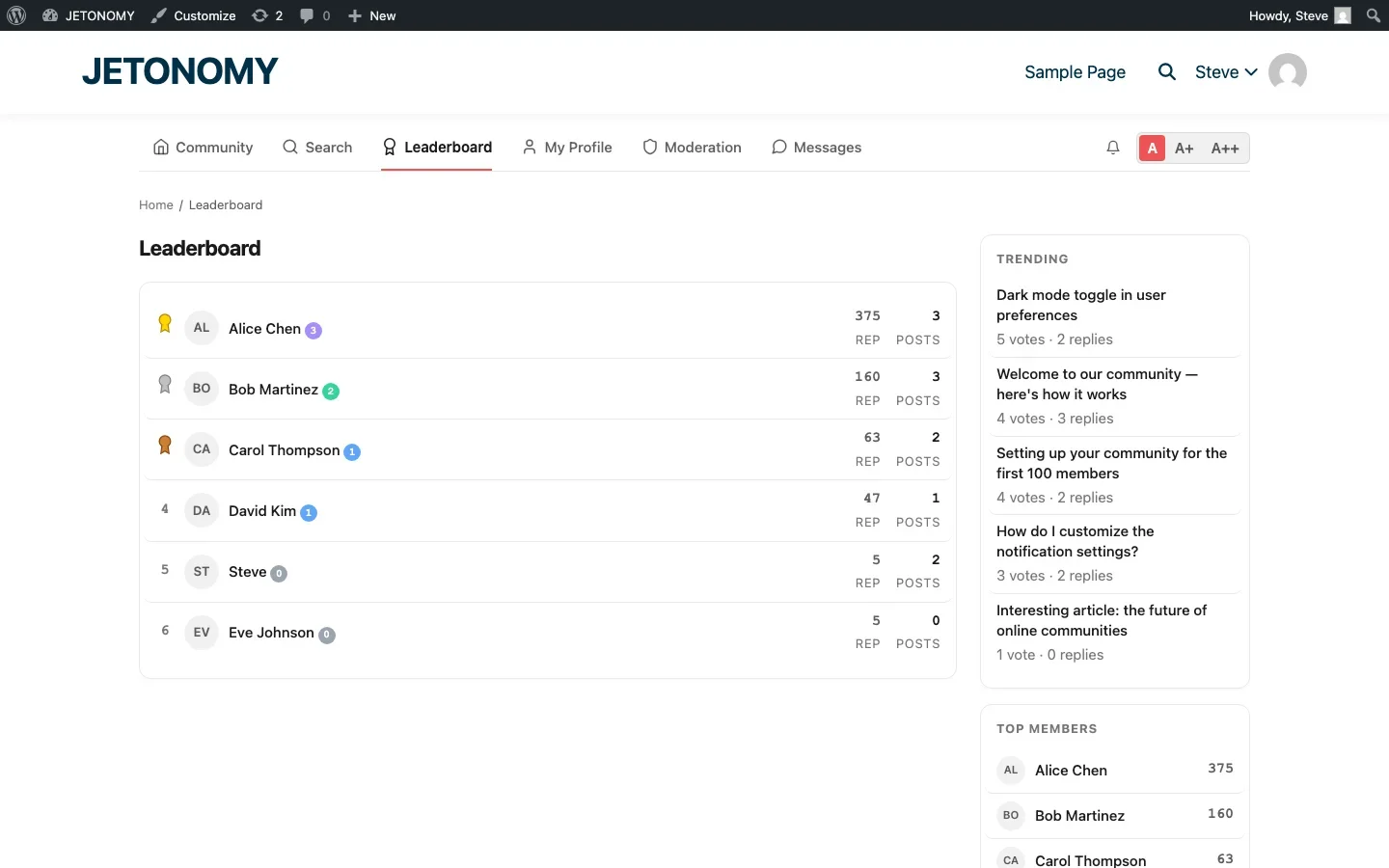
Stack Overflow’s user rankings page shows the top contributors by reputation. This creates healthy competition and public recognition for the people who contribute the most knowledge.
Jetonomy includes a built-in leaderboard that ranks members by reputation score. Top contributors are also visible in the sidebar widget on every page.
Going Beyond Stack Overflow
A WordPress Q&A has advantages that Stack Overflow does not:
- Brand integration. Your Q&A lives on your domain, uses your branding, and contributes to your site’s SEO.
- Mixed community types. Add a Forum space for general discussion and an Ideas space for feature requests alongside your Q&A. Read our guide to community types for how to mix them effectively.
- Private Q&A spaces. Gate access behind course enrollment or membership for premium support communities.
- Pro extensions. Add polls to questions, emoji reactions to answers, analytics for tracking resolution rates, and private messaging for sensitive follow-ups.
Launch Checklist
Before opening your Q&A to the public:
- 15–20 seed questions with detailed answers
- Trust level thresholds configured
- Q&A link added to main navigation
- Tags created for your main topic areas
- At least 2–3 Q&A spaces organized by topic
- Team commitment to answer new questions within 4 hours for the first month
If you are also running a support forum to reduce tickets, the Q&A format is ideal for the support spaces specifically.
Your community has answers. A Q&A platform gives those answers a permanent, searchable, votable home where the best knowledge rises to the top. That is the Stack Overflow model, running on your WordPress site, under your brand.
Reputation Inflation Is a Real Risk
One thing Stack Overflow itself has struggled with over the years is reputation inflation, early, prolific answerers accumulate reputation that newer, equally knowledgeable members can never catch up to, simply because the easy questions were already claimed. On a smaller site this shows up faster: your first five power users can end up dominating the leaderboard within weeks, which discourages newer contributors from bothering to answer at all. Consider reputation decay for stale answers, or a separate “recent contributions” leaderboard alongside the all-time one, so new members have something realistic to aim for.
Where Jetonomy Pro Fits
Voting, accepted answers, trust levels, and the leaderboard described above are all part of free Jetonomy, none of it requires Pro. Jetonomy Pro is worth adding once your Q&A spaces are mixed with premium support or course-gated spaces, since the Private Spaces and membership adapters let you gate specific Q&A areas to paying customers while keeping general Q&A open. Take a look at Jetonomy Pro if that split matches how you plan to run support.













