
You have decided to add a community to your WordPress site. Good. But now comes the decision that most guides skip: what type of community do you actually need?
“A forum” is not a complete answer. Forums are one format. There are others, and they serve fundamentally different purposes. Choosing the wrong format creates friction. Members do not engage the way you expect. Questions get buried in discussions. Feature requests get lost in general chat.
This guide breaks down the four main community formats, Forum, Q&A, Ideas Board, and Social Feed, explains when each one works best, and shows you how to combine them in a single community.
Forum: The Classic Discussion Format
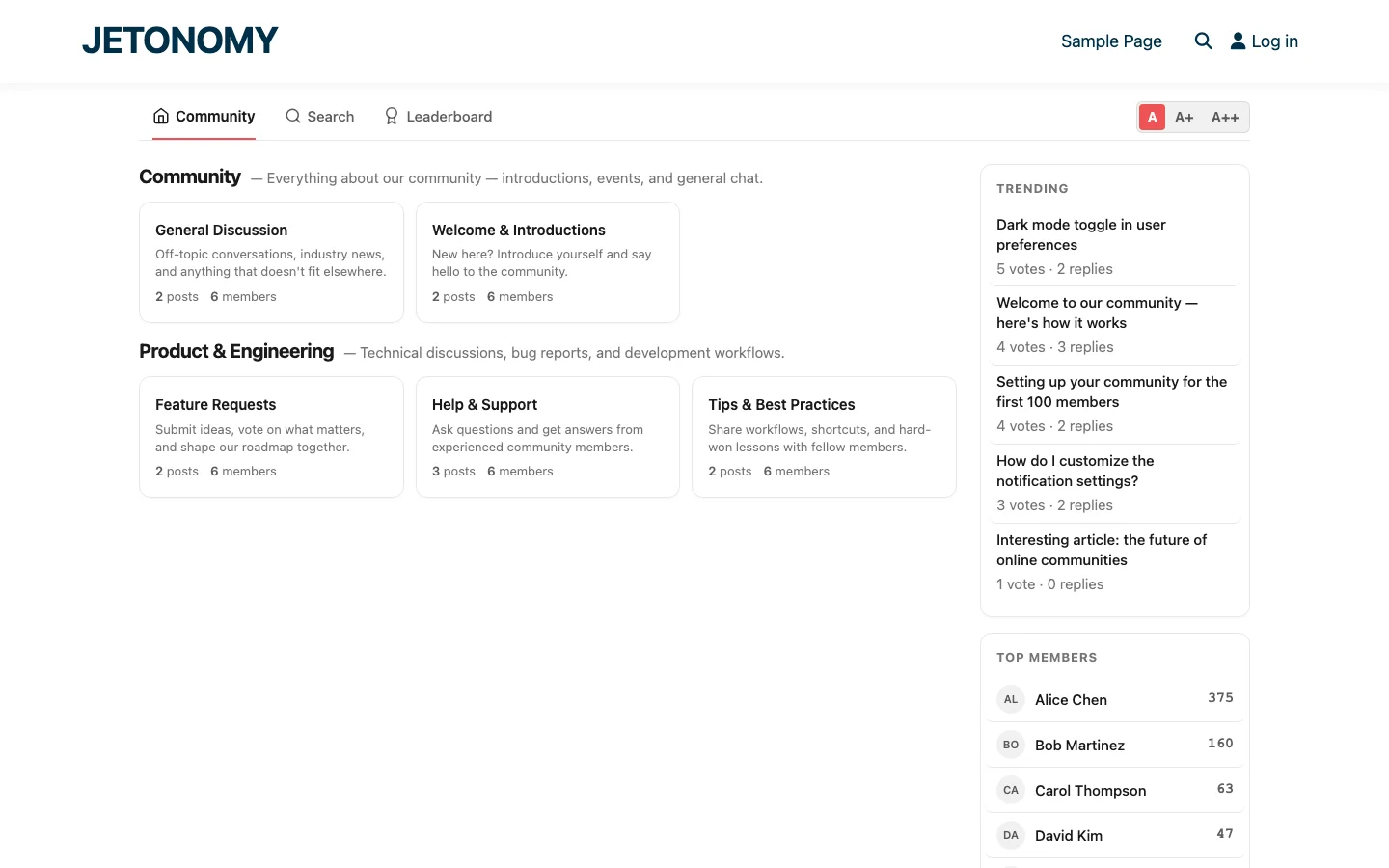
A forum is the oldest and most versatile community format. Topics are created by members, replies stack chronologically, and conversations develop organically over time.
How It Works
A member creates a topic with a title and body. Other members reply. Replies can be threaded (nested under specific replies) or flat (stacked chronologically). Topics are organized into categories or spaces, and members can browse, search, or filter to find discussions.
Best For
- General discussion, Off-topic conversations, community announcements, introductions
- Advice and opinions, “What theme do you recommend for a photography site?”
- Sharing resources, Tutorials, articles, tips, and best practices
- Community building, Welcome posts, member spotlights, weekly prompts
- Announcements, Product updates, event announcements, rule changes
Not Ideal For
- Support questions, Forum threads make it hard to identify which reply actually solved the problem. Questions get multiple partial answers but no clear resolution.
- Feature prioritization, Without voting, popular feature requests look identical to unpopular ones.
Real-World Example
A WordPress theme company creates forum spaces for “General Discussion”, “Show & Tell” (members share their sites), and “Announcements” (release notes and updates). Members browse, chat, and share without needing structured Q&A or voting.
Q&A: The Knowledge Base Builder
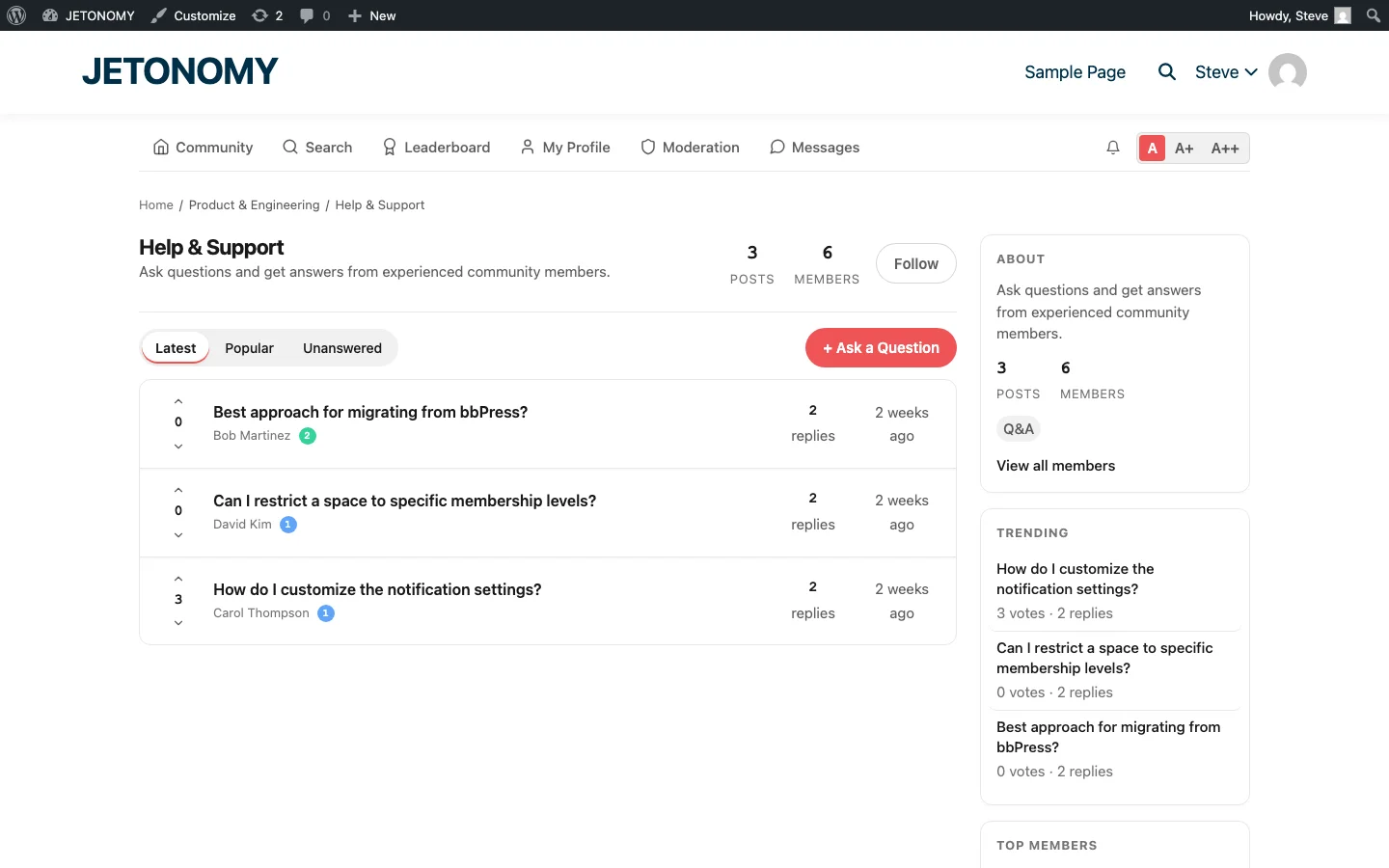
Q&A format is specifically designed for questions that have answers. It looks similar to Stack Overflow or Quora: someone asks a question, others post answers, the community votes on the best ones, and the question asker (or a moderator) marks the definitive answer as “accepted.”
How It Works
A member posts a question. Other members post answers (not replies, the distinction matters). Each answer can be upvoted or downvoted independently. The answer with the most votes floats to the top. The question asker can mark one answer as accepted, which pins it at the top with a visual indicator.
This creates a self-organizing knowledge base. The best answers surface automatically. Outdated or incorrect answers sink. And the accepted answer badge tells future visitors exactly which response to trust.
Best For
- Customer support, “How do I configure SMTP settings?”
- Technical troubleshooting, “Getting a 500 error after updating to PHP 8.3”
- Knowledge bases, Answers accumulate into a searchable library
- Course discussions, Students ask questions about specific lessons
Not Ideal For
- Open-ended discussions, “What is the future of WordPress?” does not have a single correct answer
- Community building, Q&A is transactional by nature. People come, get their answer, and leave.
Real-World Example
A SaaS company creates a “Help & Support” Q&A space. Customers search before asking. When they post a question, the Similar Topics feature shows related discussions. Power users answer common questions and earn reputation points. The support team focuses on complex issues while the community handles the routine ones. This approach is why many SaaS teams are replacing Zendesk with community Q&A spaces.
Ideas Board: The Product Roadmap
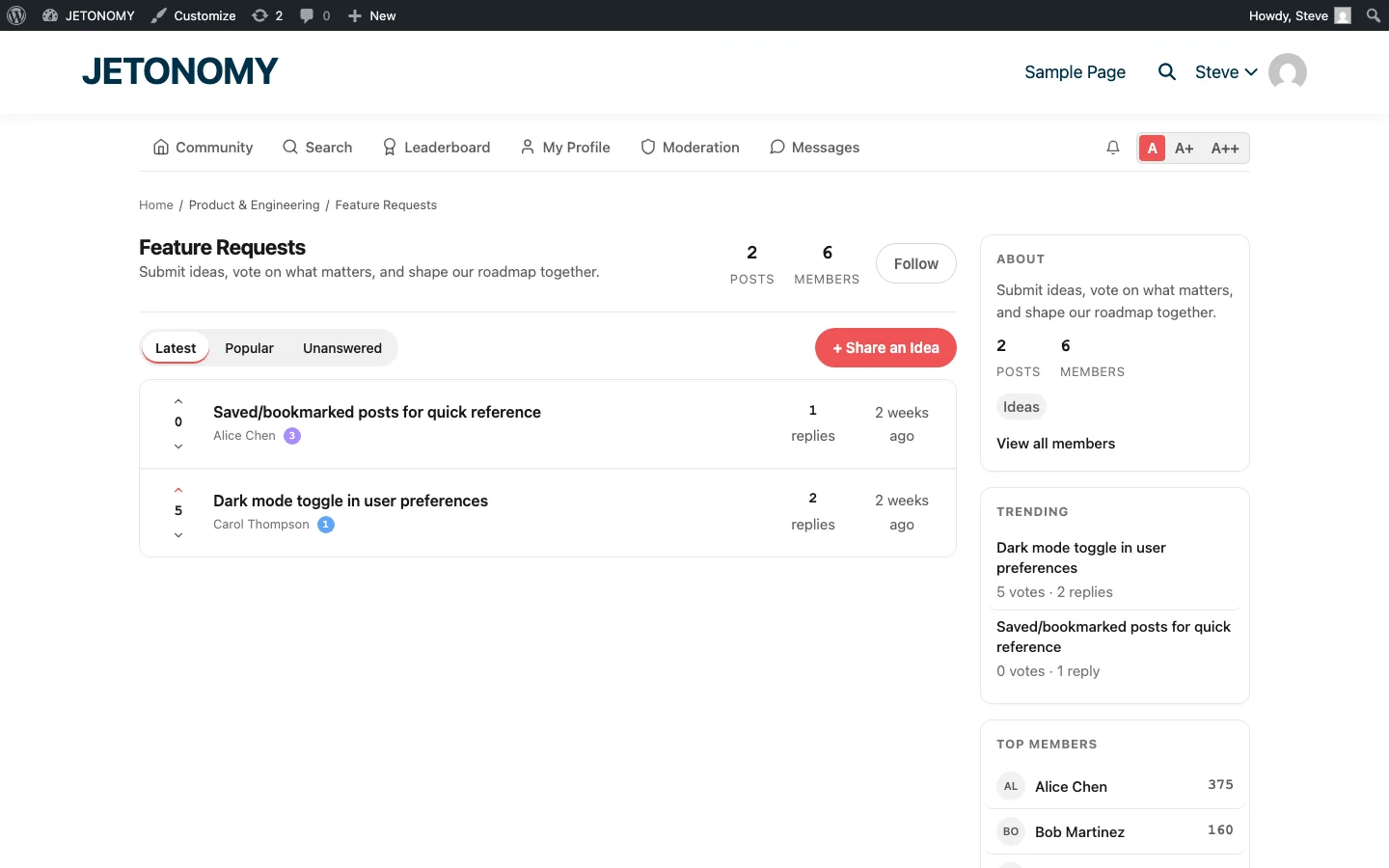
An Ideas Board lets members submit suggestions and vote on them. The result is a community-driven prioritization system where the most wanted features rise to the top.
How It Works
A member submits an idea with a title and description. Other members upvote ideas they want. The idea list is sortable by votes, recency, or status. Administrators can assign status labels to ideas: “Under Review”, “Planned”, “In Progress”, “Completed”, or “Declined.”
Some implementations include a roadmap view that shows ideas organized by status in a Kanban-style board, giving the community visibility into what is coming next.
Best For
- Feature requests, “Please add dark mode” with 47 upvotes tells you more than 47 individual support tickets saying the same thing
- Product feedback, Let users tell you what to build instead of guessing
- Roadmap transparency, Show your community what you are working on and what is next
- Community governance, Let members vote on community policies or event ideas
Not Ideal For
- Bug reports, Bugs need to be fixed regardless of vote count. Use a Q&A space for bug reports.
- Discussions, Ideas boards are for proposals, not conversations. Keep discussions in forum spaces.
Real-World Example
A WordPress plugin developer creates a “Feature Requests” Ideas space. Customers submit ideas like “Add CSV export” or “Support for multisite.” Other users upvote. The developer checks the Ideas board monthly to see what the community wants most. When a feature ships, the idea status changes to “Completed” and everyone who voted gets notified.
This approach is far more effective than collecting feature requests through email or a Google Form. The community does the prioritization for you, and contributors feel heard because they can see their votes make a difference. For a deeper look at this workflow, check out our guide on adding a feature request board to your community.
Social Feed: The Lightweight Alternative
A Social Feed is the simplest community format. Think Twitter or LinkedIn feed: short posts, no required titles, no complex threading. Members share quick updates, links, thoughts, or questions in a scrollable feed.
How It Works
A member posts a short update, a few sentences, a link, an image. Other members react with emoji, reply with quick comments, or vote. The feed is chronological or algorithmically sorted by engagement. Posts are lightweight and low-commitment.
Best For
- News communities, Share and discuss industry news
- Team spaces, Quick updates, links, and casual conversation without the overhead of topics
- Event communities, Live discussion during conferences or webinars
- Low-pressure engagement, Members who will not write a 200-word forum post will happily post a two-sentence update
Not Ideal For
- Knowledge accumulation, Feed posts are ephemeral. They disappear into the scroll. If you need searchable answers, use Q&A.
- Structured support, Feed posts lack the structure (voting, accepted answers) needed for effective support.
Real-World Example
A marketing agency creates a “Daily Links” social feed space where team members share interesting articles, campaigns, and resources they found that day. It replaces a Slack channel with something that is searchable and does not disappear into chat history.
Mixing Types in a Single Community
Here is the key insight that most guides miss: you do not have to choose one type for your entire community. The best communities mix multiple formats, using each one where it fits.
In Jetonomy, every space can have its own type. So a single community might look like this:
| Category | Space | Type | Purpose |
|---|---|---|---|
| Community | General Discussion | Forum | Open conversation, introductions |
| Community | News & Links | Social | Share articles and quick updates |
| Product | Help & Support | Q&A | Questions with votable answers |
| Product | Bug Reports | Q&A | Reproducible bug reports |
| Product | Feature Requests | Ideas | Vote on what to build next |
| Product | Tips & Tutorials | Forum | User-contributed guides |
| Product | Announcements | Forum | Release notes, events |
This structure serves every use case without forcing conversations into the wrong format. Support questions go to Q&A where they get accepted answers. Feature requests go to Ideas where they get votes. Casual discussion goes to Forum where it flows naturally.
Choosing the Right Type: A Decision Framework
If you are not sure which type to use for a given space, ask these three questions:
1. Does the conversation have a single correct answer?
If yes → Q&A. Questions with correct answers need voting and accepted answer badges. “How do I reset my password?” has one right answer. Put it in Q&A.
2. Are you collecting proposals that need prioritization?
If yes → Ideas. Feature requests, policy proposals, event suggestions, anything where the community should vote to surface the most popular options.
3. Is the content short-form and time-sensitive?
If yes → Social Feed. Quick updates, links, and casual conversation that does not need to be findable six months from now.
4. Is it none of the above?
If yes → Forum. The classic discussion format handles everything else: open-ended conversations, announcements, tutorials, community building.
How Each Type Affects Community Behavior
The format you choose shapes how people participate. This is not just about features, it is about psychology.
- Forum encourages exploration and conversation. Members browse, discover interesting topics, and join discussions they did not plan to participate in.
- Q&A encourages precision. Members come with a specific question, find or post it, get their answer, and leave. It is efficient but not social.
- Ideas encourages advocacy. Members do not just submit ideas, they rally others to upvote them. This creates investment and ownership.
- Social Feed encourages frequent, low-effort participation. The barrier to posting is so low that members contribute daily instead of weekly.
A healthy community usually needs at least two of these behaviors. Pure Q&A communities are efficient but feel transactional. Pure forums can feel overwhelming for new members. The mix creates a community that is both useful and welcoming.
Migration: Changing Types Later
What if you pick the wrong type? It is not permanent. You can change a space’s type at any time. The existing content stays, the interface around it changes.
A common pattern is to start with Forum type for everything, then switch specific spaces to Q&A or Ideas once you see how members actually use them. If your “General Discussion” space fills up with support questions, create a dedicated Q&A space for support and move those conversations over.
Getting Started
Here is what to do right now:
- List the conversations your community will have. Support questions? Feature requests? General chat? News sharing? Write them down.
- Match each conversation type to a format. Use the decision framework above.
- Create 3–5 spaces to start. One forum, one Q&A, and one Ideas board covers most communities. You can add more later.
- Tell members which space to use for what. Add clear descriptions to each space so members know where to post.
For the technical setup, follow our step-by-step guide to adding a forum to WordPress. It walks through installation, space creation, and configuration for all four community types.
And if you are building a support-focused community, our guide on building a support forum that reduces tickets goes deeper on the Q&A setup specifically.
The right structure makes the difference between a community that thrives and one that confuses its members. Choose your types deliberately, and your community will organize itself.