Most WordPress community sites start as passion projects or lead-generation tools. Then, somewhere around month six, the traffic grows, the engagement builds, and the question surfaces: can this actually generate revenue?
The answer in 2026 is yes, and it is more accessible than most site owners realize. A WordPress site powered by BuddyPress, with the right membership plugin and a few revenue layers on top, can generate anywhere from a few hundred dollars a month to a full six-figure annual income. The gap between those outcomes comes down to tier design, plugin selection, and whether you layer your revenue streams or stack them in isolation.
This guide walks through the complete playbook: how to design membership tiers that convert, which plugin combinations work best with BuddyPress in 2026, how to set up sponsorship deals that do not feel like banner ads, and how to run an affiliate layer that members actually use.
Why WordPress Communities Are a Strong Revenue Base in 2026
The paid community market is not slowing down. Platforms like Circle, Skool, and Mighty Networks have validated the model at scale, but they charge platform fees, limit your data ownership, and offer no flexibility in how you structure monetization. A self-hosted WordPress community gives you all of that flexibility at a fraction of the ongoing cost. If you are comparing platforms, see our breakdown of the best community platforms for coaches in 2026, it covers why WordPress holds up against the hosted alternatives.
There are three structural advantages to monetizing on WordPress:
- Zero revenue share. You keep 100% of membership income. A $50/month membership site with 200 members earns $10,000/month gross, and WordPress takes nothing off the top beyond hosting costs.
- Composable architecture. You can bolt on a job board, a product directory, a sponsored newsletter, and a members-only deals section without rebuilding anything. Each layer adds revenue without touching the core membership flow.
- Ownership of the member relationship. Email, user data, activity history, purchase records. You own all of it and can move between plugins without losing history.
BuddyPress specifically adds social infrastructure that most membership plugins lack: activity feeds, groups, member profiles, private messaging, and notifications. That social layer is what turns a course site or forum into a community people pay to stay inside.
Designing Membership Tiers That Convert
Pricing psychology is not complicated, but most WordPress sites get it wrong by creating too many tiers or pricing them too close together. The model that consistently performs best is a three-tier structure: Free, Paid, and VIP.
The Free Tier: Your Acquisition Engine
Free members are not a cost center. They are your conversion pipeline and your social proof engine. A community with 500 members, even if 80% are free, looks more alive than one with 100 paying members only. BuddyPress activity feeds, public member directories, and open groups all work to make free members visible.
Free tier access should include:
- Public activity feed access (read-only or limited posting)
- Member directory browsing
- One or two open groups relevant to the niche
- A sample of premium content (first module of a course, one gated post per month)
The goal of the free tier is to give members enough value to trust the community, and enough friction to want more. BuddyPress groups are ideal for this: put core discussions in free groups, but gate the high-signal conversations (expert Q&A, deal flow, case studies) behind the paid tier.
The Paid Tier: Core Revenue
This is where most of your revenue will come from, and the pricing needs to reflect real value. For a B2B or professional community, $29 to $79 per month is the typical range. Consumer communities tend to convert better at $9 to $19 per month with an annual option that saves 20%.
Annual plans are worth pushing hard. A $49/month plan with a $399/year option (about 32% off) dramatically improves your cash flow and reduces churn. Members who pay annually churn at roughly half the rate of monthly subscribers.
Paid tier benefits should be concrete and describable in one sentence each:
- Access to gated BuddyPress groups (expert discussions, niche sub-communities)
- Unlimited access to the content library
- Monthly live Q&A sessions (recorded for async access)
- Direct messaging with moderators or experts
- Member-only job board or directory listings
Keep the list short. Five to seven concrete benefits convert better than a long feature comparison table.
The VIP Tier: High-Value, Low-Volume
VIP pricing typically runs 5x to 10x the paid tier. For a $49/month community, a VIP tier at $249 to $499 per month is defensible if it includes genuine access and accountability.
What justifies VIP pricing:
- Monthly one-on-one calls or office hours with the founder or experts
- Early access to new features or content
- Private Slack or dedicated BuddyPress group for VIP members only
- Annual strategy review or audit (for professional communities)
- Co-marketing opportunities (featured in newsletter, directory, or social posts)
You do not need many VIP members to make this tier meaningful. Ten VIP members at $299/month equals $2,990/month on top of your base membership revenue, with very little marginal cost. To maximize VIP retention, pairing the tier with invite-only spaces for premium members creates the kind of exclusivity that keeps high-value members engaged long-term.
The Plugin Stack: MemberPress, PMPro, and RCP with BuddyPress
Three plugins dominate the WordPress membership space in 2026: MemberPress, Paid Memberships Pro (PMPro), and Restrict Content Pro (RCP). All three integrate with BuddyPress, but they do it differently, and the right choice depends on how complex your access control needs to be.
MemberPress
MemberPress is the most polished of the three for non-technical site owners. Its access rules are point-and-click, the checkout flow is clean, and the developer ecosystem is large enough that there is an add-on for almost anything you need.
BuddyPress integration with MemberPress works through the BuddyPress Groups add-on, which lets you automatically assign users to BuddyPress groups based on their membership level. A user who upgrades from free to paid gets added to the paid-only groups automatically. Downgrading or canceling removes them from those groups on the next billing cycle check.
MemberPress pricing in 2026 starts at $179/year for the Basic plan. The Plus plan ($299/year) adds advanced add-ons including the BuddyPress integration. For a community site, Plus is effectively required.
Best for: Sites that prioritize a clean checkout experience and want minimal developer involvement.
Paid Memberships Pro (PMPro)
PMPro is the most flexible option and the one with the deepest BuddyPress integration. The BuddyPress Add On (free in the PMPro add-on library) lets you gate entire BuddyPress components: activity feeds can be restricted, profile fields can vary by membership level, and groups can require membership.
PMPro’s pricing model is also different: the plugin core is free, and you pay for a plan ($349/year for Plus, which covers most production sites) to access premium add-ons and support. This makes it easy to prototype before committing.
One standout feature of PMPro for community sites: member directories. The Members List add-on creates a searchable, filterable directory of members that can show membership level, join date, and profile information. For professional communities, this is a significant value-add that justifies paid membership on its own.
Best for: Sites that need deep access control granularity and are comfortable with a more configuration-heavy setup.
Restrict Content Pro (RCP)
RCP is the lightest of the three. It handles content restriction well and integrates cleanly with WooCommerce if you already have a shop, but its BuddyPress integration is thinner than either MemberPress or PMPro.
RCP works best for sites where the primary gating is content (posts, pages, custom post types) rather than community features. If your community is BuddyPress-heavy and the social layer is central to the value proposition, RCP will require more custom code to get the member experience right.
Best for: Simpler sites where content restriction is the primary use case and BuddyPress groups are secondary.
Recommended Stack for Most BuddyPress Community Sites
For a site where BuddyPress is the core social layer and membership is the primary revenue model, the recommended stack is:
- PMPro for membership management and BuddyPress integration
- BuddyPress for social infrastructure (activity, groups, profiles, messaging)
- WooCommerce + PMPro WooCommerce Add On if you want to sell one-time products alongside memberships
- MailPoet or FluentCRM for member email sequences and retention campaigns
Sponsorship Patterns That Generate Real Revenue
Sponsorships are underused on WordPress community sites, partly because site owners think of them as banner ads and assume they do not convert. That framing is the problem. The sponsorship patterns that work in 2026 are integrated into the community experience, not bolted onto the sidebar.
Community-Branded Content
A sponsor pays to publish one piece of content per month inside your community, written in your voice and subject to your editorial standards. This is not a guest post or a press release. It is a sponsored analysis, a tool breakdown, or a case study that your audience would find valuable regardless of who paid for it.
Pricing for community-branded content in a niche professional community: $500 to $2,500 per piece, depending on your audience size and engagement rate. A community with 1,000 active members and a 30% email open rate commands more than one with 5,000 members and 8% open rates.
Structure the deal as a monthly retainer (three to six pieces minimum) rather than one-off placements. Sponsors get consistent brand presence, you get predictable revenue.
Job Board Sponsorships
If your community is professional (WordPress developers, agency owners, freelancers), a job board is a natural fit. WP Job Manager is the standard plugin, and it integrates cleanly with BuddyPress member profiles.
Revenue model options:
- Pay-per-listing: $25 to $99 per job post, depending on visibility options (30-day listing, featured placement, email blast to member list).
- Unlimited posting subscription: $200 to $500/month for agencies or companies that hire regularly.
- Sponsored featured listing: $150 to $300 for a 30-day featured placement at the top of the job board.
A job board with 20 listings per month at an average of $50 per listing generates $1,000/month passively. Add two featured placements at $200 each and that is $1,400/month from a single feature.
Product Directory Sponsorships
A curated product or tool directory is another community asset that sponsors will pay to appear in. For a WordPress community, this could be a directory of WordPress themes, plugins, hosting providers, or agencies.
The sponsorship model here is tiered visibility:
- Basic listing (free or low-cost): Name, URL, one-line description
- Enhanced listing ($50 to $150/month): Logo, extended description, screenshot, category highlight
- Premium/featured listing ($300 to $800/month): Top placement in category, badge, inclusion in monthly newsletter, member review prompts
The directory becomes self-funding once you have 5-10 premium listings. At $400/month per premium slot and 8 sponsors, that is $3,200/month from the directory alone.
Revenue Math: A Realistic Sponsorship Scenario
| Revenue Source | Unit Price | Volume/Month | Monthly Revenue |
|---|---|---|---|
| Branded content | $1,000/piece | 2 sponsors | $2,000 |
| Job board listings | $60 avg | 20 listings | $1,200 |
| Directory premium slots | $400/month | 6 sponsors | $2,400 |
| Sponsorship total | $5,600/month |
This is not hypothetical. It is a reasonable month-12 target for a niche community with 500 to 1,000 active members. Getting there requires proactive outreach to relevant vendors in your space, not waiting for sponsors to come to you.
Building an Affiliate Layer for Members
The affiliate layer is different from the other revenue streams. Instead of selling to your members, you are enabling your members to earn while they bring in new members or promote products they already use. Done well, it turns your most engaged members into a distributed sales force.
Member Referral Programs
A referral program rewards existing members for bringing in new paid members. The mechanics are straightforward: each member gets a unique referral link, and when someone signs up through that link, the referring member earns a credit or cash payment.
For MemberPress, the AffiliateWP integration handles this natively. For PMPro, the PMPro Referral Program add-on (available with a Plus plan) provides the same functionality.
Typical referral economics:
- Pay 20% to 30% of the first month’s membership fee as a referral bonus
- For a $49/month plan, that is $9.80 to $14.70 per referral
- Or offer a fixed credit: $15 credit toward their own membership for each paid referral
The credit model is often more effective than cash because it reduces churn (members stay active to use their credits) and costs you less in real dollars.
Members-Only Affiliate Deals
Negotiate exclusive discounts with tools and services your members use, and pass those savings through as an affiliate arrangement where you earn a commission on any purchases.
This works at any community size, but it works best when your members have a specific, identifiable need. A WordPress developer community needs hosting, themes, plugins, and design tools. Negotiate a 20% discount from a hosting company, set up an affiliate account, and promote the deal inside your member-only groups.
The key is exclusivity. “Members-only deal” with a discount code converts far better than a generic affiliate link, because it signals that the member is getting something others do not have access to.
Setup steps:
- Identify five to ten products your members already use or would benefit from
- Apply to affiliate programs for each (most SaaS products and hosting providers have them)
- Negotiate exclusive discount codes if possible (even 5% exclusive beats a standard 10% public discount in terms of conversion)
- Create a members-only page or BuddyPress group post with all active deals
- Include deals in your member onboarding sequence
Revenue Math: Affiliate Layer
A community of 500 paid members, with 15% using one or more affiliate products per month, generates:
- 75 transactions at an average $30 commission = $2,250/month
- Plus referral bonuses paid out: -$500 (25 referrals at $20 credit each)
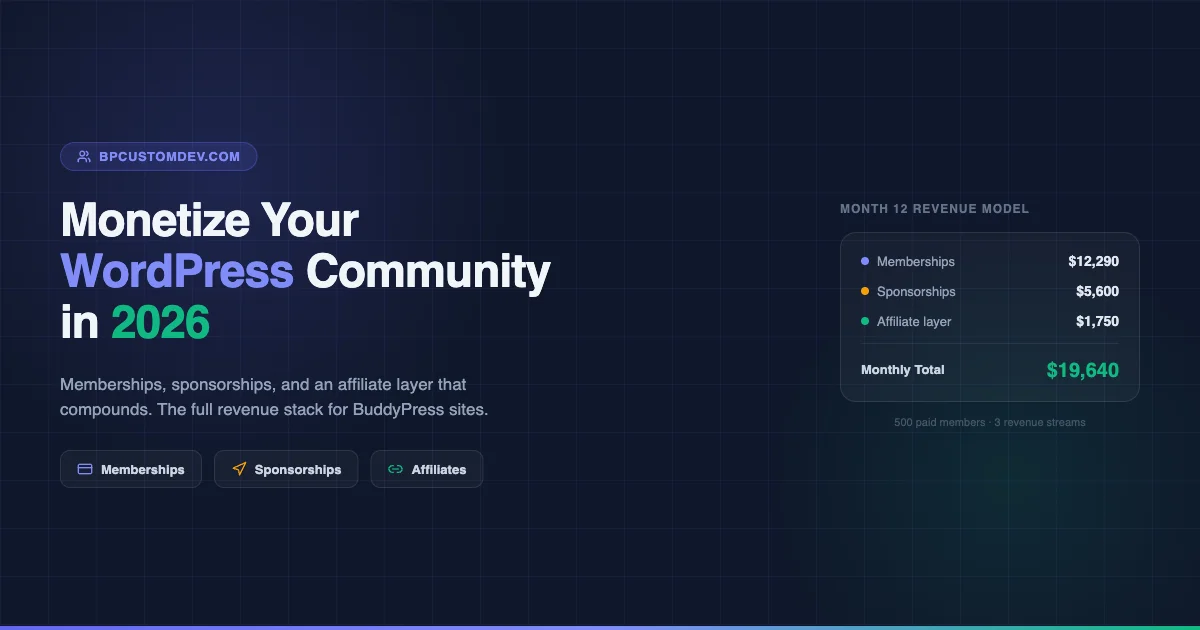
- Net affiliate layer revenue: $1,750/month
This grows as your member count grows, without requiring additional infrastructure investment.
Combined Revenue Model: The Full Stack
When you layer all three revenue streams together, the numbers compound:
| Revenue Stream | Conservative (Month 6) | Target (Month 12) |
|---|---|---|
| Membership (200 paid @ $49/month) | $9,800 | $9,800 |
| VIP tier (10 members @ $249/month) | $2,490 | $2,490 |
| Sponsorships | $2,000 | $5,600 |
| Affiliate layer | $800 | $1,750 |
| Total | $15,090/month | $19,640/month |
These numbers assume a community that started from scratch. By month six with consistent content and outreach, 200 paid members is achievable in most professional niches. By month twelve, sponsorships and the affiliate layer have matured enough to add meaningful revenue on top of the membership base.
Implementation Timeline
Staggering your launch across phases prevents overwhelm and lets you validate each revenue stream before adding the next. If you are migrating an existing audience from a Facebook group or another platform into your new paid community, the process deserves its own planning, see how to migrate a Facebook group to a paid community in 2026 for a step-by-step walkthrough.
Month 1 to 2: Foundation
- Install BuddyPress and configure core components (activity, groups, profiles, messaging)
- Choose your membership plugin (PMPro recommended for most BuddyPress sites) and configure free/paid tiers
- Set up payment processing (Stripe via PMPro or MemberPress gateway)
- Build your onboarding email sequence (3 to 5 emails over the first 14 days)
- Launch with a founding member discount (20% off annual plans for the first 50 members)
Month 3 to 4: Stabilization
- Activate the referral program once you have 50+ paid members
- Set up your first members-only affiliate deals (target 3 products initially)
- Begin outreach to sponsorship prospects (start with product vendors in your niche)
- Launch the VIP tier once you have feedback on what high-value members want
Month 5 to 6: Revenue Diversification
- Launch the job board if your community is professional/B2B
- Build the product directory and approach the first 5 enhanced listing sponsors
- Start a monthly members-only newsletter that includes sponsored content and affiliate deals
- Review churn data and adjust tier benefits accordingly
Month 7 and Beyond: Optimization
- A/B test pricing pages (annual vs. monthly framing, benefit ordering)
- Increase sponsor rates as your community grows and engagement data improves
- Build out the affiliate library (target 10+ products with member-exclusive deals)
- Add a premium group or cohort experience at a higher price point
Technical Checklist Before Launch
Before you start selling memberships, confirm these items are in place:
- SSL certificate: Non-negotiable for any site processing payments.
- Payment gateway: Stripe is standard. PayPal as a backup option. Both integrate with PMPro and MemberPress natively.
- Email deliverability: Configure SMTP (WP Mail SMTP, Postmark, or SendGrid) before sending any transactional email. Membership confirmation emails that land in spam will kill your conversion rate.
- Member data backup: Set up daily automated backups before your first paid member signs up.
- Cancellation flow: Build a cancellation survey. PMPro’s Cancel Reason add-on and MemberPress both support this. Every cancellation is data about what you need to fix.
- Terms of service and refund policy: Required for payment processors and important for managing member expectations.
Common Mistakes That Slow Revenue Growth
After building WordPress community sites across dozens of niches, these are the patterns that consistently delay monetization:
Launching paid before there is a community. A membership with no existing members is a hard sell. Build to at least 200 to 300 free members before opening the paid tier. The social proof of existing members, active feeds, and visible discussions is what converts signups.
Gating too much content too early. If free members cannot see enough to want to upgrade, they leave instead of converting. Give them a real preview of the value behind the gate.
Underpricing the paid tier. A $9/month community signals low value. Professional communities that charge $49 to $79 per month attract members who take participation seriously, which improves the quality of the community for everyone and reduces churn.
Ignoring churn. Acquiring a new member costs 5x to 10x more than retaining an existing one. Build a retention sequence that triggers at the 60-day mark and 90-day mark, where churn typically spikes for monthly subscribers.
Treating sponsorships as an afterthought. Sponsors want audience data before they commit. Track and publish your engagement metrics (active members per month, email open rates, group post frequency). A one-page media kit with real numbers closes sponsor deals faster than any sales pitch.
Conclusion
Monetizing a WordPress community in 2026 is not a single-lever problem. The sites that generate consistent five-figure monthly revenue treat memberships as the foundation, sponsorships as the multiplier, and the affiliate layer as the compounding mechanism that grows with the community itself.
The WordPress and BuddyPress ecosystem in 2026 gives you the tools to build this without a developer team. PMPro handles the membership access control. BuddyPress provides the social infrastructure. WP Job Manager, a custom directory page, and AffiliateWP fill in the additional revenue layers. What separates the sites that succeed from the ones that stall is consistent execution on the member experience, not the sophistication of the technology stack.
Start with the paid tier. Get 50 paying members. Then add one revenue layer at a time, validating each before moving to the next. By month twelve, you will have a community business with multiple income streams, full data ownership, and zero platform fees.