How to Make BuddyPress Member Profiles Private and Secured For BuddyPress Platform
BuddyPress Private Community Pro adds granular privacy and access-restriction controls across BuddyPress components, custom post types, and pages. Here's how to map member tiers before configuring, use profile-completion gates effectively, and avoid restricting too much too early.

The BuddyPress Private Community Pro plugin adds granular privacy and access-restriction controls to a BuddyPress community, private profiles, membership requirements before members can post or join groups, and role-based restrictions across nearly every BuddyPress component. Default BuddyPress treats most content as visible to anyone who’s logged in, with limited control over who can see what or do what based on membership status, engagement level, or role.

Why open-by-default doesn’t fit every community
BuddyPress core’s default posture makes sense for a lot of communities, an open, browsable site where anyone can see anyone else’s profile lowers friction and encourages discovery. But it’s the wrong default for a meaningful subset of communities: paid membership sites where content is the product, professional networks where members expect a degree of privacy from casual browsers, communities built around sensitive topics where public visibility carries real risk, or any site where engagement itself needs to be earned rather than granted automatically at signup.
Private Community Pro exists to let those communities configure restrictions that match how they actually need to operate, rather than forcing every BuddyPress site into the same open, browse-everything model. Default settings work fine for a default use case. Most real communities aren’t the default case.
Key features
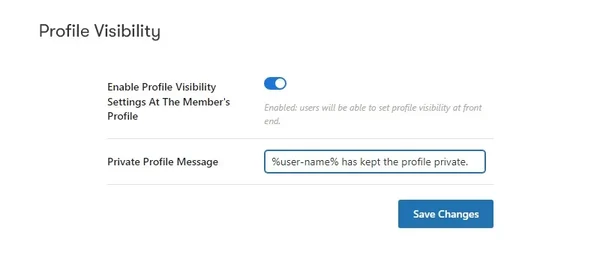
1. Private member profiles. Members can restrict their own profile visibility so only authorized viewers, other members, friends, or nobody but themselves, can see their details. This puts privacy control in the member’s own hands rather than making it a blanket, site-wide decision the admin has to make on everyone’s behalf.
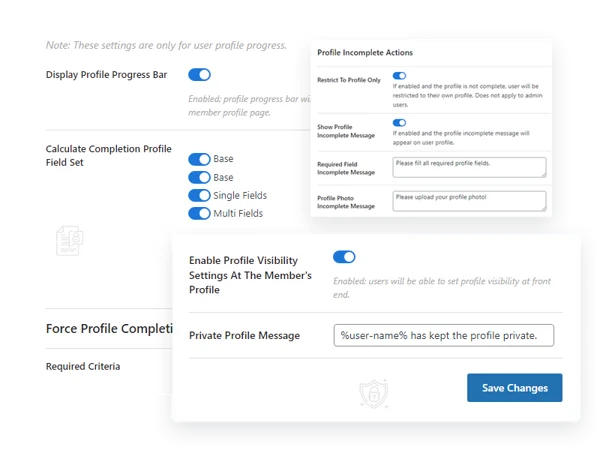
2. Individual profile completion tracking. A visible progress bar based on filled profile fields, avatar, and cover image encourages members to finish setting up their profile rather than leaving it half-empty.
3. Enforced profile completion gates. Require members to finish specific profile fields before unlocking access to certain content or features, a useful mechanism for making sure new members actually engage with onboarding rather than skipping straight past it.
4. Component, CPT, and page-level access restriction. Restrict visitor access not just to BuddyPress components but to custom post types and standard WordPress pages, giving you one consistent restriction layer across your whole site rather than a patchwork of separate plugins for different content types.
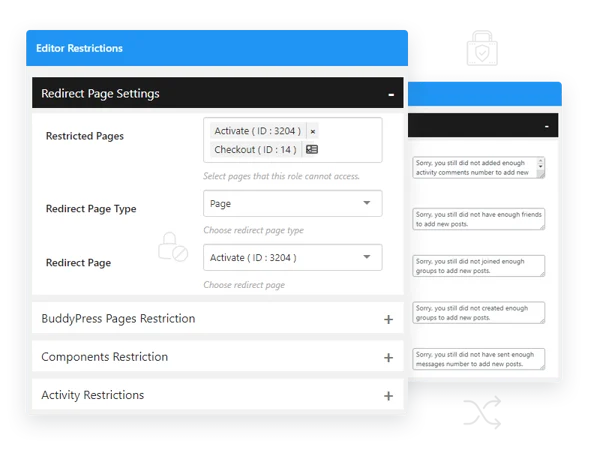
5. Role-based page restriction. BuddyPress-specific pages can be restricted by user role, so different member tiers see a genuinely different navigation and access footprint rather than everyone seeing the same pages with content simply hidden below.
6. Activity-posting requirements. Prevent members from posting activities until they’ve met defined criteria, keeping brand-new, unverified accounts from immediately flooding the activity stream.
7. Comment and group-joining requirements. Set prerequisites members must meet before commenting or joining groups of varying privacy levels, a lightweight vetting layer for actions that would otherwise be open to anyone.
8. Group-creation requirements. Require a minimum number of friends, activities, comments, or a specific role before a member can create a new group, preventing an unmoderated proliferation of low-effort or duplicate groups.
9. Tab and profile-section restrictions. Certain user roles can be blocked from viewing specific BuddyPress profile tabs or custom tabs added by third-party plugins, giving you fine control over what different member types can see.
10. Friendship request restrictions. Certain roles can be blocked from sending or receiving friend requests, useful on communities where friend connections aren’t meant to be universally open.
11. Messaging restrictions and message caps. Prevent certain roles from starting new conversations, replying, or messaging non-friends, and cap how many messages a given role can send, a real defense against spam and unsolicited outreach on larger member bases.
12. Custom restriction notices. Rewrite the messages members see when they hit a restriction, so the experience explains clearly what’s required rather than presenting a generic, unhelpful error. This one setting has an outsized effect on how a restriction actually feels to the member hitting it.
Mapping your restriction needs before touching settings
This plugin has more configuration surface area than most BuddyPress add-ons, which makes planning before configuring even more important than usual. Write out, component by component, exactly what a brand-new unverified member should be able to do, what an established member should be able to do, and what should stay entirely restricted regardless of role. Most communities land on a rough three-tier structure, new/unverified, standard member, and some elevated tier (paid, verified, or long-tenured), even before opening the plugin’s settings screen.
Without that map, it’s easy to end up with restrictions that technically function but don’t add up to a coherent member experience, a member who can create a group but can’t comment on one, or who can message anyone but can’t see basic profile information, combinations that confuse rather than protect.
Put the map in writing, even informally, before touching a single toggle. A spreadsheet with roles as rows and capabilities as columns takes twenty minutes to build and saves hours of trial-and-error clicking through settings screens trying to reconstruct a coherent policy after the fact.
The profile-completion gate: a genuinely underused feature
Requiring profile completion before unlocking certain access solves a problem most communities have without realizing there’s a fix available. New members who skip profile setup entirely tend to be the least engaged, least trustworthy-feeling accounts in any community, not necessarily because they’re bad actors, but because an incomplete profile signals low investment either way. Gating meaningful participation behind a completed profile filters for members who are actually willing to invest a few minutes before they start posting, which correlates reasonably well with members who’ll invest more over time.
Keep the required fields short. A gate requiring twenty fields before any access unlocks becomes a barrier that drives away exactly the engaged members you want, not just the low-effort ones. Three to five meaningful fields, enough to establish a real identity, not so many that it feels like a job application, usually strikes the right balance.
Message caps and restrictions as spam defense
On any community with open messaging, unrestricted direct messaging between strangers is one of the more common vectors for spam and unwanted solicitation, especially as a member base grows past a size where everyone roughly knows everyone. Capping message volume for new or unverified roles, and restricting messaging to friends-only for those same roles, closes that gap without needing to disable messaging entirely for legitimate use. Established or verified members, whose behavior pattern is already known, can retain fuller messaging privileges.
Three membership structures this plugin supports well
A paid membership community with tiered access. Component and page restrictions map directly onto membership tiers, free members see a limited footprint, paid members unlock the rest. This is close to the core use case the plugin was built for.
A professional or vetted networking community. Profile completion gates and group-joining requirements function as a soft vetting layer, filtering for members who’ve demonstrated some baseline investment before they can fully participate, without needing a formal manual application-and-approval process for every single member.
A community handling sensitive or personal topics. Private profiles and restricted visibility settings matter most here, where members may have real reasons not to want their participation broadly visible even to other logged-in members, let alone the open web.
Group-creation requirements: preventing sprawl without killing initiative
Letting any member create a group at any time sounds like a healthy default for encouraging organic community structure, and on a small site it usually is. At scale, unrestricted group creation tends to produce a directory cluttered with near-duplicate groups, abandoned single-member groups, and groups created on a whim that never see a second post. Requiring a minimum activity or friend count before group creation filters for members who’ve actually invested in the community enough to understand what makes a group worth starting, rather than treating group creation as a low-effort default action available to anyone the moment they register.
Calibrate the threshold against your actual community size and activity level, not an arbitrary number. A requirement of fifty friends before group creation is reasonable on a mature ten-thousand-member network and completely unworkable on a six-month-old community where even your most active members haven’t accumulated that many connections yet. Revisit this threshold periodically as your community matures rather than setting it once and leaving it fixed indefinitely.
Tab and section restrictions for a tiered member experience
Beyond blocking entire pages or components, the ability to restrict specific profile tabs by role lets you build a genuinely different experience for different member tiers without maintaining separate templates or themes. A free-tier member might see a standard profile with basic tabs; a paid-tier member might see additional tabs, exclusive content, direct booking, advanced settings, that free members can’t access at all rather than seeing a locked, teased version of. There’s a real design decision buried in that choice: do you want free members to see what they’re missing (a locked tab visible but inaccessible, functioning as a soft upsell) or do you want the tab to simply not exist for them at all (cleaner, but no upsell visibility). Both are valid strategies depending on whether your business model depends on visible upgrade prompts or a cleaner, no-pressure free experience.
How this interacts with a membership or paywall plugin
If your community already runs a dedicated membership plugin handling payments and tier assignment, Private Community Pro’s restrictions should layer on top of that system’s role assignments rather than duplicating them. Confirm exactly how your membership plugin assigns WordPress roles or member types on signup and upgrade, then build your BuddyPress restriction rules around those same role definitions. Building a parallel, disconnected restriction system that doesn’t actually sync with your membership plugin’s tier logic is a common source of confusing bugs, a member who paid and upgraded but still hits restrictions meant for free members, because the two systems were configured independently rather than pointing at the same underlying role data.
Common configuration mistakes
Restricting too much too early is the most frequent one. A brand-new community with few members that locks down nearly everything behind requirements members can’t yet meet, because there’s no one to befriend yet, no established activity to reference, creates a dead-feeling experience for its first cohort of members, exactly when first impressions matter most. Loosen restrictions during early growth and tighten them as the community matures and has enough member density for requirements like “have at least five friends” to be achievable.
The second is leaving default, generic restriction notices in place. A member who hits a wall with no explanation of what they need to do next gets frustrated and often just leaves rather than trying to figure out the requirement. The custom notice feature exists specifically to prevent this, use it, and write notices that tell the member exactly what to do to unlock the thing they’re trying to access. “This content requires 5 friend connections, you currently have 2” beats a bare “Access Denied” every time, because it turns a dead end into a visible next step.
Frequently asked questions
Can a member see that a restriction exists even if they can’t meet the requirement yet? That depends on your notice configuration, a well-written restriction notice tells them the requirement exists and what it takes to meet it, which is generally better for member experience than a restriction that simply hides the option with no explanation at all.
Do these restrictions apply to site administrators too? Typically not, admin roles usually bypass member-facing restrictions by default, since admins need full visibility to manage the community. Verify this specifically for your setup if you’re testing restrictions and finding they don’t seem to apply during your own testing as an admin account.
Can restriction rules change automatically as a member’s status changes, like when they upgrade to a paid tier? This depends on how your role and membership system is structured. If role changes happen automatically on upgrade, through a membership plugin integration, restrictions tied to role should update accordingly without manual intervention.
Will overly aggressive restrictions hurt SEO by hiding content from search engines? Content restricted from logged-out or unauthorized visitors generally isn’t crawlable by search engines either, since crawlers see what an anonymous visitor would see. If organic discovery matters to your growth strategy, think carefully about what stays public versus what gets restricted, since there’s a real tradeoff between privacy and discoverability.
Is there a way to test restrictions without affecting the live site? Test on a staging environment with a few dummy accounts representing each of your defined roles before rolling changes out to your live member base, restriction misconfigurations are the kind of mistake that’s very visible to members immediately, so catching them in staging is worth the extra setup step.
What happens to a member’s restricted content if their role changes back down a tier, like a lapsed subscription? Access typically re-evaluates against current role at the time of each request, so previously accessible content becomes restricted again automatically once the role reverts. Confirm this matches your billing plugin’s downgrade timing so members don’t experience an awkward gap or overlap between payment lapse and access change.
Can restrictions be applied differently across multiple groups on the same site, or are they always site-wide? Some restriction types, like group-joining requirements, can be configured at the group level, allowing different groups to enforce different entry criteria. Site-wide restrictions, like messaging caps, generally apply uniformly across the whole community rather than per group.
Privacy as a feature, not just a limitation
It’s easy to think about privacy and access controls purely as restrictions, things members can’t do. Reframe it: for the right community, tighter access controls are a feature members actively value, not a limitation they tolerate. A member on a sensitive-topic support community chooses that community specifically because their participation isn’t broadcast to the open internet. A paid member on a tiered site values that their paid tier actually means something distinct from the free tier. Configured well, restriction isn’t friction, it’s the thing making the community trustworthy enough to join in the first place. A site that asks nothing of anyone and hides nothing from anyone rarely feels exclusive, valuable, or safe, even when openness was meant to be the friendly choice.

Map your tiers before you open the settings screen. Keep the requirements achievable for your actual member base at its current size, not some future size you’re hoping to grow into. Write restriction notices a real person would understand. Get those three things right and the plugin’s extensive settings stop feeling overwhelming and start feeling like exactly the right amount of control for a community that actually needs it.
Most plugins with this much settings surface get configured once and forgotten. This one benefits from the opposite habit, a quarterly check-in where you revisit whether your thresholds and requirements still match the community your site has actually become, not the smaller, newer version it was when you first set them.















