How To Control And Manage BuddyPress Communtiy and BuddyBoss Members
BuddyPress Moderation Pro adds member blocking, content reporting, avatar moderation, and automated flagging by report threshold to a BuddyPress community. Here's how to build a moderation policy before configuring settings, train moderators consistently, and set thresholds that avoid both abuse and inaction.

BuddyPress Moderation Pro gives admins the moderation controls BuddyPress core doesn’t ship with, member blocking, content reporting, avatar and photo moderation, and automated flagging based on report thresholds. Left to its defaults, a growing BuddyPress community has almost no built-in mechanism for handling harassment, spam, or inappropriate content beyond an admin manually deleting things they happen to notice.

Why moderation can’t be an afterthought
Most communities don’t think seriously about moderation until they need it, and by then it’s already a fire to put out rather than a system to rely on. A single ugly incident, harassment in a group, a spam wave, an inappropriate avatar upload, spreads fast in an active community, and an admin scrambling to manually delete content and ban accounts after the fact looks reactive and unprepared in front of the exact members they most need to reassure.
Moderation infrastructure set up before you need it changes that entirely. Members reporting a problem see it handled through a defined process rather than watching an admin improvise in real time. That difference in perceived competence matters more to long-term trust than most admins credit it for.
There’s a business reason to take this seriously beyond member sentiment, too. A community that visibly can’t handle a moderation problem well develops a reputation for that among the exact members you most want to keep, the ones invested enough to have opinions about how the place is run. Word travels fast in any active community about how a bad incident was handled, and that story sticks around a lot longer than the incident itself.
Key features
1. Role-based reporting permissions. Decide which user roles can report content, opening it to everyone versus restricting it to established members changes how the reporting queue behaves in practice.
2. Component-level moderation toggles. Turn moderation on for specific BuddyPress components, activity streams, groups, member profiles, rather than an all-or-nothing switch.

3. Member-to-member blocking. Members can block someone directly, restricting that person’s ability to interact with them without requiring admin intervention for every interpersonal conflict.
4. Avatar and group photo moderation. Profile pictures and group images can go through the same moderation pipeline as text content, closing a gap most communities never think about until an inappropriate image is already live.
5. Configurable automatic moderation per component. Enable or disable automated flagging separately for each BuddyPress component, giving you granular control rather than one blunt setting.
6. Report thresholds for auto-moderation. Define how many reports something needs before it’s automatically flagged or hidden pending review, letting the community’s own reporting activity do some of the initial triage work.
7. A dedicated moderator panel. A purpose-built interface for the moderation workflow, rather than moderators digging through the standard WordPress admin to find what needs review.
8. Content-type filtering. Customize moderation rules by content type, text posts, images, videos, so a photo-heavy group and a text-heavy discussion group can be governed by different thresholds if that fits your community.
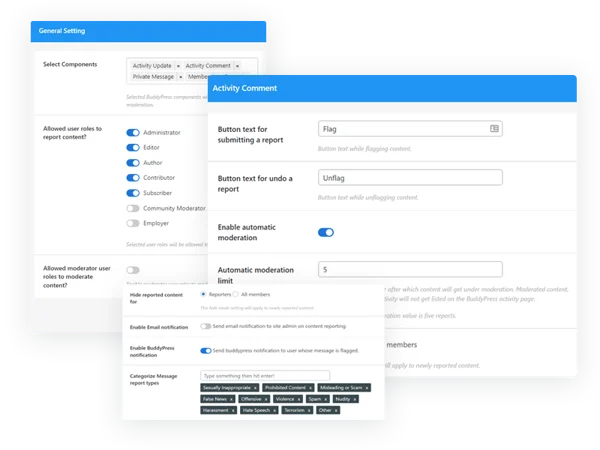
9. Admin notifications on reported content. Whoever’s responsible for moderation gets notified when something’s flagged, rather than needing to check the queue proactively to find out something needs attention.
10. Report categorization. Reports can be tagged by type, spam, harassment, inappropriate content, so a moderator scanning the queue can prioritize by severity rather than working through an undifferentiated list.
11. User notifications on moderated content. Members whose content gets flagged or removed are told, via email and in-site notifications, rather than left to wonder why something they posted disappeared.
12. Optional content pre-moderation. Require manual approval before user-generated content goes live at all, for communities where pre-publication review is worth the added friction.
Building a moderation policy before turning any settings on
The plugin gives you the mechanics. It doesn’t tell you what your community’s actual standards are, and that gap is the first thing to close before configuring anything. Write down, in plain language, what counts as reportable content on your specific site, this varies enormously between a professional networking community and a casual hobby forum, and settings that are appropriate for one will feel either too permissive or too restrictive on the other.
Once you have that written standard, map it onto the plugin’s settings rather than the other way around. Deciding report thresholds and component toggles before you’ve defined your actual moderation philosophy means configuring blind and adjusting reactively later, after members have already experienced whatever gaps the initial setup left.
Setting report thresholds without over- or under-triggering
A threshold set too low, say, auto-flagging after a single report, is vulnerable to abuse. A coordinated group of members, or even one determined bad actor with multiple accounts, can weaponize the reporting system itself to silence content they simply disagree with rather than content that’s genuinely problematic. A threshold set too high defeats the point of automation entirely, since legitimately harmful content sits live and visible until enough reports accumulate manually.
Most communities land somewhere in the three-to-five-report range for auto-flagging on components with meaningful member volume, adjusted down for very small communities where reaching even three genuine reports takes real consensus, and adjusted up for very large ones where report volume alone isn’t a reliable signal of severity without some correlation to total active membership.
The moderator panel: giving moderators tools without giving them admin access
One underappreciated benefit of a dedicated moderator panel is the ability to delegate moderation work without handing out full WordPress admin capabilities. Site admin access is broad, plugin management, user role changes, site settings, and handing that level of access to every trusted community moderator is more exposure than the job actually requires. A scoped moderator panel lets you build a moderation team that can do the job without also being able to, intentionally or accidentally, break something well outside their actual responsibility.
This scoped-access principle applies just as much to volunteer moderators on a hobbyist community as it does to paid staff on a commercial one. Trust and capability aren’t the same thing, a moderator you trust completely with judgment calls about content still doesn’t need the ability to deactivate plugins or change payment settings, and giving them that access anyway is an unforced risk with no corresponding benefit.
Where BuddyNext fits if you’re evaluating options beyond a BuddyPress add-on
If you’re weighing whether to keep extending an existing BuddyPress site with moderation add-ons like this one, or considering what a community platform with moderation built in from the ground up looks like, BuddyNext is worth knowing about as a standalone alternative, a free Community OS with feeds, groups (called Spaces), profiles, messaging, and moderation tools included natively rather than layered on afterward. It isn’t built on BuddyPress and isn’t something you’d install on top of an existing BuddyPress site; it’s a genuinely separate platform, worth comparing on its own terms if you’re evaluating your options for a new community project rather than committed to extending your current BuddyPress install.
Common moderation mistakes on community sites
Setting up the technical infrastructure and then never assigning clear human ownership over the queue is the most common failure. A reporting system that funnels into an inbox nobody checks regularly is functionally the same as having no moderation at all, just with extra steps and a false sense of security for admins who assume it’s being handled.
The second is inconsistent enforcement, moderating some content aggressively while letting similar content from a well-liked or long-standing member slide. Members notice this fast, and inconsistent enforcement erodes trust in the entire moderation system faster than having no visible moderation at all, since it signals the rules are more about who you are than what you did. A community that visibly enforces the same standard against a popular member as it does against a newcomer builds more trust in the long run than one that quietly looks the other way for its favorites, even when the strict enforcement is briefly unpopular in the moment.
The third is treating pre-moderation as a default setting rather than a deliberate tradeoff. Requiring approval before anything goes live meaningfully slows down a community’s pace and can kill the spontaneity that makes an activity feed feel alive. Reserve pre-moderation for genuinely high-risk contexts, a community with a history of problems, or content types with outsized reputational risk, rather than applying it universally out of an abundance of caution.
Training moderators once you’ve recruited them
Handing someone the moderator panel without any onboarding is a common shortcut that causes real problems down the line. Two moderators applying the same written policy differently, in good faith, produces exactly the inconsistent enforcement problem described above, not from bad intent, but from genuinely different interpretations of ambiguous language in your guidelines. Walk new moderators through five or six real, past examples from your queue and how they were handled, so their judgment calibrates against actual precedent rather than their personal instinct alone.
Give moderators a clear escalation path for the genuinely hard calls, too. Not every reported item has an obvious answer, and a moderator who feels obligated to make a final ruling on every ambiguous case alone, without a way to consult someone else, either burns out or starts making increasingly conservative calls that swing enforcement too far in the restrictive direction. A simple internal channel where moderators can flag “not sure, thoughts?” cases to each other or to a lead admin keeps the harder judgment calls from resting on one person’s shoulders every time.
Building an appeals path
Even a well-calibrated moderation system will occasionally get a call wrong, and members need somewhere to go when they believe that’s happened to them. Without a defined appeals process, a member who feels wrongly moderated has no path forward except public complaint, in your activity feed, in a review, or by simply leaving quietly and telling others why. A short, clearly communicated appeals process, even a simple one (reply to the notification email, a moderator different from the original one reviews it), gives members a legitimate channel that doesn’t require going public to be heard.
This matters even more on communities where moderation decisions carry real stakes, a member losing access to a paid community, or having content removed that represented real work or reputation. The appeals path doesn’t need to be elaborate. It needs to exist and be genuinely followed when used, not a formality that quietly gets ignored.
Balancing automation against human judgment
Automated flagging based on report thresholds is efficient at triage but bad at nuance. A sarcastic comment reported by someone who missed the tone, a heated but ultimately within-bounds disagreement between two engaged members, a joke that reads differently out of context, automated systems flag based on volume and pattern, not understanding. Treat auto-flagging as a way to surface things for human review faster, not as a substitute for a human actually reading the content before a permanent action gets taken. Reserve fully automated removal, with no human review step at all, for the narrowest, most unambiguous categories, clear spam patterns, for instance, where false positives are rare and low-stakes.
Frequently asked questions
Can a blocked member see the content of the person who blocked them? Blocking behavior typically restricts interaction and visibility in both directions, though exact scope depends on your configuration, verify the specific behavior on your setup before assuming it matches another platform’s blocking model exactly.
Does automated flagging remove content immediately, or just queue it for review? That depends on your configuration. Some admins set auto-flagged content to hide pending review; others leave it visible with a flag attached, reviewed on the moderator’s own schedule. The stricter option protects faster but risks false positives affecting legitimate content temporarily.
Can I have different moderators responsible for different components, one person handling groups, another handling profile content? The component-level toggles support this kind of division of labor, though the actual assignment of which human handles which queue is a workflow decision you manage outside the plugin itself.
What happens to a member’s reporting history if their own account later gets moderated? This is typically tracked independently, a member’s past reports of others’ content and any moderation action taken against their own content are separate records, not something that cancels out.
Is pre-moderation compatible with a fast-moving activity feed, or does it inherently slow things down? It inherently adds a delay between posting and visibility, since content has to clear review first. If your community values real-time conversation, consider pre-moderation only for specific higher-risk components rather than the entire activity stream.
How do I handle a member who repeatedly files reports that turn out to be unfounded? That’s a policy decision rather than a plugin setting, track report accuracy per member if your queue volume makes that practical, and consider a private conversation with a member whose reports are consistently off-base before assuming bad faith. Some members genuinely misunderstand what’s reportable rather than deliberately abusing the system.
Can moderation actions be reversed if a moderator makes a mistake? Reversal capability depends on your specific setup, but building a habit of logging moderation decisions with a brief reason gives you the record needed to review and correct mistakes when they surface, regardless of whether the plugin itself has a one-click undo.
Does enabling moderation on every component at once overwhelm a small moderation team? It can. Start with the components carrying the highest actual risk on your specific site rather than enabling everything simultaneously, and expand coverage as your team and process mature enough to handle the added volume.
Moderation as infrastructure, not a crisis response
The communities that handle a difficult moderation incident well are almost always the ones that built the system before they needed it, not the ones scrambling to configure settings while an active problem is unfolding. Treat this less like a plugin you install once a problem appears and more like insurance you set up while things are calm, the value shows up exactly when you’d rather not be improvising.

Write the policy first. Configure the thresholds to match it, not the other way around. Assign a real human to actually own the queue. Those three steps matter more than any individual setting in the plugin, and none of them cost anything beyond the time it takes to think them through properly before your community needs them.
A moderation system nobody’s tested is a moderation system you’re finding out about live, in front of your members, during the exact moment it matters most. Run through a few hypothetical scenarios with whoever’s on your moderation team before launch, a spam wave, a heated public disagreement, an inappropriate image upload, and walk through how the settings and the human process would actually respond to each. It’s a lot cheaper to find the gaps in a dry run than during a real incident with real members watching.















