How To Create Polls for Any type of Website Activities in BuddyPress Community
BuddyPress Polls lets members create polls as activity updates with results embeddable anywhere via shortcode. Here's how to write questions that actually get votes, use polls for real decisions instead of filler engagement, and avoid the mistakes that wear the format out.

The BuddyPress Polls plugin lets community members create polls as activity updates and lets other members respond, with results displayed on posts, pages, or custom post types via shortcode. Polls are one of the lowest-effort, highest-response engagement mechanics available on any social platform, a single click to participate, no writing required, immediate visible results.

Why polls outperform most other activity types
Most activity update formats require the participant to generate something, a comment worth writing, a status worth posting, a reaction to type out. Polls flip that requirement. A member doesn’t need to think of what to say; they just need an opinion about a question someone else already framed, and clicking an option takes less effort and less social risk than writing a comment that other people will read and judge.
That lower barrier to participation is exactly why polls consistently pull in engagement from members who otherwise lurk. A member who never comments on anything will often still click a poll option, because voting carries none of the exposure a written comment does. For a community trying to activate its quiet majority, and every community has one, usually the bulk of its member base, polls are one of the more reliable tools available.
Most communities operate on some version of the ninety-ten rule: a small fraction of members generate the visible activity, and the large majority read without ever posting. Polls are one of the few mechanics that reliably pulls a slice of that silent majority into a recorded, visible action, even if just once, without asking them to write a single word.
Key features of BuddyPress Polls
1. Poll creation as an activity type. Members create polls directly as activity updates, the same posting flow they already use for status updates.
2. Shortcode display anywhere. Poll activities can be embedded on any post, page, or custom post type using a shortcode, extending polls beyond the activity stream into any part of your site.
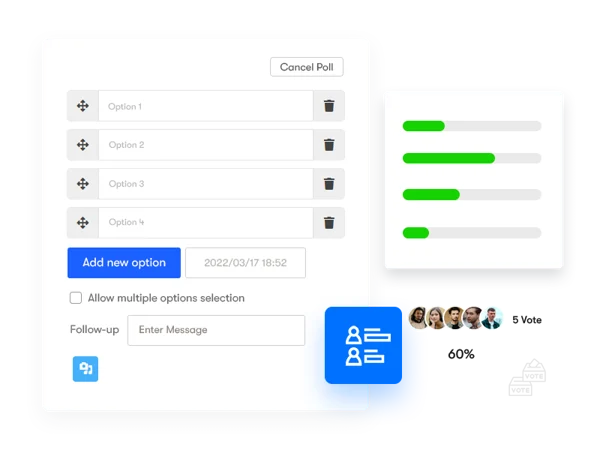
3. Admin control over who can create polls. Restrict poll creation to specific roles or member types if open poll creation isn’t right for your community.
4. Time-bound polls. Set a closing date and time so a poll naturally expires rather than sitting open indefinitely, collecting stray votes long after the question stopped being relevant.
5. Single-choice or multi-select voting. Configure each poll individually based on whether the question genuinely has one right answer per voter or allows multiple selections.
6. Poll description and image attachment. Add context or a relevant image to a poll rather than relying on the question text alone to carry the full context.
7. Visible results after voting. Once a member votes, results become visible, a small design choice that matters. Seeing the running tally immediately after voting is part of what makes polls feel satisfying rather than like a survey submitted into a void.
8. Per-option vote limits. Set caps on individual poll options if you need to control how many votes a specific choice can receive, useful for polls functioning more like limited-slot sign-ups than open-ended opinion gathering.
9. Voter list and results transparency. Members can see who voted for what, adding a layer of social transparency beyond just the aggregate numbers, if that fits your community’s culture.
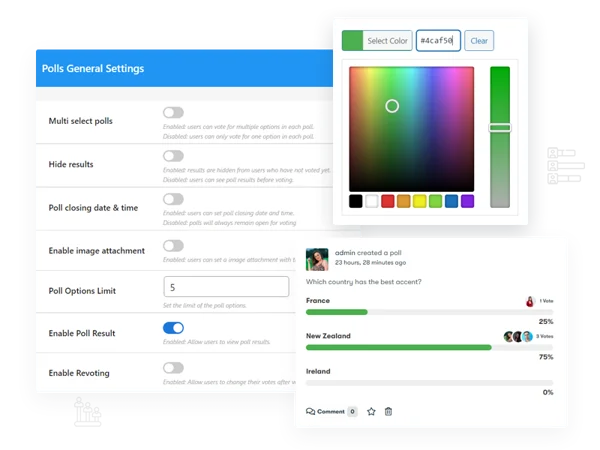
10. Revoting, if enabled. Admins can allow members to change their vote after initially submitting, useful for polls where opinions might genuinely shift over the polling period rather than being fixed at first click.
11. Custom after-vote messaging. Display a message once a member submits their vote, a thank-you note, a related link, a next step.
12. Role and member-type based creation limits. Combine with creation restrictions to fine-tune exactly which members can generate new polls.
13. CSV export of results. Poll creators get access to a Results widget in the WordPress admin dashboard, with results exportable to CSV for further analysis outside the platform.
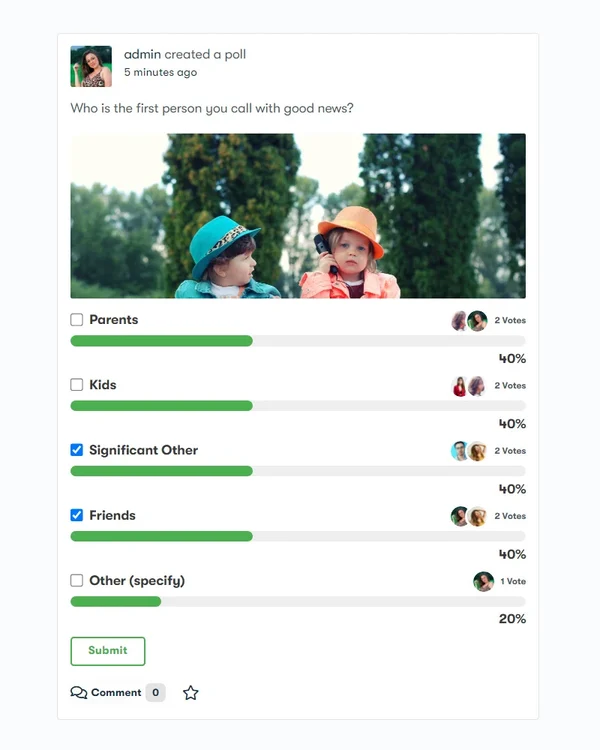
14. Responsive design and theme compatibility. Polls render properly across device sizes and integrate with third-party themes without requiring custom template work.
Writing a poll question that actually gets votes
Poll performance depends far more on question quality than on any plugin setting. A vague or overly broad question (“What do you think about our community?”) gets skipped past. A specific, low-effort, genuinely curious question (“Which feature should we build next: X or Y?”) gets clicked. The best-performing polls tend to share three traits: they’re answerable in under three seconds of thought, they touch something the member actually has an opinion about, and the outcome visibly matters, members are more likely to vote when they believe the result will influence a real decision rather than disappearing into an admin’s private spreadsheet.
Keep the option list short. Two to four options cover the overwhelming majority of genuinely useful poll questions; five or more starts diluting individual vote share and makes results harder to read at a glance, undermining the format’s core appeal of instant, legible feedback. If a question genuinely needs more than four options to be fair, it may be a sign the question itself needs narrowing rather than the poll needing more choices.
Using polls for real decisions, not just engagement filler
The strongest use case for this plugin isn’t generic engagement bait, it’s genuine decision-making input. Which feature to prioritize next, which event date works better, which of two design directions members prefer. When members learn that poll results actually shape real decisions on the site, participation compounds over time, because voting starts to feel meaningful rather than performative. When polls are run purely as filler content with no visible connection to any decision, that signal fades fast, and engagement drops off correspondingly.
Close the loop explicitly when you can. If a poll asked members to choose between two features and you built the winning one, say so in a follow-up post. That visible feedback loop, “you voted, and here’s what happened as a result”, is what separates a poll members take seriously from one they’ve learned to ignore.
This is easy to skip in practice, since it takes an extra post the admin has to remember to write days or weeks after the poll itself. Build it into your process deliberately, a calendar reminder tied to the poll’s close date, or a habit of writing the follow-up post the same day you announce the winning decision, whatever mechanism actually gets it done rather than relying on remembering.
Time-bounding and vote limits: when to use each
A closing date matters most for anything tied to a real-world decision with a deadline, an event date, a feature prioritization tied to a development sprint, anything where the answer needs to be final by a specific point. Open-ended opinion polls with no real deadline can run indefinitely without much downside, though even those benefit from an eventual close, since a poll that’s been open for a year with a slowly creeping vote count reads as stale rather than active.
Per-option vote limits serve a different purpose entirely, they’re for polls functioning more like a sign-up sheet than an opinion survey. “Which volunteer shift can you cover” with a cap of five per shift behaves more like registration than polling, and the vote-limit feature is what makes that use case work cleanly within the same tool rather than needing a separate sign-up plugin. It’s a small feature with an outsized practical payoff for any community that regularly needs to coordinate limited-capacity slots.
Three community types and how they’d use polls differently
A product feedback or beta community. Polls here function as lightweight, ongoing user research, feature prioritization, naming decisions, UX preference checks. The CSV export feature earns its keep specifically in this context, letting you pull results into a broader product-decision document rather than referencing the live poll page every time.
A social or hobbyist community. Lean into lighter, more casual polls, opinion questions, fun debates, “this or that” formats. These don’t need to tie to any real decision; their value is purely in generating quick, low-stakes interaction that keeps the feed active between more substantial discussions.
An events-driven community. Use polls heavily for logistics, date selection, venue preference, topic voting for an upcoming session. Time-bounding matters most here, since event-planning polls have hard real-world deadlines that make an indefinitely open poll actively unhelpful.
Common mistakes with poll usage
Running too many polls too close together is the most common one. A feed with a new poll every day trains members to tune them out, the same attention-decay problem that affects any repeated content type. Space polls out enough that each one still reads as a distinct, worth-a-click event rather than background noise. A rough weekly or biweekly cadence works for most active communities without wearing the format out.
The second is asking a question where the outcome doesn’t actually matter to anyone, including the admin running it. Members are reasonably good at sensing when a poll is filler rather than a genuine question, and running too many low-stakes, purposeless polls erodes trust in the format even when a genuinely important poll comes along later. Save the format for questions worth asking, and it stays worth answering.
Measuring whether polls are actually helping
The obvious metric is votes per poll, but that number alone can mislead. A poll with high vote counts but no follow-through, a question asked, answered, and never acted on or referenced again, is generating activity without generating value. Track a second, quieter metric alongside raw votes: how often poll results actually get referenced in a follow-up decision, announcement, or discussion. A community running one poll a month that consistently feeds into visible decisions builds more long-term trust in the format than one running a poll every other day that nobody remembers by the following week.
Also worth watching: whether the same small group of highly active members votes on every poll, or whether polls are genuinely reaching the quieter members they’re best suited to activate. If your poll voter list looks identical to your top-commenters list every time, the format isn’t doing the job it’s uniquely good at, pulling in the people who never comment but will click a button.
Designing multi-select versus single-choice polls
The choice between single-choice and multi-select isn’t cosmetic, it changes what the results actually mean. A single-choice poll asking “which feature matters most to you” produces a clean ranking. The same question run as multi-select produces a much softer signal: everything gets some votes, and it’s harder to tell what genuinely matters most versus what merely matters somewhat to a lot of people. Reserve multi-select for questions where the honest answer really is “more than one of these”, availability windows, interests, topics someone wants covered, rather than defaulting to it because it feels more permissive or inclusive. A poll that’s structurally mismatched to its own question produces results that are technically valid but practically useless for decision-making.
Handling a poll that gets an unexpected or awkward result
Occasionally a poll surfaces a result the admin didn’t expect or doesn’t love, members overwhelmingly voting against a direction leadership had already leaned toward, for instance. This is where the “close the loop” habit gets tested for real. Acknowledging an unwelcome result honestly, even if the final decision doesn’t fully follow the vote, preserves more trust than quietly ignoring the poll and hoping nobody notices it never got referenced again. Members forgive a poll result being overridden for good, explained reasons far more readily than they forgive a poll that clearly existed for show.
Frequently asked questions
Can members see who voted for a specific option, or only the aggregate count? That depends on your configuration, voter-list visibility is a setting you control, and some communities prefer keeping votes anonymous while others value the transparency of visible voter lists.
What happens to an open poll if the plugin is deactivated? Poll data remains in the database; deactivating removes the display and interaction functionality rather than deleting the underlying results, so reactivating restores access to existing poll data.
Can I limit poll creation to a specific group rather than site-wide? Creation restrictions are typically configured by role or member type rather than by individual group, though group-level activity restrictions elsewhere in your BuddyPress setup can layer on top to achieve a similar effect.
Does revoting reset a member’s original vote, or add a second vote alongside it? When revoting is enabled, a new vote replaces the member’s original selection rather than adding an additional count, the tally reflects each member’s current choice, not their full voting history.
Can a poll be embedded outside of BuddyPress entirely, like on a standard WordPress page with no BuddyPress components? Yes, the shortcode display feature is specifically built for this, letting a poll created as a BuddyPress activity surface anywhere shortcodes are supported on your site.
Is there a way to prevent the same member from voting twice using two different accounts? Vote tracking is tied to logged-in member accounts, so a member using two separate registered accounts could technically vote twice unless your site has other safeguards against duplicate account creation. This is a broader account-integrity question more than a poll-specific one.
Do polls support anonymous voting from logged-out visitors? Voting typically requires a member account, since results and vote attribution are tied to registered users. If you need public, non-member polling, that’s a different tool and use case than what this plugin is built for.
Can I schedule a poll to publish automatically at a future date rather than posting it manually? Check your specific setup for native scheduling support. If it’s not built in, treat poll timing the same way you’d handle any other scheduled community content, through your regular content calendar and manual posting workflow.
Where polls fit in a broader engagement strategy
Polls are a tactic, not a strategy on their own. They’re excellent at pulling passive members into a single, low-effort action, and reasonably good at surfacing genuine community sentiment on a specific question. They’re not a substitute for deeper engagement mechanisms, real discussion, meaningful group activity, actual relationships between members. Use polls as one recurring ingredient in a broader activity mix, not as the primary thing keeping members coming back, and they’ll keep performing the specific job they’re good at without being asked to carry more than that.

Write questions with real stakes, close the feedback loop when a poll actually informs a decision, and space them out enough that each one still feels worth a click. That’s the whole playbook, and it works because it respects what the format is actually good for instead of overusing it.
Every engagement mechanic wears out the moment it stops being genuine. Polls wear out faster than most, precisely because they’re so easy to run and so tempting to overuse. Treat every poll you publish as a small ask of your members’ attention, and spend that ask on questions actually worth answering.














