BuddyX Pro vs Free: What $99 Actually Gets You (And When the Free Theme Is Enough)
BuddyX free is a genuinely good theme. BuddyX Pro adds real features that save real dev hours. Here's an honest, scenario-by-scenario breakdown of when the free version is enough and when Pro pays for itself.

Let’s get the conflict of interest out front: we build BuddyPress and BuddyX sites for clients, and we have a partner relationship with Wbcom Designs, who makes BuddyX Pro. When someone asks us whether they should buy BuddyX Pro, we have a financial incentive to say yes.
So we’re going to be deliberate about being honest here.
BuddyX free is a genuinely good theme. It handles standard BuddyPress functionality well, looks modern, and requires no purchase to get a working community site up and running. For a meaningful slice of projects, it’s the right choice.
BuddyX Pro adds real features that save real hours. But those features only matter if your project actually needs them. Paying $99 for capabilities you’ll never use doesn’t make your site better.
This review covers what each version does, where Pro pays for itself, and where Free is the smarter call. We’ll look at specific Pro features, estimate the dev hours they replace, and give you three scenarios for each side of the decision. If you’re also comparing the BuddyPress theme stack against BuddyBoss, our BuddyBoss vs BuddyPress + BuddyX comparison covers that ground in full.
What BuddyX Free Actually Covers
BuddyX free is available from the WordPress.org theme directory. It’s actively maintained by Wbcom Designs and works with current WordPress and BuddyPress versions.
Here’s what you get with zero spend:
Full BuddyPress Component Support
BuddyX free integrates with all core BuddyPress components out of the box: member profiles, activity streams, groups, messaging, friend requests, and notifications. The theme’s templates are built specifically for BuddyPress rather than bolted on as an afterthought, which is not something you can take for granted with general-purpose themes.
Profile pages display member info cleanly. Group pages show activity, members, and sub-pages in a readable layout. The activity stream uses a card-based design that works well on mobile. None of this requires configuration or custom CSS.
WordPress Customizer Integration
BuddyX free exposes a solid set of customizer options: color scheme, typography controls, layout width, header style, and footer columns. You can get a site that matches basic brand requirements without touching a stylesheet.
For clients who don’t have strong design opinions, the defaults are clean enough to ship. For clients who do have design opinions, you have enough handles to work with inside the customizer.
WooCommerce Basic Compatibility
BuddyX free is compatible with WooCommerce at the shop, product, cart, and checkout level. If you need a community site with a simple shop attached, the free version handles the fundamentals without visual conflicts.
The important qualifier here is “basic.” BuddyX free won’t give you member storefronts, vendor dashboards, or marketplace functionality. It gives you WooCommerce pages that render correctly inside the BuddyX layout. That’s actually useful for a lot of projects.
bbPress Support
If your community site includes a forum via bbPress, BuddyX free has you covered. Forum indexes, topic lists, reply threads, and user profile integration all render within the theme’s design system.
Basic Widgets and Sidebar Areas
BuddyX free includes several BuddyPress-specific widgets: online members, recently active members, groups list, and activity filters. These cover the standard sidebar patterns for community sites without requiring third-party plugins.
Mobile-Responsive Layouts
The free theme is fully responsive. Member profiles, activity feeds, and group pages all adapt to mobile screens without breaking. This has been a consistent strength across BuddyX versions and it carries through to the free tier.
BuddyX Pro: What Changes at $99
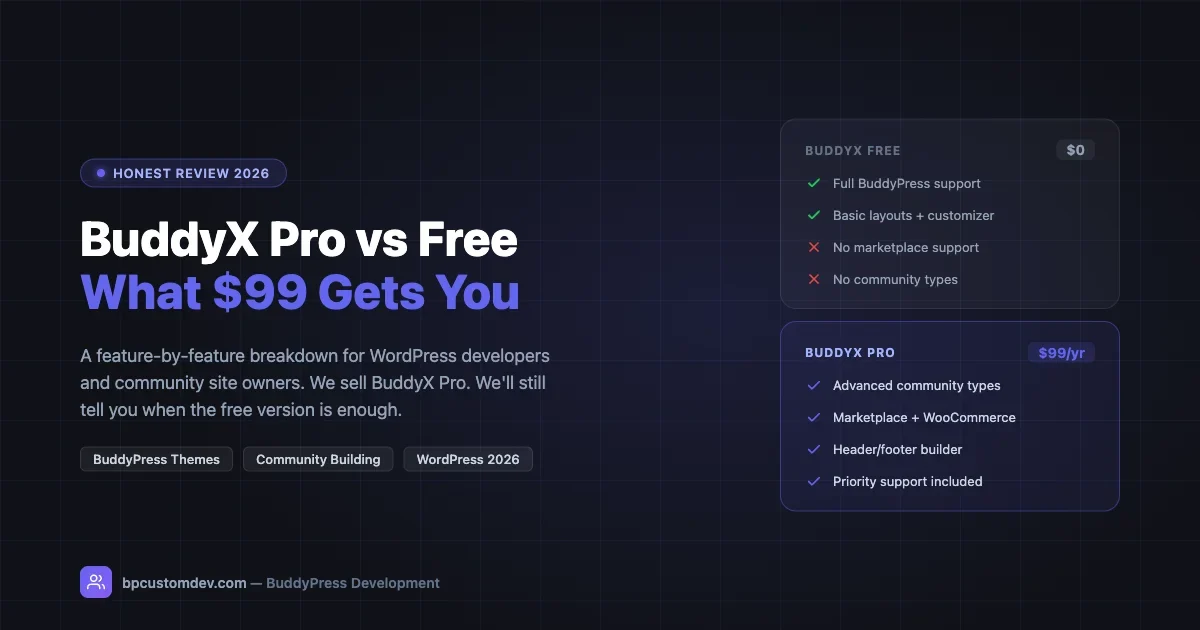
BuddyX Pro is sold by Wbcom Designs at $99 per year for a single site license. The Pro version adds a meaningful set of features that go beyond cosmetic upgrades. Here’s what you actually get:
Advanced Community Types
This is the feature with the highest potential impact for developers building non-standard community sites.
BuddyPress has a native concept of “group types” that lets you classify groups differently (alumni group vs project group vs regional chapter, for example). BuddyX Pro extends this with dedicated layout templates, icons, and navigation patterns for each community type you define.
What this means in practice: if you’re building a platform where different kinds of communities need genuinely different visual presentations and navigation structures, you can define those differences in BuddyX Pro without building custom page templates from scratch.
The hours saved here are real. Building a custom template set for three community types from scratch typically runs 8-15 hours depending on complexity. BuddyX Pro gives you that structure to work from, which cuts that to 2-4 hours of customization. At even a modest dev rate of $75/hour, $99 covers itself on this feature alone for the right project.
Marketplace Integration (Dokan, WCFM, WC Vendors)
If your site includes a multi-vendor marketplace, this is where BuddyX Pro earns its keep most clearly.
BuddyX Pro includes built-in layout compatibility with the three major WordPress marketplace plugins: Dokan, WCFM Marketplace, and WC Vendors. What “built-in compatibility” means in practice:
- Vendor store pages match the BuddyX design system automatically
- Vendor dashboard pages render cleanly inside the theme without layout collisions
- The member profile and vendor store pages link coherently
- WooCommerce product and shop pages maintain visual consistency across the community and marketplace sections
Getting this to work manually with BuddyX free is possible but requires custom CSS, potentially some PHP template overrides, and testing across all the page types each marketplace plugin touches. That’s typically 6-12 hours of integration work. BuddyX Pro cuts it to configuration and light tweaking. For a deeper look at how a full community marketplace works on BuddyPress, see our guide on building a community-driven marketplace with BuddyPress.
Premium Header and Footer Builder
BuddyX Pro includes a drag-and-drop header and footer builder that goes well beyond the customizer options in the free version. You can build multi-row headers, add conditional elements (show cart icon only when WooCommerce is active, show login/profile widget conditionally), and create custom footer layouts with custom column configurations.
For straightforward sites, the free version’s header and footer are fine. For sites where the header needs to carry login state, notification indicators, search, and navigation across different screen sizes, the Pro builder saves significant time compared to building these elements in custom PHP or CSS.
Rough time comparison: implementing a conditional header with login state, notification count, and responsive navigation in BuddyX free via custom code takes 4-8 hours. BuddyX Pro’s header builder gets you there in 1-2 hours through its interface.
Additional Widgets and Elementor Support
BuddyX Pro adds extra widgets including a BuddyPress login widget, member spotlight widget, group spotlight widget, and several layout widgets designed for landing page sections. It also includes deeper Elementor integration if you’re building pages with Elementor as your editor.
The Elementor integration in particular opens up template flexibility for homepage and landing page designs that would otherwise require custom code.
Extended Color and Typography Controls
Pro adds granular color controls per-section: you can set different background colors, text colors, and accent colors for the activity area, member profile header, group headers, and sidebar areas independently. The free version gives you global color settings; Pro gives you section-level control.
This matters more than it sounds for complex sites where different sections need different visual weight. It’s not a reason by itself to buy Pro, but it compounds with other Pro features when you’re building something beyond a basic community site.
Sticky Header and Advanced Navigation Options
BuddyX Pro adds a configurable sticky header with scroll behavior options, transparent header mode for full-width hero areas, and more navigation menu configuration options. For a site where the header is a significant part of the design, these save custom CSS work.
Priority Support
BuddyX Pro includes priority support from Wbcom Designs. In our experience, this means faster response times and more detailed help with integration questions. If you’re deploying BuddyX on a client project with a deadline, this matters. If you’re a solo developer comfortable with the theme’s documentation and BuddyPress generally, it’s less critical.
When the Free Version Is Enough: Three Scenarios
Scenario 1: Simple Internal Community or Team Site
You’re building an internal community platform for an organization: a member association, a corporate team, or a club. The use case is activity updates, member profiles, groups for sub-teams, and direct messaging. No marketplace. No multi-vendor anything. No complex community type differentiation.
BuddyX free covers this completely. The theme will look clean, all the BuddyPress components will work, and you won’t hit any gaps that require Pro features. The $99 buys nothing you’ll use on this project.
If the customizer options in the free version satisfy the client’s brand requirements, you can build and ship this project without Pro.
Scenario 2: BuddyPress Plus a Simple Shop (No Marketplace)
Your site has a community layer (BuddyPress) and a basic WooCommerce store. Members can buy things. There’s one vendor: the site owner. No vendor storefronts. No Dokan or WCFM.
BuddyX free handles this. WooCommerce compatibility at the shop, product, cart, and checkout level is included in the free version. The site will look consistent across both the community and store areas without additional work.
Where you’d upgrade to Pro is if you add multi-vendor functionality. If you’re staying single-vendor, Free works.
Scenario 3: Developer Learning BuddyPress or Building a Prototype
You’re learning the BuddyPress ecosystem, building a demo for a client pitch, or prototyping a concept before committing to a full build. You want a theme that accurately represents BuddyPress functionality without a purchase decision.
BuddyX free is the right starting point. It’s a faithful representation of what BuddyPress sites can look like. Once the project scope is confirmed and you understand whether the final build needs marketplace support or advanced community types, you make the upgrade decision then.
Don’t buy Pro for a prototype. Evaluate your actual feature requirements first.
When Pro Pays for Itself: Four Scenarios
Scenario 1: Multi-Vendor Marketplace Community
This is the clearest case for Pro. You’re building a platform where members can set up vendor stores (using Dokan, WCFM, or WC Vendors) alongside their member profiles. Think: a freelance marketplace, a local business directory with actual storefronts, or a creator marketplace.
Without Pro, you’re writing custom CSS to reconcile the marketplace plugin’s frontend with BuddyX’s design. You’re handling the seams between member profile pages and vendor store pages manually. You’re dealing with visual inconsistencies across the checkout, vendor dashboard, and community sections.
With Pro, those integrations are handled. The hours you save on CSS reconciliation and layout debugging easily cover the $99, usually within the first 10 hours of the project.
Estimate: BuddyX Pro saves 6-10 hours on marketplace integration vs building that integration from BuddyX free. At $75/hour, that’s $450-$750 in dev time for a $99 investment.
Scenario 2: Platform with Multiple Community Types
You’re building a platform where different kinds of groups need genuinely different visual treatments. A platform for alumni associations where there are chapters, committees, and event groups, each needing different layouts. Or a professional community where there are peer groups, mentorship circles, and project teams.
BuddyX Pro’s community types system gives you the structure to differentiate these without building custom templates from zero. You get layout templates, icon systems, and navigation patterns per type, which you customize rather than build.
Estimate: 8-15 hours of custom template development becomes 2-4 hours of configuration and customization. Even at the low end, the math works out clearly.
Scenario 3: Client Site Needing a Complex Header
The client wants a header that shows different navigation for logged-in vs logged-out users, includes a notification badge for BuddyPress activity, shows a cart icon when items are in the WooCommerce cart, and collapses into a mobile menu at small viewports.
Building this in BuddyX free requires custom code: PHP for conditional elements, JavaScript for the cart count, CSS for responsive behavior, and testing across states. That’s 4-8 hours minimum.
BuddyX Pro’s header builder handles conditional elements, notification indicators, and cart display through its interface. You get to the same result in 1-2 hours.
If the project has this requirement, Pro pays for itself before you even configure the rest of the site.
Scenario 4: Client Timeline Is Tight
The project has a deadline. You’re building a community site that overlaps with a marketplace component, and the client needs the site live in three weeks. You don’t have budget for time debugging theme integration seams.
Pro’s pre-built integrations and the priority support channel make the difference here. When you hit a BuddyX-specific issue at 11pm before a client review, having priority support access matters. The $99 is project risk reduction as much as it is feature access.
Pricing Context: $99 vs Developer Hours
BuddyX Pro is priced at $99 per year per site. There’s also a lifetime option and multi-site bundles available from Wbcom Designs.
At a dev rate of $75/hour (on the conservative side for WordPress developers in 2026), $99 buys 1.3 hours of development work. If BuddyX Pro saves you more than 90 minutes on a project, it’s paid for itself on the hours math alone.
On any project that involves marketplace integration, community type differentiation, or a complex header layout, Pro will save you more than 90 minutes. Often significantly more.
On a basic community site with no marketplace and a standard header, Pro doesn’t save you 90 minutes because you don’t need what it provides.
The honest answer to “is BuddyX Pro worth it” is: it depends on your project requirements, and the decision should be made per-project, not as a blanket policy.
Feature Comparison: Free vs Pro
Feature | BuddyX Free | BuddyX Pro ($99/yr) |
|---|---|---|
BuddyPress core components | Yes | Yes |
bbPress forums | Yes | Yes |
Basic WooCommerce compatibility | Yes | Yes |
WordPress Customizer options | Standard set | Extended, section-level |
Mobile responsive layouts | Yes | Yes |
Multi-vendor marketplace (Dokan, WCFM, WC Vendors) | No | Yes |
Advanced community types | No | Yes |
Header and footer builder | Basic customizer | Full drag-and-drop builder |
Conditional header elements | Manual CSS/PHP required | Built-in via builder |
Elementor integration | Basic compatibility | Extended widgets and templates |
Sticky and transparent header | No | Yes |
Priority support | No | Yes |
BuddyPress spotlight and login widgets | Standard set | Extended set |
What BuddyX Pro Does Not Do
A fair review includes what Pro doesn’t cover, so you don’t buy it expecting something it doesn’t deliver.
BuddyX Pro does not replace the need for marketplace plugins. Dokan, WCFM, or WC Vendors still need to be purchased and configured separately. BuddyX Pro provides the theme-level integration; the plugin functionality and its own licensing are separate costs.
BuddyX Pro does not add BuddyPress features that BuddyPress doesn’t include natively. If you need advanced group moderation, private groups with paid access, or gamification, you need BuddyPress extension plugins alongside the theme. BuddyX Pro is a theme, not a BuddyPress functionality extension.
If you’re choosing a community stack fresh, BuddyNext is a free, standalone community platform worth a look, an activity feed, member profiles, Spaces (groups), and deep moderation in one plugin, built as its own modern architecture rather than on top of BuddyPress (so it isn’t a BuddyPress add-on and existing BuddyPress plugins won’t run on it). Because it runs on your own site you keep full ownership of member data, and its Pro tier adds native Stripe memberships when you’re ready to monetize.
BuddyX Pro is a theme license, not a site-building service. You still need to configure it, and there’s a learning curve for the header builder and community types system if you haven’t used them before.
BuddyX Pro is priced annually. If your project is one-time with no ongoing maintenance, factor the renewal cost into whether the support access justifies year-over-year spend. Some clients prefer a one-time investment in a lifetime license for that reason.
How We Use BuddyX Pro on Client Projects
Our general approach at bpcustomdev: we start with the client’s requirements before deciding on free vs Pro.
If a client needs marketplace functionality, community types, or a complex header layout, we include BuddyX Pro in the project estimate. The cost is small relative to the dev hours it saves, and those savings pass directly to the client in a more predictable project timeline.
If a client needs a standard BuddyPress community site with a basic shop and no marketplace, we often build on BuddyX free and apply the $99 savings elsewhere in the budget, toward better hosting, more thorough QA, or extended support scope.
We don’t treat Pro as a default just because we have the relationship with Wbcom Designs. The relationship is useful when clients have specific support needs or we hit edge cases in the theme, but the feature decision is always requirement-driven.
Our Honest Verdict on the buddyx pro vs free Question
BuddyX is one of the best-maintained BuddyPress theme options available. Both the free and Pro versions are actively developed, and the free tier is more capable than many premium themes from other vendors.
BuddyX Pro is worth $99 if your project needs any of: marketplace integration with Dokan, WCFM, or WC Vendors; advanced community types with differentiated layouts; or a header layout with conditional elements beyond what the standard customizer handles.
BuddyX free is the right choice if your project is a standard community site without marketplace requirements, a simple BuddyPress plus single-vendor WooCommerce setup, or a prototype where you haven’t confirmed the full requirements yet.
The honest breakdown: Pro earns its keep on marketplace projects and complex community type setups. On simpler projects, you’re paying for features you won’t use. Make the decision per-project, not as a blanket policy.
If you’re working through this decision for a specific project and want a second opinion on whether the requirements warrant Pro, that’s the kind of scoping conversation we have regularly. To see how BuddyX fits into a broader plugin stack alongside tools like Jetonomy and WPMediaVerse, read our breakdown of the complete BuddyPress community stack. Or reach out and we’ll give you a straight answer on your specific project.
Frequently Asked Questions
Can I upgrade from BuddyX free to Pro without rebuilding the site?
Yes. BuddyX Pro is built on the same codebase as BuddyX free, so upgrading is a theme switch followed by Pro-specific configuration. Your existing posts, pages, BuddyPress data, and customizer settings carry over. You won’t need to rebuild content or reconfigure BuddyPress components.
Does BuddyX Pro work with current BuddyPress and WordPress versions?
Yes. Wbcom Designs maintains BuddyX Pro to work with current BuddyPress and WordPress versions. Check the changelog on their site for the specific compatibility matrix, but both the free and Pro versions are actively updated.
Is the $99 price per site or for unlimited sites?
The standard BuddyX Pro license is per-site at $99/year. Wbcom Designs also offers multi-site bundles if you’re managing multiple projects. Check their pricing page for current bundle options, as these do change.
Does BuddyX Pro work without BuddyPress?
BuddyX is designed as a BuddyPress theme. Without BuddyPress active, it functions as a general WordPress theme, but the BuddyPress-specific templates, layouts, and features only make sense with BuddyPress installed. If you’re not building a community site with BuddyPress, BuddyX is probably not the right theme regardless of which version you’re considering.
What’s the support experience like with BuddyX Pro?
Based on our experience: priority support access through Wbcom Designs is responsive and knowledgeable about BuddyX-specific questions. They understand their own codebase and can give useful guidance on integration questions. For generic WordPress or BuddyPress questions not specific to BuddyX, you’ll still need community resources, but for BuddyX-specific issues, the support is solid.