Daily Member Engagement: Stories That Bring Users Back
Most BuddyPress communities struggle with return visits. Learn how WP Stories uses variable rewards, social proof, and completion loops to create daily engagement habits that bring members back every day.

The Return Visit Problem Every Community Faces
You launched your BuddyPress community. Members signed up. They filled out their profiles, maybe joined a group, posted an introduction. And then they never came back.
This is not your failure as a community builder. It is the default outcome for almost every online community. Industry data consistently shows that the average community retains less than 20% of new members after the first week. By the end of the first month, that number often drops below 10%.
The problem is not that members do not like your community. The problem is that your community does not give them a reason to return today. Not next week. Not when they have time. Today.
Think about the platforms you check every day. Instagram. Twitter. LinkedIn. What pulls you back? It is not a conscious decision. It is a habit, built on psychological mechanics that these platforms have spent billions of dollars perfecting. Your BuddyPress site is competing for the same daily attention, but without any of those habit-forming mechanics built in.
The default BuddyPress activity feed updates whenever members post, but it does not create urgency. Whether you check the feed today or next Thursday, the updates will still be there. There is no penalty for missing a day, no reward for showing up consistently, and no signal that tells members “something is happening right now that you will miss if you do not check.”
This is the core engagement gap that stories fill. Not through gimmicks, but through the same behavioral psychology that drives daily engagement on the world’s largest social platforms. And with mobile-friendly community platforms becoming the norm, members expect these social features on every device.
Variable Rewards: The Engine Behind Daily Habits
In 1950, psychologist B.F. Skinner discovered something that would eventually shape every social media platform on earth. When rewards are unpredictable, the behavior that seeks them becomes stronger and more persistent than when rewards are predictable.
This is the variable reward loop, and it is the single most powerful driver of habitual behavior in digital products.
In a standard BuddyPress activity feed, the reward pattern is mostly predictable. You visit the site, you see text updates from members, you scroll, you leave. The content varies, but the format is always the same. Text on a screen. After a few visits, your brain categorizes this as a known quantity, and the pull to return weakens.
Stories introduce variable rewards on multiple levels:
- Content variability: Each story is a visual surprise. You do not know what you will see until you tap. It could be a photo from an event, a behind-the-scenes look at someone’s project, a funny moment, or an announcement. The format (image, video, text overlay) changes from story to story.
- Social variability: You do not know who will have a story today. The stories bar changes every 24 hours as old stories expire and new ones appear. The cast of characters shifts daily.
- Quantity variability: Some days there are three stories. Other days there are fifteen. You never know how much content awaits until you check.
This triple layer of unpredictability is what makes stories addictive in the behavioral sense. Each visit to your community delivers a slightly different experience, and your brain registers this as a reward worth seeking again tomorrow.
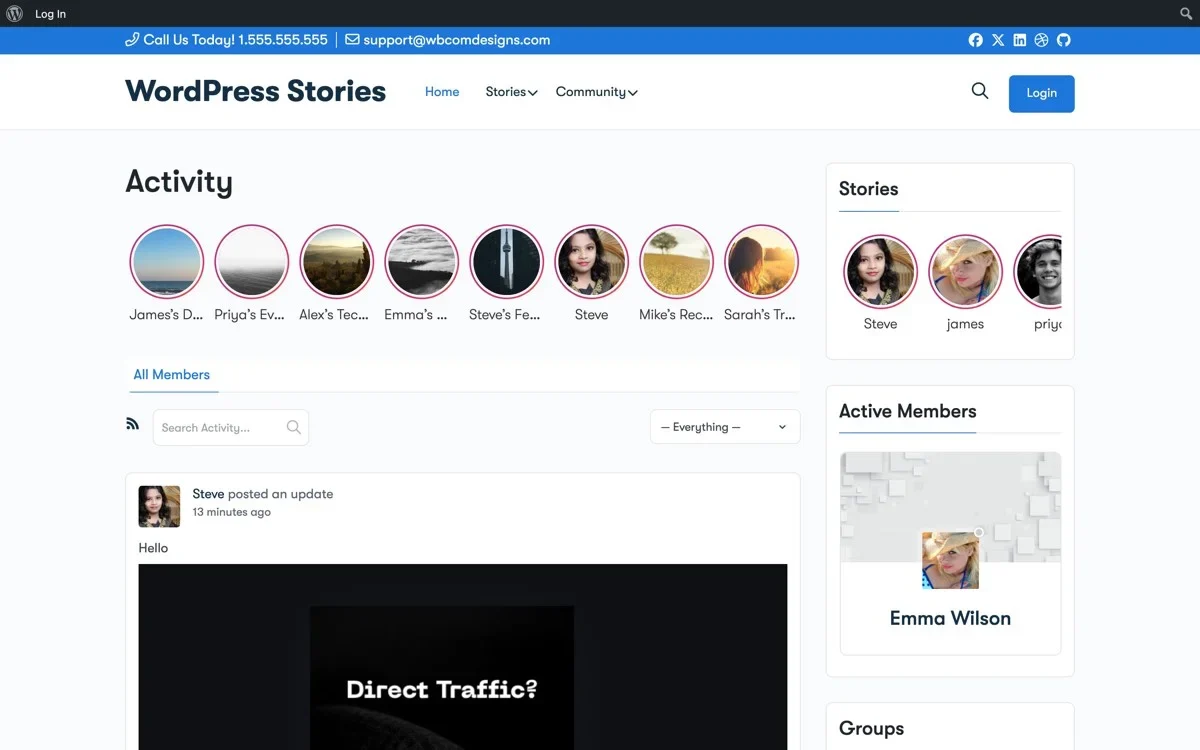
The 24-hour expiry is the critical ingredient. Without it, stories would accumulate like regular posts and lose their urgency. The expiry creates what psychologists call a “closing window” that turns passive interest into active behavior. Members do not think “I should check the community sometime.” They think “I need to check before Sarah’s story disappears.”
Viewer Tracking as Social Proof
Social proof is the psychological phenomenon where people copy the actions of others in an attempt to reflect correct behavior. In community engagement, social proof answers the question every member silently asks: “Is anyone else actually using this?”
WP Stories bakes social proof into every layer of the experience.
The stories bar itself is social proof. When a member arrives at the activity page and sees twelve story avatars with colored rings, they immediately understand that twelve people in their community are actively creating content right now. This is a stronger signal than a text-based activity feed, which could contain updates from weeks ago mixed with today’s content.
View counts validate participation. When a member creates a story and sees that 47 people viewed it, they receive direct evidence that their contribution mattered. This validation is more immediate and more powerful than waiting for someone to like or comment on a traditional activity update.
The viewer list creates reciprocity. WP Stories shows story creators a list of who viewed their story. When Sarah sees that Tom viewed her story, she feels a subtle social obligation to view Tom’s story in return. This reciprocity loop drives engagement in both directions: creators post more because they see views, and viewers return more because they feel seen.
Viewed vs. unviewed visual indicators. The colored ring around story avatars changes from a vibrant gradient (unviewed) to a muted gray (viewed). This visual distinction serves as both a progress indicator and a completionist trigger. Members who see a mix of colored and gray rings feel compelled to tap through the remaining unviewed stories.
The net effect of these social proof mechanisms is that story engagement becomes self-reinforcing. High view counts attract more viewers. More viewers encourage more creators. More creators fill the stories bar, which makes the community look more active, which attracts more viewers. The cycle feeds itself.
Story Likes as Lightweight Interaction
Traditional BuddyPress engagement requires effort. Writing a comment takes thought. Even clicking a “Favorite” button requires the member to scroll to the right activity item, read it, decide they like it, and click. Each step is a friction point where engagement can stall.
Stories reduce the interaction to its absolute minimum: a single tap to like.
This is not laziness. It is recognition that most social interactions in real life are lightweight. A nod, a smile, a thumbs up. These micro-interactions happen hundreds of times per day in physical communities. Online communities need their digital equivalent.
WP Stories enables several lightweight interaction patterns:
- Quick reactions: While viewing a story, members can tap a heart icon or send an emoji reaction. This takes less than a second and communicates “I saw this and appreciated it.”
- Story replies: Members can send a short text reply directly from the story viewer. The reply goes as a private message or notification to the story creator, creating a personal connection without the public pressure of a comment.
- Share to activity: Members can share someone else’s story as an activity update, amplifying reach while giving credit to the original creator.
The ratio of views to reactions to comments follows a predictable pattern. For every 100 story views, you might see 10-15 reactions and 2-3 replies. This might seem low, but compare it to traditional activity updates where a post might get 100 views, 3 likes, and 0 comments. Stories generate 3-5 times more total interactions per impression than text updates.
The reason is psychological distance. Reacting to a story feels private and low-risk. The reaction goes to the creator, not to the public feed. There is no performance anxiety, no worry about saying the right thing, no concern about how the comment will look to others. This privacy removes the friction that prevents most members from interacting with traditional activity content. You can also combine stories with gamification features like badges and points to further incentivize engagement.
Highlights: Rewarding Your Most Active Contributors
Every community has a power law distribution of content creators. About 10% of members create 90% of the content. These active contributors are the lifeblood of your community, and they need to feel valued.
Story Highlights give active creators a permanent showcase on their profile. When a story expires after 24 hours, members can choose to save it as a Highlight, which persists on their profile page indefinitely. Highlights are organized into named collections, similar to Instagram’s highlight reels.
This feature serves multiple engagement purposes:
It rewards consistent creators. Members who post stories regularly build up a rich Highlights section on their profile. When other members visit their profile, they see a visual portfolio of contributions. This is more impressive than a list of text activity updates and encourages profile visitors to follow or friend the creator.
It gives stories a second life. The 24-hour expiry is essential for daily urgency, but some stories deserve to last longer. A member who shares a tutorial, a community event recap, or a creative project should be able to preserve that content. Highlights solve this without undermining the expiry mechanic.
It improves the new member experience. When new members join your community and browse existing member profiles, Highlights give them an immediate visual sense of what the community is about and who the active participants are. This reduces the cold-start problem where new members see empty profiles and conclude the community is inactive.
It creates aspirational behavior. When members see other members with polished, curated Highlight sections, they are inspired to create their own. This aspirational dynamic drives content creation beyond the daily story posting cycle.
Measuring Daily Active Users: Before and After
The only way to know whether stories are actually improving engagement is to measure it. Here is a framework for tracking the impact of WP Stories on your community’s daily active user (DAU) metrics.
Establish Your Baseline
Before enabling WP Stories, record these metrics for at least two weeks:
- DAU (Daily Active Users): Unique members who log in and view at least one page per day.
- DAU/MAU ratio: The percentage of monthly active users who are active on any given day. A healthy community has a DAU/MAU ratio of 20-30%. Most BuddyPress communities hover around 10-15%.
- Average session duration: How long members spend on the site per visit.
- Activity interactions per day: Total likes, comments, and favorites on activity updates.
- Content creators per day: How many unique members post at least one activity update or media item.
Track the Post-Launch Period
After enabling WP Stories, track the same metrics plus:
- Stories created per day: New stories posted by members.
- Story views per day: Total story views across all stories.
- Unique story creators per day: How many different members are posting stories.
- Story interaction rate: Reactions and replies as a percentage of views.
- Cross-engagement: Whether members who view stories also interact more with the activity feed.
What to Expect
Based on communities that have implemented WP Stories, here are typical results:
- Week 1: DAU spikes 30-50% as members explore the new feature. Story creation is high as early adopters experiment.
- Week 2-3: DAU settles to a new baseline approximately 15-25% higher than pre-stories levels. Story creation normalizes as the novelty wears off for some members.
- Month 2-3: The sustained DAU increase stabilizes around 20% above the original baseline. A consistent group of story creators emerges. The stories bar becomes a habitual part of the community experience.
- Month 6+: Stories become an expected feature. New members discover and adopt stories quickly. The DAU/MAU ratio improves by 5-10 percentage points compared to pre-stories levels.
The most important metric to watch is the DAU/MAU ratio. This number tells you what percentage of your registered members are forming a daily habit around your community. Stories are specifically designed to improve this ratio by giving members a time-sensitive reason to visit every day.
Configuring WP Stories for Maximum Engagement
The default WP Stories settings are reasonable for most communities, but optimizing the configuration for your specific audience can amplify the engagement impact.
Story Expiry Duration
The default 24-hour expiry works well for communities with 50+ daily active users. For smaller communities (under 50 DAU), consider extending expiry to 48 or even 72 hours. The reason is content density: if only three members post stories per day, a 24-hour expiry means the stories bar often looks sparse, which undermines the social proof effect. A longer expiry keeps more stories in the bar, creating the impression of activity even with fewer daily creators.
Story Creation Prompts
Enable story creation prompts to nudge members who have not posted a story in the past week. WP Stories can display a subtle prompt above the activity feed: “What is happening today? Share a story.” These prompts are most effective when they are contextual. A photography community might prompt “Share your latest shot as a story.” A fitness community might prompt “How is your workout going? Post a story.”
Notification Settings
Configure notifications to maximize the pull-back effect:
- Enable “friend posted a story” notifications. When a member’s friend posts a story, they receive a notification that pulls them back to the site. This is the single most effective notification for driving return visits.
- Enable “story reaction” notifications. When someone reacts to a member’s story, the creator gets notified. This completes the feedback loop and encourages the creator to post more.
- Limit notification frequency. If a member has 50 friends all posting stories, they do not need 50 individual notifications. WP Stories can batch these into a digest: “5 friends posted stories today.”
The “Add Story” Button Placement
The “Add Story” button should be impossible to miss. Configure it to appear in at least two places:
- At the beginning of the stories bar (a “+” icon that is always visible).
- As a floating action button in the bottom-right corner of the activity page (especially important for mobile users).
The goal is to eliminate the friction of finding where to create a story. If a member sees something worth sharing, the creation entry point should be within one tap.
Profile Integration
Enable the Stories tab on member profiles. This serves two purposes: it gives creators a permanent home for their story activity, and it gives profile visitors a reason to check back regularly. When a member visits a friend’s profile and sees “3 active stories,” they are pulled into the story viewer immediately.
The Psychology of Completion Loops
Completion loops are the psychological drive to finish a sequence once started. This is why you feel compelled to read all your unread emails, clear notification badges, or finish watching a video series.
WP Stories leverages completion loops through the stories bar visual design. When a member taps on the first story avatar, the viewer opens and plays through that member’s stories. When the last story slide ends, the viewer automatically advances to the next member’s stories. This creates a seamless chain that encourages members to watch all available stories in sequence.
The visual indicator in the stories bar reinforces this. As members view stories, the vibrant ring around each avatar fades to gray. A stories bar with a mix of colorful and gray rings creates a visual “incomplete” state that drives members to tap the remaining unviewed stories.
This completion drive is surprisingly powerful. In communities where the average member might spend 30 seconds scanning the activity feed, the same member often spends 2-3 minutes watching through all available stories. This increased time-on-site directly improves engagement metrics and increases the probability that the member will also interact with the activity feed.
You can amplify the completion loop by enabling story progress indicators at the top of the viewer. These thin progress bars show how many slides remain in the current story, creating a micro-completion loop within each individual story.
Building the Daily Engagement Habit
Habits form through a three-part loop: cue, routine, reward. For WP Stories to create a daily engagement habit, each part of the loop needs to be in place.
The cue is what triggers the behavior. For stories, the cues include: push notifications (“3 friends posted stories today”), email digests (“Here is what you missed in the community”), and the visual presence of the stories bar when members visit for other reasons.
The routine is the behavior itself: visiting the community and watching stories. WP Stories makes this routine as frictionless as possible. The stories bar is visible immediately on the activity page. Tapping a story opens the viewer. Swiping advances to the next story. No menus, no navigation, no decisions required.
The reward is what makes the behavior satisfying. Stories deliver multiple reward types: the satisfaction of seeing what friends are up to (social reward), the surprise of unexpected content (novelty reward), the completion of viewing all stories (achievement reward), and the validation of receiving views on your own stories (recognition reward).
When all three components are working, the daily engagement habit forms within 2-3 weeks for most members. After that, checking stories becomes automatic, similar to checking email or social media. Your community becomes part of members’ daily digital routine rather than an occasional destination they visit when they have a specific need.
Getting Started with WP Stories
The psychology behind stories is well-understood. Variable rewards, social proof, completion loops, and habit formation are not theories. They are proven mechanisms that the largest social platforms in the world rely on to drive daily engagement.
WP Stories brings these same mechanics to your BuddyPress community. The difference between a community with 10% DAU/MAU and one with 25% DAU/MAU is often not the quality of the content or the size of the member base. It is whether the platform gives members a reason to return every single day.
Stories are that reason.
Get WP Stories for BuddyPress and start building the daily engagement habit your community needs to thrive.