Discord Wants Your Members' Government ID: The Self-Hosted Alternative That Does Not
Discord's Teen-by-Default rollout and the new age-verification requirement broke teen, learning, parenting, and faith-based communities overnight. Here is how to run a real private community without forcing your members to upload a government ID to a third-party vendor, on a stack you actually own.
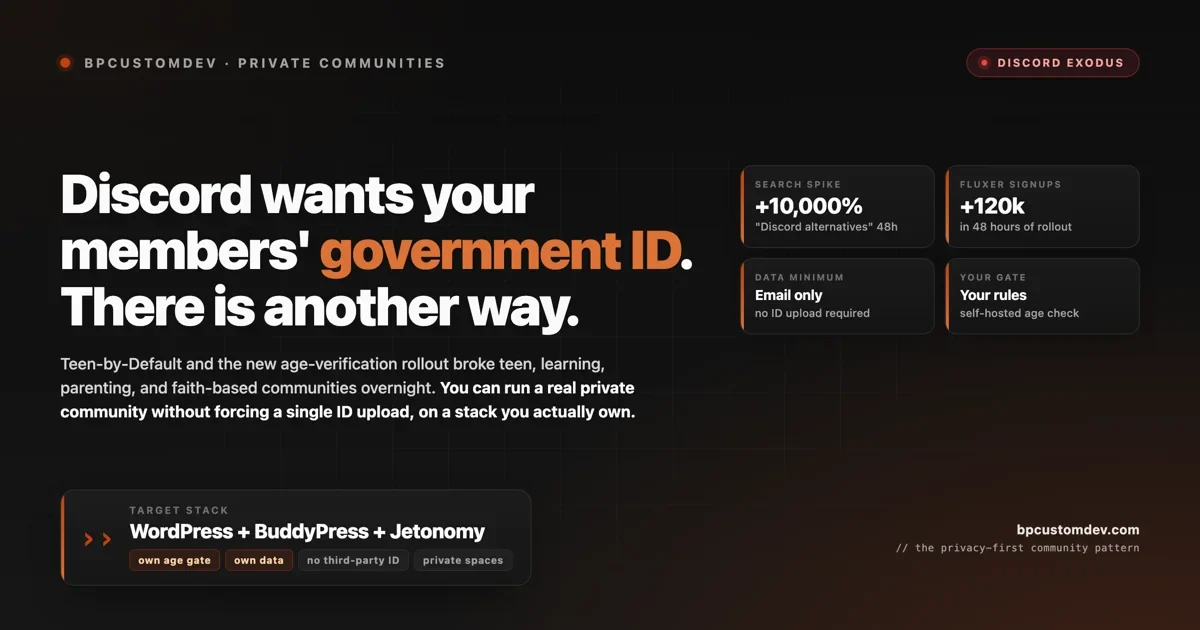
Discord’s age-verification rollout in 2026 changed the contract between community owners and their members. The new defaults treat any account that might belong to a teen as a teen until proven otherwise, and the proof Discord wants is a government ID upload, a face scan, or a credit card. For most communities this is an inconvenience. For teen learning groups, parenting communities, faith-based groups, school study servers, and any community where members are minors or simply care about their privacy, it is the end of the platform. Search volume for “Discord alternatives” spiked over 10,000 percent in the 48 hours after the rollout. Privacy-first apps like Fluxer reportedly added 120,000 new users in the same window. The exodus is real and it is mid-flight.
This post is about what changed, why it broke specific kinds of communities so hard, and how to run a real private community without forcing your members to hand a copy of their passport to a third party. The destination we recommend is self-hosted WordPress with BuddyPress and Jetonomy. The reason is not ideological. It is structural. When you own the platform, you also own the gate. You decide what age verification looks like, what data is collected, and where it is stored. None of that decision tree is available to you on Discord.
If you run a teen-facing, family-facing, or faith-based community on Discord and you have not started the migration conversation yet, this is the post to read first.
What Discord actually changed
Discord’s stated reason for the change is regulatory pressure. The UK Online Safety Act, the EU Digital Services Act, US state-level age-verification laws (Texas, Florida, Utah, and others), and the Australian Online Safety Amendment are all pushing platforms with under-18 users toward strong age-assurance requirements. Discord’s response is the “Teen-by-Default” policy: new accounts are treated as belonging to teens until the user verifies they are an adult, and certain features (DMs from strangers, public server discovery, age-gated content access) are restricted at the teen tier.
The verification options Discord offers, per their public help center, are:
- Government photo ID upload. Driver’s license, passport, or national ID card uploaded to a third-party age-verification provider Discord contracts with.
- Face scan. A live biometric estimation that infers your age from your face. Provided by the same third-party vendor.
- Credit card verification. A nominal charge (refunded) to confirm the card holder is over 18.
All three of these route your members’ identity data through a vendor neither you nor your members chose, with a privacy policy neither you nor your members negotiated, and with no contractual recourse if the data leaks. The vendor handling the verification is bound by their own privacy policy and the laws of their own jurisdiction, not yours. If you are operating in the EU under GDPR, the data-processor relationship is implicit and you have no DPA in place. If your members are minors, the consent question is even more complicated.
The other change that landed at the same time, less publicized but more consequential for community owners: Discord is restricting which features teen accounts can use. DMs from non-friends are blocked. Server discovery filters out servers with adult-flagged content. Voice channels in mixed-age servers have new moderation requirements. Server admins who run mixed teen-and-adult communities now have to choose: split the community, lose teen access to features they used to have, or push everyone through verification.
For some communities, splitting works. For most, it does not. A study server with college students (some 17, some 18) cannot be cleanly split. A youth ministry community has the same problem. A parenting community where the parents are adults but the kids occasionally participate has the same problem. A high school esports team has the same problem. The communities that get broken are the ones where age was never the organizing principle.
Why this broke specific kinds of communities
The communities that have been hit hardest by the rollout share a pattern. They are organized around a shared interest, not around age. Age is incidental. Members who refuse to verify (whether because they are minors who do not have ID, or adults who object to handing it to a third party) lose access to features the community depends on. In a server where verification status determines who can DM whom or who can see which channels, the community fragments into a two-tier structure that the original organizers never wanted.
Six community types are visibly in distress in the post-rollout discussions:
- Teen learning and study groups. Discord study servers organized around AP exams, college admissions prep, programming, music practice, language learning. Many of these have a mix of minors and adults. Verification splits the room and breaks the peer-learning model that made them work.
- Parenting and family communities. Servers where adult parents discuss raising kids, sometimes with older teens participating. The parents do not want to hand their ID to a third-party vendor either. The teens cannot. The community fragments.
- Faith-based and youth ministry communities. Servers run by churches, synagogues, and other religious organizations as discipleship spaces for teens and young adults. The privacy expectations in these communities are high; the ID-upload requirement breaks the implicit trust.
- School and university spaces. Discord servers run by individual professors, course TAs, or student-led clubs. The 17-year-old freshmen and the 18-year-old freshmen suddenly have different feature access. Splitting per-section is not realistic.
- Esports and gaming youth leagues. Competitive youth gaming communities have always run on Discord. The new verification regime breaks tournament organization, roster management, and team voice channels.
- Privacy-conscious adult communities. Adults who object to face scans or ID uploads on principle, even if they personally qualify. Security researchers, journalists, activists, anyone with a threat model that includes platform data leaks.
The unifying observation is that Discord’s new verification requirement is not a problem because the regulation is wrong. It may well be necessary at the platform level. The problem is that Discord, as a centralized platform with one global verification policy, applies the requirement uniformly to every community on it. A community owner has no way to say “for this server, the relevant gate is parental email consent, not ID upload.” The platform decides; the community lives with it.
The market reaction in the first 48 hours
The numbers below are reported across LevelUpTalk, Technobrax, and adjacent coverage of the rollout:
- Google search for “Discord alternatives” rose over 10,000 percent in the 48-hour window after the rollout hit users at scale.
- Stoat, a small privacy-first chat alternative, saw search volume rise approximately 9,900 percent in the same window.
- Fluxer reportedly added 120,000 new users in the first 48 hours of the rollout, per their public posts and aggregator reporting.
- Subreddit threads on r/discordapp and r/communitybuilding documenting the migration are now among the highest-engagement posts in those communities over the past 30 days.
The exodus is real but it is also distributed across many destinations. There is no single winner. Stoat, Fluxer, Revolt, Matrix, GoToSocial, Zulip, Element, and various self-hosted Mastodon-on-WordPress configurations are all picking up traffic. The fragmentation makes the moment interesting for community owners who want to land somewhere stable: instead of betting on which Discord-alternative SaaS will still exist in 18 months, the option to self-host the community on infrastructure you control is suddenly more attractive than it has been in years.
Why “upload your ID to a third party” is the wrong primitive
The deeper problem with Discord’s verification regime is not the specific verification methods. It is that age verification is being treated as a platform-wide identity proof, when most communities need something much simpler and more contextual.
A youth ministry community does not need a government ID upload. It needs the youth pastor to know who is in the group. A study server for AP Calculus does not need a face scan. It needs a verified email from a school domain or an invitation from a current member. A parenting group does not need a credit card verification. It needs a screening question and an admin approval before joining.
These are all forms of age and identity verification, but they are contextual to the specific community. The community owner knows what level of friction is appropriate for the audience. The platform should give the community owner the tools to set that gate, not make a one-size-fits-all decision and force every community on the platform to comply.
The reason Discord cannot offer this flexibility is the same reason any centralized platform cannot offer it: the regulator looks at the platform as a single liable entity, and the platform’s safest legal response is to apply the strictest interpretation uniformly. The community owner sits downstream of that decision with no influence over it.
Self-hosted WordPress communities are not subject to the same constraint. When you operate the platform yourself, you are the entity that decides what age verification looks like for your community. You can implement it as parental email consent for a youth ministry, as a school-domain email check for a study group, as an admin-approval screening for a parenting forum, or as nothing at all if your community is genuinely all-adult and you choose to accept that risk. The choice belongs to you, not to a regulator-via-platform two steps removed.
The WordPress self-hosted alternative
The architecture we recommend for community owners exiting Discord because of the verification rollout is WordPress with BuddyPress and Jetonomy. BuddyPress handles member profiles, groups, activity streams, and private messaging. Jetonomy handles forums, Q&A, and structured discussions. Both ship as free plugins through wordpress.org. The combination gives you the equivalent of a Discord server (text channels, voice via add-on, member directory, DMs, private groups) running entirely on infrastructure you control.
The features that matter specifically for the post-Discord use case:
- Your own age gate, your own rules. WordPress can implement the gate at registration: invitation-only, email-domain restriction, parental email consent for under-18, admin approval, paid membership, or no gate at all. You choose. None of the implementations require the member to upload an ID to a third party.
- Private spaces and groups. BuddyPress groups can be public, private, or hidden. Hidden groups do not appear in any directory. Private groups appear but require approval to join. This is the standard pattern for cohort-based learning groups, faith-based study groups, and family-only spaces.
- No third-party identity vendor in the loop. Member identity stays in your WordPress database. You can layer in single sign-on with the user’s own auth provider (Google, school SSO, the church’s identity provider) if you want, but the data does not leave your stack.
- Private messaging without DM exposure. BuddyPress and Jetonomy both support private one-to-one and small-group messaging that is gated by membership status, group membership, or trust level. You can replicate Discord’s DM functionality with whatever gating model fits the community.
- Moderation in your hands. Trust levels, role-based permissions, content reporting, and auto-moderation rules are all configurable by the community owner. The platform does not impose moderation defaults you cannot adjust.
The trade-off is operational. Self-hosted WordPress requires you to handle hosting, updates, backups, and security patching. For a small community (under 500 members) this is roughly one hour per month of operational work, plus the initial setup. For a large community (thousands of members) it is more, but still well within what most community organizers can manage with a managed WordPress host like Cloudways, Kinsta, or SiteGround.
What this looks like for specific community types
The architecture above is generic. Here is what it looks like applied to the specific community types most affected by the Discord rollout.
Youth ministry or faith-based teen community. WordPress site, BuddyPress with private group per youth cohort, Jetonomy forum for prayer requests and study discussions, registration gated by parental email consent (the youth pastor sends parents an email; parents reply to confirm). The student account is created only after the parental confirmation lands. Voice can be added via a Jitsi or BigBlueButton integration if needed for weekly meetings. Total monthly cost: $30 to $60 for hosting plus optional voice add-on.
Study group for high school or college students. WordPress site, BuddyPress with one group per course or per study cohort, Jetonomy with Q&A mode enabled for homework help. Registration gated by school-domain email (only addresses ending in @yourschool.edu can sign up). Optional admin approval for non-school-domain members who are tutors or external mentors. Total monthly cost: $20 to $40.
Parenting and family community. WordPress site, BuddyPress for member profiles and connections, Jetonomy forum for discussion topics organized by child age range (newborn, toddler, school-age, teen). Registration gated by a short screening question and admin approval. Private DMs gated by trust level (new members cannot DM until trust level 2). Total monthly cost: $30 to $60.
Esports or gaming youth league. WordPress site, BuddyPress for team rosters, Jetonomy for tournament discussion and rule clarification, custom registration form that captures team affiliation and parent/guardian email for under-18 members. Voice channels via a self-hosted Mumble server or a Jitsi integration. Total monthly cost: $40 to $80, plus voice infrastructure.
None of these configurations require uploading a government ID. None route member data through a third-party vendor. All of them are operable by the community organizer without writing custom code, using the standard plugins and configurations we ship for clients.
What you give up moving off Discord
Honesty about trade-offs matters. The things Discord does well that WordPress does not yet match:
- Real-time voice and video at scale. Discord’s voice infrastructure is genuinely best-in-class. WordPress can do voice via Jitsi or BigBlueButton integrations, but the quality, latency, and ease-of-use are not at the Discord level. For communities where voice is the primary value (gaming, jam sessions, debate clubs), this matters.
- Mobile push notification UX. The Discord mobile app’s notification flow is polished. WordPress community plugins have improved mobile UX considerably (Jetonomy supports web push and PWA installation) but it is not Discord-level.
- The casual social discovery layer. Discord’s server discovery, friend-of-friend connections, and casual-hangout feel are part of why people stay. A focused WordPress community feels more like a forum and less like a hangout. For some communities that is a feature; for others it is a loss.
- Network effects. Your members are already on Discord with other communities. They are not already on your WordPress site. Migration friction is real and the conversion rate from “I will join the new place” to “I actually log in regularly” is realistically 30 to 60 percent for the first month.
For communities where these trade-offs are deal-breakers, staying on Discord and pushing members through verification may be the right call. For communities where data ownership, privacy, and platform control matter more than voice quality and casual discovery, the move is worth the friction.
The migration shape
If you decide to move, the migration is roughly the same shape as the X Communities migration we wrote up in the 72-hour sprint guide. Discord-specific notes:
- Discord does not provide a full server export. You can use a tool like DiscordChatExporter (open source) to export channel history as HTML or JSON, but you cannot programmatically migrate the conversations into another platform without manual work. Plan for a manual seeding step similar to the X Communities sprint.
- Member migration is opt-in only. You cannot bulk-create accounts on the new platform for your Discord members. Each member has to sign up themselves, which means the announcement and re-invite step matters more than the technical migration.
- Voice channels do not migrate cleanly. If voice was a core part of your Discord workflow, plan a parallel setup: keep voice on Discord for now (where verification regime is less of an issue for adult-only use), and move text discussions, knowledge, and asynchronous content to WordPress.
- Bots do not migrate. If your Discord server depends on bots (MEE6, Carl-bot, Dyno, custom bots), the equivalent automation on WordPress is built differently. BuddyPress and Jetonomy support most of the same workflows (welcome flows, moderation, role auto-promotion) but the implementation is plugin-based rather than bot-based.
Realistic timeline: a focused community organizer can stand up the new WordPress site, configure BuddyPress and Jetonomy, seed a starter set of discussions, and run the announcement in 7 to 14 calendar days. The conversion rate from Discord members to active WordPress members is typically 30 to 60 percent in the first month, climbing to 60 to 80 percent by month three if the new platform has good engagement habits in place.
FAQ
Will WordPress work for a community that needs voice? Partially. Voice via Jitsi or BigBlueButton works for scheduled meetings, but it is not as good as Discord for casual always-on voice channels. If voice is the primary value of your community, this is the biggest trade-off and the place to think carefully before committing to the move.
What about Matrix or Element instead of WordPress? Matrix is excellent for privacy-first chat and end-to-end encrypted DMs. It is not as strong as WordPress for community structure (profiles, groups, long-form discussions, knowledge accumulation). For pure chat-replacement use cases, Matrix is a good choice. For community-with-knowledge-archive use cases, WordPress is better.
Can my members keep their Discord identity? Not directly. WordPress can implement Discord SSO so members log in with their Discord account, which preserves the identity but does not preserve the Discord features. Most communities migrating off Discord skip the SSO step and use email registration to fully decouple.
What about regulatory compliance? When you self-host, you become the data controller under GDPR (or the equivalent under other regimes). This is more responsibility, but also more control. For communities under 5,000 members, GDPR compliance is straightforward with the standard WordPress compliance plugins. For larger communities or communities in regulated industries, consult an actual lawyer.
What if I run a mixed-age community where some members really should be verified? Implement age verification at the WordPress level for the specific cohorts where it matters. You can require parental email consent for under-18 members and skip verification entirely for the adult cohort. The point is that you choose where to apply the gate, not the platform.
Is this future-proof against regulators? No platform is. But self-hosted WordPress puts the regulatory decision in your hands. If a regulator requires age verification for your specific community, you implement it. If they do not, you do not. The verification mechanism is yours to design.
How we help
For community owners migrating off Discord because of the verification rollout, we run two engagement types. Setup and migration is a 14-business-day engagement that stands up a Jetonomy-on-WordPress community with BuddyPress, configures the appropriate registration gate for your community type, seeds 20 to 30 starter discussions from your Discord history, and runs the member announcement. Pricing starts at $3,500 for a community under 1,000 members. Custom integrations is for communities that need school SSO, parental consent workflows with a specific compliance vendor, or voice infrastructure integration. Pricing starts at $7,500.
If you want to evaluate the platform first, Jetonomy free plus BuddyPress is enough to validate the configuration on a staging site before committing to the migration.
If you are also evaluating whether community-first support is a fit for the customer-facing side of your business, our writeup on replacing Zendesk with a community forum covers the architecture from the SaaS support angle. If you are coming from X Communities or Facebook Groups instead, the migration shape is similar but the export step differs (we covered both in the X Communities sprint guide). And if you are on BuddyBoss and concerned about the March 2026 supply-chain incident, our IOC checklist post covers what affected operators should do.
Reach out with the size of your community, the type (study group, faith-based, parenting, esports, etc.), and your target launch date, and we will scope within 24 hours.
The takeaway
The Discord verification rollout is not the last platform-level identity decision that is going to break specific kinds of communities. The regulatory pressure that drove this change is going to keep pushing other centralized platforms in the same direction. Communities that want to set their own gates, protect their members’ privacy, and not be subject to a third-party vendor’s decisions about identity proof have one structural answer: own the platform.
Self-hosted WordPress with BuddyPress and Jetonomy is the lowest-friction version of that structural answer for the post-Discord moment. The setup cost is real, the operational discipline is real, and the loss of Discord’s specific feature set (voice especially) is real. The gain is permanent. You decide who joins, you decide what verification looks like, and your members’ data lives on infrastructure that answers to you, not to a regulator three steps removed.
For most teen, learning, parenting, and faith-based communities reading this in the wake of the rollout, the move is worth it. The communities that act in the first 30 days will retain the most members. The ones that wait will watch their server lose engagement to the verification friction one week at a time.