X Communities Shuts Down May 30: Your 72-Hour Migration Sprint to WordPress and Jetonomy
X Communities ends May 30, 2026. Here is the hour-by-hour playbook for moving your members to self-hosted WordPress with Jetonomy in 72 hours: stand up the platform, seed the forum with your top threads, and convert your most active X members into forum members.
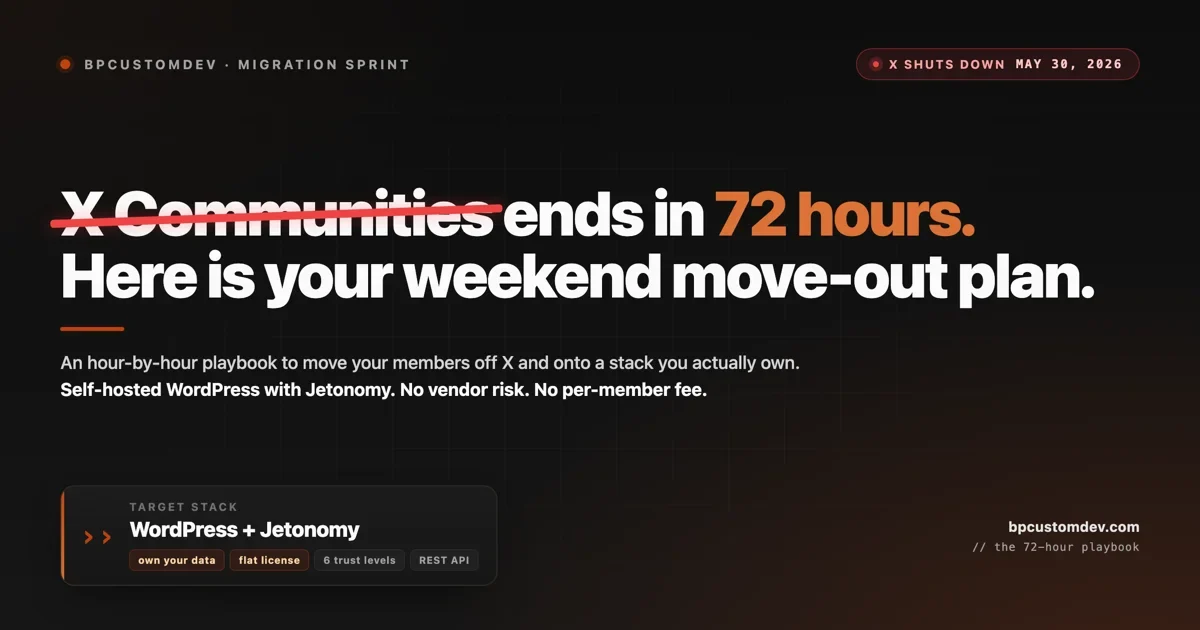
X is shutting down Communities on May 30, 2026. That gives most admins less than a week. The decision about which platform to move to has been covered before (we wrote the full comparison here). This post is the other half. It is the hour-by-hour playbook for actually executing the move on a single weekend, with self-hosted WordPress and Jetonomy as the destination.
This is the same sprint we run for agency clients who realized in mid-May that XChat is not a replacement for what they built on Communities. The goal: by hour 72 the new platform is live, seeded with your top threads, and your members have an invite in their inbox. None of this needs developer help if you have used WordPress before. If you have not, the steps still work, but expect the timeline to feel tighter.
Three things to know up front.
- The 72 hours are calendar hours, not work hours. Most of the timeline is configuration and waiting (DNS, email sends, plugin downloads). The actual hands-on work is closer to 16 to 20 hours.
- You will lose some members in the move. Realistic conversion from X Community to active forum member is 10 to 25 percent. The point of the seeding step in Phase 2 is to push that number up by making the new home feel like a real community on day one.
- The work compounds. Standing up your own forum on infrastructure you own is a one-time cost. The next forced migration (and there will be one) only costs you a database export.
Before hour zero: the 2-hour prep checklist
Do these the night before you start. If any of them are blocked, you do not have a 72-hour sprint, you have a 96-hour sprint.
- A domain or subdomain you can point at a new server. If your existing brand site is on WordPress already, a subdomain like
community.yourdomain.comworks. - A managed WordPress host account. Cloudways, Kinsta, SiteGround, or WP Engine. Avoid the cheapest shared hosting. A community gets traffic spikes when you announce.
- Admin access to your X account for the Community you are migrating, and a way to take screenshots of long threads (a tool like Page Screenshot or a paid Apify scraper).
- A way to email your member list. A newsletter tool you already use (Buttondown, ConvertKit, MailerLite), or a CSV that you can plug into a transactional email tool.
- A copy of your community guidelines and code of conduct, if you had them on X. If you did not, draft them now. Phase 1 needs them ready.
If you can check all five boxes by the end of prep night, you are ready for hour zero.
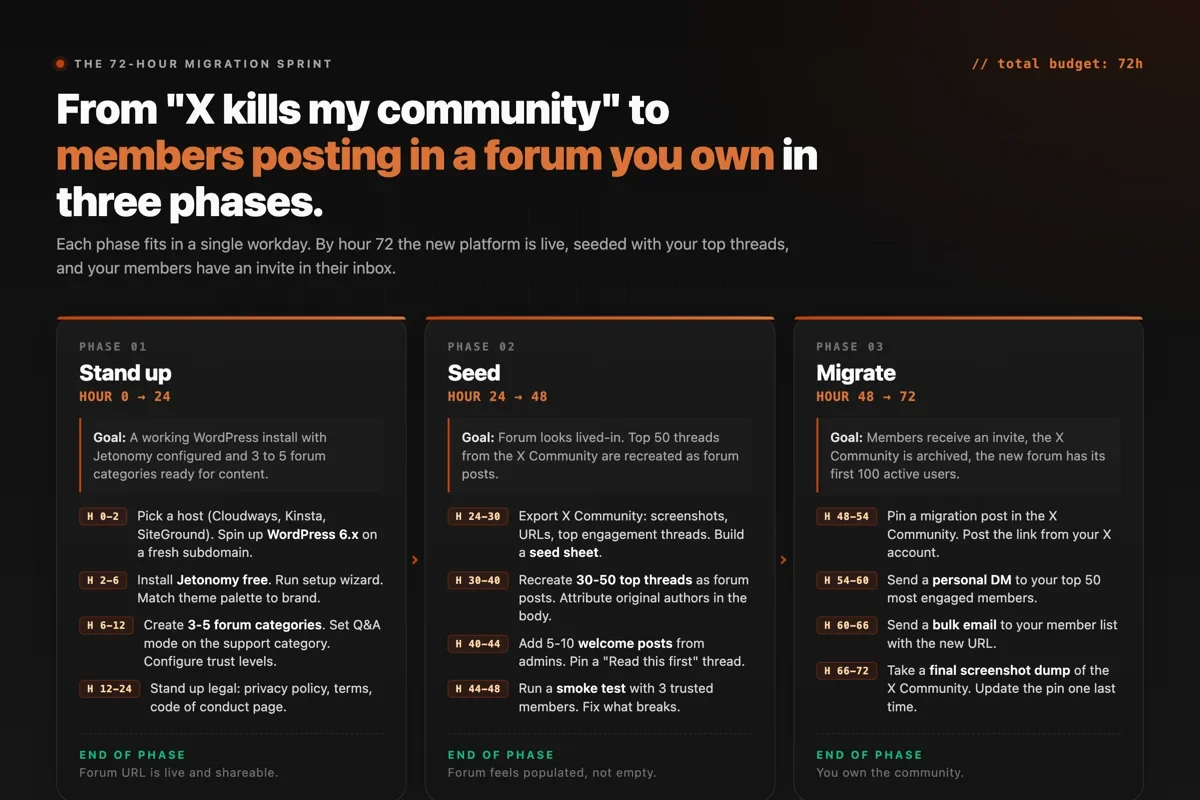
Phase 1, hours 0 to 24: stand up
Goal at the end of phase 1: A working WordPress install with Jetonomy configured. Three to five forum categories created. Trust levels set. Legal pages live. The URL is shareable.
Hours 0 to 2: provision the host
Pick a managed WordPress host. We use Cloudways for client builds because it lets you pick the underlying server (DigitalOcean, Vultr, AWS) and scale the droplet up when traffic hits without rebuilding. Spin up the smallest plan you can. For a community under 5,000 members, $14 to $30 a month is enough. You can resize later.
Install a fresh WordPress 6.x on the subdomain. Most managed hosts do this in one click. Set the admin email to something you actually check. Pick a strong password and store it in 1Password or Bitwarden right now, not “in a minute”.
Hours 2 to 6: install the forum plugin
We build and ship Jetonomy, the WordPress forum and Q&A plugin we use across our agency portfolio. The free version on WordPress.org covers forum categories, Q&A mode with accepted answers, idea boards with voting, six trust levels, and 48 REST API endpoints. Most communities under 5,000 members never need to upgrade to Pro.
Install it from the WordPress admin or via WP-CLI:
wp plugin install jetonomy --activateThe setup wizard runs on first activation. It asks four questions: what kind of community (Forum, Q&A, Ideas, or Hybrid), how many categories to create, whether to enable trust levels, and which user role gets moderator access. Pick Hybrid if you want flexibility, set 3 to 5 categories, enable trust levels, and leave moderation to admins for now.
Hours 6 to 12: structure and theme
Create your forum categories. The right number is 3 to 5 for a community under 5,000 members. More than 5 fragments the conversation; fewer than 3 makes it hard to navigate. Categories we recommend for almost every community:
- General discussion. The default landing space. Set this as forum-mode (threaded).
- Questions and answers. Set this as Q&A mode with accepted answers enabled. This is where most search traffic will land.
- Show and tell. A space for members to share what they are building, working on, or have shipped. High engagement, low moderation load.
- Announcements. Admin-only posting. Set this as forum-mode and disable replies if you want it one-way.
- Off topic (optional). Every community needs a low-stakes space. Skip it if your community is strictly professional.
For the theme, do not use a generic WordPress theme. The forum should feel like an extension of your brand. We use Astra, Kadence, or Blocksy with a custom color palette matched to the community’s existing brand. Set the primary accent to your brand color and the body type to something legible at 16px. Jetonomy reads the theme palette automatically, so the forum styling inherits without manual work.
Hours 12 to 24: legal, trust, and a smoke test
Three pages need to exist before you send any member there:
- Privacy policy. A GDPR-aware one if any members are in the EU. WordPress has a built-in generator under Settings > Privacy. Use it as a starting point and edit the data-collection section to match what your forum actually stores.
- Terms of service. Cover content ownership, moderation rights, account closure. Termsfeed generates a usable draft in 5 minutes if you do not have one already.
- Code of conduct. Pull from our community code of conduct template if you are starting from scratch. Pin it as the first post in General discussion.
Configure trust levels next. Jetonomy ships with six. The defaults are reasonable, but adjust the thresholds based on the size of your community. For under 1,000 members, drop the trust-level-2 threshold (the one that lets users post links) to encourage early activity. For over 10,000 members, raise it to keep spam down.
Run a smoke test. Sign up a fresh account from an incognito window. Post a thread. Reply to it. Try to post a link as a brand-new account. Confirm trust levels actually gate what you think they gate. This catches 90 percent of the issues that would otherwise surface during the migration announcement.
Phase 2, hours 24 to 48: seed
Goal at the end of phase 2: The forum looks lived-in. Top 30 to 50 threads from the X Community are recreated as forum posts with proper author attribution. A handful of admin-posted welcome threads are pinned. A small group of trusted members has tested the experience and reported back.
This is the hardest phase psychologically. The work is repetitive. The temptation is to skip it and go straight to inviting members. Do not skip it. An empty forum on launch day is the single biggest reason migrated communities die in week one.
Hours 24 to 30: build the seed sheet
X does not provide a full export of Community content. What it does provide is the public URLs and visible thread bodies. Open your X Community, sort by most-replied threads of the last 6 months, and capture the top 50 in a Google Sheet:
- Thread URL
- Original post body (copy-paste)
- Original poster handle (for attribution)
- Approximate reply count
- The 2 or 3 best replies (manually selected)
- Suggested forum category for the recreated post
This is 4 to 6 hours of tedious work. There is no fully automated way to do it. You can speed it up by recruiting 2 or 3 of your most active members to help with the capture, in exchange for a thank-you in the launch announcement.
Hours 30 to 40: recreate the threads
Create user accounts for the original posters where you can. For X Community members you do not have direct contact with, post the thread under an “Archive” admin account with a clear attribution line at the top: “Originally posted by @username on X Communities, 2024-12-03. Reposted here as part of our migration archive.”
Recreate the original post body in full. Add the top 2 or 3 replies as actual replies under the new thread (also with attribution lines). Mark the most useful reply as the accepted answer if the category is in Q&A mode. This is what makes the forum show up in search later.
30 to 50 reseeded threads is the right target. More than that gets repetitive. Fewer than that and the forum still feels empty.
Hours 40 to 48: pinned posts and smoke testing
Write 5 to 10 fresh admin posts that did not exist on X. Examples:
- A “Welcome from the team” post pinned at the top of General discussion.
- A “Read this first” introduction to the community structure and rules.
- An “Introduce yourself” thread to give new members an instant first action.
- A “Why we moved here” thread that links to your migration announcement and explains what is different about the new platform.
- One or two genuinely useful resource posts (a starter guide, a roundup, a curated link list) that demonstrate the kind of content the community is here for.
Invite 3 to 5 of your most trusted members to sign up and post a reply on the welcome thread. This is your final smoke test. Their feedback in this window is the most valuable signal you will get. Fix whatever breaks.
What you are actually replacing
Mid-sprint is a good moment to sanity-check the bet you are making. XChat (the group-chat product X is migrating Communities into) is not a forum. It is a chat product wrapped around your old community URL. Side by side, the architecture trade-off looks like this:
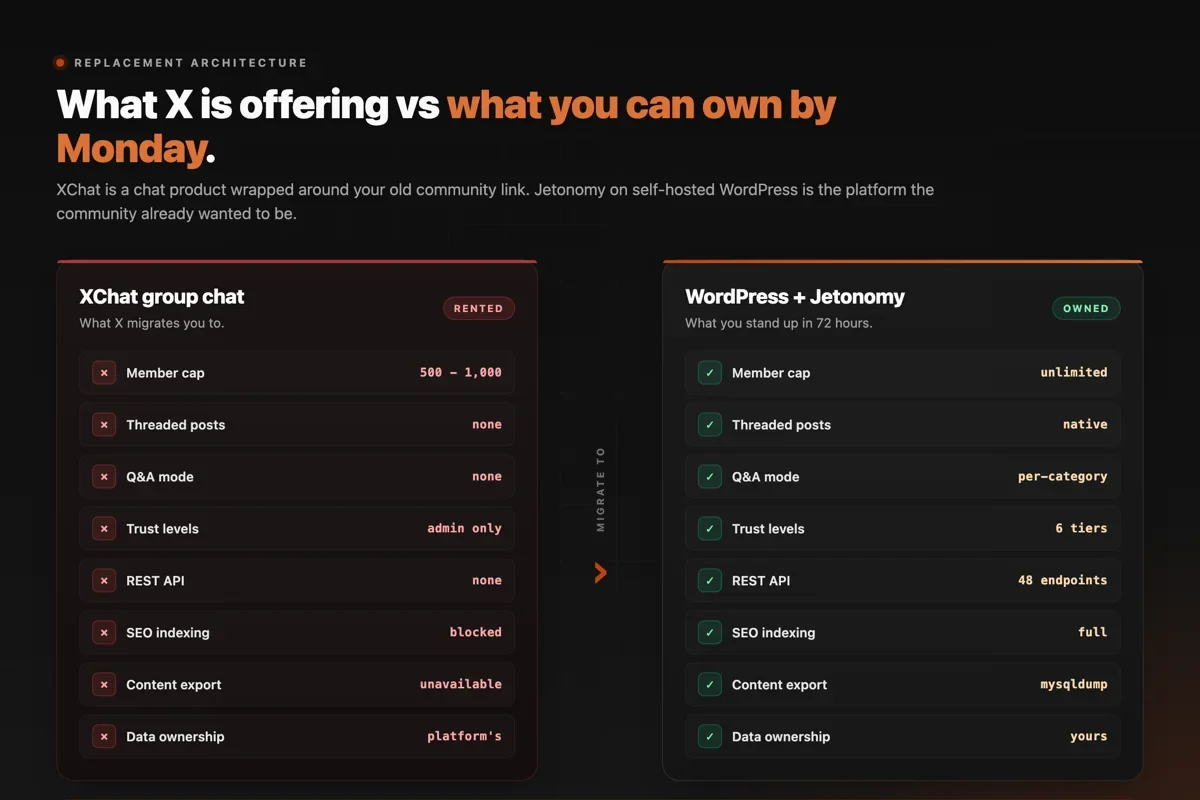
The dimension that matters most past year one is the one most decision matrices underweight: where the data lives. On XChat, every member, every post, every relationship graph belongs to the platform. On self-hosted Jetonomy, the same data is in your MySQL database. Migration off Jetonomy to a different platform later (Discourse, a custom build, even another forum plugin) is a few hundred lines of SQL. Migration off XChat to anywhere is a manual rebuild.
If you want the full decision matrix across all five platforms (Discord, Circle, Skool, Mighty, and self-hosted), we wrote that here. This post assumes you already picked self-hosted and just need to ship it by Friday.
Phase 3, hours 48 to 72: migrate
Goal at the end of phase 3: Members have received the invite. The X Community has a final pinned migration post. The new forum has its first 100 active users.
Hours 48 to 54: announce on X
Pin a migration post inside the X Community itself. Keep it short. The body should say four things: (1) X is shutting down Communities, (2) here is where we are moving, (3) the new place is live now, (4) here is the direct link.
Post the same announcement from your own X account in the timeline, so it appears in your followers’ feeds. Pin it to your profile. Repost it 24 hours later. You are competing with the noise of every other shutdown announcement, so two posts is the minimum.
Hours 54 to 60: direct messages to top members
Pull a list of your top 50 most active X Community members. Send each one a personal DM. Not a template, a real personal message. This is the single highest-conversion step in the entire sprint. Members who get a direct invite from the admin convert to active forum users at roughly 4 to 5 times the rate of members who only see the public announcement.
If 50 personal DMs is too many to write, prioritize the 20 you most want to keep. Quality of relationship matters more than total volume here.
Hours 60 to 66: bulk email to your list
If you have a member email list (newsletter, course platform, CRM), this is the moment to use it. The single most important asset of the entire sprint is the email you send. We recommend the format below:
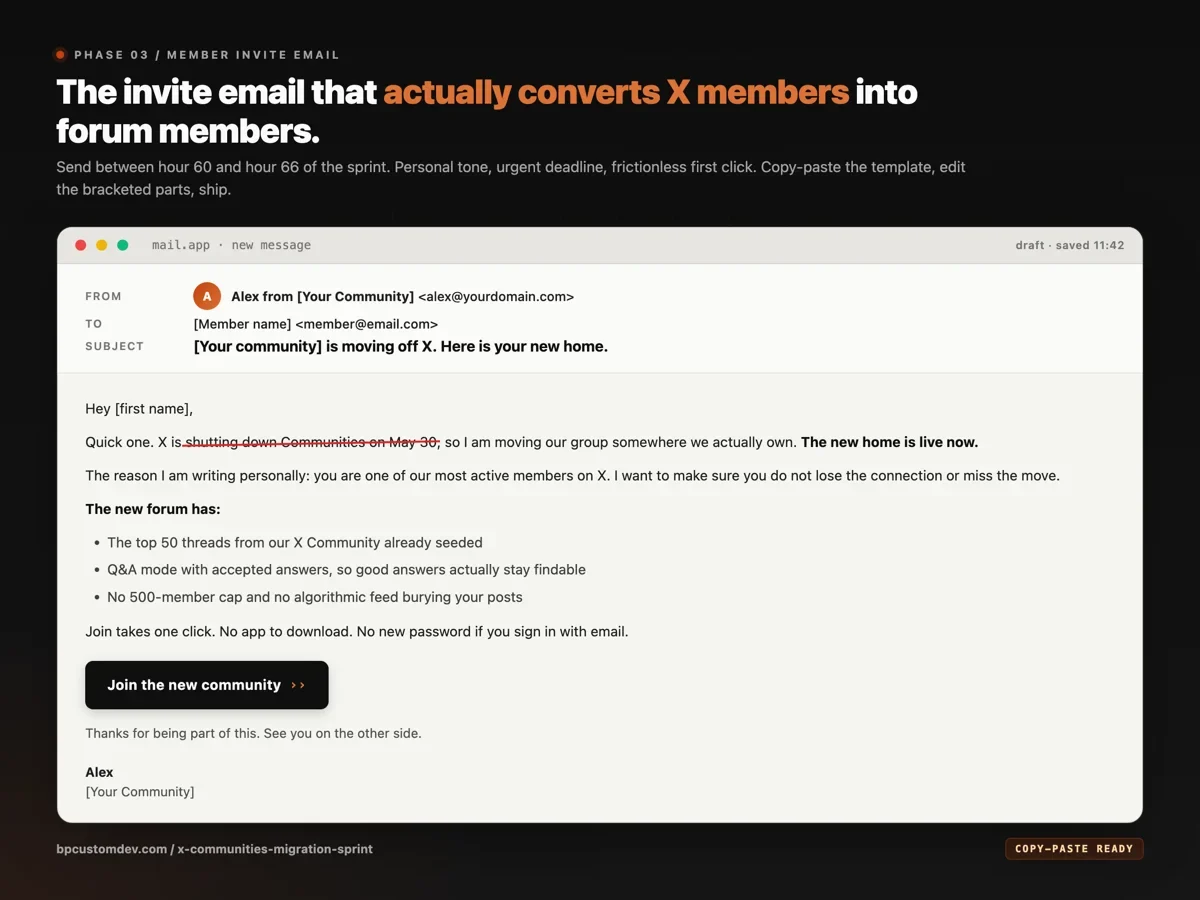
Two notes on this email. First, the subject line matters more than the body. “[Your community] is moving off X” is a 28-character subject that delivers the urgency without sounding like marketing. Second, the call-to-action button is the only link in the email. Do not give the reader four options. Give them one.
Hours 66 to 72: archive and close
Take a final screenshot dump of the X Community. Capture the member count, the top threads, the most-quoted posts. Store these in a dated folder. You may never need them, but you will not be able to recover them after May 30.
Update the pinned migration post one final time with a closing message. The body should say: this Community will be inaccessible after May 30. Here is the new home. We hope to see you there.
By the end of hour 72, you have done the work. The platform is live, the seed is in, the invites have gone out. What happens next is a community-building problem, not a migration problem.
The first 7 days after the sprint
The migration is over, but the first week determines whether the new community sticks. Three habits to set early:
- Reply to every first post. When a new member posts for the first time, an admin reply within 6 hours roughly doubles the chance they post again that week. Set a Slack or email notification on new threads and prioritize first-time posters.
- Pin one new thread per day for the first week. This is the “always something new at the top” effect. It signals the platform is active even when traffic is still ramping.
- Run a weekly digest email starting week 2. The platform you built has SEO and search advantages that X never did. Use them. A weekly “best of” email gives lapsed members a reason to come back.
We covered the longer-term member growth playbook in how to get your first 1,000 community members. The post-migration version of the same problem is slightly different because you start with an existing member base, but the principles transfer.
If 72 hours is genuinely not enough
For admins reading this on May 26 or later, 72 hours might not be realistic. Here is the compressed 5-day version:
- Day 1: Host and plugin install. Categories created. Legal pages drafted. The smoke test runs.
- Day 2: Theme and branding. Trust levels configured. Five admin-written welcome posts.
- Day 3: Seed sheet built. 20 to 30 top threads recreated. Pinned posts done.
- Day 4: Top-50 DMs sent. Bulk email composed and queued.
- Day 5: Email sent. Migration post pinned on X. Archive screenshots taken.
This is the version we run for clients who hire us with under a week left. It still works. The conversion rate drops by maybe 5 percentage points compared to the full 72-hour version (because you have less time for personalization), but the platform is owned, the data is yours, and you are not on XChat.
If your community is on Facebook Groups instead of X, the shape of the move is similar but the export path is different. We covered that flow in how to migrate your community from Facebook Groups to a self-hosted platform. If you are still weighing whether to go fully custom or stay on a SaaS at all, the longer comparison lives in our custom community platform vs SaaS guide.
A realistic note on member retention
One last math point so the expectations are calibrated. If your X Community has 10,000 members and you run the full 72-hour sprint, expect 1,000 to 2,500 to land as active forum members in the first week. Then expect attrition. By month three the active number typically stabilizes at roughly 60 to 70 percent of the week-one figure. That is the realistic floor. The communities that retain better than the floor tend to do three unglamorous things: they post something fresh every day, they reply to every first-time poster within hours, and they ship a weekly digest email. None of it is exotic. The discipline matters more than the platform.
Why we shipped Jetonomy for this exact use case
Three clients in 18 months asked us to help them migrate communities off a SaaS that had raised prices 3x, sunset a feature, or got acquired and changed direction. The pattern was consistent enough to build a product around. We started Jetonomy to be the WordPress forum we wished existed when the third migration call came in.
The product decisions are downstream of that pattern. Custom database tables (so it scales to 100,000+ posts without dragging the host site). Six trust levels modeled on Discourse (because community self-moderation works when the incentive structure is right). Q&A mode with accepted answers (because Stack Overflow proved the format). A REST API on everything (because eventually you will want to build a mobile app or pipe the data into a CRM, and you should not need to ask permission).
Pricing: the free version on WordPress.org handles forums, Q&A, idea boards, trust levels, and the REST API. Pro adds 14 modular extensions ($79 a year personal, $399 lifetime agency). There is no per-member fee, ever.
If the 72 hours is genuinely beyond what you can pull off in time, we set up self-hosted Jetonomy installs for clients in 5 business days, including the seeding work. Pricing starts at $2,500 for a community under 5,000 members. Reach out with the size of your X Community and your target launch date. Quote within 24 hours.
One last reminder. The XChat replacement that X is offering is going to feel acceptable for the first few days because it preserves the URL and most of the people. By month three, the lack of threading, Q&A mode, search, and moderation will surface as the same problems that drove admins to X Communities in the first place. The communities that move to infrastructure they own in the next week will not be doing this exercise again in 2028. The ones that wait will.