BuddyBoss Supply-Chain Hack: The IOC Checklist Every Operator Should Run Today
On March 17, 2026, BuddyBoss's official update server pushed malicious builds of Platform 2.20.3 and Theme 2.19.2 to live customer sites. 309 sites had their databases and Stripe keys exfiltrated. Here is what happened, the indicators of compromise, and the threat-model question every WordPress community owner should be asking by now.
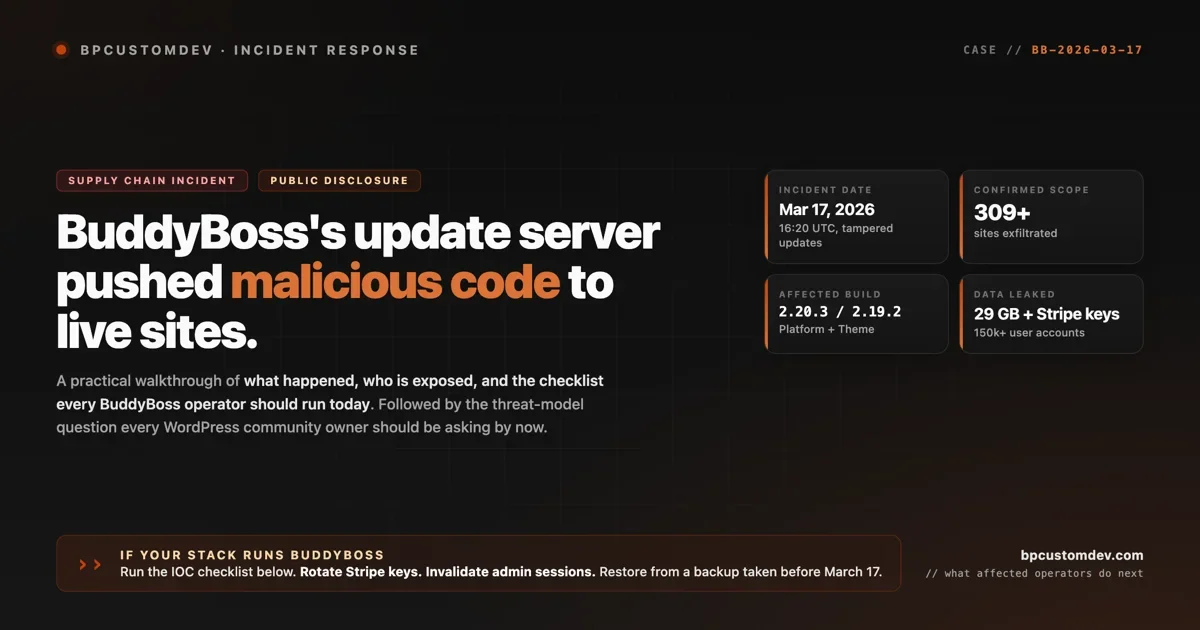
On March 17, 2026 at 16:20 UTC, BuddyBoss’s official update server pushed tampered builds of BuddyBoss Platform 2.20.3 and BuddyBoss Theme 2.19.2 to live customer sites. Two days later, Cybernews researchers discovered the attacker’s exposed staging server and confirmed that 309 websites had already had their credentials and full databases exfiltrated. The leaked data, according to public reporting, includes 29 GB of SQL dumps, 150,000+ user accounts, live Stripe API keys, and active WordPress admin session tokens. This is not a vulnerability that requires a clever exploit chain. This is a supply-chain breach. Trusted auto-updates were the attack.
This post is the practical walkthrough we wrote for our agency clients after the disclosure. What happened, who is exposed, the indicators of compromise every BuddyBoss operator should check on their site today, and what the incident says about the threat model behind commercial WordPress plugins generally. It is not a hit piece on BuddyBoss. The same incident could have hit any vendor that ships auto-updates through a single private channel. The reason to write about it carefully is that operators need useful action items, not panic.
If you run BuddyBoss Platform or Theme, the checklist below is the first thing to do today. Stop reading and run it now if you have to choose.
What is confirmed, what is not
The public reporting is consistent across Wiz Threats, Cybernews, Security Boulevard, and Ctrl-Alt-Intel. The facts that are not disputed:
- March 17, 2026, 16:20 UTC. Malicious builds of Platform 2.20.3 and Theme 2.19.2 are uploaded to BuddyBoss’s update distribution infrastructure.
- March 19, 2026. Cybernews researchers discover an exposed attacker staging server that contains the exfiltrated data, the malicious payloads, and chat transcripts from the actor.
- March 19, 2026. Researchers privately disclose to BuddyBoss and Caseproof. No public response is reported at time of the Cybernews story.
- March 25, 2026. Wiz publishes an incident page on threats.wiz.io documenting the supply-chain attack.
- 309 sites confirmed exfiltrated at point of disclosure. The actual count is almost certainly higher, since the staging server was a snapshot at one moment.
- 29 GB of stolen SQL databases, 150,000+ user accounts, live Stripe API keys, and wp-config.php contents were found on the attacker server.
- BuddyBoss serves roughly 50,000 customers, per Cybernews, with around 27,000 of those running Platform or Theme. The blast radius is bounded by that number, not by the 309 confirmed cases.
What is not yet public: how the attacker breached the update distribution infrastructure itself. Compromised developer credentials, a compromised CI/CD pipeline, an infrastructure exploit, an insider, all remain possible. Until BuddyBoss publishes a post-mortem, this is open. There is also no CVE assigned at the time of writing, which is unusual for a supply-chain incident of this scale, and Patchstack and WPScan have not published advisories specific to the tampered 2.20.3 and 2.19.2 builds.
One additional detail that has been widely reported, separate from the operator action items: chat transcripts on the attacker’s exposed server showed the threat actor used an AI assistant to help draft the malicious updates. That detail does not change what affected operators need to do. It is included here only for completeness because it has been published elsewhere and you will encounter it in other coverage.
The attack vector, in one paragraph
A normal WordPress vulnerability lives in plugin code. An attacker has to find it, write an exploit, and trick the site into running the exploit. Supply-chain attacks skip every step of that. The attacker breached BuddyBoss’s update server, which is the trusted channel that ships automatic updates to every paid Platform and Theme customer, and uploaded malicious replacement builds tagged as version 2.20.3 (Platform) and 2.19.2 (Theme). Customer sites that had auto-updates enabled then downloaded and installed the malicious builds over a normal HTTPS connection, signed and shipped through the official channel, with no warning visible to the operator. The malicious code embedded a credential-harvesting routine and a reverse-shell capability for remote command execution. The harvester read database credentials from wp-config.php, dumped tables, captured Stripe API keys from common locations, stole active admin session tokens, and shipped all of it to the attacker’s server. There is nothing the average WordPress operator could have done with their own site configuration to prevent the initial breach. The trusted update channel was the vector.
The IOC checklist: run this on your site today
If your stack runs BuddyBoss Platform or Theme, work through this list now. The order matters. Steps 1 and 2 stop the bleeding. Steps 3 to 7 are forensics and recovery.
- Identify whether you pulled the malicious build. Check your WordPress admin under Plugins for BuddyBoss Platform and the active theme for BuddyBoss Theme. If the version reads Platform 2.20.3 or Theme 2.19.2, you almost certainly ran the malicious code. If you are on an earlier version and your auto-update was disabled or delayed, you may be clean. Verify file hashes (step 2) before assuming clean.
- Verify file hashes against the known-malicious values. The two confirmed malicious file hashes from public reporting are:
bp-loader.phpSHA-256ddda12b545a7b817883641421cf6a213f4c5100effa40cdb55018efce11bbe42, and themefunctions.phpSHA-2565027a0e77eca13a5cc120d3e37262c4073452569ad341cd1558051b5a91ce144. SSH to your site and runsha256sum wp-content/plugins/buddyboss-platform/bp-loader.phpand the equivalent for the theme. If they match, you are infected. - Block the known command-and-control endpoint. Public reporting identifies outbound connections to
195.178.110.242:8443. Block this at your firewall or host control panel immediately, even if you do not believe you are infected. It costs nothing and contains the worst case. - Rotate every credential that was reachable from the site. Stripe live keys. Stripe restricted keys. WordPress admin passwords for all users. Database credentials in
wp-config.php. SMTP credentials. Any third-party API keys stored in WP options or in plugin settings (Mailchimp, ConvertKit, Twilio, S3, anything). Assume all of them are in the attacker’s hands and treat them as burned. - Invalidate all active WordPress admin sessions. The malicious build stole session tokens. Rotating passwords does not invalidate existing sessions. Force-logout every admin: in
wp-config.php, changeAUTH_KEY,SECURE_AUTH_KEY,LOGGED_IN_KEY,NONCE_KEY, and the matching salt constants. WordPress will invalidate every existing session globally. - Restore from a backup taken before March 17, 2026. A downgrade in place is not enough. The malicious build wrote files, may have created backdoor admin accounts, and may have planted webshells in directories the plugin does not normally touch. The only safe recovery is a full restore from a known-clean backup, followed by a clean re-install of BuddyBoss Platform and Theme from a verified-clean source.
- Audit for backdoor accounts and modified files. After restoring, list WordPress users via
wp user list --role=administratorand confirm you recognize every administrator. Runwp plugin verify-checksums --allto flag any plugin files that diverge from the official repo. Search the uploads directory for any.phpfiles (uploads should not contain PHP). Look for cron jobs you did not schedule viawp cron event list.
If your site processes payments through Stripe and you pulled the malicious build, also notify Stripe through their fraud channel. Stripe will rotate the compromised keys on their end and can flag suspicious activity on the account. Do not skip this step. Cybernews reported live Stripe API keys among the exfiltrated data, and Stripe key rotation is one of the few mitigations that is genuinely effective against the specific kind of damage this incident enables.
What BuddyBoss has said publicly
At the time the Cybernews story was published, BuddyBoss had not issued a public response to the private disclosure made on March 19. As of this writing, we have not found an official post-mortem, security advisory, or status page entry on buddyboss.com discussing the incident. This may change. We will update this post if BuddyBoss publishes a customer-facing statement with version-specific guidance.
Until they do, the most authoritative public sources are the Wiz Threats incident page and the original Cybernews investigation. Affected operators should not wait for the vendor advisory to start mitigation. The IOC checklist above is actionable now.
The threat model question
Stepping back from the immediate response: this incident is worth thinking about regardless of whether you personally run BuddyBoss, because the threat model it exposed applies to every commercial WordPress plugin that ships through a single vendor-controlled update channel. There are a lot of them.
Commercial WordPress plugins tend to share three architectural properties that make them attractive supply-chain targets:
- Centralized update server. The vendor controls a single endpoint that ships builds to thousands of customers simultaneously. One breach reaches the whole customer base.
- Closed code. The build that ships is not the build in a public repository. There is no community of third parties watching for tampering between commits and releases. The vendor’s own infrastructure is the only line of defense.
- Auto-update on by default. Most customers enable auto-updates because manual update discipline is hard to maintain at scale. When auto-update is on, a compromised build reaches the customer in minutes.
The contrast worth drawing is with free, open-source community plugins like BuddyPress itself. BuddyPress ships through wordpress.org, with releases tagged in a public SVN repository, code reviewed publicly, and version diffs that any third party can inspect. A supply-chain attack against the WordPress.org plugin repository is not impossible (the repository has had incidents before, including the AdvancedCustomFields takeover in 2024), but it is structurally harder to execute silently because the code is open and many eyes are on it. The threat model differs.
This is not an argument that open-source is automatically safer. Open-source plugins have their own risk profile: abandoned codebases, sole-maintainer fragility, slow patching of disclosed vulnerabilities. The honest framing is that the failure modes are different. Commercial plugins fail loudly when the vendor’s distribution channel is breached. Open-source plugins fail quietly when maintenance lapses or a vulnerability sits in the repo for years. The right move depends on your specific threat tolerance and the size of your community.
Harden in place, or migrate?
If you run BuddyBoss and pulled the malicious build, the immediate question is not whether to migrate. It is how to recover this week. Run the IOC checklist. Rotate credentials. Restore from backup. Get to a known-clean state before you make any longer-term decision.
After the immediate response, the strategic question splits two ways.
Harden in place. Keep BuddyBoss, but reduce the blast radius of a future incident. Concrete actions: disable plugin auto-updates and move to a staged-update workflow where you test new versions on a staging site before promoting to production. Limit which credentials live in WordPress (move Stripe keys out of plugin settings and into environment variables read by must-use plugins, so they never sit in the database). Run a file-integrity monitor like Wordfence, Sucuri, or MalCare in scanning mode so tampered files surface within hours, not days. None of these would have prevented the March 17 incident on a site with auto-updates on, but they would shrink the window of exposure on the next one.
Migrate. Move the community itself off BuddyBoss and onto a stack with a different threat model. The architecture we ship for clients in this situation is BuddyPress (the free, open-source social-community plugin BuddyBoss was forked from) plus Jetonomy for forums, Q&A, and idea boards. Both ship through wordpress.org with open code and public release histories. The data lives in your database. There is no vendor-controlled distribution server that can leak it. The trade-off is the migration cost: rebuilding profiles, groups, forum content, courses, and any custom theme work. For most agency-managed sites with 5,000+ members, the migration cost is recovered in the first year through eliminated BuddyBoss license fees alone.
The right call depends on your community size, your tolerance for the migration project, and how much you trust BuddyBoss’s response to this incident once they publish one. We are not making a blanket recommendation either direction. We are saying both options are legitimate, and the worst option is doing nothing and hoping the next incident lands somewhere else.
FAQ for affected operators
These are the questions agency clients have asked in the first 72 hours after the incident broke. Quick answers.
I am on managed hosting (Cloudways, Kinsta, WP Engine, SiteGround). Does the host have a backup from before March 17? Probably yes, for at least 14 days back. Cloudways keeps daily snapshots on the supported plans. Kinsta keeps 14 to 30 days depending on the plan tier. WP Engine keeps 30 days. SiteGround keeps 30 days on most plans. Open a support ticket and request a snapshot from March 16 or earlier. Do not restore to production directly. Spin up a staging site from the snapshot, verify it is clean, then promote.
I do not have SSH or WP-CLI access. How do I check file hashes? Your managed host’s file manager usually supports a download of any single file. Download wp-content/plugins/buddyboss-platform/bp-loader.php to your laptop, then run shasum -a 256 bp-loader.php on macOS or Get-FileHash bp-loader.php -Algorithm SHA256 on Windows PowerShell. Compare the output to the malicious hash listed in the IOC checklist. If it matches, you are infected. If your host blocks downloads of PHP files, ask support to run the hash check for you. Most hosts will do this for security incidents.
I run a WordPress multisite network with BuddyBoss installed. What changes? On multisite, BuddyBoss is typically network-activated, which means the malicious update hit the network installation once and affected every sub-site that depends on the plugin. The IOC checklist still applies, but multiply it: rotate credentials per sub-site (especially Stripe keys, since different sub-sites likely have different Stripe accounts), invalidate admin sessions globally by rotating salts in the network wp-config.php, and restore the network from a single backup rather than per sub-site.
What about BuddyBoss App customers (the mobile app product)? Public reporting at the time of this writing covers the Platform plugin and the Theme. We have not seen confirmation that BuddyBoss App, BuddyBoss Network, or other BuddyBoss products were compromised by the same March 17 incident. Treat them as not-confirmed-affected, but watch for follow-up disclosure. The fact that other BuddyBoss products were not named does not prove they were not touched, only that they were not in the reported scope.
My site processes payments through Stripe. Should I notify Stripe directly? Yes. Open a fraud report through your Stripe dashboard (Support, then Report fraud). Stripe will rotate the live and restricted API keys on their end and flag the account for monitoring. If you wait, you may end up paying for fraudulent charges processed through the leaked keys. Live key rotation is fast, takes a few minutes, and does not interrupt legitimate payments because Stripe issues a new key pair before invalidating the old one.
I am not on the affected versions. Am I in the clear? Probably, but verify. Check the file hashes anyway. Auto-update behavior across hosts and configurations is not uniform, and there are edge cases where a site updated to a malicious version, then rolled back to an earlier version, leaving residual malicious files behind. The hash check is the only authoritative answer.
Caseproof was mentioned in the disclosure. Who are they? Caseproof is the parent company that has owned BuddyBoss since 2022. They also own MemberPress and several other WordPress commercial plugins. Caseproof received the same private disclosure on March 19 as BuddyBoss itself. Whether MemberPress or other Caseproof-owned plugins were affected by the same supply-chain breach is not confirmed in public reporting. MemberPress operators should monitor their own indicators and stay alert to follow-up disclosure.
Should I post a customer-facing notice on my site? If you process payments or store any user data (which BuddyBoss communities almost always do), yes. Depending on your jurisdiction (GDPR for EU, CCPA for California, state-level breach laws in the US, AU Notifiable Data Breach scheme), you may be legally required to notify affected users within 72 hours of becoming aware of the breach. Talk to legal counsel if you are unsure, but err toward disclosure. A vague “we identified suspicious activity affecting accounts” notice plus instructions to reset passwords is better than silence.
If you want help
For BuddyBoss customers affected by the March 17 incident, we run two engagement types. Incident response is a five-business-day engagement to work through the IOC checklist, audit the site for backdoors, rotate credentials safely, and restore from a clean backup. Pricing starts at $1,500 for a single-site environment and scales with the number of affected sites. Migration to BuddyPress plus Jetonomy is a 30-business-day engagement covering the platform rebuild, content migration, theme adaptation, and member communication. Pricing starts at $4,500 for a community under 5,000 members.
If you have a tight timeline or a non-standard environment, reach out with the size of your community and the incident details and we will scope within 24 hours.
If you are exiting a different community SaaS or platform (X Communities, Facebook Groups, Discord, Circle, Skool, Mighty), the migration path is similar but the export step differs by source. We covered the X Communities version in our 72-hour migration sprint guide, and the comparison across destination platforms is in the alternatives breakdown.
The takeaway
Supply-chain attacks against the WordPress commercial-plugin ecosystem are no longer theoretical. The March 17 BuddyBoss incident is the largest case of its kind in the WordPress space in recent memory, but the pattern (compromised update server, trusted channel, broad customer exposure) is the pattern, not an outlier. Any vendor that ships through a single private channel can be a target. The operator-side mitigation discipline that matters is the same in every case: auto-update only after staging validation, file-integrity monitoring on production, off-database storage of high-value credentials, and a tested backup-and-restore process you can execute under pressure.
For BuddyBoss customers specifically, run the IOC checklist today. The 309-site figure is a point-in-time snapshot from March 19. The actual exposure is higher. Assume you are in the affected set until file hashes prove otherwise, and act accordingly.
We will update this post if BuddyBoss publishes a post-mortem or if new IOCs become public. For now, the action items above are the most authoritative public guidance we can write.