Mastodon for Your Brand Community: Should You Federate (And How)?
Threads federation, Ghost native ActivityPub, and GoToSocial changed the calculus for brand Mastodon presence in 2026. Here is a practical decision framework covering managed hosting, self-hosting resource requirements, content norms, and common pitfalls.

The question brands ask about Mastodon in 2026 has shifted. In 2022, it was “should we even be on Mastodon?” By 2023, it was “is this worth the effort?” Now, with Threads federation live and Ghost native ActivityPub shipping to paying creators, the question is more specific: “Should we federate our brand community, and if we do, how do we actually set it up without it becoming a moderation nightmare?” That is the question this guide answers.
Why Brands Are Federating in 2026
The case for brand presence on the Fediverse is no longer hypothetical. Three factors converged in 2024-2026 that made federation a legitimate growth channel rather than a technical experiment:
The Threads Bridge Effect
Meta’s completion of Threads ActivityPub federation connected the Fediverse to a platform with mass-market reach. A brand with a Mastodon account can now be followed by Threads users without those users ever opening Mastodon. This fundamentally changed the Fediverse’s audience ceiling. The niche it started as now has legitimate spillover into mainstream social media audiences.
The practical implication: if your brand’s target audience skews toward people who use Threads (which skews younger and more design/creator-oriented), a Mastodon presence is now addressable by that audience. You are not limited to the existing Mastodon user base.
The Tech and Developer Audience Lives Here
Software developers, open-source contributors, journalists, academics, and privacy-conscious professionals disproportionately left Twitter for Mastodon starting in late 2022 - and that migration largely stuck. If your community specifically targets developers and technical creators, see how to build an online support community that matches the expectations of this audience. If your brand targets any of these audiences - dev tools, SaaS products, open-source projects, digital rights organizations, research institutions - Mastodon has your audience at a density you will not find on any other single platform outside LinkedIn for professional contexts.
Ownership and Portability
For brands burned by platform changes - Twitter’s API pricing, Facebook reach collapse, Instagram algorithm shifts - the Fediverse’s architecture offers something genuinely different: an account that you own, that your followers can carry with them when they move servers, and that cannot be suspended by a platform company’s policy change. For brands building long-term community relationships, this structural stability has real value.
The Options: Hosted, Self-Hosted, and Everything Between
Before getting into the how-to, it is worth mapping the landscape of options. “Setting up Mastodon” is not a single decision - it branches immediately based on whether you want to run your own server or join an existing one.
Option 1: Join an Existing Mastodon Instance
The simplest path: create a brand account on an existing Mastodon server. mastodon.social is the largest general instance. There are also niche instances for specific industries - fosstodon.org for open-source and tech, hachyderm.io for tech and developer communities, infosec.exchange for security professionals.
Pros: Zero infrastructure cost, immediate access to an existing community, no server maintenance.
Cons: Your handle is on someone else’s domain (e.g., @yourbrand@mastodon.social instead of @yourbrand@yourdomain.com). You are subject to that instance’s moderation policies and server stability. If the instance closes, your account history is harder to migrate (though ActivityPub’s Move activity helps). You cannot customize the experience for your followers.
This option makes sense for small brands testing Fediverse presence with minimal commitment, or for individual team members who want personal accounts rather than a brand account.
Option 2: Managed Mastodon Hosting
Several managed Mastodon hosting services let you run your own instance without managing the underlying infrastructure. Notable options include masto.host, Cloudplane, and SpaceSocialNet. You get your own domain, full admin control, and no server maintenance. Pricing ranges from roughly $6/month for a small instance to $50-100+/month for larger communities.
Pros: Your own domain, admin controls, no server maintenance, better onboarding than raw self-hosting.
Cons: You are still dependent on the hosting provider. If they change pricing or shut down, you need to migrate. Data export via ActivityPub standards is solid and well-tested, but migration requires coordination.
For most brands that want Fediverse presence without operations overhead, managed hosting is the right starting point. You can always migrate to self-hosting later if growth justifies it.
Option 3: Self-Hosted Mastodon
Running Mastodon yourself on a VPS or dedicated server. Full control, no dependency on any provider beyond your hosting infrastructure.
Let’s be direct about the resource requirements for Mastodon, because this is frequently understated:
Instance Size | Active Users | RAM | CPU | Storage (6 months) |
|---|---|---|---|---|
Small brand | Under 100 | 4GB | 2 vCPU | 50-100GB |
Mid-size community | 100-500 | 8GB | 4 vCPU | 200-500GB |
Large community | 500-2000 | 16-32GB | 8 vCPU | 1TB+ |
Storage grows significantly if you do not configure media proxying and remote media purging. Mastodon caches media from federated instances by default, and that accumulates fast. A fresh install with active federation can consume 10-20GB of remote media within weeks if you do not set aggressive purge schedules.
CPU spikes during fan-out. When a popular account on your instance posts, Mastodon needs to deliver that post to the inboxes of all followers across potentially thousands of servers. This is handled by Sidekiq workers, and if your follower count grows, Sidekiq queue depth becomes a real operational metric.
Self-host if: You need complete data sovereignty, you have ops capacity (or budget for a DevOps hour/month), and you want custom domain identity at @yourbrand@yourdomain.com.
Do not self-host if: Your engineering team is already stretched, you are testing Fediverse presence, or your community is primarily consumers rather than technical users who care about hosting infrastructure.
Option 4: GoToSocial (Lightweight Alternative)
GoToSocial is an ActivityPub server written in Go that implements the Mastodon-compatible API but uses dramatically fewer resources than Mastodon itself. A GoToSocial instance can run on 512MB RAM with a single vCPU on a $5/month VPS. It is ActivityPub-native and compatible with most Mastodon clients.
What GoToSocial does not have: a Mastodon-style web interface for browsing federated content, some Mastodon admin tools, and some features that Mastodon-specific clients expect. It is excellent for brand broadcast accounts where the primary use case is publishing content and receiving engagement, not running a full social reading experience.
If your goal is “post from our brand account and engage with replies” rather than “run a full community server,” GoToSocial is worth serious consideration. The resource savings are substantial and the operational complexity is minimal.
Content Patterns That Work on Mastodon for Brands
The Fediverse has distinct norms that differ from Twitter/X, LinkedIn, and Instagram. Brands that treat it as a cross-posting destination get ignored or worse, defederated by large servers. Understanding what actually works matters.
Lead with Value, Not Promotion
Mastodon’s culture is strongly anti-promotional. Pure marketing posts (“Check out our new feature!”) get minimal engagement and can generate negative responses from the community. Posts that share knowledge, opinions, behind-the-scenes context, or contribute to ongoing technical conversations perform significantly better.
Compare: “We just launched a new community analytics dashboard - check it out!” versus “We spent three weeks debating whether to ship aggregate-only analytics or individual member views. Here is what we learned from talking to community managers at mid-sized Discord servers before deciding.” The second is Mastodon content. The first is Twitter content that works worse on Mastodon than it does anywhere else.
Threads, Not Single Posts
Mastodon’s 500-character limit (configurable on your own instance) and threading model favor multi-post threads for detailed content. A well-structured thread on a technical topic will get significant engagement from followers who boost it into their networks. This is where technical communities - developer tools, open-source projects, research groups - see the most value from Fediverse presence.
Content Warnings Are Expected
Using content warnings (CWs) for posts that contain political content, potentially distressing topics, or long threads is a social norm on Mastodon, not optional politeness. Brands that post content that would typically require a CW without using one signal unfamiliarity with the platform and get called out for it. If you are scheduling posts via a tool that does not support CWs, that is a gap to fix before posting at volume.
Interact With the Community Around Your Topic
Fediverse presence compounds when your account follows and engages with others in your topic space, not just broadcasts. Search your niche keywords, boost posts from community members whose work is relevant to your audience, reply to discussions thoughtfully. Brands that only broadcast get treated like broadcast accounts - they accumulate followers slowly and engagement stays low.
Common Pitfalls That Sink Brand Mastodon Accounts
Scaling Moderation
If you run your own instance and it grows, moderation becomes a real job. Mastodon instances defederate from servers with inadequate moderation. If your instance becomes known for not handling harassment reports or for tolerating spam, large servers will block you - and that cuts off your content from large swaths of the Fediverse immediately. This is not theoretical. Server admins talk to each other, and defederation decisions happen fast when abuse reports pile up.
For brand accounts where you want broad reach, managed hosting with an established instance that already has moderation trust is safer than running your own server that starts with no trust history.
Instance-Level Trust Takes Time
A new instance does not immediately federate freely with all other servers. Some instances have allowlist policies that require new servers to prove themselves over time. Some individuals on established servers will block any account from instances they do not recognize. Building instance-level trust takes months of consistent, legitimate activity.
Starting with managed hosting on an established domain with existing trust bypasses most of this friction. Starting your own domain-level instance means you are starting with zero trust history.
Media Storage Blindness
This is the most common operational surprise for first-time Mastodon self-hosters. Mastodon caches remote media aggressively. Images and video from accounts on other servers that your followers interact with get cached locally. Without configuring the remote media cleanup task (tootctl media remove), your storage fills up silently over weeks.
Set up automated media cleanup from day one. The tootctl command for this is:
tootctl media remove --days=7
Run this weekly via cron. Combined with object storage (S3 or compatible) for media files instead of local disk, and you avoid the storage surprise entirely.
Email Delivery
Mastodon sends email for notifications, password resets, and admin alerts. Configuring a proper transactional email service (Postmark, SendGrid, Mailgun) is not optional - Mastodon’s built-in sendmail will get your IP flagged as spam quickly. This is a setup step that gets skipped in basic tutorials and then causes problems weeks later.
WordPress + ActivityPub as an Alternative Path
For brands that already run a WordPress site and content operation, there is a meaningful alternative to running a full Mastodon server. The WordPress ActivityPub plugin turns your WordPress site into a Fediverse publisher. Your blog posts become Fediverse-addressable content. Authors get handles at @author@yourdomain.com. The site itself can have a single account at @site@yourdomain.com.
For a brand whose primary Fediverse goal is content distribution - getting blog posts, case studies, announcements in front of Fediverse followers - this path has a dramatically lower operational cost than running Mastodon. You are already running WordPress. Adding ActivityPub federation is one plugin and some configuration.
What you do not get: a social reading experience, the ability to browse federated content on your instance, or the full Mastodon feature set. You get a publishing presence in the Fediverse, which is enough for many brand use cases.
If you’re choosing a community stack fresh, BuddyNext is a free, standalone community platform worth a look, an activity feed, member profiles, Spaces (groups), and deep moderation in one plugin, built as its own modern architecture rather than on top of BuddyPress (so it isn’t a BuddyPress add-on and existing BuddyPress plugins won’t run on it). Because it runs on your own site you keep full ownership of member data, and its Pro tier adds native Stripe memberships when you’re ready to monetize.
Setting Up Your Brand Account: The Practical Path
For most brands reading this in 2026, the recommendation is:
- Start with the WordPress ActivityPub plugin if you run WordPress. Configure your brand account at @yourbrand@yourdomain.com, enable federation for your blog posts, and spend 60 days measuring how Fediverse audiences engage with your content. This costs nothing but setup time and tells you whether the Fediverse audience is actually present and responsive for your niche.
- If you need a full Mastodon social presence, start with managed hosting. masto.host is the most straightforward option - pick the plan that matches your expected active user count, connect your domain, configure email delivery, and publish. Come back to self-hosting in 12 months if growth justifies it.
- If you are specifically targeting the developer or open-source community, skip step 1 and go directly to a managed Mastodon instance. Developers on Mastodon expect to follow Mastodon accounts, not just receive RSS-like federation from WordPress. The social reciprocity of following and being followed matters in that community.
- If your brand has ops capability and needs full data ownership, self-host Mastodon on a 4-8GB VPS, configure object storage for media from day one, set up email via a transactional provider, and configure automated media cleanup. Budget 4-6 hours of initial setup and 30-60 minutes per month of ongoing maintenance.
There is no single right answer, and the brand that starts with step 1 and grows into step 4 over two years has made smarter decisions than the brand that over-engineered infrastructure for a Fediverse presence they have not yet validated.
What to Measure
Fediverse analytics are less centralized than Twitter or Instagram analytics. There is no single dashboard. What you can measure:
- Follower growth rate via your Mastodon admin panel or instance stats
- Boosts (reposts) per post as the primary reach signal - boosts are how content spreads on Mastodon, equivalent to retweets in amplification effect
- Replies as engagement quality signal - Mastodon replies tend to be more substantive than Twitter replies due to the platform’s culture
- Traffic from Mastodon referrers in your site analytics - this shows whether Fediverse presence translates to site visits
- New email subscribers or sign-ups attributing “social” as source – the eventual business conversion from Fediverse presence tends to come through newsletter subscriptions and direct inquiry rather than direct conversion
Do not expect Fediverse analytics to match the precision of Facebook Ads Manager. The Fediverse is not a performance marketing channel. It is a community-building and brand awareness channel where the metrics are relationship-oriented rather than conversion-oriented.
Tools for Managing a Brand Mastodon Account
Once you have your instance or account set up, you need a workflow for publishing, monitoring, and engaging. The tooling ecosystem for Mastodon has matured considerably since 2022 - you are not limited to the Mastodon web interface or the mobile app.
Scheduling and Publishing
Mastodon supports scheduled posts natively via the API. Most scheduling tools that support Mastodon use the standard Mastodon API, which means compatibility is broad. Buffer added Mastodon support. Publer supports it. Fedica has full scheduling, analytics, and multi-account management built specifically for the Fediverse.
For teams that already run content operations in a CMS or editorial calendar, the most practical workflow is writing content in your primary tool and posting via API. The Mastodon API is well-documented and REST-based. A simple integration between your WordPress publishing workflow and your Mastodon account can turn a new blog post into a scheduled Mastodon thread automatically.
Monitoring Mentions and Replies
Fedica is the most capable monitoring tool for Fediverse mentions. It pulls mentions across instances, surfaces boosted posts, and lets you track keywords across the public Fediverse timeline. For brands with active community conversations, this is closer to Hootsuite functionality than the native Mastodon web client offers.
Simpler option: the Mastodon notification system handles direct mentions and replies in-app. If your volume is low (under 50 interactions per day), the native notification stream is sufficient. Route Mastodon notifications to a shared team inbox via email or Slack webhook if multiple team members are monitoring.
Cross-Posting from WordPress
The ActivityPub plugin handles cross-posting automatically if you have it configured. Every new WordPress post sends an activity to your followers’ inboxes. This is the zero-friction cross-posting path - your WordPress publishing workflow drives the Fediverse distribution without any additional tooling.
For more granular control - posting excerpts with links rather than full post content, controlling which categories federate, customizing the post format - the plugin provides filters and settings that let you tune this behavior without custom development.
Analytics
Mastodon instances expose basic analytics via the admin panel. Third-party tools include Fediverse.to for tracking hashtag performance and Fedica’s analytics module. For most brands, combining Mastodon’s native engagement metrics (boosts, replies, favorites per post) with referral traffic from your site analytics gives you enough data to make content decisions without building custom infrastructure.
Timing: When to Start Your Brand Mastodon Presence
There is a trap brands fall into with any new distribution channel: starting before they have something worth distributing. Mastodon is no different. A brand account posting generic promotional content to a Fediverse audience will not gain followers, will not see engagement, and will conclude after three months that “Mastodon does not work for us” - when the real issue was that the content would not have worked anywhere.
The right time to start a Mastodon brand presence is when you have a content rhythm that produces material your target audience would genuinely want in their feed. For developer tool brands, that means code tips, architecture decisions, open-source updates, and debugging insights. For research organizations, that means findings, commentary on field news, and links to relevant work. For community-focused brands, that means community building advice, platform decisions, and member story highlights.
If your content calendar currently consists only of product announcements and blog post links, spend six weeks building genuine-value content before starting your Mastodon account. That is not a reason to delay - it is a reason to start the content work now so that when you do launch, the first 30 posts are already queued and set the right tone from day one.
Mastodon audiences remember first impressions because the community is tightly connected and conversations about new accounts spread through boosts quickly. A strong launch - valuable content, engaged presence, responsive to replies - builds follower trust faster than months of mediocre content could recover.
The Summary Decision
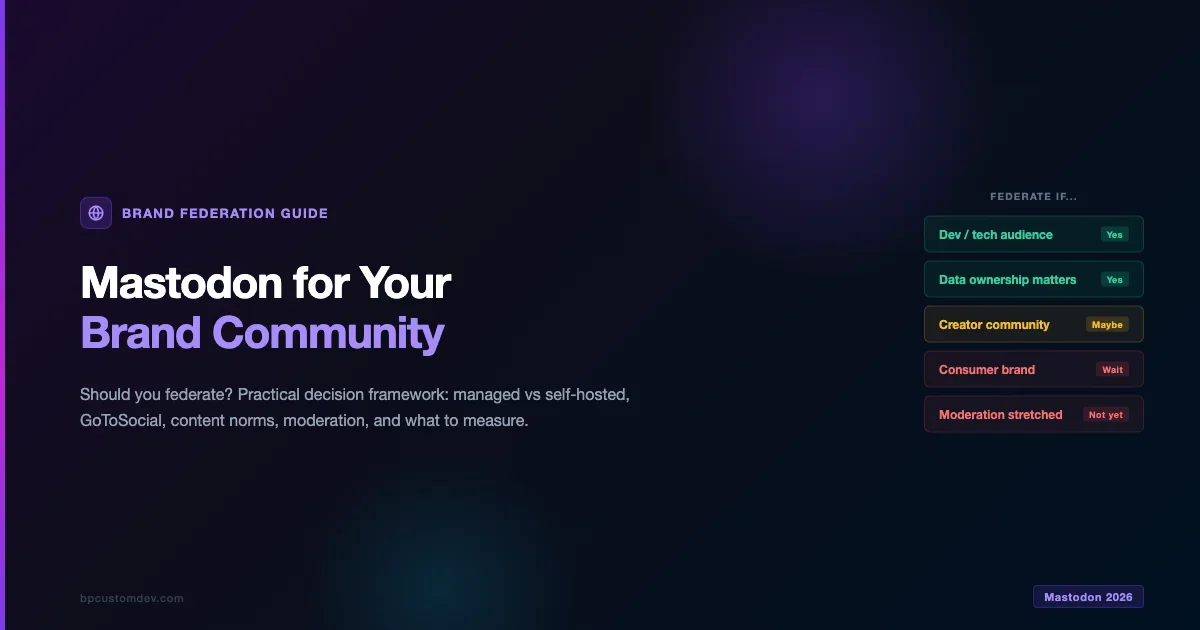
Federation is worth pursuing for brands whose audiences are present on the Fediverse, who have something genuinely valuable to share (not just promotional content), and who can staff the moderation work it requires. For brands still building that initial audience, reaching your first 1,000 community members is the prerequisite work that makes federation meaningful. For developer tools, open-source projects, research organizations, privacy-conscious B2B brands, and media companies, the case is strong in 2026.
For consumer brands, brick-and-mortar businesses, and organizations whose audiences live primarily on Facebook, Instagram, or TikTok - the Fediverse is not where your audience is, and the return on setup and maintenance investment does not yet justify the effort.
The Fediverse will not replace your existing social media presence. It extends it into a different part of the internet where the norms are different, the audience is self-selected, and the relationship potential runs deeper than algorithmic reach optimization allows. That is a specific value proposition that fits specific brands well. Know whether yours is one of them before you start spinning up servers.