5 Steps To Allow More User-Generated Content On Your Social Networking Website


If surveyed, 85% of people think that visual user-generated content (UGC) is more convincing than videos or brand images. That’s why UGC is often referred to as the gold standard for marketing content.
Even though most consumers trust user-generated content more than brand content, many businesses don’t know how to motivate their users to create it. About half of people believe brands should offer guidelines for writing reviews or other content, but only 16% of companies actually do. There’s a real opportunity here for brands willing to make use of user-generated posts on social networks.
So how do you encourage your followers to create this kind of content?
What Is User-Generated Content?

User-generated content refers to unsponsored, unpaid posts that people share on social networks about products or services they’ve actually used. If your friend shares a Twitter post about a great hotel stay, that’s UGC. If a brand reposts Instagram Stories from customers at one of its events, that’s UGC too.
The way brands can put user-generated content to work is what makes the format so powerful. Even though it happens naturally, sharing and re-sharing UGC can have a real impact for both consumers and brands.
UGC doesn’t have to explicitly mention your product. It can just as easily showcase values or a lifestyle that lines up with your brand’s ethos and target market. Vans, the skateboard footwear and apparel retailer, frequently reposts photos and videos of skaters, BMX riders, and performers wearing gear that fits its “Off the Wall” aesthetic.
Also Read: Best WordPress BuddyPress Events Plugins
Benefits of User-Generated Content
1. It Puts Your Customers Front and Center
One of the best things about user-generated content is that it’s a win for both you and your audience when you fold their content into your marketing.
- You’re letting their voices tell your story for you.
- Your marketing messages come from individuals, not from a brand.
- You’re no longer marketing to your customers, you’re marketing with them.
- It’s a chance to highlight the people who’ve shaped your brand’s image.
2. It Provides Social Proof
UGC is great social proof. Content created by real customers improves your credibility and puts your brand’s promises into perspective.
3. Consumers Trust It More
People across generations and demographics trust UGC more than brand content, because it’s made by people who genuinely like the brand rather than the brand itself. In fact, close to half (47%) of millennials and 36% of baby boomers say they trust UGC, compared to just 25% of both groups who trust content from brands directly.
4. It Stretches Your Budget
Marketing budgets are usually tight, so getting more visually appealing content without extra spend matters. UGC costs next to nothing since you’re pulling images and videos directly from your users on social media.
Millions of people share images and video on social media daily, giving marketers a huge pool of content to draw from, UGC is one of the fastest-growing sources of video content marketers have access to. Pairing it with branded or paid content tends to work well: engagement increases by an average of 28% when user-created visuals are used alongside professional content.
5. It Shows Your Brand Is Open to Conversation
Beyond sparking conversation among fans, brands that regularly highlight UGC build a stronger connection with their customers. People want to be heard, a Bazaarvoice study found that 64% of millennials and 53% of baby boomers want more ways to share their thoughts about brands.
Using UGC in your marketing, or reposting it to your own social accounts, helps the people you’re marketing to feel heard and valued.
If you want to give your community members their own blog and a solid writing experience, the BuddyPress Member Blog plugin is a good fit, whether you’re looking to add blogging to your community site or build a platform focused on publishing your users’ content.
Also Read: Why Community Management Matters For Your Business?
BuddyPress Member Blog

The BuddyPress Member Blog plugin lets users create and manage their own blog posts right from their BuddyPress profile. Admins can moderate submitted content and only approve posts they’re happy to have on the site, and can restrict blogging by user role or member type.
BuddyPress Member Blog Key Features
- Submit blog posts directly from the frontend.
- Option to allow image uploads with posts.
- Displays posts on the author’s profile.
- Restrict posting by user role or member type.
- Users can edit their own posts.
- Users can remove their own posts.
- Supports user-generated content throughout.
- Exclude or include specific categories in the frontend post form.
General Settings

1. Create a New Post Page
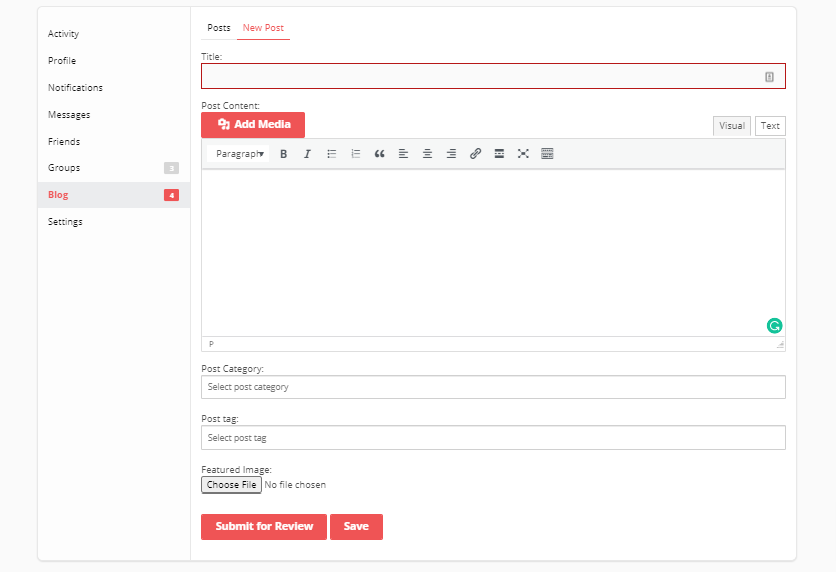
The plugin offers a page for creating new blog posts, mapped in this field. If you don’t have one yet, create it using the [bp-member-blog] shortcode and map it here.
2. Allowed User Roles to Create Posts
Limits blog posting by member role, only roles you select can post from the frontend.
3. Allowed Member Types to Create Posts
Restricts blog posting by member type, only the types you select can publish from the frontend.
4. Enable User Publishing
Turn this on if you want posts to publish without review.
5. Media Management
Turn this on if you want media files permanently deleted when their associated blog post is removed.
6. Exclude Categories
Choose which categories you don’t want featured in posts.
Also Read: How to Create Website Content that Actually Converts
Integrating Member Blog With BuddyPress
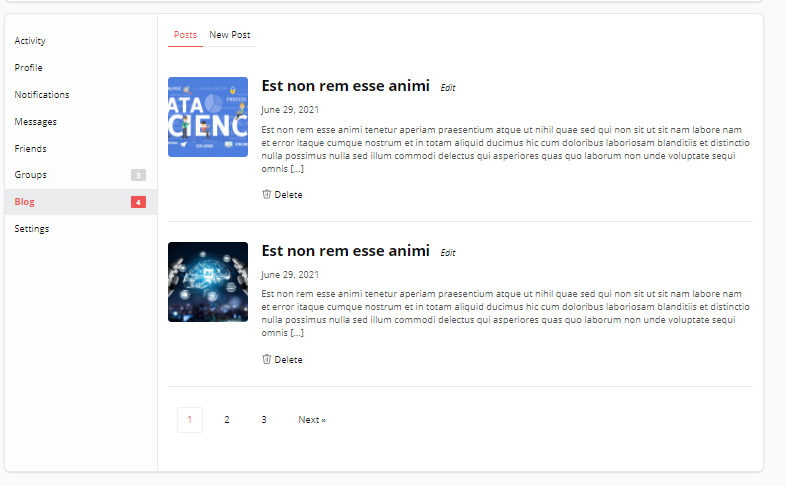
The BuddyPress Member Blog plugin integrates directly with BuddyPress, adding a tab to the member profile page where members can manage their blog. Visitors can also browse to any member’s profile to read their posts.
1. Blog Post
2. New Post
3. Profile Page

Conclusion
Social networking and blogging serve a similar purpose: connecting people and giving them a way to create and share content. Both are trending right now, letting users communicate and expand their reach by posting their own content. Since blogging is a solid way to boost engagement and conversions on a community site, it’s worth considering this BuddyPress extension so members can post directly to your community website through a frontend blog post form.
Interesting Read:
How To Use Forums In eLearning