BuddyPress Profile Fields: Field Types, Groups and How to Add Repeater Fields
BuddyPress profile fields explained: built-in field types, field groups and visibility, how to plan profiles members complete, and how to add repeater fields for work history, education and portfolios.
Member profiles are the heart of a community. They are how members find each other, decide whom to message and judge whether a group is for them. BuddyPress gives you extended profile fields (called xProfile fields) to collect exactly the information your community needs, but it has one well-known gap: each field holds one answer. A member cannot list three jobs, two degrees or five skills with dates without workarounds. That is what repeater fields solve.
This guide covers BuddyPress profile fields from the ground up: the field types you get, how field groups and visibility work, how to plan a profile that members actually complete, and how to add repeater fields for resumes, portfolios and work history. It is written for community owners and the people who set up their sites, and we refreshed it on 18 October 2026.
No coding is needed for anything in the first half of this guide. Where custom development genuinely helps, we say so and explain why.
The short answer
- Built-in profile fields live under Users, Profile Fields in the WordPress dashboard once the Extended Profiles component is active.
- Field groups organise fields into sections, which appear as tabs when members edit their profile.
- Each field has a visibility setting, so members can choose who sees, for example, their phone number.
- Repeater fields (several entries for the same field, such as each job in a work history) are not part of BuddyPress itself. Add them with a plugin such as BuddyPress Profile Pro, or with custom development.
- Plan the profile before you build it. Every required field is a reason someone abandons signup.
What BuddyPress profile fields can do out of the box
With the Extended Profiles component switched on, you can add fields of common types:
Field type | Good for |
|---|---|
Text box | Job title, company, city |
Multi-line text area | A short bio or “what I can help with” |
Date selector | Graduation year, membership start date |
Drop-down select box | One choice from a list: country, industry, level |
Radio buttons | One choice from a short list, shown all at once |
Checkboxes | Several choices: interests, languages |
Multi-select box | Several choices from a long list |
Number, URL and phone fields | Years of experience, website, contact number |
Each field can be required or optional, can have a description shown to members, and, for choice fields, a set of options you define. Fields can also be used to filter the member directory with suitable search plugins, which is often why owners add them in the first place.
Field groups
Fields belong to groups. The first group (often called “Base”) is the one shown at registration; other groups appear as separate tabs when a member edits their profile. Use groups to keep signup short and move detail elsewhere: name and location in the first group, professional details in a second, interests and preferences in a third.
Visibility
Every field has a visibility level such as everyone, logged-in members, friends only or only the member. You set the default and decide whether members may change it. Personal details like phone numbers and dates of birth should default to private, with members able to share them if they choose.
Where the built-in fields fall short
The single-answer limit shows up as soon as a profile has to describe someone’s history rather than a single fact:
- Work experience: several jobs, each with a title, company and dates
- Education: several schools or degrees, each with a year
- Certifications: several, each with an issuer and expiry date
- Portfolio items: several projects, each with a title, link and description
- Contact details: several addresses or phone numbers for different purposes
Owners try workarounds: “Job 1”, “Job 2”, “Job 3” fields, or one large text box where members type everything. Both fail. Numbered fields waste space when empty and run out when someone has a fourth job. Free text cannot be filtered, sorted or displayed consistently.
What repeater fields are
A repeater field (or repeater group) is a set of fields a member can fill in more than once. For work experience, the set might be job title, company, start date, end date and a description. The member clicks “add another” for each job, and the profile shows each entry as its own block, in the order the member chooses.
Think of the way professional networking sites show work history: one block per role, each with its own title, company and dates, added whenever the person changes jobs. A repeater group gives your community the same structure. The benefits are practical:
- Profiles read like a CV, which is exactly what professional and alumni communities need
- Data stays structured, so it can be displayed neatly and used in search
- Members are not limited to an arbitrary number of entries
- Empty entries do not leave gaps on the profile
Adding repeater fields with BuddyPress Profile Pro
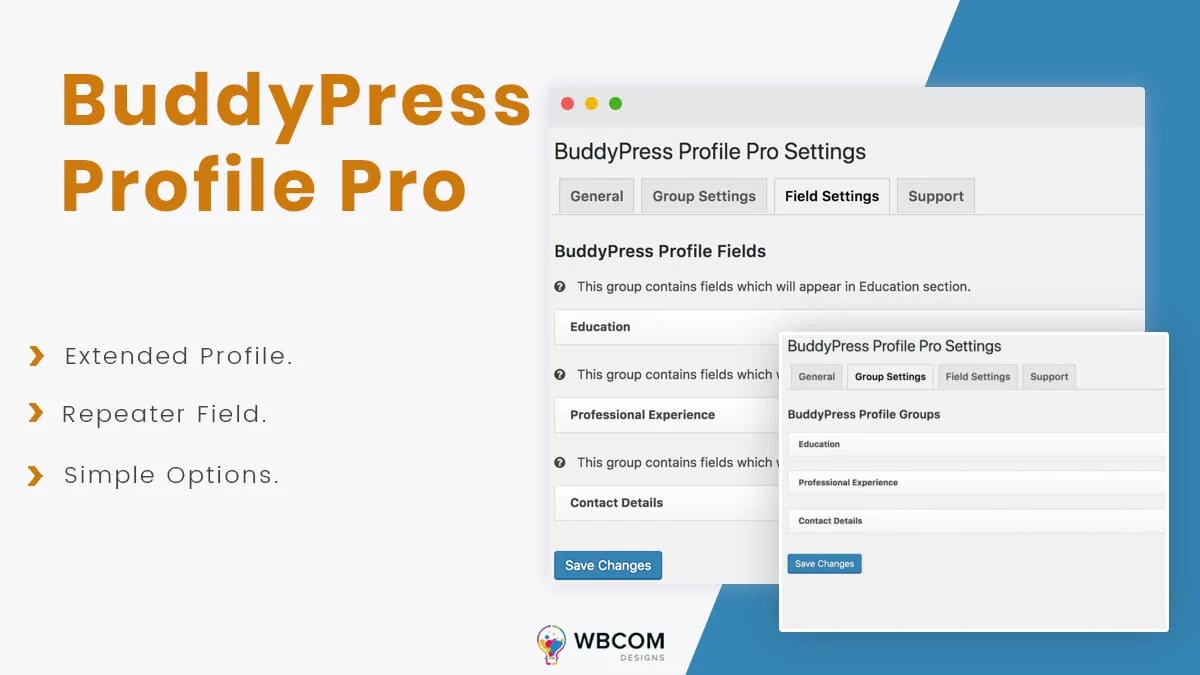
BuddyPress Profile Pro is our add-on that extends BuddyPress profiles with field groups and repeater fields. Once installed, it adds settings in three areas.
1. General settings
General options apply to all groups and repeater fields, including autocomplete for fields where members tend to type the same values.
2. Group settings
Create a group with a title and description, and mark it as a repeater group so members can add it more than once. The plugin comes with default groups for Education, Professional Experience and Contact Details, which you can keep, edit or remove.
3. Field settings
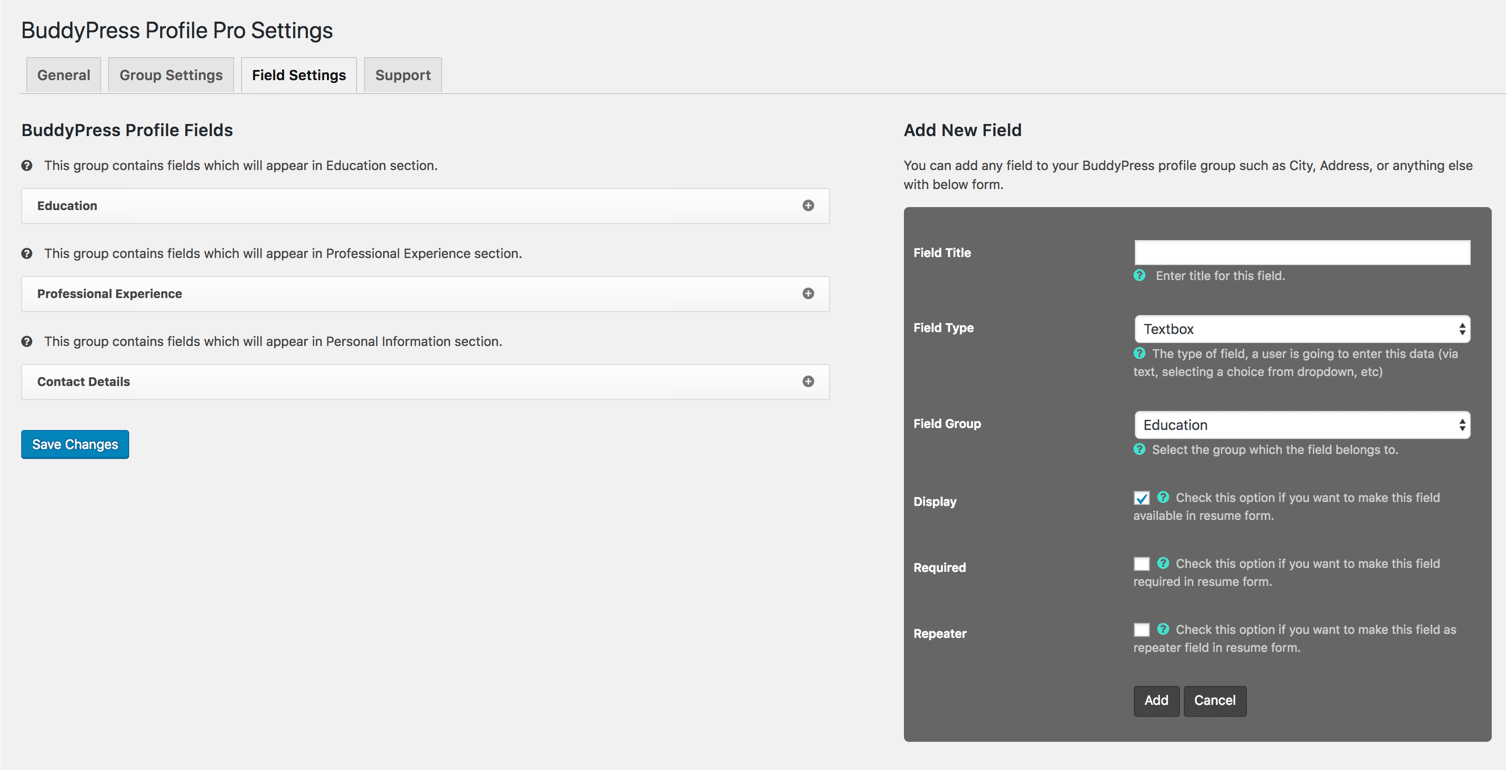
Add fields to each group with a title, a field type and the group they belong to, and choose whether a field repeats.
4. What members see
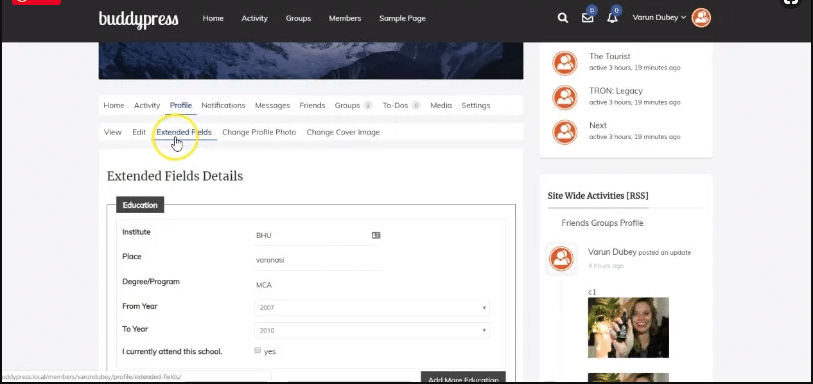
Group fields and repeater entries appear on each member’s profile. Members fill them in from their profile and add as many entries as they need.
You can watch the plugin in action in this walkthrough video, and see details on the BuddyPress Profile Pro page.
Planning a profile members will actually complete
The most common profile mistake is asking for too much, too early. A good profile plan answers three questions for every field: why do we need it, who will see it, and when do we ask for it?
When | Ask for | Why then |
|---|---|---|
At signup | Name, and at most one or two fields the community depends on (for example role or location) | Every extra field at signup loses people |
First week | A photo, a short bio, interests | Members now know what the community offers |
When it becomes useful | Work history, education, portfolio (repeater groups) | Ask when the member wants to be found for it, such as before joining a directory or job board |
Rules that keep profiles useful
- Prefer choices over free text for anything you want to filter by: industry, country, skill level.
- Keep option lists short and current. A drop-down with 80 industries helps nobody.
- Write a one-line description under each field explaining why you ask.
- Make sensitive fields private by default: phone, date of birth, address.
- Review fields once a year and hide those nobody fills in.
Common uses for repeater profile fields
Community type | Repeater groups that help |
|---|---|
Professional network | Work experience, certifications, skills with level |
Alumni association | Degrees and years, chapters or clubs joined |
Freelancer marketplace | Portfolio projects, services offered, past clients (public only with permission) |
Job board community | Work history and education that form a ready-made CV |
Association or society | Committee roles over the years, awards |
Learning community | Courses completed elsewhere, qualifications |
Three example profile designs
A professional network for marketing consultants
- Signup group: name, country, primary specialism (drop-down)
- About group: short bio, website, languages spoken (checkboxes), open to work (radio: yes, no, selectively)
- Experience (repeater): role, company, start and end dates, one-line summary
- Certifications (repeater): name, issuer, year
An alumni association
- Signup group: name, graduation year, programme (drop-down)
- Now: current city, current employer and role, willing to mentor (checkbox)
- Education (repeater): degree, institution, year, for members with several
- Involvement (repeater): clubs, committees and years
A hobby community for photographers
- Signup group: name or display name, region
- Gear and style: main camera system (drop-down), genres (checkboxes), experience level (radio)
- Portfolio (repeater): project title, link, short description
- Exhibitions and awards (repeater): title, venue, year
None of these needs more than three or four fields at signup, and each one can grow later without disturbing members who joined early. Notice the pattern in all three: a tiny signup group, one group of quick facts, and repeater groups for anything that is a history or a list. That shape keeps signup fast and profiles rich.
Getting members to complete their profiles
Fields only help if members fill them in. Communities with complete profiles usually do a few simple things:
- Show the benefit. “Complete your experience to appear in the expert directory” works better than “Please complete your profile”.
- Ask at the right moment. Prompt for work history when a member joins a job-related group, not on day one.
- Use a welcome sequence. One email in the first week with a direct link to the profile edit tab that matters most.
- Lead by example. Make sure moderators and early members have complete profiles; new members copy what they see.
- Keep required fields minimal. Required fields at signup lower completion of everything else.
- Feature good profiles. A weekly “member spotlight” encourages others to fill theirs in.
Displaying profile data well
How profile data appears matters as much as what you collect:
- Put the most useful facts first: role, location and what the member can help with, before long histories.
- Show repeater entries newest first for work and education, the order people expect from a CV.
- Hide empty sections instead of showing blank headings.
- Use the same fields in the member directory cards, so members can scan before clicking.
- Check profiles on a phone. Long repeater sections should collapse or stack cleanly on a small screen.
Your theme controls most of this. Community themes built for BuddyPress and BuddyNext lay out profile tabs and fields with this in mind; see our guide to BuddyPress themes.
Importing existing member data into profile fields
If your members’ details already live in a spreadsheet, a CRM or another platform, you can bring them into profile fields rather than asking everyone to type them again. The work has three parts:
- Map the data. List each column in your source and the profile field (or repeater field) it belongs to. Clean up values to match your drop-down options.
- Import into a staging copy first, then check a handful of profiles against the source.
- Tell members what was imported and ask them to review it, especially anything visible to others.
Simple imports can be done with an import plugin; imports into repeater groups or from another platform’s export usually need a small custom script. For moving whole communities, see our guide to moving from a SaaS platform to WordPress.
Data, privacy and member trust
The more members tell you, the more you are responsible for. Before you add a field, decide:
- Do we need it? If you cannot say how the community uses a field, do not collect it.
- Who can see it? Set the default visibility deliberately, and tell members in the field description.
- How long do we keep it? Your privacy policy should cover profile data, and WordPress’s privacy tools can export or erase a member’s personal data when they ask.
- Is it searchable by search engines? Public profiles can appear in search results. If your community is private, check what a logged-out visitor can see.
Our article on what community platforms keep about your members covers member data more broadly.
Common profile mistakes
- Copying a form from another site. Fields that made sense for someone else’s community rarely fit yours. Start from what your members need to know about each other.
- Too many required fields. Required fields at signup are the biggest single cause of abandoned registrations.
- Free text for everything. If you will ever want to filter by it, make it a choice field.
- Numbered fields instead of repeaters. “Job 1, Job 2, Job 3” looks broken the day a member needs a fourth.
- Public by default for personal details. Members lose trust quickly if their phone number appears to everyone.
- Never reviewing the fields. A field nobody completes in six months is clutter; hide it.
- Changing option lists without a plan. Renaming or removing a drop-down option can leave existing members with values that no longer exist. Plan the change and update their data.
Profiles and moderation
Profiles are user-generated content, so they need the same care as posts. Decide what is not allowed in bios and links, who reviews reported profiles, and what happens to a profile when a member is suspended. Keep link fields in check, since spammers sign up purely to place links in profiles; requiring approval for new members or hiding new members’ links until they have been active for a while both help. Our guide to keeping a community fast covers what large numbers of profiles mean for performance, too.
Profiles on BuddyNext
If you are planning a new community, or rebuilding an older BuddyPress site, BuddyNext is the community platform we build and support today, and it runs on the same WordPress foundation. Profile planning works the same way on either platform: decide what you need, when you ask for it and who sees it. Our guide to moving from BuddyPress to BuddyNext explains what moves across, including member profiles.
When profiles need custom development
Plugins cover most profile needs. Custom work makes sense when profile data has to connect to something else:
- Syncing profile fields with a CRM or an association’s member database
- Showing profile data in a custom directory with advanced filters and maps
- Generating a printable CV or member card from repeater data
- Verifying entries, such as checking a certification with an issuer
- Importing existing member data from spreadsheets or another platform
That is the kind of work our BuddyPress development services and custom plugin development cover. The community portal requirements checklist is a good place to start writing down what your profiles must do.
How long does it take to set up good profiles?
For most communities, a focused afternoon covers the setup, and the thinking matters more than the clicking:
Step | Time |
|---|---|
Decide what members need to know about each other, with two or three real members if you can | 1 hour |
Group the fields into signup, quick facts and repeater histories | 30 minutes |
Create the fields, descriptions and visibility defaults | 1 hour |
Add repeater groups and test them as a member | 1 hour |
Review signup and profiles on a phone, and as a logged-out visitor | 30 minutes |
If several people run the community, agree on one person who owns the profile plan, so new fields are added deliberately rather than whenever someone has an idea. Revisit the plan after the first month, when you can see which fields members actually complete and which they skip. Small changes then, based on real use, beat a perfect plan made before launch.
A quick setup checklist
- Extended Profiles component active
- Field groups planned: signup, first week, later
- Each field has a reason, a description and a default visibility
- Signup asks for the minimum
- Repeater groups added for histories such as work, education and portfolio
- Profile checked as a new member, an existing member and a logged-out visitor
- Privacy policy updated to cover profile data
Frequently asked questions
Does BuddyPress support repeater fields?
Not on its own. Each BuddyPress profile field holds a single answer. To let members add several entries, such as multiple jobs, use an add-on like BuddyPress Profile Pro or custom development.
Where do I add BuddyPress profile fields?
In the WordPress dashboard under Users, Profile Fields, once the Extended Profiles component is active in the BuddyPress settings.
Can members hide some profile fields?
Yes. Each field has a visibility level. You set the default and choose whether members can change it, so they can keep details like a phone number private.
How many profile fields should I ask for at signup?
As few as possible: a name plus one or two fields the community depends on. Ask for the rest after members have joined and seen the value of a complete profile.
Can profile fields be used to search members?
Yes, with a member search or directory filter plugin. Choice fields such as drop-downs and checkboxes filter far better than free text.
Do repeater fields slow the site down?
Not noticeably for normal profiles. Each entry is a little more data per member. Performance matters more for pages that load many profiles at once, such as a member directory with filters, so test those pages with realistic numbers of members.
Can I show repeater data in the member directory?
Usually you show a summary, such as the most recent job title, rather than the whole history. Showing full histories in directory cards makes them long and slow to scan; keep the detail on the profile page.
Will my profile fields survive a theme change?
Yes. Profile fields and members’ answers are stored by the community plugin, not the theme. A new theme may display them differently, so check profile pages after switching.
Can I change a field after members have filled it in?
Yes, but carefully. Renaming a field is safe; changing a field’s type or removing options can affect existing answers. Make the change on a staging copy first and check a few profiles.
Should profiles be public?
It depends on the community. Public profiles help members be found and can bring search traffic; private profiles protect members in sensitive communities. Many sites show a small public summary and keep details for logged-in members.
What is the difference between a field group and a repeater group?
A field group is a section of the profile, filled in once. A repeater group is a set of fields a member can fill in several times, such as one block per job.
















