BuddyPress Forum or bbPress Forum? Which Is Better for Your WordPress Community in 2026
BuddyPress has no forum of its own: group forums run on bbPress. We compare bbPress 2.6.22 with wpForo, Asgaros Forum and Jetonomy, with current data and honest cons.
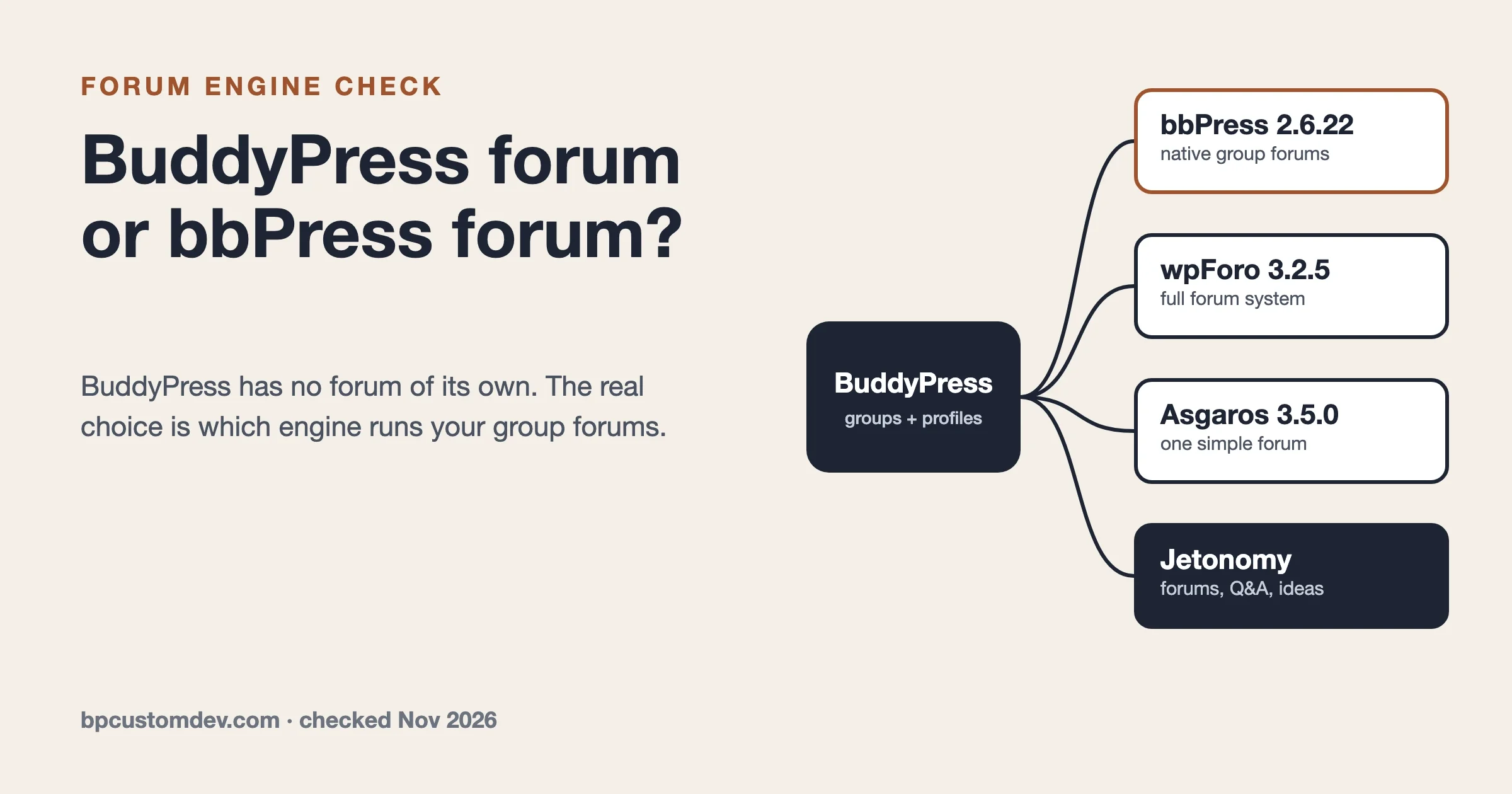
BuddyPress does not have a forum of its own. When you add forums to a BuddyPress site, including the Forum tab inside each group, the forum software doing the work is the free bbPress plugin. So the real question is not BuddyPress forum or bbPress forum, it is whether bbPress is still the right forum engine for your community, or whether wpForo, Asgaros Forum or our own Jetonomy fits better.
Short version: bbPress is still the default for BuddyPress group forums and it just shipped a security release, but it moves slowly and looks dated without theme work. wpForo is the most feature-rich free alternative. Jetonomy, built by our team, pairs BuddyPress groups with modern forum and Q&A spaces. Every version number, install count and rating below was checked on WordPress.org and the vendors’ own pages on 18 November 2026.
Does BuddyPress have a forum?
Not built in. The BuddyPress documentation says it plainly: forums in BuddyPress use the bbPress software, and you install bbPress to get them. The BuddyPress codex page on group and sitewide forums lists three setups, and all three start with the same step, install and activate bbPress.
BuddyPress used to ship a forums component of its own, based on the old standalone bbPress 1.x. That was retired years ago. If you read a tutorial that tells you to enable “Discussion Forums” inside BuddyPress settings, it is describing a version of BuddyPress that no longer exists.
What BuddyPress does give you is the social layer around a forum: member profiles, friendships, private messages, an activity stream, notifications and groups. A forum is one part of that picture, and BuddyPress hands that part to whatever forum plugin you choose.
BuddyPress vs bbPress: what is the difference?
BuddyPress is a social network plugin. bbPress is a forum plugin. Both are free, both come from the same open source community around WordPress.org, and they were designed to work together, which is why people compare them even though they do different jobs.
BuddyPress | bbPress | |
|---|---|---|
What it is | Social network: profiles, groups, activity, messages | Forum: forums, topics, replies |
Current version (18 November 2026) | 14.5.6, released 17 Nov 2026 | 2.6.22, released 15 Nov 2026 |
Active installs | 90,000+ | 100,000+ |
WordPress.org rating | 4.1 out of 5 (375 ratings) | 3.9 out of 5 (343 ratings) |
Requires | WordPress 6.1, PHP 5.6 | WordPress 6.0, PHP 7.2 |
Where content is stored | Its own bp_* tables | wp_posts, as forum, topic and reply post types |
Best at | Casual, fast, people-first interaction | Long, searchable discussions |
Weak at | Keeping long discussions findable | Social features and a modern look |
The way members behave is the practical difference. In an activity stream, people post short updates and move on, and a good answer from last month sinks out of view. In a forum, a topic has a title, a home and a URL, so the answer to “how do I reset my course progress” is still there in a year and can rank in search. Most communities need both modes, which is why the BuddyPress plus bbPress pairing became the default.
The storage row matters more than it looks. bbPress keeps every forum, topic and reply in the same wp_posts table as your blog posts and pages. On a small forum that is invisible. On a forum with hundreds of thousands of replies it makes that table large, and backups, searches and some admin screens get slower with it. That is a trade-off, not a bug, and it is the main reason some alternatives use their own tables.
How do BuddyPress and bbPress work together?
You install both, turn on the BuddyPress Groups component, and switch on group forums in the bbPress settings. Each group admin then decides whether their group gets a forum. These steps were checked against bbPress 2.6.22 and BuddyPress 14.5.6 on 18 November 2026.
- Install and activate BuddyPress, then go to Settings > BuddyPress > Components and make sure User Groups is active.
- Install and activate bbPress.
- Go to Settings > Forums, find the BuddyPress Integration section, tick Enable Group Forums and pick a parent forum for group forums.
- Open a group, go to Manage > Forum and tick the option that gives the group its own forum.
- For sitewide forums outside groups, create forums under Forums > New Forum and add a Forums page to your menu.
If you manage sites from the command line, installing both plugins is one WP-CLI command. Activate the Groups component in the dashboard afterwards.
# Checked on 18 November 2026
wp plugin install buddypress bbpress --activate
Once it is running, new topics show up in the group activity stream, members can @mention each other inside replies, and forum activity appears on member profiles. That integration is the strongest argument for bbPress on a BuddyPress site: it is native, free and documented by the same people who build BuddyPress.
Is the bbPress forum plugin still a good choice in 2026?
For a small or medium BuddyPress community that wants free group forums, yes. bbPress 2.6.22 came out on 15 November 2026 as a security and maintenance release, and the bbPress release post says it tightens access checks for forums, topics, replies, attachments and BuddyPress group moderation, keeps protected content out of sitemaps and feeds, and improves block theme rendering and PHP compatibility. No database upgrade is needed.
Three things should shape your decision, though.
It moves slowly
The 2.7 branch has been in development for a long time and is still at 2.7.0 alpha 4 on the bbPress download page. Releases in the 2.6 line are mostly fixes. If you want new forum features such as accepted answers, voting or an ideas board, they will not come from bbPress itself.
Security fixes have been frequent this year
Patchstack lists no open bbPress advisories on 18 November 2026, which is good news. But three were published and fixed in 2026, all rated CVSS 5.3:
- CVE-2026-74010, broken access control, affects 2.6.14 and earlier, fixed in 2.6.15, published 31 August 2026.
- CVE-2026-62137, sensitive data exposure, affects 2.6.14 and earlier, fixed in 2.6.15, published 11 September 2026.
- CVE-2026-110762, unauthenticated information exposure, affects 2.6.18 and earlier, fixed in 2.6.19, published 14 October 2026.
The lesson is simple: if you run bbPress, keep it updated. A forum that sat on 2.6.14 since the summer is exposed to two of these.
BuddyPress itself needs the same attention. The CVE.org record for CVE-2026-1360, published 30 July 2026, describes an authenticated (Subscriber and above) PHP object injection through XProfile field data and lists BuddyPress 14.5.0 and earlier as affected. Patchstack’s entry for the same CVE (published 3 August 2026, CVSS 8.8) shows a wider range, 14.5.6 and earlier, and still said no official patch was available when we checked on 21 November 2026. Either way, run the current BuddyPress 14.5.6, the security release from 17 November 2026, but do not treat it as the fix: Patchstack still lists 14.5.6 as affected, so limit open registration and keep a firewall or mitigation rule in place.
It looks plain out of the box
bbPress outputs simple markup and leaves the design to your theme. With a community theme that styles it, it looks fine. With a general theme, forum pages often look like an unstyled list, and mobile layouts suffer. That is the most common complaint in recent reviews.
What are the best bbPress alternatives for a BuddyPress site?
Three alternatives are worth a serious look on a BuddyPress site in late 2026. Each makes a different trade-off.
wpForo: the most features in a free plugin
wpForo is a full forum system with several layouts (extended, simplified, Q&A, threaded and boxed), its own member profiles, a reputation system and migration tools. Version 3.2.5 shipped on 13 November 2026 with a batch of security fixes for stored cross-site scripting through registration fields, profile fields and quoted posts. Its readme lists BuddyPress among the profile and membership plugins it integrates with, and its free Go2wpForo tool migrates from bbPress, Asgaros, phpBB, SMF, MyBB and others.
The trade-off is that wpForo is a world of its own. It has its own profiles, its own layouts and its own settings, so on a BuddyPress site you are running two community systems side by side. Recent versions also add cloud-based AI indexing features, so read what data those send off-site before you switch them on.
Asgaros Forum: small, simple and fast to set up
Asgaros Forum is a lightweight forum you add with a shortcode. Version 3.5.0 shipped on 23 October 2026 with a fix for broken access control in the subscription feature and WordPress 7.1 compatibility. It suits a single sitewide forum on a small site.
It is not built around BuddyPress groups, so you do not get per-group forums. The other caution is maintenance. It is largely a one-developer project, and recent reviews include a site owner whose security scanner flagged an older version and who could not reach the developer, plus another hoping the plugin will not be abandoned. The changelog shows a steady run of security fixes, so stay on the latest version.
Jetonomy: forums, Q&A and ideas paired with BuddyPress groups
Jetonomy is the forum and Q&A plugin our team builds. It gives you four kinds of space (forum, Q&A with accepted answers, an ideas board, and a short-form Show & Tell feed), trust levels from 0 to 5, a moderation queue and more than 80 REST API routes in the free version. It stores discussions in its own dedicated tables instead of wp_posts.
On a BuddyPress site it plays the role bbPress plays today. According to the Jetonomy BuddyPress integration docs, it detects the Groups component automatically, lets a group admin create or link a forum space in the group creation wizard, keeps group and space membership in sync both ways (including admin and moderator roles), adds a Forum tab to paired groups, and posts new topics to the group activity stream. It also has one-click importers for bbPress, wpForo and Asgaros. The free version is free forever; Jetonomy Pro is $69 a year or $199 once for one site.
Our honest cons. Jetonomy is not listed in the WordPress.org plugin directory, so you download it from jetonomy.org and you will not find hundreds of public WordPress.org reviews to judge it by. It is far newer than bbPress, so the ecosystem of third-party add-ons and tutorials is smaller. And its importer does not create redirects for your old forum URLs, so you map those yourself with a redirect plugin or server rules.
How do the options compare side by side?
All figures checked on 18 November 2026. Ratings are converted from the WordPress.org 100-point scale to five stars.
bbPress | wpForo | Asgaros Forum | Jetonomy | |
|---|---|---|---|---|
Version | 2.6.22 | 3.2.5 | 3.5.0 | 2.0.3 |
Last release | 15 Nov 2026 | 13 Nov 2026 | 23 Oct 2026 | 2.0.3 is current |
Active installs | 100,000+ | 20,000+ | 10,000+ | Not on WordPress.org |
Rating | 3.9 (343) | 4.7 (391) | 4.7 (210) | No WordPress.org rating |
BuddyPress group forums | Yes, native | Profile integration | No | Yes, paired spaces |
Q&A with accepted answers | No | Yes, Q&A layout | No | Yes |
Storage | wp_posts | Own tables | Own tables | Own tables |
Importer from bbPress | n/a | Yes (Go2wpForo) | No | Yes, one click |
Price | Free | Free core, paid add-ons | Free | Free, Pro from $69/yr |
What users say, and our suggestion
We read the WordPress.org reviews from the last twelve months for each plugin on 18 November 2026, plus recent threads in the WordPress.org support forums. Review counts in that window are small for all of these plugins, so treat them as signals rather than a verdict.
bbPress
- Data: 3.9 out of 5 from 343 ratings, 100,000+ active installs, last updated 16 November 2026. Main support happens on bbpress.org, so the WordPress.org resolved-thread figure does not apply.
- Praised: a long-time user calls it a historic plugin that is still useful for turning WordPress into an online community (December 2025). People also value that it is free and native to BuddyPress.
- Complaints: a site owner who tried to go back to bbPress found it bare-bones and poor on mobile with most themes, and felt development had stalled (October 2026). Recent support threads repeat the same setup problems: private forums returning 404 for logged-out visitors, logged-in members told they must log in to post, and forums not appearing on the Forums page.
wpForo
- Data: 4.7 out of 5 from 391 ratings, 20,000+ active installs, last updated 14 November 2026, 3 of 3 WordPress.org support threads resolved in the last two months.
- Praised: a long-time bbPress user moved to wpForo and kept posts, attachments and member ratings (November 2026). Others single out the support forum and the documentation.
- Complaints: every review in the last twelve months was five stars, so there is no critical review to quote. The WordPress.org support forum shows recurring threads about members unable to log in, migration issues and translations, and the 3.2.5 release was mostly security fixes.
Asgaros Forum
- Data: 4.7 out of 5 from 210 ratings, 10,000+ active installs, last updated 23 October 2026, 0 of 3 recent support threads resolved.
- Praised: works out of the box and is quick to install (August 2026).
- Complaints: a site owner reported a security scanner warning on 3.4.0 and could not reach the developer (October 2026). The low resolved count matches that.
Jetonomy
- Data: not in the WordPress.org directory, so there are no WordPress.org ratings, install counts or support-thread figures to show. That is too little public review data for us to summarize fairly, and we would rather say so than quote our own marketing.
- What to check yourself: the live demo on jetonomy.org and a staging import of your own bbPress data.
Our suggestion
- Small BuddyPress community, tight budget, group forums needed: bbPress 2.6.22. It is native, free and maintained. Pair it with a community theme so it looks right on phones.
- A forum is the main product, not a side feature: wpForo, if you accept a second profile system next to BuddyPress.
- One simple sitewide forum on a small site: Asgaros Forum, kept on the latest version.
- You want Q&A with accepted answers, an ideas board and group-paired spaces on BuddyPress: Jetonomy, tested on staging with your real data first.
- You are starting a new community from scratch: look at BuddyNext, our community plugin that is not built on BuddyPress and works with Jetonomy, before you stack BuddyPress add-ons. For BuddyPress sites, BuddyX and Reign are our themes that style both BuddyPress and bbPress pages.
Our real cons as one of these options: Jetonomy and BuddyNext are younger than bbPress and BuddyPress, the third-party ecosystem around them is smaller, and moving an established forum always means an import plus redirects.
Should you use BuddyPress and bbPress together, or pick one?
Use both when your members need two ways to talk. A course cohort, a membership site or a local club usually does: quick updates and introductions in the activity stream, real questions and how-to answers in the forum. Use bbPress alone when you only need a support forum and do not want profiles, friends or an activity stream. Use BuddyPress alone when the community is about people and short updates and nobody will ever search for an old answer.
For a wider view of the plugins that build out the social side, see our WordPress community plugins comparison. If you are also weighing BuddyBoss, which forked BuddyPress and ships its own bbPress-derived forums, read BuddyPress vs BuddyBoss first. And for a frank look at where BuddyPress itself stands, our honest assessment of BuddyPress in 2026 covers the install trend and the security picture.
Can you switch from bbPress later without losing posts?
Yes, with planning. Both wpForo and Jetonomy import bbPress forums, topics and replies with their authors. What an importer does not keep for you is search traffic: bbPress URLs such as /forums/topic/your-topic/ change when you move, so every old URL needs a 301 redirect to its new home. Jetonomy’s own migration guide says its importer does not create redirects, so plan them up front.
A safe order that works for any of these moves:
- Take a full database and files backup.
- Copy the site to staging and run the import there first. Time it, because large forums take a while on shared hosting.
- Compare counts: forums, topics and replies before and after. Open a few long threads and check that authors, dates and attachments came across.
- Export a list of old topic URLs and map each to its new URL in a redirect plugin or your server rules.
- Switch the live site over in a quiet hour, then keep the old plugin deactivated (not deleted) for a few weeks in case you need to re-run anything.
Moderation needs a plan of its own in a bigger forum. Our guide to community moderation with AI tools and human teams covers queues, trust levels and what to automate.
Common bbPress setup problems people report
These come up again and again in the bbPress support forum on WordPress.org (checked 18 November 2026). Most are configuration, not bugs.
- Private forums show a 404 to logged-out visitors. That is how bbPress hides private content. Show a login prompt or make the forum hidden instead of private, depending on what you want visitors to see.
- Logged-in members are told they must log in to post. Usually a caching layer serving a logged-out copy of the page, or a role problem. Exclude forum pages from page caching and check the member’s forum role under Users.
- The Forums page is empty or missing from the menu. The forum root slug and your page slug clash, or the page lacks the forum index shortcode. Check Settings > Forums and the page content.
- Topics and replies sit in pending. WordPress discussion settings and anti-spam plugins apply to bbPress too. Check comment moderation rules and your spam plugin’s queue.
- Group forums do not appear. Group forums are off until you enable them under Settings > Forums, and each group admin still has to switch the forum on for that group.
Frequently asked questions
Is bbPress free?
Yes. bbPress is free and open source under the GPL, with no paid tier. Some third-party add-ons and themes that style it are paid.
Do I need BuddyPress to use bbPress?
No. bbPress runs on any WordPress site on its own. You only need BuddyPress if you want group forums, member profiles, an activity stream and the other social features.
Does bbPress work with BuddyBoss?
BuddyBoss Platform is a fork of BuddyPress that ships its own forums component derived from bbPress, so you do not install bbPress separately on a BuddyBoss site. Check BuddyBoss’s own documentation for its current forum features.
Will bbPress slow down my site?
On a small forum, rarely. On a very large forum, the wp_posts table grows with every reply, and that can slow searches, backups and some admin screens. Object caching and a good host help. Forums with their own tables avoid that particular issue.
Can I have group forums and sitewide forums at the same time?
Yes. bbPress supports sitewide forums, group forums or both. Group forums sit under a parent forum you choose in Settings > Forums.
Which forum plugin is best for SEO?
Any of them can rank if topics have clear titles, public forums are indexable and old URLs never break. The biggest SEO risk is a migration without redirects, not the choice of plugin.