Site administrators can use the BuddyPress Friendship Restrictions plugin to limit BuddyPress friendship functionality. You can control who can add friends, who can be added as friends, how many requests are allowed, and how many friends a member can have on your BuddyPress site. BuddyPress needs to be active on your site for it to work.
Friendship Restrictions is a solid plugin for sites that want to keep in-site spam to a minimum. It has two modes of operation, admin control and user control, letting either the site admin or the members themselves limit messaging to friends, followers, or fellow group members. It gives site administrators complete control over how the friends feature works.
Installation of BuddyPress Friendship Restrictions Plugin
The installation process is straightforward. Follow the steps below to install BuddyPress Friendship Restrictions.
- Go to your BuddyDev account page and download the Friendship Restrictions plugin.
- Extract the
buddypress-friendship-restrictions.zipfile into your WordPress plugins folder. - In your WordPress Dashboard, go to Plugins > Add New, select Upload Plugin, choose
buddypress-friendship-restrictions.zip, and install it. - Click the Activate Plugin button to turn it on, or
- Go to WordPress Dashboard > Plugins and activate it from there.
Also Read: Best WordPress BuddyPress Events Plugins
Setting Up BuddyPress Friendship Restrictions Plugin
Setup is just as simple. Follow these steps to configure it:
- Go to WordPress Dashboard > Settings > Friendship Restrictions.
- Make the changes you need and click Save Changes.
The Benefit of the Friendship Restrictions Plugin
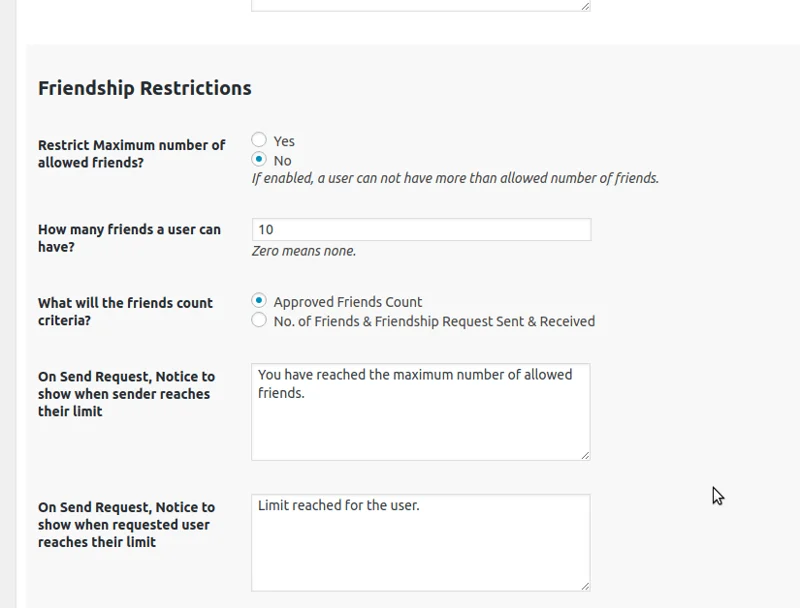
At its core, the plugin gives you fine-grained control over the friends feature by role or member type. It lets you:
- Exempt specific roles from global friendship constraints.
- Set custom constraints by role or member type.
- Bypass all restrictions for a given role or member type where it makes sense.
Features of this Plugin
- Restrict who can send friendship requests, by role.
- Restrict who can be added as a friend, by role.
- Throttle BuddyPress friendship requests (limit how many can be sent in a given period).
- Limit the total number of friends a member can have.
- Extend easily using filters.
- Set individual role-based limits (planned for a future update).
General Options in BuddyPress Friendship Restrictions Plugin
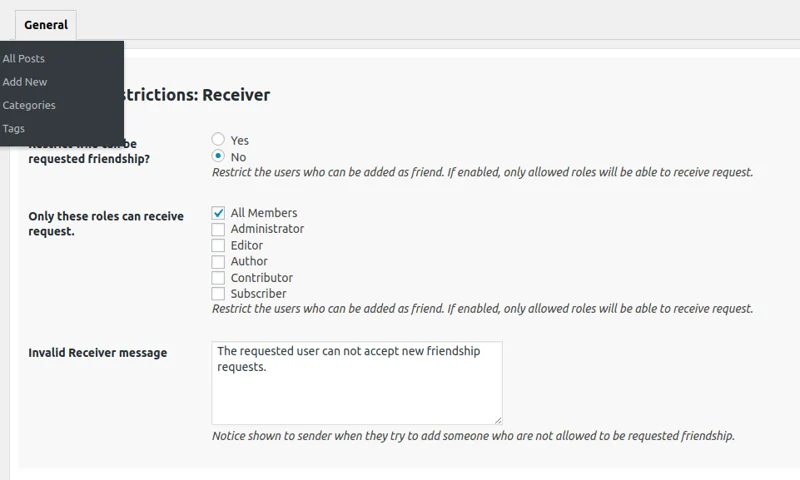
- Toggle an option on to bypass the global restrictions; leave it off and the role stays subject to them.
- Enable or disable restrictions on submitting requests.
- Restrict or remove the cap on how many friends a role can have.
- Enable or disable request restrictions for a specific role.
- Choose which roles can send friendship requests to this role.
- Choose which roles this role is allowed to send friendship requests to.
- Choose which other roles this role’s users can be friends with.
Also Read: Best WooCommerce Dropshipping Plugins
Should You Use It

BuddyPress Friendship Restrictions is worth a look for dating sites, professional networks, fan clubs, and any community where unrestricted friend requests tend to turn into spam or harassment. Role-based limits mean you can keep the friends feature open for the members who need it while throttling or blocking it for roles that don’t, without touching a line of code.
Interesting Reads: