People use social networks to build communities and stay in touch. They chat with friends or strangers, join groups tied to their interests, or just talk about whatever’s on their mind, and one of the perks of a social community platform is that you’ll almost always find someone who shares your interests. A site with these features also helps establish your brand as trustworthy: an active, loyal user base signals that a company is meeting real needs, and every review or conversation members leave behind is effectively vouching for your reputation. That’s where the BuddyPress Profile Visibility Manager plugin comes in.
The plugin lets site administrators monitor and control their users’ account privacy. BuddyPress needs to be active on your site for it to work, and it gives users the following options.
Features of BuddyPress Profile Visibility Manager Plugin
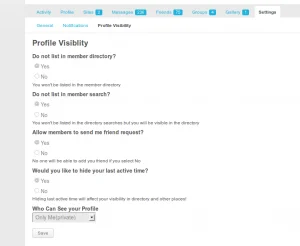
- A user can choose to show or hide their profile in the Members Directory.
- A user can choose to hide or expose their profile in directory searches.
- A user’s last-active time can be hidden or shown.
- A user can set their account visibility to one of the following:
Everyone: Anyone can view their profile.Logged-in users only: Only logged-in members can view it.Friends only: Only their friends can view it.Members of my group: Visible only to members of groups the user belongs to.Just me: Only the user and the super admin can view it.
In short, it’s a mix of privacy and visibility controls that let each user decide how exposed they want to be.
Also Read: Best WordPress BuddyPress Events Plugins
Installation of BuddyPress Profile Visibility Manager Plugin
Installing the plugin is straightforward:
- Download the BuddyPress Profile Visibility Manager plugin from your BuddyDev account.
- Extract the
bp-profile-visibility-manager.zipfile into your WordPress plugins folder, or - Go to Plugins > Add New in your WordPress Dashboard, select Upload Plugin, choose
bp-profile-visibility-manager.zip, and install it. - Click Activate Plugin on the install screen, or
- Go to WordPress Dashboard > Plugins and activate it from there.
Setting up BuddyPress Profile Visibility Manager Plugin
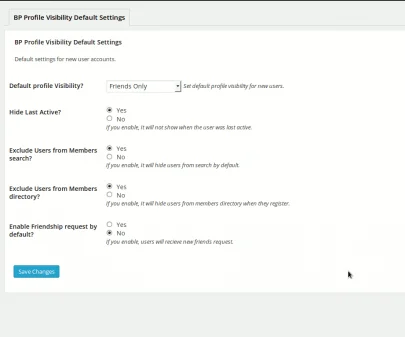
Setup takes just a couple of steps:
- Go to WordPress Dashboard > Settings > BP Profile Visibility Settings.
- Make your changes and click Save Changes.
Advantages
The plugin lets you protect BuddyPress components from users who aren’t logged in. If a logged-out user tries to access a protected component, they’ll see a prompt asking them to register or log in. Some of the standout features:
- Lock Custom Post Types: Blocks logged-out users from viewing custom post-type pages and prompts them to log in or register.
- Lock Pages: Hides all or specific WordPress pages from logged-out users. You choose which pages to restrict.
- Custom Restriction Message: Lets you write (and optionally add media to) a custom message shown to logged-out users who try to access a locked page or component.
- Front-end Profile Visibility Settings: If enabled, members can set their own profile visibility from the front end, visible to everyone, just themselves, friends, or all members.
Also Read: Best WooCommerce Dropshipping Plugins
Should You Use It
BuddyPress Profile Visibility Manager is built to keep your members’ profiles free of unwanted attention and out of Google’s index when they’d rather stay private. Between locking BuddyPress components for logged-out and logged-in users alike and giving members granular control over their own visibility, it covers most of what a privacy-conscious community site needs.
Interesting Reads: