Are you trying to figure out how to build a membership site with WordPress? Membership sites let you charge users for access to restricted content, which is a solid way to grow your website’s revenue.
In this article, we’ll walk through exactly how to build a membership site using WordPress.
What Is a WordPress Membership Site?
A membership site invites users to pay for access to certain areas of your website. It lets you restrict access to all or part of your content, forums, online courses, downloads, support, and more. WordPress membership sites are an increasingly popular, straightforward way to make money online.
In most cases, a membership site fits one or more of these criteria:
- It hosts content only members can access.
- Users need to register, and sometimes pay for a subscription, to access certain areas or content.
- Members get their own profiles, usually customizable.
- There’s a community built around the site.
What Are the Benefits of Creating a WordPress Membership Site?
There are plenty of reasons to consider running your own membership site. Here are some of the biggest benefits:
1. More Income
Membership sites run on a recurring billing model, so you get a steady stream of income that grows as more visitors sign up. That’s a real boost on top of affiliate sales and advertising if you’re already running those.
Also Read: Best WordPress BuddyPress Events Plugins
2. Less Work Over Time
Membership sites are a great way to build passive revenue: create premium content once, then add to it on your own schedule. Once a membership site is built well, you don’t need to do much more to keep it growing unless you choose to refresh content or engage with members directly.
3. Establish Authority
When you restrict content behind a membership plan, users tend to see that premium content as valuable, and see you as someone with real expertise on the subject.
4. Grow Your Email List
When you add registered users to your email list, you fill it with people who already know your site and are more likely to engage with your emails. That’s a real boost to your email marketing.
Membership Plugins for WordPress
Now let’s look at some of the best WordPress membership plugins so you can decide which fits your site.
1. MemberPress Membership Plugin
MemberPress packs in a lot of features and is a solid choice for a membership plugin. Site owners can create an unlimited number of membership packages or digital products, and users can restrict access to pages, posts, categories, tags, files, and videos using the MemberPress AWS add-on.
2. JetEngine Membership Solution
JetEngine’s membership feature lets admins build multi-step registration forms, set up welcome-email notifications, and assign membership levels to user roles. It also helps manage content accessibility, set visibility per content section, and allow or block digital content downloads.
3. S2Member
S2Member is a free WordPress membership plugin with a solid starting point, four membership levels out of the box. It’s been around a long time and has a loyal user base. It supports PayPal and integrates well with MailChimp, bbPress, and BuddyPress. Admins can restrict access by role, capability, post, page, or nearly anything else in WordPress.
Also Read: Why Community Management Matters For Your Business?
4. WooCommerce Membership Plugin
WooCommerce Memberships lets you create multiple tiers, paid or free. Members can upgrade, downgrade, pause, or cancel depending on the control you give them, and they can find everything about their membership in the Member Area.
5. WP-Members: Membership Framework Plugin
This is the original WordPress membership plugin, simple to install and configure. It controls content access for registered users by blocking posts and pages, and manages login, registration, and profile display within your theme. It works well for newsletters, premium content sites, associations, and similar use cases.
What’s the Best Membership Plugin for WordPress?
There are plenty of solid membership plugins for WordPress. If you want the most complete option, MemberPress is worth using.
We recommend MemberPress because it’s easy to use, works well with the Reign theme, and is one of the most popular membership plugins out there.
Steps to Build a Membership Site With WordPress
Let’s walk through building a membership site with WordPress using MemberPress.
1. Set Up the MemberPress Plugin
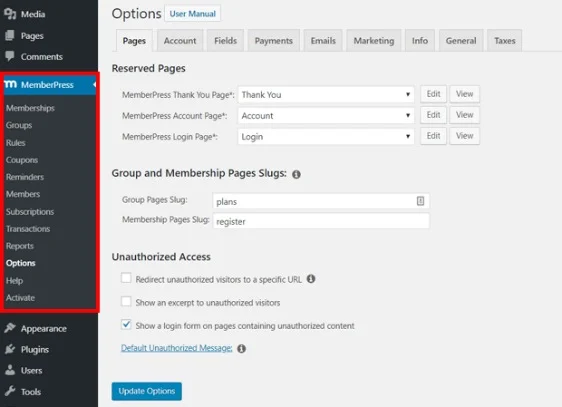
Start by installing and activating the MemberPress plugin. Then click the link to the plugin’s options page in your Dashboard notification.
2. Set Up Your Payment Methods
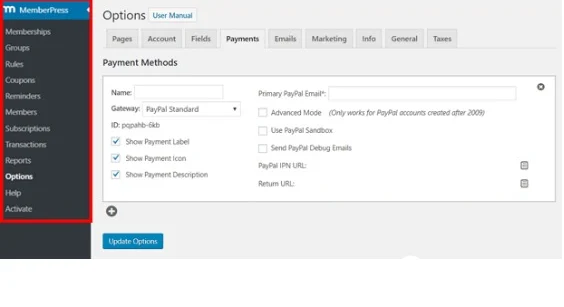
Click the Payments tab on the options page to set up the payment gateways you want to use.
3. Create Membership Levels
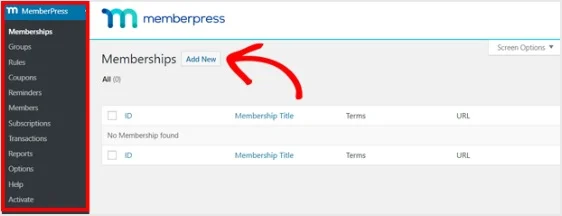
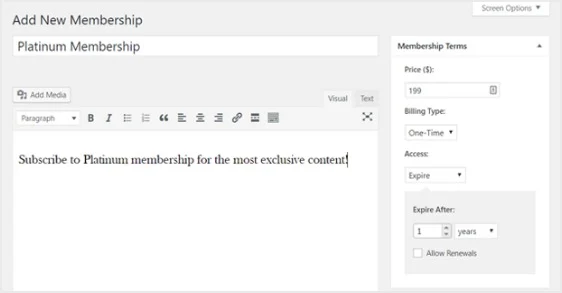
Go to MemberPress > Memberships from the Dashboard menu, then click Add New.
Set the price, billing type, and access time in the Membership Terms section on the right.
4. Set Up Access Rules
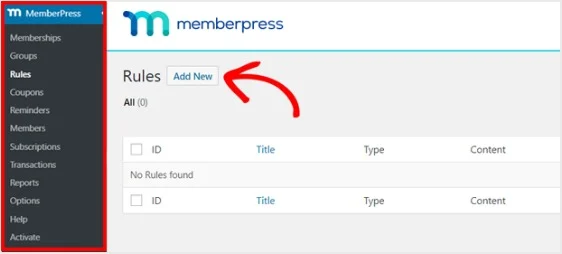
Go to MemberPress > Rules and select Add New.
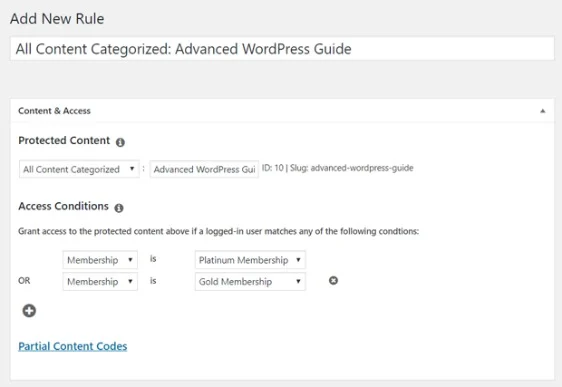
Create a rule linking your content to the membership levels you already set up.
5. Create Members-Only Content
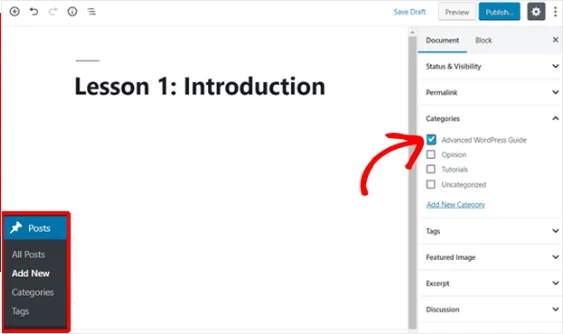
Create a new post with your content, then select the appropriate category.
Scroll down to the MemberPress Unauthorized Access section.
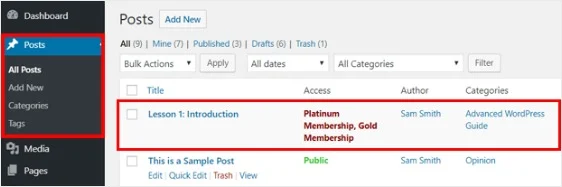
Go to Posts > All Posts to see which content is restricted to which membership levels.
6. Create a Pricing Page
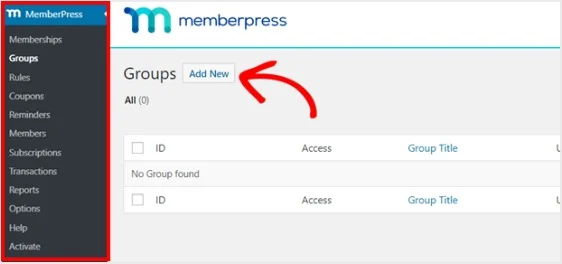
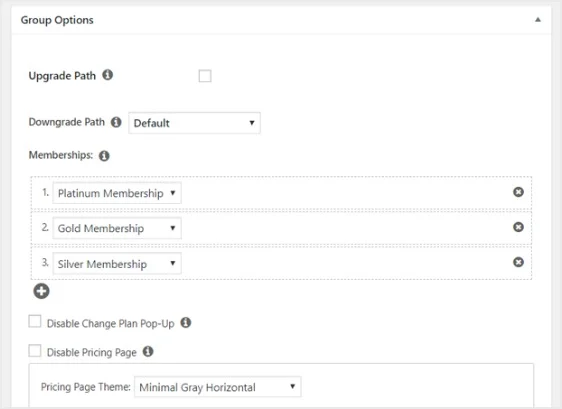
Go to MemberPress > Groups, then click Add New.
7. Add Sign-Up and Login Forms
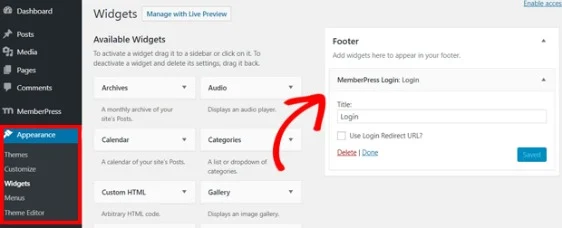
Go to Appearance > Widgets and drag the MemberPress login widget into a widget-ready area of your choice.
Also Read: How to Create Website Content that Actually Converts
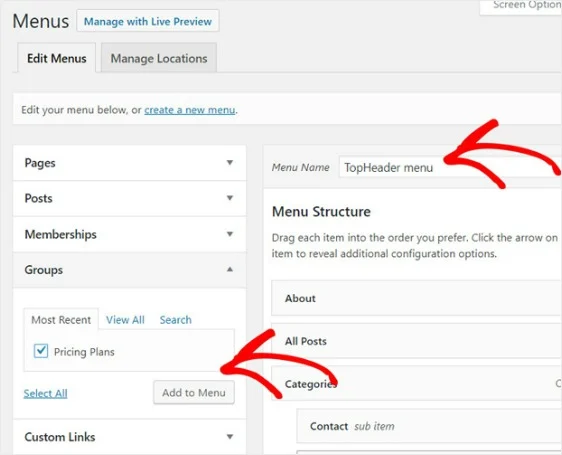
Go to Appearance > Menus and create a new menu, or use an existing one.
Conclusion
Following the steps above will get you a fully functional membership website on WordPress. If you’d rather build the membership layer on top of an actual community rather than bolt it onto existing content, BuddyNext Pro adds native Stripe memberships to a community you own outright, worth a look if community and membership go hand in hand for your site. We hope you found this useful, let us know in the comments if you have questions or suggestions.
Interesting Read:
How To Use Forums In eLearning