How to Increase Community Engagement by Allowing Member to Update Statuses
The BuddyPress Status plugin gives members a status icon, tagline, and lightweight reactions so activity updates get acknowledged without forcing every response into a full comment. Here's how the feature works, how to configure it, and where it fits into a broader engagement strategy.

Activity feeds without reactions feel flat. Someone posts an update, three people read it, nobody responds, and the post just sits there looking like it landed in an empty room. That silence is one of the fastest ways to kill momentum on a new community site, and it’s exactly the problem the BuddyPress Status plugin was built to fix. It gives members a status icon, a tagline, and a set of reaction options that turn a wall of text into something that visibly responds to whoever is reading it.

Why status and reactions matter more than they seem to
Social platforms outside of WordPress figured this out a long time ago. A like button costs the reader almost nothing - one tap - but it costs the poster everything in terms of feeling heard. Text-only activity feeds skip that entirely. If reacting to someone’s update requires typing out a full reply, most members won’t bother, and the ones who do post updates start to feel like they’re talking into a void.
Status icons solve a slightly different problem: presence. A tagline and mood icon sitting next to a member’s name on their profile answers a question before anyone has to ask it - are they around, are they focused on something specific, are they open to a conversation right now. On a busy community site, that small signal does a surprising amount of work toward making the space feel alive rather than static.
Walking through what the plugin actually does
1. Status Updates and Reactions. Members can post what they’re doing right now, and anyone browsing the activity stream can react to any post using a set of predefined icons rather than writing a comment. This lowers the bar for engagement dramatically. A member who wouldn’t normally stop to type a reply will still tap a reaction icon on their way past, and that small interaction is often what pulls them back into an actual conversation later.
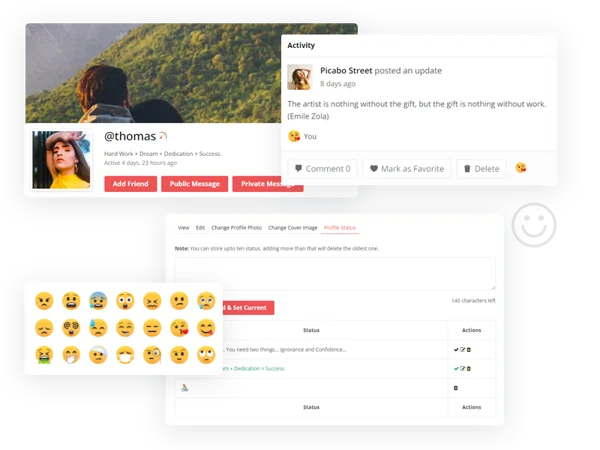
2. Profile Header Status Icon and Tagline. This is the presence signal mentioned above - a small icon and short piece of text next to the profile header, visible to anyone who visits that member’s page. Think of it as the WordPress community equivalent of a status message on a messaging app - short and current, enough to give a visitor a sense of what that person is up to without needing a full bio.
3. Status Icon on Posted Activities. Whatever icon a member has set follows them into the activity stream, appearing next to every update they post. That consistency matters for recognition. Regular visitors start to associate a specific icon with a specific person the same way they’d recognize a familiar avatar, which speeds up how quickly the feed feels navigable instead of like an undifferentiated list of text.
4. Built-in and Custom Icons. The plugin ships with a set of icons members can choose from immediately, and site owners can add custom ones on top of that set. A niche community - gamers, cyclists, a specific professional field - often gets more mileage out of a handful of icons tailored to that audience than out of a generic emoji pack that doesn’t quite fit the tone of the site.
5. Easy Icon Selection. Choosing an icon happens through a drag-and-drop interface pulling from various emoji sets, rather than a dropdown menu buried three clicks deep in a settings page. The friction of setting a status matters. If it takes thirty seconds and four page loads to change a mood icon, most members simply won’t do it more than once.
The admin side of things
6. Admin Customization. Site owners can upload their own emoticons, which opens the door to on-brand iconography instead of relying entirely on stock emoji sets. A community built around a specific hobby or industry can add icons that actually mean something to that audience - a status icon shaped like a specific tool, mascot, or symbol tied to the niche - rather than settling for a generic smiley that could belong to any site on the internet.
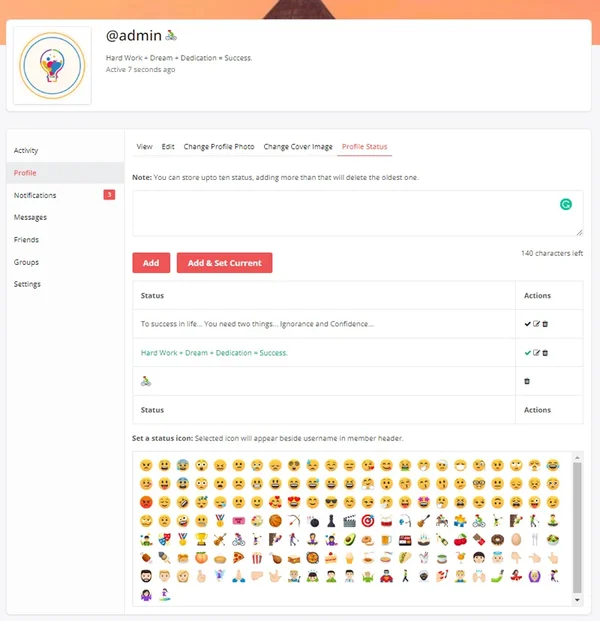
7. Notifications for Activity Reactions. When someone reacts to a member’s post, that member gets notified. This closes the feedback loop that makes engagement features actually work - a reaction that nobody ever sees is functionally the same as no reaction at all. Notifications are what turn a silent tap on an icon into something the original poster actually experiences as being heard.
8. Editing and Deleting Statuses. Members aren’t locked into whatever status they set last week. Old statuses can be edited or removed, and new ones added, which matters for accuracy. A status that says “heads down finishing a project” is useful information the day it’s posted and stale, potentially misleading information a month later if nobody bothers to update it.
General settings and what each one controls
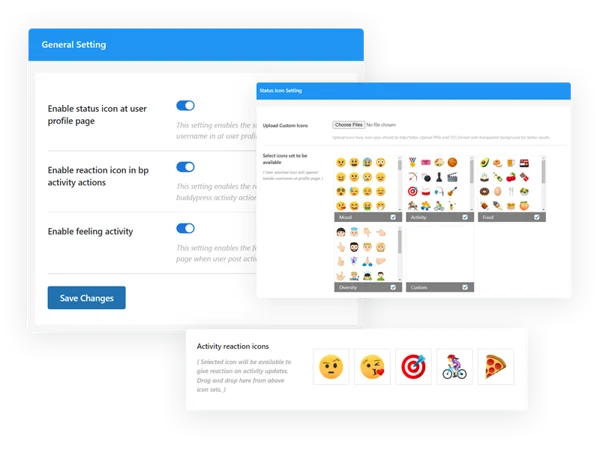
Three toggles control most of what shows up on the front end. The first enables or disables the status icon inside the activity loop - the main stream where updates from across the community appear. Turning this off keeps the feed text-focused, which some communities prefer if the tone is meant to be more professional than playful.
The second toggle controls whether the status icon and tagline appear on the individual profile page itself. A site that wants presence signals in the shared activity stream but not cluttering personal profile pages can enable one setting while leaving the other off, giving fairly granular control over where these visual cues actually show up.
The third toggle governs whether reaction icons appear on activity actions at all. Some communities - support forums in particular - find that reaction icons encourage low-effort engagement that doesn’t actually move a conversation forward, and prefer to keep the interaction limited to replies and comments instead. Having this as a separate toggle from the status icon settings means a site can adopt status presence signals without necessarily adopting the reaction system, or the reverse.
Setting this up without overthinking it
Start with the icon set before touching anything else. Decide whether the built-in options match your community’s tone or whether it’s worth the time to upload custom icons first. Doing this early avoids the awkward situation of members setting statuses with placeholder icons, then having to reset them once branded icons go live.
Next, decide on the three toggles based on where you actually want status and reactions visible. A common default that works for most general-purpose communities is enabling all three - icon in the activity loop, icon on profile pages, and reactions on activity actions - since that gives the fullest picture of an active, responsive community. Niche or more formal communities may want to dial one or two of these back.
Finally, seed the feature yourself before opening it to members. Set your own status, react to a few existing posts if there’s any activity yet, and confirm notifications are firing correctly. A feature that silently fails to notify people of reactions defeats its own purpose, so this is worth testing before members start relying on it.
Mistakes that undercut the feature
The most common one is leaving the default icon set in place on a site with a distinct visual identity. Generic smiley emoji clash with a carefully designed BuddyPress theme, and the mismatch is more noticeable than site owners expect once real members start posting with them. Even a small custom set - five or six icons that fit the brand - reads as more intentional than a default pack that could belong to any site.
Another mistake: turning on reactions without turning on notifications, or assuming notifications work by default without testing them. If members react to posts and the poster never finds out, the whole point of the feature - closing that feedback loop - quietly fails, and nobody reports it as broken because nothing throws an error. It just slowly stops mattering to people.
A third mistake is treating status icons purely as decoration rather than as information. If half your community sets a status once during onboarding and never touches it again, the tagline stops being a useful presence signal and starts being stale, sometimes actively misleading, information sitting on a profile. Encouraging members to update statuses periodically, even with a simple reminder, keeps the feature functioning as intended rather than decaying into unused UI.
How different types of communities tend to use it
Support and help communities lean heavily on the reaction system and lightly on status icons. A member asking a technical question doesn’t particularly care whether the person answering has set a fun mood emoji on their profile; they care whether their question got a useful reply. Reactions do get used here, mostly as a quick “this solved my problem” signal that helps other members skim a thread and find the answer that worked without reading every reply in order.
Hobby and interest-based communities go the other direction. Status and tagline features get used constantly because the tone of the site invites that kind of personal expression. A cycling community where members set their status to whatever route they rode that weekend, or a book club community where the tagline reflects whatever they’re currently reading, turns the feature into a genuine piece of community texture rather than an underused setting buried in a profile.
Professional and B2B communities sit somewhere in between. Status icons tend to get dialed back or disabled entirely on the activity loop, since a stream of casual mood emoji doesn’t fit a site aimed at industry professionals networking around serious topics. Reactions, on the other hand, often stay on, since a quiet endorsement icon on a colleague’s post carries useful professional weight without requiring a public comment.
Course and cohort-based communities use the notification piece more than any other group. Instructors and students both benefit from knowing when their post got a reaction, since it’s often the only signal that anyone read a given update in a fast-moving cohort discussion thread. Turning off reaction notifications on this kind of site tends to backfire, since it removes the one lightweight acknowledgment mechanism students have for each other’s work.
Troubleshooting the situations that come up most
Reactions appear to save but the count doesn’t update. This is almost always a caching issue rather than a plugin bug - page caching or object caching serving a stale version of the activity item before the reaction count refreshes. Clearing the relevant cache, or checking behavior with caching temporarily disabled, usually isolates whether the plugin itself is at fault or the caching layer is simply serving old data.
Custom icons don’t show up after uploading. Double-check the upload actually completed and that the icon set was saved in the admin settings rather than just previewed. It’s a common false alarm - the icon uploaded correctly but the settings screen wasn’t actually saved afterward, so the front end is still pulling the previous configuration.
Notifications aren’t firing for reactions. Confirm the site’s notification system as a whole is working first, since this is sometimes a symptom of a broader email or in-app notification issue rather than something specific to the status plugin. If other BuddyPress notifications - new friend requests, group invitations - are also silently failing, the root cause sits somewhere else in the notification pipeline, not in this plugin’s reaction handling.
Where this fits into a broader community engagement strategy

Status and reactions are a small piece of a larger engagement puzzle, not a replacement for the rest of it. They work best layered on top of things that already exist - groups people actually want to join, discussions worth having, content worth reacting to. Adding reaction icons to a dead activity feed won’t revive it. Adding them to a feed that already has real conversation happening gives members a lightweight way to participate more often than they otherwise would.
If you’re evaluating your community platform’s engagement layer more broadly, not just BuddyPress status specifically, it’s worth knowing that BuddyNext, a free standalone community plugin that isn’t built on top of BuddyPress, ships reactions and activity feeds as part of its core rather than as an add-on. That’s not a reason to rip out an existing BuddyPress setup that’s already working - migrations are disruptive and not something to take lightly - but for anyone starting a new community site from scratch and comparing engagement-focused options, it’s a reasonable one to have on the shortlist alongside BuddyPress plus a status plugin like this one.
Frequently asked questions
Do members need to set a status before they can react to posts?
No. Reacting to an activity update and setting a personal status and tagline are independent actions. A member can react to dozens of posts without ever setting their own status icon.
Can I limit which reaction icons are available?
Site owners control the icon sets available across the plugin, including what gets offered for reactions versus what gets offered for personal status icons, so you’re not stuck with every default icon showing up in both contexts if that doesn’t fit your community.
Will this slow down the activity feed on a busy site?
Reaction and status data adds a modest amount of extra information to each activity item, but on the vast majority of BuddyPress sites this isn’t a meaningful performance factor compared to the overall volume of activity items and members being queried on the page.
What happens to a member’s status if they leave the community?
Status data is tied to the member’s account like any other profile information, so it persists as long as the account exists and follows the same removal behavior as the rest of their profile data if the account is deleted.
Can members opt out of showing a status icon entirely?
That depends on how the site owner has configured the front-end settings, but generally a member can simply choose not to set a status, in which case nothing displays next to their name beyond whatever the theme normally shows. Setting a status is an action a member takes, not something forced onto every profile automatically.
Does the plugin work with member types and custom profile fields?
Status and reactions operate independently of BuddyPress member types and custom profile fields - they’re a separate layer sitting on top of the activity and profile systems rather than something tied to how you’ve segmented your membership. A site running multiple member types will see status and reaction features work the same way across all of them.
A quiet activity feed is a signal, not a personality trait of your community. Most of the time it means the feedback loop between posting and being acknowledged is too thin, and reactions plus status presence are a fast, low-effort way to thicken it without asking members to write more than they already are.
Start small if you’re unsure. Turn on reactions first, watch how members use them for a week or two, and add the status and tagline layer once the reaction habit has already taken hold. Rolling out every feature at once tends to overwhelm a community that isn’t used to any of it yet, while a staged rollout gives each piece room to actually get adopted before the next one shows up.