How to get Customized Newsfeed Experience like Facebook in BuddyPress Community
BuddyPress Newsfeed merges the separate members/groups/friends/favorites activity tabs into one unified stream, Facebook-style. Here's how to decide what to merge, where to position the tab, and why chronological beats algorithmic ranking for most community sizes.

The BuddyPress Newsfeed Plugin merges the separate activity tabs BuddyPress ships with by default, members, groups, friends, favorites, into one unified stream, the same way Facebook’s main feed works. Out of the box, BuddyPress splits activity across several tabs, and a member has to click between them to get a full picture of what’s happening across the community.

Why tabbed activity streams create friction
Default BuddyPress asks members to make a navigational decision before they’ve even seen any content: do I check the members tab, the groups tab, or friends? Most members won’t check all three consistently. They’ll settle into whichever tab loads by default and miss everything happening in the others, a friend’s update in a group they’re not scanning, an announcement in the general activity stream they never open because they’ve trained themselves to only check “Friends.”
That fragmentation isn’t a design flaw exactly, it reflects a reasonable engineering decision to keep different activity types separated by source. But it puts the burden of assembly on the member, and most members won’t do that work. They’ll experience the community as smaller and quieter than it actually is, simply because they’re only seeing a fraction of the activity happening across it.
That perception gap matters more than it might seem. A community that’s genuinely active but feels quiet to its own members is a community at risk of losing them anyway, nobody sticks around a place that feels empty, even when the emptiness is an illusion created by bad navigation rather than an actual lack of activity.
What the plugin actually changes
BuddyPress Newsfeed collapses those separate tabs into one merged stream, mirroring the “everything in one place” pattern members already know from every major social platform. Nobody has to be taught how to use a unified feed, it’s the default mental model most internet users bring with them already.
Key features of the BuddyPress Newsfeed Plugin
1. Unified activity stream. Member activity, group activity, friend updates, and favorites merge into a single tab instead of requiring separate clicks to check each one.
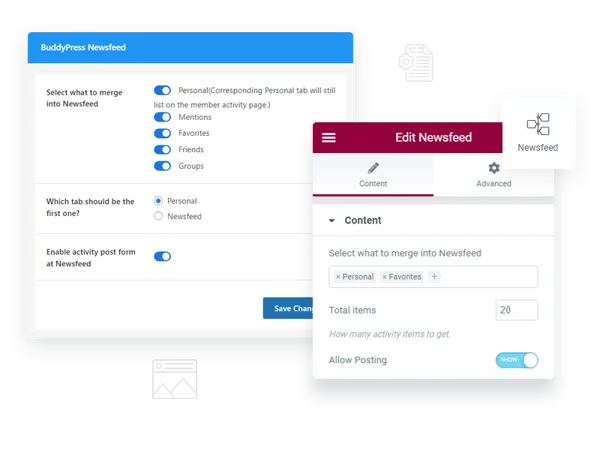
2. A new Newsfeed tab on member profiles. Each member gets a personalized feed showing activity relevant to their own connections, distinct from a generic site-wide stream.
3. Admin control over which activity types merge. Site admins choose exactly which activity categories feed into the unified stream, rather than being locked into an all-or-nothing merge. This granularity is what makes the plugin adaptable across very different community types instead of forcing one rigid feed structure on everyone.
4. Adjustable tab position. Where the Newsfeed tab sits in the profile navigation is configurable, letting you position it as the default landing tab if that fits your site.
5. Optional posting form directly in the Newsfeed tab. Members can post a new activity update right from the merged feed rather than needing to navigate elsewhere to post.
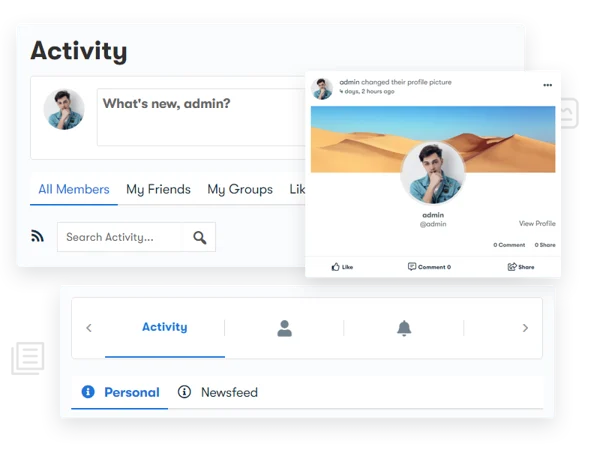
6. A separate personal-activity tab. Members can still view just their own posting history in isolation, for the cases where they specifically want to review what they’ve posted rather than the merged feed.
7. Direct posting from the merged view. Combined with the posting form above, this keeps the entire “check activity, post activity” loop inside one tab instead of bouncing between screens.
Deciding what to merge
Not every activity type belongs in a unified feed for every community. The setting worth thinking through carefully is which categories to include. Merging member status updates and group activity is close to universally sensible, that’s the core social content most communities want surfaced together. Merging in every notification-adjacent event (someone joined a group, someone updated their profile photo) tends to add noise rather than value, the same problem Facebook’s own feed has wrestled with for years as it’s added more and more automatically generated activity types over time.
Start conservative. Merge status updates, group posts, and friend activity first. Watch how the feed feels for a couple of weeks before adding lower-value activity types into the mix. It’s easier to add more merged categories later than to walk back a feed that’s already become cluttered and retrain members to trust it again.
Where to position the tab
If the newsfeed is meant to become the primary way members experience activity, it needs to be the first thing they see, not an option buried behind other tabs. Consider setting it as the default landing tab on a member’s own profile and on the site-wide activity directory. A unified feed that requires an extra click to reach doesn’t actually solve the discovery problem it’s meant to solve, it just adds a fourth tab to the three that already existed.
The tradeoff: unified feeds versus focused ones
A merged feed solves the discovery problem but reintroduces a different one at scale: on a highly active community, a fully unified feed can move fast enough that anything not checked within a few hours scrolls out of easy reach. This is the exact tension every major social platform has spent years trying to solve with algorithmic ranking, and BuddyPress Newsfeed, being a straightforward reverse-chronological merge, doesn’t attempt to solve it the way a ranked algorithmic feed would.
For most BuddyPress communities, measured in the hundreds or low thousands of active members rather than millions, a chronological merged feed is still the right tradeoff. Ranking algorithms introduce their own problems (opacity, distrust, the sense that “the algorithm” is hiding things) that are rarely worth solving for at this scale. Reserve concern about feed velocity for genuinely large, high-volume communities where a member’s friends and groups alone generate enough activity to bury anything within minutes.
If your community does eventually grow into that high-velocity territory, the mitigation doesn’t have to be a full ranking algorithm. Simpler tools help first: keeping the sticky-post feature (if you’re running one) reserved for anything that genuinely needs to survive the scroll, encouraging members to use group-specific feeds for group-specific discussion rather than posting everything to the general stream, and periodically reviewing whether any merged activity category has become high enough volume that it’s worth splitting back out on its own.
Retaining the separate personal activity tab, why it still matters
Even after merging into a unified newsfeed, keeping a distinct “my activity” tab serves a real purpose: a member checking whether their own post actually went through, reviewing their own posting history, or curating what they’ve shared shouldn’t have to scroll through a merged feed full of other people’s content to find their own. This is a small detail easy to overlook when configuring the plugin, but it’s the kind of thing that generates a support question the first time a member can’t quickly find something they know they posted.
Think of the two tabs as serving genuinely different intents rather than one being a redundant leftover of the other. The newsfeed answers “what’s happening around me.” The personal tab answers “what have I contributed.” Those are different questions a member asks at different moments, and collapsing both into a single view would quietly make the second question harder to answer even while making the first one easier.
Three community types and how they’d configure this
A small, tightly-knit community under a few hundred members. Merge everything without much hesitation. Feed velocity is low enough that a fully unified stream stays easy to follow, and the discovery benefit outweighs any noise concern.
A large, multi-group professional network. Be more selective about what merges. Consider keeping the group-specific activity in its groups and only merging friend and site-wide activity into the newsfeed, so members interested in a specific group’s discussion aren’t forced to hunt for it in a fast-moving general stream.
A support or customer community tied to a product. Prioritize merging in a way that surfaces genuinely helpful activity, new answered questions, popular threads, over routine status updates, since the primary member goal here is usually finding an answer rather than socializing broadly.
Notice that none of these three configurations is objectively correct in isolation, the right merge strategy is a function of what your specific members are actually trying to accomplish when they open the feed, not a universal best practice you can copy from another site without adjustment.
How this compares to just training members to check multiple tabs
Some admins try to solve the fragmentation problem through communication instead of a plugin, a pinned post explaining “remember to check all three tabs,” a help article walking new members through the navigation. This approach rarely works at scale. It asks every single member to permanently override a habit, forever, on every visit, and habits formed by years of using unified-feed platforms elsewhere don’t get overridden by a one-time instruction. A member reads the tip once, maybe follows it for a week, and reverts to checking whichever tab loads by default within a month. Structural fixes beat behavioral asks almost every time a platform’s default navigation is working against the intended usage pattern.
What “merged” actually looks like in the activity stream
Once merged, activity items don’t lose their source context, a group post still shows which group it came from, a friend’s update still shows it’s from a friend connection rather than a stranger. The merge changes where items appear, not what information each item carries. This distinction matters when configuring your theme’s activity item templates: verify that source labeling remains visible and legible after the merge, since some theme customizations that were built assuming activity would always appear in a single-source tab can strip or obscure that context when multiple sources start appearing side by side.
Handling the transition on an active community
Rolling this out on a community that’s already active and has members with established tab habits deserves the same care as any interface change to a system people use daily. Announce it before flipping it on, explain briefly what’s changing and why, and expect a short adjustment period where some long-time members ask where their familiar “Friends” tab went. Keeping the personal activity tab available, as described below, softens this transition considerably, since members who specifically relied on isolating their own posts still have a place to do that.
Consider rolling it out gradually if your platform supports it, enabling the merge for new registrations first while existing members opt in, rather than flipping the default for your entire existing base simultaneously. Not every setup supports this kind of staged rollout, but where it’s available, it reduces the number of “where did my tab go” support questions landing in your inbox in the first week.
Frequently asked questions
Will merging activity types slow down page load on a busy site? Pulling from multiple activity sources into one query is inherently more work than a single-source tab. On a high-traffic community, monitor page load after enabling the merge and consider caching if you notice a measurable slowdown.
Can different member roles see different merged content? Configuration is typically site-wide rather than role-specific, if you need role-based feed differences, that’s custom development layered on top rather than a built-in setting.
Does this replace the site-wide activity directory that shows all public activity? No, they serve different purposes. The newsfeed is personalized to a member’s own connections and groups; the site-wide directory shows broader public activity regardless of a member’s individual relationships.
What happens to existing bookmarked links to the old separate tabs after this is enabled? Depending on how your theme handles tab URLs, old direct links to a specific tab may redirect to the new merged view or may continue functioning as separate filtered views within it, test this on staging if your community has shared direct tab links anywhere, like in onboarding documentation.
Is there a way to let members personally choose merged versus separated tabs, rather than a single site-wide setting? That level of per-member customization isn’t a standard built-in option. The configuration is generally an admin-level decision applied uniformly across the community.
Does the posting form inside the Newsfeed tab support the same features as the standard “What’s New” composer elsewhere, like photo uploads or mentions? It’s designed to mirror the standard composer’s core functionality. If your site runs additional activity-composer plugins layered on top of core BuddyPress, verify compatibility with the embedded posting form specifically, since third-party composer extensions don’t always hook into every location a posting form can appear.
Can group activity from private or hidden groups appear in a member’s merged newsfeed if they’re not a member of that group? No, the merge respects existing BuddyPress privacy and group-visibility rules. A member only sees merged activity from groups and connections they already have access to; the plugin changes display aggregation, not underlying permission logic.
If I later decide to un-merge the feed and go back to separate tabs, is that reversible? Yes, the merge is a display configuration rather than a change to how activity data is stored. Disabling the plugin or reverting the setting restores the original separated-tab structure without any data loss.
What this doesn’t fix
A unified feed makes existing activity easier to find. It does nothing to generate activity that isn’t happening in the first place. If your community’s actual problem is low posting volume rather than fragmented discovery, merging tabs won’t move the needle, the real fix there is a different conversation entirely, about onboarding, prompts, and reasons for members to post in the first place. Diagnose which problem you actually have before assuming this plugin is the solution.
A quick way to tell the two apart: check whether activity actually exists somewhere on the site but members aren’t finding it, versus whether activity simply isn’t being generated at all. Look at your raw activity counts across all the separate tabs combined. If the total volume is reasonable but spread thin and scattered, fragmentation is the problem and this plugin is the right fix. If the total volume is low across the board regardless of how it’s organized, the underlying issue is participation, not discovery, and no amount of feed merging will fix that on its own.

Every major social platform arrived at the unified feed independently because splitting activity across tabs asks members to do work they’ll mostly refuse to do. BuddyPress Newsfeed brings that same lesson to a community site, not by reinventing anything, but by removing the friction default BuddyPress leaves in place.
Merge conservatively, position it prominently, and keep the personal tab available for members who still want to find just their own posts. That’s the whole configuration that matters.
Interfaces rarely fail because a feature is missing. They fail because the feature exists but asks the user to do too much work to find it. A unified feed is, at bottom, a decision to do that assembly work on the member’s behalf instead of leaving it to them, a small shift in who carries the cognitive load, and one that consistently pays off across every platform that’s tried it.














