How to Build a Leaderboard That Motivates (Not Alienates) Your Community
Leaderboards can drive healthy competition or toxic comparison. Here is how to design one that motivates your best contributors without making everyone else feel like they do not belong.

A leaderboard is the most visible expression of your community’s values. It tells every member: these are the people we celebrate. These are the behaviors we reward. This is what success looks like here.
Get it right, and the leaderboard drives healthy competition, surfaces role models, and motivates members to contribute more. Get it wrong, and it creates an exclusive club that makes 95% of your community feel like outsiders.
The difference is in the design.
Why Leaderboards Work (When They Work)
Leaderboards tap into two psychological drivers:
Social Comparison
People naturally compare themselves to others. A leaderboard makes this comparison constructive by showing members where they stand relative to peers and what they could achieve with more participation. “I am at 160 reputation and the #5 spot is at 200, I could reach that this month.”
Public Recognition
Being listed on a leaderboard is public recognition of contribution. It tells the entire community: this person’s work matters. For many community contributors, this recognition is more motivating than any material reward.
What Jetonomy’s Leaderboard Looks Like
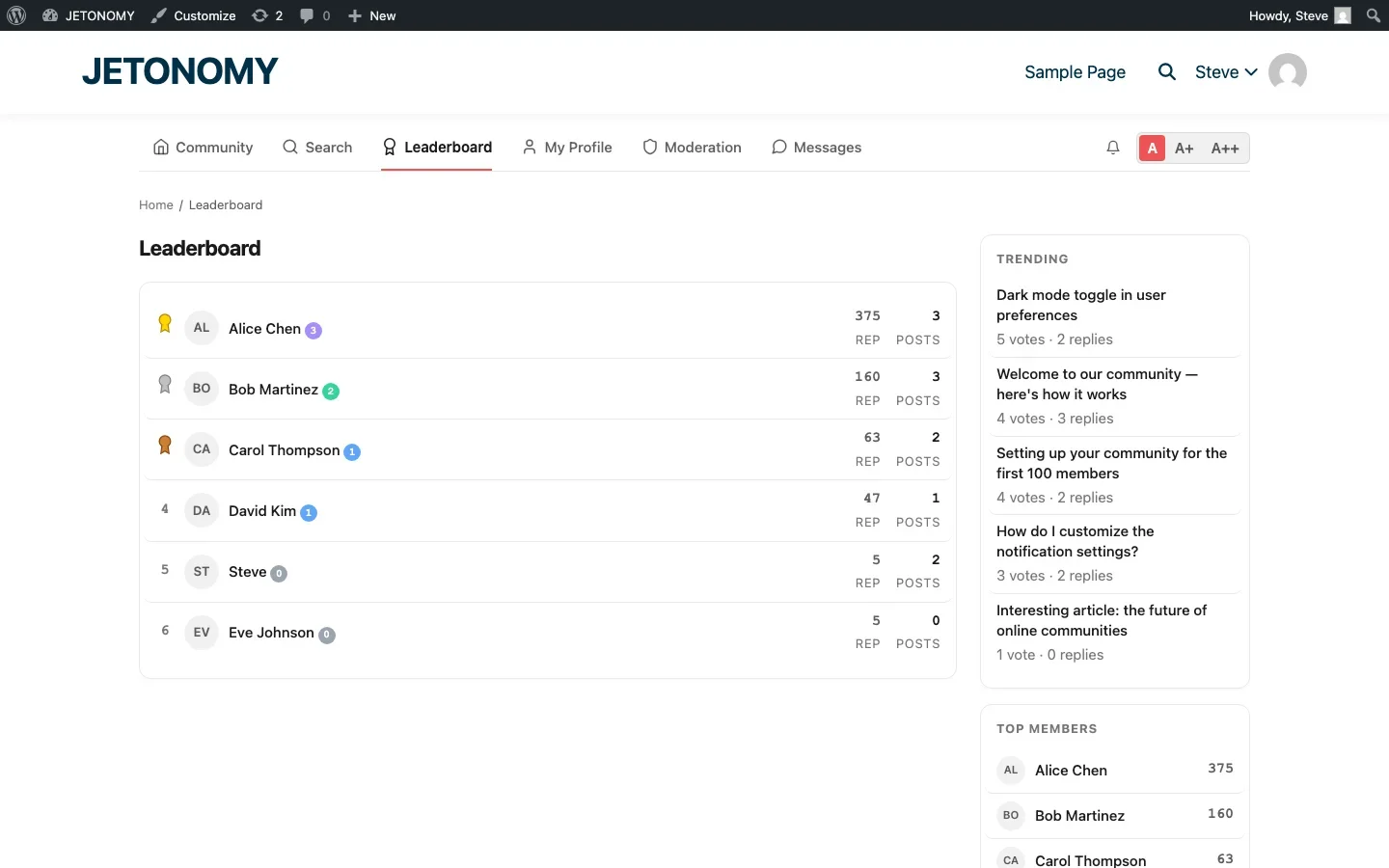
Jetonomy includes a built-in leaderboard accessible from the main navigation. It ranks members by reputation score and shows:
- Rank position (with trophy icons for top 3)
- Member name and avatar
- Trust level badge (the colored indicator showing earned status)
- Reputation score (total points earned from contributions)
- Post count (topics and replies created)
The sidebar on every page also shows a “Top Members” widget with the top 5–10 contributors, creating passive exposure to the leaderboard throughout the browsing experience.
Designing a Leaderboard That Motivates
1. Rank by Quality, Not Quantity
A leaderboard that ranks by post count rewards spam. A leaderboard that ranks by reputation, where reputation comes from upvotes, accepted answers, and community validation, rewards quality.
In Jetonomy, reputation is earned primarily through receiving upvotes (+10 points) and having answers accepted (+15 points). This means a member who posts one brilliant answer that gets 10 upvotes earns more reputation than a member who posts 10 mediocre replies. The leaderboard reflects contribution quality, not contribution volume.
For the detailed reputation point structure, see our guide on building a reputation system.
2. Show Multiple Time Periods
An all-time leaderboard inevitably becomes static. The same 5–10 power users sit at the top permanently. New members cannot realistically compete with someone who has been contributing for two years.
Counter this by offering multiple time-period views:
- This Week, Shows who is contributing right now. New members can appear here immediately.
- This Month, Shows consistent recent contributors.
- All Time, Shows the community veterans and their cumulative impact.
The weekly leaderboard is especially important for motivation. A new member who earns the #3 spot on the weekly board gets the same rush of recognition as an established member on the all-time board. It creates achievable goals for everyone.
3. Celebrate More Than Just the Top 3
If only the top 3 positions get recognition (trophy icons, special styling), everyone else feels irrelevant. Expand recognition:
- Top 3 get trophy icons (gold, silver, bronze)
- Top 10 are visible on the main leaderboard page
- “Top Members” sidebar widget shows top 5–10 on every page
- Rising stars, highlight members who moved up the most positions this month
- Streak badges, recognize members who have been consistently active
4. Never Publicly Display Negative Metrics
Some forums show a “lowest reputation” list or display members with negative scores. This is toxic. It shames people publicly and discourages participation.
If a member has low or negative reputation, that information should only be visible to them (on their profile) and to moderators. The leaderboard should only celebrate positive contributions.
5. Combine Leaderboard with Badges
The leaderboard shows ranking. Badges show achievements. Together, they create a richer picture of community contribution:
- A member at #7 on the leaderboard with a “Community Expert” badge and a “100 Accepted Answers” badge tells a clear story about their contribution.
- A new member at #45 with onboarding badges shows they are just getting started but already engaged.
When Leaderboards Go Wrong
Watch for these warning signs:
The Monopoly Problem
If the same 3 people dominate the top positions for months and nobody new breaks in, the leaderboard becomes demotivating. “Why bother? I will never catch @alice’s 5,000 reputation.”
Fix: Add weekly and monthly views. Highlight rising stars. Create category-specific leaderboards (e.g., “Top in Help & Support” vs. “Top in Feature Requests”).
The Gaming Problem
If reputation is easy to inflate through low-effort actions, some members will game the system. Mass-upvoting friends, posting trivial replies to accumulate points, or creating sock puppet accounts to self-upvote.
Fix: Weight reputation toward quality signals (accepted answers, upvotes received) rather than quantity signals (posts created). Rate-limit posting for new accounts. Monitor for suspicious voting patterns.
The Exclusion Problem
If 90% of your members never appear on the leaderboard, they may feel the community is for power users only. “This forum is a clique. The leaderboard people talk to each other and ignore everyone else.”
Fix: Celebrate milestones at all levels, not just the top. Onboarding badges show new members they are making progress. Encourage top leaderboard members to welcome newcomers and answer their questions.
The Top Members Sidebar Widget
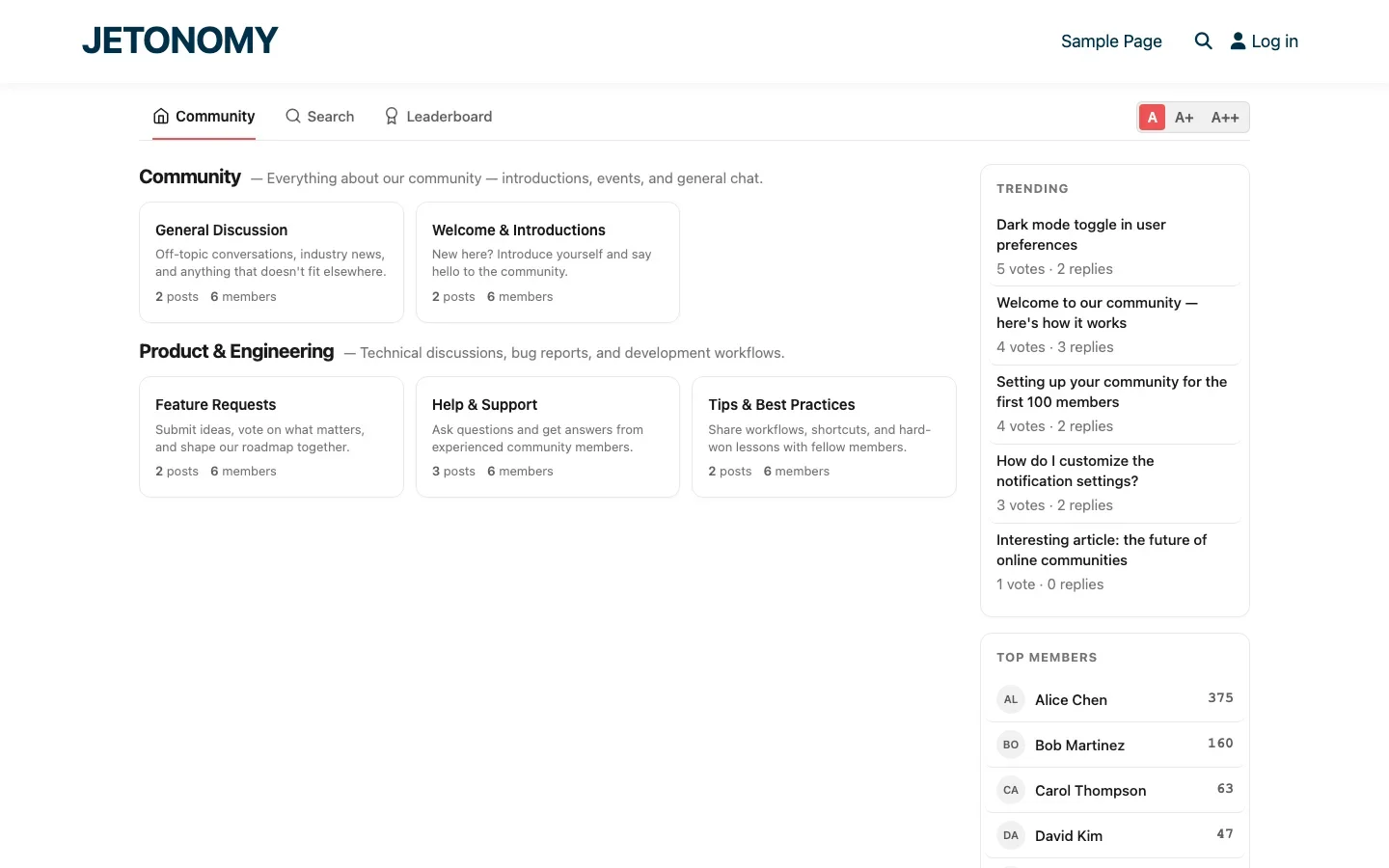
The leaderboard page is a destination that members visit intentionally. The Top Members sidebar widget is ambient, it appears on every page, creating passive exposure to your top contributors.
This widget serves two purposes:
- For new members: It shows the community is active and has recognizable contributors. Social proof that this is a real community with real people.
- For top members: It is constant recognition. Their name appears on every page of the community. That visibility is a powerful motivator.
Leaderboard and Community Health
Your leaderboard data tells you about community health:
Pattern | What It Means | Action |
|---|---|---|
New names appearing in top 10 | Community is growing healthily | Welcome and recognize newcomers |
Same names, no turnover | Growth may be stalling | Add weekly views, recruit new contributors |
Top member scores increasing fast | Power users are very active | Great, make sure they are not burning out |
Large gap between #1 and #2 | Over-dependence on one person | Nurture other contributors to diversify |
Declining scores across the board | Overall engagement dropping | Investigate content strategy, check notifications |
Getting Started
Jetonomy’s leaderboard is included in the free version. No configuration needed, it works out of the box with the default reputation system.
- The leaderboard appears automatically in the main navigation after installation
- The Top Members sidebar widget displays on every community page
- Adjust reputation point values in Jetonomy → Settings → Reputation if needed
- Add custom badges (Pro) to complement leaderboard rankings with achievement recognition
For the full gamification strategy, combine the leaderboard with our guides on reputation systems and engagement tools. And for the base forum setup, follow our WordPress forum guide.
A well-designed leaderboard does not just rank people. It tells your community what you value. Make sure it tells the right story.
Let Members Opt Out Without Making It Awkward
Not every valuable contributor wants their name and activity level broadcast publicly. Employees posting under a company account, members in sensitive professional fields, or people who simply find public ranking uncomfortable may want to help the community without appearing on a leaderboard at all.
- Add a visibility toggle in profile settings so members can exclude themselves from the leaderboard and Top Members widget while still earning reputation and badges privately.
- Make the opt-out easy to find, burying it forces members to either accept unwanted visibility or ask a moderator directly, which most will not bother doing.
- Do not silently zero out an opted-out member’s reputation elsewhere, trust levels and moderation permissions should still reflect their real contribution history.
Where Jetonomy Pro Extends the Leaderboard
The core leaderboard, reputation scoring, and Top Members widget described above all ship in free Jetonomy. Jetonomy Pro is where category-specific leaderboards, custom badge sets, and the analytics dashboard live, useful once the single global leaderboard starts showing the monopoly problem described above and you want a per-category view instead of building a workaround. Details are on the Jetonomy Pro page.













