How To Add Vendor's Products to their Business Profiles?
BuddyVendor bridges BuddyPress or BuddyBoss with Dokan, WCFM, or WC Vendors, putting a vendor's product catalog directly on their community profile. Here's how it works, how to configure the activity feed without drowning it in product posts, and where it actually earns its place.

BuddyVendor connects a BuddyPress or BuddyBoss community to a WooCommerce marketplace, letting vendors show their products directly on their community profile instead of keeping the two systems separate. Without something bridging them, a site running both BuddyPress and a multi-vendor marketplace plugin ends up with two disconnected experiences: a social profile over here, a store listing over there, with no reason for a visitor to move between the two.

Why community and commerce need to be one experience, not two
A visitor who follows a vendor, sees their activity updates, and checks their profile is already showing buying intent. Making them navigate away to a separate shop page to actually see what that vendor sells adds friction at exactly the point where interest is highest. BuddyVendor removes that friction by putting a “Products” tab directly on the profile, so the social relationship and the commercial one live in the same place.
It’s built to bridge BuddyPress or BuddyBoss Platform with the major WooCommerce multi-vendor plugins, Dokan, WCFM, and WC Vendors, rather than replacing any of them. You keep your existing vendor management system. BuddyVendor is the connective layer that surfaces that vendor’s catalog inside their community identity.
Think of it less as a new feature and more as plumbing. Nobody browses a marketplace because the plumbing is good. They notice, sharply, when it’s missing, when a “vendor” is just a name with no products anywhere near it, or a product page with no way to learn who’s actually selling the thing.
Key features of BuddyVendor
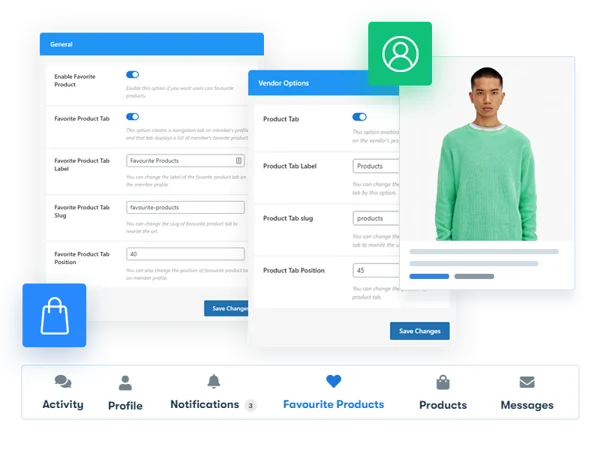
1. Profile integration with a dedicated Products tab. Registered vendors get a “Product” tab on their profile that pulls in their live catalog automatically. No manual syncing required, add a product through your vendor dashboard as usual, and it appears on the profile.
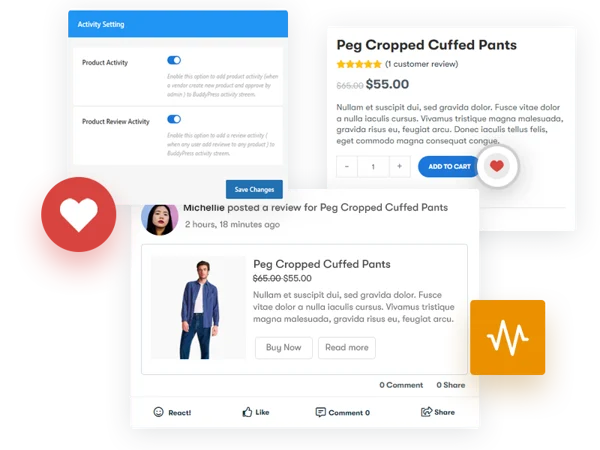
2. Favorite Product tab for members. Any community member, vendor or not, can mark products as favorites and see them collected on their own profile, a lightweight wishlist that lives inside the social layer rather than a separate account page.
3. Flexible label and slug customization. The wording, URL slug, and tab position for both the Product tab and the Favorite Product tab can be changed to match your site’s terminology. A site that calls vendors “creators” or “sellers” instead of “vendors” isn’t stuck with mismatched labels.
4. Multi-vendor plugin compatibility. Works with Dokan, WCFM, and WC Vendors, the three most widely used WooCommerce marketplace plugins. Pick whichever one fits your marketplace’s commission structure and vendor tools; BuddyVendor sits on top regardless of which one you’re running.
5. Favorite product marking. Members mark products they’re interested in without adding them to cart, useful for browsing behavior and for vendors who want to see which of their items are generating the most saves.
6. Automatic BuddyPress activity generation. New product listings and new reviews can post into the BuddyPress activity stream automatically, giving vendors organic visibility every time they add something new, the same way a status update would surface, except it’s commercial content tied to a real product.
7. Product management from the profile context. Vendors manage their listings through their existing multi-vendor dashboard as usual; BuddyVendor’s job is display and activity syncing, not replacing that management workflow.
Setting it up on an existing marketplace
Install BuddyVendor after your BuddyPress or BuddyBoss setup and your chosen multi-vendor plugin (Dokan, WCFM, or WC Vendors) are already running. Order matters here, BuddyVendor needs both systems active to detect vendor accounts and pull product data, so activating it before your marketplace plugin is configured will just leave the Products tab empty.
Once active, go to its settings screen and set the tab labels first. Decide what you’re calling the Products tab and the Favorite Products tab, and get the slugs right before vendors start sharing profile links, changing a URL slug after people have bookmarked or shared it breaks those links. Next, decide on tab position: most marketplace sites put Products high in the profile navigation, since it’s the primary reason a visitor is browsing a vendor’s profile in the first place. Finally, configure whether new product activity and new review activity should post to the site-wide feed, a decision that depends on how much commercial content your community tolerates in its main activity stream.
Balancing commerce and community in the activity feed
This is the setting worth thinking through carefully. Auto-posting every new product to the activity stream gives vendors visibility, but a marketplace with a hundred active vendors adding products daily can turn the main feed into a scrolling product catalog, drowning out the actual social activity, comments, discussions, group posts, that makes a community feel like a community rather than a storefront with a comment section bolted on.
A middle path many sites land on: let product activity post to the feed, but cap it, or route it into a dedicated “Marketplace” activity filter separate from general community activity. Members who want to browse new listings can switch to that filter; members who came for discussion aren’t forced to scroll past product cards to find it.
What this changes for vendors specifically
A vendor’s profile stops being just a bio and an avatar and starts functioning as a storefront with a social layer wrapped around it. That matters for trust, a buyer deciding whether to purchase from an unfamiliar vendor on a marketplace behaves differently when they can see that vendor’s community activity, follower count, and engagement history alongside the product listing, compared to a bare product page with no context about who’s selling it.
It also changes how vendors think about their own activity. A vendor who understands that posting an update drives traffic to their Products tab has a direct incentive to stay active in the community, not just list products and disappear. That’s a retention mechanism for the marketplace side that a standalone WooCommerce store, without any community layer, doesn’t have access to.
Common setup mistakes
The most frequent one is activating BuddyVendor before fully configuring the underlying multi-vendor plugin, then assuming the plugin is broken when the Products tab shows nothing. Check that vendor accounts actually have published products first, an empty tab is usually a data problem, not a BuddyVendor problem.
The second is leaving activity auto-posting on with no cap on a marketplace that’s growing fast. What looks fine with ten vendors turns into feed noise at a hundred. Revisit this setting periodically as vendor count grows rather than setting it once at launch and forgetting about it.
A fourth, less obvious one: never testing the Favorite Product feature from a regular member’s account, only from an admin’s. Admin accounts sometimes have different capability sets than a default subscriber or member role, and a favoriting button that works fine for you in testing can silently fail for actual members if role permissions weren’t checked. Log in as a test member account and click through the flow before considering the rollout finished.
The third is inconsistent labeling between the marketplace plugin’s own vendor dashboard language and BuddyVendor’s tab labels. If Dokan calls something a “Store” and your BuddyVendor tab says “Products,” members notice the mismatch even if it doesn’t break anything functionally. A few minutes spent aligning terminology across both plugins pays off in a site that feels coherent rather than stitched together.
Three marketplace types where this pattern shows up
A local artisan or craft marketplace built on BuddyPress. These sites often function as much as a community of makers as they do a sales channel, vendors follow each other, comment on each other’s work, share process photos in activity updates. BuddyVendor is close to essential here, because the community relationships are themselves part of the sales pitch: a buyer who’s been following a ceramicist’s activity feed for months is a warmer lead than a cold visitor landing on a product page from search. Losing that context by keeping products on a separate shop page would throw away the exact thing making the marketplace work.
A service-and-product hybrid, like a fitness or wellness community. Coaches sell branded merchandise or digital products alongside offering community engagement, workout logs, group challenges, member support. Here, the Products tab functions almost like a secondary monetization layer sitting under the main community value. It doesn’t need to dominate the profile, but having it there means a coach with an engaged following has an easy path to convert that following into product sales without redirecting people off-site.
A large multi-category general marketplace with hundreds of vendors. Scale changes the calculus. With this many vendors, the activity-feed auto-posting setting becomes the most important configuration decision in the whole setup, left uncapped, the feed becomes unusable noise; capped or filtered correctly, vendors still get organic visibility without drowning out community discussion. This is also where the Favorite Product feature earns its keep most: at scale, a wishlist-style save mechanism that lives inside the social profile gives you a signal about buying intent that’s more useful than raw page-view analytics.
The trust signal this creates for buyers
Marketplace buyers, especially first-time ones on a smaller or newer platform, hesitate over unfamiliar sellers in a way they don’t on an established platform with built-in reputation systems. A bare product listing gives them a price, a photo, and a description, nothing about who’s behind it. A profile with visible activity history, follower connections, and community participation alongside the same product listing gives a buyer something closer to a track record to evaluate, even without a formal review system attached.
This matters most in the early life of a marketplace, before enough transaction volume has built up review counts and star ratings that buyers typically lean on. In that gap, social proof from the community layer, how long a vendor’s been active, how they interact with other members, whether they respond to comments, substitutes for the transaction-based trust signals that haven’t accumulated yet. A brand-new marketplace with zero reviews on every listing is a hard sell to a cautious buyer. A brand-new marketplace where that same buyer can see six months of genuine community activity behind each vendor is a different proposition entirely, even with the exact same absence of purchase history.
SEO and discoverability considerations
A vendor profile with an integrated product tab creates a single, content-rich URL that combines social proof with commercial intent, a page structure search engines tend to reward over a thin product listing with no surrounding context. Whether that translates into meaningfully better rankings depends heavily on your site’s overall SEO setup, internal linking, and how unique the profile content actually is beyond the product data itself. Treat it as a secondary benefit worth knowing about, not the reason to install the plugin.
Frequently asked questions
Do I need Dokan, WCFM, or WC Vendors specifically, or will BuddyVendor work with any WooCommerce vendor setup? It’s built for compatibility with those three specifically. If you’re running a different or custom vendor system, test carefully on staging before rolling out, compatibility with plugins outside that list isn’t guaranteed.
Can a non-vendor member still use the Favorite Product feature? Yes. Favoriting products is open to any logged-in member, vendor status isn’t required to save items of interest.
Does this replace the checkout process? No. BuddyVendor handles display and profile integration. Checkout, payments, and order processing stay entirely within WooCommerce and your multi-vendor plugin’s existing flow.
What happens to a vendor’s Products tab if they’re suspended or their account is deactivated? That depends on how your multi-vendor plugin handles suspended vendor accounts, if their products are hidden or unpublished at that level, the Products tab reflects that automatically since it’s pulling live data, not a cached snapshot.
Can I show only a subset of a vendor’s products on their profile, like just their bestsellers? The tab is designed to reflect the vendor’s published catalog. If you need curated or filtered display logic beyond that, you’re looking at custom development on top of the plugin rather than a built-in setting.
Will enabling this slow down profile page load times? Pulling product data adds a query beyond what a standard BuddyPress profile page runs. On a marketplace with vendors carrying large catalogs, keep an eye on page load if you’re not running caching, the same way you would for any dynamic content query.
Can members message a vendor directly from the Products tab? Messaging capability depends on whatever direct-messaging setup already exists in your BuddyPress or BuddyBoss install, BuddyVendor surfaces the products, it doesn’t add a separate contact mechanism on top of your existing messaging features.
Do reviews left on a product also show up as BuddyPress activity? New reviews can generate activity stream entries the same way new product listings can, subject to the same auto-posting setting. This gives vendors visibility not just when they list something, but when a buyer validates it publicly.
Is there a limit to how many products display on the Products tab? The tab is built to reflect the vendor’s full published catalog rather than a capped preview. For vendors with very large catalogs, consider whether your marketplace plugin’s own product organization, categories, search, filters, is strong enough to keep a large tab browsable rather than an unstructured wall of items.
Where this fits in the broader multi-vendor toolkit
Dokan, WCFM, and WC Vendors each already solve the commerce side well, commission splits, vendor payouts, product management dashboards. None of them, on their own, do anything with the social layer if you’re also running BuddyPress. That gap is specifically what BuddyVendor closes. It’s not a replacement for choosing a solid multi-vendor plugin; it’s what makes that choice pay off in a community context instead of sitting alongside the community as an unrelated feature.
If your BuddyPress site doesn’t run a marketplace at all, this plugin has nothing to do. It only earns its place once commerce and community are both already part of the site’s purpose, and the goal is making them reinforce each other instead of competing for the visitor’s attention. That’s a narrower use case than most plugins on a typical BuddyPress site, and it’s worth being honest about that before installing something your site doesn’t actually need.

A marketplace with no community layer is a directory of listings. A community with no commerce layer is a place people talk but never buy. BuddyVendor’s whole reason for existing is closing that gap, one profile, one identity, one place a buyer decides to trust a vendor enough to click through and purchase.
Get the labeling and activity settings right at launch, and the rest largely runs itself.
The plugins doing the heavy lifting elsewhere, Dokan, WCFM, WC Vendors on the commerce side, BuddyPress or BuddyBoss on the community side, don’t need to know about each other for your marketplace to technically function. Visitors, though, experience your site as one thing, not two systems bolted together. Whether that experience feels coherent or feels like two separate plugins doing their own jobs is largely decided by whether something like BuddyVendor is doing the connecting.














