How to Suggest Friends With Profile Matching Feature in Buddypress Community
BuddyPress Friends and Follow Suggestions brings Facebook-style profile-matching connection suggestions to a BuddyPress or BuddyBoss community. Here's how the matching actually works, which profile fields to weight, and why it's one of the more effective fixes for the cold-start problem new members hit.

The BuddyPress Friends and Follow suggestions plugin adds a “People you may know” widget to a BuddyPress or BuddyBoss community, built on profile-matching rather than random or purely recency-based suggestions. It’s the same mechanic Facebook and LinkedIn built entire growth strategies around, surface the right connection at the right moment, and members do the rest of the work themselves.

The cold-start problem this actually solves
A brand-new member on a BuddyPress site lands on an empty activity feed populated by strangers they have no reason to follow yet. That’s the cold-start problem, and it’s the single biggest reason new signups on community sites go quiet within the first week. They joined, looked around, saw nothing relevant, and left without ever forming the connections that would have made the site useful to them.
Every social platform of any size has had to solve some version of this. The specifics differ. The underlying problem, a new user with zero context, dropped into a network that means nothing to them yet, is identical whether the platform is a global social network or a five-hundred-member niche community.
Suggested connections shortcut that dead period. Instead of a new member manually browsing a directory of hundreds or thousands of strangers, hoping to stumble onto someone relevant, the widget surfaces a short list of people whose profile data actually overlaps with theirs, same location, same interests, same professional field, whatever fields your site collects. The member reviews five or six names instead of five hundred, and the ones that make sense jump out immediately.
How the matching actually works
The plugin scores potential matches against the profile fields already collected through BuddyPress’s extended profile system, anything from location and industry to custom fields your site defines. Admins choose which fields count toward the match and can weight some more heavily than others. A dating-adjacent or professional networking site might weight location and interest fields heavily; a general hobbyist community might weight interest tags almost entirely and ignore location.
None of this works without profile data to begin with. A site where most members skip the extended profile fields during registration has nothing meaningful for the matching algorithm to compare. If your onboarding flow doesn’t currently encourage or require filling out at least a few profile fields, fix that first, this plugin amplifies good profile data, it doesn’t generate it from nothing.
Key features of the plugin
1. Profile matching criteria toggles. Enable or disable specific fields as matching criteria with a single click, giving you control over exactly what drives a suggestion.
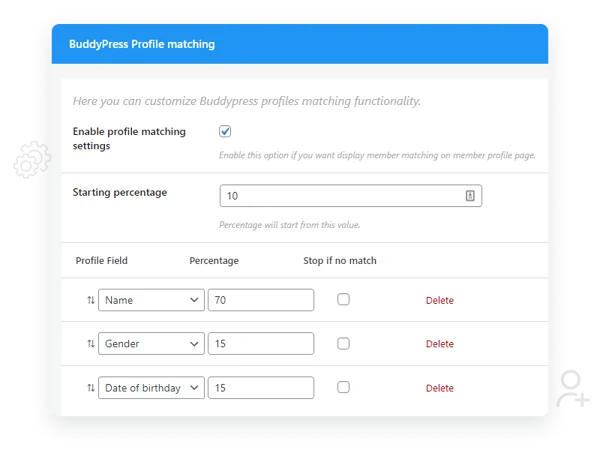
2. Default matching percentage threshold. Set the minimum overlap required before someone qualifies as a suggestion, so members aren’t shown near-random matches with almost nothing in common.
3. Multiple rule sets. Build more than one matching configuration based on different combinations of profile data, useful if your community serves genuinely distinct member segments who’d benefit from different matching logic.
4. BuddyPress and BuddyBoss support. Works across both platforms, so switching between them later doesn’t mean losing this feature.
5. A familiar widget format. The suggestion widget mirrors the layout pattern members already know from Facebook, small profile photo, name, matching percentage, and a direct action button. Familiarity here isn’t an accident; it lowers the learning curve to zero.
6. Adjustable member count. Control how many suggestions display at once. Too few and the widget feels empty on a small site; too many and it clutters a sidebar.
7. Direct friend or follow requests from the widget. A member can act on a suggestion without navigating away, no click-through to a full profile required first, though they can still visit the profile if they want more context before connecting.
8. Visible matching percentage on profiles. Members see how closely their profile matches another member’s, which adds a layer of transparency about why a connection was suggested in the first place.
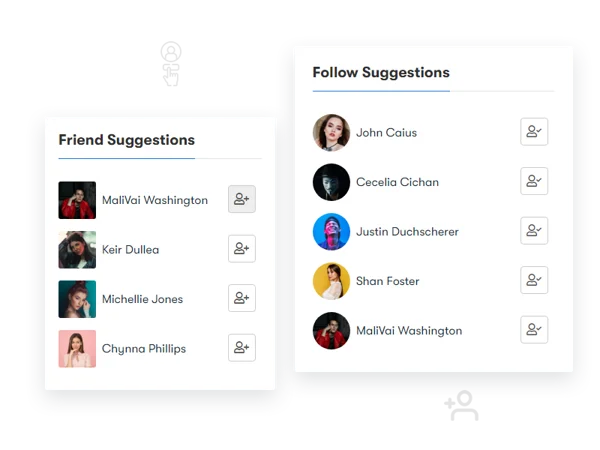
9. Multiple suggestion lists. Run more than one suggestion feed based on different profile-data combinations, so a member might see “people near you” and “people in your field” as two separate, smaller lists rather than one undifferentiated one.
Note: for BuddyPress specifically, follow suggestions require the separate BuddyPress Follow plugin installed alongside this one. BuddyBoss Platform ships with following built in, so that extra step isn’t needed there.
Setting it up: which fields actually matter
Before touching a single setting, audit your extended profile fields and decide which ones are filled in consistently. A matching algorithm built on a field that only thirty percent of members bothered to complete will produce sparse, low-confidence suggestions for the other seventy percent. Location, primary interest or specialty, and one or two custom fields specific to your niche usually make a solid starting set, resist the urge to weight every available field equally, since that dilutes the signal from the fields that actually matter to your community.
Set the matching-percentage threshold conservatively at first. A threshold that’s too low surfaces suggestions with almost nothing in common, and members learn quickly to ignore a widget that keeps recommending irrelevant people. Start higher than feels comfortable, watch how many suggestions members actually receive, and lower it only if the pool feels too thin.
Where to place the widget for maximum effect
The highest-impact placement is on the member’s own activity dashboard or homepage right after registration, when the cold-start problem is most acute. A suggestion widget buried three clicks deep in a rarely-visited settings page does almost nothing; the same widget sitting on the first screen a new member sees after completing their profile does the actual job it’s designed for.
What good suggestion quality looks like in practice
A new member who logs in and sees three or four names with visibly relevant matching percentages, sixty, seventy, eighty percent, and clicks connect with at least one of them within the first session is the outcome you’re optimizing for. If new members are consistently ignoring the widget, that’s not a sign the feature doesn’t work; it usually means the matching fields or threshold need retuning, not that the concept has failed. Check the actual matching percentages members are seeing before assuming the widget itself is the problem.
Three community types and how they’d configure this differently
A professional networking or industry community. Weight job title, industry, and location heavily. A member relocating for work or switching industries benefits enormously from being connected to peers in the same boat immediately, rather than discovering them organically months later through unrelated activity.
A hobbyist or interest-based community. Interest tags and custom fields matter more than location here, someone into a specific niche hobby cares far more about finding another enthusiast than finding someone geographically nearby. Weight accordingly, and consider disabling location matching entirely if your community is fully remote in nature.
A local or regional community. Flip the priority entirely, location becomes the dominant matching field, since the whole value proposition of the community is connecting people who can meet in person or coordinate around shared geography. Interest fields become secondary refinement rather than the primary driver.
Common mistakes when configuring this
Matching on too many fields at once is the most common one, it produces suggestions with technically nonzero overlap on paper but nothing a member would recognize as a real reason to connect. Fewer, more meaningful fields beat a kitchen-sink approach every time.
The second mistake is forgetting the BuddyPress Follow plugin dependency mentioned above. Admins configure follow suggestions, test them, and find the follow button doesn’t function, not because BuddyPress Friends and Follow suggestions is broken, but because the underlying follow functionality was never installed on a vanilla BuddyPress site. BuddyBoss users don’t hit this, since following ships natively.
A third mistake, easy to miss: setting up matching once at launch and never revisiting it as your member base grows and shifts. A field combination that worked well for your first two hundred members might make far less sense once the community has diversified into segments that didn’t exist at launch. Treat the configuration as something to revisit periodically, not a set-once decision.
The psychology behind why this works
Facebook didn’t invent the underlying idea, sociologists have described “homophily,” the tendency of people to bond with others who share traits with them, for decades before any social network existed. What Facebook did was operationalize it: instead of hoping people would organically discover their homophilous matches, the platform surfaced them directly and removed the search cost entirely. That’s the exact mechanism this plugin brings to a BuddyPress site, at a scale appropriate for a community of hundreds or thousands rather than billions.
There’s a second, quieter psychological effect at work too. Showing a member their matching percentage, sixty-two percent, say, does something a plain list of names doesn’t: it gives the connection a stated reason. A member is more likely to click “connect” on someone described as a strong match than on an unexplained name in a directory, because the percentage answers the unspoken question “why would I want to know this person” before they’ve even had to ask it.
Measuring whether the feature is actually working
The clearest signal is the connection rate off the widget itself, what percentage of members who see a suggestion actually click through and send a request. If that number is low, the problem is almost always the matching configuration, not the concept. Check whether the fields you’re matching on are the ones members actually filled in, and whether your threshold is set so high that only a handful of members qualify as matches for anyone.
A secondary signal worth tracking: how quickly new members send their first friend or follow request after registering. Communities that add a well-tuned suggestion widget to the post-registration flow typically see that number drop from days down to minutes, since the widget removes the step where a new member would otherwise have to go looking on their own initiative.
Rolling this out on an established community versus a brand-new one
On a brand-new site with no members yet, this feature has nothing to work with, matching requires a pool of existing profiles to match against, so it’s not something to prioritize configuring before you have at least a modest base of members with filled-out profiles. Turn your early attention to profile field design and onboarding instead; add the suggestion widget once there’s enough data for it to be useful.
On an established community, rolling this out retroactively means existing members suddenly see a new widget suggesting people they’ve never noticed before, some of whom they may have been on the site alongside for years without connecting. That’s a genuinely useful surprise for members, but it’s worth a short announcement explaining the new feature so it doesn’t read as an unexplained change. Expect an initial burst of connection activity in the first week or two as long-time members work through a backlog of suggestions that’s been sitting there, invisible, the whole time.
Frequently asked questions
Can members opt out of appearing in other people’s suggestions? That depends on your privacy settings configuration, some sites expose a member-level toggle, others treat suggestion eligibility as tied to standard profile visibility settings.
Does the matching percentage update automatically as members edit their profiles? Yes, since the calculation runs against live profile field data, editing a field changes future matching calculations involving that member.
Will this work well on a very small community, like under a hundred members? Matching quality depends on having enough members with completed profiles to generate meaningful overlap. On a very small site, consider a lower matching threshold temporarily, since a strict threshold on a small member pool can leave the widget empty for most people.
Can I exclude certain member roles from appearing in suggestions, like vendors or moderators? Rule sets can be scoped to specific member data, which gives you a path to build exclusion logic depending on how your roles are reflected in profile fields or member types.
Does a high matching percentage guarantee two members will actually get along? No, it’s a data-driven starting point based on stated profile information, not a personality or compatibility assessment. It surfaces relevant people faster than manual browsing would; it doesn’t replace the actual human judgment of whether to connect.
Can suggestions get stale, will a member keep seeing the same names forever? Once a member connects with a suggested match, that person typically drops out of future suggestion lists, since they’re no longer a stranger to connect with. New members joining the community and matching well continually refresh the pool, so the list naturally rotates as your community grows.
What happens if two members have nearly identical profiles, will they always be suggested to each other at the top of the list? Ranking depends on your configured weighting and threshold, but yes, members with unusually high overlap across your chosen fields will generally surface near the top of each other’s suggestion lists, which is exactly the intended behavior.
Is there a performance cost to running matching calculations on a large member base? Calculating overlap across profile fields for every member pair is more computationally intensive than a simple query, so on a very large site, tens of thousands of members, check how the plugin handles this at scale, whether through caching, batching, or limiting the comparison pool, before assuming it’ll perform identically to a small community install.
Where this fits against manual browsing and search
Most BuddyPress sites without this plugin rely on a members directory with search and filter options as the only discovery mechanism. That works fine for a member who already knows what they’re looking for. It does nothing for a member who doesn’t know the directory exists, doesn’t know what to search for, or simply won’t put in the effort to browse hundreds of profiles manually. Suggestion widgets exist specifically for that second, much larger group, the passive majority who’ll connect with someone if it’s put in front of them, but won’t go looking on their own.
A profile-matching suggestion engine won’t build a community from nothing. It has nothing to work with on a site with no members and no profile data. What it does, on a site that already has both, is compress the time between “just joined” and “found someone worth connecting with” from weeks of aimless browsing down to a single glance at a widget.

Get the matching fields right, get the placement right, and this becomes one of the quieter but more reliable retention tools available for a BuddyPress community, not because it’s flashy, but because it solves the exact moment where most new members would otherwise drift away unnoticed.
Most retention work happens after the fact, win-back emails, re-engagement campaigns, all of it reacting to a member who already went quiet. This is the rare feature that works before the problem starts, at the exact point a new member is deciding, often within their first ten minutes, whether the site has anything for them.
Get that ten minutes right and a lot of the retention work downstream never has to happen at all.














