How to Add Emoji Reactions to Your WordPress Forum
Emoji reactions let members express appreciation, agreement, and emotion without cluttering the thread with one-word replies. Here is why they matter and how to add them to your WordPress forum.

Open any active forum thread and count the replies that are just “Thanks!” or “+1” or “Great answer!” These replies add no information. They clutter the thread. They push genuinely useful content further down the page. But the impulse behind them is valid, members want to acknowledge good content.
Emoji reactions solve this elegantly. Instead of posting a reply that says “Thank you,” a member clicks a thumbs-up emoji. Instead of writing “This is really helpful,” they click a heart. The acknowledgment happens. The thread stays clean. Everyone wins.
Why Reactions Matter More Than You Think
Reactions seem like a small feature. A nice-to-have. But they have outsized effects on community health:
They Reduce Thread Noise
A popular answer in a forum without reactions might generate 15 “Thank you” replies. With reactions, those same 15 people click an emoji. The result: 15 acknowledgments, zero clutter. The thread shows the question, the answers, and meaningful follow-up replies, nothing else.
This matters most in Q&A spaces where signal-to-noise ratio determines whether future visitors can quickly find the solution. A thread with 3 answers and 15 reactions is instantly scannable. A thread with 3 answers buried under 15 “Thanks!” replies requires scrolling and filtering.
They Lower the Engagement Barrier
Writing a reply requires composing a thought, typing it out, and clicking submit. Reacting requires one click. This lower barrier means members who would never post a reply will still react. Every reaction is a micro-engagement that keeps the member connected to the community.
The engagement ladder looks like this: Read (passive) → React (one click) → Vote (one click) → Reply (effort) → Post a topic (more effort). Reactions fill the gap between passive reading and active posting.
They Provide Emotional Feedback
An upvote means “this is useful.” But human communication needs more than binary useful/not-useful signals. Reactions let members express:
- 👍 Thumbs up, “This works” / “I agree”
- ❤️ Heart, “I love this” / “This resonates”
- 😄 Laugh, “This is funny” / “Made my day”
- 🎉 Celebrate, “Congrats” / “Great achievement”
- 👀 Eyes, “Interesting” / “I am watching this”
- 🚀 Rocket, “Ship it” / “Great idea”
This emotional richness makes the community feel warmer and more human compared to forums that only have upvote/downvote.
They Motivate Content Creators
Writing a detailed answer takes effort. If that answer receives silence, the author has no idea whether it helped anyone. If it receives 12 reactions, they know 12 people found it valuable. That social feedback loop is what keeps your best contributors writing detailed, helpful answers.
How Reactions Work in Jetonomy
The Reactions extension in Jetonomy Pro adds emoji reactions to every post and reply in your forum.
The Member Experience
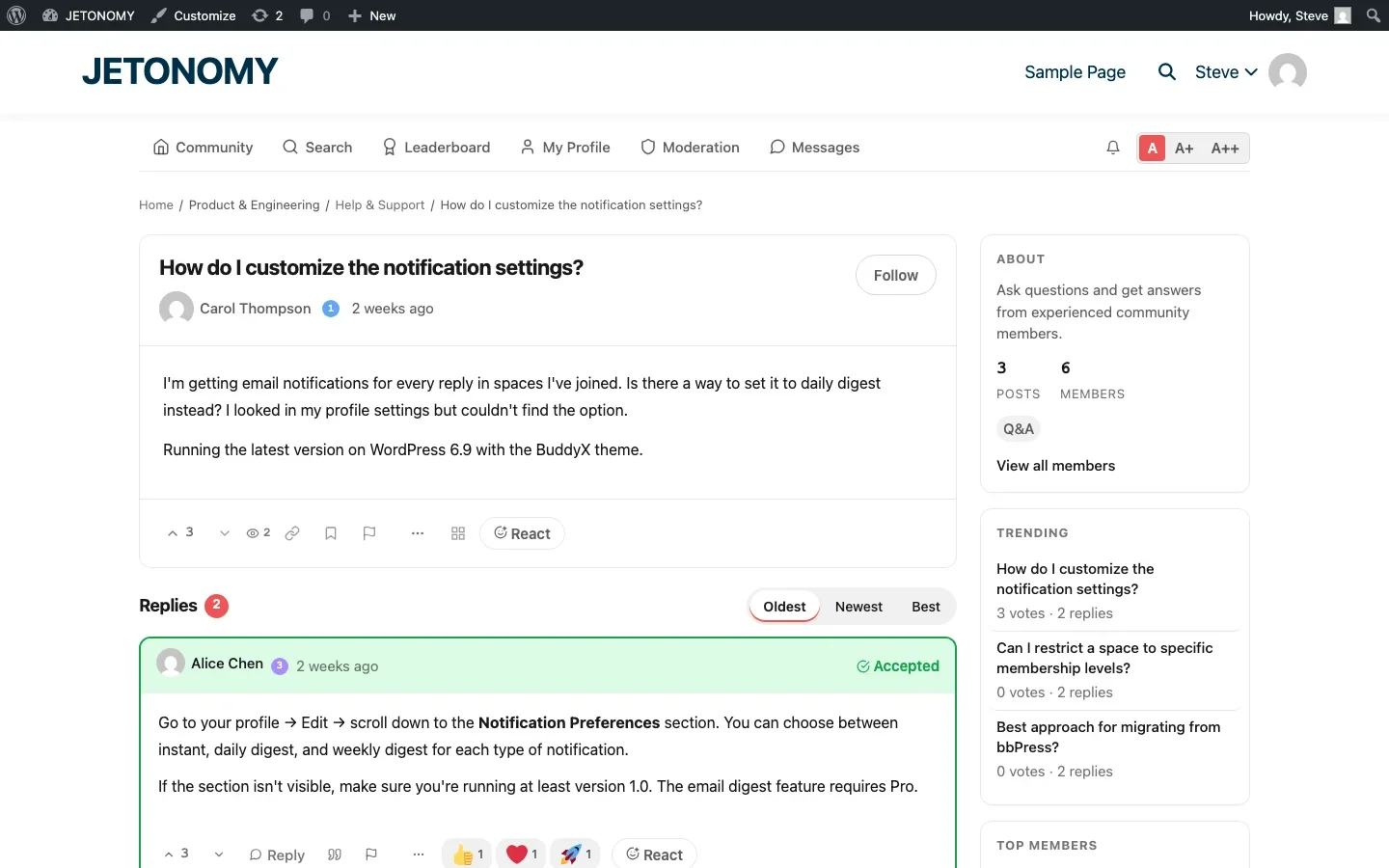
- Below each post and reply, a “React” button appears alongside the voting and reply controls
- Clicking it opens an emoji picker with the available reaction set
- The member selects an emoji, it is added to the post with a count
- Other members see the reaction counts and can add their own
- Clicking the same emoji again removes the reaction (toggle behavior)
Native Unicode Emoji
Jetonomy uses native Unicode emoji characters, not custom image sprites. This means reactions display correctly on every device and operating system without loading additional images. No broken image paths. No CDN dependencies. Just native emoji that work everywhere.
Notification Integration
When a post receives reactions, the author gets an on-site notification. This creates a positive feedback loop, the author sees that people appreciate their contribution, which motivates more contributions.
Setting Up Reactions
Step 1: Enable the Extension
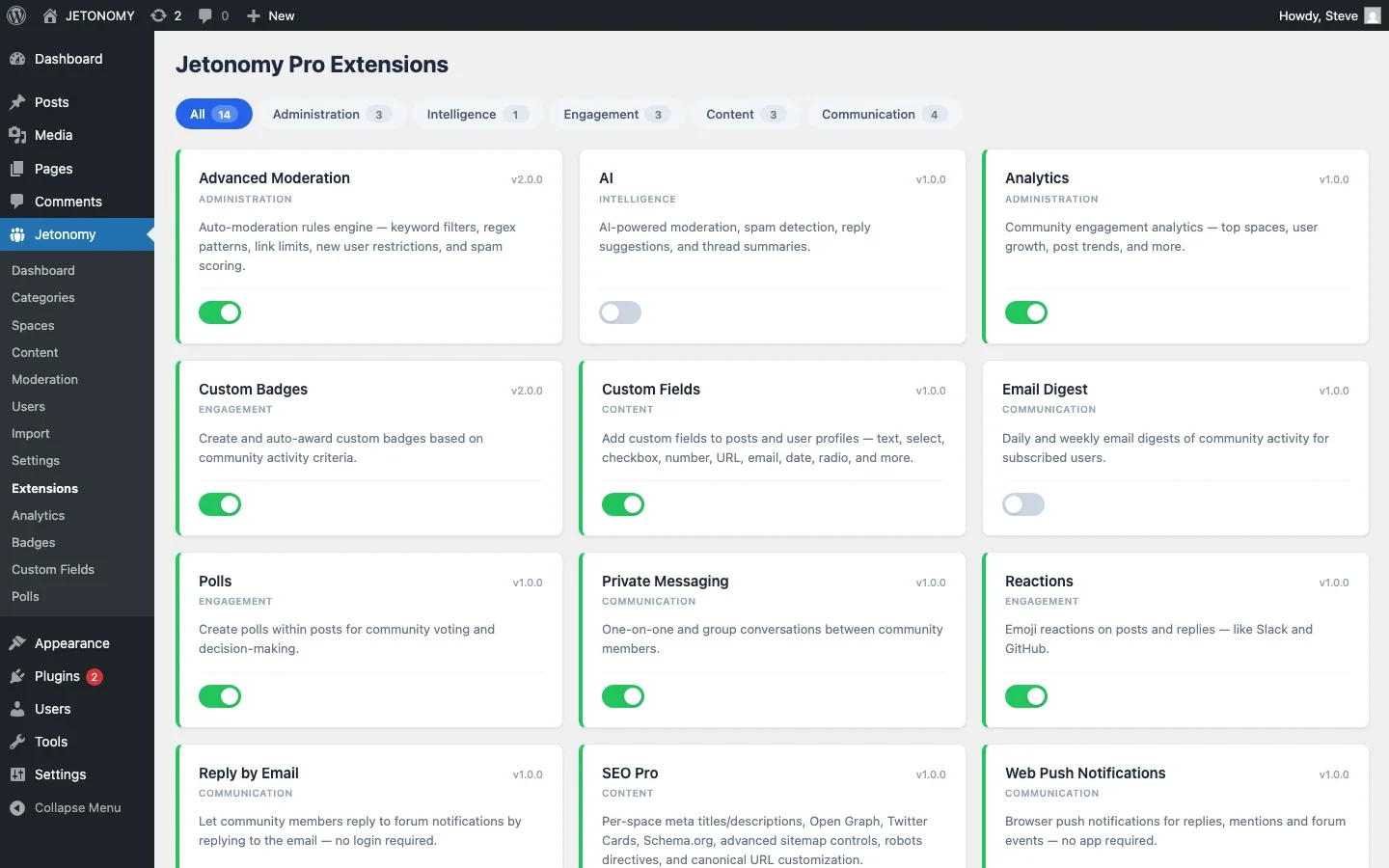
Go to Jetonomy → Extensions and toggle on Reactions. The extension works immediately with no additional configuration.
Step 2: Choose Your Reaction Set
Decide which emoji to make available. A focused set of 4–6 reactions works better than offering every emoji in the Unicode spec. Recommended starter set:
Emoji | Meaning in Community Context |
|---|---|
👍 | Helpful / Agree / Works for me |
❤️ | Love this / Great contribution |
🎉 | Celebration / Congratulations |
🚀 | Great idea / Ship it |
👀 | Interesting / Watching this |
😕 | Confused / Need more detail |
The last one, a confused reaction, is especially valuable. It gives members a way to signal “I do not understand this” without posting a reply that might feel confrontational. Authors see confused reactions and can clarify their content.
Step 3: Announce to Your Community
Post a quick announcement: “We have added emoji reactions! Instead of replying with just ‘Thanks’ or ‘+1’, you can now react with emoji. It keeps threads clean and lets content creators know their answers are appreciated.”
Reactions vs. Votes: They Serve Different Purposes
A common question: if we have upvotes, why do we need reactions? The answer is that they serve different purposes:
Feature | Votes | Reactions |
|---|---|---|
Purpose | Sort content by quality | Express emotion and acknowledgment |
Affects ranking | Yes, upvoted answers rise to top | No, reactions do not change order |
Affects reputation | Yes, upvotes earn points | No, reactions are social signals |
Emotional range | Binary (up/down) | Rich (multiple emoji options) |
Typical count | 3–15 per post | 5–30 per popular post |
Votes are functional. Reactions are social. Both are valuable. A post with 10 upvotes and 25 reactions is clearly high-quality content that the community loves. The metrics tell different stories.
Reactions as Community Health Indicators
Reaction data tells you things that post counts and vote counts cannot:
- Posts with many heart reactions resonate emotionally. Write more content in that style.
- Posts with many confused reactions are unclear. The author should edit for clarity, or you should create better documentation on that topic.
- Members who react frequently but rarely post are engaged lurkers. They are potential contributors who might post if encouraged.
- Declining reaction counts over time may indicate engagement fatigue. Refresh your content strategy or introduce new engagement features.
Combining Reactions with Other Engagement Features
Reactions work best as part of a broader engagement system. Combine them with:
- Reputation and trust levels, Members see reactions as social validation of their contributions, reinforcing the reputation loop
- Badges, Create a badge for receiving 100 reactions. “Community Favorite” for members whose content consistently resonates.
- Polls, Reactions and polls together cover the full spectrum from one-click engagement to structured feedback
What About Negative Reactions?
Should you include a thumbs-down or angry face reaction? Most community managers advise against it. Here is why:
- Downvotes (the functional sorting mechanism) already handle content quality signals
- Negative emoji reactions feel personal in a way that downvotes do not
- They can be used to bully or harass individual members
- A confused reaction (😕) serves the legitimate “this is unclear” use case without being hostile
If you want members to flag problematic content, use the content flagging system instead. Flags go to moderators. Negative reactions go public and can create toxic dynamics.
Getting Started
- Enable Reactions in Jetonomy Pro Extensions
- Choose 4–6 emoji that fit your community’s tone
- Announce the feature with a topic explaining how to use reactions
- Monitor reaction patterns for insights into content quality and community engagement
For the full forum setup, follow our WordPress forum guide. Reactions are one piece of the engagement puzzle, combine with the features in our engagement toolkit guide for maximum impact.
One click. One emoji. Zero thread clutter. That is the value of reactions.
Revisit the Reaction Set After a Few Months
The starter set of 4-6 emoji is a guess at launch. Once you have real usage data, some reactions will clearly carry meaning in your community and others will barely get used. A rarely-clicked emoji is not neutral, it is one more option members have to scan past before finding the one they actually want.
- Check reaction counts by emoji after 60-90 days and retire anything under roughly 5% of total reaction volume.
- Watch for a reaction being used in an unintended way, a “laugh” emoji showing up on serious support answers usually means members are using it as a lightweight disagreement signal, worth naming explicitly instead.
- If a niche community consistently reaches for an emoji that is not in your set (a specific tool icon, a mascot), consider whether a small custom addition earns more genuine engagement than staying generic.
Where Reactions Fits in Jetonomy Pro
Reactions is a standalone Jetonomy Pro extension that layers directly on top of the free voting and reputation system, no migration or reconfiguration needed to turn it on. It is usually one of the cheaper engagement wins to enable early, since it needs zero setup beyond picking the emoji set. Details are on the Jetonomy Pro page.













