10 Best Free Alternatives to Patreon in 2026
Ko-fi is the best free Patreon alternative for most creators: 0% on tips, 5% on memberships. We compare 10 options with a free plan, with fees checked on 18 November 2026.
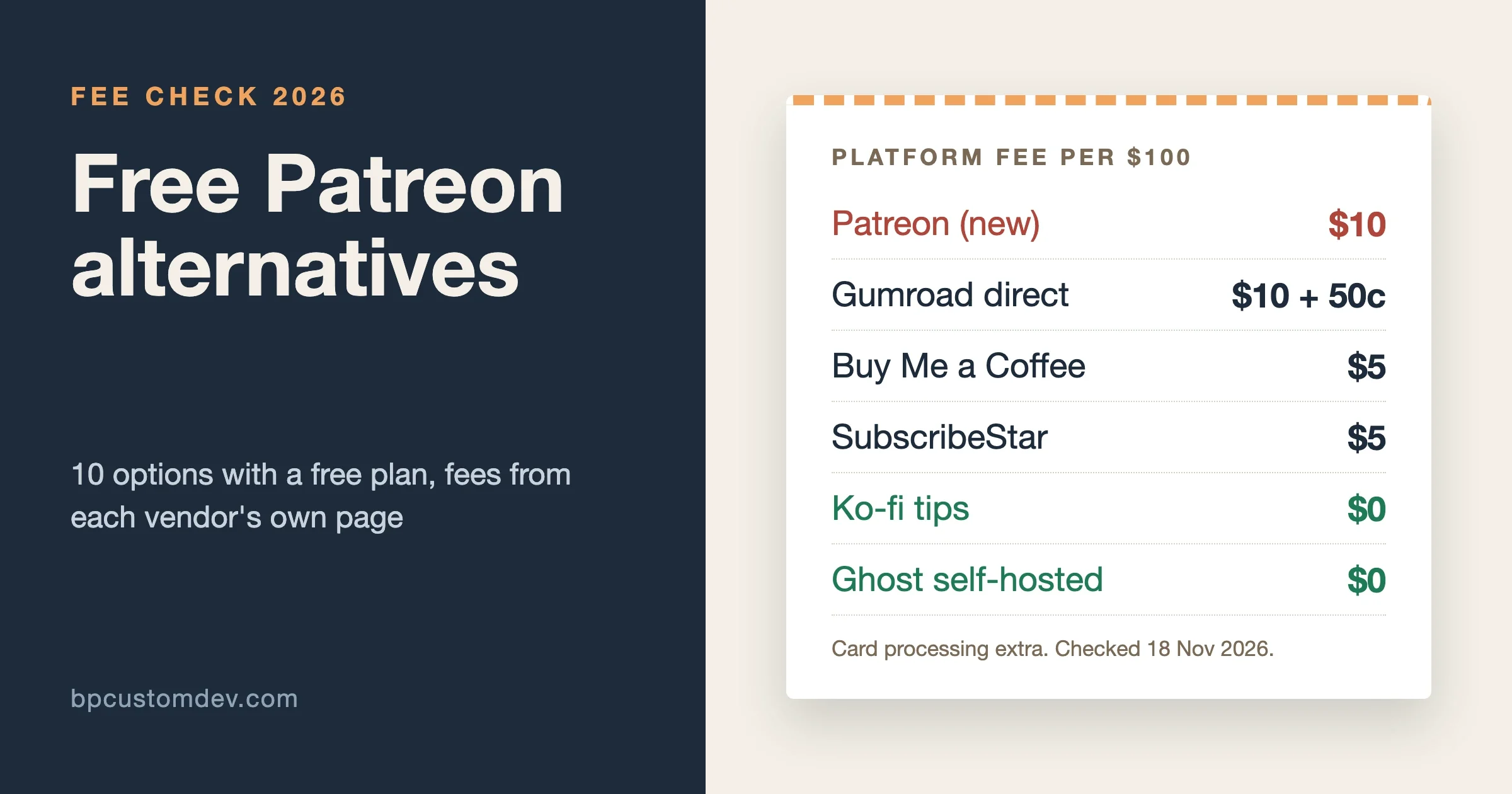
The best free alternative to Patreon for most creators is Ko-fi: it costs nothing to start, takes 0% on one-off tips, and charges a 5% platform fee on memberships and shop sales, against Patreon’s standard 10% for new creators. Buy Me a Coffee (flat 5%) is the easiest to set up, Bandcamp is the natural home for musicians, and Ghost or a WordPress site is the route if you want to own your members list and pay no platform cut at all. We checked every fee below on the vendors’ own US pages on 18 November 2026.
People who search for a Patreon alternative usually want one of three things. Lower fees. Fewer rules about what they can post. Or a way to stop renting their audience from a platform that can change its terms. The ten options below cover all three, and each one has a free plan or a free self-hosted route, so you can test it before you pay anything.
A word on how we built this list. Every platform here is live and taking new creators today. Fees come from each vendor’s English-language US page, without VAT or GST added for any country. Where we could not confirm a number on an official page, we left it out rather than guess.
How much does Patreon take, and what do the alternatives charge?
Patreon charges a standard 10% platform fee to creators who publish their page after 4 August 2025, plus payment processing and applicable taxes. Creators who launched before that date keep their legacy plan unless their page is unpublished. So the real comparison is 10% plus processing against the numbers below.
Platform | Monthly cost | Platform fee | Best for |
|---|---|---|---|
$0 (Gold: $12/month) | 0% on tips, 5% on memberships and shop; 0% on Gold | Tips plus a small shop | |
$0 | 5% on everything | The fastest setup | |
$0 | None (funded by donations) | Open-source and donation-only work | |
$0 | 5% platform service fee | Tiered subscriptions | |
$0 | 10% + $0.50 direct, 30% via Discover | Digital products with memberships | |
$0 | 10% on paid subscriptions | Writers and newsletters | |
$0 | 15% on subscriptions, 10% after $5,000/year | Musicians and labels | |
$0 (Pro: $15/month) | 5% on memberships | Merch plus memberships | |
Server cost only | 0% | Writers who want to own everything | |
WordPress + a membership plugin | Hosting cost only | 0% with Simple Membership | Communities that want a full site |
Card processing (usually Stripe or PayPal) comes on top of every row. Ko-fi’s help article puts processor fees at roughly 2% to 3.4% plus $0.30, Substack lists Stripe at 2.9% plus $0.30 with 0.5% extra on recurring billing, and SubscribeStar quotes a range from 3% plus $0.30 to 10% plus $0.40 depending on where the fan pays from. Small payments lose a bigger share to that fixed $0.30, which is why a $3 tier is rarely worth it.
What should you check before you switch?
Fees get the headlines, but they are rarely the reason a move fails. These are the five checks we run with clients before any creator or community moves money off Patreon.
- Can you export your supporters? Names and emails at minimum. Without them, a ban or a policy change takes your audience with it.
- Who holds the money? Ko-fi and Liberapay pay into your own PayPal or Stripe account. Gumroad, Substack and SubscribeStar collect first and pay you out, which means payouts can be paused for review.
- Does it support the payment type you sell? Liberapay allows donations only. Bandcamp subscriptions are yearly or monthly bundles of music, not general memberships.
- Who handles sales tax and VAT? A merchant of record (Gumroad, SubscribeStar) does it for you. A payment-link platform leaves it with you.
- What do your fans already use? A musician’s fans are on Bandcamp. A writer’s readers live in email. Asking fans to make a new account always costs some of them.
A good test: imagine the platform shuts your page tomorrow. If you could still email every paying supporter by lunch, you have chosen well.
The 10 best free Patreon alternatives in 2026
1. Ko-fi: the best free all-rounder
Ko-fi started as a tip jar and grew into a full creator page with memberships, a shop, commissions and crowdfunding goals. On the free plan, Ko-fi takes 0% of one-off donations and 5% of membership, commission and shop sales. If you opt in as a Contributor you pay 5% on everything, including tips, and get extras such as supporter-only posts and scheduled posts. Ko-fi Gold costs $12 a month and drops the platform fee to 0% across the board.
Money goes straight to your PayPal or Stripe account rather than sitting in a Ko-fi balance, which many creators like. The trade-off is that you need one of those accounts in a supported country.
Pick it if most of your income is tips today and you want room to add a membership later without moving platforms.
2. Buy Me a Coffee: the simplest page to set up
Buy Me a Coffee charges no monthly fee and a flat 5% transaction fee, so creators keep 95% before card processing. It covers one-time support, memberships and sales of digital extras. Supporters can pay with cards, Apple Pay, Google Pay and Cash App without creating an account, and payouts go directly to a bank account in 44 countries.
Its FAQ also states that your supporter list is yours and can be exported at any time. That matters more than the fee if you ever plan to leave.
Pick it if you want a page live in ten minutes and a single, predictable fee.
3. Liberapay: no platform cut at all
Liberapay is a non-profit that takes no cut of payments and funds itself through donations to its own account. You still pay processor fees, which its FAQ puts at an average of about 3% for Stripe and 5.1% for PayPal over the past year.
There is a catch, and it is a big one for Patreon refugees. Liberapay is for donations only. Its rules say payments must not be linked to a contract or a promise of rewards, so you cannot sell tiers with exclusive posts. That makes it a good fit for open-source maintainers, podcasters and writers who publish everything for free and ask for support, and a poor fit for anyone who paywalls content.
4. SubscribeStar: the closest copy of Patreon’s model
SubscribeStar works like Patreon: a creator page, subscription tiers, posts locked to tiers, polls, goals and direct messages. Its pricing page lists a 5% platform service fee for regular creators, with payment processing passed on separately. It also collects and remits VAT and sales tax for you, and offers payouts to more than 200 countries.
Two details to read before you sign up. SubscribeStar can hold a rolling reserve when a creator’s refund or chargeback rates run high, and new pages go through an approval step that some creators say takes a long time (more on that in the reviews section).
5. Gumroad: products first, memberships second
Gumroad has no monthly fee and charges 10% plus $0.50 on each sale made through your own profile or links, rising to 30% when a buyer finds you through Gumroad Discover. It supports recurring memberships alongside one-off products such as e-books, presets, courses and templates. Since 1 January 2025, Gumroad acts as merchant of record and handles sales tax for you.
The fee is no lower than Patreon’s, so choose Gumroad for its storefront and tax handling, not to save money.
6. Substack: for writers whose work lives in email
Substack is free while your newsletter is free. Once you switch on paid subscriptions, it takes 10% of subscription revenue, and Stripe charges 2.9% plus $0.30 per transaction and 0.5% on recurring billing. You get a publishing tool, an email list, podcast hosting and a reader network that can recommend you to new subscribers.
Your email list is exportable, which makes Substack less of a trap than it looks. The fee, though, is the same as Patreon’s, so it only wins if the discovery network brings you readers.
7. Bandcamp subscriptions: the musician’s Patreon
Bandcamp subscriptions let fans pay a yearly fee for everything you release, plus subscriber-only tracks, messages and merch. Bandcamp takes 15% of the subscription price plus 2.9% and $0.30 for processing. If you made $5,000 or more in the past year, its share drops to 10%, and subscriber-exclusive merch is always 10%. Its general fees page confirms the same 15% to 10% step for digital sales.
Fans already shop on Bandcamp, which is the real advantage. They do not need a new account or app to support you.
8. Fourthwall: merch and memberships in one shop
Fourthwall is a free storefront for print-on-demand merch that also runs paid memberships with members-only video, images, polls, private RSS feeds and Discord channel access. On both the free and the $15-a-month Pro plan, the membership fee is 5%. Digital products carry a 5% fee on Free and none on Pro.
It is built for YouTubers and streamers who already sell shirts. If you have no merch plans, Ko-fi or Buy Me a Coffee will feel lighter.
9. Ghost, self-hosted: 0% and you own the stack
Ghost is open-source publishing software under the MIT licence. Self-hosted, it costs nothing beyond your server, and its pricing page confirms Ghost adds no transaction fees on paid subscriptions; you pay Stripe only. You get a newsletter, a members area with free and paid tiers, and full ownership of your list.
The cost is your time. Ghost’s install guide recommends an Ubuntu server with at least 1 GB of memory and the Ghost CLI or Docker, and updates, backups and email delivery become your job. Ghost(Pro), the hosted version, removes that work, but paid subscriptions start on the Publisher plan ($29 a month billed yearly); the $18 Starter plan does not include them.
10. Your own WordPress site with a membership plugin
If you want a full website with a community, not just a creator page, WordPress gives you a free route with no platform cut. Simple Membership (40,000+ active installs, 4.6 out of 5 from 478 ratings, updated 10 November 2026) handles free and paid membership levels, content protection, and one-time or recurring payments through PayPal and Stripe. You pay hosting and card fees, nothing else.
For a community layer (feed, member profiles, private spaces and messaging), our team builds BuddyNext, a free, self-hosted community plugin for WordPress. We are biased, so here are its limits plainly: the free version runs the community, but charging for access (gated spaces, member tiers, paywalls) is a Pro feature, priced from $149 a year for one site. BuddyNext itself takes no cut of what you charge. For a deeper look at the WordPress route, see our guide to WordPress membership plugins.
Pick it if you have, or can hire, someone comfortable running a WordPress site, and you want your members, content and payments in one place you control.
Which Patreon alternative is best for musicians and bands?
Bandcamp is the best Patreon alternative for most musicians and bands, because fans already buy music there and its subscriptions bundle your whole catalogue with exclusive releases. The fee (15%, then 10% once you pass $5,000 a year) is higher than Patreon’s on paper, but a listener who already has a Bandcamp account is far easier to convert.
Three other setups we see work for music:
- Ko-fi for tips around releases. 0% on one-off tips makes it a good tip jar to link from YouTube or SoundCloud.
- Fourthwall for touring artists. Merch and memberships sit in one shop, at 5% on memberships.
- Your own site for labels and collectives. A WordPress or Ghost site can host several artists, a members area and a shop without a per-sale platform cut.
Bands often split income across two platforms: Bandcamp for music sales and subscriptions, and Ko-fi or Buy Me a Coffee for quick tips from live-stream viewers. That is fine. Just send everyone to one link page so fans are not confused.
Is there a good Patreon alternative in the UK?
Yes. Every platform in this list accepts UK creators, and Buy Me a Coffee was founded in the UK in 2017. For UK creators selling to EU or UK fans, the most useful detail is tax handling: SubscribeStar and Gumroad collect and remit VAT and sales tax for you, while tip-jar platforms such as Ko-fi pay out to your own PayPal or Stripe account and leave tax reporting with you. Check the UK figures on each vendor’s site before you choose, since we only quote US pages here.
What users say, and our suggestion
We read recent reviews on Trustpilot for each hosted platform on 18 November 2026. Trustpilot skews negative, because unhappy users are the ones who write, and for some platforms most reviewers are readers or buyers rather than creators. Read the numbers as a signal, not a verdict.
Platform | Trustpilot score (reviews) | What people praise | What people complain about |
|---|---|---|---|
4.5 (796) | Fast, human support; help recovering hacked accounts | Pages suspended with little explanation | |
4.0 (1,689) | Easy to use; friendly support replies within a day | Slow support at times; accounts blocked without clear reasons | |
1.6 (46) | No praise in the last 12 months | Unanswered support email; very long page approval; site glitches | |
1.4 (424) | Occasional praise for support | Payouts skipped “under review”; accounts banned without notice | |
1.4 (190) | Strong writers on the platform | Mostly reader complaints: hard to cancel, unwanted emails | |
4.2 (396) | Easy shop builder; good print quality; responsive service | Print defects on some orders; slow replies | |
2.2 (18) | Clean, fast editor; built-in newsletter and members | Canned support replies; billing after trials (hosted plan only) | |
Liberapay, Bandcamp | Too few reviews | Not enough recent reviews to judge | Not enough recent reviews to judge |
4.6 on WordPress.org (478) | Free PayPal and Stripe recurring payments | 10 of 14 support threads resolved in the last two months |
The pattern is clear. The two biggest complaints across hosted platforms are the same ones that drive people off Patreon: a page or payout frozen without explanation, and slow support when it happens. One Gumroad reviewer wrote in September 2026 that their “payout has now been skipped around eight times.” No hosted platform is immune, which is the strongest argument for keeping a copy of your supporter list somewhere you control.
Our suggestion
- You mostly get tips: Ko-fi on the free plan. 0% on tips is hard to beat.
- You want Patreon-style tiers with the least effort: Buy Me a Coffee at 5%, or Ko-fi Gold if your monthly income is well above $240 (where a $12 flat fee beats 5%).
- You make music: Bandcamp subscriptions, with Ko-fi as a tip jar.
- You write: Substack if you want its reader network, self-hosted Ghost if you want 0% and can run a server.
- You sell merch: Fourthwall.
- You run a community, not just a page: your own WordPress site. Simple Membership handles payments for free; BuddyNext adds the community, with paid spaces in its Pro version.
- You publish everything for free and ask for support: Liberapay.
If you are weighing a community business rather than a creator page, our breakdown of community monetization models compares subscriptions, tiers, one-time access and sponsorships with real numbers.
How do you move your patrons off Patreon without losing them?
Moving platforms costs some supporters, but planning keeps the loss small. Patreon does not let you move card details to another service, so every patron has to sign up again. Here is the order we recommend:
- Export your member list from Patreon (name, email, tier) before you announce anything.
- Set up the new page with matching tiers, and price them the same or lower. A move is not the moment to raise prices.
- Give patrons a reason to switch: an exclusive post or bonus only on the new platform.
- Announce the date at least one billing cycle ahead, and post reminders on Patreon itself.
- Run both for one or two months, then pause new Patreon sign-ups before closing tiers.
- Email everyone who has not moved, once, with a direct link. Then stop.
If your new home is a membership site, a one-step checkout matters more than any feature list. We wrote about that in letting members pay and get in instantly. And if you are deciding what the new community itself should look like, start with our guide to building a community-based website.
Frequently asked questions
What is the best free Patreon alternative?
Ko-fi is the best free Patreon alternative for most creators: no monthly fee, 0% on one-off tips and 5% on memberships and shop sales. Buy Me a Coffee is the simplest alternative at a flat 5%.
Is there a Patreon alternative with no fees at all?
Liberapay takes no platform fee but only allows donations, not paid tiers. Self-hosted Ghost and WordPress with Simple Membership also take no platform cut. In every case, Stripe or PayPal still charges its processing fee.
Is Ko-fi or Buy Me a Coffee better than Patreon?
On fees, yes. Patreon’s standard plan for new creators is 10%, while Buy Me a Coffee charges 5% and Ko-fi charges 0% to 5%. Patreon still has the larger built-in audience of people already used to paying creators monthly.
Which Patreon alternative is best for artists who post adult or edgy content?
Read each platform’s content rules before you move; every service in this list has its own content guidelines and payment-processor limits, and they change. A self-hosted site gives you the most control, but your payment processor’s rules still apply.
Can I use Patreon and an alternative at the same time?
Yes. Many creators keep Patreon for existing patrons and add Ko-fi or Buy Me a Coffee for tips and new supporters. Buy Me a Coffee even suggests this on its own comparison page.
Do I need to pay tax on income from these platforms?
Yes, creator income is usually taxable where you live. Gumroad and SubscribeStar collect and remit sales tax and VAT on your behalf; platforms that pay straight into your PayPal or Stripe account leave that to you.
Fees and features on this page were checked on each vendor’s US page and on WordPress.org on 18 November 2026. Platforms change their terms often, so confirm the current fee before you move a paying audience.