Leaving Circle, Skool, Mighty Networks or Discord: How to Export Your Members and Content and Bring Them Home
What Circle, Skool, Mighty Networks and Discord let you export, what their APIs expose, what neither gives you, and how to bring your members and content home to a community you own.


You built a community on someone else’s platform and now you want to own it. The hard question is practical: how do you get your members and your content out, and what do you actually get? This guide to moving a community to WordPress goes platform by platform through Circle, Skool, Mighty Networks and Discord, using each platform’s own help pages and developer documentation, and then shows how to bring everything home to a site you control.
What is the quick answer?
All four give you a member list. Circle and Mighty Networks also have documented APIs that can pull much more, including posts, comments, events and lessons. Skool has an export button and a Zapier link, but we found no public developer API. Discord has no owner export of server messages, only a developer API for bots. None of them hands you everything in one click, so plan for a mix of exports, API pulls and a clean-up.
In this guide
- The platforms side by side
- Circle: export, API and gaps
- Skool: export, automation and gaps
- Mighty Networks: export, API and what we pulled in real migrations
- Discord: data package, bot API and gaps
- Bringing your community home, step by step
- Keeping your members, payments and links intact
- FAQ
How we checked this: we read each platform’s own help center and developer documentation in October 2026. For Circle we also read its published Admin API specification. For Mighty Networks we add what our own migration tooling does, from real projects with no client names. Platforms change these pages often, so check the current version before you plan.
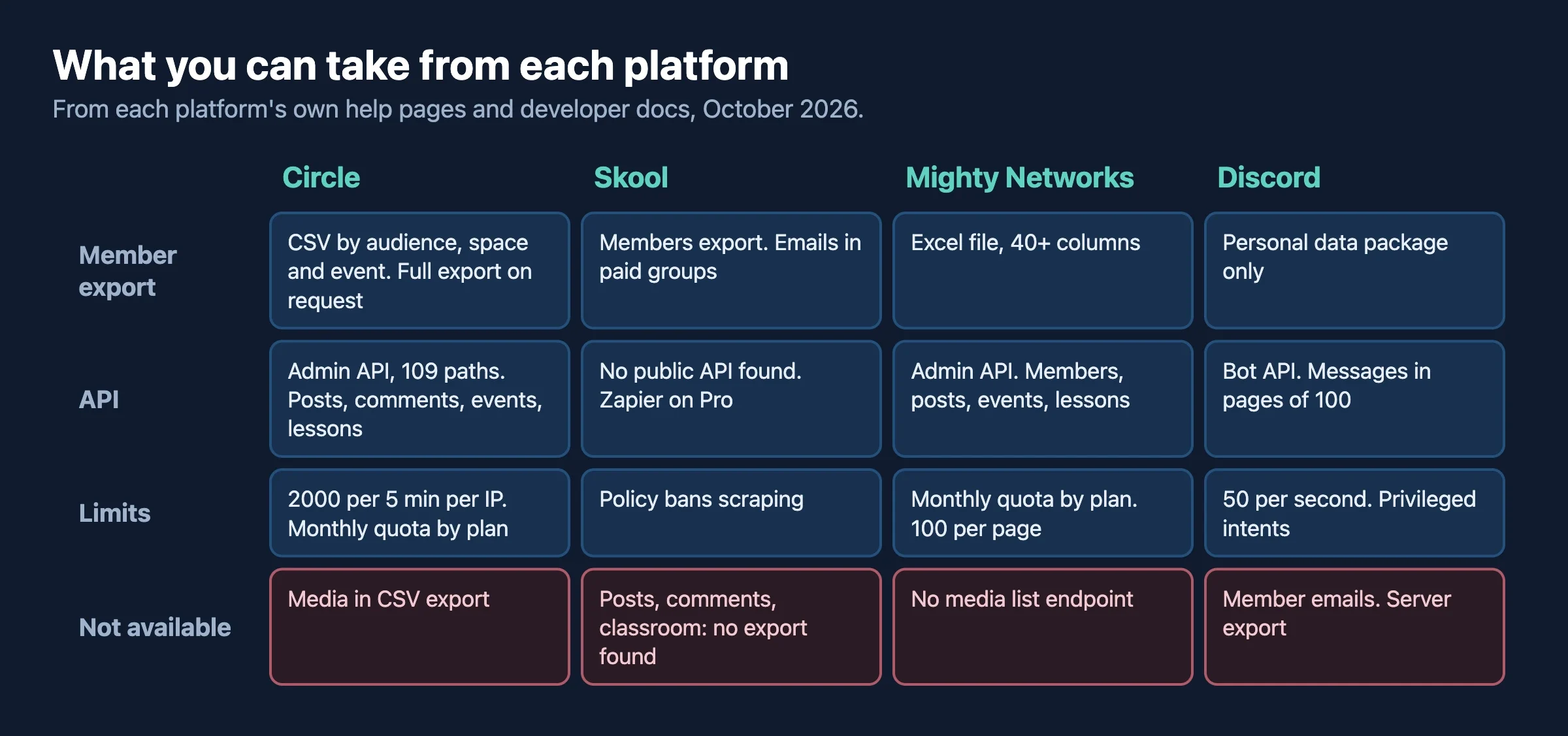
How do the four platforms compare on exports and APIs?
This is the short version. Each platform gets its own section below with the detail and the source.
Platform | Built-in export | API | Not available |
|---|---|---|---|
Circle | Member CSVs by area. Full data export (members, spaces, posts, comments) on request to support | Admin API, token auth, 109 documented paths. Quota depends on plan | Uploaded media in the CSV export. Payment card data |
Skool | Members export with email (paid groups) and membership answers | No public developer API found. Zapier link on the Pro plan | Posts, comments and classroom: no export found. Policy bans scraping |
Mighty Networks | Member list as an Excel file | Admin API, bearer token, monthly request quota by plan | No documented media export. No content export in the help page we read |
Discord | Personal data package only. No server export | Developer API for bots, with rate limits and privileged intents | Member emails. Anything a bot is not allowed to see |
How do I export my community from Circle?
What does Circle’s built-in export give me?
Circle lets admins download audience data as CSV files. Its help center says the CSV can include a unique ID, first and last name, email, join date, active status, tags, profile and avatar URLs, engagement counts, custom profile fields, last active date, email marketing preference, invitation status and an activity score. You can export from the audience page, from a space group, from a space, and from event attendee lists. The file is emailed to your admin address.
Circle also describes a fuller data export. Only admins can request it, by writing to Circle support, and it arrives as four CSV files for members, spaces, posts and comments. The post and comment files include the body text, author, dates and threading (parent comment). Circle’s note on that page says the posts and comments files do not include any uploaded media, and the page was last updated in 2022.
What does Circle’s API expose?
Circle’s Admin API is described by Circle as designed for community admins to build automations, migration scripts and administrative integrations. An admin gets a token from the Developers › Tokens page in the community. Its published specification lists 109 paths, including:
- Members, member tags, profile fields, access groups and member segments
- Spaces, space groups and space members
- Posts, comments and topics
- Events and event attendees
- Course sections, course lessons and lesson progress
- Paywalls, member subscriptions and member charges, with export endpoints for subscriptions and charges
- Messages, forms and flagged content
We did not test every endpoint, and we did not verify whether the messages resource can read existing direct-message history. Treat it as a lead to check, not a promise.
What are the limits?
- Rate limit: the usage page says 2000 requests per 5 minutes per IP, and that the number can change.
- Monthly quota by plan: 5,000 requests a month on Business, 30,000 on Enterprise and Circle Plus, and 250,000 on Circle Plus Platform, per Circle’s usage page. It lists enforcement starting January 1, 2025.
- Pagination: list calls return 10 items per page unless you ask for more with
per_page, so large communities mean many calls.
What neither the export nor the API gives you
- Uploaded media inside the CSV export. You would fetch files through the content you pull from the API, and check what Circle serves.
- Members’ card details. Payment data lives with the payment processor, not in a file you can move.
Our guides on Circle alternatives and why EU brands are leaving Circle and Skool explain the why. This guide is about the how.
How do I export my community from Skool?
What does Skool’s built-in export give me?
Skool admins can export the member list from the Members tab with the Export button. Skool’s help center says the same button exports members’ answers to membership questions. A June 2024 announcement in Skool’s own community says admins of paid groups can also get members’ email addresses in the export, from members › export. The announcement does not list every column, so check a sample export before you plan around it.
We did not find any official export for posts, comments or classroom content. If you need those, the honest options are to ask Skool support what they can provide, or to rebuild the important content by hand.
Does Skool have an API?
We found no public developer API in Skool’s Help Center or on its site. A search of the Help Center for “API” returns the Zapier articles and little else. What Skool does document is a Zapier integration. Its help article says it is only available on the Pro plan, uses an API key from the group’s Plugins settings, and supports four things: sending paid members’ name and email to a CRM, sending membership question answers to a CRM, inviting a member to your group, and unlocking a course for a member. The article does not mention rate limits.
That is a way to send new activity out of Skool as it happens. It is not a way to pull your history.
A warning about scrapers
Third-party tools exist that scrape Skool. Skool’s platform policy tells users to refrain from scraping data or making automation requests. Using a scraper on your own community may put your account at risk, so ask Skool in writing before you try. We do not recommend it.
What neither the export nor the API gives you
- Posts, comments and classroom lessons: no export that we found.
- Your members’ consent record: you have what the member list shows, and your own emails.
The cost side is covered in Skool’s true cost versus self-hosted WordPress.
How do I export my community from Mighty Networks?
What does Mighty’s built-in export give me?
Mighty Networks’ help article says that on the plan it names (the Launch Plan or higher when we read it), you can download member data as an Excel (.xlsx) file for the whole network, for a single space you host, or for each paid plan. The network file has more than 40 columns, covering member ID, names, email, membership and member types, notification preferences, location, subscription information, space memberships, ambassador level and custom field answers. You must agree to Mighty’s terms before downloading, which say not to sell or share member data. The article does not cover exporting posts or other content.
Mighty Insights can download reports as PDF, CSV, Excel, HTML or PNG, but those are analytics, not your content.
What does Mighty’s API expose?
Mighty documents an Admin API at api.mn.co/admin with bearer-token authentication. Network admins generate tokens under Admin › Settings › API Keys. The documentation covers networks, members, spaces, posts, comments, reactions, events and RSVPs, plans and their members, and coursework items such as lessons, quizzes and sections. It also has webhooks for events such as member joins and purchases.
- Quota: the Scale plan includes 5,000 API requests a month, with extra requests charged at $0.002 each. Other plans show custom limits, so ask your account team.
- Pagination: the default is 25 items per page, with a maximum of 100.
- Errors: a 429 response means you hit the rate limit.
What we pulled in real Mighty migrations
We have moved Mighty communities onto the Wbcom stack, without naming clients. Our tooling reads the Admin API with the client’s key and network ID, and it takes members, posts, comments, reactions, polls, events and RSVPs, courses and lessons, and media. A few lessons from that work apply to anyone doing this:
- The calls add up. Posts, events and members come in a few calls. Comments and reactions are fetched per post, and custom field answers per member, so the heavy pass takes thousands of requests on a mid-sized network. Check your quota before you start.
- There is no list endpoint for media. We find files by parsing the URLs out of post and lesson content.
- Mighty-hosted files stop working when the account lapses. Download them before you cancel. External videos (YouTube, Zoom, Vimeo) stay as links.
- Plan prices are not in the plans list. We recover the real amounts from purchase and subscription records.
- Content needs clean-up. Posts arrive with HTML, absolute links to the old site and embedded media that break in a native feed unless you convert them.
- Run a final sync at cutover. We pull only what changed since the last sync, so the new site catches posts made while you were moving.
What neither the export nor the API gives you
- A documented content export, or a media listing.
- Payment card details, which stay with the payment processor.
Our overview, Whop vs Circle vs Skool vs Mighty Networks, covers how the four compare as products.
How do I export my community from Discord?
What does Discord’s built-in export give me?
Discord’s data package is personal. A member can request a ZIP of their own data, which includes the messages they sent. For a server you own, Discord’s help article says the package covers things like your uploaded emoji, audit log actions, a list of your channels with permissions, server settings and webhooks. It does not give you other members’ messages. The request can take up to 30 days. So the built-in route does not export a server’s history.
What does Discord’s API expose?
Discord’s developer documentation describes a bot API that can read what a bot is allowed to see in a server you manage.
- Messages:
GET /channels/{id}/messagesreturns up to 100 messages per call, paged withbefore,afteroraround. The bot needs the View Channel and Read Message History permissions. - Members:
GET /guilds/{id}/membersreturns up to 1000 members per call, paged by user ID. It needs the Server Members privileged intent. The member object has no email field. - Message content: without the Message Content privileged intent, a bot receives empty values for content, embeds, attachments and components.
- Privileged intents: apps with fewer than 10,000 users can enable them in the Developer Portal. Larger apps need review.
- Rate limits: bots can make up to 50 requests per second overall, and each route has its own limit shown in response headers. A 429 response says when to retry.
What neither the export nor the API gives you
- Member emails. Discord’s member object has none. You have to ask your members for an email, for example through a sign-up form or a connect step on the new site.
- Anything outside the bot’s permissions. Private channels, voice conversations and direct messages between members are not yours to export.
Treat a bot export as a record of public discussion you already host. Tell your members what you are saving and why. Our post Discord as borrowed land covers the ownership argument, and a 72-hour migration sprint from X Communities shows how fast a move can go when planned.
How do I move my community to WordPress?
Here is the honest part. The BuddyNext Importer covers BuddyPress and BuddyBoss sources only, and its README lists other sources as future work. Circle, Skool, Mighty and Discord have no one-click importer from us or anyone we know. A move from these platforms is a small custom project: export or pull the data, map it, then write it into the new site through BuddyNext’s own services. That is what our Mighty tooling does.
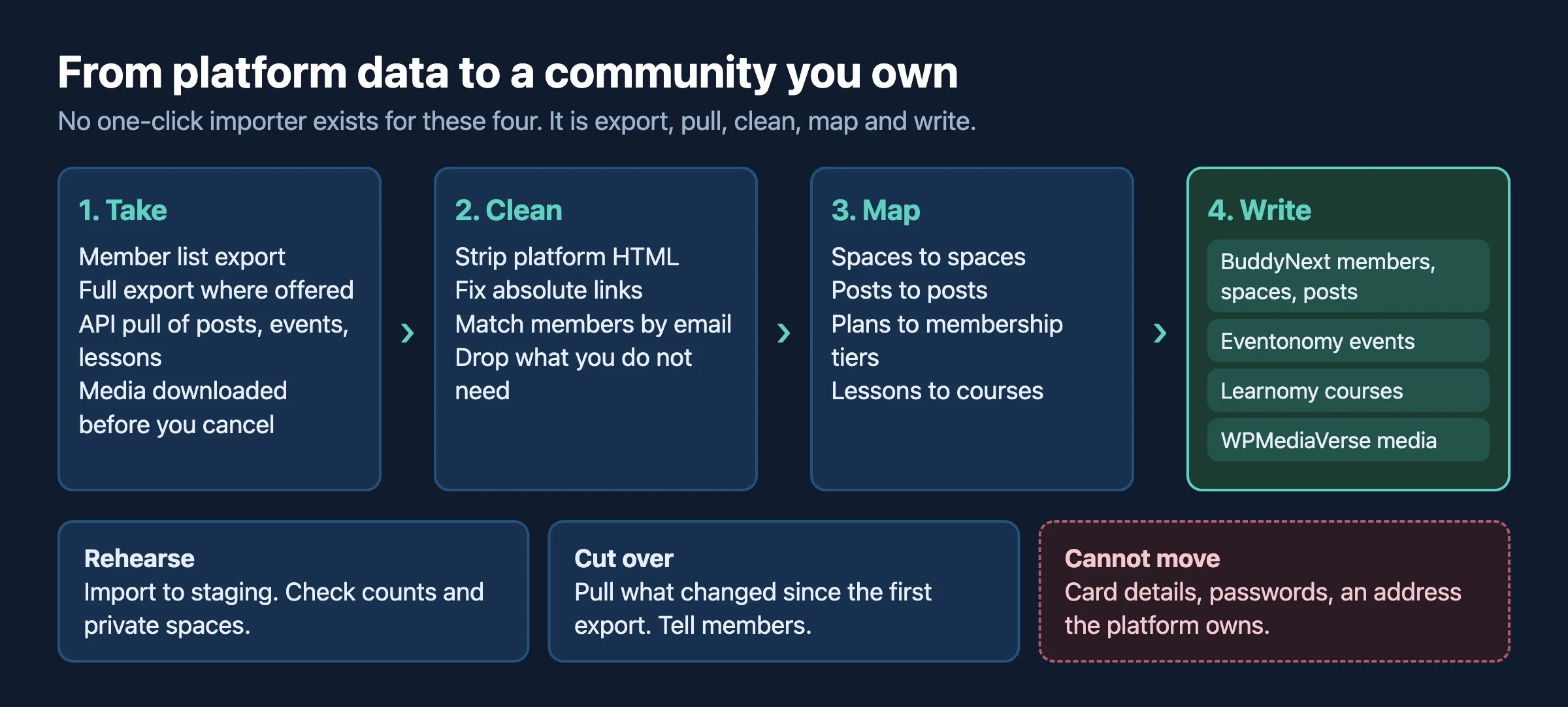
Step 1: Decide what you really need
You rarely need every post from three years ago. List what matters: members and their emails, the best discussions, courses and lessons, events, and paid memberships. Everything else can stay in an archive file.
Step 2: Take the exports and the API pulls
- Download the member list from the platform.
- Ask for the full data export where one exists (Circle).
- Pull posts, comments, events and lessons through the API where one exists (Circle, Mighty, Discord with a bot).
- Download media before you cancel. Check the file URLs in your exports for the platform’s own hosting.
Step 3: Map it to the new site
Platform data | Lands in |
|---|---|
Members and profile fields | WordPress users and BuddyNext profile fields |
Spaces, groups or channels | BuddyNext spaces |
Posts and comments | BuddyNext posts and comments |
Events and RSVPs | Eventonomy events |
Courses and lessons | Learnomy courses |
Photos, video and files | WPMediaVerse and the media library |
Paid plans and subscribers | Membership tiers on the new site |
Step 4: Rehearse the import
Import into a staging copy first. Check member counts, open a few old discussions, and confirm private spaces stay private. Our guide to moving from BuddyPress to BuddyNext lists the same rehearse-first habits.
Step 5: Run a final sync at cutover
Your old community keeps living while you build. Pull what changed since your first export just before launch, and import only that. Then tell members.
How do I keep my members, payments and links?
How do I re-invite members without losing them?
- Create their accounts on the new site from the member list, using the email as the key.
- Send a short sequence of emails: a heads-up a week before, a launch email with a one-click way in, and a reminder a few days later.
- Offer a clear sign-in path. A WordPress password reset link works everywhere. A magic-link sign-in is smoother if you add a plugin for it.
- Keep the old community open and read-only, or pinned with a notice, for a transition period. Members who miss the email will find the sign.
Only email people you are allowed to email. The rules depend on your country and on what members agreed to, and an export does not carry proof of consent. If you are unsure, ask a privacy professional.
How do I keep payments and subscriptions continuous?
Card details do not travel in a CSV. Payment processors keep them, and moving them between processors is done by the processors themselves. Ask your processor what it supports before you promise members a seamless switch. In practice you have three options: keep the same processor and re-create the plans on the new site, ask members to re-subscribe with a launch offer, or keep the old platform for paid members until their renewal date. Match each member to a plan from payment records at cutover, not from guesses.
What happens to old links?
If you used your own domain on the old platform, you control the DNS and can point it to the new site and add redirects. If your community lived at an address the platform owns, such as a Skool group address, you cannot redirect it. Leave the old community up with a pinned message pointing to the new home for as long as you can.
When don’t you need this?
If your community is small and young, starting fresh and inviting people may be simpler than a migration. If you only want your member emails, the built-in export is enough. And if your platform meets your needs and you only worry about ownership, a regular export as a backup may be all you need. Make it a habit, because platforms change what they allow.
FAQ
Can I export everything from Circle?
Not in one click. You get member CSVs yourself, a four-file data export (members, spaces, posts, comments) by asking support, and more through the Admin API. The posts and comments files do not include uploaded media.
Does Skool have an API?
We found no public developer API. Skool documents a Zapier integration on its Pro plan, which can send new member information out and invite members or unlock courses in. It cannot pull your history. Skool’s policy also tells users not to scrape.
Can I get posts out of Mighty Networks?
Yes, through the Admin API, within your plan’s monthly request quota. The help page we read for the member export does not cover posts, so use the API.
Can I export a Discord server?
Not with a built-in tool. A bot you set up can read channel history it has permission to see, in pages of 100 messages, within Discord’s rate limits. Member emails are not available from Discord at all.
Will my members’ passwords move?
No. You create accounts and let members sign in with a reset link or magic link. Passwords stay with the old platform.
How long does a move take?
It depends on the amount of content, the API quotas and how much clean-up your posts need. A small community can move in days. Larger ones with courses and media take longer. A staging run gives the best estimate.
Want us to move your community for you?
We have moved Mighty Networks communities onto the Wbcom stack, and we build custom community platforms. We can audit what your platform lets you take, plan the quota, pull and clean the data, rehearse on staging and launch with you. Talk to us about moving your community and tell us which platform you are leaving.
Sources we checked
- Circle: export your community data
- Circle: export a CSV of your members
- Circle: Admin API
- Circle: usage and limits
- Skool: Zapier integration
- Skool: platform policy
- Mighty Networks: Admin API
- Mighty Networks: can I download my member data?
- Discord: your data package
- Discord: message resource
- Discord: rate limits
















