How to Build a Community Portal on WordPress (Instead of Renting One From an Enterprise Platform)
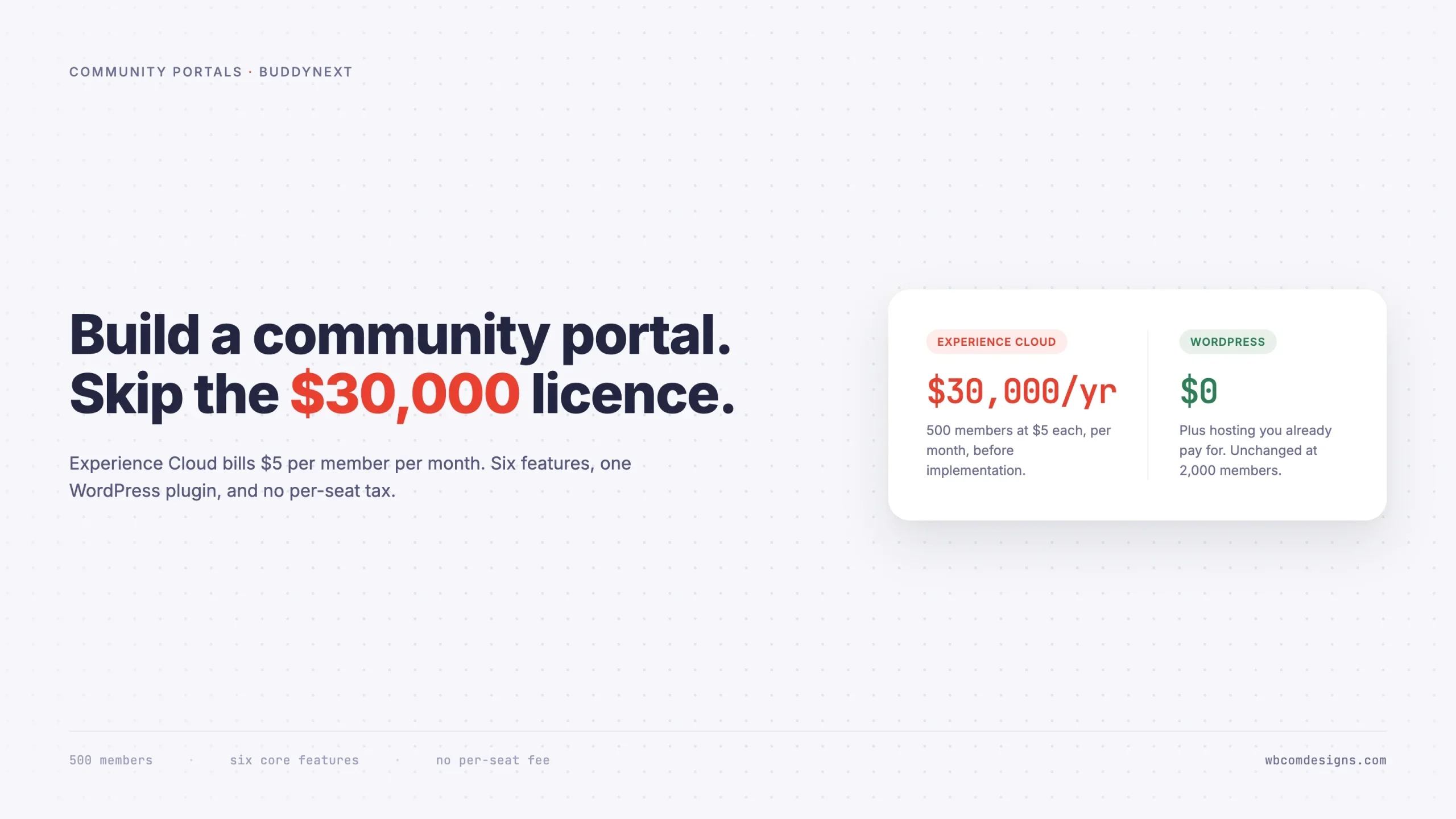
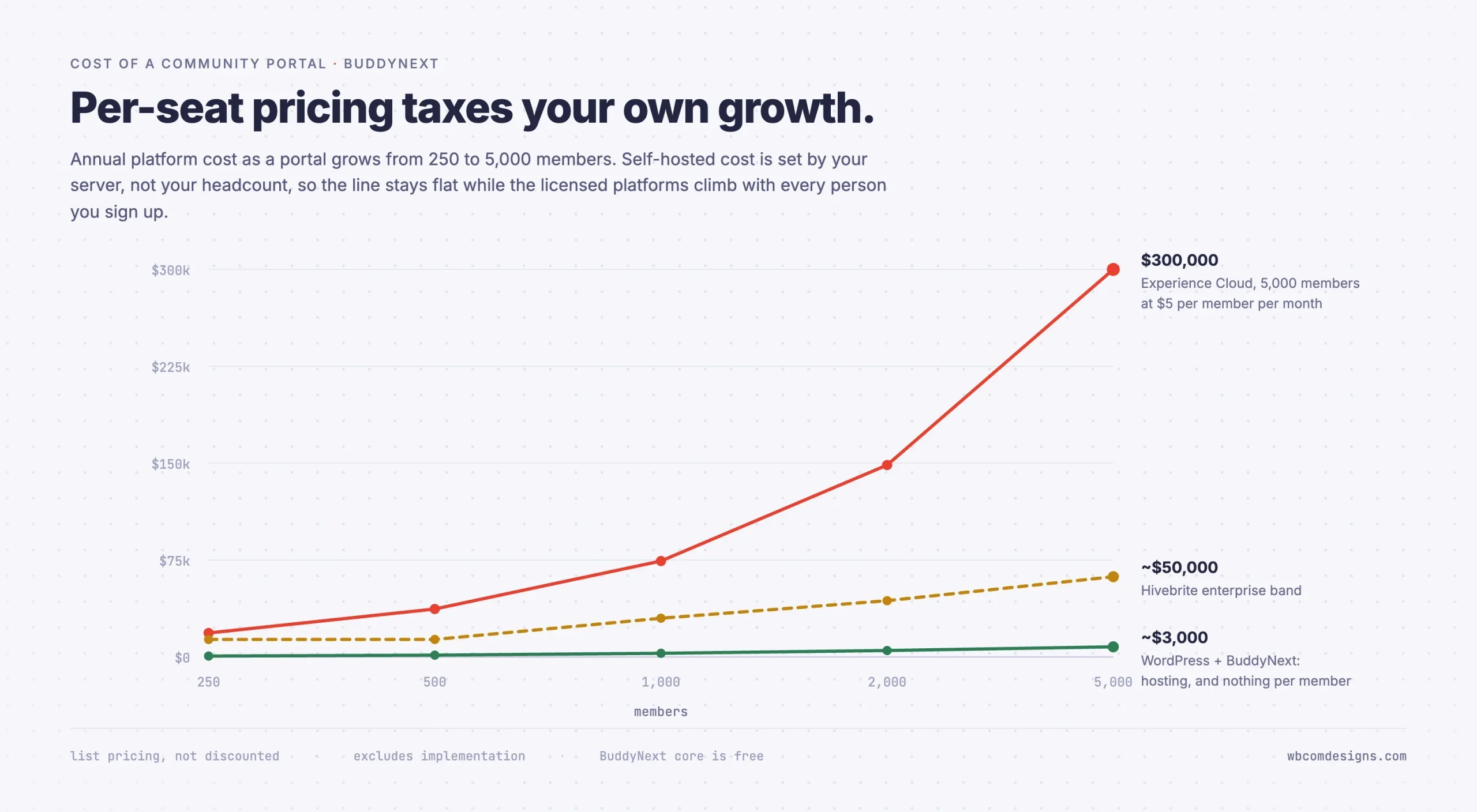
Experience Cloud bills $5 per member per month, so a 500-member portal costs $30,000 a year. Every community portal is built from the same six features. Here is how to run all six on WordPress, and the three cases where you should still buy commercial.

Updated September 2026.
Enterprise community portal platforms like Salesforce Experience Cloud, Hivebrite, and Higher Logic price their community licenses per member, per month. That single detail is the whole story: your community succeeding, growing from a few hundred members to a few thousand, is the exact event that triggers your bill climbing right alongside it. The vendor’s cost to serve you barely moves. You are paying a tax on your own growth, not for compute or storage that actually scales with usage.
None of that includes implementation. Enterprise community builds routinely involve a substantial services engagement before a single member logs in, on top of the recurring license.
Here is the part that should annoy you. Strip the enterprise packaging off any of these products and you find the same six features underneath. Features that amount to a database schema, a permissions check, and a set of templates. You can run all six on WordPress, on hosting you already pay for, with an afternoon of setup work.
This guide shows you how. It also tells you where the commercial platforms still earn their keep, because there are three situations in which paying for one is the right call, and pretending otherwise would waste your time.
What “community portal” actually means
Search for “community portal” and you get Microsoft SharePoint documentation, a residents’ app for housing associations, a hospital patient login, and a machine-learning research wiki. Four unrelated products, all using the same two words. That is not Google being confused. It is a genuine ambiguity in the term, and it is why so many portal projects go sideways: the people funding the project and the people building it often mean different things.
So before anything technical, get specific about which portal you are building.
Portal type | Who logs in | What they came for | Genuinely social? |
|---|---|---|---|
Client portal | Your agency’s clients | Files, project status, invoices, approvals | No, it is one-to-one with you |
Customer portal | Buyers of your product | Orders, licences, downloads, support | Partly, peer support helps |
Employee portal or intranet | Staff | Announcements, documents, who-does-what | Yes |
Member portal | Paying members of a body | Gated content, directory, events, renewals | Yes |
Association portal | Professionals in a field | Peer discussion, CPD, committees, chapters | Yes, it is the core value |
Resident portal | Households in a building or estate | Notices, documents, maintenance, neighbours | Yes |
Alumni portal | Graduates | Finding each other, mentoring, events, giving | Yes, it is the entire point |
Five of those seven live or die on whether members talk to each other. That distinction matters more than any feature list, because it decides which kind of software you should be shopping for. A client portal is a filing cabinet with logins, and a document-management plugin handles it. Everything else in that table is a community with a membership boundary drawn around it, and community software is what you actually need.
If your portal sits in the bottom five rows, the rest of this guide applies directly.
The six features every community portal has
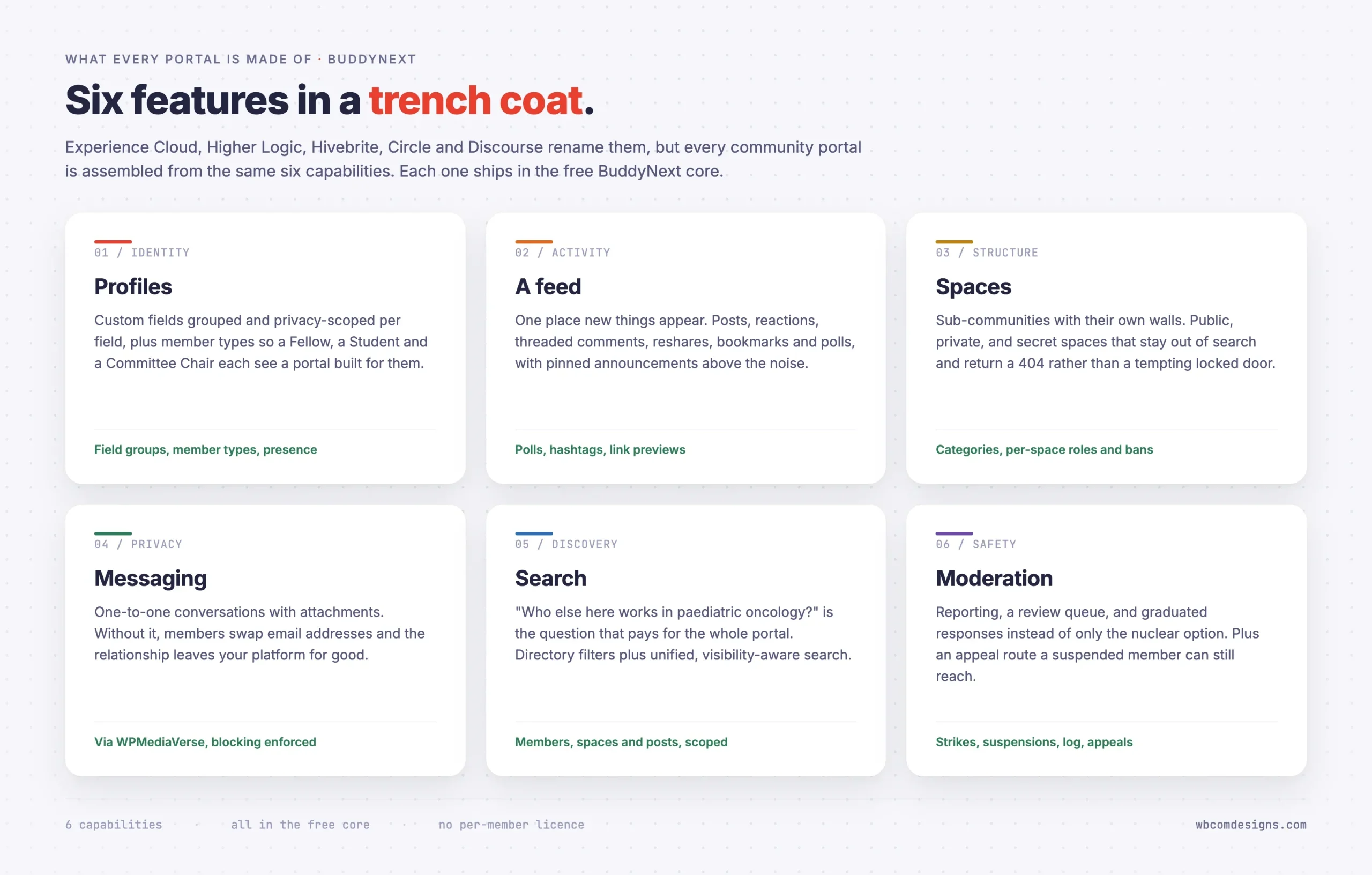
Read the feature matrices for Experience Cloud, Higher Logic Thrive, Hivebrite, Circle, Bettermode and Discourse side by side. Once you clear away the naming, where Groups become Spaces become Hubs become Chapters, every one of them is built from the same six capabilities.
1. Identity: profiles that hold more than an email address
A portal needs to know who someone is in the context of your organisation, not just their login. Job title, chapter, graduation year, membership tier, unit number, certifications. Custom profile fields, arranged in groups, with per-field privacy so a member can list an employer publicly and keep a phone number private.
The overlooked half of identity is member types: the ability to say this person is a Fellow, that one is a Student Member, that one is a Committee Chair, and to change what each of them sees. Without it, everyone gets the same portal and nobody feels it was built for them.
2. A feed: one place where new things appear
This is the feature that separates a portal people visit from a portal people forget. Not a newsletter archive. A running stream of posts, with the ability to react, comment, reply, reshare and bookmark. Polls too, because asking 300 members a question and getting an answer within the hour is the most persuasive demo of a working portal there is.
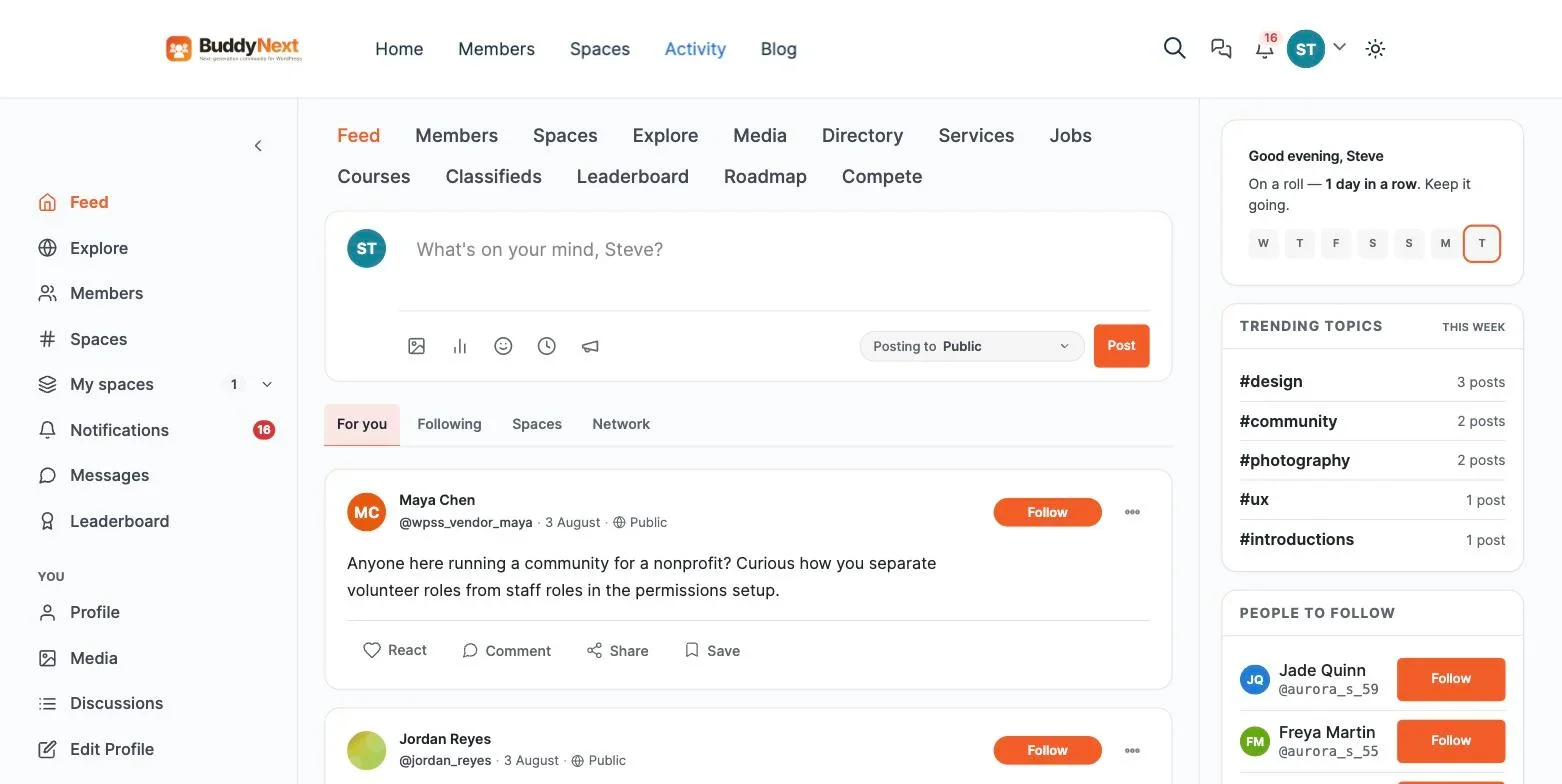
Announcement posts matter as well. That is the pinned, official, this-came-from-the-organisation post that sits above the noise.
3. Spaces: sub-communities with their own walls
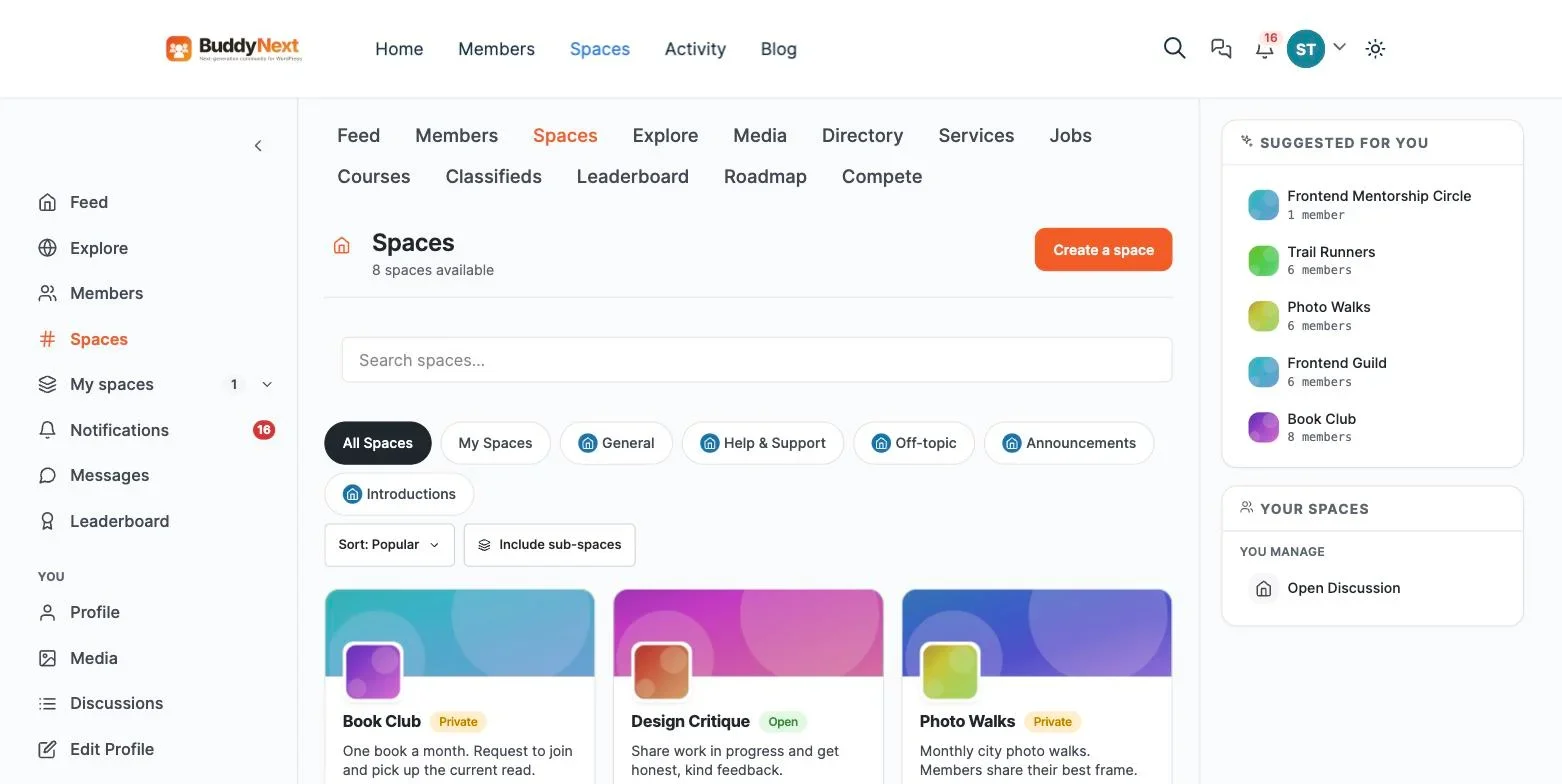
A 2,000-member portal with one shared feed is a shouting match. Members need somewhere smaller: the London chapter, the 2019 cohort, Building C, the Ethics Committee, the product beta group.
Three requirements people forget until it is too late. Spaces need visibility levels, including secret, where the space stays out of search results and returns a 404 to non-members rather than a tempting “you do not have access” page. They need categories, so 60 spaces stay browsable. And they need their own moderation, so you can remove someone from one space without banning them from the whole portal.
4. Private messaging: the conversations that are nobody else’s business
Members will want to talk one to one. If your portal cannot do it, they will swap email addresses and the relationship leaves your platform, taking its value with it. You need direct messaging with attachments, plus a block function that holds across the feed, comments and DMs rather than only one of them.
5. Search and directory: finding people and things
“Who else here works in paediatric oncology?” is the question that justifies an alumni or association portal’s entire budget. Answering it needs a searchable member directory with filters, and unified search across members, spaces and posts. Critically, search that respects visibility, so a private profile or a secret space never surfaces to someone who should not see it.
6. Moderation: the part nobody budgets for and everybody needs
Every community, however professional its membership, eventually has an incident. You need member reporting, a review queue an administrator can work through, graduated responses (warn, suspend, shadow-ban, rather than only the nuclear option), a moderation log so decisions are defensible, banned-word safeguards, and an appeals route a suspended member can still reach.
That last detail is where cheap solutions fall over. If suspending someone locks them out of the page where they would appeal, you have built a system that cannot correct its own mistakes.
Six features. That is the product. Everything else the enterprise platforms charge for is a wrapper around these.
Why portal software costs what it costs
Not because the engineering is hard. Because of who buys it.
Enterprise portal software is sold to organisations that have a compliance department, a procurement process, and a budget line that renews annually. Per-seat pricing is attractive to a vendor for one reason: your portal’s success raises your bill automatically, with no extra sales effort required. A community that doubles in size arrives as a renewal-time cost increase rather than a cost the vendor actually incurred.
The features that genuinely cost money to build and run are real: SOC 2 audits, uptime commitments, SAML single sign-on against a corporate identity provider, a named customer success manager, 24/7 support with a contractual response time. They are also completely separate from the six features above, and most organisations buying a portal do not need them yet.
The trick the pricing pulls is bundling the second list with the first, so you cannot buy community software without also buying enterprise assurance you have no use for.
The WordPress stack that replaces it
WordPress already solves the parts of a portal nobody wants to build twice: user accounts, roles and capabilities, media handling, page templates, an editor your staff already know, and a hosting market that delivers real performance without an enterprise price tag.
What it has never shipped is the social layer. That is the gap, and it is the same gap that sends people looking for BuddyBoss alternatives when a licence renewal lands.
BuddyNext, the community layer
BuddyNext is a complete, standalone community platform that adds all six portal features to WordPress. It does not require BuddyPress and is not built on it. Mapping it against the list above:
- Identity. Profile field groups with per-field and profile-level visibility, member types with assignments, online and last-active presence, cover photos on directory cards.
- Feed. Posts with text, links, images, video and polls. Reactions, threaded comments, reshares, bookmarks, hashtags you can follow, link preview cards, and announcements.
- Spaces. Public, private and secret visibility, space categories, per-space roles, per-space bans, optional per-space photo albums.
- Messaging. Direct messaging and media sharing, with member blocking enforced across feed, comments and DMs.
- Search and directory. A visibility-scoped search index across members, spaces and posts, plus a filterable member directory.
- Moderation. Reporting, a wp-admin review queue, strikes, suspensions, shadow-bans, a moderation log, banned-word safeguards, and an appeals flow that stays reachable while a member is suspended.
It also leaves WordPress core alone. The wp-login.php route, the core /feed/ endpoint and the wp/v2 REST namespace all behave exactly as they did before.
Two things in it matter specifically to portal buyers. It is REST-first, with 222 routes under buddynext/v1 catalogued in an OpenAPI document, so the same data can drive a web portal and a native mobile app without a second integration project. And it exposes 1,292 documented hooks, so the customisation your organisation inevitably wants is a small plugin rather than a vendor feature request disappearing into a roadmap you cannot see.
On top of the core social layer, the platform’s business and growth layer adds native Stripe membership tiers with monthly, yearly and one-time billing, drip email, analytics, push notifications, AI-assisted moderation, and white-labelling, so a paid, gated portal doesn’t need a separate membership plugin bolted on. It also connects to companion capabilities for threaded forums and Q&A, and points/badges/leaderboards, if your portal needs long-form discussion or gamified participation on top of the core six.
The companions, and what each is for
Capability | Adds | Do you need it? |
|---|---|---|
Messaging and media | Direct messaging and media handling | Yes, this powers the platform’s DM and media features |
Forums companion | Threaded forums and discussions | If members need long-form Q&A alongside the feed |
Gamification companion | Points, badges, leaderboards | Optional, and it moves participation in professional communities more than people expect |
Native membership tiers | Membership billing, on-site checkout, drip email, analytics, push notifications, AI moderation, white-labelling | Needed if members pay you for access, or if you need engagement reporting |
Each companion capability also has a standalone plugin available for sites that don’t run the full platform, so nothing locks you into a single bundle. For a member or association portal where access is paid, plan for the native membership layer from the start rather than treating it as an afterthought once you’re ready to charge.
Building it: the actual sequence
This assumes WordPress 6.9 and PHP 8.2, which BuddyNext requires. Any decent managed host is already there.
Step 1. Install and run setup
Install BuddyNext, activate it, and open its admin hub. The setup routine creates the community pages for you: feed, members, spaces, search, login, and each member’s own profile. There is no Composer step and no build process, because runtime dependencies ship inside the plugin.
Configure messaging now if you want DMs enabled from day one. The DM surfaces stay hidden until it’s active, and configuring it upfront is easier than explaining a missing tab later.
Step 2. Decide who gets in, before you build anything else
This is the step that distinguishes a portal from a public social site, and leaving it late causes real pain.
Ask two questions. Can anyone register, or is membership by invitation only? And should any of this be visible to people who are not logged in?
For a private portal, turn off open registration and use the invite system. BuddyNext handles registration and login on its own mapped pages rather than wp-login.php, so your members never see a WordPress admin screen. Enable email verification so an invitation landing in the wrong inbox cannot become an account.
If your organisation handles anything sensitive, turn on two-factor now rather than later. BuddyNext does TOTP with a scannable QR code, plus an email-code fallback for the members who will inevitably lose their authenticator app.
Step 3. Model your members
Build the profile field groups that reflect how your organisation actually thinks about people. An association might use Professional Details (registration number, specialty, employer, years qualified) and Contact Preferences. An alumni portal wants graduation year, degree, current role, city, and a “happy to mentor” checkbox. That last field is what turns a directory into a mentoring programme.
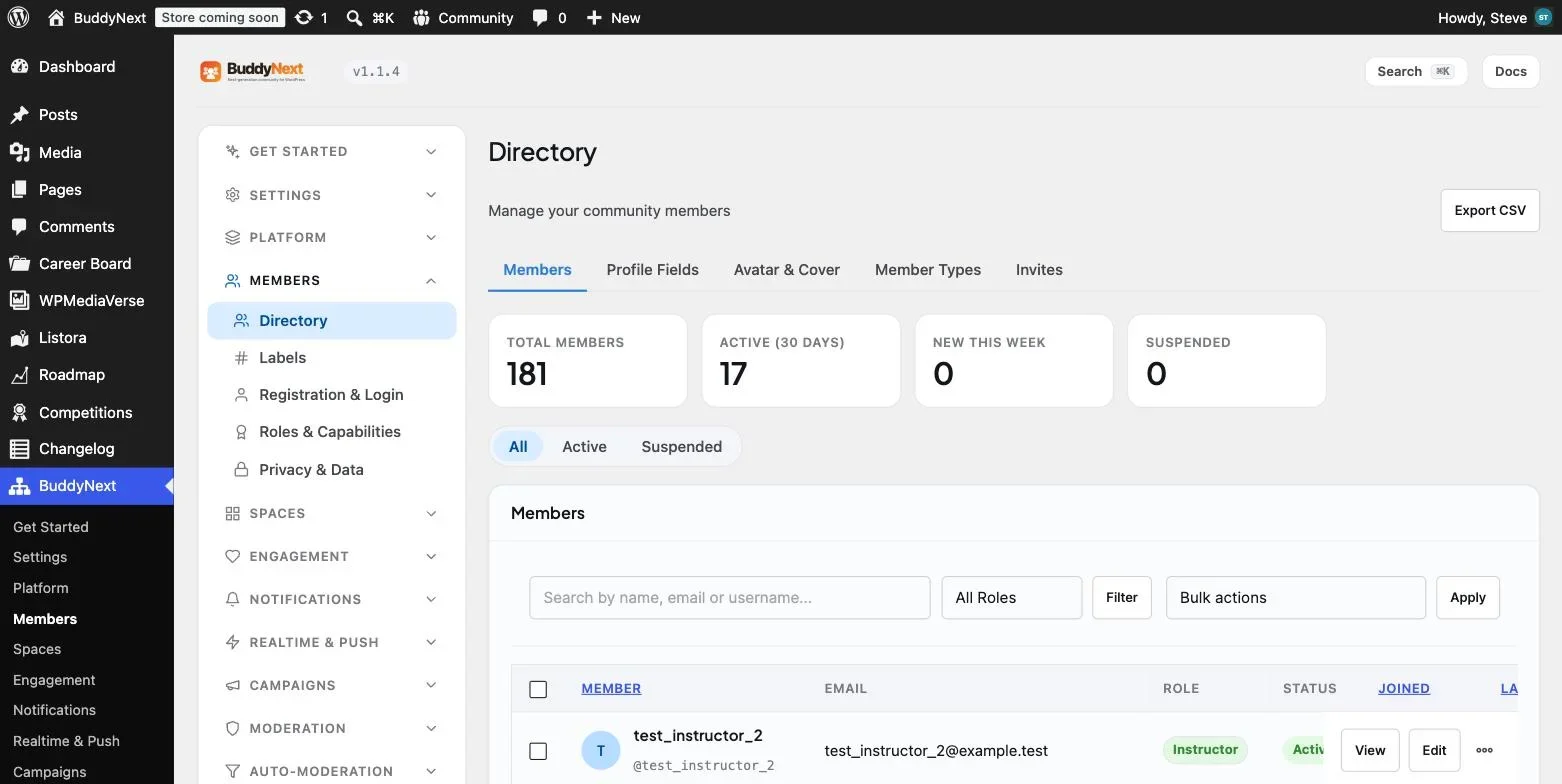
Then define member types: Fellow, Associate, Student, Retired, Chapter Chair, Committee Member. Member types are how you later show different content to different people without maintaining parallel sites.
Set per-field visibility deliberately. Employer public, phone number members-only, internal notes admin-only. Getting this right before you import 2,000 records is much cheaper than getting it wrong afterwards.
Step 4. Design the space structure
Resist the urge to create forty spaces on day one. An empty space reads as a dead community, and forty empty spaces read as an abandoned one.
Start with three to five, chosen because you already know there is a conversation waiting to move into them. Group them under space categories so the structure scales later. Use secret visibility for anything genuinely confidential, such as committee work, disciplinary matters, or board papers, and remember that secret spaces stay out of the search index rather than teasing their own existence.
Set per-space roles so chapter chairs and committee secretaries can run their own space without you handing out site administrator accounts. This is the single biggest reduction in your own workload.
Step 5. Set up moderation before you need it
Configure the banned-word safeguards, decide who staffs the report queue, and write down your escalation path: what earns a warning, what earns a suspension, who reviews appeals. Put it on a page inside the portal.
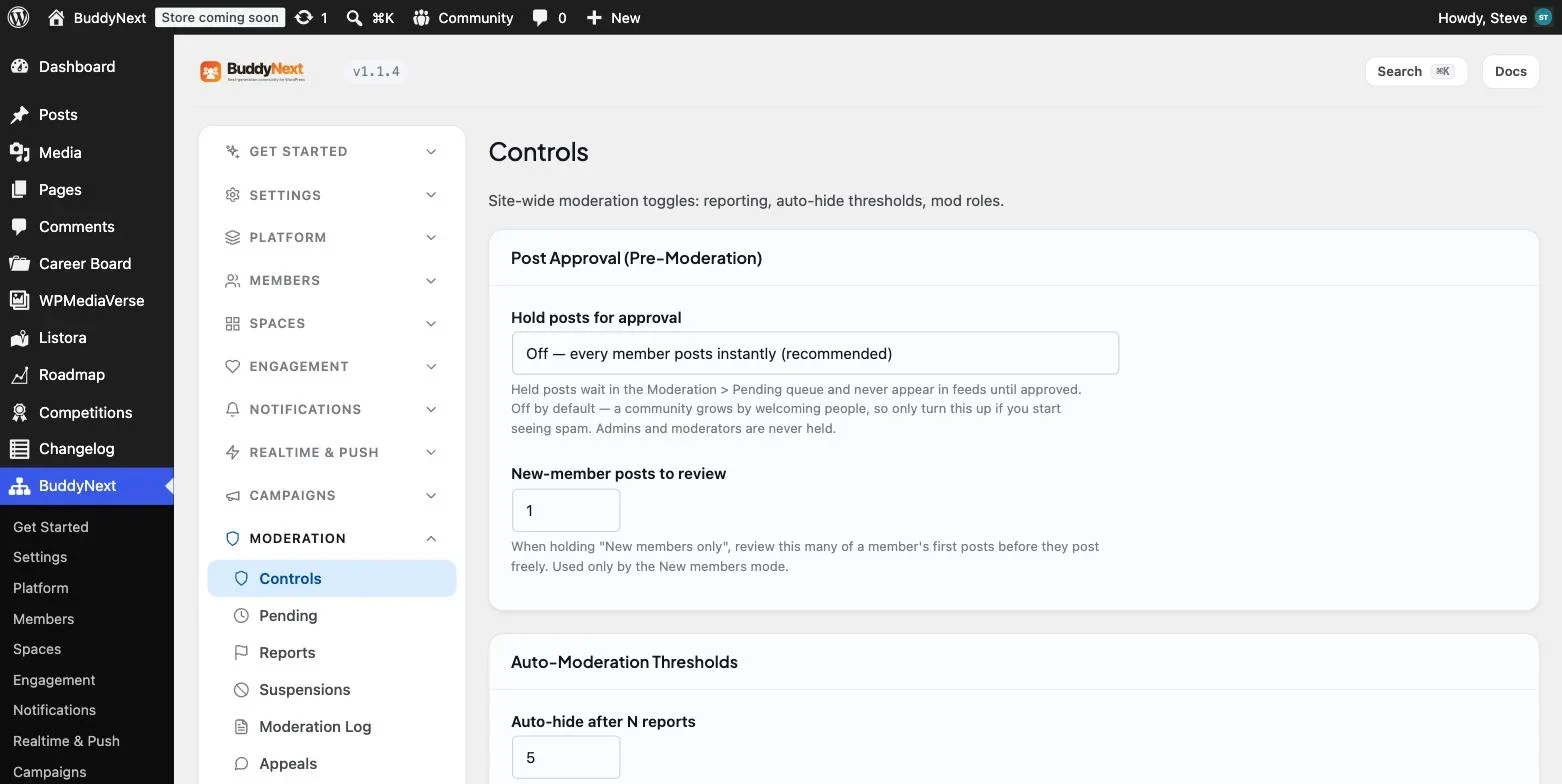
BuddyNext’s model is reactive by design. Members post immediately and reports go to a review queue. That is the right default for a professional community, where pre-moderation kills conversation dead. Rules-based or AI pre-screening is available as part of the platform’s advanced moderation layer if you later need it.
One infrastructure note: the rate limiter works everywhere through its database table, but the fast object-cache path needs Redis or Memcached. If your host offers either, turn it on.
Step 6. Make it look like your organisation
BuddyNext derives its entire accent ramp from a single hue value using OKLCH, so matching your brand colour is one setting rather than a stylesheet fork. Set your logo, set the hue, done.
If you need to change structure rather than colour, copy the plugin’s template into {your-theme}/buddynext/ and edit it there. It is the same override pattern WooCommerce uses, and your changes survive plugin updates.
Check it on a phone. Most portal members will use one, and the admin listings collapse to a card stack below 782px, which matters if your chapter chairs will moderate from their phones.
Step 7. Seed it, then invite people
The most common way a portal fails is launching empty. Before a single invitation goes out, put twenty or thirty real posts in: the announcement explaining what the portal is for, a few genuine discussion questions in each space, a poll, and three or four member profiles filled in properly by staff or friendly volunteers.
Then invite in waves rather than all at once. Fifty engaged members produce a portal that looks alive. Two thousand simultaneous invitations produce a portal where 1,950 people log in once, see nothing happening, and never return.
Step 8. Connect the rest of your operation
This is where WordPress quietly beats the commercial platforms. Because the portal is a plugin on your own site rather than a hosted island, adjacent functionality is another plugin instead of an integration contract:
- A job board that shows a member’s postings on their profile
- Courses and CPD tracking, surfaced on the profile as completed learning
- Events with member-only registration
- A member business directory with maps
- Member blogs, with published articles listed on the author’s profile
BuddyNext ships bridges for these as separate, individually toggleable integrations, each of which self-guards if the partner plugin is absent. Outbound webhooks are available on an opt-in basis if you need to push events into a CRM or a chat tool.
The real cost comparison: structure, not sticker price
Rather than comparing specific dollar figures, which change constantly and vary by contract negotiation, the honest comparison is structural. Ask any vendor you’re evaluating one question: does the price change if my community succeeds and doubles in size? For per-seat enterprise platforms, the answer is almost always yes, and often steeply. For a self-hosted WordPress stack, the answer is no. Your hosting costs track server capacity, not headcount, and a community that grows from 500 to 5,000 members doesn’t trigger a renegotiated contract.
The other structural difference is what happens if you leave. Self-hosted data is already yours; exporting it is a database backup, not a migration project. Hosted platform data lives in the vendor’s tenant, and extracting years of posts, profiles, and connection history back into a usable format is a project you’ll need to budget time and often money for.
Implementation cost follows a similar pattern. A self-hosted setup can be genuinely fast for a straightforward portal, an afternoon of configuration for the six core features, or a longer, agency-led project if your requirements are complex. Enterprise platform implementations are almost always the latter, regardless of how simple your actual requirements are, because the platform’s flexibility comes bundled with its complexity.
When you should buy the commercial platform anyway
Three situations. If any of them describes you, the enterprise platform is buying something real, and this stack will not substitute for it.
You have a hard SSO mandate. If IT requires SAML or OIDC against Okta, Entra ID or Shibboleth, that is a genuine gap. BuddyNext does OAuth social login through Google, Facebook, GitHub, Discord and Apple, which is not the same thing as enterprise identity federation. You can close the gap with a third-party SAML plugin, but you are then assembling and maintaining it yourself. Weigh that honestly.
You need to hand a customer a compliance certificate. Self-hosting means your organisation is the one being audited. If a contract requires the platform vendor to hold SOC 2 Type II or ISO 27001, no amount of good WordPress configuration produces that certificate. This is the most common legitimate reason large associations stay on commercial platforms.
Nobody will own it. A self-hosted portal needs someone whose job includes updates, backups and the report queue. A few hours a month, not a full-time role, but a real assignment. If your organisation cannot name that person, a hosted platform’s support contract is worth what it costs, because “there is nobody to call” is how self-hosted portals quietly rot.
Outside those three, the enterprise premium is buying you packaging around six features you can run yourself.
Frequently asked questions
Can WordPress really handle thousands of portal members?
Yes, with adequate hosting. The constraint is never the WordPress user table. It is unbounded queries in badly written plugins. BuddyNext paginates every list surface and counts efficiently. Add Redis object caching and a CDN, and a five-figure member count is unremarkable.
Do I need BuddyPress as well?
No. BuddyNext is standalone and does not depend on BuddyPress. Do not run both.
What about a mobile app?
The REST-first architecture is the point here. A native app authenticates through an app-connect endpoint that mints a WordPress Application Password behind a one-time bridge token, then reads the same 222 routes the web portal uses. BuddyNext also installs as a PWA, which for most portals is enough and needs no app store review. Note that PWA install requires HTTPS, so it cannot be tested over plain HTTP.
How is this different from Slack or a Facebook Group?
Both are rented, and neither gives you searchable history you own. Slack’s free tier hides your archive, Facebook owns the relationship with your members and can change the rules at any time, and neither offers a member directory tied to your own records. A portal is an asset. A group is a tenancy.
Can members pay for access?
Yes, through BuddyNext’s native membership tiers, which handle checkout, coupons, tax and invoicing as part of the platform’s business layer. If your portal is paid, plan for this layer from the start rather than adding it as an afterthought, or compare the wider field in our guide to membership community plugins for WordPress.
How long does the build actually take?
A working portal with accounts, feed, spaces, profiles, messaging and moderation is an afternoon. What takes weeks is the part no software solves for you: deciding your member types, writing your community guidelines, and seeding enough real content that the first fifty members find something worth replying to.
Is it risky to leave a familiar enterprise vendor for a self-hosted plugin?
The main risk is organisational, not technical: someone needs to own updates and moderation going forward, which a vendor’s support contract previously covered implicitly. Mitigate this by naming that owner explicitly before migrating, and by running the new portal in parallel with the old one during a transition period rather than cutting over in one step.
What happens to renewal negotiations once I’m not locked into per-seat pricing?
They mostly disappear, since there’s no annual seat-count renegotiation to have. The trade is that you take on the hosting and maintenance responsibility a vendor’s contract used to cover, so budget a small amount of ongoing staff time for that instead of a growing license line item.
How do I budget for hosting a self-hosted portal at scale?
Start with a mid-tier managed WordPress host and monitor performance as your member count grows. A few hundred active members typically run comfortably on standard managed hosting. Past a few thousand, add object caching (Redis or Memcached) and a CDN for media, and consider a host with dedicated resources rather than shared hosting. The cost curve here is gradual and tied to actual server load, not a step function triggered by crossing a seat-count threshold in a contract.
Where to start
Install BuddyNext on a staging site this week and build the portal you have been quoted for. You will know within an afternoon whether the six features cover your requirements, and you will have something concrete to hold against the proposal on your desk, which is a far better negotiating position than a feature list.
If it turns out you do need SAML, a SOC 2 certificate, or a vendor to call at 2am, you will have learned that for the price of an afternoon rather than the price of a year’s contract.
Whichever path you take, the decision is reversible in principle but expensive in practice to reverse twice. Get the ownership question right this time by being honest about which of the three exception cases actually applies to you, rather than defaulting to the familiar enterprise name because switching later feels riskier than it actually is.
Six features, one afternoon, and a straight answer to whether you actually need what the enterprise packaging bundles in. That is the whole exercise, and it is worth running before the next renewal invoice arrives.
















