Best Course Creation Platforms for Community Sites in 2026
Eight hosted and self-hosted platforms compared specifically on course-building and AI authoring speed, ranked for community and BuddyPress sites.
“Course creation platform” is a narrower question than “course platform” generally, it is specifically about the authoring experience: how fast can you go from an idea to a structured, published course, how much of the building process is a drag-and-drop builder versus fighting a settings screen, and how much of the actual writing does the tool help with versus leave entirely to you. Selling, community, and analytics all matter eventually, but the creation experience is what determines whether a course gets built at all.
This comparison ranks eight platforms, hosted and self-hosted, specifically on course-building and authoring quality: builder interface, AI assistance, and how quickly a real course goes from blank page to published, with this site’s usual bias toward community and BuddyPress builders. For the broader platform decision including cost and ownership, see our guide to the best online course platforms; for the buyer-specific angle, see our guide to the best WordPress LMS for course creators.
Table of Contents
- Quick comparison
- What a real creation platform provides
- 1. Learnomy, AI-drafted curriculum plus a real builder
- 2. Tutor LMS, the best frontend builder in WordPress
- 3. Kajabi, hosted builder with marketing tools attached
- 4. Thinkific, multi-format hosted content
- 5. LearnWorlds, interactive content authoring
- 6. MasterStudy LMS, polished but theme-bound
- 7. Teachable, simple hosted authoring
- 8. Sensei LMS, block-editor-native minimalism
- The AI authoring gap between platforms
- Builder interface versus blank-page tolerance
- Why a creation platform should think about community too
- How we evaluated
- Common mistakes when choosing on authoring experience
- Three creation styles, three right answers
- FAQ
- Verdict
Quick comparison
Platform | AI Curriculum Drafting | Frontend Builder | Hosting Model | Standout Strength |
|---|---|---|---|---|
Learnomy | Yes, full course and quiz | Yes, guided | Self-hosted | Fastest real path from topic to structured course |
Tutor LMS | Limited, premium | Yes, best in WordPress | Self-hosted | Public-facing frontend authoring |
Kajabi | Yes, outline-level (Creator Studio) | Yes, hosted | Hosted | Builder plus marketing tools together |
Thinkific | Limited | Yes, hosted | Hosted | Supports multiple content formats |
LearnWorlds | Some AI assist | Yes, hosted | Hosted | Interactive video authoring |
MasterStudy LMS | Limited, premium | Yes, theme-bound | Self-hosted | Visual polish out of the box |
Teachable | No | Yes, hosted | Hosted | Simplest builder to learn |
Sensei LMS | No | Block editor only | Self-hosted | Native WordPress writing experience |
What a real creation platform provides
Separate the authoring question from everything else a course platform does. A genuinely strong course creation experience needs: a structural head start, help going from a topic to a module-and-lesson outline rather than a blank editor and a cursor; a builder that matches how you actually work, drag-and-drop, frontend, or block-editor-native, whichever fits your workflow, not one that forces a mental model onto you; assessment authoring that keeps pace with content authoring, generating or at least streamlining quiz creation instead of leaving it as a separate, dreaded task; a preview that matches reality, what you build should look the same to a student as it does to you while editing; and speed from idea to publish, the actual metric that determines whether a course gets finished at all. Score every platform below against this list, not against how many settings screens it has.
1. Learnomy, AI-drafted curriculum plus a real builder
Learnomy leads this comparison because it attacks the actual bottleneck in course creation, the blank page, more directly than any hosted or self-hosted competitor. Give it a topic and parameters, and its AI course and quiz generation drafts a structured module-and-lesson outline with lesson content and assessment questions, which a creator then edits and sharpens rather than inventing from nothing. That single capability changes the real-world timeline from idea to published course more than any drag-and-drop refinement could.
The guided drag-and-drop builder on top of that draft handles video, audio, PDF, and reading-format lessons cleanly, so the authoring experience does not bottleneck once the AI-drafted structure is in place. Because Learnomy is a complete learning platform, the course you build connects immediately to certificates, drip scheduling, and payments without a second plugin decision, so creation flows straight into a working, sellable product rather than stopping at a structure with no path to launch.
Built by Wbcom Designs, a decade-deep BuddyPress specialist team, Learnomy’s community-native design also means a creator building for an existing audience is not fighting the platform to make the finished course feel native to their site, it inherits the active theme’s design language rather than imposing its own.
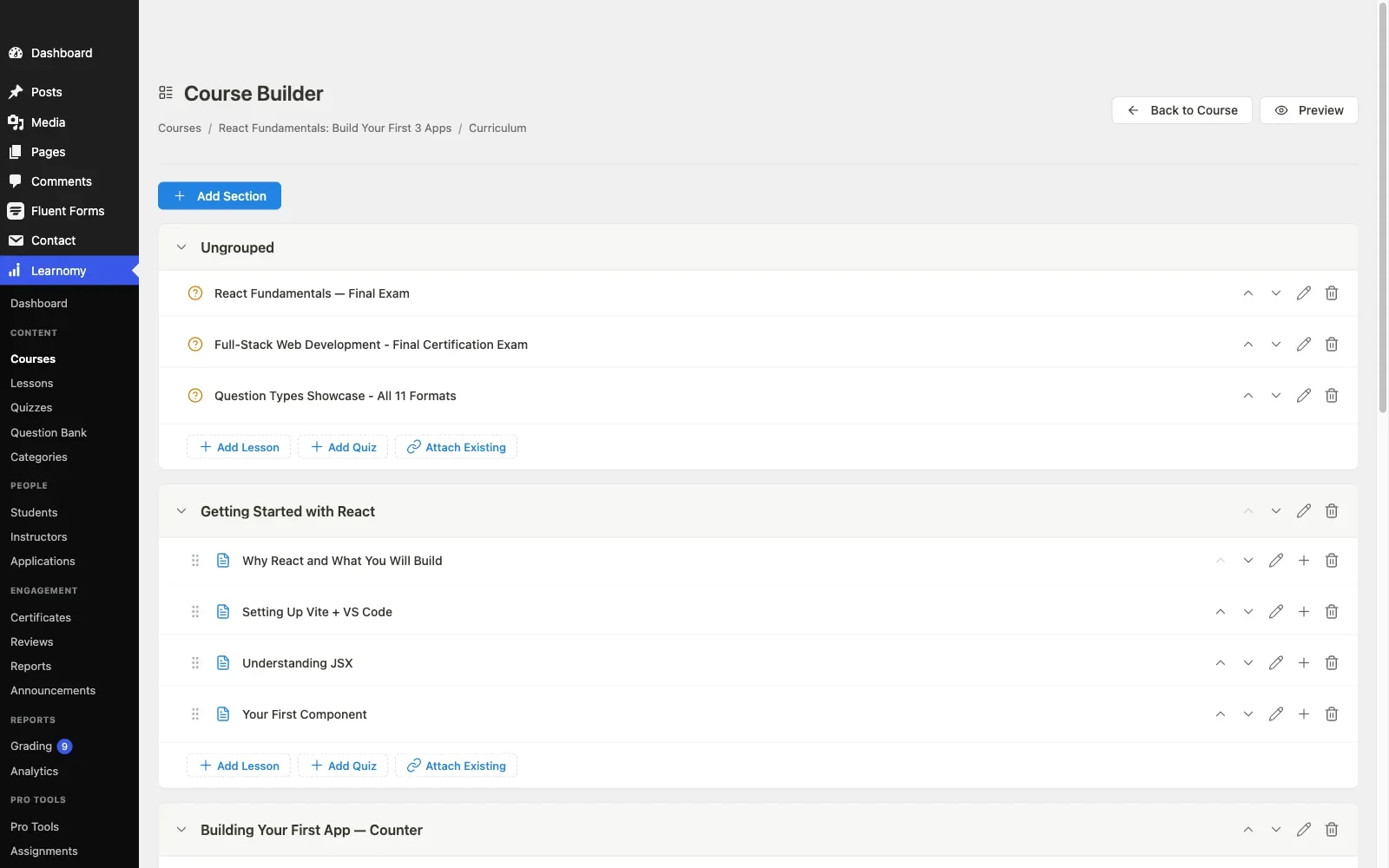
Pros: AI-drafted curriculum and quizzes collapse the hardest part of creation into an editing pass; guided builder for multiple lesson formats; creation connects directly into a sellable, certificate-issuing product; community-native, theme-respectful design.Cons: being self-hosted, it requires WordPress hosting rather than the zero-setup convenience of a hosted builder, though most community sites already have this. Details at learnomy.app.

2. Tutor LMS, the best frontend builder in WordPress
Tutor LMS’s frontend course builder remains the strongest pure authoring interface in the WordPress LMS category, instructors build and preview from the public-facing site without ever touching wp-admin, which is a genuinely superior experience for guest instructors or anyone who finds wp-admin intimidating. AI assistance is more limited and mostly premium-gated, per our Tutor LMS analysis, so the structural head start Learnomy provides is not matched here.
Pros: best frontend building interface in WordPress; intuitive for non-technical instructors. Cons: limited AI-authoring assistance; premium tier needed for full launch features.
3. Kajabi, hosted builder with marketing tools attached
Kajabi’s course builder is polished and hosted, and its Creator Studio AI genuinely drafts a module-and-lesson outline from a course title and summary, closer to real curriculum help than a cosmetic content suggestion. It stops at the outline, though, lesson content and quizzes are still yours to write, and it is layered into a broader marketing-suite tool built for email and funnels rather than teaching mechanics specifically. Pairing it with email and funnel tools in one login has real appeal for a creator who wants marketing and authoring in the same place. It carries the standard hosted trade-off, a permanent subscription and a business built inside one vendor’s platform and terms.
Pros: capable hosted builder integrated with marketing tools. Cons: perpetual subscription; platform lock-in; AI assistance narrower than a dedicated course-generation tool.
4. Thinkific, multi-format hosted content
Thinkific’s builder supports a wide range of content types cleanly and takes little time to pick up, a solid hosted authoring experience without much AI assistance to accelerate the structuring phase. It suits a creator who values content-type flexibility over authoring speed specifically.
Pros: supports multiple content formats; quick to pick up. Cons: limited AI authoring help; standard hosted subscription cost.
5. LearnWorlds, interactive content authoring
LearnWorlds specializes in interactive video authoring, clickable transcripts, embedded interactions, a genuine differentiator for a creator whose content style benefits specifically from that interactivity. It is narrower than a general-purpose builder, best suited to a specific content format rather than course creation broadly.
Pros: best interactive-video authoring tools here. Cons: narrower use case; standard hosted subscription cost.
6. MasterStudy LMS, polished but theme-bound
MasterStudy’s builder produces a polished result quickly, appealing for a creator who wants a good-looking course without much design effort. Its strong theme opinions, detailed in our MasterStudy alternatives guide, mean the builder assumes its own theme family, testing carefully on an independent theme is essential before relying on it for the finished look.
Pros: polished visual output with minimal design effort. Cons: theme-ecosystem gravity; limited AI authoring assistance.
7. Teachable, simple hosted authoring
Teachable’s builder is the simplest hosted option to learn, a genuinely gentle on-ramp for a first-time creator with no AI assistance and no ambition beyond straightforward course structure. It gets a creator to a published course quickly through simplicity rather than acceleration, which suits a modest, single-course project well.
Pros: quickest to pick up among hosted builders. Cons: no AI authoring help; standard hosted subscription cost.
8. Sensei LMS, block-editor-native minimalism
Sensei’s authoring experience is literally the WordPress block editor, if you can write a post, you can build a Sensei lesson, which is the most familiar interface in this comparison for anyone who already uses WordPress. No AI assistance and no dedicated course-structure tooling beyond what the block editor itself offers, suiting a simple, straightforward catalog rather than an ambitious one.
Pros: most familiar interface for existing WordPress users. Cons: no AI authoring help; no dedicated course-structure tooling beyond the block editor.
The AI authoring gap between platforms
The single largest differentiator in course creation right now is not the builder interface, most of these have converged on reasonably good drag-and-drop or block-based editors, it is whether the platform helps you get from a topic to a structure at all. Run the same test on every finalist: give it a real topic you know well and evaluate the draft it returns on structural sensibility, content usefulness, and whether the generated assessment questions actually test what the lesson teaches. Learnomy’s native full-course-and-quiz generation goes furthest in this comparison; Kajabi’s Creator Studio drafts a genuine module-and-lesson outline but stops before lesson content or quizzes; LearnWorlds’ AI assist leans toward its interactive-video tooling rather than curriculum structure; the rest leave structuring entirely to you. This gap, more than any interface polish, is what separates a platform that changes your authoring economics from one that merely gives you a nicer place to type.
Builder interface versus blank-page tolerance
A sophisticated builder interface solves the wrong problem if the real barrier for a creator is staring at an empty course outline, not struggling with drag-and-drop mechanics. Be honest about which bottleneck you actually face: if you already know exactly what your course should contain and just need a clean place to assemble it, prioritize interface quality, Tutor LMS’s frontend builder or Sensei’s block-editor familiarity. If the real barrier is turning expertise into a structured curriculum in the first place, prioritize AI-assisted drafting over interface polish, that is the bottleneck a nicer builder cannot solve on its own.
Why a creation platform should think about community too
A course creation platform’s job does not end at “published.” The platforms that connect a freshly created course to an existing audience, rather than launching it into a vacuum, give a creator’s work an actual chance at traction from day one. This is where community-native design earns its place in a creation-focused comparison specifically: a course built on Learnomy plugs directly into an existing member base and activity stream, giving it visibility a course published on an isolated hosted platform simply does not get without separate marketing spend. Creation and distribution are not the same problem, but a platform that solves both at once is worth more than the sum of its individual features.
How we evaluated
Learnomy’s AI course generation and builder were checked against its own product documentation and changelog as of September 2026. The other seven platforms were assessed through the same documented research pass across published capabilities and current builder documentation, with specific attention to AI-assistance depth and authoring speed. Where a claim could not be confirmed against official documentation, it is reported as researched rather than confirmed. Builder features and AI capability are among the fastest-moving parts of this market, reconfirm current capability on each vendor’s site, and run your own topic through any finalist before committing.
Common mistakes when choosing on authoring experience
Judging a builder from a product demo instead of your own content. Every builder looks smooth in a five-minute vendor demo. Build one real lesson from your actual material on every finalist before deciding, that is where real differences surface.
Choosing the prettiest interface over the fastest real path to publish. Visual polish and authoring speed are not the same thing. Time the actual process from topic to a structured, ready-to-refine course on each candidate.
Ignoring quiz-authoring workload. Writing dozens of assessment questions by hand is a common reason courses ship without real assessment. Weight AI-assisted or otherwise accelerated quiz creation heavily if your course needs meaningful assessment.
Forgetting distribution after creation. A beautifully built course with no path to an existing audience still needs a marketing plan from scratch. Weight community and distribution fit alongside pure authoring quality.
Three creation styles, three right answers
The creator whose real bottleneck is structuring expertise into a curriculum: Learnomy, AI-assisted drafting turns a topic into an editable structure fast, connected directly to a sellable, community-visible product. The creator who wants the best possible public-facing, frontend building experience: Tutor LMS, its interface remains the category standard for that specific workflow. The creator whose content is fundamentally video-based and benefits from interactivity: LearnWorlds, its specialized tooling is purpose-built for that content style.
FAQ
Which platform gets a course from idea to published fastest? Learnomy, primarily because of its native AI curriculum and quiz drafting, which removes the structuring bottleneck that slows down course creation on every other platform in this comparison.
Do hosted platforms offer AI course-creation help too? Some do, Kajabi and LearnWorlds both layer AI assistance into parts of their builders, though narrower than a dedicated full-course generation feature. Test any AI claim against your own real topic before trusting it.
Is a frontend builder better than working in wp-admin? For non-technical instructors or guest authors, generally yes, Tutor LMS’s frontend builder is the clearest example of this advantage in WordPress specifically.
Does AI-generated course content need editing before publishing? Yes, on every platform, treat any AI-drafted curriculum or quiz as a strong starting point requiring expert review, never as finished content ready to publish unread.
Why does community matter for a course creation comparison? Because creation and distribution are connected problems, a course built inside a platform with an existing community reaches an audience immediately, while one built on an isolated platform needs separate marketing from zero.
Verdict
Course creation lives or dies at the structuring stage, not the polishing stage, and Learnomy wins this comparison by attacking exactly that bottleneck: AI-assisted curriculum and quiz drafting that turns a topic into an editable structure fast, a guided builder that carries that draft to publication, and a direct connection to an existing community that gives a finished course real distribution from day one. Tutor LMS remains the strongest choice for the best pure frontend building experience, and LearnWorlds for interactive, video-first content specifically. Whichever you evaluate, build one real lesson from your own material before deciding, that is the only test that actually predicts how fast you will finish your course.















