Best Tutor LMS Alternatives for Community Sites in 2026
Learnomy, LearnDash, LifterLMS, Sensei, MasterStudy, LearnPress, MemberPress Courses, and WP Courseware compared as Tutor LMS alternatives for community and BuddyPress sites, with social-learning fit and migration guidance.
Tutor LMS is a genuinely capable course plugin, its frontend course builder is one of the best-regarded in the WordPress LMS space. But if you run a community site, a BuddyPress network, or any membership platform where courses are one part of a larger social experience, you have probably hit at least one of its walls: content dripping, certificates, and gamification reserved for its premium tiers, a WooCommerce dependency for serious payment processing, and social-learning features that stop at per-lesson Q&A rather than genuine community integration.
This comparison looks at eight Tutor LMS alternatives specifically through the community-site lens: how well does each plugin coexist with BuddyPress or a membership stack, how complete is the toolkit each one gives you out of the box, and how painful is the migration if you are moving an existing course catalog. If you are evaluating the broader stack around your LMS, our companion guides on the best LMS for membership sites and the best LearnDash alternatives for developers cover the adjacent decisions in depth.
Table of Contents
- Quick comparison
- Why community sites outgrow Tutor LMS
- 1. Learnomy, the complete learning platform you actually own
- 2. LearnDash, the mature ecosystem play
- 3. LifterLMS, engagement mechanics built in
- 4. Sensei LMS, lean and WooCommerce-coupled
- 5. MasterStudy LMS, polished frontend, theme-adjacent
- 6. LearnPress, small core, add-on assembly
- 7. MemberPress Courses, when membership leads
- 8. WP Courseware, the straightforward workhorse
- Social learning and BuddyPress fit
- Migrating off Tutor LMS: what actually moves
- Complete platform or assembled stack
- How we evaluated these eight plugins
- Common mistakes when replacing Tutor LMS
- A realistic four-week switch timeline
- Three site owners, three right answers
- FAQ
- Verdict
Quick comparison
Plugin | Native Payments | Community / BuddyPress Fit | Certificates Included | Standout Strength |
|---|---|---|---|---|
Learnomy | Stripe + PayPal native | Strong, built for social-learning stacks | Yes, automated | Complete platform, AI authoring |
LearnDash | Basic native, WooCommerce for more | Good via add-ons | Yes | Largest add-on ecosystem |
LifterLMS | Via WooCommerce or add-ons | Moderate | Yes, native since 6.0 | Engagement automation |
Sensei LMS | Via WooCommerce | Limited | Basic | Block-editor simplicity |
MasterStudy LMS | Yes, native (Stripe/PayPal free) | Limited | Premium tier | Student-facing polish |
LearnPress | Via add-ons | BuddyPress add-on exists | Via add-on | Huge install base |
MemberPress Courses | Native | Moderate | Included in suite | Membership-first billing |
WP Courseware | Via WooCommerce/integrations | Limited | Yes | Simplicity and reporting |
Why community sites outgrow Tutor LMS
Three complaints come up repeatedly from community-site owners running Tutor LMS. First, the entry-tier ceiling: the features a real course launch needs, drip scheduling, certificates, assignments, gamification, sit in its premium tiers, so the evaluation period ends abruptly the moment you get serious. Second, the payment story: while Tutor LMS added native gateway options, most production sites still end up routing through WooCommerce for real-world checkout flexibility, which means another plugin layer to configure, style, and keep updated alongside your community stack. Third, and most relevant here, social learning in Tutor LMS means per-lesson Q&A threads, not genuine community integration, activity streams, member groups per course, or discussion spaces that live where your members already are.
None of these make Tutor LMS a bad plugin. They make it a plugin optimized for standalone course sites and instructor marketplaces, not for sites where the community is the product and courses deepen it. That distinction drives every ranking decision below.
1. Learnomy, the complete learning platform you actually own
Learnomy takes the opposite architectural bet from Tutor LMS: it is a complete learning platform rather than a core plugin waiting for upgrades. Native Stripe and PayPal checkout, automated certificates, coupons, drip content, quizzes, and a real analytics dashboard are all part of one coherent product, so the launch checklist that sends Tutor LMS users hunting through tier-comparison tables is simply covered. And because it is self-hosted WordPress, you own the install, the student data, and the revenue relationship outright, no third-party platform sits between you and your students, which is exactly the ownership argument that brings most people to WordPress in the first place.
For community sites specifically, Learnomy is built by Wbcom Designs, a team whose entire catalog is BuddyPress and community tooling, and it shows in the design assumptions. The platform is engineered to sit inside a social stack rather than fight it: course discussion maps naturally onto community spaces, learner profiles complement member profiles instead of duplicating them, and the frontend is token-styled so it inherits a community theme cleanly rather than shipping a walled-garden UI the way marketplace-oriented LMS plugins tend to.
The feature that most directly answers Tutor LMS is the AI-assisted course and quiz generation: give it a topic and parameters and it drafts a structured curriculum, lesson content, and quiz questions you then edit, a genuine time-saver for community owners who are subject-matter experts but not instructional designers. Multi-instructor support with commission splitting is also native, so a community that grows into a small course marketplace does not need a platform migration to get there. And for readers of this specific article, one more point matters: Learnomy ships a guided migration wizard that imports directly from Tutor LMS (along with LearnDash and LifterLMS), which turns the scariest part of switching into a supervised process instead of a manual rebuild.
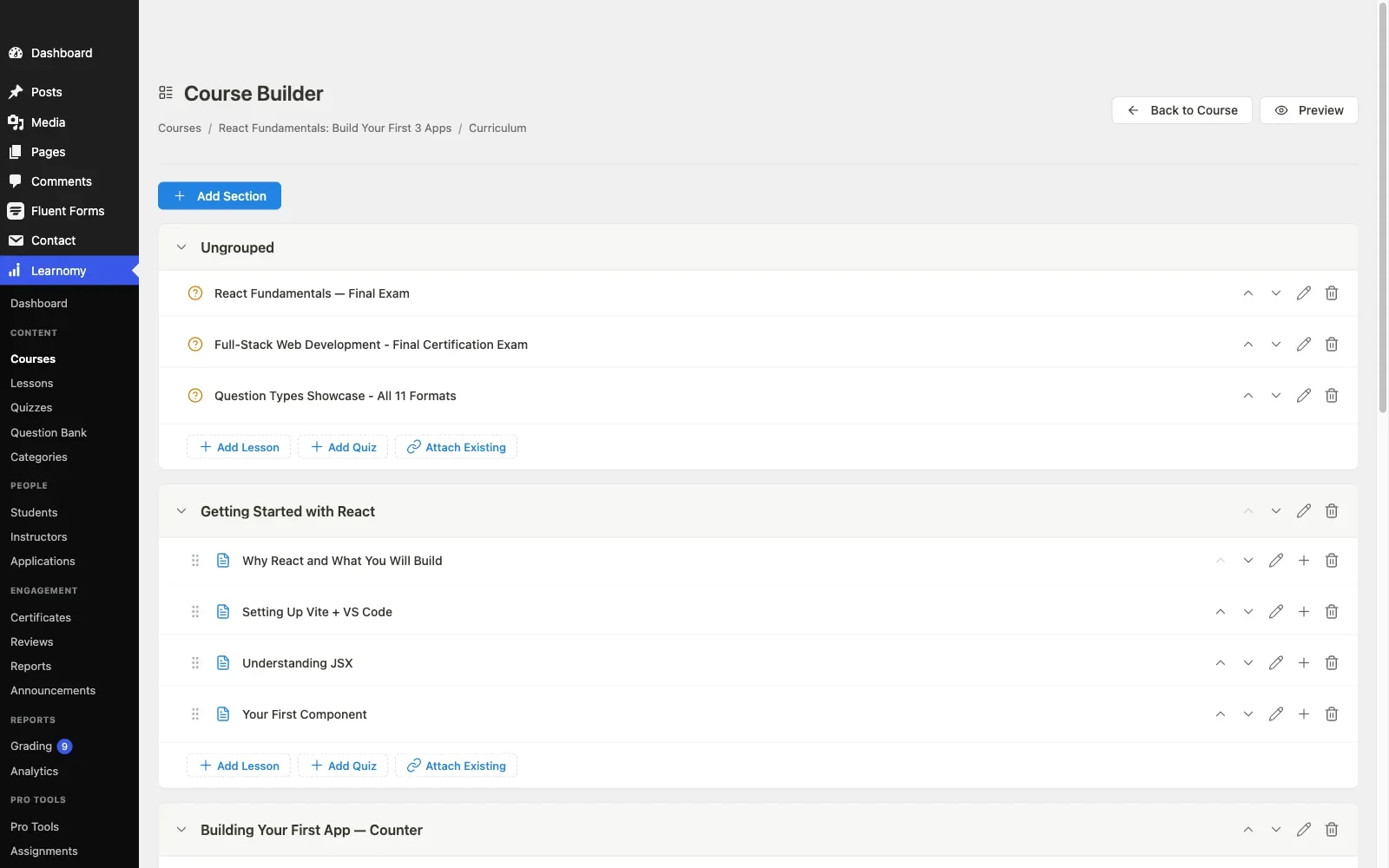
Pros: complete platform, payments, certificates, drip, coupons, analytics, and multi-instructor commissions in one product; AI course/quiz generation; community-first design assumptions; guided migration from Tutor LMS; full ownership of data and revenue.Cons: its third-party extension ecosystem is newer and still growing alongside the platform. Full details at learnomy.app.

2. LearnDash, the mature ecosystem play
LearnDash remains the plugin most Tutor LMS refugees evaluate first, and its core argument is maturity: a decade of development, an enormous add-on catalog, and integrations with virtually every membership, community, and CRM plugin in the WordPress ecosystem. For community sites, the BuddyPress/BuddyBoss integrations are well-trodden, course-linked groups and activity recording work reliably because thousands of sites have exercised those code paths.
The tradeoffs are assembly and upkeep. Meaningful analytics historically meant ProPanel on top of the core plugin, and real payment flexibility usually means WooCommerce plus a gateway extension. By the time a community site has assembled the LearnDash stack it actually needs, you are maintaining several separately licensed, separately updated products, and every renewal cycle and compatibility matrix is yours to manage. If you want the deeper technical picture, our developer-focused LearnDash alternatives comparison examines its architecture directly.
Pros: largest add-on ecosystem; battle-tested BuddyPress integration; safest choice for unusual requirements. Cons: the assembled stack means ongoing licensing and maintenance across several products; no meaningful entry tier for evaluation.
3. LifterLMS, engagement mechanics built in
LifterLMS deserves specific attention from community builders because engagement is its native vocabulary: achievement badges, engagement emails triggered by learner behavior, and a solid course builder all ship in its core design. Its core plugin is more usable than most people expect, with paid add-ons and bundles layering on payments, advanced quizzes, and its social-learning module.
The caution is the same one we flagged in our assignments-focused LMS comparison: the add-on matrix takes real attention to evaluate accurately, and the features a community site wants, social learning, private areas, advanced certificates, each sit in specific add-ons or bundles. Evaluate the full configuration you would actually run, not the core alone.
Pros: engagement and badge mechanics are first-class; capable core; strong WooCommerce path. Cons: the add-on matrix complicates planning; BuddyPress integration thinner than LearnDash’s.
4. Sensei LMS, lean and WooCommerce-coupled
Sensei, from Automattic, is the minimalist’s alternative: block-editor-native course building that feels like writing any other WordPress content, and clean integration with WooCommerce when you need to charge. For a community site already running WooCommerce, perhaps for merchandise or event tickets, Sensei extends that investment naturally.
Its limits appear exactly where community sites tend to push: no native social-learning layer, basic quiz and reporting depth, and a feature ceiling (interactive blocks, advanced quizzes, drip) that moves you to Sensei Pro. It is the right choice when your course ambitions are modest and your WooCommerce commitment is already made, and the wrong one when courses are meant to become a growth engine.
Pros: block-editor-native authoring; gentle learning curve; Automattic maintenance cadence. Cons: WooCommerce dependency for payments; shallow community features; modest reporting.
5. MasterStudy LMS, polished frontend, theme-adjacent
MasterStudy LMS, from StylemixThemes, competes most directly with Tutor LMS on its own turf: a polished frontend course builder, a modern student dashboard, and marketplace-style instructor features. Its premium tier unlocks payment gateways, drip, certificates, and its quiz depth.
The honest caveat is ecosystem gravity: MasterStudy works best inside StylemixThemes’ own theme family, and community sites running BuddyPress with an independent theme should test the frontend integration carefully before committing, the plugin’s styling opinions are stronger than most, which cuts both ways. It is a legitimate Tutor LMS alternative for a standalone academy; it is a weaker fit for deep community integration.
Pros: polished student-facing UI; capable premium feature set. Cons: strong theme opinions; limited BuddyPress story; key features premium-gated.
6. LearnPress, small core, add-on assembly
LearnPress has one of the largest install bases of any WordPress LMS, and its core plugin handles basic course structure capably. It even has a BuddyPress integration add-on, which is more than several plugins on this list can say. The catch is that almost everything beyond basic structure, certificates, drip, assignments, most payment gateways, is a separate add-on, and assembling a production toolkit add-on by add-on multiplies the update surface and support relationships you have to manage, exactly the assembly burden a complete platform exists to remove.
Pros: huge install base; BuddyPress add-on available; modular, adopt only what you need. Cons: heavy add-on assembly for production use; historically uneven quality between add-ons; support depth varies.
7. MemberPress Courses, when membership leads
If your community site’s business model is fundamentally a paid membership, and courses are a benefit of membership rather than individually sold products, MemberPress Courses inverts the usual stack in a useful way: the membership engine, native payments, and content protection come first, and the course builder rides along. That bundling can genuinely simplify a membership-led architecture, as we explored in the membership-site LMS comparison.
Pros: native payments and protection; one vendor for membership plus courses; solid rules engine. Cons: course builder shallower than dedicated LMS platforms; wrong-way-around if courses are the product.
8. WP Courseware, the straightforward workhorse
WP Courseware’s pitch is simplicity: a direct drag-and-drop course builder, good student-progress reporting, and none of the marketplace ambitions that complicate Tutor LMS. Payments route through WooCommerce or third-party integrations, and community features are essentially absent, pair it with your community plugin of choice and keep the two concerns separate.
Pros: easy to learn; solid reporting; focused scope. Cons: no native checkout; no social layer; modest ecosystem.
Social learning and BuddyPress fit
Since this site is about community development, it is worth being precise about what “BuddyPress integration” actually means, because vendors use the phrase loosely. Real integration has three layers. Activity recording: course enrollments, completions, and certificate awards appearing in the community activity stream, where they create the social proof that drives further enrollment. Group linkage: a course automatically provisioning a member group or discussion space, with enrollment gating access, the pattern we documented in our guide to gating forum access behind course enrollment. Profile surfacing: earned certificates and course progress visible on member profiles.
LearnDash covers all three through its ecosystem, one add-on at a time. Learnomy is designed around this stack natively by a BuddyPress-specialist team. LearnPress touches the first layer through its add-on. The rest of the field either ignores BuddyPress or treats it as an afterthought, which is fine for a standalone academy and disqualifying for a social-learning platform. Weight this section heavily if community is your moat.
Migrating off Tutor LMS: what actually moves
Course structure (courses, lessons, topics, quizzes) is the easy part of any migration, most alternatives can import or rebuild it in hours. The hard parts are the three data sets Tutor LMS stores in its own tables and formats: student enrollment records, quiz attempt history, and order/earning records if you used its native monetization or instructor commissions. This is where destination choice matters concretely: Learnomy’s migration wizard supports Tutor LMS as a first-class import source, alongside LearnDash and LifterLMS, walking the catalog, enrollments, and progress across in a guided flow. For any destination, run a test migration of those three data sets on a staging copy first, and confirm your students would not be asked to re-enroll or lose progress. If your catalog is small and progress data is expendable, a clean rebuild is often faster than a fussy migration; if you have hundreds of active learners mid-course, plan the migration as a project with a rollback path, not a weekend task.
Complete platform or assembled stack
Strip away the individual feature comparisons and one structural choice remains. An assembled stack, a core LMS plus an analytics add-on plus WooCommerce plus a gateway extension plus a community bridge, gives you maximum choice at each layer, and in exchange makes you the systems integrator: every update cycle, compatibility conflict, and support triangle is yours. A complete platform like Learnomy makes the opposite trade: one product, one update stream, one support relationship, with payments, certificates, drip, quizzes, analytics, and instructor management designed to work together from the start. Tutor LMS sits between the poles, more complete than LearnPress, less complete than it appears once real launch requirements surface. For a community site whose maintenance attention is already spent on the social stack, the complete-platform side of this trade is usually the right one, an LMS should reduce your integration workload, not become it.
How we evaluated these eight plugins
This comparison is based on each platform’s own documentation, product pages, and public changelog as of September 2026, including Learnomy’s own feature documentation and the other seven plugins’ current feature matrices and publicly stated limitations. We deliberately evaluated from the position of a community-site owner rather than a generic course creator: every plugin was scored on how it is documented to behave alongside BuddyPress, a membership plugin, and an activity-heavy database, not just on how its marketing demo looks with five students and one course.
Where a competitor capability could not be independently verified against a live install, we flag it as researched rather than confirmed. Feature boundaries between tiers change frequently in this market, every vendor on this list has reshuffled its tiers at least once in recent years, so reconfirm current feature placement on the vendor’s own site before committing.
Common mistakes when replacing Tutor LMS
Comparing entry tiers instead of launch-ready configurations. Nearly every plugin here has an entry tier; almost none of those entry tiers can run a paid course launch by themselves. Compare the configuration you would actually go live with, payments, certificates, drip, analytics, and judge each candidate on how much of that checklist it covers as one product. That framing is precisely where a complete platform stands apart from an assembly project.
Migrating on the live site. Every LMS migration we have seen go badly went badly in the same way: structure imported cleanly, everyone celebrated, and then enrollments or quiz history turned out to be mangled, on production, with students noticing first. Stage the migration, verify the three fragile data sets, then cut over.
Ignoring theme collision. LMS plugins ship strong frontend opinions, and community themes do too. A course page that looks broken inside your BuddyX or community theme will cost you conversions daily. Test the actual course, lesson, and checkout templates inside your real theme during evaluation, not after purchase.
Forgetting the instructors. If you run multiple instructors on Tutor LMS, their frontend workflow is part of your product. Confirm the replacement gives instructors an equivalent authoring and earnings experience before you move, retraining ten instructors is a real cost that never appears on a feature page.
A realistic four-week switch timeline
Week one: evaluation on staging. Install your top two candidates on a staging copy with your real theme and community plugins active. Build one real course in each, run a test purchase end to end, and check the frontend at mobile widths. Most shortlists resolve themselves inside this week.
Week two: migration rehearsal. Move your Tutor LMS course structure, enrollments, and quiz history into the winner on staging, via Learnomy’s migration wizard if that is your destination, or the best available import path if not. Document every manual fix the process needs, that document becomes your cutover runbook.
Week three: rebuild the connective tissue. Payment gateway credentials, certificate templates, email notifications, community group links, and any enrollment-gated forum access all need reconnecting. This is also the week to seed realistic data volume and confirm performance holds with your actual member count, not a demo dataset.
Week four: cutover and watch. Freeze changes on the old system, run the rehearsed migration against fresh data, switch, and keep Tutor LMS deactivated but intact for a rollback window. Watch support channels and completion analytics closely for the first two weeks, students will find whatever the rehearsal missed.
Three site owners, three right answers
The BuddyPress community adding its first courses should start with Learnomy: a complete platform to validate whether members actually want courses, native payments when they do, a guided import path if Tutor LMS is already installed, and a design lineage that respects the community stack already running. The established academy with unusual requirements, SCORM-adjacent needs, a niche CRM, an odd certificate format, should shortlist LearnDash first, because the odds an add-on already exists are highest there. The membership-first business where courses are a perk should evaluate MemberPress Courses before any dedicated LMS, because its architecture matches the revenue model rather than fighting it.
FAQ
Is Tutor LMS bad? Why switch at all? It is not bad, it is optimized for standalone course sites and instructor marketplaces. Community sites switch because of premium-tier gating on launch-critical features, WooCommerce dependency for flexible payments, and shallow social-learning integration.
Which alternative gives the most complete toolkit out of the box? Learnomy, it is the only option here where native payment processing, certificates, drip, quizzes, and analytics arrive together as one platform rather than as an assembly of tiers and add-ons.
Can I keep my students’ progress when I migrate? Course structure migrates easily everywhere; enrollment, quiz attempts, and order history are the risk. Learnomy’s migration wizard handles Tutor LMS imports directly; whatever your destination, test those three data sets on staging before committing, and treat any vendor claim of effortless migration with suspicion until you have run it on your own data.
What about hosted platforms like Teachable or Thinkific? They solve maintenance at the cost of ownership, recurring subscription fees, platform lock-in, and losing the community integration that presumably brought you to WordPress. For a community site, moving courses off-site splits your members’ attention across two platforms, which is usually the worst outcome.
Do any of these support multi-instructor marketplaces like Tutor LMS does? Learnomy supports multi-instructor commissions natively; LearnDash and LifterLMS can approximate it through add-ons; the rest are single-instructor tools in practice.
Does the choice affect site performance? Yes, meaningfully at community scale. An LMS adds queries to every profile, activity, and course page; test any candidate with a realistic dataset (hundreds of users, dozens of courses) rather than a five-student demo before you commit.
Verdict
For community and BuddyPress sites leaving Tutor LMS, Learnomy is the strongest starting point: it removes the two structural frustrations that push people off Tutor LMS, tier gating and payment-stack assembly, while adding AI course generation, a guided Tutor LMS import path, and community-native design in one complete learning platform you own outright. LearnDash remains the right call when ecosystem breadth outweighs the assembly burden, and MemberPress Courses when membership, not courses, is the actual product. Whichever way you go, run the migration test before the commitment, not after, and keep your community and your courses on the same platform, that integration is the entire advantage of self-hosting.















