Best LifterLMS Alternatives for Community-Powered Courses in 2026
Eight LifterLMS alternatives compared for community and BuddyPress sites: Learnomy, LearnDash, Tutor LMS, Sensei, MemberPress Courses, MasterStudy, WP Courseware, and Thinkific, with add-on assembly analysis and migration guidance.
LifterLMS earns real respect in the WordPress LMS space: its course builder is solid, its engagement mechanics (badges, triggered emails, achievements) are genuinely first-class, and its core plugin is more capable than most. So why do so many site owners go looking for alternatives? Almost always for the same reason: the add-on matrix. The features a real course business needs, payment gateways beyond the basics, advanced quizzes, social learning, private coaching areas, are distributed across individually licensed add-ons and bundles (certificates moved into the free core as of LifterLMS 6.0, but the rest of the list has not), and mapping your actual requirements onto that matrix accurately takes a spreadsheet and a free afternoon.
This comparison evaluates eight LifterLMS alternatives with a specific bias we are open about: this site serves people building community-powered learning, BuddyPress networks, membership communities, and social-learning platforms where courses live inside a larger member experience. If that is you, the ranking below will fit better than a generic listicle. For adjacent decisions, see our guides to the best LMS for membership sites, Tutor LMS alternatives for community sites, and LearnDash alternatives for developers.
Table of Contents
- Quick comparison
- Why people leave LifterLMS
- 1. Learnomy, the complete learning platform
- 2. LearnDash, the ecosystem heavyweight
- 3. Tutor LMS, the frontend-builder rival
- 4. Sensei LMS, the lean WooCommerce companion
- 5. MemberPress Courses, membership-first courses
- 6. MasterStudy LMS, the polished academy option
- 7. WP Courseware, simple and dependable
- 8. Thinkific, the hosted exit ramp
- The assembly problem, spelled out
- Community and social-learning fit
- Migrating from LifterLMS without losing students
- How we evaluated these platforms
- Common mistakes when switching LMS plugins
- Three scenarios, three right answers
- FAQ
- Verdict
Quick comparison
Platform | Native Payments | Certificates | AI Content Help | Standout Strength |
|---|---|---|---|---|
Learnomy | Stripe + PayPal native | Automated, included | Yes, course + quiz generation | Complete platform, community-native |
LearnDash | Basic native / WooCommerce | Included | Limited | Largest ecosystem |
Tutor LMS | Native + WooCommerce | Premium tier | Premium tiers | Frontend course builder |
Sensei LMS | Via WooCommerce | Basic | No | Block-editor simplicity |
MemberPress Courses | Native | Included in suite | No | Membership-first billing |
MasterStudy LMS | Yes, native (Stripe/PayPal free) | Premium tier | Some AI features | Student-facing polish |
WP Courseware | Via WooCommerce/integrations | Included | No | Simplicity and reporting |
Thinkific | Native (hosted) | Included | Some AI features | Zero maintenance |
Why people leave LifterLMS
Talk to site owners who migrated away from LifterLMS and three themes repeat. The first is configuration opacity: the core is generous, but the moment you need a payment gateway, an advanced quiz, or a private coaching area, you are into individually licensed add-ons or multi-product bundles, and comparing your real configuration against a competitor’s single product is genuinely hard. The second is WooCommerce gravity: LifterLMS has its own checkout, but many stores end up wanting WooCommerce’s gateway breadth anyway, at which point you are maintaining two commerce layers. The third is the modern feature gap: no meaningful AI-assisted authoring, and a social-learning story that amounts to an add-on rather than an architecture.
None of this makes LifterLMS a mistake for the sites it fits, single-instructor course businesses that picked their add-ons carefully and stopped. But if you are here, you have probably felt at least one of these frictions, so let us look at what replaces it.
1. Learnomy, the complete learning platform
Learnomy answers the add-on matrix by refusing to play the game: it is a complete learning platform in one product. Native Stripe and PayPal checkout, automated certificates, drip content, quizzes, coupons, analytics, and multi-instructor commission handling all ship together, there is no bundle tier to decode and no per-student platform fee taken from your revenue, ever. You install it, you own it, and the features a launch actually requires are simply there, which is precisely the piece of the LifterLMS experience that sends people searching for alternatives.
Two capabilities push it past parity into advantage. The first is AI-assisted course and quiz generation: from a topic and a few parameters it drafts a structured curriculum, lesson content, and quiz questions for you to edit, converting the blank-page problem into an editing problem. LifterLMS offers nothing comparable natively. The second is its community lineage: Learnomy comes from Wbcom Designs, a team that has spent a decade building BuddyPress and community plugins, so it is designed from the start to live inside a social stack, learner activity, member profiles, and course discussion belong to one coherent experience rather than two plugins politely ignoring each other.
For readers of this specific article there is a third, very practical point: Learnomy ships a guided migration wizard that imports directly from LifterLMS, along with LearnDash and Tutor LMS, walking courses, lessons, quizzes, and enrollments across in a supervised flow rather than leaving you to script the move yourself. Where LifterLMS still holds an edge is the depth of its engagement automation, its triggered-email and achievement engine is mature and granular. If your entire business is built on those mechanics, weigh that seriously. For everyone else, the comparison favors the platform that treats the fundamentals as one product.
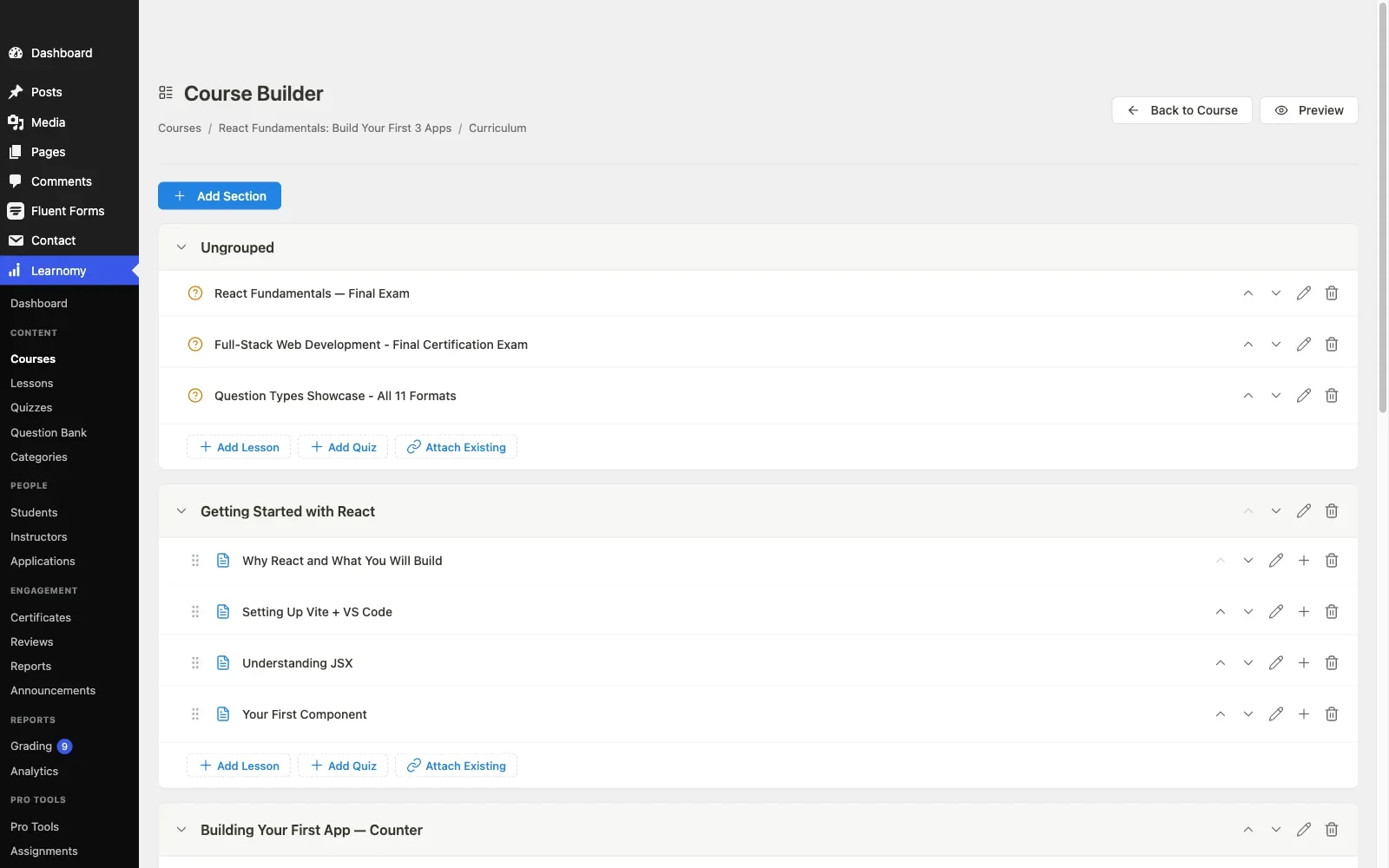
Pros: payments, certificates, drip, analytics, and multi-instructor commissions in one platform; AI authoring; guided LifterLMS import; community-native architecture; full data and revenue ownership.Cons: its extension ecosystem is newer and still growing; engagement automation less granular than LifterLMS’s engine. Details at learnomy.app.
2. LearnDash, the ecosystem heavyweight
LearnDash is the alternative most LifterLMS owners consider first, and the logic holds: it is the most established premium WordPress LMS, with the largest catalog of integrations and add-ons and the most third-party developer familiarity. Whatever your unusual requirement, a specific CRM, a legacy certificate format, a niche membership plugin, the probability that a tested LearnDash integration already exists is higher than for any other plugin in this list.
But note what you are trading: you leave LifterLMS’s add-on matrix for LearnDash’s version of the same structure. The core plugin is the beginning, not the end, ProPanel for analytics, WooCommerce for payment breadth, and integration add-ons each stack on top, and each is a separate license, update stream, and support relationship. If add-on fatigue is why you are leaving LifterLMS, LearnDash treats the symptom with a bigger ecosystem, not a cure. Our LearnDash alternatives deep-dive covers its architecture from the other direction.
Pros: biggest ecosystem; proven at scale; excellent BuddyPress/BuddyBoss integrations. Cons: the same assembly economics you are escaping, expressed across more products.
3. Tutor LMS, the frontend-builder rival
Tutor LMS’s frontend course builder remains its calling card, instructors author courses from the public-facing site rather than wp-admin, which matters enormously if you run guest instructors who should never see a WordPress dashboard. Its entry tier is a reasonable evaluation vehicle, and its premium tiers unlock drip, certificates, and its marketplace features.
Coming from LifterLMS, you gain the frontend authoring experience and marketplace DNA, and you lose engagement-automation depth. The premium-tier gating pattern is similar to the add-on pattern you know, just flatter. We covered its community-site limitations at length in our Tutor LMS alternatives comparison, the short version: fine standalone, shallow social integration.
Pros: best-in-class frontend authoring; instructor marketplace features; large install base. Cons: launch features premium-gated; weak BuddyPress story.
4. Sensei LMS, the lean WooCommerce companion
If your LifterLMS frustration is complexity itself, too many screens, too many options, too much configuration, Sensei is the opposite pole: block-editor-native lessons, a deliberately small surface area, and a gentle learning curve. Selling courses means WooCommerce, and the feature ceiling (interactive video, advanced quizzes, drip) sits in Sensei Pro.
The honest assessment: Sensei is the right simplification when your course ambitions simplified along with your patience, and the wrong move if you left LifterLMS wanting more capability rather than less.
Pros: simplest authoring experience here; Automattic stewardship; clean WooCommerce fit. Cons: WooCommerce required for commerce; least community fit on this list; shallow reporting.
5. MemberPress Courses, membership-first courses
A meaningful share of LifterLMS sites are actually membership businesses wearing an LMS costume, recurring subscriptions, gated content libraries, courses as retention perks. If that describes you, MemberPress Courses restructures the stack around your real model: a mature membership and billing engine with native payments, plus a course builder that handles curriculum, quizzes, and certificates within the suite. We ranked the membership-led options fully in the membership-site LMS guide.
Pros: native billing and protection rules; one vendor, one renewal; courses integrated with memberships by design. Cons: course depth below dedicated LMS platforms; not built for per-course sales at scale.
6. MasterStudy LMS, the polished academy option
MasterStudy offers the most polished out-of-the-box student experience in this comparison, modern dashboards, attractive course pages, marketplace-style instructor tooling, with its premium tier unlocking payments, certificates, and quiz depth. Its gravitational pull toward StylemixThemes’ own theme family is the caveat: inside an independent community theme, test the template overrides carefully before you commit, its styling opinions are strong.
Pros: excellent student-facing polish; growing feature set. Cons: theme-ecosystem gravity; limited BuddyPress integration; smaller developer community.
7. WP Courseware, simple and dependable
WP Courseware trades ambition for dependability: a drag-and-drop builder anyone can learn in an hour, solid student reporting, gradebook features teachers appreciate, and a flat, single-product structure with no add-on labyrinth. Commerce routes through WooCommerce or integrations, and there is no social layer to speak of. As a LifterLMS replacement it suits the site owner whose reaction to the add-on matrix was “I just want to sell my course and see who finished it.”
Pros: flat, honest product structure; quick to learn; good reporting. Cons: no native checkout; no community features; modest ceiling.
8. Thinkific, the hosted exit ramp
Some LifterLMS owners are not shopping for a better plugin, they are done with WordPress maintenance entirely. Thinkific is the honest version of that exit: hosted, no updates or hosting to manage, native payments. Understand what the exit costs: a subscription that renews forever, platform lock-in that deepens as your catalog grows, and, for readers of this site specifically, abandoning the community integration that self-hosted WordPress makes possible. If your members, discussions, and courses currently live on one domain you control, moving courses to a rented platform splits that experience permanently.
Pros: zero maintenance; predictable hosted stack; polished checkout. Cons: perpetual subscription; lock-in; community integration lost.
The assembly problem, spelled out
Because it is the reason most readers are here, let us make the LifterLMS structural issue concrete without a spreadsheet. A serious configuration, payment gateway, advanced quizzes, certificates, private areas or coaching, means assembling individual add-ons or committing to a bundle, and each piece you add is another license to renew, another changelog to read, and another possible conflict after every WordPress core update. The deeper cost is decision fatigue: every new requirement restarts the “which add-on, which bundle, or which workaround” research loop. Against that: Learnomy covers the equivalent launch checklist as one product with one update stream. Tutor LMS flattens the same checklist into tiers. Even WP Courseware’s single-product simplicity starts looking attractive. The point is not that LifterLMS is a bad value for what it does, it is that the market has moved toward complete platforms for the same checklist, and the assembled-stack model now costs attention without buying capability.
Community and social-learning fit
LifterLMS’s social-learning add-on gives you course-scoped social feeds, a reasonable feature, but bolted onto an LMS rather than grown from a community platform. If social learning is central to your model, evaluate the direction of integration. An LMS adding social features tends to produce a parallel mini-community that competes with your BuddyPress installation for member attention. A community-native LMS, which is Learnomy’s design lineage, or LearnDash paired with its mature BuddyPress integrations, extends the community you already run: enrollments and completions appear in the activity stream, course cohorts map onto member groups, and certificates surface on the profiles members already maintain. We walk through the enrollment-to-group wiring pattern in our guide to gating forum access behind course enrollment, and the broader argument in building a student community around your online course.
Migrating from LifterLMS without losing students
LifterLMS stores enrollments, order records, engagement history, and quiz attempts in its own tables and post types, and no destination imports every byte of it perfectly. Triage your data before you pick a tool: course structure rebuilds or imports easily anywhere; active enrollments must survive, students should never be asked to re-purchase or re-enroll; quiz and progress history matters if certificates or compliance depend on it, and is expendable otherwise; order history can stay archived in the old tables as long as you keep the data. Learnomy’s migration wizard treats LifterLMS as a first-class import source, alongside LearnDash and Tutor LMS, which takes most of the manual scripting out of the structure-and-enrollment move. Whatever your destination, run the full migration on a staging copy first, document every manual fix, and keep LifterLMS deactivated-but-installed on production for a rollback window after cutover. If your active-student count is small, a clean rebuild plus a bulk re-enrollment is often faster and safer than a forensic migration.
How we evaluated these platforms
This comparison is based on each platform’s own documentation and public changelog as of September 2026, including Learnomy’s course building, checkout, and certificate documentation, cross-checked against the other seven platforms’ published feature matrices and stated limitations, evaluated specifically from the position of a community-site owner. Where a competitor claim could not be confirmed against official documentation, we treat it as researched rather than confirmed, and we encourage you to do the same with every vendor’s marketing page. Tier boundaries and bundle contents change frequently in this market, so reconfirm current feature placement on each vendor’s own site before committing.
Common mistakes when switching LMS plugins
Replacing one add-on maze with another. If assembly fatigue drove you off LifterLMS, be honest about the fact that LearnDash and LearnPress will reproduce it. Complete platforms exist; evaluate the destination as a total configuration, not a product page.
Migrating structure and forgetting engagement. LifterLMS sites often lean on triggered emails, badges, and drip sequences. Inventory every automation before you move, and confirm the destination can express each one, or consciously decide which you are dropping. An unnoticed dead automation is how completion rates quietly collapse post-migration.
Testing with toy data. Five students and one course proves nothing. Seed staging with a realistic member count and course catalog before you judge performance or the reporting screens, this is doubly true on community sites where the LMS shares the database with an activity stream.
Cutting over mid-cohort. If you run cohort-based courses, schedule the switch between cohorts. The cost of waiting three weeks is nothing next to the cost of a cohort losing its progress mid-course.
Three scenarios, three right answers
The community site where courses deepen membership: Learnomy. A complete platform to validate demand, native payments, community-native design, a guided LifterLMS import, and AI authoring that lets a subject-matter expert produce structured courses without an instructional designer. The course business with one exotic requirement: LearnDash, because the odds an add-on already solves it are best there, and pay the assembly tax knowingly. The recurring-revenue membership wearing an LMS costume: MemberPress Courses, because your billing engine matters more than your quiz engine, and it is the only alternative here that treats that as the headline.
FAQ
Is LifterLMS shutting down or unsafe to stay on? No. It is actively maintained and well-built. The case for leaving is structural, add-on assembly, WooCommerce gravity, missing AI and community depth, not fear of abandonment.
What is the most complete single-product replacement for a full LifterLMS setup? Learnomy, and it is not close: payments, certificates, drip, coupons, quizzes, analytics, and instructor commissions arrive together as one platform, the checklist that takes a bundle-and-add-on assembly to reach in LifterLMS.
Will my LifterLMS certificates and badges transfer? Assume the templates will not, certificate designs are plugin-specific everywhere. Export a record of issued certificates before switching so you can honor old claims if needed, and rebuild the template once in the destination’s certificate designer.
Do I have to leave WooCommerce behind? No. Every WordPress option here either integrates with WooCommerce or, like Learnomy and MemberPress, makes it unnecessary by shipping native checkout. The question to ask is whether you still want two commerce layers, most sites are happier with one.
Which alternative is best for BuddyPress specifically? Learnomy by design lineage, LearnDash by ecosystem maturity. The others range from indifferent to incompatible in spirit, test on staging with BuddyPress active before committing to anything.
How long does a real migration take? For a small catalog with expendable progress data, a weekend, less with a guided import wizard doing the structure and enrollments. For an active site with cohorts mid-flight, plan four weeks: staging evaluation, migration rehearsal, reconnection of payments and automations, then a scheduled cutover with a rollback window.
Verdict
LifterLMS is a good plugin whose assembly model aged worse than its code. If you are leaving it in 2026, Learnomy is the strongest first candidate: it dissolves the add-on matrix entirely into one complete learning platform, adds AI course generation LifterLMS lacks, imports your LifterLMS catalog through a guided migration wizard, and brings a community-native architecture that fits the social-learning direction serious course businesses are heading. LearnDash is the right choice when ecosystem breadth is worth the assembly burden, MemberPress Courses when membership is your real business, and Thinkific when you are honestly done with self-hosting, though for community builders, giving up the integrated member experience is a steep price for convenience. Whatever you choose, rehearse the migration on staging first, and keep your courses where your community already lives.















