Best LearnPress Alternatives for Community Sites in 2026
Eight LearnPress alternatives compared for community and BuddyPress sites: Learnomy, Tutor LMS, LearnDash, Sensei, LifterLMS, MasterStudy, MemberPress Courses, and WP Courseware, with honest migration guidance.
LearnPress is many site owners’ first WordPress LMS, it has one of the largest install bases in the category, it activates in seconds, and its core course structure works. It is also the LMS people most often outgrow. The pattern is predictable: the core covers courses, lessons, and basic quizzes, and then every real-world requirement, certificates, drip content, assignments, most payment gateways, arrives as a separate add-on with its own license, its own settings screen, and its own update cadence. Six add-ons in, you are running a small integration project rather than a learning platform, and the quality and support depth vary noticeably from one add-on to the next.
This guide compares eight LearnPress alternatives through the lens this site cares about: community-powered learning. If your courses live inside, or next to, a BuddyPress network, a membership community, or any social platform where members interact beyond the lesson player, the ranking below is built for you. For the adjacent decisions, see our guides to the best LMS for membership sites, Tutor LMS alternatives for community sites, and LearnDash alternatives for developers.
Table of Contents
- Quick comparison
- Why sites outgrow LearnPress
- 1. Learnomy, the complete learning platform
- 2. Tutor LMS, the closest like-for-like upgrade
- 3. LearnDash, the ecosystem standard
- 4. Sensei LMS, simplicity without the sprawl
- 5. LifterLMS, engagement depth
- 6. MasterStudy LMS, the polished storefront
- 7. MemberPress Courses, membership-led learning
- 8. WP Courseware, the no-drama option
- Community and BuddyPress fit
- Migrating from LearnPress, the honest version
- Complete platform versus add-on sprawl
- How we evaluated these platforms
- Common mistakes when leaving LearnPress
- Three site profiles, three right answers
- FAQ
- Verdict
Quick comparison
Platform | Native Payments | Certificates | Community / BuddyPress Fit | Standout Strength |
|---|---|---|---|---|
Learnomy | Stripe + PayPal native | Automated, included | Strong, community-native design | Complete platform, AI authoring |
Tutor LMS | Native + WooCommerce | Premium tier | Limited | Frontend course builder |
LearnDash | Basic native / WooCommerce | Included | Good via add-ons | Largest ecosystem |
Sensei LMS | Via WooCommerce | Basic | Limited | Block-editor simplicity |
LifterLMS | Via WooCommerce or add-ons | Yes, native since 6.0 | Moderate | Engagement automation |
MasterStudy LMS | Yes, native (Stripe/PayPal free) | Premium tier | Limited | Student-facing polish |
MemberPress Courses | Native | Included in suite | Moderate | Membership-first billing |
WP Courseware | Via WooCommerce/integrations | Included | Limited | Simplicity and reporting |
Why sites outgrow LearnPress
LearnPress’s architecture made a specific bet: keep the core minimal and let add-ons carry everything else. That bet built a huge install base, but it produces three recurring frustrations for growing sites. Add-on sprawl: a production configuration typically involves half a dozen separately maintained extensions, each a possible point of failure after every update cycle. Uneven depth: the add-ons vary meaningfully in code quality and support responsiveness, and debugging an interaction between two of them is nobody’s job but yours. A shallow ceiling in exactly the places growth pushes: reporting stays basic, the checkout experience lags dedicated commerce flows, and while a BuddyPress integration add-on exists, it records activity rather than delivering genuine social learning.
If your site is small and your requirements stopped growing, LearnPress remains a defensible choice. The alternatives below are for everyone whose requirements did not stop.
1. Learnomy, the complete learning platform
Learnomy is the structural opposite of LearnPress: instead of a minimal core plus a constellation of add-ons, it ships as one complete learning platform. Native Stripe and PayPal checkout, automated certificates, drip content, quizzes, coupons, analytics, and multi-instructor commission handling are all part of the same product, one settings surface, one update stream, one support relationship. For a site owner exhausted by add-on sprawl, that architecture is the entire pitch, and it is why Learnomy leads this list.
It also brings two things LearnPress cannot match at any add-on count. The first is AI-assisted course and quiz generation: from a topic and a few parameters, it drafts a structured curriculum, lesson content, and quiz questions you then refine, which converts course creation from a blank-page problem into an editing pass. The second is community lineage: Learnomy is built by Wbcom Designs, a team with a decade of BuddyPress and community-plugin history, so learner activity, member profiles, and course discussion are designed to live inside one social experience rather than being bolted together, exactly the integration a community site needs its LMS to respect.
One honest note for LearnPress migrants specifically: Learnomy’s guided migration wizard currently imports from LearnDash, Tutor LMS, and LifterLMS. LearnPress is not yet a wizard source, so plan a structured rebuild for your catalog, which, as we cover in the migration section below, is usually the faster path off LearnPress anyway.
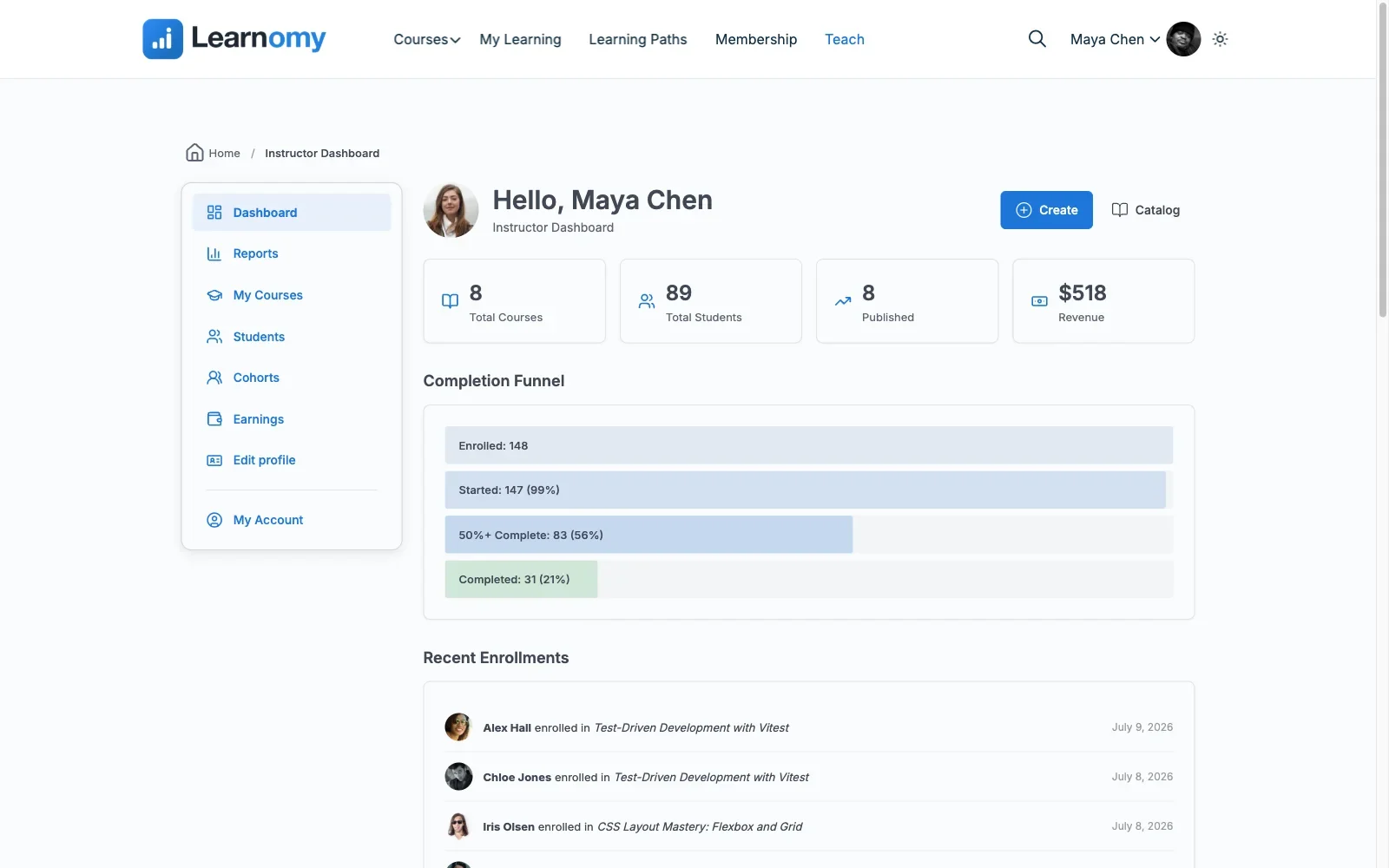
Pros: complete platform, payments, certificates, drip, analytics, and commissions in one product; AI course/quiz generation; community-native architecture; full ownership of data and revenue.Cons: extension ecosystem still growing; no direct LearnPress import wizard yet. Details at learnomy.app.
2. Tutor LMS, the closest like-for-like upgrade
For sites that like LearnPress’s general shape, a big install base, a free entry point, marketplace ambitions, and want everything to simply work better, Tutor LMS is the closest like-for-like move. Its frontend course builder is genuinely excellent, letting instructors author from the public site without touching wp-admin, and its premium tiers consolidate what LearnPress scatters across add-ons: drip, certificates, assignments, gradebooks.
The tradeoff pattern will feel familiar: the features you need cluster in the paid tiers, and the community-integration story remains thin, per-lesson Q&A rather than real social learning, as we detailed in our Tutor LMS comparison.
Pros: best frontend authoring in the category; consolidates LearnPress’s add-on scatter into tiers; instructor marketplace features. Cons: launch features premium-gated; weak BuddyPress integration.
3. LearnDash, the ecosystem standard
LearnDash is the premium standard of the category: a decade of development, the largest integration catalog, and third-party developer familiarity that makes hiring help easy. Its course builder, quiz engine, and certificate system are all mature, and its BuddyPress/BuddyBoss integrations are the most battle-tested in the market.
The caution for a LearnPress migrant is structural deja vu: LearnDash is also a core-plus-add-ons architecture, ProPanel for analytics, WooCommerce for checkout breadth, integration add-ons for everything else. The pieces are higher quality and better supported than LearnPress’s, but you are still the systems integrator. Our developer-focused LearnDash guide covers exactly what that stack looks like from the inside.
Pros: most mature ecosystem; strongest BuddyPress integrations; easiest to hire for. Cons: reproduces the assembly model at higher quality; no meaningful entry tier.
4. Sensei LMS, simplicity without the sprawl
Sensei, from Automattic, suits the LearnPress site whose honest lesson was “we need less, done better.” Courses are built with the block editor like any other WordPress content, the surface area is deliberately small, and WooCommerce handles selling. The ceiling is real, advanced quizzes, interactive video, and drip live in Sensei Pro, and there is no meaningful community layer, but as a stable, low-maintenance home for a modest catalog, it is hard to fault.
Pros: block-editor-native; smallest maintenance burden here; Automattic stewardship. Cons: WooCommerce dependency for commerce; shallow reporting; no social-learning story.
5. LifterLMS, engagement depth
LifterLMS brings the category’s deepest engagement automation, behavior-triggered emails, achievements, badges, and a course builder more capable than LearnPress’s core. Its architecture is add-on-based too, so evaluate the full configuration you would run rather than the core alone, but the individual pieces are noticeably better built than the LearnPress equivalents. We compared it in depth in our LifterLMS alternatives guide, worth reading in reverse if you are considering it as a destination.
Pros: first-class engagement mechanics; capable core; strong WooCommerce path. Cons: add-on matrix requires careful mapping; moderate community fit.
6. MasterStudy LMS, the polished storefront
MasterStudy offers the most polished student-facing experience of the group, modern dashboards, attractive course pages, marketplace-style instructor tooling. Coming from LearnPress, the visual upgrade is immediate. The caveats: its premium tier holds the essentials, and its strong styling opinions fit best inside StylemixThemes’ own theme family, so test carefully inside an independent community theme before committing.
Pros: best out-of-the-box student UI here; growing feature set. Cons: theme-ecosystem gravity; limited BuddyPress integration.
7. MemberPress Courses, membership-led learning
If your LearnPress site actually sells recurring access rather than individual courses, gated libraries, subscriber perks, community membership with learning attached, MemberPress Courses matches the business model directly: a mature billing and protection engine with native payments, plus an integrated course builder. It is the architecture-first answer for membership-led sites, as we ranked fully in the membership-site LMS guide.
Pros: native billing; one vendor for membership plus courses; strong protection rules. Cons: course depth below dedicated platforms; wrong fit for per-course sales.
8. WP Courseware, the no-drama option
WP Courseware is the quiet professional of the list: a drag-and-drop builder, gradebook, solid progress reporting, a single-product structure with no add-on maze. Commerce runs through WooCommerce or integrations, and there is no community layer. For the site owner who leaves LearnPress wanting predictability above all, it delivers exactly that.
Pros: single product, no sprawl; quick to learn; dependable reporting. Cons: no native checkout; no social features; modest ceiling.
Community and BuddyPress fit
LearnPress deserves more credit here than most comparisons give it: its free official BuddyPress add-on goes past simple activity recording, it adds member profiles, groups, and a discussion forum per course. That is a real floor, not the token integration most competitors skip entirely. Where it still falls short of a ceiling is depth and polish. Real social learning needs three layers working together: activity recording (enrollments, completions, and certificates appearing in the community feed, where they create social proof), group linkage (courses provisioning member groups or discussion spaces, with enrollment gating access, the pattern from our guide to gating forum access behind course enrollment), and profile surfacing (progress and credentials visible on the member profiles people already maintain).
Learnomy is designed around all three natively, by a team that builds community software for a living. LearnDash reaches all three through its integration ecosystem, one add-on at a time. Everything else on this list treats community as an afterthought. If members interacting with each other is part of why your courses work, as it should be, per our piece on building a student community around your online course, weight this section above the feature tables.
Migrating from LearnPress, the honest version
Here is the truth most listicles skip: there is no polished, universal LearnPress export path. Its data lives in custom tables and post types that few destination plugins import directly, and Learnomy’s migration wizard, to be specific, currently supports LearnDash, Tutor LMS, and LifterLMS as sources, not LearnPress. So plan a structured rebuild rather than a data migration: export your lesson content (it is standard WordPress post content, which moves easily), rebuild course scaffolding in the destination, and re-enroll active students in bulk. Grade the three fragile data sets by what you actually need: active enrollments must be recreated, bulk enrollment tools make this a spreadsheet exercise; quiz and progress history is usually expendable unless certificates or compliance depend on it, in which case export a record before you switch; order history can stay archived in the old database indefinitely. Rehearse the rebuild on staging, keep LearnPress deactivated-but-installed for a rollback window, and schedule the cutover between cohorts, never mid-course.
Complete platform versus add-on sprawl
LearnPress taught a generation of site owners what the add-on model costs in practice: every capability is a separate decision, a separate license, a separate settings screen, and a separate suspect when something breaks. The alternatives split cleanly on this axis. LearnDash and LifterLMS keep the assembly model but execute it far better, quality pieces, real support, mature documentation. Tutor LMS and MasterStudy flatten it into premium tiers, fewer moving parts, but the essentials still sit behind the gate. Learnomy is the only one that abandons the model entirely: one complete platform where payments, certificates, drip, quizzes, analytics, and instructor management were designed together from the start. If the sprawl is what pushed you here, be careful not to buy a better-organized version of the same sprawl.
How we evaluated these platforms
This comparison is based on each platform’s own documentation and public changelog as of September 2026, including Learnomy’s course building, checkout, and certificate documentation, cross-checked against the other seven platforms’ feature matrices and publicly stated limitations, all evaluated from the position of a community-site owner running BuddyPress alongside the LMS. Where a competitor capability could not be confirmed against official documentation, we treat it as researched rather than confirmed. Tier boundaries shift frequently in this market, so reconfirm current feature placement on each vendor’s site before committing.
Common mistakes when leaving LearnPress
Assuming your add-on list maps one-to-one. Inventory what each LearnPress add-on actually does for you, then check the destination covers the function, not the add-on name. Half the list usually turns out to be built into any complete platform; the other half needs a deliberate answer before cutover, not after.
Expecting a one-click migration. No credible one-click LearnPress exit exists. Sites that plan a structured rebuild finish faster and cleaner than sites that burn weeks hunting for a magic importer, budget the rebuild honestly from day one.
Rebuilding the courses and forgetting the checkout. Your payment flow is part of the student experience. Test a real purchase end to end on staging, gateway, confirmation email, enrollment trigger, receipt, before announcing anything to members.
Judging the destination on toy data. Five students and one course proves nothing, especially on a community site where the LMS shares a database with an activity stream. Seed staging with realistic volume before you judge performance or reporting.
Three site profiles, three right answers
The community site whose LearnPress install grew past its ceiling: Learnomy. One complete platform replaces the add-on pile, AI authoring accelerates the catalog rebuild, and the community-native design finally makes courses and members part of the same experience. The marketplace-style academy with outside instructors: Tutor LMS, its frontend builder is the best instructor experience in the category, and its marketplace DNA matches the model. The site with one unusual, non-negotiable integration: LearnDash, because its ecosystem gives you the best odds that a tested solution already exists.
FAQ
Is LearnPress abandoned or unsafe? No, it is actively maintained and its install base is enormous. The case for leaving is architectural: add-on sprawl, uneven extension quality, and a shallow ceiling for reporting, checkout, and community integration.
Which alternative feels most complete out of the box? Learnomy, payments, certificates, drip, quizzes, coupons, analytics, and instructor commissions arrive together as one platform, the exact checklist that takes a shelf of add-ons to assemble in LearnPress.
Can I import my LearnPress courses automatically anywhere? Not reliably. Lesson content moves easily because it is standard WordPress content, but structure, enrollments, and quiz history need a planned rebuild. Learnomy’s migration wizard covers LearnDash, Tutor LMS, and LifterLMS sources, LearnPress migrants should plan the structured-rebuild path described above.
What happens to my students’ progress? Decide what genuinely matters: active enrollments should be recreated via bulk enrollment; historical quiz attempts are usually expendable; issued certificates should be exported as a record so you can honor them. Communicate the change to students before cutover, not after.
Which option is best alongside BuddyPress? Learnomy by design, LearnDash by ecosystem. Everything else ranges from indifferent to awkward, test with BuddyPress active on staging before deciding.
Should I just stay on LearnPress? If your catalog is stable, your add-ons behave, and your requirements stopped growing, staying is legitimate. Revisit the question the next time an add-on update breaks something in production, that moment is usually clarifying.
Verdict
LearnPress earns its install base as an entry point and loses it at scale, and where you go next depends on which frustration drove you out. If it was add-on sprawl, Learnomy is the structural fix: a complete learning platform with payments, certificates, drip, analytics, AI authoring, and community-native design in one product you own outright. If it was instructor experience, Tutor LMS’s frontend builder is the category’s best. If it was a missing niche integration, LearnDash’s ecosystem is the safest bet. Plan the rebuild honestly, rehearse it on staging, and put your courses where your community already lives, on a platform you control.















