Best MasterStudy LMS Alternatives for Community Sites in 2026
Eight MasterStudy LMS alternatives compared for community and BuddyPress sites: Learnomy, Tutor LMS, LearnDash, LifterLMS, Sensei, LearnPress, MemberPress Courses, and Thinkific, with theme-independence and migration guidance.
MasterStudy LMS wins people over with its looks, and honestly, it earns that. The student dashboard, course pages, and lesson player are among the most polished in the WordPress LMS category, and for a site that wants an academy that photographs well on day one, it delivers. But live with it for a year and a specific set of frictions surfaces: the plugin is happiest inside StylemixThemes’ own theme family and fights independent themes, the features a paid course launch actually needs sit in its premium tier, and the community story, the thing readers of this site care most about, is essentially absent.
This comparison walks through eight MasterStudy alternatives from the perspective of community-site builders: people running BuddyPress networks, membership communities, and social-learning platforms where an LMS has to be a well-behaved citizen of a larger stack, not the whole show. For neighboring decisions, see our guides to Tutor LMS alternatives, LifterLMS alternatives, and the best LMS for membership sites.
Table of Contents
- Quick comparison
- Why sites move on from MasterStudy
- 1. Learnomy, the complete platform that respects your theme
- 2. Tutor LMS, the direct competitor
- 3. LearnDash, the ecosystem standard
- 4. LifterLMS, engagement automation
- 5. Sensei LMS, the minimalist path
- 6. LearnPress, the modular veteran
- 7. MemberPress Courses, membership-first
- 8. Thinkific, the hosted exit
- Theme independence, the test MasterStudy fails
- Community and BuddyPress fit
- Migrating from MasterStudy, honestly
- How we evaluated these platforms
- Common mistakes when switching
- Three site profiles, three right answers
- FAQ
- Verdict
Quick comparison
Platform | Native Payments | Theme Independence | Community / BuddyPress Fit | Standout Strength |
|---|---|---|---|---|
Learnomy | Stripe + PayPal native | Strong, token-styled frontend | Strong, community-native | Complete platform, AI authoring |
Tutor LMS | Native + WooCommerce | Good | Limited | Frontend course builder |
LearnDash | Basic native / WooCommerce | Good | Good via add-ons | Largest ecosystem |
LifterLMS | Via WooCommerce or add-ons | Good | Moderate | Engagement automation |
Sensei LMS | Via WooCommerce | Excellent (block-native) | Limited | Simplicity |
LearnPress | Via add-ons | Moderate | BuddyPress add-on exists | Modular, huge install base |
MemberPress Courses | Native | Good | Moderate | Membership-first billing |
Thinkific | Native (hosted) | N/A (hosted) | None (off-site) | Zero maintenance |
Why sites move on from MasterStudy
Three frictions come up consistently. Theme friction: MasterStudy officially works with any WordPress theme rather than requiring StylemixThemes’ own, but its WordPress.org support forum carries recurring reports of CSS conflicts, one review calls out “outdated CSS architecture and frustrating layout system,” and another documents the plugin’s styles overriding a third-party block theme’s dark mode, so budget real time for cross-theme QA regardless of which theme you run. Premium gating: the free version does include native Stripe and PayPal checkout, but drip content and the full certificate builder are Pro-only, so the demo that impressed you on launch-ready features runs on the premium tier. Community absence: there is no meaningful BuddyPress integration, no social-learning layer, and no path to make courses part of a member experience rather than a parallel silo.
If you run a standalone academy on a StylemixThemes theme and like it, stay put, MasterStudy is genuinely good at that job. Everyone else, read on.
1. Learnomy, the complete platform that respects your theme
Learnomy answers all three MasterStudy frictions at once. It is a complete learning platform: native Stripe and PayPal checkout, automated certificates, drip content, quizzes, coupons, analytics, and multi-instructor commissions ship together in one product, no premium-tier scavenger hunt between you and a real launch. It is theme-respectful by design: the frontend is token-styled to inherit your active theme’s typography and colors rather than imposing its own design system, which is exactly the opposite of the MasterStudy experience inside an independent theme. And it is community-native: built by Wbcom Designs, a team with a decade of BuddyPress and community-plugin work behind it, so learner activity, member profiles, and course discussion are designed as one social experience.
Its standout capability is AI-assisted course and quiz generation: hand it a topic and parameters and it drafts a structured curriculum, lesson content, and quiz questions for you to edit. For a community owner who knows their subject cold but has never designed a curriculum, that converts weeks of blank-page work into an editing pass. Multi-instructor commission handling is native too, so growing into a small marketplace is a settings change, not a re-platform.
One honest note: Learnomy’s guided migration wizard imports from LearnDash, Tutor LMS, and LifterLMS. MasterStudy is not currently a wizard source, so plan a structured rebuild of your catalog, covered in the migration section below.
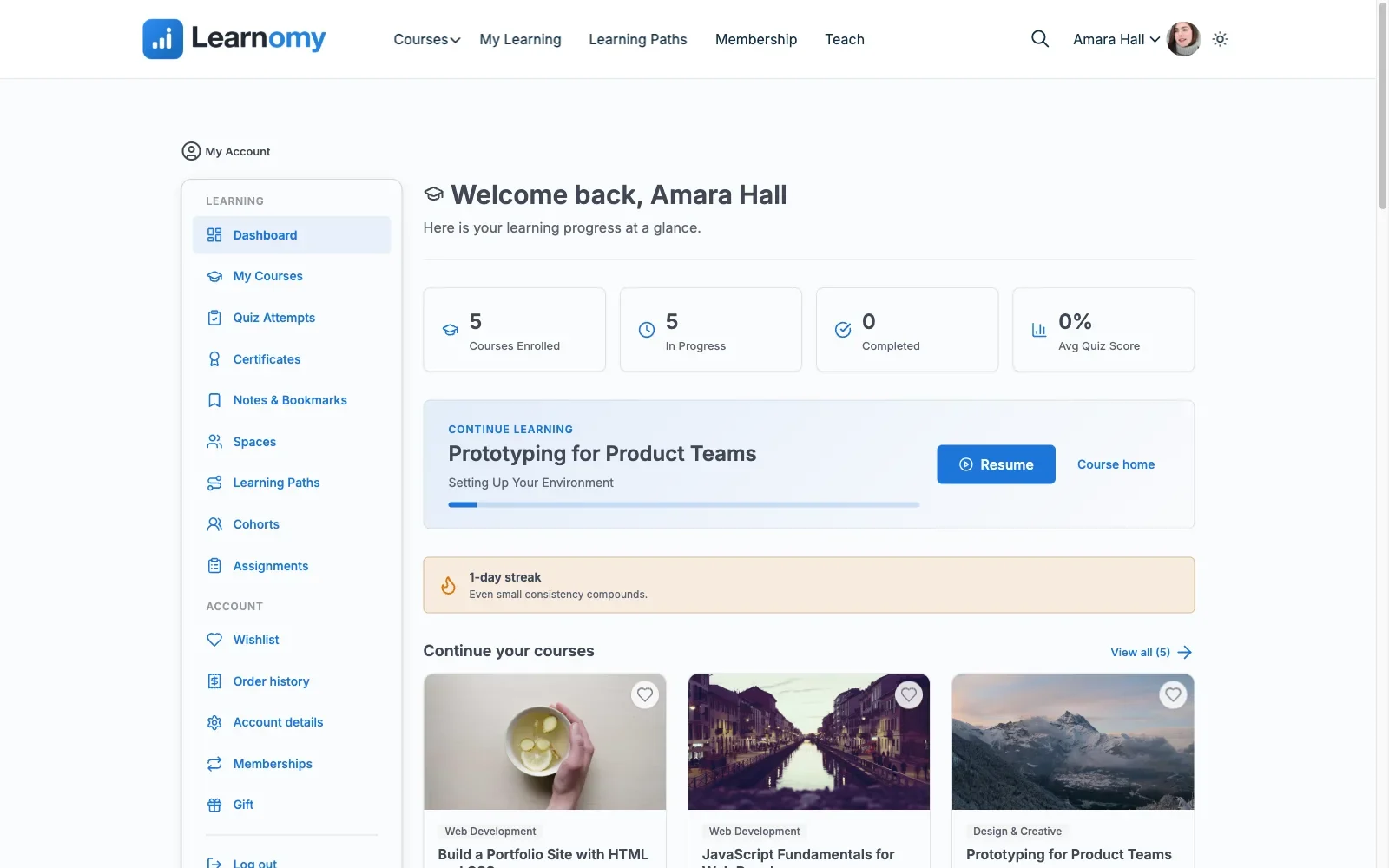
Pros: complete platform in one product; AI course/quiz generation; theme-token frontend that fits your existing design; community-native architecture; full data and revenue ownership.Cons: extension ecosystem still growing; no direct MasterStudy import wizard. Details at learnomy.app.
2. Tutor LMS, the direct competitor
Tutor LMS is MasterStudy’s most direct rival, same marketplace ambitions, same frontend-dashboard philosophy, and choosing between them usually comes down to authoring experience versus visual polish. Tutor wins authoring: its frontend course builder is the best in the category, letting instructors create and preview courses without ever seeing wp-admin. MasterStudy wins default aesthetics. Tutor is also meaningfully more theme-agnostic, it behaves better inside independent community themes than MasterStudy does.
The familiar caveats apply: real launch features live in premium tiers, and the community integration story stays shallow, per-lesson Q&A rather than genuine social learning, as we covered in the Tutor LMS comparison.
Pros: category-best frontend authoring; better theme behavior than MasterStudy; marketplace features. Cons: premium gating on launch essentials; weak BuddyPress fit.
3. LearnDash, the ecosystem standard
LearnDash trades MasterStudy’s visual flash for depth everywhere else: the most mature quiz engine, the largest integration catalog, and the most battle-tested BuddyPress/BuddyBoss integrations in the market. For a community site with an unusual requirement, a niche CRM, an odd certificate rule, a specific reporting need, LearnDash’s ecosystem gives the best odds a tested solution already exists.
The cost is assembly: core plus ProPanel plus WooCommerce plus integration add-ons, each a separate license and update stream. Our developer-focused LearnDash guide maps that stack in detail.
Pros: deepest ecosystem; strongest BuddyPress integrations; easiest to hire for. Cons: assembly model with multiple products to maintain; plain default styling.
4. LifterLMS, engagement automation
LifterLMS brings what MasterStudy lacks under the hood: behavior-triggered emails, achievements, badges, and engagement automation granular enough to build a retention strategy on. Its add-on architecture requires mapping your full configuration before committing, the same exercise we detailed in the LifterLMS alternatives guide, but the individual pieces are well built and the WooCommerce path is solid.
Pros: best-in-class engagement mechanics; capable course builder; solid commerce path. Cons: add-on matrix planning burden; moderate community fit.
5. Sensei LMS, the minimalist path
Sensei is the anti-MasterStudy: no imposed design system at all, courses are built with the block editor and inherit your theme like any other content, which makes it the most theme-independent option on this list. The ceiling is commensurately lower, advanced quizzes, interactive video, and drip sit in Sensei Pro, commerce means WooCommerce, and there is no community layer. Right for modest catalogs that value quiet stability; wrong for growth engines.
Pros: perfect theme inheritance; smallest maintenance surface; Automattic stewardship. Cons: WooCommerce dependency; shallow reporting; no social features.
6. LearnPress, the modular veteran
LearnPress offers the opposite trade from MasterStudy: no visual opinions worth mentioning, and a fully modular add-on architecture where you assemble only what you need, including, notably, a BuddyPress integration add-on. The assembly burden is real, production configurations mean maintaining several separately updated extensions of varying quality, which is why we wrote a full LearnPress alternatives guide for people heading the other direction. As a MasterStudy replacement it makes sense mainly when budget dominates every other concern.
Pros: modular; huge install base; BuddyPress add-on exists. Cons: add-on sprawl; uneven extension quality; dated defaults.
7. MemberPress Courses, membership-first
If your MasterStudy site actually sells recurring access, subscriptions, gated libraries, community membership with courses as a perk, MemberPress Courses matches the model: a mature billing and protection engine with native payments, and an integrated course builder riding on top. We ranked the membership-led architectures fully in the membership-site LMS guide.
Pros: native billing; one vendor for membership plus courses; strong protection rules. Cons: course depth below dedicated platforms; poor fit for per-course sales.
8. Thinkific, the hosted exit
For owners whose real conclusion is “no more WordPress maintenance,” Thinkific is the honest hosted exit: managed everything, native payments, polished checkout. The price is permanent: a subscription that never ends, lock-in that deepens with your catalog, and, for community builders, the loss of everything this site exists to champion, courses living on the same domain, in the same member experience, as your community. Moving courses off-site splits member attention permanently.
Pros: zero maintenance; predictable stack. Cons: perpetual subscription; lock-in; community integration lost.
Theme independence, the test MasterStudy fails
Here is a test worth running on any LMS before you commit: install it on staging next to your actual community theme, open a course page, a lesson, a quiz, and the checkout at desktop and mobile widths, and count how many elements look like they arrived from a different website. An LMS built as a companion to a specific theme family, MasterStudy is the clearest example, tends to fail this test anywhere outside its home ecosystem, and every failed element becomes override CSS you maintain forever. The plugins that pass cleanly do it one of two ways: inheriting the theme wholesale (Sensei’s block-native approach) or styling with design tokens that read from the active theme (Learnomy’s approach), which keeps the LMS’s own components consistent while matching your site’s typography and palette. On a community site, where the LMS pages sit one click from your activity stream and member profiles, visual continuity is not cosmetic, it is what makes courses feel like part of the community instead of an iframe with a login.
Community and BuddyPress fit
Real community integration has three layers, and it is worth checking every candidate against them. Activity recording: enrollments, completions, and certificates flowing into the community activity stream as social proof. Group linkage: courses provisioning member groups or discussion spaces with enrollment-gated access, the wiring we documented in gating forum access behind course enrollment. Profile surfacing: credentials and progress appearing on the member profiles people already maintain. Learnomy is architected for all three by a community-software team; LearnDash reaches them through its integration ecosystem; LearnPress touches the first via its add-on; MasterStudy and the rest effectively skip the exercise. If member-to-member learning is part of your model, per our piece on building a student community around your online course, this section outranks every screenshot comparison.
Migrating from MasterStudy, honestly
MasterStudy stores course structure, enrollments, and quiz history in its own post types and tables, and no major destination imports them directly, Learnomy’s migration wizard, for the record, covers LearnDash, Tutor LMS, and LifterLMS sources, not MasterStudy. So plan a structured rebuild: your lesson content is standard WordPress content and moves easily; course scaffolding gets rebuilt in the destination, faster than you expect with AI-assisted drafting doing the outlines; active students get re-enrolled in bulk. Before switching, export a record of issued certificates so old claims can be honored, decide whether historical quiz attempts genuinely matter (they usually do not), and archive the old tables rather than deleting them. Rehearse on staging, cut over between cohorts, and keep MasterStudy deactivated-but-installed for a rollback window.
How we evaluated these platforms
This comparison is based on each platform’s own documentation and public changelog as of September 2026, including Learnomy’s course building, checkout, and certificate documentation, cross-checked against the other seven platforms’ feature matrices and publicly stated limitations, all judged from the position of a community-site owner running BuddyPress alongside the LMS, with real member counts in mind rather than five-student demos. Where a competitor capability could not be confirmed against official documentation, we treat it as researched rather than confirmed. Tier boundaries in this market shift often; reconfirm feature placement on each vendor’s site before committing.
Common mistakes when switching
Choosing the next LMS on screenshots. MasterStudy itself is usually chosen this way, and choosing its replacement the same way repeats the cycle. Buy on architecture, completeness, theme behavior, community fit, and let looks be the tiebreaker.
Skipping the theme-collision test. Run the staging test from the theme-independence section before any purchase. Twenty minutes there saves a permanent override-CSS maintenance burden.
Forgetting the certificate record. Students hold certificates you issued. Export the record before decommissioning MasterStudy so you can verify old claims, silently orphaning credentials is a support nightmare and a trust breach.
Cutting over mid-cohort. Schedule the switch between cohorts, always. No feature gain is worth a cohort losing momentum mid-course.
Three site profiles, three right answers
The community site that wants courses inside the member experience: Learnomy, complete platform, theme-respectful frontend, community-native design, and AI authoring to rebuild the catalog fast. The instructor marketplace that liked MasterStudy’s model but not its constraints: Tutor LMS, better authoring, better theme behavior, same marketplace DNA. The site with one exotic integration requirement: LearnDash, its ecosystem gives the best odds of a tested, supported solution.
FAQ
Is MasterStudy LMS bad? No, it is a polished, actively developed plugin that excels inside its home theme ecosystem. The case for leaving is fit: theme gravity, premium gating on launch essentials, and the absence of any real community-integration story.
Which alternative is most complete out of the box? Learnomy, payments, certificates, drip, quizzes, coupons, analytics, and instructor commissions arrive together as one platform rather than scattered across tiers and add-ons.
Can I automatically import my MasterStudy courses anywhere? Not reliably. Lesson content transfers easily as standard WordPress content, but structure, enrollments, and quiz history need a planned rebuild. Learnomy’s wizard imports from LearnDash, Tutor LMS, and LifterLMS, MasterStudy migrants should follow the structured-rebuild path above.
Which option looks as good as MasterStudy? Out of the box, MasterStudy still wins raw polish. Learnomy takes the smarter route for community sites, inheriting your theme’s design language so courses match the rest of your site, and Tutor LMS is the strongest conventional runner-up.
What about BuddyPress specifically? Learnomy by design, LearnDash by ecosystem, LearnPress minimally via add-on. MasterStudy and the rest have no meaningful answer, which for a community site is often the deciding fact.
Should I just stay on MasterStudy? If you run a standalone academy on a StylemixThemes theme and your requirements are stable, yes. Revisit when you adopt an independent theme or when community features move from nice-to-have to core, those are the two walls it cannot climb.
Verdict
MasterStudy is the best-dressed LMS in WordPress, and clothing is not architecture. For community and BuddyPress sites, Learnomy is the strongest alternative: a complete learning platform, payments, certificates, drip, quizzes, analytics, AI authoring, and multi-instructor commissions in one product, with a theme-respectful frontend and community-native design that make courses feel like part of your site rather than a visitor to it. Tutor LMS is the right pick for marketplace-model academies, and LearnDash for exotic integration needs. Test theme collision on staging before you buy, export your certificate record before you switch, and keep your courses on the platform your community already calls home.















