Best WordPress LMS with Quizzes for Community Sites in 2026
Eight WordPress LMS plugins compared on quiz-builder depth: question types, question banks, grading, anti-cheat, and AI quiz generation, ranked for community and BuddyPress sites.
A course without assessment is a content library, quizzes are what turn watching into learning, and they are also where WordPress LMS plugins differ most sharply. Some ship quiz engines with a dozen question types, question banks, timers, and attempt controls; others offer a multiple-choice afterthought and call it done. If you searched for an LMS with quizzes, you have probably already discovered that the marketing pages all say “powerful quizzes” and the products behind them do not mean the same thing by it.
One scope note before we start: this is a comparison of LMS plugins with strong built-in quiz builders, tools where quizzes live inside courses, gate lesson progression, and feed completion analytics. It is not a roundup of standalone quiz and trivia plugins, those are a different tool for a different job, and bolting one onto an LMS means quiz results that never touch your course progress or certificates. As always on this site, we rank with community builders in mind: BuddyPress networks, membership communities, and social-learning platforms where assessment is part of a member experience. Related picks live in our guides to the best LMS with assignments and the best LMS for membership sites.
Table of Contents
- Quick comparison
- What a real quiz builder includes
- 1. Learnomy, quizzes with an AI head start
- 2. LearnDash, the deepest conventional quiz engine
- 3. Tutor LMS, frontend quiz authoring
- 4. LifterLMS, quizzes tied to engagement
- 5. MasterStudy LMS, polished quiz presentation
- 6. Sensei LMS, block-based quizzes
- 7. LearnPress, quizzes via assembly
- 8. WP Courseware, quizzes plus gradebook
- AI quiz generation, the real dividing line
- Quizzes in a community: assessment as a social feature
- How we evaluated quiz depth
- Common mistakes when choosing on quiz features
- Three assessment styles, three right answers
- FAQ
- Verdict
Quick comparison
Platform | Question Variety | AI Quiz Generation | Attempt Controls / Timers | Standout Strength |
|---|---|---|---|---|
Learnomy | Strong core set | Yes, native | Yes | AI-drafted quizzes inside a complete platform |
LearnDash | Deepest in category | Limited | Yes, granular | Question banks and quiz logic |
Tutor LMS | Broad | Premium tiers | Yes | Frontend quiz authoring |
LifterLMS | Good, deeper via add-on | No | Yes | Quizzes wired to engagement triggers |
MasterStudy LMS | Good | Some AI features | Yes | Student-facing quiz polish |
Sensei LMS | Moderate, blocks-based | Yes, Pro tier (3 questions/lesson) | Basic, more in Pro | Quiz authoring in the block editor |
LearnPress | Basic core, more via add-ons | No | Via add-ons | Modular assembly |
WP Courseware | Solid essentials | No | Yes | Gradebook integration |
What a real quiz builder includes
Before comparing products, fix the checklist. A production-grade LMS quiz engine needs: question variety (multiple choice, multi-select, true/false, fill-in-the-blank, matching, ordering, and ideally open-answer with manual grading); question banks and randomization, so repeat attempts and shared answers do not trivialize the assessment; attempt controls, limits, cooldowns, and pass thresholds that gate lesson progression; timers at quiz and question level for anything resembling an exam; feedback modes, per-question explanations versus end-of-quiz summaries, each right for different pedagogy; grading workflow for open answers, with an instructor inbox; and reporting that shows per-question success rates, because a question everyone misses is usually a broken question, not a hard one. Every plugin below is scored against this list, not against its own marketing page.
1. Learnomy, quizzes with an AI head start
Learnomy tops this list for a reason that has nothing to do with question-type counts: it is the platform that changes the economics of writing quizzes at all. Its AI quiz generation drafts questions, answer options, and correct-answer keys from your course topic and lesson content, so an instructor’s job becomes reviewing and sharpening a draft rather than staring at a blank question editor. Anyone who has hand-written the eighty-plus questions a real course needs knows this is not a gimmick, it is the difference between courses that get proper assessments and courses that ship with three token quizzes.
The conventional machinery is there too: a solid set of question types, pass thresholds that gate progression, attempt controls, and quiz results feeding the same analytics dashboard that tracks enrollment and completion, so you can see exactly where learners stall. Because Learnomy is a complete learning platform, quiz outcomes connect directly to the things that give them meaning, automated certificates when a passing score completes a course, drip schedules that release content after an assessment clears, and progress data on the learner’s profile. Nothing needs an add-on to talk to anything else.
The community angle matters here as well: built by Wbcom Designs, a decade-deep BuddyPress specialist team, Learnomy treats assessment as part of a member experience, results and credentials belong to the same identity a member carries through the rest of the community, which is exactly what a social-learning site wants and generic LMS plugins ignore.
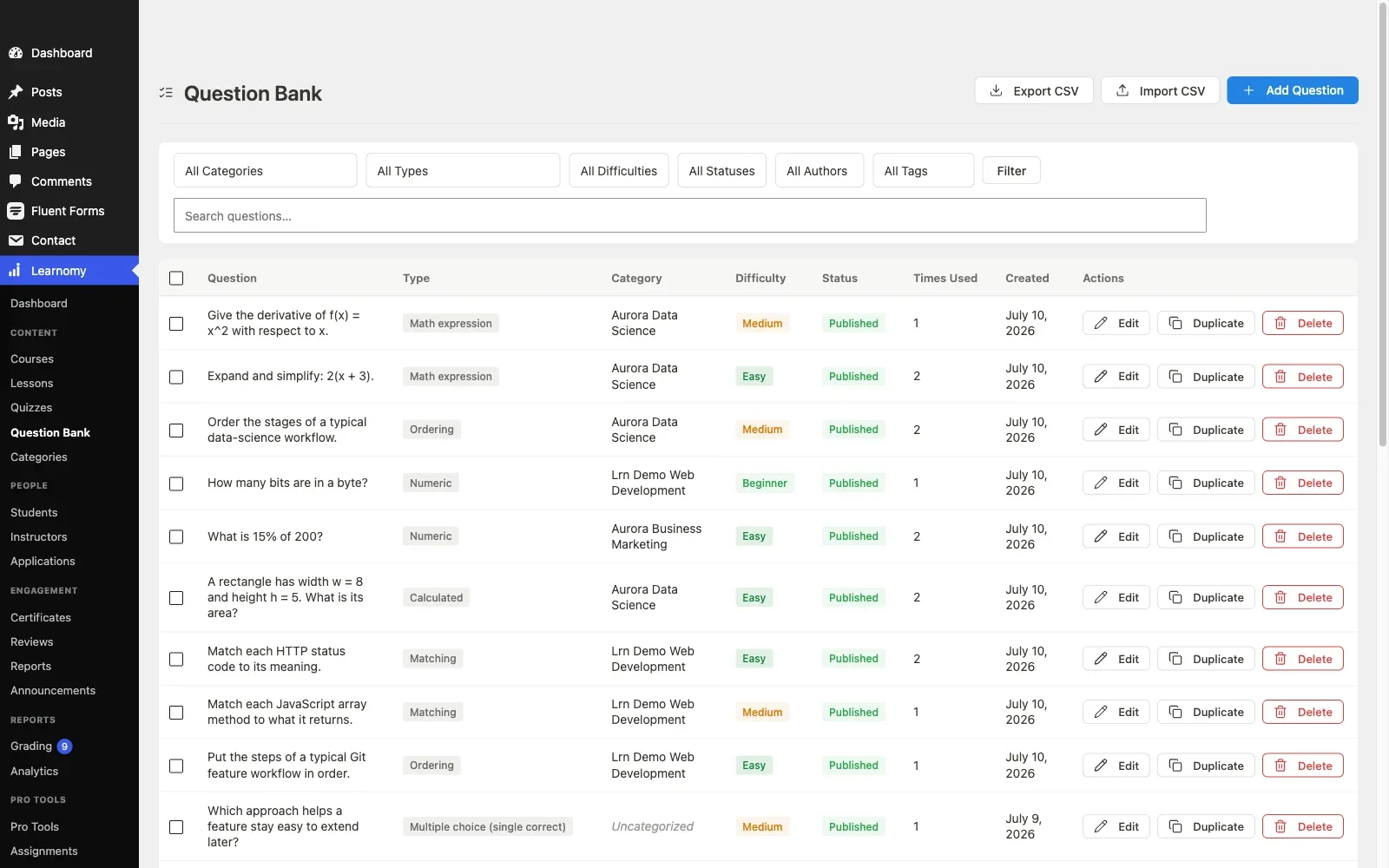
Pros: AI quiz generation that changes authoring economics; quizzes integrated with certificates, drip, and analytics in one platform; community-native design; full data ownership.Cons: conventional question-type variety trails LearnDash’s exam-grade engine; extension ecosystem still growing. Details at learnomy.app.
2. LearnDash, the deepest conventional quiz engine
Judged purely as a quiz machine, LearnDash’s engine is the most complete in WordPress: eight-plus question types, question banks with randomization, per-question points and categories, quiz timers, attempt limits, leaderboards, and certificates triggered by scores. If you are building exam-style assessment, compliance training, timed certification tests, question-bank-driven practice exams, this is the conventional benchmark the others chase.
The costs are the familiar LearnDash costs: the engine lives inside an assembly-model product line where analytics, commerce, and community integration each add another licensed piece, and the authoring UI, while powerful, has a learning curve that casual instructors feel. Our LearnDash alternatives guide covers the surrounding architecture.
Pros: deepest question types and banks; granular exam controls; mature reporting. Cons: assembly-model surroundings; steeper authoring curve; no meaningful AI assist.
3. Tutor LMS, frontend quiz authoring
Tutor LMS extends its signature frontend-authoring philosophy to quizzes: instructors build assessments from the public-facing course builder with a broad set of question types, timers, and attempt settings, no wp-admin required. For marketplace sites where outside instructors author their own courses, this is the best quiz-authoring experience available, and its premium tiers add AI-assisted features to the mix.
The caveats mirror our full Tutor LMS analysis: meaningful capability sits in premium tiers, and quiz results stay inside Tutor’s own world, thin connections to any broader community experience.
Pros: best instructor-facing quiz authoring; broad question types; marketplace fit. Cons: premium gating; shallow community integration.
4. LifterLMS, quizzes tied to engagement
LifterLMS’s core quiz builder covers the essentials well, and its advanced-quizzes add-on brings additional question types and controls. Its distinctive strength is what happens after the quiz: results can trigger its engagement engine, a failing score can fire a check-in email, a passing streak can award an achievement, which turns assessment into a retention tool. Factor the add-on mapping exercise from our LifterLMS guide into any evaluation.
Pros: quiz outcomes wired to automations; solid core builder. Cons: full depth requires add-on assembly; no AI authoring.
5. MasterStudy LMS, polished quiz presentation
MasterStudy delivers the best-looking student quiz experience of the group, clean layouts, real-time feedback, a modern results screen, with a capable set of question types and timers in its premium tier. The strategic caveats from our MasterStudy alternatives guide apply unchanged: strong theme opinions, premium gating, and no community story.
Pros: most polished quiz-taking UI; good question variety. Cons: theme gravity; premium gating; no BuddyPress fit.
6. Sensei LMS, block-based quizzes
Sensei builds quizzes the way it builds everything: as blocks in the editor, which makes authoring feel native to WordPress and keeps setup simple. The free tier covers ordered questions and basic grading; interactive question types, deeper controls, and Sensei Pro’s AI assist (which drafts three multiple-choice questions per lesson from the lesson content) arrive with Sensei Pro. Right for straightforward knowledge checks inside modest catalogs; underpowered for exam-style assessment.
Pros: friendliest authoring; perfect theme inheritance. Cons: modest depth; Pro needed for interactive types; no banks or AI.
7. LearnPress, quizzes via assembly
LearnPress’s core quiz module covers basic multiple-choice assessment, and everything beyond, more question types, review modes, export, arrives through its add-on catalog, the assembly pattern we mapped in the LearnPress alternatives guide. It works, with the usual sprawl costs: several extensions of varying quality standing between you and a production assessment stack.
Pros: modular; only pay attention to what you need. Cons: basic core; add-on sprawl; uneven extension quality.
8. WP Courseware, quizzes plus gradebook
WP Courseware pairs a solid-essentials quiz builder, question pools, timers, retake controls, with the feature teachers actually ask for: a real gradebook that aggregates quiz results across a course, exportable for records. No AI, no community layer, no drama, a dependable choice for instructor-led courses with conventional assessment needs.
Pros: gradebook; dependable essentials; single-product simplicity. Cons: no AI authoring; no social features; modest ceiling.
AI quiz generation, the real dividing line
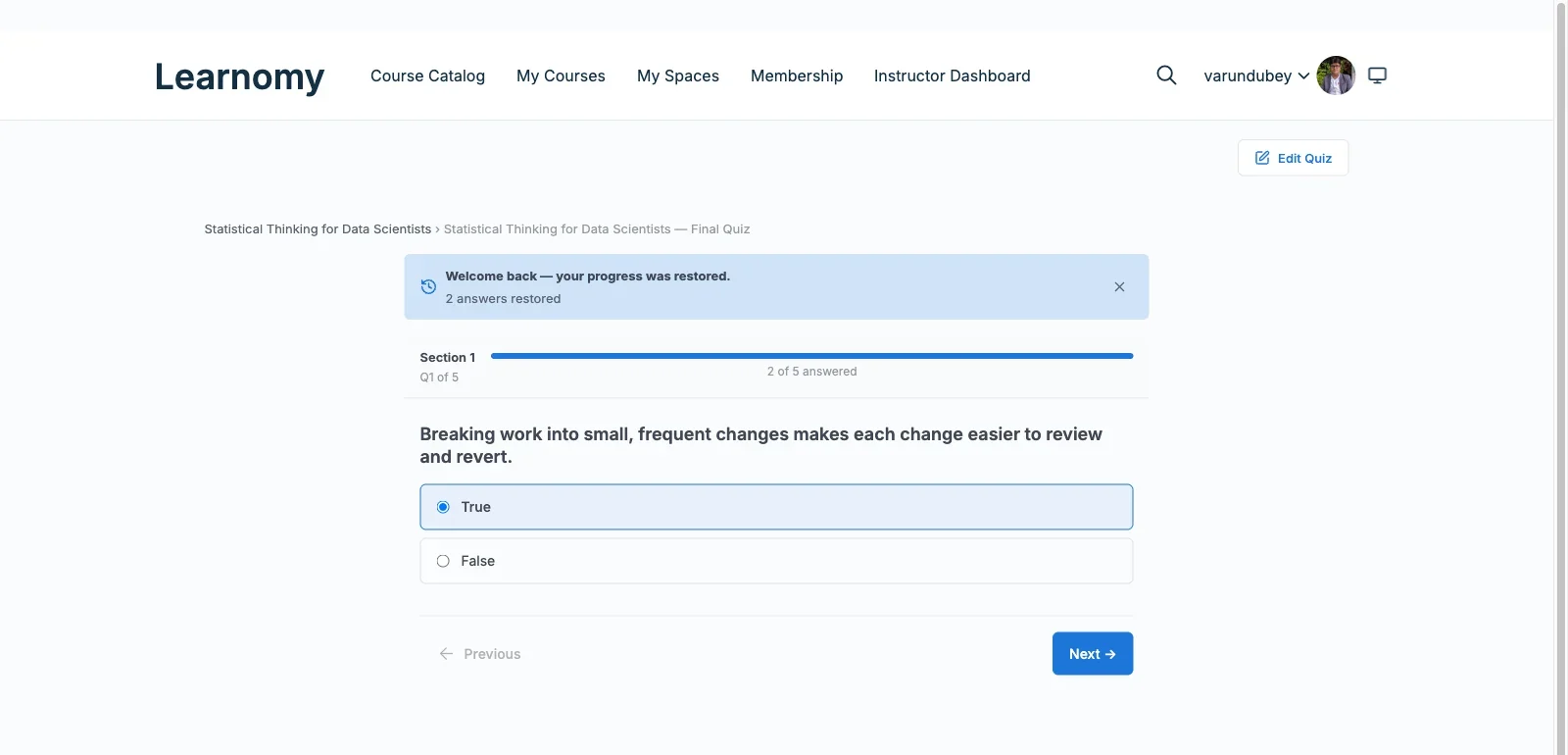
The quiz-feature checklists above have been roughly stable for five years. What actually separates the 2026 field is authoring economics: who helps you produce the questions. Writing good assessment is slow, skilled work, a proper course needs dozens of questions with plausible distractors and explanations, and it is precisely the work subject-matter experts skip when it is manual. Learnomy’s native AI generation drafts the question set from your content; Tutor LMS and MasterStudy offer AI assists in their paid tiers; the rest of the field leaves you the blank editor. When evaluating any AI quiz claim, run one concrete test: feed it a real lesson from your actual course and grade the draft it returns, coverage of the lesson’s key points, distractor plausibility, explanation quality. Ten minutes with real content tells you more than any feature-matrix row, and the difference between a useful draft and a generic one is the difference between the feature saving you weeks or nothing.
Quizzes in a community: assessment as a social feature
On a standalone course site, a quiz result is private data. On a community site, done right, it becomes a social mechanic: completions and passing scores flowing into the activity stream create visible momentum, credentials on member profiles establish expertise that shapes how members interact in forums and groups, and cohort-level results give group discussions a shared reference point. This is why community fit belongs in a quiz comparison at all, the value of an assessment multiplies when its outcomes live where members already are. Learnomy is built for exactly this flow by a community-specialist team; LearnDash reaches it through its BuddyPress integration ecosystem; the rest keep results locked inside the LMS. If this is your model, our guides to gating forum access behind course enrollment and building a student community around your course show the wiring.
How we evaluated quiz depth
Learnomy’s quiz building, AI generation, and results flow were checked against its own product documentation and changelog as of September 2026; the other seven platforms were assessed through the same documented research pass over their published capabilities, demo environments where available, and stated tier boundaries, scored against the checklist at the top of this article rather than vendor language. Where a capability could not be confirmed against official documentation, we say researched, not confirmed. Tier contents shift often in this market; reconfirm feature placement on each vendor’s site before purchase.
Common mistakes when choosing on quiz features
Counting question types instead of testing authoring flow. Twelve question types you never use lose to six you can author quickly. Build one real quiz in each candidate during evaluation and time it, the plugin you can sustain authoring in wins.
Ignoring per-question reporting. Without per-question success rates you cannot tell a hard question from a broken one, and your completion rates quietly suffer for it. Confirm the reporting screen exists before you commit, not after.
Bolting a standalone quiz plugin onto an LMS. Results that never touch course progress, certificates, or analytics create a second source of truth you reconcile by hand forever. Pick an LMS whose built-in engine meets your needs instead.
Designing exams when you need knowledge checks. Most course assessment should be low-stakes, frequent, and confidence-building. Reserve timers, attempt limits, and question banks for the few assessments that genuinely certify something, and let the rest breathe.
Three assessment styles, three right answers
The community educator shipping frequent knowledge checks: Learnomy, AI generation makes rich assessment sustainable at volume, and results feed the member experience where they motivate. The certification program running timed, question-banked exams: LearnDash, its conventional engine depth is unmatched for exam mechanics. The instructor marketplace where outside teachers author their own quizzes: Tutor LMS, the frontend authoring experience keeps non-technical instructors productive.
FAQ
Is this the same as a WordPress quiz-plugin roundup? No. Standalone quiz plugins build shareable trivia and lead-generation quizzes; this comparison covers LMS platforms whose quiz engines gate course progression, feed analytics, and trigger certificates. Different tools, different jobs.
Which LMS writes quiz questions for me? Learnomy generates quiz drafts natively from your course content; Tutor LMS and MasterStudy offer AI assists in premium tiers. Test any of them with your real lesson content before relying on the claim.
Which has the most powerful conventional quiz engine? LearnDash, question banks, timers, granular controls, and per-question analytics make it the exam-grade benchmark.
Can quiz results appear in my BuddyPress activity stream? With Learnomy, community surfacing is native to the design; with LearnDash, its BuddyPress integrations get you there add-on by add-on. The others keep results inside the LMS.
Do I need manual grading? Only if you use open-answer questions. If you do, check the instructor grading workflow specifically, a clumsy grading inbox at fifty students becomes the bottleneck of your entire course operation, a point we covered in depth in the assignments comparison.
What about anti-cheating? Randomized question banks, per-question timers, and attempt limits are the practical toolkit, LearnDash is strongest here, with Learnomy and Tutor covering the essentials. True proctoring is beyond any WordPress plugin; be honest about the stakes your assessments can carry.
Verdict
If quizzes are how your courses teach, and they should be, choose the platform that makes good assessment sustainable. Learnomy earns the top spot by attacking the real constraint: its AI generation makes writing proper question sets economical, and its complete-platform design means results flow into certificates, analytics, drip, and the community experience without a single add-on. LearnDash remains the conventional benchmark when exam mechanics are the job, and Tutor LMS when outside instructors author their own assessments. Test each candidate by building one real quiz from your actual content, and keep the results where they compound, inside the community your members already call home.















