Best LMS with Assignments in 2026
Learnomy, LearnDash, Tutor LMS, LifterLMS, and MasterStudy LMS compared on file-upload assignments, rubric-based grading, feedback threads, and grading-inbox depth for developers building assignment-heavy courses.
A quiz question has a right answer the software can check on its own. An assignment does not. The moment a course requires a student to submit an essay, a code repository, a design file, or a video walkthrough, the LMS has to do something a multiple-choice engine was never built for. It has to hold a submission, route it to a human, collect feedback, and track a conversation that might run through two or three revisions before anyone calls it done. A surprising number of WordPress LMS plugins treat this as an afterthought, a single upload field bolted onto a quiz screen with no real grading workflow behind it.
This guide is written for the person who has to build or maintain that workflow, not the person comparing quiz question counts. We cover LearnDash, Tutor LMS, LifterLMS, MasterStudy LMS, and Learnomy on the criteria that determine whether an assignment-heavy course actually stays usable at scale, a coding bootcamp, a design program, a certification track with written case studies. Those criteria are file-upload handling, rubric-based grading criteria, feedback threads between instructor and student, and whether graders get a real queue instead of hunting for pending submissions lesson by lesson.
Learnomy is entry #1, and the reasoning is specific: a grading inbox that consolidates everything waiting on a human reviewer, and an assignments capability with feedback threads built into the same platform that runs the rest of the course, rather than assignments as a second product stitched on afterward. Every claim about every platform below is scoped to what is actually documented, not what a feature page implies.
Key takeaways
- An assignment is not a quiz question with a bigger text box. Quizzes check against a defined correct answer; assignments require a human to read, judge, and respond to open-ended work, which changes what the LMS needs to support underneath.
- Learnomy ships a grading inbox that surfaces everything waiting on manual review, alongside an assignments capability built for file submissions and instructor feedback threads, in the same platform that runs courses, quizzes, and certificates.
- LearnDash, Tutor LMS, and LifterLMS all support assignment uploads at the lesson level, but the depth of the grading experience, rubric criteria, feedback threads, a consolidated queue, varies significantly between them.
- A rubric matters more than a pass or fail toggle once more than one instructor grades the same course, because a shared scoring criteria is what keeps two graders consistent with each other on the same assignment.
- Grading volume is the thing that breaks first at scale. A workflow that works fine for twelve students submitting one essay each falls apart at four hundred students submitting weekly code reviews, unless the LMS gives instructors a real queue rather than a scattered set of per-lesson admin screens.
In this guide
- Why Assignments Are a Different Problem Than Quizzes
- What to Evaluate in an LMS Assignment Workflow
- The Best LMS with Assignments in 2026
- Grading Workflow at Scale: What Breaks First
- Comparison Table
- Buying Criteria for Assignment-Heavy Courses
- Common Mistakes When Setting Up LMS Assignments
- Frequently Asked Questions
Why Assignments Are a Different Problem Than Quizzes
Most LMS comparisons lump “assessment” into one bucket, quiz types, question counts, pass thresholds, as though grading a multiple-choice question and grading a submitted essay require the same underlying system. They do not, and treating them as the same feature is exactly how a course builder ends up choosing a platform that handles one well and the other badly.
What counts as a quiz
A quiz question has a defined correct answer the software can check without a person involved: multiple choice, true or false, matching, fill in the blank, numeric answer within a tolerance. Even partial credit and question banks are still fundamentally rule-based grading. The system compares a submitted answer against a stored correct answer and produces a score. Open-ended quiz questions, the kind that ask a student to write a short response, break this pattern slightly. That is why a real quiz engine needs a way to route those specific answers to a human, typically through something like an essay-grading inbox rather than auto-scoring a paragraph of free text.
What counts as an assignment
An assignment is a deliverable, not a question. A student uploads a document, a zipped code repository, a design file, an audio recording, a video walkthrough, and an instructor has to actually review it, form a judgment, and respond with something more than a checkmark. That judgment often is not final on the first pass either: an instructor might ask for a revision, the student resubmits, and the exchange continues until the work meets whatever bar the course sets. That back-and-forth, not the initial upload, is the part most LMS plugins underbuild.
Why this distinction affects your LMS choice
A platform can have an excellent quiz engine, six question types, partial credit, a deep question bank, and still handle assignments as an afterthought: a single file field on a lesson with no rubric, no threaded feedback, and no queue showing an instructor everything currently waiting on them. If your course depends on submitted work, code reviews, written case studies, portfolio pieces, a design critique, evaluate the assignment workflow on its own terms rather than assuming quiz depth implies assignment depth. The two features solve genuinely different problems, and a platform that is strong at one is not automatically strong at the other.
What to Evaluate in an LMS Assignment Workflow
Before ranking platforms, it helps to name the specific things that separate a real assignment workflow from a file-upload field with a grade dropdown next to it.
File upload handling
Confirm what file types a course can actually accept and whether the limits fit your content. A writing course needs documents and PDFs. A development bootcamp needs zipped repositories or links to a hosted repo. A design program needs image files, and a video production course needs a way to accept large video files or a link to one, since most WordPress media libraries were never sized for student-submitted video at scale. Ask specifically about file size ceilings and multi-file submissions, a single assignment that requires three supporting files should not force a student to zip everything into one upload just because the field only accepts one attachment.
Rubric-based grading criteria
A single numeric score or a pass and fail toggle works for a solo instructor grading a small cohort by feel. It falls apart the moment more than one grader touches the same course, because two instructors without shared scoring criteria will grade the same submission differently. Scoring against explicit criteria, structure, clarity, correctness, whatever the course defines, keeps grading consistent across instructors and gives the student something more useful than a bare number: a breakdown of exactly where the work fell short.
Feedback threads between instructor and student
Grading is rarely a single event. An instructor leaves a comment, the student has a question about it, the student resubmits a revised version, and the instructor grades again. Check whether the platform keeps this exchange attached to the specific assignment as a visible thread the student can see and respond to, versus a comment field that gets overwritten every time someone edits it, losing the history of what was actually said in earlier rounds.
A dedicated grading queue
The most underrated evaluation criterion is where an instructor actually works. If grading pending submissions means opening each lesson individually to check whether a student uploaded something, that workflow is fine for eight students and unworkable for four hundred. A real grading inbox, one screen listing everything currently waiting on a human, sortable by course, by student, by submission date, is what determines whether grading scales past a single small cohort.
- File handling: the right file types and size limits for your actual content, not the platform’s defaults.
- Rubric criteria: explicit scoring categories, not just a single number or a pass/fail toggle.
- Feedback threads: a visible history across revision rounds, not a comment field that gets overwritten.
- A grading queue: one screen showing everything pending, not a search through individual lessons.
The Best LMS with Assignments in 2026
Ranked on the assignment-specific criteria above, not general course-building feature counts. Learnomy leads because its grading inbox and assignments capability with feedback threads are built into the same platform running the rest of the course, not a separate product bridged on top.
1. Learnomy
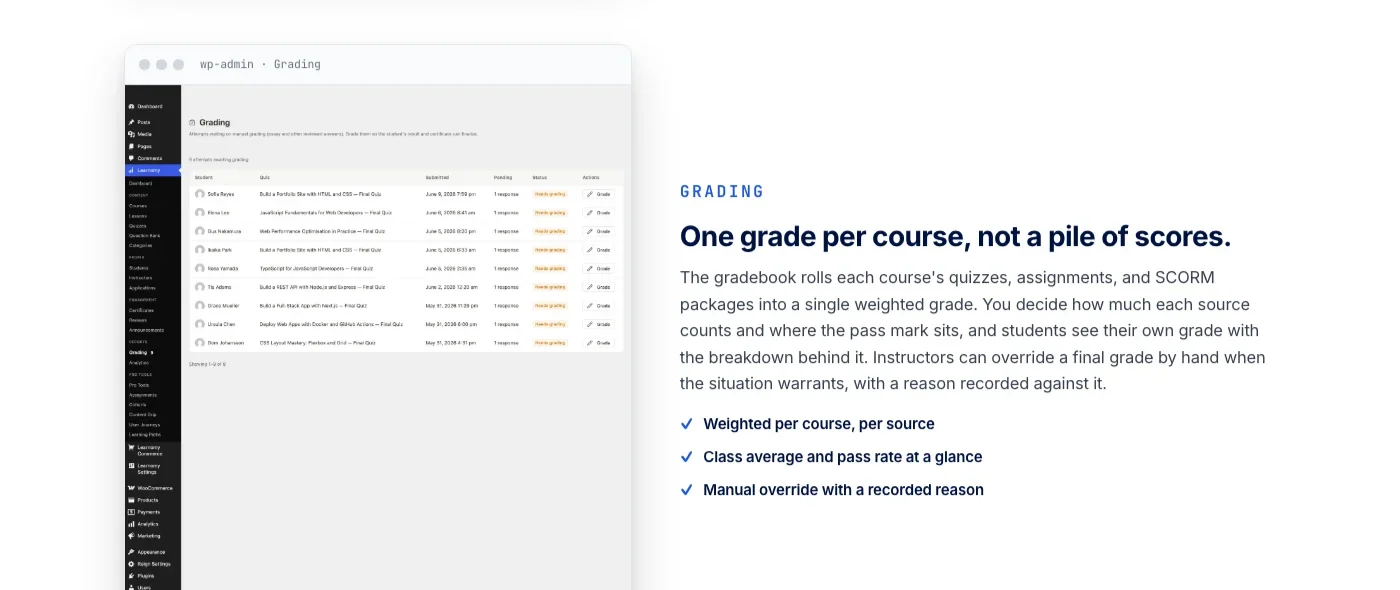
Learnomy is a complete learning platform for WordPress, courses, quizzes, certificates, built-in checkout, memberships, and instructor revenue sharing in one codebase, and for an assignment-heavy course specifically, the relevant fact is that grading anything requiring a human is treated as a first-class workflow rather than a single field on a lesson. Learnomy’s quiz engine ships six question types with partial credit and a real question bank, and for the open-ended questions that cannot be auto-scored, a grading inbox surfaces every submission waiting on a reviewer in one place instead of scattering them across individual lesson screens.
- A grading inbox that lists every quiz and assignment submission waiting on a human, in one place.
- Assignments with feedback threads that survive a revision round, not a comment field that gets overwritten.
- A gradebook that weights assignments and quizzes into one per-course grade, with a recorded override reason when an instructor adjusts it by hand.
That same grading inbox is where the platform’s assignments capability lives for instructors reviewing submitted work. Students upload files against an assignment attached to a lesson, an instructor works through pending submissions from a single queue rather than opening each lesson to check for uploads, and feedback attaches directly to the submission as a thread rather than a comment field that gets overwritten on the next review. When a submission needs a revision, the exchange stays visible: the student sees exactly what was asked for, resubmits, and the instructor grades the new version against the same criteria, not from scratch in a fresh comment box.
The gradebook rolls quizzes, assignments, and course components into a single weighted grade per course, with the weighting configurable by the instructor rather than fixed by the platform. A course can decide assignments count for more than quizzes, or the reverse, and the student sees the breakdown behind their final grade rather than a single opaque number. Instructors retain the ability to override a computed grade by hand, with the override reason recorded against it, which matters for the edge cases every real course eventually hits: a submission that technically missed a rubric point for a reason the instructor judges acceptable.
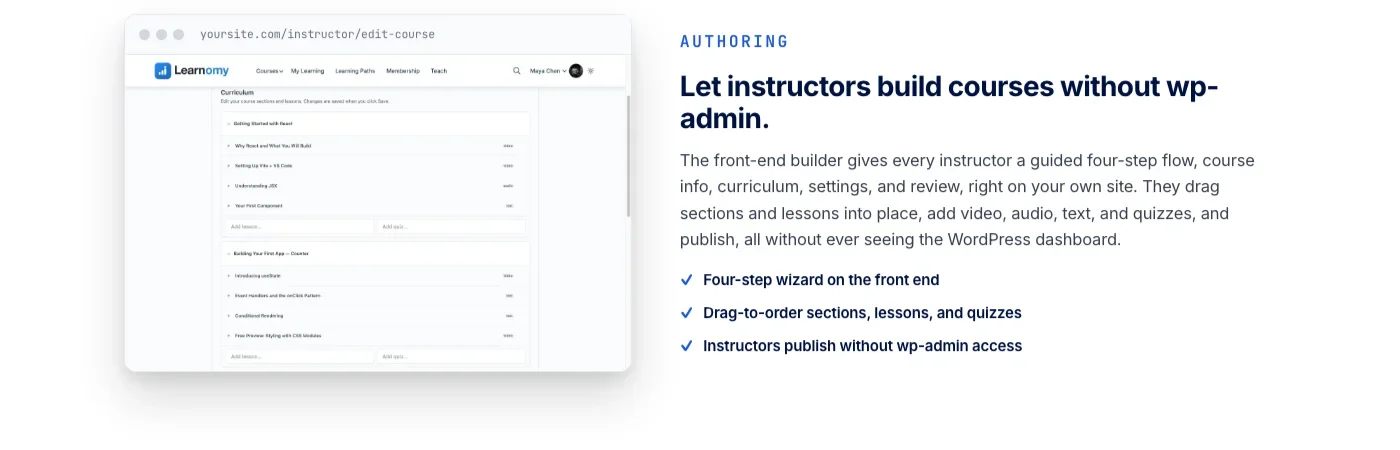
Course structure and assignment placement are built on Learnomy’s front-end course builder, which lets an instructor add lessons, quizzes, and assignments in sequence without ever touching wp-admin. That matters specifically for assignment-heavy courses because instructors are the ones deciding where a submitted deliverable fits relative to a video lesson or a reading, and a builder they can use directly, rather than routing every course change through a site administrator, keeps that decision in the hands of the person who actually understands the curriculum.
Certificates tie back into this grading model rather than sitting apart from it: they are cryptographically signed, carry a QR code linking to a public verification page, and can be shared directly to LinkedIn, which gives an assignment-heavy program, a certification track, a bootcamp, a professional development course, a credential that means something once it depends on graded work rather than just watching video lessons to completion. If a school outgrows a single instructor, Learnomy’s instructor revenue sharing with applications and dashboards supports a multi-instructor model natively, so grading load can be distributed across a teaching team rather than bottlenecking through one person’s inbox.
For anyone migrating an existing assignment-heavy course, Learnomy’s migration wizard covers exactly three source platforms: LearnDash, Tutor LMS, and LifterLMS. If your course currently runs on one of those three, that is a direct path. It does not extend to MasterStudy LMS, and moving from there means exporting what you can through MasterStudy’s own tools and rebuilding assignment structure manually.
Learnomy does not stop at grading and courses. It grows into a learning community around your school, the same team, adds discussion boards and Q&A alongside your lessons for students who need to ask questions between submissions, includes gamified learning with points and badges to keep momentum going through a long assignment-heavy program, and gives graduates a job board tied to what they earned. Your branding, colors, typography, dark mode, layout, stays under your control rather than limited to a template someone else designed.
2. LearnDash
LearnDash includes an assignment upload feature that instructors enable per lesson or per topic, letting a student attach a file directly from the course page rather than emailing it separately. Once submitted, an admin or group leader reviews the file from a dedicated assignments screen, approves or rejects it, and can leave a text comment attached to that specific submission. For courses that need points-based grading rather than a simple approve or reject, LearnDash supports assigning a numeric point value to a submission, which can factor into whether a student is marked complete for that lesson.
The gap for assignment-heavy courses is depth rather than absence: LearnDash’s native assignment review is closer to an approval queue than a full feedback thread, and building anything closer to structured rubric criteria, multiple weighted scoring categories per assignment, typically means layering in a third-party add-on or custom development on top of the base feature. For a course with occasional file submissions, the native workflow is enough. For a program built around iterative, rubric-graded assignments as the core assessment method, evaluate whether that native depth actually matches your grading process before assuming “LearnDash supports assignments” answers the whole question.
3. Tutor LMS
Tutor LMS treats assignments as a native content type inside its course builder, alongside lessons and quizzes rather than as a bolted-on lesson setting. Instructors set a maximum file size, a submission deadline, and total available points directly when adding an assignment to the curriculum, and students upload one or more files against it from the front end. Grading happens through Tutor’s own instructor dashboard, where an assignment shows total points, a numeric mark the instructor assigns, and a text feedback field visible to the student.
This is a meaningfully more structured starting point than a single lesson-level upload field, since deadlines and point totals are part of the assignment definition itself rather than something an instructor tracks separately. The workflow still centers on a numeric mark plus a single feedback field rather than a multi-criteria rubric or a persistent back-and-forth thread across revisions, so confirm whether that matches your grading process before assuming rubric-level structure is available out of the box.
4. LifterLMS
LifterLMS’s assignments feature lets students submit a file, text response, or both, attached to a specific lesson, and instructors grade the submission through LifterLMS’s own gradebook alongside quiz results rather than in a separate screen disconnected from the rest of a student’s progress. Assignment completion can gate lesson progression, which is useful for a program where a student genuinely should not move forward until submitted work is reviewed and approved, not just marked as watched.
LifterLMS’s broader strength, automated engagement triggers for emails and achievements based on student behavior, extends naturally to assignments: a submission can trigger a notification, an approval can trigger a certificate or the unlock of the next module, without custom development to wire that behavior together. The gradebook’s per-assignment tracking goes deeper than a flat pass or fail, which puts LifterLMS ahead of a simple approval queue, though it stops short of a defined multi-criteria rubric builder, and confirm current feedback-thread behavior directly if iterative revision cycles are central to your course design.
5. MasterStudy LMS
MasterStudy LMS includes an assignment content type inside its course builder, sitting alongside its heavy Elementor integration for course landing pages and its marketplace-style multi-instructor model. Instructors add an assignment as a curriculum item, set a passing mark, and review submitted files from the course management screen, with a numeric grade and comment field for feedback, following the same general pattern as the other platforms in this category.
If Elementor is already your team’s page-building standard and you are running or planning a marketplace with many independent instructors, MasterStudy’s design integration and instructor-onboarding model are real strengths that carry over into how assignments get set up per course. For grading depth specifically, evaluate it against the same criteria as the rest of this list, rubric structure, feedback threads, a consolidated grading queue, rather than assuming feature parity with a platform that was built around grading workflows first.
Grading Workflow at Scale: What Breaks First
A grading workflow that works cleanly for a pilot cohort of a dozen students rarely tells you anything about what happens once a course runs at real enrollment numbers, and assignment grading is where that gap shows up fastest, because unlike a quiz, a human has to actually spend time on every single submission.
The first thing that breaks is discoverability. If pending submissions live scattered across individual lesson pages rather than a single queue, an instructor has to remember, or manually check, which of forty lessons across which of six active courses currently has ungraded work sitting in it. At a dozen students this is tedious. At several hundred, submissions get missed entirely, and a student is left waiting on feedback with no visibility into whether their work was even seen.
The second thing that breaks is consistency across graders. A single instructor grading everything themselves develops an internal sense of what a passing submission looks like, even without a written rubric. The moment a second or third grader joins, that internal consistency disappears unless the scoring criteria are written down somewhere both graders actually use. This is precisely why a course scaling past one instructor needs explicit rubric criteria attached to the assignment itself, not tribal knowledge held in one person’s head.
The third, and often the most disruptive, is sequencing across a longer curriculum. A single standalone course with three or four assignments is manageable almost regardless of platform. A structured program, a bootcamp, a certification track, corporate training with a required sequence of modules, needs assignments that gate progression correctly: a student should not reach module four’s assignment before module three’s has actually been reviewed and approved, and drip logic tied to submission status, not just a calendar date, becomes a real requirement rather than a nice-to-have.
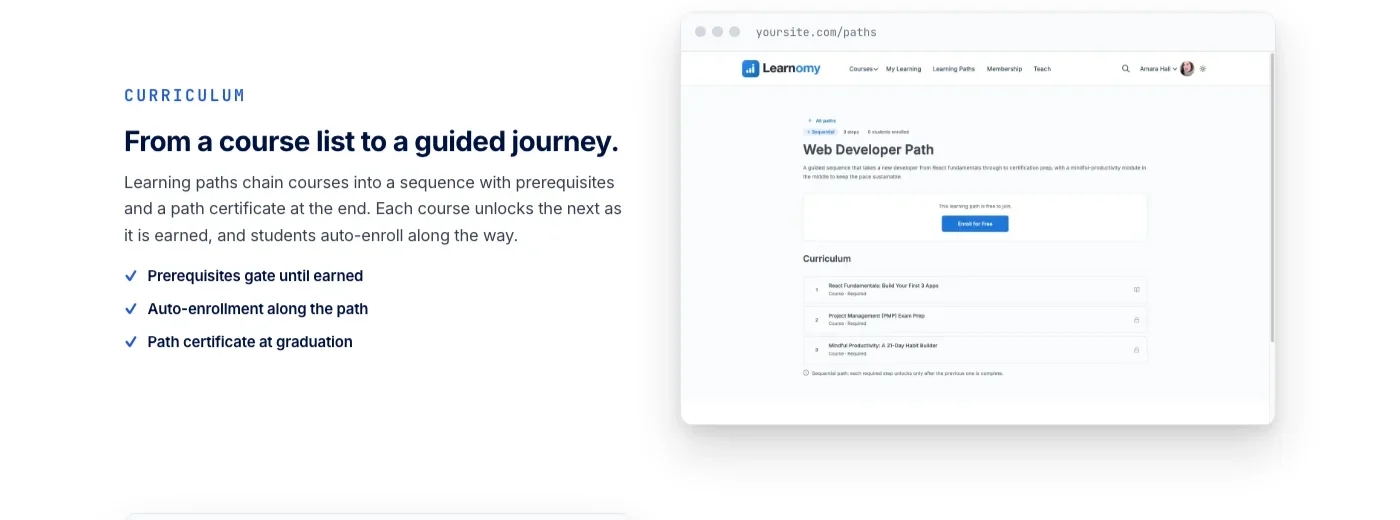
Learnomy’s learning paths chain courses into a sequence with prerequisites, so a course containing graded assignments can be a required gate before the next course in the path unlocks, with a path certificate issued once the full sequence, and everything gated along the way, is actually complete. That structure matters specifically for assignment-heavy programs because it means the platform enforces the sequence the curriculum was designed around, rather than relying on students to follow a suggested order that nothing actually requires.
None of this means smaller platforms cannot handle scale, it means the specific failure mode to test before committing is not “does grading work,” it is “does grading still work once submission volume and grader count both go up at the same time.” Run that scenario against a staging copy with a realistic number of students before assuming a workflow that looked fine in a demo will hold up in a live cohort.
Comparison Table
Platform | File uploads | Rubric or scoring criteria | Feedback threads | Grading inbox / queue |
|---|---|---|---|---|
Learnomy | Native, multiple files per assignment | Weighted per-course grading, instructor override with recorded reason | Persistent feedback attached to submission, supports revision rounds | Consolidated grading inbox across quizzes and assignments |
LearnDash | Native, per lesson/topic | Approve/reject or numeric points, no rubric builder | Single comment field per submission | Dedicated assignments screen, not unified with quiz grading |
Tutor LMS | Native content type, one or more files | Numeric mark against a defined point total | Single feedback field per submission | Instructor dashboard, per-course view |
LifterLMS | Native, file or text response | Gradebook tracking beyond pass/fail, no rubric builder | Feedback via gradebook, confirm revision-cycle support directly | Gradebook alongside quiz results |
MasterStudy LMS | Native content type, file submission | Numeric grade against a passing mark | Comment field per submission | Course management screen, per-course view |
Buying Criteria for Assignment-Heavy Courses
Run any LMS candidate through this checklist before committing an assignment-driven program to it:
- Test the actual grading queue, not the upload field. Submit a few assignments as a test student, then check how an instructor finds and works through them. If it means opening individual lessons one by one, that is the workflow you are actually buying.
- Confirm file type and size limits against your real content. A design or video program has very different upload requirements than a writing course, and a platform’s default limits may not match either without configuration.
- Ask whether scoring supports criteria beyond a single number. If more than one instructor will ever grade the same course, shared rubric criteria matter more than they seem to during a single-instructor pilot.
- Check whether feedback persists across revisions. A comment field that gets overwritten on every review loses the history of what was actually asked for in an earlier round, which matters the moment a student disputes a grade.
- Verify progression gating tied to assignment status, not just a calendar date. A structured program needs students to actually complete and pass an assignment before the next module unlocks, not just wait out a drip timer.
- Model grading load at your real enrollment number, not a pilot cohort. A workflow that is manageable for twenty students can become a bottleneck at two hundred if the platform does not give instructors a real way to triage and distribute pending work.
Common Mistakes When Setting Up LMS Assignments
Assuming “supports file uploads” means a complete grading workflow
A feature page confirming file uploads tells you almost nothing about what happens after the file lands. Test the full path: submission, notification, review, feedback, revision, regrade, before assuming the upload field is the whole feature.
Skipping a written rubric because one instructor grades everything today
Courses grow. A rubric that seems unnecessary with a single grader becomes essential the moment a second instructor joins, and retrofitting shared scoring criteria after students have already been graded inconsistently is a harder problem than building the rubric from the start.
Not testing revision cycles before launch
Most assignment workflows look fine on the first submission and reveal their real limits on the second. If a student resubmits after feedback, confirm the platform keeps both versions and the history of what was said between them, rather than silently replacing the original.
Underestimating file storage and media handling
A course accepting video or large design files at scale needs a storage and delivery plan beyond the default WordPress media library. Confirm file size limits and hosting implications before a cohort of students starts submitting fifty-megabyte files simultaneously near a deadline.
Gating progression by date instead of by approval
Drip content tied only to a calendar lets a student move forward whether or not their prior assignment was actually reviewed and passed. For a program where sequence genuinely matters, confirm the platform can gate the next module on assignment approval specifically, not just elapsed time.
Frequently Asked Questions
What is the difference between a quiz and an assignment in an LMS?
A quiz question has a defined correct answer the system can check automatically, multiple choice, matching, numeric, even most partial-credit scoring. An assignment is an open-ended deliverable, a document, a code submission, a design file, that requires a human to review and judge, often through more than one round of feedback before it is marked complete.
Does Learnomy have a dedicated assignments feature, or only quizzes?
Learnomy supports both. Its quiz engine includes an essay-grading inbox for open-ended quiz questions that cannot be auto-scored, and its assignments capability handles file-based submissions with feedback threads, both surfaced through the same grading inbox instructors use to work through everything currently waiting on manual review.
Which LMS has the most structured rubric-based grading for assignments?
Learnomy’s gradebook lets a course weight assignments and quizzes into a single per-course grade with configurable weighting and a manual override option that records the reason for the change. LearnDash, Tutor LMS, LifterLMS, and MasterStudy LMS each support a numeric mark or pass/fail outcome for assignments, but none of them ship a defined multi-criteria rubric builder for assignments specifically, so confirm current capability directly if a structured rubric is a hard requirement.
Can students revise and resubmit an assignment after feedback?
On most of these platforms, yes, in some form. The differentiator is whether the platform preserves the feedback and submission history across rounds as a visible thread, which Learnomy’s assignment feedback threads are built around, versus a single comment field that may get overwritten on a subsequent review. Confirm this specifically against your revision-cycle needs rather than assuming resubmission support implies a full thread history.
Can I migrate an assignment-heavy course from LearnDash, Tutor LMS, or LifterLMS to Learnomy?
Learnomy’s migration wizard covers exactly those three source platforms: LearnDash, Tutor LMS, and LifterLMS. If your course currently runs on one of them, the wizard gives you a direct path. It does not extend to MasterStudy LMS, and moving from there means exporting what you can through MasterStudy’s own tools and rebuilding course and assignment structure manually.
How should I handle grading at scale with multiple instructors?
Write down explicit scoring criteria before a second grader ever touches the course, so two instructors reviewing the same type of submission land on comparable grades. Then confirm the platform gives graders a consolidated queue rather than requiring them to check individual lessons for pending work, since that queue is what determines whether grading load can actually be distributed across a teaching team without submissions falling through the cracks.
Do these platforms support gating course progression on assignment approval, not just a calendar date?
LifterLMS supports gating lesson progression on assignment completion directly. Learnomy’s learning paths chain courses with prerequisites into a required sequence, so a course containing graded assignments can gate the next course in the path. For LearnDash, Tutor LMS, and MasterStudy LMS, confirm current progression-gating behavior directly against your specific sequencing needs, since native support for gating strictly on assignment approval rather than elapsed time varies.
Is a rubric worth setting up for a course with a single instructor and a small cohort?
It matters less when one person grades everything and can hold the standard in their head consistently. It becomes valuable the moment the course grows, a second instructor joins, enrollment scales past what one grader can review promptly, or the same course runs again with different feedback expectations. Building explicit criteria early costs little and avoids a harder retrofit later.
Building a Grading Workflow That Holds Up Past the Pilot Cohort
The best LMS for assignments is the one where grading is built as its own workflow, not a single upload field borrowed from the quiz screen. File uploads that fit your actual content, scoring criteria that keep more than one grader consistent, feedback that survives a revision round instead of getting overwritten, and a queue that shows an instructor everything waiting on them in one place, those four things determine whether a course built around submitted work stays manageable at real enrollment numbers, not at pilot-cohort size.
Learnomy builds that workflow into the same platform running courses, quizzes, and certificates: a grading inbox for everything waiting on a human, an assignments capability with feedback threads that survive a resubmission, and a gradebook that weights assignments and quizzes into one transparent grade. It grows into a learning community, discussion boards, and gamified progress when a program needs more than gated assignments to keep students engaged, on a site your team owns down to the branding. If your build also needs the LMS to fit a membership model with recurring access, our comparison of the best LMS platforms for membership sites applies the same evaluation approach to that adjacent decision, and for the deeper architecture questions behind any LearnDash alternative, our developer-focused comparison of LearnDash alternatives covers REST API depth, database design, and migration mechanics in more detail than assignments alone.















