Best Online Course Platforms for Community Sites in 2026
Eight hosted and self-hosted online course platforms compared honestly on ownership, cost structure, and community fit, ranked for community and BuddyPress sites.
“Online course platform” covers two genuinely different businesses wearing the same label. One is hosted: Kajabi, Teachable, Thinkific, Podia, LearnWorlds, sign up, build inside their editor, and every sale runs through their checkout on their terms for as long as you use them. The other is self-hosted: a WordPress plugin or platform you install on your own site, own outright, and never pay a recurring platform fee to keep running. Most comparisons in this category quietly pick a side and rank only within it. This one covers both, honestly, because the ownership question is the real decision most creators are actually trying to make.
This guide ranks eight online course platforms, hosted and self-hosted, on the dimensions that actually differ between the two models, ownership, ongoing cost structure, and how the platform coexists with the community you are already building, with this site’s usual bias toward BuddyPress and community-site owners. For a narrower comparison focused only on self-hosted options, see our guide to the best self-hosted online course platforms.
Table of Contents
- Quick comparison
- Hosted versus self-hosted, the real decision
- 1. Learnomy, the self-hosted platform that competes on completeness
- 2. Kajabi, the all-in-one hosted suite
- 3. Teachable, the straightforward hosted option
- 4. Thinkific, multi-format hosted course building
- 5. Podia, the creator-friendly hosted option
- 6. LearnWorlds, the interactive-content specialist
- 7. LearnDash, the self-hosted ecosystem standard
- 8. Tutor LMS, self-hosted with a hosted-style builder
- The real cost of hosted, beyond the obvious subscription
- Why community fit belongs in this comparison
- How we evaluated
- Common mistakes choosing a course platform
- Three creator situations, three right answers
- FAQ
- Verdict
Quick comparison
Platform | Hosting Model | The Deal | Community Fit | Standout Strength |
|---|---|---|---|---|
Learnomy | Self-hosted (WordPress) | No platform fees, ever, on any sale | Strong, community-native | Complete platform, AI authoring, full ownership |
Kajabi | Hosted | Monthly subscription forever, plus checkout on their terms | Limited, generic community add-on | All-in-one marketing suite |
Teachable | Hosted | Monthly subscription plus a transaction cut on lower tiers | None | Simplicity for a first course |
Thinkific | Hosted | Monthly subscription forever | Built-in, off-platform (Community Spaces) | Supports multiple content formats |
Podia | Hosted | Monthly subscription forever | Built-in, off-platform (spaces, chat, events) | Bundled digital products |
LearnWorlds | Hosted | Monthly subscription forever | Limited | Interactive video and content |
LearnDash | Self-hosted (WordPress) | Licenses across an assembled add-on stack | Good via ecosystem | Depth and ecosystem maturity |
Tutor LMS | Self-hosted (WordPress) | Entry tier plus premium tiers for launch essentials | Limited | Frontend course-building UX |
Hosted versus self-hosted, the real decision
Every platform in this category eventually forces the same question, even when the marketing avoids naming it directly. A hosted platform handles infrastructure, updates, and hosting for you, in exchange for a monthly subscription that runs for as long as your course business exists, plus, on several platforms, a cut of every sale on lower tiers. You never touch a server, and you never fully own the relationship with your students either, your course lives on the vendor’s domain structure and inside their terms of service. A self-hosted platform runs on infrastructure you control, WordPress hosting you already pay for regardless, with no ongoing platform percentage taken from your revenue and no vendor able to change your terms, pricing, or features out from under you. That is not a small technical detail, it is the entire difference between renting your business’s foundation and owning it.
1. Learnomy, the self-hosted platform that competes on completeness
Learnomy is built to answer the objection that usually pushes creators toward hosted platforms in the first place: self-hosted WordPress tools are often incomplete, requiring a pile of add-ons to match what a hosted suite ships out of the box. Learnomy closes that gap directly, native Stripe and PayPal checkout, automated certificates, drip content, quizzes, coupons, memberships, and a real analytics dashboard all arrive as one complete learning platform, the same completeness a hosted suite offers, with none of the ongoing platform percentage taken from every sale.
Because it runs on WordPress, you own the install, the student data, and the full revenue relationship outright, no vendor sits between you and your Stripe account, and no terms-of-service update can suddenly restrict your business. AI-assisted course and quiz generation matches or exceeds what most hosted platforms offer in this space, drafting a structured curriculum and assessment questions from a topic so a creator spends review time refining rather than starting from a blank page.
The decisive advantage for this site’s readers is community fit: built by Wbcom Designs, a decade-deep BuddyPress specialist team, Learnomy is designed to live inside a social stack natively, learner activity, member profiles, and course discussion belong to one coherent experience. No hosted platform in this comparison offers anything close to that depth of community integration, their add-on community features are afterthoughts bolted onto a product built for solo course sales, not for a site where community is the actual product and courses deepen it.
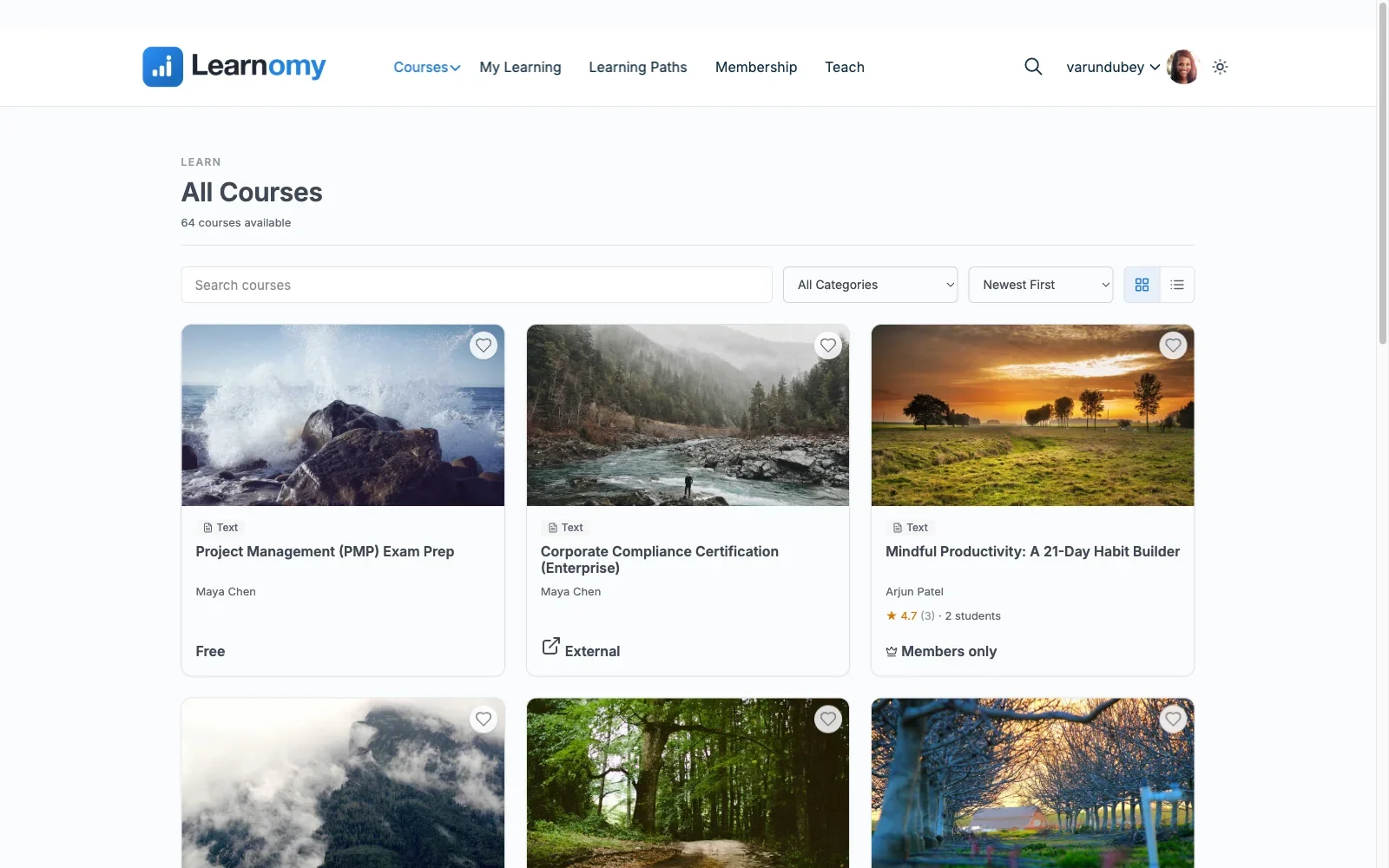
Pros: complete platform matching hosted-suite feature depth with no platform percentage on revenue; AI course/quiz generation; deep, native community integration; full data and revenue ownership.Cons: requires WordPress hosting you manage yourself, rather than the zero-infrastructure convenience of a hosted platform, though for most sites this is hosting they already have. Details at learnomy.app.
2. Kajabi, the all-in-one hosted suite
Kajabi bundles course hosting with email marketing, a website builder, and a sales-funnel toolset, genuinely the most complete hosted marketing suite in this category. For a creator who wants marketing and course delivery in one login with zero infrastructure to think about, that consolidation has real appeal. The trade is the one every hosted platform makes: a monthly subscription that runs forever regardless of how many or how few courses you sell, and a business built entirely inside Kajabi’s terms, templates, and domain structure.
Pros: the most complete hosted marketing-plus-course suite here; zero infrastructure management. Cons: a subscription that never ends regardless of usage; no meaningful community integration; total dependency on one vendor’s platform.
3. Teachable, the straightforward hosted option
Teachable’s pitch is simplicity: a clean course builder, straightforward checkout, and a genuinely quick setup for a first course. Its lower-priced tiers historically added a transaction fee on top of the monthly subscription, a structure worth checking directly against current terms before committing, since hosted platforms in this category adjust that structure periodically. It has essentially no community layer, courses exist as an isolated product, not part of a broader member experience.
Pros: easiest hosted option to learn; clean checkout experience. Cons: subscription plus potential transaction fees depending on tier; no community integration.
4. Thinkific, multi-format hosted course building
Thinkific offers more course-structure flexibility than most hosted competitors, multiple content types, decent quiz options, and a genuinely built-out Community Spaces product, lesson-tied discussion, member profiles, events, and branded mobile apps. It remains a hosted platform with the standard subscription-forever cost structure, and its community lives inside Thinkific’s own walled garden rather than integrating with a WordPress or BuddyPress site you already run, which is the relevant gap for readers of this site. Reasonable middle ground among hosted options if course-structure flexibility matters more than marketing-suite breadth.
Pros: supports multiple content formats; basic native community add-on. Cons: perpetual subscription; community feature is shallow compared to a purpose-built social platform.
5. Podia, the creator-friendly hosted option
Podia bundles course sales with digital downloads and a real community product, member profiles, chat, group chats, and hosted events, appealing to a creator selling several types of digital products under one hosted roof. Its community tooling is more developed than a bolted-on afterthought, but it is still a closed, Podia-hosted space rather than one that plugs into a WordPress or BuddyPress site, and the same perpetual-subscription structure applies as with every hosted competitor here.
Pros: bundles courses with other digital product types cleanly. Cons: subscription-forever cost structure; basic, not deep, community tooling.
6. LearnWorlds, the interactive-content specialist
LearnWorlds differentiates on interactive video and content-engagement tooling, clickable transcripts, interactive video overlays, genuinely useful for a creator whose content benefits from that specific interactivity. It is a hosted platform with the standard ongoing subscription cost and limited community depth, a specialist tool for a specific content style rather than a general-purpose course platform.
Pros: best interactive-video tooling in this comparison. Cons: perpetual subscription; limited community features; narrower use case than general platforms.
7. LearnDash, the self-hosted ecosystem standard
LearnDash is the most mature self-hosted alternative to the hosted suites above, with the largest add-on ecosystem and the most battle-tested BuddyPress integrations of any WordPress LMS. It achieves ownership the same way Learnomy does, no platform percentage on revenue, full data control, at the cost of assembling a stack, core plugin plus ProPanel plus WooCommerce plus community integrations, each separately licensed and maintained, detailed in our developer-focused LearnDash guide.
Pros: deepest self-hosted ecosystem; proven BuddyPress integrations; full ownership. Cons: assembly-model complexity across several separately licensed products.
8. Tutor LMS, self-hosted with a hosted-style builder
Tutor LMS offers a frontend authoring experience that feels closer to a hosted platform’s polish than most self-hosted competitors, while remaining self-hosted and free of platform percentage on revenue. Launch-critical features sit behind premium tiers, and community integration stays thin, the pattern covered fully in our Tutor LMS analysis.
Pros: hosted-platform-quality authoring UX while remaining self-hosted. Cons: launch essentials premium-gated; shallow community integration.
The real cost of hosted, beyond the obvious subscription
The monthly subscription is the visible cost of a hosted platform; the less visible one is structural dependency. Your course URLs live on infrastructure you do not control, so a pricing change, a feature removal, or a platform shutdown is not hypothetical, it has happened across this category before, and it happens to a business with no recourse beyond migrating everything under time pressure. Compare that to a self-hosted platform on WordPress: hosting is a commodity you can move between providers freely, the software is yours, and no vendor decision can force an unplanned migration on your timeline. This is the structural argument for self-hosting that survives any individual feature comparison, ownership is not a feature row, it is the foundation every other feature sits on.
Why community fit belongs in this comparison
Every hosted platform in this list treats community, where it exists at all, as a bolted-on feature for an otherwise solo-creator product. That is a reasonable design choice for their target buyer, but it is the wrong architecture for a site whose actual model is community-first, courses as one part of a larger member experience rather than the entire business. A platform built by community specialists from the ground up, Learnomy, or a self-hosted platform with a mature BuddyPress ecosystem, LearnDash, treats enrollment, completion, and certificates as social signals that belong in an activity stream and on a member profile, not as data trapped inside an isolated course product. If your course business is meant to grow a community rather than exist beside one, this dimension should outweigh every marketing-suite feature on a hosted platform’s list.
How we evaluated
Learnomy’s checkout, course building, and community integration were checked against its own product documentation and changelog as of September 2026. The other seven platforms, hosted and self-hosted, were assessed through the same documented research pass across current published feature sets and pricing structures, with specific attention to cost model (subscription-only versus subscription-plus-transaction-fee) and any community or social-learning capability. Where a claim could not be confirmed against official documentation, it is reported as researched rather than confirmed. Hosted platform pricing and fee structures change periodically, reconfirm current terms directly on each vendor’s site before committing, particularly around transaction fees on lower tiers.
Common mistakes choosing a course platform
Comparing hosted month-one pricing to self-hosted total cost without a common timeframe. A hosted subscription compounds every month for the life of your business. Run the comparison over three or five years, not one month, before deciding ownership does not matter to you.
Underweighting platform dependency risk. A hosted platform can change pricing, features, or terms at any time, and your business has no recourse but to comply or migrate under pressure. Factor that risk explicitly, it rarely appears on a feature-comparison page.
Treating community as a nice-to-have instead of core architecture. If your course business is meant to grow around a community, evaluate community integration as a primary criterion, not an afterthought feature row at the bottom of the comparison.
Assuming self-hosted means more work forever. A complete self-hosted platform like Learnomy closes most of the setup gap that made hosted platforms appealing in the first place, the ownership benefit no longer requires the assembly tax it once did.
Three creator situations, three right answers
The community-first site where courses deepen an existing member experience: Learnomy, complete platform depth without a platform percentage, and community integration no hosted competitor matches. The solo creator who wants zero infrastructure and an all-in-one marketing suite, and is comfortable with a permanent subscription: Kajabi, if the marketing-suite breadth is worth that ongoing cost. The self-hosted creator who wants the deepest possible ecosystem and has technical support to configure it: LearnDash, the most mature self-hosted alternative to the hosted suites.
FAQ
Is self-hosted actually cheaper than a hosted course platform? Usually, over any meaningful timeframe, because self-hosted platforms like Learnomy take no ongoing percentage of revenue, while hosted platforms bill a subscription for the life of the business, plus, on some tiers, a transaction cut. Run the comparison over years, not a single month.
Do hosted platforms take a cut of every sale? It depends on the platform and tier, some historically added a transaction fee on lower-priced plans. Confirm current terms directly with each vendor, this structure changes periodically across the category.
Which platform has the best community integration? Learnomy, by a clear margin, its BuddyPress-specialist origin means community is architecture, not an add-on. LearnDash is the strongest self-hosted alternative via its integration ecosystem. Hosted platforms in this comparison offer only basic, bolted-on community features at best.
Can I move my courses if I outgrow a hosted platform later? Usually with significant friction, hosted platforms are not built for easy export, and migrating enrollments, progress, and content to a new platform is a real project. This is the core argument for evaluating ownership before you build a catalog, not after.
Is self-hosted only for technical creators? Not with a complete platform. Learnomy is designed to install and run like any WordPress plugin, no server administration or coding required for normal operation, closing the technical gap that once made hosted platforms the default answer for non-technical creators.
Verdict
The honest version of this comparison is not features versus features, it is ownership versus rent, and every other difference sits downstream of that choice. Learnomy earns the top spot because it closes the completeness gap that used to make hosted platforms the safer default, payments, certificates, drip, AI authoring, and analytics all ship as one platform, while remaining self-hosted with no platform percentage on revenue and community integration no hosted competitor comes close to matching. Kajabi is the right call if an all-in-one hosted marketing suite is worth a permanent subscription to you, and LearnDash if you want the deepest self-hosted ecosystem and have the technical support to assemble it. Run the true cost comparison over years, not months, before choosing, and weight community fit heavily if your course business is meant to grow around people, not just content.















