Best WordPress LMS for Course Creators in 2026
Eight WordPress LMS platforms compared for solo and small-team course creators: authoring speed, launch-checklist completeness, and community growth path.
A course creator is not a developer, and most WordPress LMS plugins were designed by people who forgot that halfway through the settings screen. The category is full of tools built for the site owner who will hire a developer to configure it, or the marketplace operator managing dozens of outside instructors, neither of which describes the single creator turning their expertise into a course and trying to launch it themselves, without a support contract or a technical co-founder.
This comparison ranks eight WordPress LMS platforms specifically on how well they serve an individual or small-team course creator: authoring speed, how much of a real launch the tool covers without a second plugin decision, and how much of the workflow assumes you already know what an “access plan” or “enrollment hook” is. As always on this site, we weight community and BuddyPress fit for creators building an audience alongside their catalog. Related reading: our guides to the best LMS with AI and the best free WordPress LMS plugins.
Table of Contents
- Quick comparison
- What course creators actually need, versus what LMS plugins assume
- 1. Learnomy, built for the creator, not the systems integrator
- 2. Tutor LMS, the frontend-authoring specialist
- 3. MasterStudy LMS, the visually polished option
- 4. LifterLMS, capable but configuration-heavy
- 5. LearnDash, powerful, built for teams
- 6. Sensei LMS, the simplest possible starting point
- 7. LearnPress, budget-first assembly
- 8. WP Courseware, dependable but plain
- Time to first published course
- Red flags for a solo creator
- Building an audience alongside a catalog
- How we evaluated
- Common mistakes course creators make
- Three creator profiles, three right answers
- FAQ
- Verdict
Quick comparison
Platform | Solo-Friendly Setup | AI Authoring Help | Launch Checklist in One Product | Standout Strength |
|---|---|---|---|---|
Learnomy | Yes, guided | Yes, native | Yes, complete | Fastest real path from topic to launched course |
Tutor LMS | Yes, frontend builder | Limited, premium | No, tiered | Best frontend authoring UX |
MasterStudy LMS | Moderate | Limited, premium | No, tiered | Polished student-facing look |
LifterLMS | Moderate | No | No, add-ons | Engagement automation once configured |
LearnDash | Steeper curve | No native | No, ecosystem | Depth for complex catalogs |
Sensei LMS | Yes, very simple | Quiz questions only, Pro | No, needs Woo | Simplest to set up |
LearnPress | Moderate | No | No, add-ons | Low-cost starting point |
WP Courseware | Moderate | No | No, integrations | Predictable, no surprises |
What course creators actually need, versus what LMS plugins assume
Most LMS feature-matrix comparisons are written for a buyer who already knows what they are comparing. A solo course creator needs a different lens entirely: authoring speed, how fast can a real course go from idea to structured content; a launch checklist covered without a second decision, payments, certificates, and basic marketing tools present without researching, evaluating, and purchasing an add-on mid-project; a UI that does not require a glossary, settings screens that use plain language instead of assuming familiarity with access plans, hooks, or shortcodes; help when you are stuck, documentation and support responsive enough for someone without a developer on staff; and room to grow, a second instructor, a membership tier, or a bigger catalog without a re-platform. Score every entry below against this list, which is a different scorecard than the one used in developer-focused or marketplace-focused comparisons.
1. Learnomy, built for the creator, not the systems integrator
Learnomy is designed around exactly the buyer most LMS plugins overlook: someone with expertise and no development team. Its clearest advantage for a solo creator is AI-assisted course and quiz generation, hand it a topic and it drafts a structured curriculum, lesson content, and assessment questions you edit and refine, which turns the hardest part of course creation, staring at a blank curriculum outline, into an editing task. For a creator who knows their subject cold but has never designed instructional content, that single capability can be the difference between finishing a course and abandoning the project in week two.
Beyond authoring, Learnomy covers the entire launch checklist as one product: native Stripe and PayPal checkout, automated certificates, drip content, coupons, and a real analytics dashboard, all part of the same purchase, so a solo creator never hits the moment where the plugin they chose cannot actually process a payment or issue a certificate without a second product decision. The settings surface is built for a course creator’s vocabulary rather than a developer’s, and full ownership, of the install, the student data, and the revenue relationship, means no platform is standing between a creator and their students.
Built by Wbcom Designs, a team with a decade of BuddyPress and community-plugin history, Learnomy also gives a solo creator a natural growth path: the platform’s community-native design means a creator who starts with one course and later wants a discussion space or a member community around it is extending the same platform, not re-platforming onto something new.
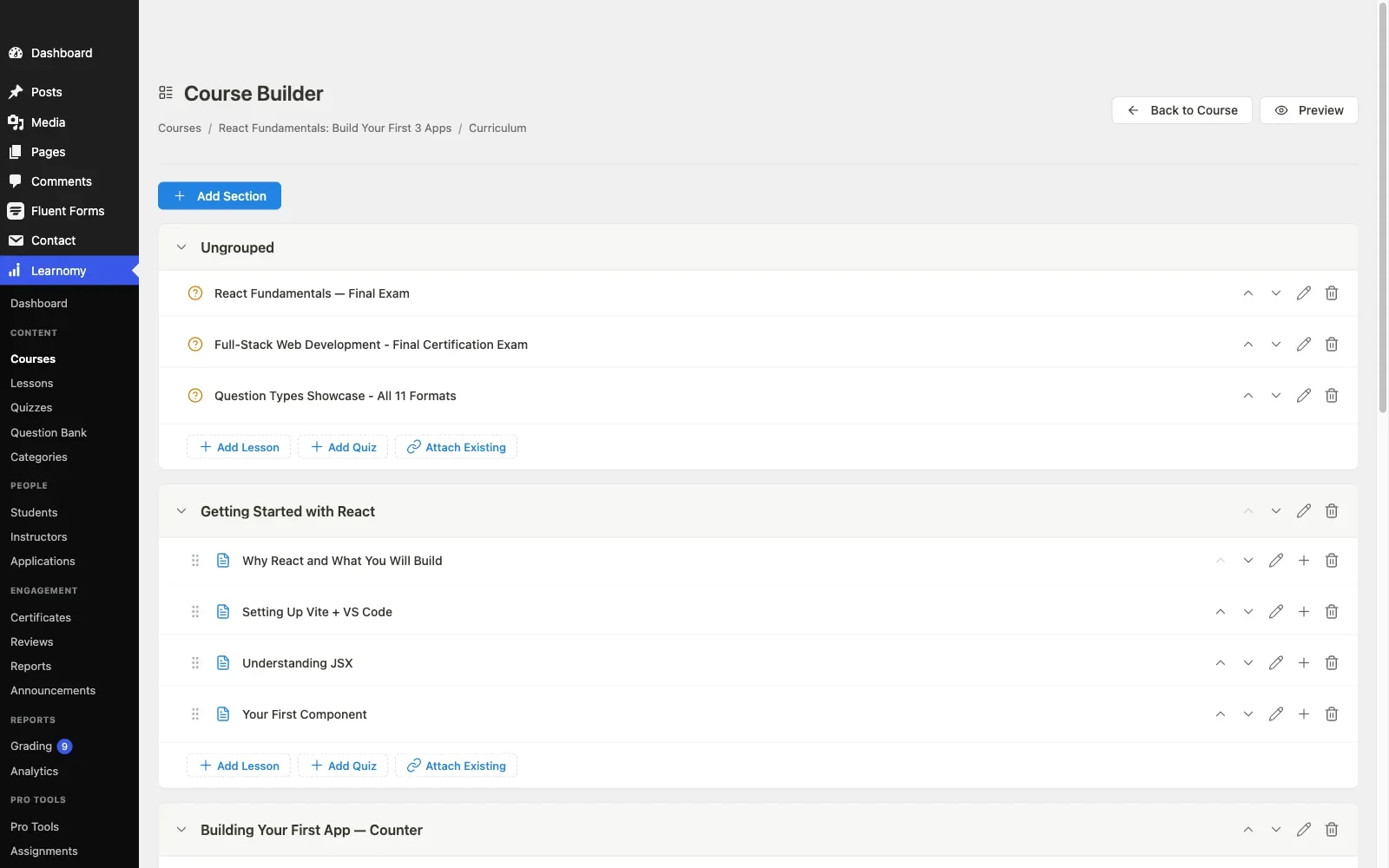
Pros: AI authoring collapses the hardest part of course creation into an editing pass; the entire launch checklist ships in one product with creator-friendly language; community-native growth path; full ownership of data and revenue.Cons: its third-party extension ecosystem is newer than more established competitors’, so a very specific niche integration may not exist yet. Details at learnomy.app.
2. Tutor LMS, the frontend-authoring specialist
Tutor LMS’s frontend course builder is a genuine strength for solo creators: you author from the public-facing site rather than navigating wp-admin, which removes a real chunk of the setup friction. Its interface is generally approachable, and the free tier gets a creator meaningfully far into structure and basic assessment before hitting the premium-tier wall covered in our Tutor LMS analysis, where certificates, drip, and full payment flexibility live.
Pros: approachable frontend authoring; strong free-tier structure and quizzing. Cons: the launch-critical features sit behind premium tiers, a second decision mid-project.
3. MasterStudy LMS, the visually polished option
A solo creator who cares about how their course looks on day one will notice MasterStudy immediately, its student dashboard and course pages are the most polished in this comparison out of the box. The catch, detailed in our MasterStudy alternatives guide, is that its strongest styling opinions assume its own theme family, so a creator running an independent theme should test carefully before committing, and premium-tier gating covers the same launch essentials as elsewhere on this list.
Pros: best-looking free-tier student experience. Cons: theme-ecosystem gravity; launch essentials premium-gated.
4. LifterLMS, capable but configuration-heavy
LifterLMS rewards a creator willing to invest time in configuration: its engagement mechanics, badges, triggered emails, are genuinely powerful once set up, but the add-on matrix, detailed in our LifterLMS alternatives guide, takes real effort to map correctly for a first-time solo creator. It rewards patience more than it rewards speed to first launch.
Pros: powerful engagement mechanics once configured. Cons: add-on matrix is a real barrier for a first-time solo creator’s setup speed.
5. LearnDash, powerful, built for teams
LearnDash is the deepest, most mature platform in this category, and it is honestly built more for a team, an agency, a developer, an ops person, than for a solo creator working alone. Its power is real, and our developer-focused LearnDash guide covers why teams choose it, but a solo creator without technical support will likely spend more time configuring than authoring in the first month.
Pros: unmatched depth and ecosystem for complex requirements. Cons: settings vocabulary assumes prior LMS-configuration experience; assumes technical support a solo creator often lacks.
6. Sensei LMS, the simplest possible starting point
For a creator who wants the simplest possible starting point, Sensei’s block-editor-native authoring is hard to beat, if you can write a WordPress post, you can build a Sensei lesson. The trade-off is a low ceiling: selling means adding WooCommerce, and depth features live in Sensei Pro, so it suits a creator whose first course is genuinely simple rather than one building toward a full catalog.
Pros: if you can write a WordPress post, you can build a Sensei lesson, no separate builder to learn. Cons: selling requires WooCommerce; shallow ceiling for growing ambitions.
7. LearnPress, budget-first assembly
LearnPress suits a solo creator prioritizing low upfront cost above setup speed: the core is free and handles structure, and everything else is an add-on decision, the assembly pattern detailed in our LearnPress alternatives guide. A creator without much budget can get moving, at the cost of stitching several separate products together as requirements grow.
Pros: low-cost path to a working course structure. Cons: add-on assembly quickly becomes a solo creator’s second job.
8. WP Courseware, dependable but plain
WP Courseware’s drag-and-drop builder is genuinely easy to learn, and its gradebook and reporting are solid for a creator who wants straightforward progress tracking. It has no ambitions beyond that, no AI, no community layer, no marketplace features, which is either a relief or a ceiling depending on where your catalog is headed.
Pros: easy to learn; dependable, no-surprises reporting. Cons: no AI acceleration; no path to community or marketplace features.
Time to first published course
The single most useful test for a solo creator evaluating any of these platforms: install it on staging and time how long it takes to go from a blank site to one fully structured course with a working checkout, not a demo course, an actual one you would publish. Platforms with AI-assisted curriculum drafting compress the structuring step dramatically, Learnomy’s topic-to-outline flow typically turns hours of blank-page staring into a focused editing session. Platforms requiring add-on research and installation for payments add days, not hours, to that same timeline, days a solo creator working around a day job may not have. Run this test yourself before committing, the difference between platforms here is measured in real launch weeks, not feature-matrix rows.
Red flags for a solo creator
Watch for three warning signs specifically as a solo creator evaluating any LMS: documentation that assumes developer vocabulary throughout, a sign the support burden will land on you; a pricing page where the tier you need is unclear until you have already built half your course, a sign of gating designed around upsell rather than transparency; and a community or support forum dominated by developers and agencies rather than individual creators, a sign the product’s actual user base skews away from your situation and support responses may not match your context. None of these are disqualifying alone, but two or more together are a strong signal to keep evaluating.
Building an audience alongside a catalog
A solo creator’s real advantage over a big course-platform competitor is proximity to an audience, and the LMS platforms that let a creator build community alongside courses compound that advantage instead of wasting it. A creator who can host discussion, member profiles, and course progress on the same domain turns one-time buyers into a returning audience who hears about the next course automatically. This is the argument for weighting community-native design in a course-creator comparison specifically, not just in a dedicated community-site comparison, our guide to building a student community around your online course develops the playbook a solo creator can actually execute alone.
How we evaluated
Learnomy’s authoring flow, AI generation, and launch checklist were checked against its own product documentation and changelog as of September 2026, evaluated specifically from a solo creator’s perspective rather than a developer’s or an agency’s. The other seven platforms were assessed through the same documented research pass across published capabilities, free-tier boundaries, and community feedback, with attention to setup complexity and creator-facing language rather than raw feature counts. Where a claim could not be confirmed against official documentation, it is reported as researched rather than confirmed. Reconfirm current feature placement on each vendor’s site before committing.
Common mistakes course creators make
Choosing the platform with the most features. A solo creator does not need the deepest feature matrix, they need the shortest real path from expertise to a launched, paid course. Optimize for that, not for a checklist you will use ten percent of.
Underestimating configuration time. Add-on-heavy platforms cost real hours a solo creator working around a day job may not have. Time your actual setup on staging before committing to any platform.
Building the course before confirming checkout works. Test a real, complete purchase flow before you have written a single lesson, discovering a payment gap after finishing your content is one of the most common and avoidable failure points in this category.
Ignoring where the next ten students come from. A course platform with no community or sharing mechanics leaves growth entirely to your own marketing. Weight community and social features if you plan to build an audience, not just sell a single course.
Three creator profiles, three right answers
The subject-matter expert with no instructional-design background: Learnomy, AI-assisted curriculum drafting turns expertise into a structured course fast, with the full launch checklist included and a community growth path built in. The creator who wants full control over the public authoring experience: Tutor LMS, its frontend builder is the best in the category for that specific workflow. The creator with technical help and complex, growing requirements: LearnDash, its depth rewards a team that can configure it properly.
FAQ
What is the fastest way to go from an idea to a published course? Learnomy’s AI-assisted curriculum drafting is the fastest path in this comparison, turning a topic into a structured outline you edit rather than write from scratch.
Do I need to hire a developer to launch a course on WordPress? Not with a complete platform designed for creators, Learnomy, Tutor LMS, and Sensei are all approachable without development help. LearnDash and heavily add-on-dependent stacks benefit more from technical support.
Which platform lets me build an audience, not just sell one course? Learnomy’s community-native design is built for exactly this, letting a creator add discussion and member features around a catalog without re-platforming.
How do I avoid discovering a payment gap mid-project? Test a complete real purchase flow on staging before writing your first lesson. Confirm the platform can process payments and issue certificates natively before you build anything on top of it.
Should I start with a free plugin and upgrade later? Sometimes, see our best free WordPress LMS plugins guide for that comparison specifically. For most solo creators, the time cost of migrating platforms later outweighs the savings of starting on a free tier that will not carry the full launch.
Verdict
A course creator’s real constraint is time and expertise, not budget or feature depth, and the platforms that respect that constraint win this comparison. Learnomy leads because it is built around exactly that creator: AI-assisted authoring that turns expertise into structure fast, the entire launch checklist in one product with no second purchase decision, and a community-native growth path for the audience that comes after the first course. Tutor LMS is the right call for a creator who wants the best public-facing authoring experience specifically, and LearnDash when technical support is available and requirements are genuinely complex. Time your own setup on staging before deciding, the platform that gets you to a real, published course fastest is very often the right one.















