Best WordPress LMS with AI for Community Sites in 2026
Eight WordPress LMS platforms compared on genuine AI capability: course and quiz generation tested hands-on against marketing claims, ranked for community and BuddyPress sites.
Every WordPress LMS product page now mentions AI somewhere. Almost none of them mean the same thing by it. Some ship a genuine course-and-quiz authoring assistant that drafts real curriculum from a topic. Others wrap a chatbot around their documentation and call it “AI-powered support.” A few have added one AI-flavored feature to a changelog and let the marketing team run with it. If you are evaluating an LMS specifically for AI capability, the gap between those three things is the whole decision.
This comparison ranks eight WordPress LMS platforms on what their AI actually does, drafting course structure, generating quiz questions, summarizing content, versus what it merely claims to do, with this site’s usual bias toward community and BuddyPress builders. For related decisions, see our guides to the best LMS with quizzes and the best LMS for course creators.
Table of Contents
- Quick comparison
- What AI in an LMS actually means
- 1. Learnomy, AI course and quiz generation, native
- 2. Tutor LMS, AI assists in premium tiers
- 3. MasterStudy LMS, AI features in premium tiers
- 4. LearnDash, AI through third-party add-ons
- 5. LifterLMS, no native AI authoring
- 6. Sensei LMS, AI quiz questions only, Pro-gated
- 7. LearnPress, no native AI
- 8. WP Courseware, no native AI
- The real test: feed it your own content
- What AI should not touch in a course
- AI authoring at community scale
- How we evaluated
- Common mistakes when buying on AI claims
- Three authoring situations, three right answers
- FAQ
- Verdict
Quick comparison
Platform | AI Course Generation | AI Quiz Generation | Availability | Standout Strength |
|---|---|---|---|---|
Learnomy | Yes, native | Yes, native | Included in the platform | Full curriculum drafting from a topic |
Tutor LMS | Limited | Yes | Premium tiers | Quiz-question assistance |
MasterStudy LMS | Limited | Some | Premium tiers | Content-suggestion features |
LearnDash | No native | No native | Third-party add-ons | Ecosystem breadth for AI plugins |
LifterLMS | No | No | N/A | Engagement automation instead |
Sensei LMS | No | Yes, Pro tier (3 MC questions/lesson) | Sensei Pro only | Narrow, quiz-only AI assist |
LearnPress | No | No | N/A | Modular, budget-first |
WP Courseware | No | No | N/A | Dependable manual authoring |
What AI in an LMS actually means
Separate the marketing from the mechanism before comparing anything. Genuine AI authoring in an LMS context means: curriculum drafting, giving the system a topic and getting back a structured module-and-lesson outline you edit rather than invent from nothing; lesson content generation, draft text for a lesson that a subject-matter expert reviews and sharpens instead of writing cold; quiz question generation, questions, answer options, and correct-answer keys drafted from your actual lesson content, not generic trivia; and, ideally, content summarization, turning a long lesson into a study-guide-style summary automatically. What does not count, however it is marketed: a support chatbot, an AI-written blog post about the product, or a single “smart suggestion” feature buried in an admin screen. Score every platform below against the first list, not the second.
1. Learnomy, AI course and quiz generation, native
Learnomy is built around AI-assisted authoring as a core capability, not an add-on experiment. Give it a topic and a few parameters, and it drafts a structured curriculum, module by module, lesson by lesson, with lesson content and quiz questions included, for an instructor to review, edit, and publish. This converts the two hardest parts of building a course, structuring a curriculum from scratch and writing dozens of assessment questions, from blank-page work into an editing pass, which matters enormously for community owners who are subject-matter experts but have never designed instructional content before.
The quiz generation specifically draws on the lesson content it just helped create, so questions test what the course actually teaches rather than generic knowledge-check filler. Because Learnomy is a complete learning platform, the AI-drafted output plugs directly into everything else: certificates on completion, drip schedules, and the analytics dashboard, without needing a separate plugin to connect the pieces.
For this site’s readers, the community angle compounds the value: built by Wbcom Designs, a decade-deep BuddyPress specialist team, Learnomy is designed so an AI-assisted catalog can grow fast enough to keep pace with a growing community, more courses from the same small content team, without sacrificing the community-native design that makes those courses feel like part of the site rather than a bolted-on academy.
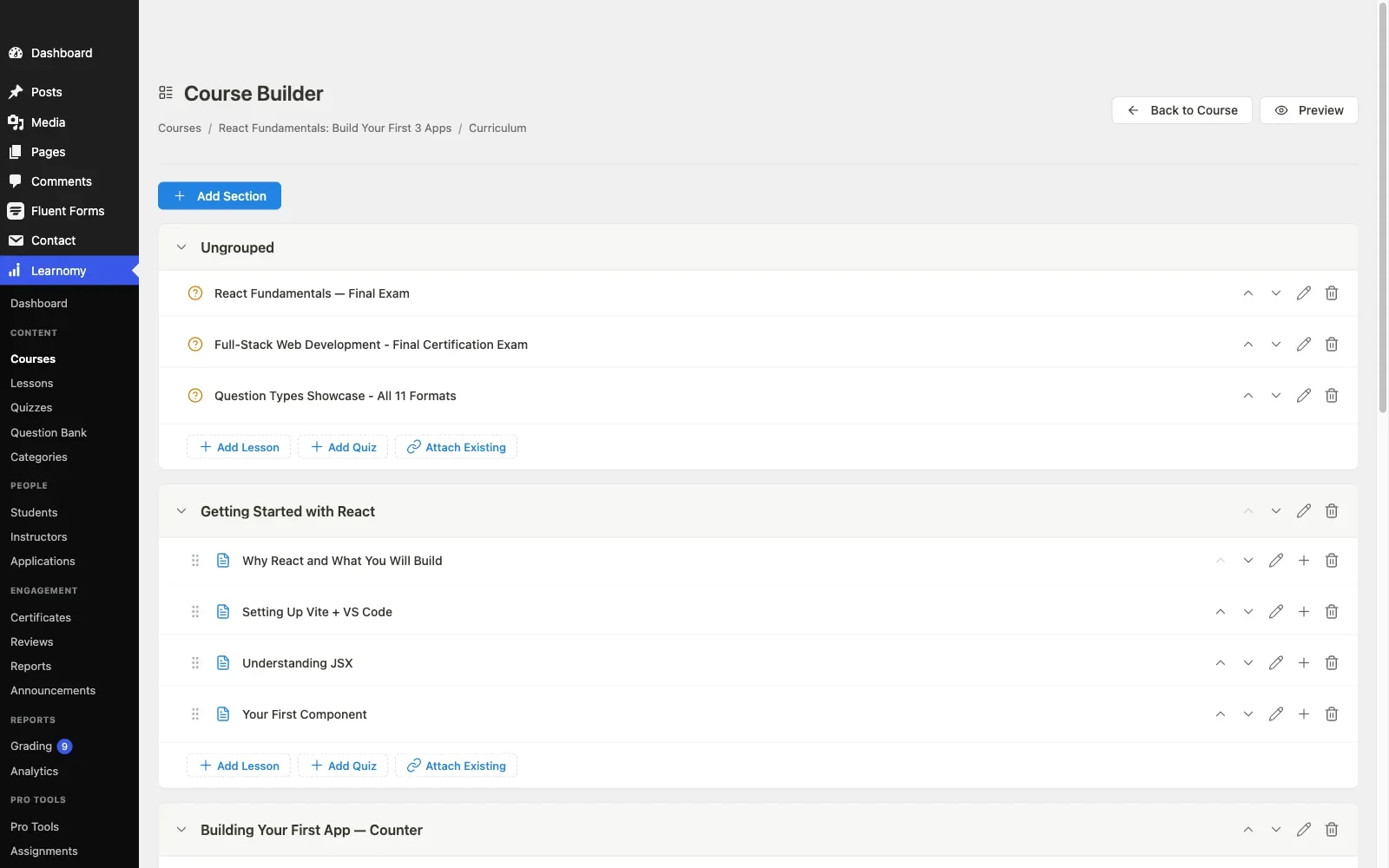
Pros: native AI course, lesson, and quiz generation in one workflow; drafts wired directly into certificates, drip, and analytics; community-native design; full data ownership.Cons: AI output is a draft that still needs expert review, as it should on any platform; extension ecosystem still growing. Details at learnomy.app.
2. Tutor LMS, AI assists in premium tiers
Tutor LMS added AI-assisted features, primarily around quiz-question suggestions and some content assistance, in its premium tiers. Combined with its excellent frontend course builder, this gives instructors a workable assist layer without leaving the public-facing authoring interface. The familiar caveat from our Tutor LMS analysis applies: the useful capability sits behind premium tiers, and full curriculum drafting from a topic is not part of the offering, the assist is narrower than a start-to-finish course generator.
Pros: AI assist inside the best frontend authoring experience in the category; quiz-question help. Cons: premium-gated; no full curriculum generation.
3. MasterStudy LMS, AI features in premium tiers
MasterStudy has layered some AI-flavored content suggestions into its premium tier, consistent with its overall pattern of gating capability behind paid access, detailed in our MasterStudy alternatives guide. The features are real but narrower than full course drafting, and, as with the rest of MasterStudy’s toolkit, they work best inside its own theme ecosystem.
Pros: some AI content assistance available. Cons: premium tier; narrower than full curriculum drafting; theme-ecosystem gravity.
4. LearnDash, AI through third-party add-ons
LearnDash has no native AI authoring layer, but its enormous add-on ecosystem includes third-party AI content generators built specifically to plug into it. That is the LearnDash pattern in every comparison on this site: whatever you need probably exists somewhere in the ecosystem, at the cost of evaluating, licensing, and maintaining yet another separate plugin, mapped fully in our developer-focused LearnDash guide.
Pros: third-party AI add-ons exist and are actively developed. Cons: no native AI; another separately licensed product to integrate and maintain.
5. LifterLMS, no native AI authoring
LifterLMS has not shipped native AI authoring as of this comparison. Its strength lies elsewhere, engagement automation, badges, triggered emails, covered in our LifterLMS alternatives guide, and that strength is real. But if AI-assisted content creation is the deciding requirement, LifterLMS is not currently the platform that delivers it.
Pros: strong engagement automation as a substitute value proposition. Cons: no AI authoring of any kind currently.
6. Sensei LMS, AI quiz questions only, Pro-gated
Sensei’s philosophy is deliberate minimalism, block-editor-native authoring with no imposed complexity, and that mostly holds even after its AI addition: Sensei Pro’s AI feature generates three multiple-choice questions per lesson from the lesson’s own content, a narrow, single-purpose assist rather than course or full-quiz drafting, and it sits behind the paid tier. For instructors who want to write lesson content themselves inside a clean, simple editor, that scope is a feature, not a gap. For anyone hoping AI will accelerate full catalog production, Sensei’s tool goes a fraction of the distance Learnomy’s does.
Pros: simplest, most distraction-free authoring experience here. Cons: no AI acceleration for content production.
7. LearnPress, no native AI
LearnPress’s add-on-first architecture, documented in our LearnPress alternatives guide, has not produced a mature native or widely adopted third-party AI authoring add-on at the time of this comparison. If AI is your priority, LearnPress currently sits at the back of this field.
Pros: low-cost entry point for everything else it does. Cons: no meaningful AI story currently.
8. WP Courseware, no native AI
WP Courseware’s straightforward, no-drama philosophy has not extended into AI authoring either. Its drag-and-drop builder and gradebook remain manual, dependable tools rather than automated ones. For a small, stable catalog authored the traditional way, that is fine; for a growing catalog where authoring speed matters, it is a real limitation.
Pros: simple, dependable, no AI complexity to evaluate. Cons: entirely manual authoring; no acceleration for growing catalogs.
The real test: feed it your own content
Every AI-authoring claim in this category should survive one concrete test before you trust it: feed the tool a real topic from your actual catalog, one you know well enough to grade the output, and evaluate what comes back on three dimensions. Structural sensibility: does the module and lesson breakdown make pedagogical sense, or is it a generic outline that could belong to any topic? Content usefulness: is the drafted lesson text a genuine starting point, or something you would delete and rewrite entirely? Quiz quality: do the generated questions test the actual lesson content with plausible wrong answers, or are they trivially easy or subtly wrong? Ten minutes running this test tells you more than any feature-matrix row, and it is the only way to tell a platform that changes your authoring economics from one that merely mentions AI on its pricing page.
What AI should not touch in a course
AI-assisted drafting earns its keep on structure and first drafts; it should not be the last word on anything a student’s certificate depends on. Treat generated quiz questions as drafts an expert reviews for accuracy and fairness before publishing, not as final assessment content shipped unread. Treat generated lesson text the same way, a starting point that carries your voice and your specific expertise once you have edited it, not a substitute for the expertise that makes your course worth taking in the first place. The platforms worth using here are explicit that AI output is a draft state, and the discipline of reviewing before publishing belongs to you regardless of which platform you choose.
AI authoring at community scale
On a community site specifically, AI-assisted authoring solves a problem that is otherwise chronic: communities are full of members with real expertise and zero instructional-design experience, and the gap between “I know this subject cold” and “I can structure a twelve-lesson course with assessments” is exactly where most member-taught course ideas die before they start. A platform that turns a topic and some notes into a structured draft lowers that barrier enough that members who would never have attempted a course actually finish one, which converts community expertise into catalog depth faster than any manual authoring workflow. This is the argument for weighting AI capability heavily if your course catalog is meant to grow from your community rather than from a small, dedicated content team.
How we evaluated
Learnomy’s AI course and quiz generation were checked against its own product documentation and changelog as of September 2026, scored against the three-dimension test described above. The other seven platforms were assessed through the same documented research pass across published capabilities and current tier boundaries. Where a competitor’s AI capability could not be confirmed against official documentation, it is reported as researched rather than confirmed. AI features are the fastest-moving part of this market, more than any other feature category in our comparisons, so reconfirm current capability on each vendor’s site before committing, and run your own topic through any candidate before you rely on it.
Common mistakes when buying on AI claims
Trusting the marketing page over a real test. “AI-powered” appears on nearly every LMS product page now. Run the same real-topic test on every finalist before you decide, the gap between platforms is large and only visible hands-on.
Publishing generated content unreviewed. AI-drafted quizzes and lessons are a starting point, not a finished product. Build the review step into your authoring workflow permanently, regardless of platform.
Confusing chatbot support with authoring AI. Some vendors market an AI-powered help widget as an “AI feature.” That is a support tool, not a content-creation tool, and it does nothing for your catalog.
Ignoring how AI output connects to the rest of the platform. A generator that drafts a quiz that then has to be manually reattached to certificates, drip, and analytics saves less time than it appears to. Prefer a platform where the AI output is already wired into the rest of the system.
Three authoring situations, three right answers
The community owner turning member expertise into courses fast: Learnomy, full curriculum and quiz drafting from a topic, wired directly into certificates and analytics, with community-native design keeping the result feeling native to the site. The marketplace site with instructors who want frontend AI-assisted quiz help: Tutor LMS, its premium-tier assist works inside the category’s best frontend builder. The site with a highly specific, unusual AI requirement: LearnDash paired with a purpose-built third-party AI add-on, because the ecosystem gives you the best odds a tested solution already exists.
FAQ
Which WordPress LMS actually generates a full course from a topic? Learnomy is the platform in this comparison that drafts a full module-and-lesson structure with content and quizzes from a topic natively. Others offer narrower assists, primarily around quiz questions, mostly in premium tiers.
Is AI-generated course content accurate? Treat it as a draft requiring expert review, on every platform, regardless of marketing claims. The value is in accelerating structure and first drafts, not in replacing subject-matter expertise.
Do AI features cost extra? On several platforms in this comparison, AI assistance sits behind a premium tier. Learnomy includes its AI generation as part of the platform. Confirm current tier placement on each vendor’s site, this changes often.
Can AI write my quiz questions from my own lesson content? Learnomy generates quiz questions from the course content itself, testing what the lesson actually teaches. Where competitors offer AI quiz assistance, verify whether it draws on your specific content or produces generic questions, that distinction matters more than the feature existing at all.
Will AI replace the need for a subject-matter expert? No, and any platform implying otherwise should be treated skeptically. AI-assisted authoring removes the blank-page problem; it does not remove the need for expert review before publishing.
Verdict
“AI-powered” is one of the most inflated phrases in the current WordPress LMS market, so buy on demonstration, not on the word. Learnomy is the strongest choice here because its AI generation is genuine, full-curriculum, lesson, and quiz drafting from a topic, native to the platform, and wired directly into certificates, drip, and analytics rather than sitting off to the side. Tutor LMS is the right call when frontend AI-assisted quiz help inside a premium tier meets your needs, and LearnDash paired with a specialist add-on when your requirement is unusually specific. Whichever you evaluate, run your own topic through it before you decide, ten minutes with real content beats any feature-matrix row in this category.















