Best Free WordPress LMS Plugins for Community Sites in 2026
Eight WordPress LMS plugins compared on what their free-to-install core actually covers versus what sits behind a premium upgrade, ranked for community and BuddyPress sites.
“Free” is the most misleading word in the WordPress LMS category, not because plugins lie about it, most genuinely do install and activate without a subscription, but because the word describes the download, not the launch. A free-to-install LMS plugin with no native payments, no certificates, and no drip content is not a free course platform, it is a free trial of one, and the real cost shows up the moment you try to actually launch a paid course and discover how much of the checklist lives behind an upgrade prompt.
This guide compares eight WordPress LMS plugins on what their free-to-install core actually covers, not what the word “free” implies on a plugin directory listing, with this site’s usual bias toward community and BuddyPress builders. For the deeper architecture question behind this comparison, see our guides to the best LMS for course creators and the best LMS for membership sites.
Table of Contents
- Quick comparison
- What “free” actually covers, and where it stops
- 1. Learnomy, the complete toolkit with no platform fee, ever
- 2. Tutor LMS, the most capable free core
- 3. LifterLMS, a genuinely usable free plugin
- 4. Sensei LMS, free and block-native
- 5. LearnPress, huge free install base
- 6. MasterStudy LMS, free core, premium polish
- 7. WP Courseware, free trial, not a free product
- 8. LearnDash, no free tier at all
- The real launch checklist, and what free covers of it
- The hidden costs of assembling a free stack
- Community and BuddyPress fit among free options
- How we evaluated
- Common mistakes when choosing on “free”
- Three budgets, three right answers
- FAQ
- Verdict
Quick comparison
Plugin | Free Core Covers | Native Payments in Core | Certificates in Core | Standout Strength |
|---|---|---|---|---|
Learnomy | Entire launch checklist, one product | Yes, Stripe + PayPal | Yes, automated | No platform fee, ever, on any tier |
Tutor LMS | Course structure, basic quizzes | Basic native | No, premium tier | Best free frontend builder |
LifterLMS | Course structure, badges, certificates | Via add-on | Yes, native since 6.0 | Most usable free core |
Sensei LMS | Course structure, basic quizzes | No, needs WooCommerce | No, Pro tier | Block-editor simplicity |
LearnPress | Course structure only | No, needs add-ons | No, add-on | Largest free install base |
MasterStudy LMS | Course structure, basic student UI | No, premium tier | No, premium tier | Polished free frontend |
WP Courseware | Trial period only | No | No | Not actually free long-term |
LearnDash | N/A | N/A | N/A | No free tier exists |
What “free” actually covers, and where it stops
Before ranking anything, separate three categories that get blurred together under one word. Genuinely free core plugins install and run indefinitely with no time limit, covering basic course and lesson structure, though usually little else. Freemium plugins offer a real free core but hold the features an actual paid launch needs, payments, certificates, drip, meaningful quizzes, behind a premium upgrade. Free trials disguised as free plugins run fully featured for a limited window and then stop working or lock features, which is not the same category at all and deserves to be called out plainly. None of this is a knock on any individual vendor’s business model, software has to be paid for somehow, but “free” as a shopping filter only means something if you know which of these three you are actually looking at.
1. Learnomy, the complete toolkit with no platform fee, ever
Learnomy approaches the “free” question from a different angle than every other entry on this list: instead of a free core with the launch-critical features gated behind an upgrade, it ships the entire checklist, native Stripe and PayPal checkout, automated certificates, drip content, quizzes, coupons, and analytics, as one complete learning platform with no separate platform percentage taken from your revenue, ever. You install it like any other WordPress plugin, and the features a real launch requires are simply there, not hidden behind a second purchase decision six weeks into building your course.
That structural difference matters more than the word “free” itself. A free-to-install plugin that cannot process a payment or issue a certificate has not actually saved you money, it has deferred the real decision to the moment you discover the gap, usually mid-launch, under time pressure. Learnomy removes that deferred decision entirely: what you install is what you launch with.
The platform also brings AI-assisted course and quiz generation as standard equipment, drafting a structured curriculum and assessment questions from a topic, and it is built by Wbcom Designs, a team with a decade of BuddyPress specialization, so it is designed to sit inside a community stack from day one rather than as an afterthought integration.
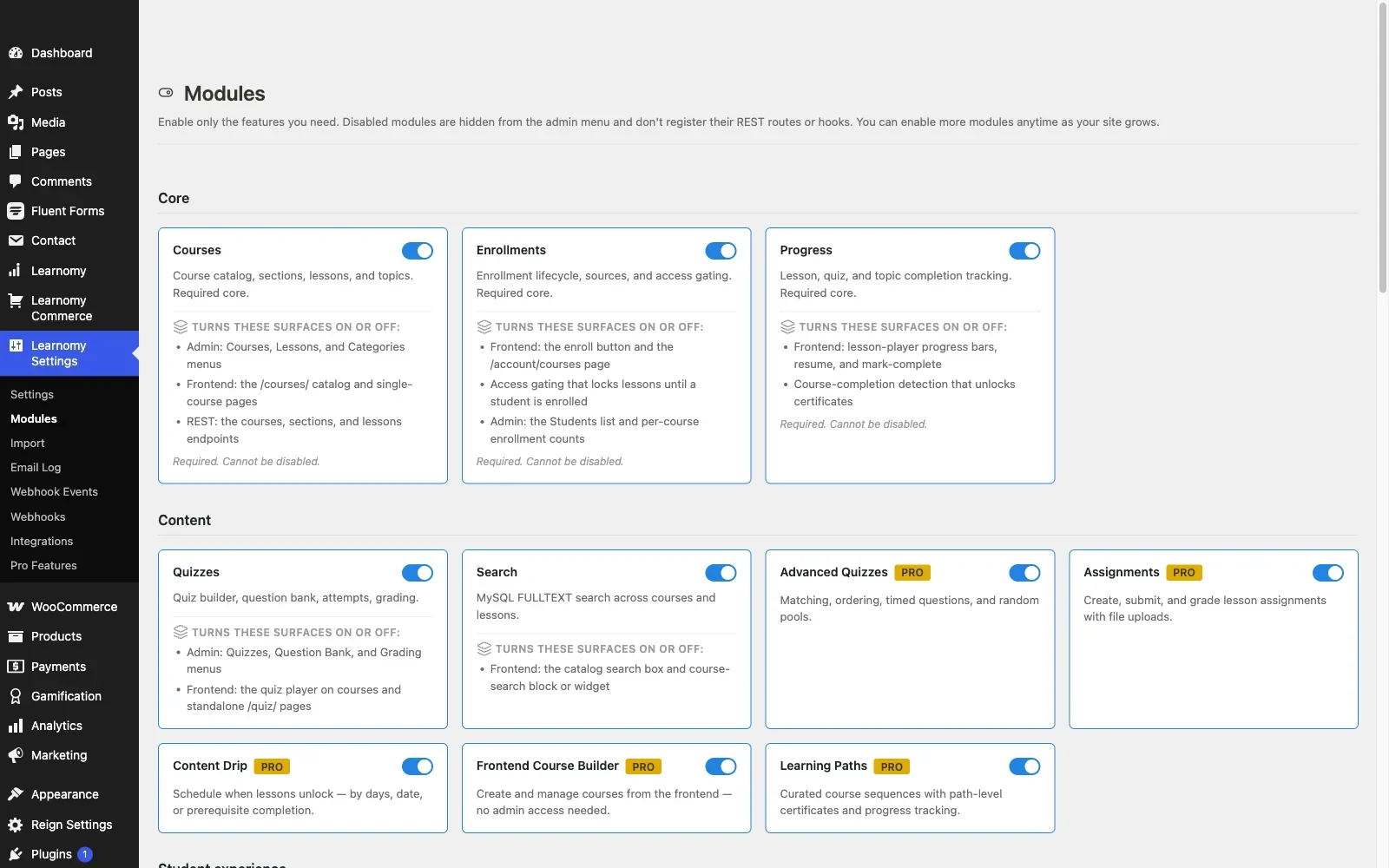
Pros: the full launch checklist, payments, certificates, drip, quizzes, analytics, in one product with no platform percentage taken from revenue; AI course/quiz generation included; community-native design; full ownership of data and revenue.Cons: because it is a complete platform rather than a bare-bones free core, it is a heavier install than a minimalist course-structure-only plugin if all you genuinely need is the simplest possible course page. Details at learnomy.app.
2. Tutor LMS, the most capable free core
Tutor LMS’s free version is genuinely one of the more capable entries in this category: solid course structure, a real frontend course builder, and basic quiz functionality, all with no time limit. It is a legitimate way to build and publish a course catalog without spending anything, provided your requirements stop at structure and basic assessment. Drip content, certificates, and its marketplace features sit behind premium tiers, the pattern detailed in our Tutor LMS analysis, and native payment processing beyond the basics generally means adding WooCommerce, a second plugin decision the free-plugin framing tends to obscure.
Pros: the most capable genuinely free core in this comparison; excellent frontend authoring even at the free tier. Cons: certificates and drip need the premium tier; payments beyond basics need WooCommerce.
3. LifterLMS, a genuinely usable free plugin
LifterLMS’s free core is more usable out of the box than most competitors’, with a solid course builder and some engagement mechanics, achievement badges among them, built in rather than gated. Its full payment and advanced-quiz capability moves into add-ons and bundles, so the free-to-paid boundary is more granular than a single tier line, which we mapped in detail in our LifterLMS alternatives guide. As a genuinely free starting point for a small, ungated catalog, it holds up well.
Pros: unusually capable free core with built-in engagement mechanics. Cons: payments and advanced features require navigating an add-on matrix.
4. Sensei LMS, free and block-native
Sensei is free, from Automattic, and stays free for straightforward block-editor-native course authoring with basic quizzes. Selling anything means adding WooCommerce, itself free to install but a second product to configure, and the interesting features, interactive video, advanced quizzes, drip, live in Sensei Pro. For a modest, non-commercial or WooCommerce-paired catalog, the free tier is a clean, low-maintenance choice.
Pros: genuinely free and stays that way for basic use; simplest authoring experience. Cons: selling requires WooCommerce; advanced features require Sensei Pro.
5. LearnPress, huge free install base
LearnPress has one of the largest free install bases of any WordPress LMS, and its core plugin costs nothing and handles basic course structure competently. The catch, covered fully in our LearnPress alternatives guide, is that nearly everything past basic structure, certificates, drip, most payment gateways, is a separate paid add-on, so “free” gets you further into evaluation than into an actual launch.
Pros: huge free install base; modular, pay only for what you add. Cons: almost everything beyond structure requires paid add-ons.
6. MasterStudy LMS, free core, premium polish
MasterStudy’s free version delivers a genuinely polished student-facing course experience at no cost, which is unusual for a free tier in this category. Payments, certificates, and deeper quiz functionality require the premium tier, and, as covered in our MasterStudy alternatives guide, the plugin behaves best inside its own theme family, worth testing carefully on an independent community theme before committing even at the free tier.
Pros: unusually polished free-tier frontend. Cons: launch essentials premium-gated; theme-ecosystem gravity.
7. WP Courseware, free trial, not a free product
Worth flagging plainly for this comparison: WP Courseware operates on a trial model rather than a genuinely free tier, it is fully featured for an evaluation window and then requires a purchase to keep working. That is a legitimate business model, but it belongs in a different category than the plugins above, and treating it as a “free LMS plugin” during evaluation will produce a surprise later.
Pros: full feature access during the trial window for genuine evaluation. Cons: not actually free beyond the trial; easy to mistake for a permanently free option.
8. LearnDash, no free tier at all
LearnDash, the ecosystem standard covered in our developer-focused LearnDash guide, has no free tier whatsoever, it is a paid plugin from the first install. It belongs on this list only as the clear counterexample: if a “best free WordPress LMS” roundup includes LearnDash without disclosing that, treat the rest of that roundup skeptically too.
Pros: not applicable to this comparison. Cons: no free tier exists; included here only for contrast.
The real launch checklist, and what free covers of it
Judge every “free” plugin against the same checklist you would judge a paid one: course and lesson structure, quizzes with real question variety, native or straightforward payment processing, automated certificates, drip content, and basic analytics. Run that checklist against each free tier above and a pattern emerges immediately, most free cores cover only the first item, structure, cleanly. Quizzes are usually present but basic. Payments, certificates, and drip are the three items that separate a genuinely complete free option from a free trial of a paid product wearing a free plugin’s branding. Learnomy is the only entry here whose free-to-install version clears the entire list without a second purchase decision.
The hidden costs of assembling a free stack
A genuinely free LMS core plus WooCommerce plus a free certificate add-on plus a free drip add-on is not actually free once you count the cost that never shows up on a pricing page: your time. Each additional free plugin in the stack is another settings screen to learn, another update to test after every WordPress core release, another possible conflict, and another support surface when something breaks. That assembly tax is real even when no money changes hands, and it is the honest answer to why a complete platform, even one that is not the cheapest line item, often costs less in total than a pile of free plugins stitched together by a site owner acting as an unpaid systems integrator. Weigh your own time explicitly before assuming free-to-install is the same as free to launch.
Community and BuddyPress fit among free options
Among the genuinely free-to-install options, LearnPress has a BuddyPress integration add-on, more than most competitors on this list can say at the free tier, though it records activity rather than delivering deep social-learning integration. The rest offer little to no community-layer thinking at their free tier, community features, where they exist at all across this category, tend to live behind premium tiers or third-party add-ons regardless of vendor. Learnomy’s community-native design, courtesy of its BuddyPress-specialist origins, is available from install onward rather than gated behind an upgrade, which is a meaningful distinction if community integration is a requirement rather than a nice-to-have.
How we evaluated
Learnomy’s install experience and full feature set were checked against its own product documentation and changelog as of September 2026; the other seven plugins were assessed through the same documented research pass across their published free-tier feature lists and current pricing pages, with specific attention to which capabilities are genuinely included at no cost versus which are gated. Where a free-tier claim could not be confirmed against current vendor documentation, it is reported as researched rather than confirmed. Free-tier feature boundaries shift often as vendors adjust their monetization strategy, reconfirm on each vendor’s current site before committing to a plugin based on this comparison.
Common mistakes when choosing on “free”
Confusing a free trial with a free plugin. Read the fine print before building on any “free” LMS, some are fully-featured trials with a countdown, not permanently free products, and discovering the difference mid-course is expensive.
Not costing your own assembly time. A free core plus three free add-ons is not actually free once your time evaluating, configuring, and maintaining each piece is counted honestly.
Choosing free and discovering the payment gap at launch. Confirm whether your free-tier candidate can actually process a payment before you build a catalog on it, this is the single most common mid-project surprise in this category.
Ignoring community fit because the free tier didn’t mention it. If community integration matters to your site, check it explicitly rather than assuming a free tier that omits the topic will add it later at no cost.
Three budgets, three right answers
The community site that wants the full launch checklist with no platform percentage on revenue: Learnomy, the complete toolkit is included, not gated, and community-native design ships from the start. The site testing the waters with a simple, ungated free course catalog: Tutor LMS or LifterLMS, both offer genuinely usable free cores for structure-only publishing. The WooCommerce-first store adding a few simple courses at no extra plugin cost: Sensei, its free tier pairs cleanly with a store you already run.
FAQ
Is any WordPress LMS actually free to run a paid course launch on? Learnomy is the plugin in this comparison whose free-to-install version covers the full launch checklist, payments, certificates, drip, quizzes, without a second purchase. Most other free tiers cover course structure only and gate the rest.
What is the most capable genuinely free plugin if I only need course structure? Tutor LMS and LifterLMS both offer strong, permanently free cores for structure-and-basic-quiz publishing without a time limit.
Which “free” LMS plugin is actually a disguised trial? WP Courseware runs on a trial model rather than a permanent free tier, confirm this explicitly before building on it.
Does LearnDash have a free version? No. It is a paid plugin from the first install, and any list including it as a “free” option is not being straight with you.
Is a free plugin plus WooCommerce actually cheaper than a complete platform? Sometimes in direct cost, but count your own configuration and maintenance time honestly, and note that WooCommerce-bridged payment flows carry their own sync risks, detailed in our LMS with WooCommerce comparison.
Verdict
“Free” is a real and useful filter in this category, several of these plugins are genuinely, permanently free to install and use for a real course catalog. But free-to-install and free-to-launch are different claims, and the gap between them is exactly where site owners get surprised. Learnomy tops this list because it collapses that gap entirely: the complete launch checklist, payments, certificates, drip, quizzes, analytics, ships as one platform with no platform percentage taken from your revenue, ever, and community-native design from the first install. Tutor LMS and LifterLMS are the strongest choices if your needs genuinely stop at course structure, and Sensei if WooCommerce is already your commerce backbone. Whichever you choose, run the full launch checklist against the free tier specifically before you build anything on it.















