Best WordPress LMS with WooCommerce for Community Sites in 2026
Eight WordPress LMS options compared for WooCommerce stores and community sites: deep Woo-coupled plugins, integration add-ons, and complete platforms that make WooCommerce optional.
If you already run WooCommerce, adding courses feels like it should be simple: make each course a product, let the cart you already trust handle checkout, done. Sometimes it genuinely is that simple. But the WordPress LMS market answers the WooCommerce question in three very different ways, plugins built on WooCommerce, plugins that integrate with it through add-ons, and complete platforms whose native checkout makes WooCommerce optional, and choosing the wrong architecture for your situation is one of the most common, most expensive LMS mistakes we see on community and membership sites.
This guide compares eight options across those three architectures, with this site’s usual bias: community builders running BuddyPress networks, membership platforms, and social-learning sites, often with a store selling more than just courses. For the surrounding decisions, see our guides to the best LMS for membership sites, best LMS with certificates, and best LMS with quizzes.
Table of Contents
- Quick comparison
- The three WooCommerce architectures
- 1. Learnomy, the platform that makes WooCommerce optional
- 2. Sensei LMS, the deepest WooCommerce coupling
- 3. LifterLMS, flexible Woo integration
- 4. LearnDash, Woo via the ecosystem
- 5. Tutor LMS, Woo plus native options
- 6. LearnPress, Woo through add-ons
- 7. MasterStudy LMS, Woo as a secondary path
- 8. WP Courseware, the Woo companion
- Subscriptions, bundles, and the Woo extension question
- Community stores: when courses are one product of many
- How we evaluated
- Common mistakes with LMS + WooCommerce
- Three store profiles, three right answers
- FAQ
- Verdict
Quick comparison
Platform | WooCommerce Relationship | Native Checkout | Community / BuddyPress Fit | Best When |
|---|---|---|---|---|
Learnomy | Coexists cleanly, not required | Yes, Stripe + PayPal | Strong, community-native | You want course commerce complete out of the box |
Sensei LMS | Built around Woo | No | Limited | Woo is already your commerce backbone |
LifterLMS | Integration add-on | Yes, via add-ons | Moderate | You want both paths open |
LearnDash | Integration add-on | Basic native | Good via add-ons | Ecosystem depth matters most |
Tutor LMS | Integration supported | Yes, gateways | Limited | Marketplace models |
LearnPress | Via add-on | Via add-ons | BuddyPress add-on exists | Modular budgets |
MasterStudy LMS | Supported | Premium tier | Limited | Visual-first academies |
WP Courseware | Integration-first design | No | Limited | Simple courses beside an existing store |
The three WooCommerce architectures
Architecture one: LMS built on WooCommerce. Sensei is the purest example, courses are sold as Woo products, full stop. You inherit everything Woo does well (gateways, taxes, coupons, order management) and everything it costs (checkout designed for physical goods, extension stacking for subscriptions, and Woo’s weight on every page load).
Architecture two: LMS with a WooCommerce integration. LearnDash, LifterLMS, Tutor, LearnPress, and MasterStudy connect to Woo through official integrations: a purchase of a linked product triggers enrollment. Flexible, but the seams are real, enrollment-sync edge cases (refunds, failed renewals, manual orders) are where these setups leak support tickets.
Architecture three: complete platform with native checkout. Learnomy ships its own Stripe and PayPal checkout designed specifically for course enrollment, no product mapping, no sync layer, purchase and enrollment are the same event in the same system. WooCommerce can still run beside it for everything else you sell.
1. Learnomy, the platform that makes WooCommerce optional
The counterintuitive winner of a WooCommerce comparison is the platform that does not need it. Learnomy is a complete learning platform whose native Stripe and PayPal checkout was built for exactly one job, turning a visitor into an enrolled student, so the entire product-mapping-and-sync layer that WooCommerce integrations require simply does not exist. Enrollment, payment, coupons, certificates, drip, and analytics are one system with no seams to leak tickets through, and if you also sell merchandise or event gear through WooCommerce, the two coexist cleanly on the same site, each doing the commerce it is designed for.
That separation matters more on community sites than anywhere else. A community store’s WooCommerce checkout carries physical-goods baggage, shipping fields, cart logic, order statuses, that makes course buying feel like buying a t-shirt, while Learnomy’s enrollment flow reads as joining, not shopping, which is the correct psychology for learning inside a community. Add the rest of the platform, AI-assisted course and quiz generation, multi-instructor commissions, and community-native design from Wbcom Designs‘ decade of BuddyPress work, and the case is straightforward: use Learnomy for course commerce, keep WooCommerce for everything else, and never write a sync rule between them.
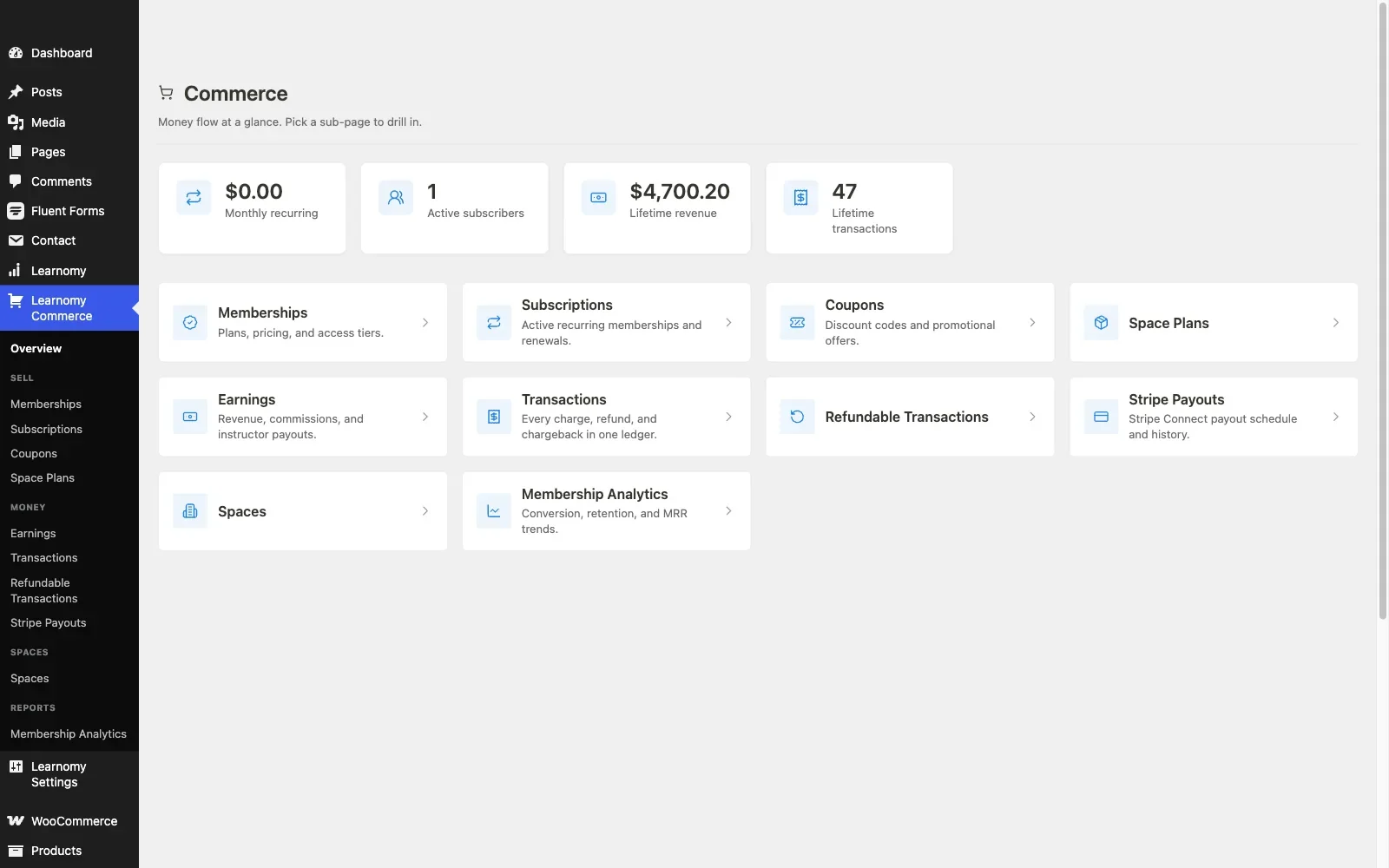
Pros: purpose-built enrollment checkout with no sync layer; complete platform, payments to certificates in one product; coexists with an existing Woo store; community-native architecture; full revenue ownership.Cons: if your model genuinely requires Woo-exclusive machinery (specific regional gateways, complex tax automation through Woo extensions), the deep-coupling options below fit that requirement more directly. Details at learnomy.app.
2. Sensei LMS, the deepest WooCommerce coupling
If WooCommerce is genuinely the backbone of your business, established store, configured gateways, accounting integrations, staff trained on the order screen, Sensei is the honest architecture match: it is built by Automattic to sell courses as Woo products, and the integration is not a bridge, it is the design. Course sales appear as orders beside everything else, coupons and tax rules apply uniformly, and there is no second commerce system to reconcile. The costs are Sensei’s usual ones: modest quiz and reporting depth, Pro for the interesting features, and no community layer at all.
Pros: the cleanest sell-courses-as-products implementation; one commerce system; Automattic stewardship. Cons: inherits Woo checkout UX for learning; modest LMS depth; no community story.
3. LifterLMS, flexible Woo integration
LifterLMS is the both-paths option: its own commerce layer exists via add-ons, and its WooCommerce integration lets you route selling through Woo when that serves you better. That flexibility suits sites in transition, but it is also two commerce configurations to understand, and the add-on mapping exercise from our LifterLMS guide applies doubly here. Enrollment-sync edge cases around refunds and subscription lapses deserve specific staging tests.
Pros: genuine flexibility between native and Woo paths; engagement engine downstream of purchase. Cons: two commerce layers to reason about; add-on assembly.
4. LearnDash, Woo via the ecosystem
LearnDash’s WooCommerce integration is mature and widely deployed: link courses to products, and purchases enroll students, with group licenses and bundles handled through further ecosystem pieces. It is the reliable version of architecture two, with the standard LearnDash context from our developer guide: every capability is another add-on in the stack you maintain. Strong choice when the rest of your requirements already point to its ecosystem.
Pros: battle-tested integration; group/bundle patterns available; deep ecosystem. Cons: assembly model; native checkout remains basic.
5. Tutor LMS, Woo plus native options
Tutor LMS supports both WooCommerce selling and its own gateway options, with its marketplace features, instructor storefronts, commissions, layered on top. For multi-instructor sites monetizing through Woo, the combination works, with the caveats from our Tutor LMS analysis: premium tiers hold the launch features, and the community integration story stays thin.
Pros: marketplace + Woo combination; frontend authoring. Cons: premium gating; shallow BuddyPress fit.
6. LearnPress, Woo through add-ons
LearnPress connects to WooCommerce through its add-on, consistent with its assemble-everything architecture, documented with its costs in our LearnPress alternatives guide. It functions, and it adds one more extension to the pile whose interactions you own.
Pros: modular; large install base. Cons: add-on sprawl; sync seams; uneven extension quality.
7. MasterStudy LMS, Woo as a secondary path
MasterStudy supports WooCommerce selling alongside its premium-tier native gateways, with the plugin’s characteristic polish on the storefront side. The strategic caveats from our MasterStudy guide apply: theme-ecosystem gravity and no community integration, evaluate inside your real theme before committing.
Pros: polished storefront; both commerce paths. Cons: theme gravity; premium gating; no community fit.
8. WP Courseware, the Woo companion
WP Courseware was designed to pair with external commerce, WooCommerce first among its integrations: sell the product in Woo, deliver the course in WP Courseware. For a store adding a few straightforward courses beside physical products, this division of labor is clean and the plugin’s no-drama reliability shines. Ambitions beyond that outgrow it quickly.
Pros: clean pairing with an existing store; dependable; single product. Cons: no native checkout; modest ceiling; no community layer.
Subscriptions, bundles, and the Woo extension question
The moment recurring revenue enters the plan, the WooCommerce path gains a hidden dependency: subscriptions on Woo mean the WooCommerce Subscriptions extension (or an equivalent), bundles mean another extension, and each adds cost, weight, and renewal-failure edge cases that your enrollment sync must handle correctly, a lapsed renewal that fails to revoke access, or worse, revokes it wrongly, is the classic integration bug. Before committing to any architecture-two setup, write down your actual selling model, one-time purchases, subscriptions, bundles, cohort seats, and trace each through the specific extension stack it requires. Then compare against the alternatives: MemberPress-style suites handle recurring access natively (see our membership-site LMS guide), and Learnomy’s complete-platform approach covers one-time enrollment and coupons without any extension stack at all. The right answer follows from the selling model, not from which plugin’s marketing you read first.
Community stores: when courses are one product of many
Community sites that monetize seriously usually sell several things at once, courses, merchandise, event tickets, sponsorships, and the instinct to force everything through one WooCommerce pipeline is understandable and usually wrong. Physical goods genuinely need Woo’s machinery. Courses genuinely do not, and routing them through a shipping-aware checkout adds friction exactly where a community wants none: a member moving from a group discussion to an enrollment should feel like they are going deeper into the community, not leaving for a store. The architecture that serves this best keeps concerns separated on one domain: WooCommerce for goods, the LMS’s own enrollment flow for learning, and the community layer connecting both, which is precisely the stack Learnomy was designed for, with enrollments and completions feeding member activity rather than an order ledger. Our guides to enrollment-gated forum access and building a student community show what that connection unlocks.
How we evaluated
Learnomy’s checkout and enrollment flow were checked against its own product documentation and changelog as of September 2026; the WooCommerce integrations of the other seven were assessed through the same documented research pass over their published capabilities, integration documentation, and known edge-case behavior, with specific attention to enrollment sync on refunds and renewals, the failure mode that dominates real-world support threads. Where a behavior could not be confirmed against official documentation, it is reported as researched rather than confirmed. Integration details change with both the LMS and WooCommerce release cycles; retest on staging with current versions before going live.
Common mistakes with LMS + WooCommerce
Choosing architecture by inertia. “We already have WooCommerce” is a data point, not a decision. If courses are becoming your primary product, evaluate whether Woo’s checkout is actually serving them or just incumbent.
Skipping the refund test. On staging, buy a course, refund the order, and check enrollment. Then fail a renewal and check again. Every integration’s marketing says this works; a meaningful fraction of production sites discover otherwise from angry students.
Stacking extensions before counting them. Subscriptions, bundles, gateway fees, each Woo extension is cost and surface area. Total the real stack your selling model needs before comparing it against a platform that needs none of it.
Sending members to a shop to learn. Watch a real member buy a course on your staging site. If the flow feels like retail, cart, shipping-shaped checkout, order confirmation, expect it to cost you enrollments, especially inside a community where joining is the emotion you want.
Three store profiles, three right answers
The community site where courses lead and the store is secondary: Learnomy, purpose-built enrollment commerce inside a complete platform, with WooCommerce running independently for merchandise. The established WooCommerce store adding courses as a product line: Sensei, one commerce system, no seams, honest fit. The multi-instructor academy monetizing through Woo: Tutor LMS or LearnDash with its Woo integration, marketplace machinery or ecosystem depth respectively, with the sync-testing discipline above.
FAQ
Do I need WooCommerce to sell courses on WordPress? No. That is the biggest misconception in this category. Learnomy ships native Stripe and PayPal enrollment checkout, and membership suites handle recurring access natively. WooCommerce is one architecture, not a prerequisite.
Which LMS has the best WooCommerce integration? Sensei, because it is not an integration, it is the design. Among bridged options, LearnDash’s is the most battle-tested.
Can I run Learnomy and WooCommerce on the same site? Yes, cleanly. Courses sell through Learnomy’s enrollment checkout; everything else sells through Woo; neither needs to know about the other.
How do subscriptions work with Woo-based course selling? Through the WooCommerce Subscriptions extension (or equivalent) plus your LMS integration’s renewal handling, test lapse-and-restore behavior specifically. If recurring access is your core model, read our membership-site LMS guide first; a membership-first architecture may fit better.
Does WooCommerce slow down a community site? It adds real weight, scripts, styles, session handling, across the site, which an activity-heavy BuddyPress install feels. If Woo exists only to sell courses, that weight buys you nothing a native enrollment checkout would not, another argument for the complete-platform path.
What about taxes on course sales? Woo’s tax machinery (and its extensions) is genuinely strong and is the best reason to keep course sales inside it for VAT-heavy, multi-jurisdiction selling. Weigh that specific requirement against the integration costs; for single-jurisdiction sellers, native-checkout platforms handle the standard cases cleanly.
Verdict
The WooCommerce question is really an architecture question. If Woo is your business’s backbone, Sensei’s honest coupling or LearnDash’s proven bridge serve it well. But if you are a community site whose real product is learning, the strongest answer is the one that ends the integration project entirely: Learnomy, a complete learning platform whose purpose-built enrollment checkout, certificates, drip, analytics, and community-native design ship as one product, coexisting peacefully with whatever WooCommerce sells beside it. Test the refund flow on staging whatever you choose, count the real extension stack before you commit to it, and let members join your courses the way they joined your community, without a shopping cart in between.















