Best WordPress LMS with Payment Integration for Community Sites in 2026
Eight WordPress LMS platforms compared on payment capability: native Stripe and PayPal checkout, coupons, refunds, and instructor payouts, ranked for community and BuddyPress sites.
Every WordPress LMS claims to sell courses. The distance between that claim and a working payment operation, gateway checkout that converts, coupons for launches, clean refunds, receipts, and, for marketplace sites, instructor payouts, is where course businesses actually live or stall. Some LMS plugins ship real native payment processing; some hand the whole problem to WooCommerce; some scatter it across add-ons. If you searched for an LMS with payment integration, you have already sensed that the phrase means five different things across five product pages.
This comparison ranks eight WordPress LMS platforms on payment capability specifically, what processes natively, what needs assembly, and how money flows from student to site owner to instructor, with this site’s standing bias toward community builders: BuddyPress networks, membership platforms, and social-learning sites where enrolling should feel like joining, not shopping. It pairs with our deeper dives into the WooCommerce question and the membership-site LMS decision.
Table of Contents
- Quick comparison
- What payment integration actually means
- 1. Learnomy, native payments in a complete platform
- 2. MemberPress Courses, the billing engine
- 3. Tutor LMS, native gateways for marketplaces
- 4. LearnDash, basic native, ecosystem for more
- 5. LifterLMS, commerce via add-ons
- 6. MasterStudy LMS, premium-tier gateways
- 7. Sensei LMS, payments mean WooCommerce
- 8. LearnPress, gateways as add-ons
- Instructor payouts and commission splitting
- Coupons, promotions, and launch mechanics
- Refunds and the money-back path
- How we evaluated
- Common payment mistakes on course sites
- Three revenue models, three right answers
- FAQ
- Verdict
Quick comparison
Platform | Native Gateways | Coupons | Instructor Payouts | Standout Strength |
|---|---|---|---|---|
Learnomy | Stripe + PayPal, built in | Included | Native commission engine | Complete payment stack, zero assembly |
MemberPress Courses | Stripe, PayPal, more | Included | No | Recurring billing depth |
Tutor LMS | Multiple, tier-dependent | Premium | Marketplace commissions | Marketplace monetization |
LearnDash | Stripe/PayPal basic | Included | Via ecosystem | Ecosystem flexibility |
LifterLMS | Via gateway add-ons | Via add-on | No | Installment payment plans |
MasterStudy LMS | Yes, native (Stripe/PayPal free) | Premium | Marketplace features | Polished purchase UI |
Sensei LMS | None (WooCommerce) | Via Woo | No | Clean Woo delegation |
LearnPress | Via add-ons | Via add-on | Via add-on | Modular pricing |
What payment integration actually means
Before comparing, unpack the phrase. A complete LMS payment stack covers: gateway checkout (Stripe and PayPal as the global baseline, processing cards without redirecting students through a generic store); enrollment atomicity, payment success and course access as one event, no sync layer that can strand a paid student outside the classroom; coupons and promotional pricing, because every real course business runs launches and seasonal discounts; receipts and records, automatic, branded, findable when tax season or a dispute arrives; refund handling that reverses access along with money; and, for multi-instructor sites, commission splitting, tracking who earned what without a spreadsheet. Judge every platform below against this list, and notice how few cover it as shipped.
1. Learnomy, native payments in a complete platform
Learnomy ships the entire checklist as one product. Native Stripe and PayPal checkout processes enrollments directly, no store plugin, no product mapping, no gateway add-on hunt, and because payment and enrollment are the same event in the same system, the stranded-student failure mode that plagues bridged setups cannot occur. Coupons are built in for launch mechanics, and the native multi-instructor commission engine tracks instructor earnings automatically, the capability that usually forces sites into marketplace-specific plugins arrives as standard equipment.
The completeness compounds downstream: successful payment triggers enrollment, enrollment feeds drip schedules and progress tracking, completion issues certificates, and all of it lands in one analytics dashboard, revenue and learning outcomes in the same view, which is how a course operator actually thinks. And because Learnomy is self-hosted and community-native, built by Wbcom Designs on a decade of BuddyPress specialization, the money relationship is entirely yours: no platform percentage, no intermediary between you and your Stripe account, and an enrollment flow that feels like joining the community rather than visiting its gift shop.
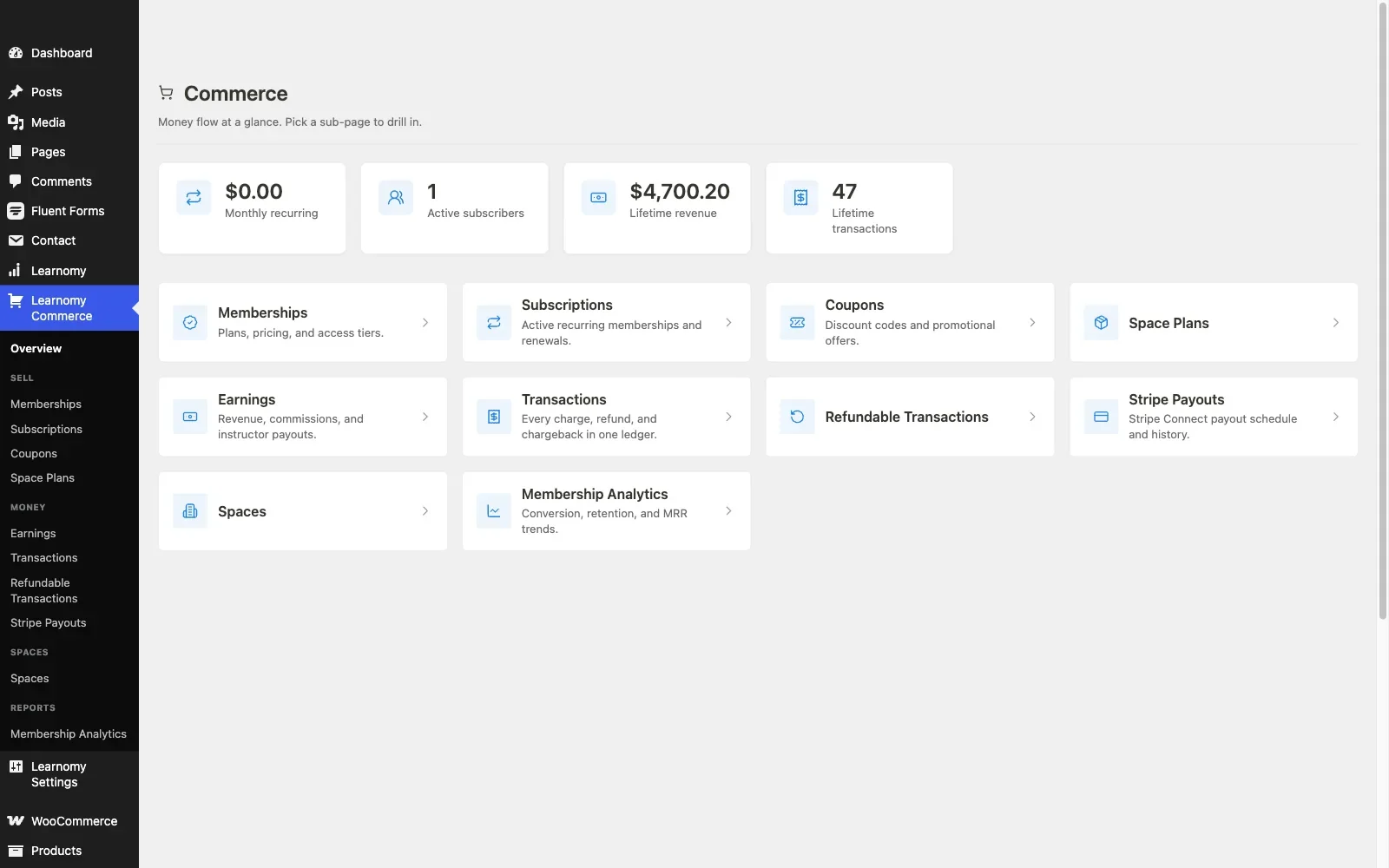
Pros: Stripe and PayPal native with atomic enrollment; coupons and commission splitting included; payment data unified with learning analytics; no platform fees; community-native design.Cons: gateway list is focused on the global baseline rather than dozens of regional processors; subscription-style recurring billing is MemberPress’s home turf, not Learnomy’s. Details at learnomy.app.
2. MemberPress Courses, the billing engine
If your revenue model is recurring, subscriptions, tiered memberships, free trials converting to paid, MemberPress is the strongest billing machinery in WordPress with courses attached: native Stripe and PayPal, proration, trial logic, dunning for failed renewals, and content protection rules that revoke cleanly on lapse. The course builder itself is serviceable rather than deep, which is the trade: you are buying a billing engine that teaches, not a teaching engine that bills, exactly the architecture we recommended for membership-led sites in the membership LMS guide.
Pros: best recurring billing in the category; clean lapse handling; native gateways. Cons: shallow course tooling; no instructor payouts; wrong shape for per-course selling.
3. Tutor LMS, native gateways for marketplaces
Tutor LMS ships native gateway support alongside its WooCommerce path, and its marketplace layer, instructor registration, earnings, commission configuration, withdrawals, is the most developed of the conventional LMS plugins. For a multi-instructor academy monetizing per-course, that combination is genuinely competitive. The recurring caveats from our Tutor LMS analysis stand: the useful machinery concentrates in premium tiers, and community integration stays thin.
Pros: developed marketplace payout flow; native + Woo flexibility. Cons: premium gating; shallow BuddyPress fit.
4. LearnDash, basic native, ecosystem for more
LearnDash includes straightforward Stripe/PayPal checkout for simple selling, and its honest positioning is that serious commerce routes through the ecosystem, WooCommerce integration for gateway breadth, further add-ons for subscriptions and group licensing. That is the familiar LearnDash bargain from our developer guide: everything is possible, every piece is another product in your stack.
Pros: workable native basics; unmatched ecosystem for complex models. Cons: assembly beyond the basics; payout features live elsewhere in the stack.
5. LifterLMS, commerce via add-ons
LifterLMS’s access-plan system, per-course pricing, payment plans, sales pages, is genuinely well designed, and it activates through gateway add-ons (Stripe, PayPal) or the WooCommerce bridge. The design is sound; the assembly is the cost, as mapped in our LifterLMS guide. Its payment-plan support (installments without full subscription machinery) is a differentiator worth noting for higher-priced courses.
Pros: thoughtful access-plan model; installment support without full subscription machinery; both native and WooCommerce-bridged checkout paths available. Cons: gateway add-ons to assemble; no payout engine.
6. MasterStudy LMS, premium-tier gateways
MasterStudy’s free tier already includes native Stripe and PayPal checkout, wrapped in the category’s most polished purchase UI, with marketplace-style instructor features and coupon support moving into the premium tier. The strategic constraints from our MasterStudy guide apply unchanged: drip and certificates are premium-gated, documented CSS conflicts show up across various themes, no community story.
Pros: polished purchase experience; marketplace features. Cons: premium gating; theme gravity.
7. Sensei LMS, payments mean WooCommerce
Sensei’s payment answer is a clean delegation: install WooCommerce, sell courses as products. There is no native alternative, which is either fine (you run Woo anyway) or disqualifying (you wanted an LMS, not a store). We covered that architecture’s full implications in the WooCommerce comparison.
Pros: inherits Woo’s gateway breadth and tax tooling. Cons: no payments without Woo; retail-shaped checkout for learning.
8. LearnPress, gateways as add-ons
LearnPress treats each gateway as a separate add-on, Stripe here, PayPal there, WooCommerce bridge elsewhere, the purest expression of the assembly model we documented in the LearnPress alternatives guide. It works once assembled; the assembly, and its update-cycle fragility, is yours forever.
Pros: pay only for the gateways you need. Cons: maximum assembly; sync seams; uneven add-on quality.
Instructor payouts and commission splitting
The payment feature that separates community-scale ambitions from solo shops is the payout side. The moment a second instructor sells a course on your site, you owe someone money on a schedule, and doing that from order exports and a spreadsheet stops scaling almost immediately. Three platforms here have a real answer: Learnomy’s native commission engine tracks per-instructor earnings automatically inside the platform; Tutor LMS’s marketplace layer handles commissions and withdrawal requests in its premium tiers; MasterStudy offers marketplace features in the same premium-gated pattern. Everything else either ignores the problem or defers it to third-party marketplace plugins with their own integration burden. For a community site, this feature deserves more weight than it gets: communities naturally produce members qualified to teach, and the platform that makes member-taught courses financially frictionless converts your community’s expertise into catalog depth, the flywheel we described in building a student community around your course, running in reverse.
Coupons, promotions, and launch mechanics
Course revenue is spiky by nature, launches, seasonal pushes, partner promotions, and coupons are the mechanism, so their availability matters more than the feature-matrix line suggests. Learnomy and MemberPress include coupon systems as standard; LearnDash includes basic codes; Tutor and MasterStudy gate theirs behind premium tiers; LifterLMS and LearnPress route through add-ons or Woo. When evaluating, look past existence to mechanics: percentage and fixed discounts, expiry dates, usage limits, and per-course scoping are the working set for real campaigns. And test the redemption flow on mobile during evaluation, a coupon field that is clumsy on a phone quietly taxes every launch you ever run, since launch traffic skews heavily mobile from social and email clicks.
Refunds and the money-back path
Every course business refunds sometimes, and the refund path is where payment architectures show their seams. The questions to answer on staging, not in production: does refunding reverse course access automatically, or is that a manual step someone will forget? Does a partial refund behave sanely? Do instructor commission balances adjust when a refunded sale had a split? Platforms with atomic payment-enrollment coupling, Learnomy natively, MemberPress within its billing engine, handle reversal most cleanly because access and money live in one system. Bridged architectures (LMS plus WooCommerce) depend on the integration’s refund hooks, which is precisely the code path least exercised by happy-path testing and most represented in support forums. Whatever you choose, write your refund policy before launch, generous windows correlate with higher conversion, and rehearse one full refund end to end so the first real one is routine.
How we evaluated
Learnomy’s checkout, coupon, and commission flows were checked against its own product documentation and changelog as of September 2026; the other seven platforms were assessed through the same documented research pass across published capabilities, gateway documentation, and tier boundaries, with specific attention to enrollment atomicity and refund behavior, the failure modes that dominate real support threads. Where behavior could not be confirmed against official documentation, it is reported as researched rather than confirmed. Gateway availability and tier placement shift often; reconfirm on each vendor’s site and retest on staging with current versions before launch.
Common payment mistakes on course sites
Launching without a test purchase. Run a real transaction, test mode, then a live one you refund, through the exact flow students will use, including the confirmation email and first-login experience. A embarrassing number of launches skip this.
Ignoring the enrollment-atomicity question. Ask of any architecture: what happens if payment succeeds and enrollment fails? If the answer involves a sync job or a webhook retry, know your manual-fix procedure before you need it.
Adding payout debt silently. The day you invite a second instructor without commission machinery, you have created bookkeeping that compounds monthly. Choose a platform with native splitting before the marketplace ambition, not after.
Treating checkout UX as fixed. Watch someone buy on a phone. Every extra field, redirect, and cart step measurably costs enrollments, the platforms with purpose-built enrollment checkout win here structurally, not cosmetically.
Three revenue models, three right answers
Per-course sales inside a community: Learnomy, native Stripe/PayPal, coupons, atomic enrollment, and commission splitting in one platform, with the checkout feeling like joining rather than shopping. Recurring membership with courses as a benefit: MemberPress Courses, the billing engine is the product, and it is the best one. Multi-instructor marketplace at scale: Tutor LMS premium, the most developed conventional payout machinery, accepting its tier costs and community-integration gaps.
FAQ
Which WordPress LMS processes payments without WooCommerce? Learnomy (Stripe + PayPal native), MemberPress (full billing engine), Tutor LMS (native gateway options), and LearnDash (basic Stripe/PayPal). Sensei cannot; LearnPress and LifterLMS need gateway add-ons.
Which handles subscriptions best? MemberPress, by a distance, trials, proration, dunning, and clean lapse handling are its core competence. Woo-based stacks need the subscriptions extension; see our WooCommerce comparison for that path’s full cost.
Which supports instructor commissions natively? Learnomy ships a commission engine as standard; Tutor LMS and MasterStudy offer marketplace payout features in premium tiers. The rest defer the problem.
Do any of these take a cut of my revenue? No, that is the structural advantage of self-hosted WordPress over hosted course platforms: your gateway account, your money, no platform percentage. Gateway processing fees (Stripe’s, PayPal’s) apply everywhere and are not the platform’s.
Can I offer payment plans or installments? LifterLMS’s access plans handle installments natively; MemberPress can shape recurring billing into plan-like structures; on other platforms, installments typically mean subscription machinery or manual arrangements, confirm before promising them on a sales page.
What about regional gateways beyond Stripe and PayPal? The Woo-bridged architectures inherit WooCommerce’s long gateway tail, the legitimate reason to accept that path’s complexity. If your students are where Stripe and PayPal operate, native-checkout platforms cover you with far less machinery.
Verdict
Payment integration is where LMS marketing and LMS reality diverge hardest, so buy the checklist, not the phrase. For community sites selling courses, Learnomy covers the whole list as shipped: native Stripe and PayPal with atomic enrollment, coupons for launch mechanics, commission splitting for the marketplace future, and every payment event feeding the same analytics and community experience, with no platform taking a percentage of your work. MemberPress owns the recurring-billing scenario, and Tutor LMS the conventional marketplace one. Run the test purchase, rehearse the refund, and keep the money path as short as the learning path, on your own site, in your own community, through your own gateway account.















