Moving From BuddyPress to BuddyNext: What Moves, What Stays
A plain-English guide to moving a BuddyPress or BuddyBoss community to BuddyNext with the BuddyNext Importer: what comes across, what does not, how to rehearse, and what your theme and hosting need.

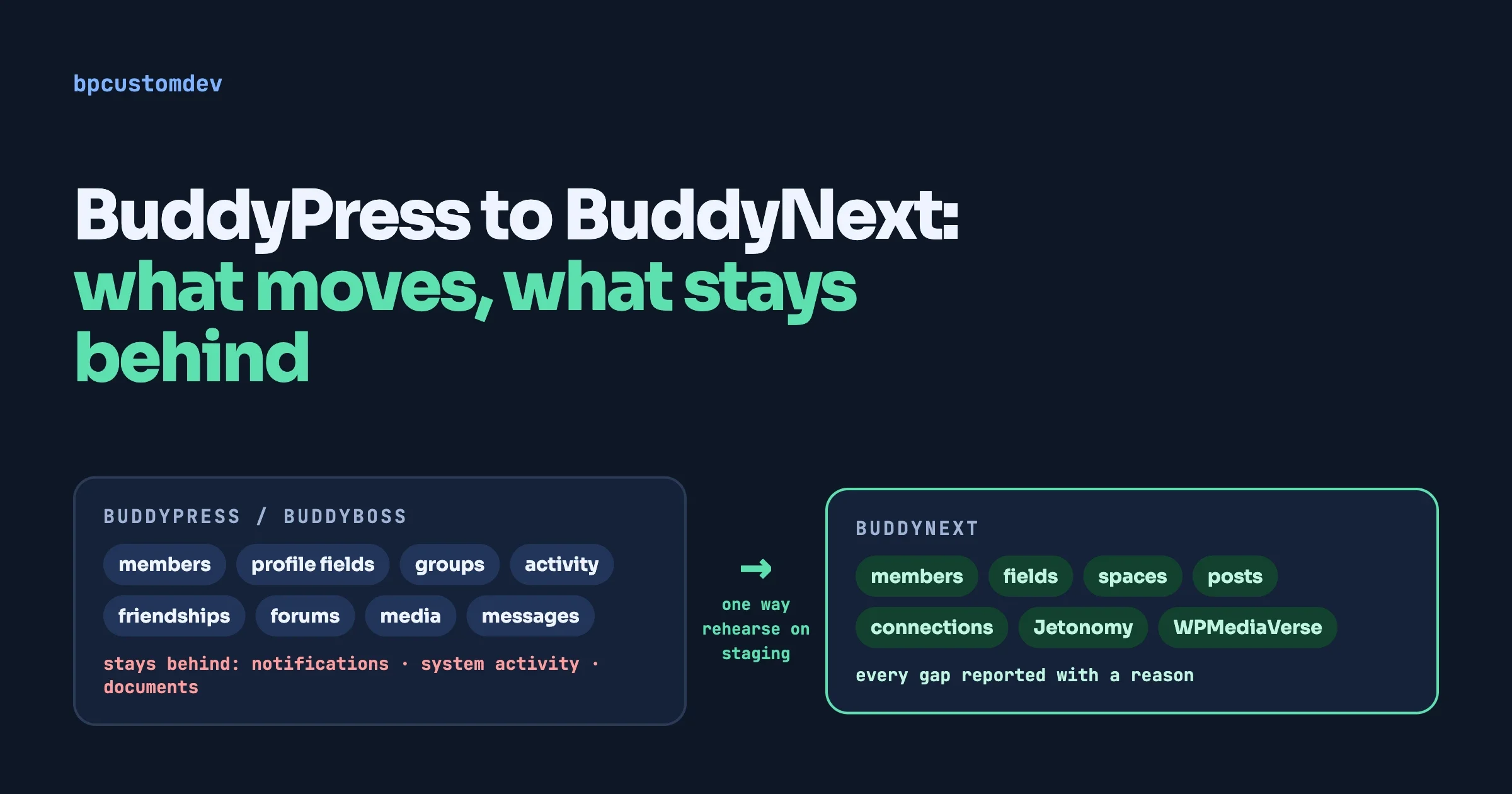
Is BuddyPress on its way out, and if you switch, will you lose your members? This guide to moving from BuddyPress to BuddyNext is for community owners who are asking that question. It explains when moving to BuddyNext makes sense, what the BuddyNext Importer brings across, what it leaves behind, and how to rehearse the move so nothing is a surprise on launch day.
What is the quick answer?
You can move a BuddyPress or BuddyBoss community to BuddyNext with the BuddyNext Importer. It carries members, profile fields, groups, activity, friendships, forums, media and private messages, and it tells you exactly what it could not carry. It cannot be undone from inside the plugin, so you rehearse on a staging copy first and only then repeat it on the live site. Your members keep their WordPress accounts, so they keep their logins.
In this guide
- Should you move at all?
- What does the importer bring across, and what does it leave behind?
- The step-by-step plan, from backup to launch
- What your theme needs
- What your hosting needs
- After the move: members, links and the first week
- For developers: commands and checks
- FAQ
How we checked this: this guide is written from the BuddyNext Importer’s own README, its data-mapping documents and its source code (the repository shows version 1.2.0), plus Reign’s BuddyNext setup documentation, all read in October 2026. The importer’s authors describe test migrations on disposable communities. We link the sources at the end.
Should I move from BuddyPress to BuddyNext at all?
Only if you have a reason. BuddyPress is still maintained, and many communities run on it happily. We wrote an honest look at that question in Is BuddyPress dead in 2026?, and we do not want to push anyone off a platform that works for them.
Moving tends to make sense in these cases:
- You want a newer community engine, with spaces, a modern feed and real-time features, and you are happy to build on it for years.
- Your BuddyPress site is held together by many add-ons, and you would rather have more of that built in.
- You are on bbPress for forums and want a more modern forum, using Jetonomy.
- You want the theme and the community engine to come from the same team.
Staying makes sense when your site is stable, your add-ons are all working and your members are happy. A migration is a one-way door. If nothing is wrong, you do not have to walk through it. If you are still weighing options, our guides to WordPress alternatives to BuddyPress and BuddyBoss alternatives cover the wider field.
What does the BuddyNext Importer bring across?
The importer is a one-time migration tool. It reads your community straight from the database, writes it into BuddyNext through BuddyNext’s own services (never by raw SQL), and then you delete it. It supports two sources: BuddyPress, including bbPress forums and rtMedia, and BuddyBoss Platform. According to its README it covers 18 steps across 12 selectable domains.
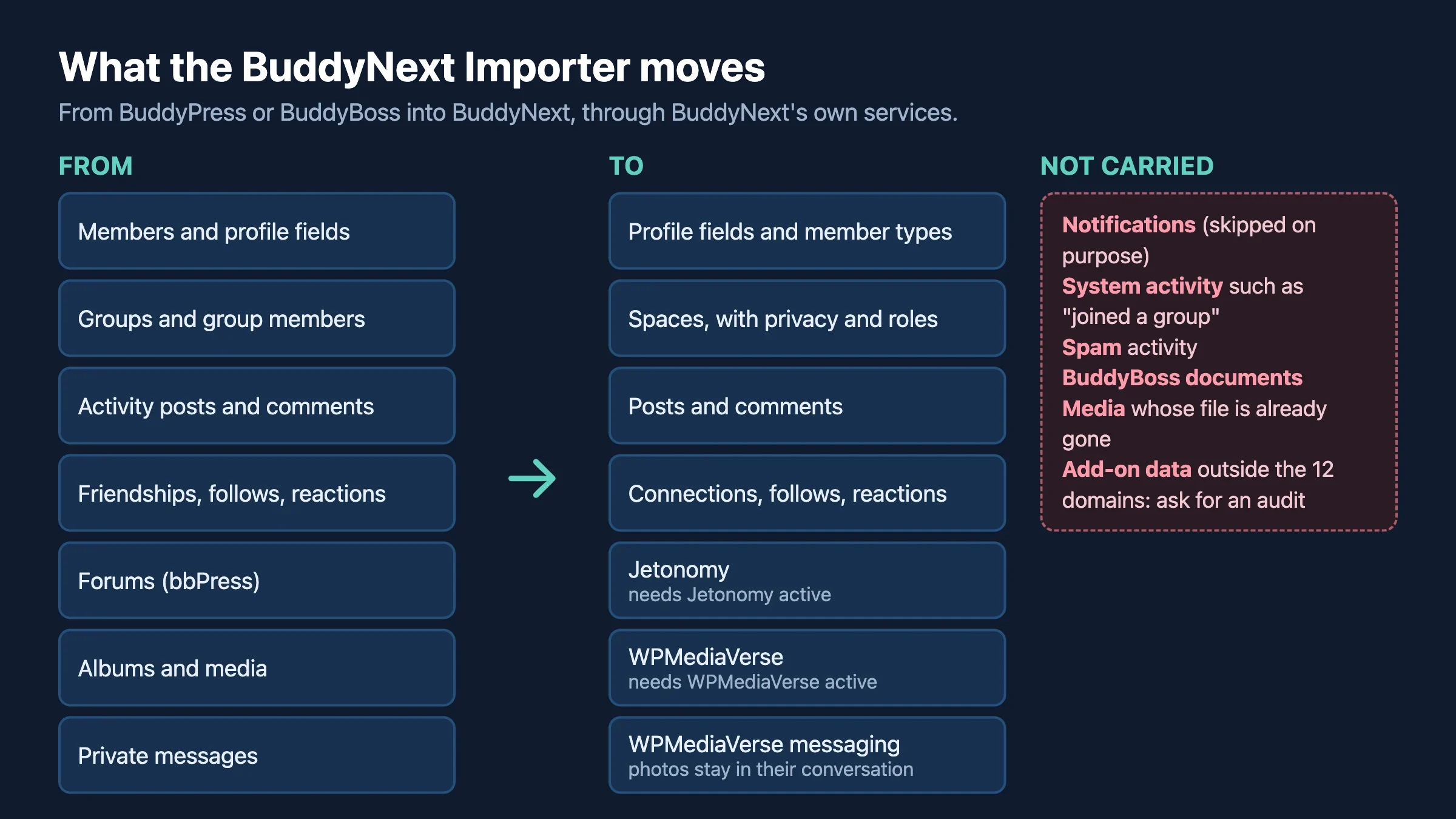
In BuddyPress or BuddyBoss | Where it lands | Notes |
|---|---|---|
Profile fields and values | BuddyNext profile fields | Per-field visibility is kept |
Member types | BuddyNext member types | A member holds one type, so extra types are dropped and reported |
Groups and their members | BuddyNext spaces | Public becomes open, private stays private, hidden becomes secret. Roles carry over |
Activity posts and comments | BuddyNext posts and comments | Threads rebuild. Blog-post activity becomes article posts |
Friendships | Connections | Pending requests stay pending |
Follows, reactions, favourites | Follows and reactions | Bookmarks on posts carry over |
Forums, topics, replies, tags | Jetonomy | Needs Jetonomy active |
Avatars and cover images | Member and space media | Existing pictures are never overwritten |
Albums and media | WPMediaVerse | Album order is kept. Needs WPMediaVerse |
Private messages | WPMediaVerse messaging | Photo attachments stay inside their conversation |
What does the importer leave behind?
Be clear about this before the old site is gone. The importer is open about what it does not carry.
- Notifications. They are skipped on purpose, because they are short-lived. Members start with a clean bell.
- System activity. Automatic entries such as “joined a group”, “became friends” and last-active timestamps are not copied, since BuddyNext can work them out from memberships and connections.
- Spam activity. Anything marked as spam in BuddyPress is skipped.
- BuddyBoss documents. Uploaded PDFs and other files kept in BuddyBoss documents are not carried, because the media engine does not support documents yet. The importer names the number before you run it.
- Media with a missing file. An rtMedia row whose original file was already deleted has nothing left to copy.
- Content that has nowhere to land. A post from a group that did not become a space is dropped instead of being published to the global feed. A post by someone who is not a member of the space it belongs to is refused. Comments on a post that did not migrate go with it.
- Follows and connections between members who block each other. These are not re-created.
- Anything outside the list above. If an add-on stores its own data in its own tables, the importer’s list does not mention it. Ask a developer to audit those before you decide.
The key promise is that nothing moves in the dark. For every domain the importer reports how many rows were in the source and how many it wrote, with a plain sentence explaining each row it did not write. Here is an example from the importer’s README.
posts       1838   1443
  395 posts were refused because their author is not a member of the space they belong to.
comments   11006   8983
  7819 comments were on a post that did not migrate, so they were dropped with it.
Read those reasons, not only the totals. A gap with a reason you accept is fine. A gap with no reason is a stop sign.
How was the importer tested?
The authors say each release is proven by migrating disposable but realistic communities and reconciling the result against an independent count of the source. Their README lists one BuddyPress and bbPress community (501 members, 20 groups, 1,838 activities, 16,802 comments, 6,757 friendships, 1,405 forum items and 200 message threads) and one BuddyBoss Platform 3.3.0 community (201 members, 20 groups, 1,284 friendships and more). It also says a second full run over a finished migration writes zero rows, so nothing duplicates and an interrupted run can resume.
That is the authors’ description. It is not a promise about your community, which is why you rehearse on your own data.
What is the step-by-step plan?
The importer’s README is firm about one thing: rehearse on a staging site or a local copy first. It says the migration cannot be undone from inside the plugin, and that reversing it means restoring a backup. Treat that as the plan’s backbone.
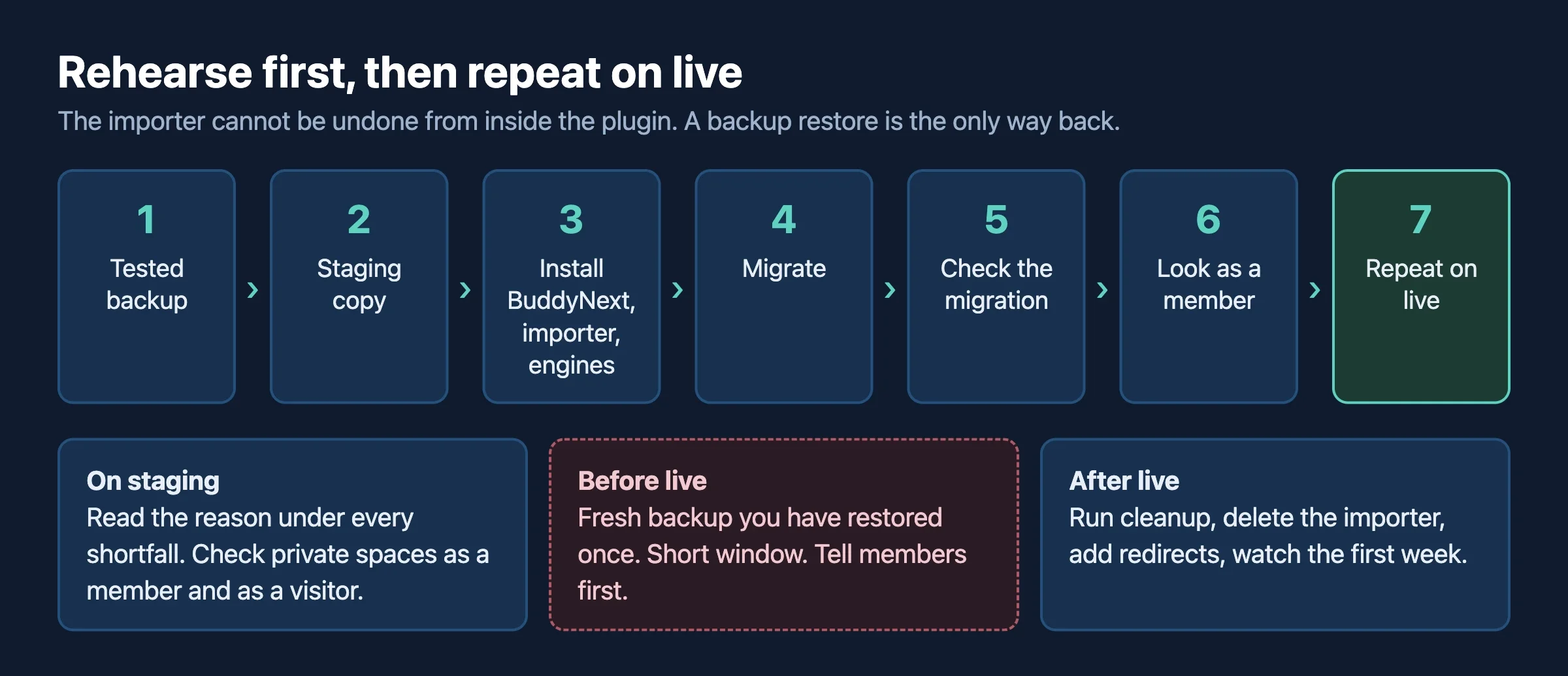
Step 1: Decide what you want to bring
Everything is selected by default, so an owner who ignores the options gets the full migration. You can leave domains out, such as messages or media, and add them later, because a later run tops up instead of duplicating. A domain you leave out on purpose is reported as “skipped by choice”, not as a shortfall.
Step 2: Take a backup you have tested
- Back up the database and the uploads folder.
- Restore that backup somewhere else and open it. A backup you have never restored is a hope, not a backup.
- Note your current member, group, activity and forum counts. You will compare them later.
Step 3: Make a staging copy
Use a host staging environment or a local copy (LocalWP, DevKinsta, wp-env and Docker all work, according to the importer’s README). Choose whatever is easiest to destroy and rebuild. Do the rest of the rehearsal there.
Step 4: Install the pieces on staging
- Check the requirements: WordPress 6.9 or newer, PHP 8.1 or newer, and BuddyNext active.
- Install BuddyNext. Add Jetonomy if you have forums, and WPMediaVerse if you have media or private messages. If an engine is missing, the importer skips that domain and says so. It never skips silently.
- BuddyPress and BuddyNext cannot run together. Reign’s documentation says they are mutually exclusive, so deactivate BuddyPress before you activate BuddyNext. The importer reads BuddyPress’s data from the database tables, which stay in place.
- Install and activate the BuddyNext Importer. Open Tools › Import to BuddyNext.
Check the importer version before you start. In the repository the plugin header says 1.2.0, but the latest published GitHub release at the time of writing is 1.1.0, so confirm which build you are given. Version 1.2.0 adds photos in BuddyBoss private messages, rtMedia albums and media never posted to activity.
Step 5: Read the source panel
The screen reads your source and writes nothing. It shows what the importer found and names content it cannot carry, such as BuddyBoss documents, before you press anything. Decide now whether any of that matters to you.
Step 6: Run the migration on staging
Press the migrate button on the admin screen, which runs with a progress monitor, or use the command line on large sites (see the developer section). During the run the importer is in “import mode”: no notifications, emails, webhooks or real-time messages fire for imported content, so your members do not get a flood of alerts.
Step 7: Check the migration
- Press Check the migration on the screen, or run the verify command.
- Compare totals against the source counts you wrote down in step 2.
- Read the reason under every shortfall.
- Confirm the privacy check. The importer verifies that no private or secret space content became publicly searchable.
Step 8: Look at it as a member would
Counts reconciling is not the same as the community feeling right. The importer’s README says so itself. Log in as a normal member and open a private space, a migrated discussion, a long activity thread, a member profile with custom fields and a conversation with photos. Then open the same pages as a logged-out visitor, and confirm the private ones are hidden.
Step 9: Fix, then repeat on live
- Note what looked wrong. Most issues are in the theme, menus or page setup, not the data.
- Schedule a short window on the live site and tell members in advance. Posts made after your copy was taken will not be in the staging data, so keep the window short.
- Repeat the install and migration on live with a fresh, tested backup.
- Run the checks again, then switch the community on for members.
- When you are done, run the cleanup step and delete the importer. Cleanup removes the importer’s mapping tables. It is final, because after it there is no duplicate protection, so do any top-up runs first.
Warning: do not run the importer on a live community you have not already copied somewhere else. If the result is wrong, the only fix is a database restore.
What does my theme need?
BuddyNext renders its own screens, and your theme styles them. Reign’s documentation says Reign detects BuddyNext and adapts without installing or configuring it, so you install and set up BuddyNext first and then judge how things look. Our sister site covers the Reign side in Keep Your Reign Site, Upgrade the Community, and BuddyX is the other theme we build for communities.
A few details from the Reign documentation are worth knowing:
- With BuddyNext active, WordPress login, register and reset links resolve to BuddyNext’s own hub (on a default install
/login/,/login/signup/and/login/reset/). This applies to the front end only, andwp-login.phpstill works for admin. - Reign makes sure the message, notification and user-menu icons are in the header, even if you trimmed them on BuddyPress.
- The friend-request header icon is not offered under BuddyNext, because it is a BuddyPress feature.
- If a sign-in popup is on in Reign, it wins over BuddyNext’s login screens. Leave it off if you want members to see BuddyNext’s.
What to check visually
- The header: bell, messages and avatar menu.
- Login and register on a phone.
- A profile with many custom fields.
- A space with a long feed and a space with images.
- The menu items that used to point to BuddyPress pages.
If your current theme is an older BuddyPress-only theme, test on staging with Reign or BuddyX before you commit. Our guide to BuddyPress hosting has more on pairing theme and server.
What does my hosting need?
The importer asks for PHP 8.1 or newer and WordPress 6.9 or newer, and BuddyNext itself will have its own needs for memory, caching and background work. The importer uses keyset pagination instead of OFFSET and is resumable, which helps large communities, but a slow or underpowered host still makes the run long.
We do not want to repeat what is already written well. Read our BuddyPress hosting guide for the server basics and the BuddyX team’s community site hosting guide for BuddyNext for PHP, memory, CPU, cache, cron and email settings with a printable checklist.
What should I do after the move?
Do my members need to log in again?
Members are WordPress users, and the import order in the importer’s mapping document starts with users that already exist. So accounts and passwords stay. Still, tell people the community has moved, what looks different and where to find things. A short email before and after the move works best.
What about old links?
The importer’s documentation does not describe URL redirects. Old BuddyPress addresses such as member, group and activity pages will not match BuddyNext’s addresses by magic. Make a list of your most shared pages (top groups, key forum topics, profile URL patterns), check where each one lives on the new site, and add redirects for the important ones. Test on staging.
The first-week checklist
- Watch for support messages that mention a missing post, group or photo. Check each against the shortfall reasons you saved.
- Ask two or three active members to walk the site and tell you what feels off.
- Check your email deliverability and notification settings, since the import itself sent none.
- Keep the old site backup for a few weeks before you delete anything.
- Review moderation settings, since spaces now have BuddyNext’s roles and privacy rules.
What should developers know?
The importer has a WP-CLI interface that mirrors the admin screen. These commands come from its README.
# read the source, write nothing
wp buddynext-import stats
# run it
wp buddynext-import migrate-all
# coverage, per-domain totals, sampled objects
wp buddynext-import verify --samples=20
# drop the mapping tables when you are done
wp buddynext-import cleanup
To choose domains, use the skip and only options. A typo is an error, not a silent no-op, and picking a child domain pulls in its parents.
wp buddynext-import migrate-all --skip=messages,media
wp buddynext-import migrate-all --only=reactions
A few design points explain how it behaves on large sites:
- Writes go through BuddyNext’s service layer, so counters, the search index, hashtags, mentions and privacy rules stay correct.
- A source-ID to BuddyNext-ID map makes every write idempotent and lets a failed run resume.
- Reads use keyset pagination (
WHERE id > ? ORDER BY id LIMIT ?). - The CLI, background runner, REST endpoint and admin screen all read one step registry, so they report the same steps.
Verification queries
Beyond the built-in verify command, you can spot-check counts. Adjust the table prefix to your site. The BuddyNext table names below come from the importer’s README, and the BuddyPress ones are the standard names.
-- source groups
SELECT COUNT(*) FROM wp_bp_groups;
-- migrated spaces
SELECT COUNT(*) FROM wp_bn_spaces;
-- source friendships
SELECT COUNT(*) FROM wp_bp_friends;
-- migrated connections
SELECT COUNT(*) FROM wp_bn_connections;
Expect small differences where the importer lists a reason, such as blocked pairs or self-references. A difference with no listed reason needs investigating before you go live.
What should I check before I commit to the move?
Spend an afternoon on these questions before you book any downtime. Most migration surprises come from things nobody looked at in advance.
- Which add-ons do you run? List every BuddyPress add-on, from reactions to events to polls. For each, decide whether BuddyNext covers it, whether it has a BuddyNext version, or whether you can live without it. Remember the importer only knows the domains listed earlier.
- How big is the community? Count members, groups, activity items, forum topics, media files and message threads. Large numbers mean a longer run and a stronger need for a proper server.
- Do you use private or hidden groups? They are the content most worth protecting. Plan to open a few of them as a member and as a visitor after the staging run.
- Who owns the old content rules? If moderators rely on specific roles or reports, write down how they work today so you can check them afterwards.
- What does your theme do for the community? Custom templates or child-theme overrides for BuddyPress pages will not carry over to BuddyNext screens. List them so your developer can rebuild what matters.
- When is your quietest week? Pick the launch window around your members’ habits, not around your own calendar.
- Who signs off? Decide in advance who looks at the staging result and who says go. A migration without a clear sign-off tends to drift.
Write the answers in one shared document. It becomes your migration brief, and it is the first thing we ask for when we run a move for a client.
When don’t you need this?
If your community is small, you can sometimes start fresh and invite members again, and that may be easier than a migration. If you have heavy custom code tied to BuddyPress internals, a migration may need development work around it. And if your site is working well, there is no rule that says you must move.
FAQ
Will I lose my members if I switch to BuddyNext?
No. Members are WordPress users and their accounts stay. The importer also carries their profile fields, groups, activity, friendships, avatars and more. Notifications and system activity entries are not copied.
Can I run BuddyPress and BuddyNext at the same time?
Not as a supported setup. Reign’s documentation says they are mutually exclusive at runtime. The importer reads the BuddyPress data from the database after you switch.
Can I undo the migration?
Not from inside the plugin. The README says reversing it means restoring a backup, and an undo button is not planned. That is why you rehearse on staging first.
Does it work with BuddyBoss?
Yes. BuddyBoss Platform is one of the two supported sources. BuddyBoss documents are the notable thing it does not carry.
How long does a migration take?
It depends on your data and your server. The importer is built for large communities, with resumable runs, but we will not give you a number without seeing your site. A staging run gives you a real estimate.
Do I need Jetonomy and WPMediaVerse?
Only for forums (Jetonomy) and for media and private messages (WPMediaVerse). If you do not have those, the importer skips those domains and says so.
Want us to move your community for you?
We build custom community platforms and run migrations. We can audit your BuddyPress or BuddyBoss site, rehearse the move on staging, fix the theme and redirects, and launch it with you. Talk to us about moving your community, and tell us which add-ons you run so we can check them first.
Sources we checked
- BuddyNext Importer on GitHub: README, data-mapping documents and source
- BuddyNext Importer releases
- BuddyNext on GitHub
















