WordPress BuddyPress Alternatives in 2026: When to Switch and What to Switch To

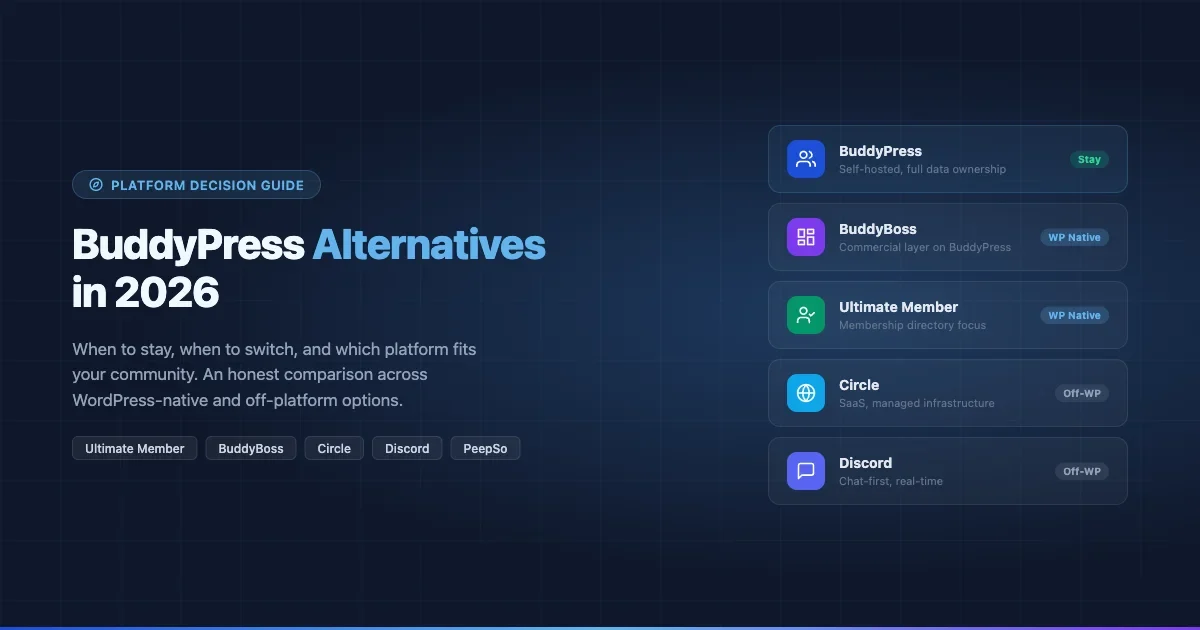
BuddyPress still runs on tens of thousands of sites. It is free, deeply integrated with WordPress, and gives you full ownership of your community data. But it is also 15 years old, and the landscape around it has changed dramatically. Circle has raised serious funding. Discord has eaten the casual end of the market. BuddyBoss has built a commercial layer on top of BuddyPress itself. So when a client asks “should we stay on BuddyPress or move?” the honest answer is: it depends on what you are actually trying to build, and the answer is different today than it was in 2020.
This guide walks through that decision plainly. No platform sponsorships, no affiliate angles. You will find when BuddyPress is genuinely the right call, which WordPress-native alternatives deserve serious consideration, when it makes sense to leave WordPress entirely, and what a real migration looks like for each path.
Why People Start Asking the Question
Most “should I switch from BuddyPress” moments are triggered by one of three things: a performance problem at scale, a feature gap that requires too many plugins to fill, or a design refresh where the team discovers the default BuddyPress templates look dated compared to what community members expect in 2026.
Performance problems are often solvable. BuddyPress itself is not inherently slow, but the stack around it (shared hosting, uncached activity queries, unoptimized media) frequently is. Before switching platforms over speed, run a proper server-side profiling session. Many sites that “outgrew BuddyPress” were actually on $20/month shared hosting with no object cache.
Feature gaps are more legitimate. BuddyPress does not have a native video room, a native paid membership gate, or a native AI content moderation system. If you need all three and you need them now, the integration work to add those via separate plugins is real. Whether that work is worth it compared to switching depends on how much custom data and community behavior you have already built up on your existing site.
Design fatigue is the most dangerous trigger because it leads to the most expensive mistakes. A platform switch to solve a visual problem is almost always wrong. Theming BuddyPress or switching to BuddyBoss (which is a commercial BuddyPress theme and plugin bundle) will solve a design problem at a fraction of the cost of migrating 50,000 members to a SaaS platform.
When to Stay on BuddyPress
BuddyPress is the right choice in several specific situations, and being honest about them matters before evaluating anything else.
You need full data ownership
Every member profile, activity feed, message thread, and group post lives in your own MySQL database. You can query it directly. You can export it. You can migrate it. With a hosted platform like Circle or Mighty Networks, your community data lives on their infrastructure under their terms of service. If they raise prices, get acquired, or shut down, your migration options are limited to whatever export tools they provide at that moment.
For communities where the data itself is the business asset (alumni networks, professional associations, advocacy groups), self-hosted WordPress with BuddyPress is the defensible choice. This data ownership question is also one of the central issues in the broader debate about custom community platforms versus SaaS solutions.
Deep WordPress integration is a requirement
If your community is tightly coupled to WooCommerce (members buy courses and unlock groups), LearnDash (forum activity tied to course completion), or custom post types that feed into member profiles, BuddyPress is the only option that sits natively inside the same WordPress installation. Every other alternative requires API bridging, and API bridges break.
You have budget constraints
BuddyPress core is free. A well-configured BuddyPress site on a $30/month VPS with Redis object caching and a clean theme can serve a community of 10,000 active members. Circle starts at $99/month and scales up from there. Mighty Networks starts at $41/month but its most capable tier is $360/month. These are real costs at real scale.
Your community needs heavy customization
BuddyPress has 15 years of hooks, filters, and documented extension points. If you are building a community that has unusual requirements (a professional licensing body with custom profile fields tied to an external credentialing database, a neighborhood platform where groups are tied to geographic boundaries), BuddyPress gives you the access you need. SaaS platforms give you what their API exposes, which is rarely enough for genuinely custom requirements.
WordPress-Native BuddyPress Alternatives
If you want to stay in WordPress but BuddyPress is not the right fit, three options deserve serious evaluation: Ultimate Member, PeepSo, and BuddyBoss. The overview of BuddyPress alternatives for WordPress sites from Wbcom Designs is worth reading alongside this guide for additional plugin context.
If you’d rather own your platform than rent a SaaS like Circle, Skool, or Discord, BuddyNext is a free, standalone community platform worth a look, an activity feed, member profiles, Spaces (groups), and deep moderation in one plugin, built as its own modern architecture rather than on top of BuddyPress (so it isn’t a BuddyPress add-on and existing BuddyPress plugins won’t run on it). Because it runs on your own site you keep full ownership of member data, and its Pro tier adds native Stripe memberships when you’re ready to monetize.
Ultimate Member
Ultimate Member is primarily a membership and user profile plugin, not a social network builder. Its strength is front-end profile pages, custom registration forms, role-based access control, and conditional content visibility. If what you actually need is a directory of members with profiles, not a social activity feed with groups and messaging, Ultimate Member is a cleaner solution than BuddyPress.
Its free tier is genuinely useful. Paid extensions add things like messaging, WooCommerce integration, and profile completeness tracking. The extension ecosystem is smaller than BuddyPress but the core feature set has less surface area, which means less that can break.
Where it falls short: there is no group-based organization of members (not natively), no activity feed, and the messaging module is basic compared to BuddyPress messaging plugins. If you need a social graph with bidirectional friendships, activity streams, and sub-communities organized as groups, Ultimate Member is not a replacement for BuddyPress. It is a different product that solves adjacent problems.
Best fit: membership directories, online courses with member profiles, B2B portals where you need custom fields and role access control but not social interaction.
PeepSo
PeepSo is the closest direct replacement for BuddyPress in the WordPress ecosystem. It has an activity stream, groups, profiles, private messaging, and an extension system for adding video, reactions, polls, and gamification. The interface is modern by default, which is the main reason people consider it as an alternative to BuddyPress.
The trade-off is cost. PeepSo core is free, but the bundle that gets you all the extensions (video, reactions, notifications, WooCommerce integration) runs at $449/year for the full “Reactor” bundle. BuddyPress with the equivalent third-party plugins can be assembled for less, though the integration quality varies.
PeepSo also has a smaller developer ecosystem than BuddyPress, which means finding a developer familiar with customizing it is harder. BuddyPress has a much larger pool of experienced developers available on freelance platforms and agencies.
Best fit: clients who prioritize out-of-the-box visual polish, do not need deep custom development, and have budget for the annual extension bundle.
BuddyBoss
BuddyBoss is built on top of BuddyPress. It is not a separate platform; it is a commercial theme and plugin bundle that replaces the default BuddyPress templates and adds features that BuddyPress core does not include natively: a native mobile app builder, course integration with LearnDash and Lifter LMS, social learning groups, and a significantly more polished default design.
This makes the migration path from BuddyPress to BuddyBoss the least risky of all the options discussed here. Your member data stays in the same database. Your user accounts migrate without any export/import. The activity feed, groups, and friendships all carry over because BuddyBoss is reading from the same BuddyPress data tables.
The cost is $228/year for the theme and platform plugin bundle, or higher tiers for multi-site. This is real money for community sites with thin revenue, but it is substantially less than SaaS alternatives at equivalent feature levels.
Where BuddyBoss falls short: it is still WordPress, which means it inherits WordPress performance requirements. If your community is generating millions of activity items per month, you need proper database infrastructure whether you are on BuddyPress or BuddyBoss. The BuddyBoss mobile app also requires a separate subscription and has been criticized for limited deep-linking and push notification reliability.
Best fit: online course creators, membership sites, and learning communities where the BuddyPress data model is already the right fit but the default BuddyPress design and feature set is insufficient.
Leaving WordPress Entirely
Sometimes the right answer is to move off WordPress. This is a serious decision with real migration costs, and it should be made based on concrete requirements, not frustration with a bad server setup or a theme that needs updating.
Circle
Circle is the community platform that most often comes up when people say “we’re leaving BuddyPress.” It has a clean interface, good course integration (via Circle Courses), a spaces-based content organization system, live streams, and a native app that actually works. It is well-funded, actively developed, and has a large user base of creators and membership operators.
The realistic cost for a medium-sized community is $199/month on the Professional plan (which unlocks custom domains, white-labeling, and API access). At that price point, you are paying for the platform, the CDN, the hosting, the app, and the development team. For a creator with 2,000 paying members at $30/month, that is less than 0.3% of revenue. For a nonprofit community or a community that does not monetize directly, it is a significant line item.
What you give up: data portability. Circle’s export tools give you CSVs of member emails and some post content, but recreating the social graph (who is friends with whom, group memberships, activity history) on another platform is not possible from an export. You are also subject to Circle’s terms of service, which have changed in ways that affected adult content creators and some political communities in recent years.
Best fit: course creators, coaches, paid newsletters expanding into community, and professional communities where the design and UX quality of the platform directly affects member retention and willingness to pay.
Discord
Discord is relevant to this conversation because many communities have migrated to it, not because it is a feature-equivalent replacement for BuddyPress. Discord is a chat-first, real-time platform. It has channels, roles, voice and video rooms, and a bot ecosystem. It does not have member profiles with custom fields, activity feeds, or a content library in the way BuddyPress does.
The migration from BuddyPress to Discord makes sense for a specific type of community: one where the primary value is real-time conversation and peer-to-peer interaction, not curated content or member profiles. Developer communities, gaming communities, and hobbyist groups tend to thrive on Discord. Professional learning communities, alumni networks, and membership sites that sell access do not, because Discord’s free model makes it difficult to gate access reliably and its search is poor for finding archived content.
Discord is free for communities, with Nitro subscriptions for individual users who want extra features. Server boosting unlocks some server-level features. There is no direct cost to running a Discord server, which makes it attractive for communities with no monetization.
Best fit: developer and technical communities, gaming and hobby groups, any community where real-time conversation is the primary value and content archiving is secondary.
Elgg
Elgg is an open-source social networking engine that predates BuddyPress. It runs as a standalone PHP application (not a WordPress plugin) and has a plugin ecosystem for adding features. It is used primarily by universities, nonprofits, and government organizations that need self-hosted social networking with heavy customization requirements.
Elgg is not a mainstream choice in 2026. Its ecosystem is smaller than BuddyPress, the default installation requires more technical configuration, and finding developers with Elgg experience is harder than finding BuddyPress developers. Where it genuinely differs from BuddyPress is in its separation from WordPress: if you want a community platform that is not tied to the WordPress core update cycle and content model, Elgg gives you that.
Best fit: organizations that need self-hosted community software outside of WordPress, particularly in education and public sector contexts where WordPress is not the institutional CMS of choice.
HumHub
HumHub is a self-hosted social network platform built on the Yii PHP framework. It has a clean modern interface, a module system for adding features, and free community edition alongside a paid enterprise version. Like Elgg, it runs as a standalone application rather than inside WordPress.
HumHub’s interface is more polished than Elgg’s out of the box, and its space-based content organization (similar to Circle’s “spaces”) maps well to communities that need sub-groups with their own content feeds. The free community edition has enough features for small to medium communities. The enterprise edition ($490/year for 100 users) adds SSO, advanced analytics, and priority support.
The same developer ecosystem caveat applies: HumHub has fewer available developers than BuddyPress, and custom module development requires Yii PHP knowledge rather than the WordPress plugin development skills that are widely available.
Best fit: organizations that want self-hosted community software with modern UX, are willing to leave the WordPress ecosystem, and have in-house PHP development capacity.
Migration Steps for Each Path
Understanding the migration effort for each option is as important as evaluating the features.
BuddyPress to BuddyBoss
This is the lowest-risk migration because you are not moving data between databases.
- Purchase the BuddyBoss Platform and BuddyBoss Theme.
- On a staging server, install BuddyBoss Platform. It will detect your existing BuddyPress installation and offer a migration assistant.
- Deactivate BuddyPress. BuddyBoss Platform takes over reading the same activity, groups, friendships, and member tables.
- Test thoroughly. Check that activity notifications, group memberships, and private messages are all intact.
- Activate BuddyBoss Theme or configure your existing theme with BuddyBoss compatibility mode.
- Push to production. The migration itself is typically a few hours of testing rather than days of data work.
Risks: BuddyPress plugins that hook into BuddyPress internals may not be compatible with BuddyBoss. Audit every active BuddyPress extension before migrating.
BuddyPress to Ultimate Member
This migration only makes sense if you are changing your community model from “social network with groups and activity” to “membership directory with profiles.” You cannot migrate the activity stream; you can migrate user accounts and some profile field data.
- Export BuddyPress xProfile field data via WP-CLI or a custom export script.
- Map BuddyPress profile fields to Ultimate Member fields. Fields that do not map must be re-entered or dropped.
- Set up Ultimate Member registration and profile templates on staging.
- Import user profile data. WordPress user accounts carry over natively since both plugins use the WP Users table.
- Deactivate BuddyPress and activate Ultimate Member.
- Communicate clearly with your community about what is changing and what will no longer be available.
Expect to lose: group memberships, activity history, private messages, friend relationships. This migration is a platform-model change, not a feature-equivalent move.
BuddyPress to Circle
This is the most common off-WordPress migration request and also the most disruptive.
- Export member email addresses from WordPress. These are the basis for recreating accounts in Circle.
- Set up your Circle community structure: create Spaces that correspond to your BuddyPress groups.
- Use Circle’s bulk invite tool to send invitations to your member email list.
- For paid membership: configure Circle’s native payment integration or connect Stripe directly.
- Set a “go dark” date for your BuddyPress site. Communities rarely migrate cleanly; you need a date after which the old site is read-only or inaccessible to drive members to the new platform.
- Content migration: post content from BuddyPress groups does not export to Circle natively. Pin the most important content manually in the new Spaces. Archive the rest.
Realistic expectation: plan to lose 20-40% of your member engagement during a migration of this type. Members who are less active will not re-register. The community will feel smaller before it feels better. That is a normal outcome of any platform migration, and it should be factored into the decision.
BuddyPress to Discord
- Create your Discord server with channels that correspond to your most active BuddyPress groups.
- Set up roles that correspond to your BuddyPress member types or subscription tiers.
- If gating access: use a bot (such as MEE6 or a custom bot via Discord’s API) to verify member status and assign roles.
- Send a migration announcement to your existing members with a clear join link.
- Run both platforms in parallel for 30-60 days. Most engaged members will migrate; less active members will not.
Content from BuddyPress does not migrate to Discord. Discord is a fresh start for the community’s content history.
A Framework for Making the Decision
If you are trying to land on a decision, work through these questions in order.
Do you own the data? If data ownership is non-negotiable (healthcare, legal, education with FERPA requirements, political organizing), the answer is self-hosted BuddyPress, BuddyBoss, Elgg, or HumHub. Circle, Discord, and any SaaS platform is off the table.
Is WordPress the right foundation? If your site is already a WordPress site with WooCommerce, courses, or custom content, staying in WordPress (BuddyPress, BuddyBoss, Ultimate Member, PeepSo) avoids an entire integration layer. If your site is purely a community with no WordPress-specific content needs, leaving WordPress is a legitimate option.
What is the scale? Under 5,000 active members, almost any option works. Over 50,000 active members, BuddyPress and BuddyBoss require proper server infrastructure (dedicated database, object caching, media CDN). Circle and Discord handle scale more transparently because the infrastructure is managed for you.
What is the primary community behavior? Real-time conversation: Discord. Async content with courses: Circle or BuddyBoss. Directory and membership management: Ultimate Member. Full social graph with groups: BuddyPress or BuddyBoss. Self-hosted outside WordPress: Elgg or HumHub. For a head-to-head comparison across the major players, see BuddyPress vs Circle vs Mighty Networks vs Skool in 2026.
What is the budget? Free with server costs: BuddyPress core, Discord, Elgg, HumHub community edition. Low cost ($200-500/year): BuddyBoss, PeepSo Reactor, HumHub enterprise. Medium cost ($100-400/month): Circle. High cost at scale (custom): Any platform with a large, active member base requires real infrastructure investment regardless of what the licensing costs.
What This Means for Your Decision in 2026
The BuddyPress ecosystem is more viable in 2026 than it was four years ago, largely because BuddyBoss has built a credible commercial layer on top of it and because the WP-native social tools (Reactions, enhanced notifications, better REST API coverage) have matured. The case for migrating off BuddyPress to a SaaS platform has weakened except in very specific circumstances.
The strongest case for staying on BuddyPress is when you combine data ownership requirements, deep WordPress integration needs, and custom development capacity. The weakest case is when you are a solo creator or small team building a paid membership community without technical resources: in that scenario, Circle’s UX and managed infrastructure genuinely justify the subscription cost.
Platform migrations are expensive in time, member loss, and development cost. Run the real numbers before committing to one. The right platform is almost always “the one your team can actually operate well” rather than “the one with the best feature list.”
If you are evaluating a migration from BuddyPress and want an independent assessment of whether your specific use case justifies it, the answer depends heavily on your current stack, your member data, and what you are actually trying to accomplish. Get that analysis done before signing up for a trial.