Community Notification Systems Compared: In-App, Email, Push, Webhooks (Build or Buy in 2026)

Every community loses members the same way: they miss something that mattered, stop checking in, and drift. The root cause is almost always the notification system. Too noisy and people mute everything. Too quiet and key moments go unseen. Getting this right is one of the highest-leverage decisions you make when building or running an online community in 2026.
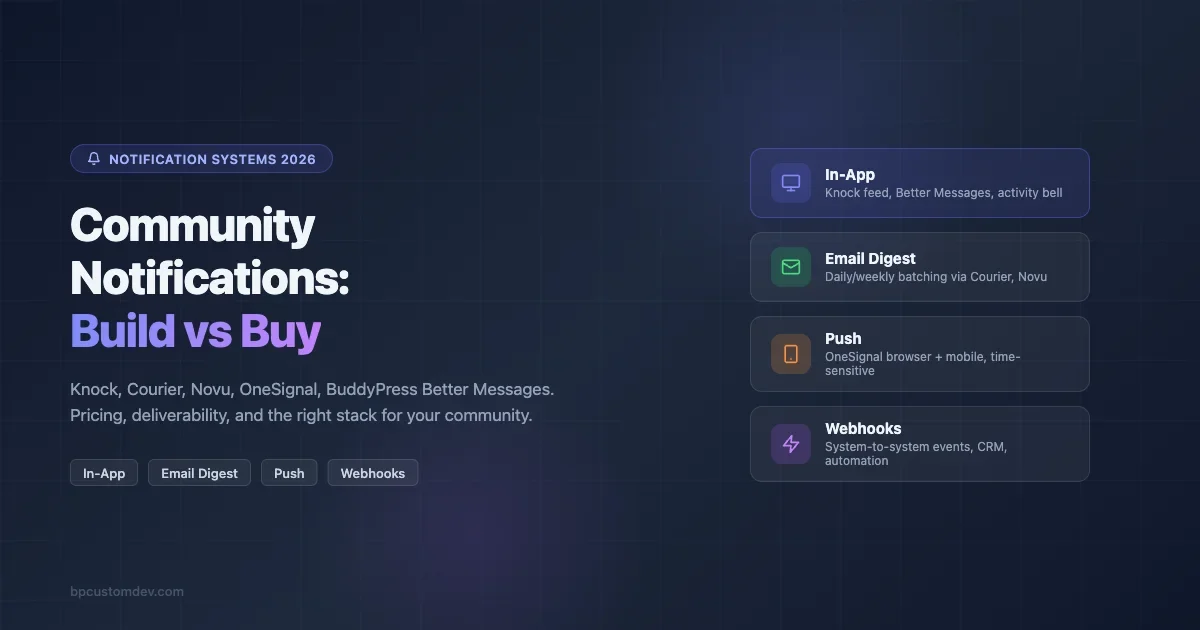
This guide breaks down the four main notification channels (in-app, email, push, and webhooks), then looks at the leading managed APIs (Knock, Courier, Novu) alongside purpose-built tools (OneSignal for push, BuddyPress Better Messages for in-app). For each option you will find realistic pricing, what it handles well, and where it falls short. The final section gives you a decision framework: when to build, when to buy, and when to combine both.
Why Notification Architecture Matters More Than the Tool You Pick
Most communities default to whatever ships with their platform. WordPress sites get the built-in email notification from BuddyPress or bbPress. Slack-based communities rely on Slack’s own mention system (and many teams eventually end up moving from Slack to a dedicated community platform once the notification and search limitations become costly). Discord communities use role pings. These defaults work at small scale, but they share a structural problem: they were designed for the platform, not for your community’s specific engagement patterns.
The difference becomes visible around 500 active members. At that point you start seeing:
- Members who only check in when pinged directly, missing broader community activity
- Email open rates dropping below 20% because every notification looks the same
- No visibility into which notification type actually drives return visits
- Zero ability to suppress notifications for specific user segments (power users vs. casual members)
A purpose-built notification system solves these by giving you channel control, delivery tracking, preference management, and templating that platform defaults don’t offer.
The Four Notification Channels: What Each One Is Good For
In-App Notifications (Activity Feed / Bell Icon)
In-app notifications show up inside your community platform. Members see them while they’re already logged in. They work well for ambient updates: someone liked your post, a new reply appeared in a thread you follow, a badge was awarded. Because the member is already in your space, the action required to engage is low.
Weakness: in-app notifications have zero reach for inactive members. If someone hasn’t logged in for three days, your in-app bell ring is invisible. They work as a retention reinforcer for already-active members, not as a re-engagement tool.
Email Notifications
Email is still the highest-reach channel for communities. You own the address, it works regardless of platform, and digest formats let you batch low-urgency activity into a single daily or weekly send. The tradeoff is latency: members don’t see emails instantly, and inbox competition is fierce.
The formats that work in community email:
- Immediate transactional: direct replies to a member’s post, password resets, payment confirmations
- Daily digest: top activity from the previous 24 hours, curated by engagement score
- Weekly roundup: best content of the week, new member highlights, upcoming events
Email deliverability is a real concern at volume. Sending from a shared IP with no warm-up, no DKIM/DMARC, and no suppression list management will land you in spam faster than your open rate can recover.
Push Notifications (Browser and Mobile)
Push notifications hit the device even when the community app is closed. They’re the highest-urgency channel: use them for time-sensitive events (live event starting, direct message received, flash sale in your marketplace). The opt-in rate for web push sits between 5-15% across most community types. Mobile push for native apps gets higher opt-in when the value proposition is clear at install time.
Push is the most abused channel. Communities that send push for every new comment get dismissed within two weeks. The safe use pattern: push only for events where a 5-minute delay would cause the member to miss something they can’t recover (a live session, a limited-time offer, a direct message).
Webhooks (Outbound Events)
Webhooks are not a member-facing notification channel. They’re a system-to-system trigger: your community platform sends an HTTP POST to another service when something happens. Use cases include: triggering a Slack message when a new post is created, syncing a new member to your CRM, logging a payment to your analytics pipeline, or kicking off an onboarding automation in n8n or Zapier.
From a build-vs-buy standpoint, webhooks are the channel most likely to require custom code. Managed notification APIs (Knock, Courier, Novu) can consume webhook events as triggers, but the routing logic and recipient mapping usually needs some configuration work on your end.
Managed Notification APIs: Knock, Courier, Novu
These three services all solve the same core problem: you shouldn’t have to build notification routing, template management, preference centers, and delivery logging from scratch. They sit between your application and your delivery providers (SendGrid, Twilio, Firebase, etc.), giving you a unified API and a workflow editor.
Knock
Knock positions itself as the notification infrastructure layer for product teams. You send events to Knock via API, define workflows in their visual editor, and Knock handles the routing across channels. The standout feature is their in-app feed component: a pre-built React/Vue component that you drop into your frontend, connected to Knock’s feed API. This gives you a real-time bell icon with activity feed without building the backend yourself.
Pricing (May 2026): Free tier includes 10,000 monthly notifications. Growth plan starts at $99/month for 100,000 notifications. Production plan from $299/month adds SLA, audit logs, and dedicated support. Per-notification overage is $0.001 on paid plans.
Best for: Product teams building community features into a SaaS app who want a polished in-app feed and multi-channel routing without hiring a notifications engineer.
Gaps: No native email sending (you bring your own ESP). Limited no-code options; the workflow editor assumes a developer is configuring it. Their pricing scales linearly, which gets expensive for high-volume communities past 500k notifications/month.
Courier
Courier takes a designer-first approach. Their template editor is the best in class among these three: drag-and-drop, brand-aware, with conditional blocks and localization built in. They handle email, SMS, push, in-app, and Slack/Teams delivery from a single API call. Their routing logic (“send email, fall back to SMS if not opened in 30 minutes”) is more mature than Knock’s.
Pricing (May 2026): Free tier is 10,000 notifications/month across all channels. Starter plan is $99/month for 250,000 notifications. Business plan from $499/month adds analytics, A/B testing of notification content, and SLA. Enterprise pricing for 1M+ events is negotiated.
Best for: Communities that care deeply about email rendering quality, need multi-channel fallback logic, or want non-developers to manage notification templates.
Gaps: Their in-app feed component is less polished than Knock’s. The free tier doesn’t include analytics. Setup is heavier than Novu’s open-source path for technically-oriented teams.
Novu
Novu is open-source first. You can self-host the entire notification infrastructure (API server, worker, dashboard, MongoDB/Redis backend) or use their cloud. The open-source path gives you full data ownership and no per-notification costs beyond your own infrastructure. Their cloud offering is competitive with Knock and Courier on features but trails on polish.
Pricing (May 2026): Self-hosted is free with no limits (you bear infra costs, roughly $50-100/month on a small VPS for a community under 10k MAU). Cloud free tier: 30,000 events/month. Business cloud: $250/month for 250,000 events. Enterprise cloud: $600/month with SSO, HIPAA, and dedicated infra.
Best for: Teams with devops capacity who want zero vendor lock-in, communities in regulated industries where data locality matters, or bootstrapped projects where per-notification fees don’t fit the budget.
Gaps: Self-hosting adds operational overhead (upgrades, Redis/MongoDB maintenance). Their cloud product’s UI lags behind Courier and Knock. Community support on GitHub is active but enterprise support requires paid plan.
OneSignal for Push Notifications
OneSignal is the dominant independent push notification service. It handles web push (Chrome, Firefox, Safari), Android, iOS, and email in a single dashboard. Unlike Knock/Courier/Novu which are developer-API-first, OneSignal has a no-code interface that non-technical community managers can operate day-to-day.
Pricing (May 2026): Free tier supports unlimited push notifications for up to 10,000 subscribers. Growth plan at $9/month adds A/B testing and email up to 1,000 subscribers (separate email pricing above that). Professional plan at $99/month unlocks advanced segmentation, automation, and analytics. Enterprise pricing for 100k+ subscribers is custom.
Where it wins: The free tier is genuinely generous for small communities. Their delivery infrastructure is battle-tested; they process over 10 billion messages per day. Integration with BuddyPress is available through third-party plugins or direct API calls. Their Journey feature (automated push sequences) is a practical tool for new member onboarding.
Where it loses: Push is a single channel. OneSignal’s email product is secondary to their push focus. For multi-channel routing you still need a separate tool. Their data residency options are limited compared to Novu self-hosted.
BuddyPress Better Messages for In-App Notifications
Better Messages is the most popular private messaging add-on for BuddyPress and BuddyBoss. It replaces the basic BuddyPress messages UI with a real-time chat interface, push notifications, and an in-app notification layer that works within the WordPress ecosystem. For WordPress-based communities, it covers the in-app notification use case without requiring a separate API service.
Pricing (May 2026): $79/year for a single site license. Multisite/agency licenses from $159/year. No per-message costs.
What it covers: Real-time messaging via WebSockets (with Ajax fallback), typing indicators, read receipts, push notifications via browser and mobile (when used with a companion app), group chats, and message reactions. The heartbeat system maintains live connections without requiring separate push infrastructure.
What it doesn’t cover: It’s purely an in-app and direct-message tool. For activity feed notifications (someone replied to your forum topic, a new member joined your group), you still need BuddyPress’s own notification system or a plugin like BuddyPress Notifications Pro. Better Messages also doesn’t handle email digests or outbound webhooks.
Practical fit: If you run a BuddyPress community and your main notification need is real-time messaging, Better Messages is the right first purchase. It’s not a full notification system, but for its specific use case it performs better than anything you could build at that price point.
Build vs. Buy: The Decision Framework
The build-vs-buy question for notifications isn’t really about cost. It’s about control, velocity, and where your team’s time should go.
Buy (use a managed service) when:
- Your team has no dedicated infrastructure engineer
- You need to ship notification features in days, not weeks
- You’re sending fewer than 500,000 notifications/month (managed services are cost-effective here)
- Non-technical stakeholders need to edit notification templates
- You need email deliverability handled with minimal configuration (Courier, especially)
Build (or self-host Novu) when:
- You have data sovereignty requirements (GDPR data residency, HIPAA, government contracts)
- You’re sending at volume where per-notification costs exceed hosting costs (rough crossover: 2-3 million notifications/month)
- Your notification logic is complex enough that managed workflow editors become a bottleneck
- You need deep integration with your existing event bus (Kafka, RabbitMQ)
Combine both when:
- You use Better Messages or a similar in-app plugin (covers one channel cheaply) and add Courier or Knock for email/push routing
- You self-host Novu but use SendGrid or Postmark as the delivery layer (common pattern)
- OneSignal handles push while your own email stack handles transactional sends
Reliability and Deliverability: What the Numbers Actually Mean
Every vendor claims 99.9% uptime. Here’s what to actually check:
Email deliverability is separate from infrastructure uptime. A service can be running at 100% while your emails land in spam. The factors that matter: IP reputation (shared vs. dedicated), warm-up practices, bounce handling, spam complaint rate, DMARC/DKIM/SPF configuration. Courier and Knock both offer dedicated sending domains on paid plans. Novu’s self-hosted path lets you use any ESP you’ve already warmed up.
Push notification delivery rates depend on the browser/OS vendor’s delivery network (FCM for Android, APNs for iOS, web push standards for browsers). OneSignal and Novu both route through these native networks. What varies is how they handle device token expiry, retry logic for failed deliveries, and silent push for badge updates.
Webhook reliability matters most when your downstream system (your CRM, your analytics stack) can’t tolerate missed events. Look for: retry logic with exponential backoff, delivery receipts, dead letter queues, and at-least-once delivery guarantees. Knock and Courier both offer retry dashboards. Novu’s self-hosted version can be configured with your own queue backend.
Cost-per-Notification Reality Check
Running numbers for a mid-size community (50,000 members, 20% monthly active, each active member receiving roughly 30 notifications/month = 300,000 notifications/month):
Service | Monthly Cost (300k notifications) | Notes |
|---|---|---|
Knock Growth | ~$299 (Production plan) | In-app feed included |
Courier Business | ~$499 | Better template tooling |
Novu Cloud Business | ~$250 | Good value at this volume |
Novu Self-hosted | ~$80 (VPS + Redis + MongoDB) | Requires devops time |
OneSignal Professional | ~$99 (push only) | Add ESP cost for email |
Better Messages (WP) | ~$7/month (annual license) | In-app + messaging only |
The cost curve changes sharply above 1 million notifications/month. At that point, Novu self-hosted or a direct ESP integration with your own notification router becomes materially cheaper than any managed service.
Pick-by-Use-Case Guide
Use this as a starting point, not a final answer. Your stack, your team’s skills, and your growth trajectory all affect the right choice.
WordPress + BuddyPress community, under 5,000 members: Better Messages for in-app/DM. BuddyPress built-in notifications for activity. Standard WordPress transactional email (WP Mail SMTP + SendGrid free tier). Total cost: under $100/year. Skip the managed APIs for now. The most reliable plugins for building a tech support community also includes notification-adjacent picks worth reviewing alongside this stack.
SaaS product with embedded community feature, growing past 10,000 users: Knock (if your team is React-based and wants the in-app feed component out of the box) or Courier (if your marketing team needs to own email templates). Both integrate in a day with a REST API. Budget $299-$499/month.
High-volume consumer community (100k+ MAU) with aggressive re-engagement goals: OneSignal for push (cost-effective at volume, good segmentation). Courier for email (deliverability tooling and A/B testing matter at this scale). Novu self-hosted for event routing if you have a devops function. Expect $600-$1,500/month fully loaded.
Regulated industry (healthcare, finance, government): Novu self-hosted is the default answer. Data never leaves your infrastructure. Add Postmark or Amazon SES for transactional email with your own HIPAA BAA or equivalent agreement.
Community building on Circle, Mighty Networks, or Skool (third-party platform): Your platform controls the in-app and email notifications. Your options are limited to what the platform exposes: webhook events (use these to trigger your own flows in n8n or Make), and the platform’s built-in digest settings. You can supplement with push via OneSignal if the platform supports code injection or custom domains, but you can’t replace their native notification stack.
Notification Fatigue: The Silent Killer of Engagement
The best notification system in the world fails if members turn it off. Notification fatigue is the direct result of sending too many low-value pings. The fix isn’t a better tool; it’s a better sending policy.
Practices that reduce fatigue without sacrificing reach:
- Digest consolidation: batch activity notifications into a single daily email rather than sending one per event. Members who reply to 10 threads don’t need 10 email notifications.
- Preference centers: let members choose which notification types they receive per channel. The best implementations show members what they’re opting out of before confirming (Courier’s preference center UI does this well).
- Frequency caps: set a maximum number of notifications per member per day. Both Knock and Courier support this at the workflow level.
- Smart suppression: don’t notify a member about activity they’ve already seen. Track read state and suppress redundant pings. This requires either the platform to expose read state (BuddyPress and Better Messages both do) or your own tracking layer.
- Re-engagement cadence: the only appropriate use of push for inactive members is a single well-timed re-engagement message per 30-day period, not a daily reminder.
What to Audit in Your Current Setup
Before spending anything on a new tool, audit what you have. These are the five questions worth answering first:
- What is your current email open rate by notification type? If you can’t answer this, you don’t know which notifications are working. Every managed API gives you this data; most platform defaults don’t.
- What percentage of your members have push enabled? If it’s under 3%, push is not a meaningful channel for your audience yet.
- How many members have unsubscribed from all email notifications? If it’s above 30%, you have a content quality problem, not a delivery infrastructure problem.
- Do you have preference management? Members should be able to control notification types per channel. If they can’t, they’ll unsubscribe from everything when one type annoys them.
- Can you correlate notification sends with return visits? Attribution doesn’t need to be perfect, but if you have no read-through data at all, you’re flying blind on ROI.
A notification system is only as good as the feedback loop you use to tune it. Start with the audit, then decide whether better tooling or better policies will move the needle.
The Bottom Line for 2026
The managed notification API market has matured significantly. Knock, Courier, and Novu all deliver on their core promise: you stop building notification plumbing and start shipping community features. The differences between them are real but less about capability and more about fit: Knock for developer teams who want a polished in-app feed, Courier for teams where non-technical stakeholders own notification content, Novu for teams with strong DevOps who want zero vendor dependency.
For WordPress communities specifically, Better Messages fills the real-time in-app messaging gap at a price that makes managed APIs unnecessary for that channel. Pair it with a decent transactional ESP (Postmark, SendGrid) and you have a solid foundation for under $200/year for most community sizes.
Push and webhook infrastructure are the places where managed services earn their keep longest. OneSignal’s push delivery network is genuinely difficult to replicate, and the per-message cost at small-to-mid scale is negligible compared to the engineering time saved.
Build when you have volume, data sovereignty requirements, or notification logic complex enough to outgrow managed workflow editors. Buy when you need to ship fast and your notification volume stays under 1 million events per month. In most cases, the right answer in 2026 is a hybrid: a purpose-built in-app tool (Better Messages or Knock’s feed component) plus a managed email/push router (Courier or OneSignal) plus outbound webhooks wired to your automation stack.