The Most Reliable Plugins for Building Tech Support & Community (After I Personally Tested Them All) In 2026
The plugins we recommend for a WordPress tech support community, checked 21 Nov 2026: Jetonomy, wpForo, Fluent Support, SupportCandy, BetterDocs and more.
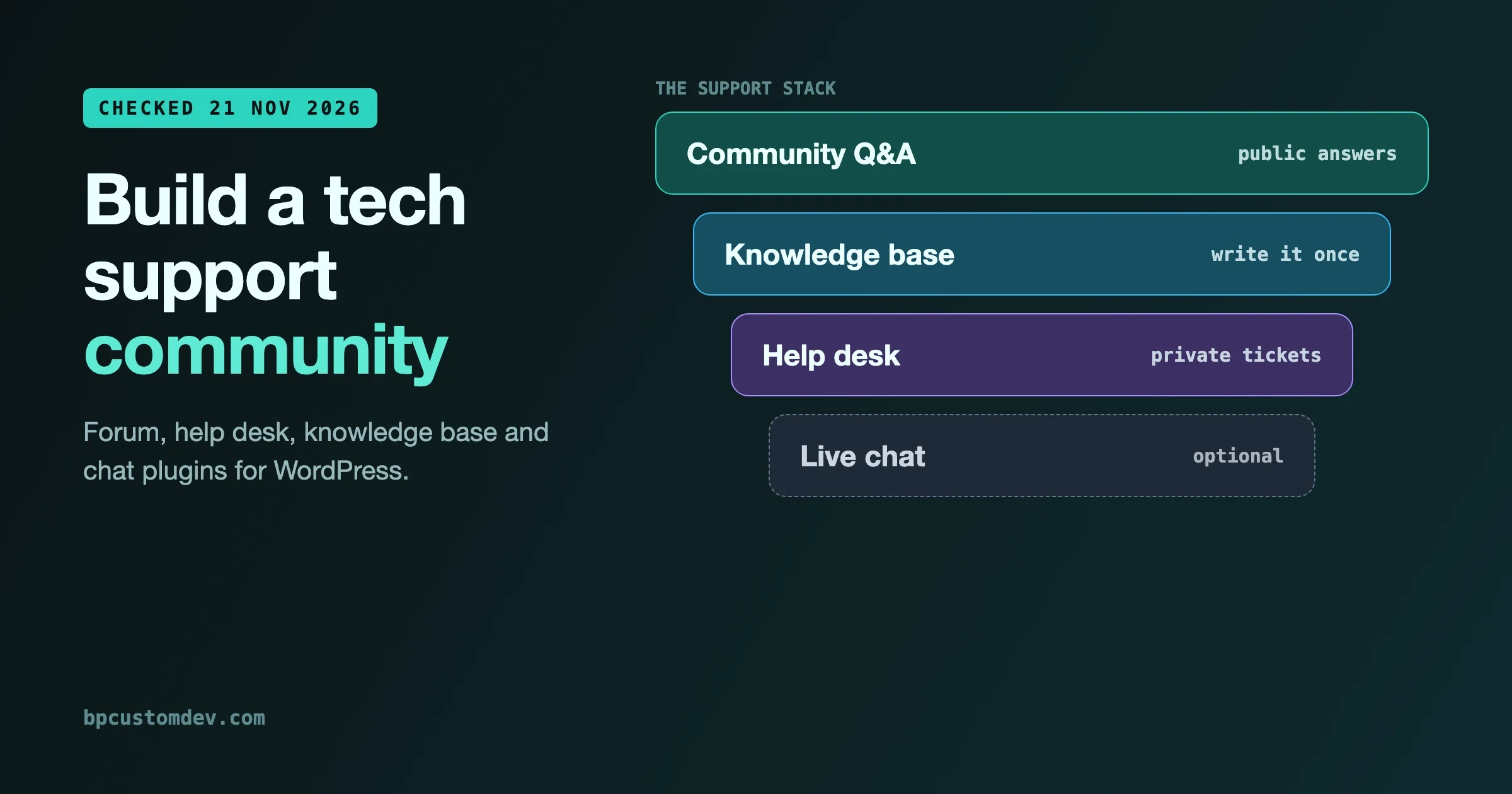
To build a tech support community on WordPress you need three plugins working together: a forum or Q&A plugin where customers answer each other (Jetonomy, wpForo or bbPress), a help desk for private tickets (Fluent Support or SupportCandy) and a knowledge base for the answers you write once (BetterDocs or Echo Knowledge Base). Live chat is optional and comes last. Every plugin below was checked on 21 November 2026 against the WordPress.org plugin API and each vendor’s own page.
This page covers the plugins our team actually recommends for that job, what each one is good and bad at, and how to combine them without building a maze. Jetonomy, BuddyX, Reign and BuddyNext are made by our team at Wbcom Designs; we say so where they appear and list their weak spots like everyone else’s.
What plugins do you need to build a tech support community?
A support community has two kinds of conversation. Public questions that other customers can answer and later readers can find in search, and private problems that involve an account, an order or a licence key. A single plugin rarely handles both well, which is why most good setups use three layers.
Layer | Job | Our first pick | Strong alternative | Free option |
|---|---|---|---|---|
Community forum or Q&A | Customers ask, answer and vote in public | Yes (all) | ||
Help desk | Private tickets with agents and email | Yes (both) | ||
Knowledge base | Articles that answer the same question once | Yes (both) | ||
Live chat | Real-time help for pre-sales and urgent issues | LiveChat | Tawk.to only | |
Social layer (optional) | Profiles, activity, groups | Yes (both) |
Start with the layer that removes the most repeated work. For most software and plugin businesses that is the knowledge base plus a public Q&A forum, because every answered public question stops the next ten tickets.
Why is a contact form not enough for tech support?
A contact form sends each question to one inbox, so every customer with the same problem asks it again, and only your team can answer. That works with ten customers a week. It breaks with a few hundred.
A community changes the maths. A question answered once in public is found by search, linked by your team, and sometimes answered by another customer before you wake up. Ticket systems keep what must stay private, and a knowledge base turns your best answers into pages. Our guide to WordPress knowledge base plugins goes deeper on that layer.
Which forum or Q&A plugin is best for a support community?
For support, a Q&A format beats a classic threaded forum: the answer that solved the problem should sit at the top, not on page three. Here is how the main options compare.
Jetonomy (forum and Q&A, our plugin)
Jetonomy is our forum and Q&A plugin. The free version includes four space types (forum, Q&A, ideas and a show-and-tell feed), voting, accepted answers, trust levels, search, notifications, moderation and one-click importers from bbPress, wpForo and Asgaros. Data lives in its own database tables rather than in WordPress posts, which keeps large forums fast. Access rules can gate spaces by membership through MemberPress or Paid Memberships Pro.
Pro adds private messaging, polls, custom badges, analytics, custom fields, AI moderation and email digests; jetonomy.org lists it from $69 a year for one site. Jetonomy does not need BuddyPress and works with any theme.
The catch: it is new, and the free version downloads from our own site rather than WordPress.org, so there is no public review history to read yet. A product with a long track record, such as wpForo, has more third-party tutorials and answers on the web.
wpForo
wpForo is the most complete free forum plugin on WordPress.org: 20,000+ active installs, a 4.7 rating from 391 reviews and version 3.2.5 released on 14 November 2026. It ships several layouts, including a Question and Answer layout that suits support, plus a free migration tool from other forum software. Recent reviewers include someone who moved a long-running bbPress forum to wpForo with posts, attachments and member ratings intact.
The catch: it is a large plugin with many settings, so plan time for configuration. One 2025 reviewer struggled to get German translations to load.
bbPress
bbPress is the lightweight forum from the WordPress community: free, 100,000+ active installs and version 2.6.22 released in November 2026. It stores topics as WordPress posts and works with BuddyPress groups.
The catch: its rating is 3.9 out of 5 from 343 reviews, and reviews from the last year call it bare-bones and weak on mobile without theme work. It has no Q&A mode or accepted answers out of the box. Security has also needed attention this year. On CVE.org, CVE-2026-74010 (broken access control, published 31 August 2026) and CVE-2026-62137 (sensitive data exposure, published 11 September 2026) affect versions up to 2.6.14, and CVE-2026-110762 (information disclosure through the BuddyPress activity stream, published 14 October 2026) affects versions before 2.6.19. Run 2.6.22. Our full WordPress forum plugin comparison covers bbPress, wpForo, Jetonomy and others side by side.
Which help desk plugin should you use for private tickets?
A help desk handles what cannot be public: billing, account access, logs with private data. Both plugins below run inside WordPress, so customer data stays on your server and there are no per-agent fees.
Fluent Support
Fluent Support takes tickets from a ticket form, contact forms, email and even remote sites, assigns them to agents with permission levels, and reports on customers and agents. From a ticket you see the customer’s history, including previous tickets and purchases. It has 10,000+ active installs, a 4.6 rating from 69 reviews and version 2.5.1 released on 20 November 2026.
Reviewers in 2026 single out support quality: patient help during migrations, and a team that debugged a 404 problem on a customer’s staging site. Some features, such as advanced automation and several integrations, sit in Fluent Support Pro, so check the plan table on the vendor site before you commit.
The catch: a smaller review base than SupportCandy, and the most useful automation sits in Pro.
SupportCandy
SupportCandy is a free, self-hosted help desk with unlimited tickets, agents, customers, categories and statuses. Its free version now includes an AI chatbot and AI assistant that use your own API key. It has 10,000+ active installs, a 4.9 rating from 289 reviews and version 3.5.6 released on 17 November 2026.
The catch: extra features are sold as add-ons, and one 2025 reviewer pointed out that ticket merging, standard in most help desks, was missing.
We would not start a new site on Awesome Support: its WordPress.org rating is 3.5 out of 5, and recent reviews describe stalled fixes and difficult support.
Which knowledge base plugin reduces support tickets?
BetterDocs
BetterDocs builds a documentation site with ready-made templates, live search, FAQs and AI-written documentation features, with Gutenberg blocks and Elementor widgets for design. It has 30,000+ active installs, a 4.8 rating from 517 reviews and version 4.9.7 released on 17 November 2026. Reviewers in 2026 describe years of use and quick, practical support.
The catch: multiple knowledge bases (one per product) and internal, role-restricted knowledge bases are Pro features, and a software company with several products will usually need them.
Echo Knowledge Base
Echo Knowledge Base offers AJAX search, categories up to five levels deep, FAQs, a table of contents, PDF export and a front-end visual editor, plus AI search and an AI chatbot. It has 10,000+ active installs, a 4.9 rating from 124 reviews and version 17.320.0 released on 8 November 2026.
The catch: much of its extra power comes as separate paid add-ons, so the price grows with your needs.
Do you need live chat on a support community?
Not on day one. Live chat is expensive in people, not software: someone must answer. It earns its place for pre-sales questions and urgent outages. For everything else, the forum and knowledge base scale better. Our WordPress chat plugins guide covers member-to-member chat inside a community, which is a different job.
LiveChat is a polished paid live chat service with an AI chatbot add-on, offline lead capture and visitor tracking. Its WordPress plugin has a 4.6 rating from 98 reviews and was last updated in May 2026. It is a paid service with a free trial, which some reviewers say the plugin listing did not make clear enough. (Affiliate link: we may earn a commission at no cost to you.)
Tawk.to is the free alternative: unlimited messaging, ticketing and its own knowledge base, with apps for iOS, Android, Windows and macOS. Its plugin has 100,000+ active installs and a 4.6 rating, but the last plugin update was on 14 January 2026 and it is tested only up to WordPress 6.9. A May 2026 reviewer found the widget hard to configure. Conversations live on Tawk.to’s servers, not your site.
Do you need BuddyPress or BuddyNext for a support community?
Only if you want a social layer: member profiles, activity feeds, groups. Many support communities are better off without it, because people come to solve a problem, not to make friends.
If you do want it, BuddyNext is our free community engine, built from scratch with spaces, profiles, messaging, moderation and gamification, and it pairs naturally with Jetonomy. BuddyPress is the established option at version 14.5.6 (17 November 2026) with 90,000+ active installs. Check its security status first: CVE-2026-1360, a PHP object injection issue in XProfile data, is listed on CVE.org for versions up to 14.5.0, while Patchstack’s database lists it as affecting up to 14.5.6 as of 21 November 2026.
For the theme, our list of WordPress community themes compares BuddyX, Reign and others.
How do you combine these plugins without confusing customers?
The biggest mistake is giving customers four doors with no signs. Here is a setup we have seen work for plugin and SaaS businesses:
- One support page. A single “Get help” page with a search box over the knowledge base, a link to the community, and a “Contact us privately” button for tickets.
- Search before posting. Show matching knowledge base articles and forum answers while customers type a new question.
- Clear rules for private data. Licence keys, invoices and site logins go to tickets, never the forum. Say so above the question box.
- Turn answers into articles. When the same forum question comes up three times, write a knowledge base article and link it as the accepted answer.
- Reward helpers. Trust levels, badges or simple public thanks for members who answer often. Our guide to community moderation covers how to keep that healthy.
- Measure. Track tickets per week before and after launch. If the number does not fall within a few months, look at search and the support page first.
How did we check these plugins?
Our team builds and supports community and support sites for clients on WordPress. For this refresh we went back to primary sources instead of trusting older notes:
- WordPress.org plugin API for version, active installs, rating, review count, last update and how many support threads were resolved in the last two months, all read on 21 November 2026.
- Recent reviews on each plugin’s WordPress.org review page, read for what people praise and what breaks.
- Vendor pages for features that sit in free versus paid plans. Where a vendor page did not say clearly, we left the claim out.
- Published security advisories (CVE.org and Patchstack) for any security statement. We do not repeat security claims from reviews alone.
We dropped plugins that have not been maintained. Older versions of this page recommended general performance and SEO plugins too; they are useful on any site, but they are not what makes a support community work, so they are out of scope here.
How do you set up a Q&A support forum, step by step?
Whichever forum plugin you choose, the order of work is the same. This is the sequence our team follows on client builds, checked on 21 November 2026:
- Decide your categories from real tickets. Export the last three months of tickets or emails and group them. Five to eight categories based on real questions beat twenty based on your product menu.
- Install the forum plugin on staging first. Create the categories, choose the Q&A layout or space type, and set who can post (logged-in customers only is the usual choice for support).
- Connect registration to your store or licence system. Customers should not create a second account to ask a question. Single sign-on through your existing WordPress users is the simplest route.
- Seed the content. Post your most common questions with full answers, marked as accepted, before anyone else sees the forum.
- Add spam protection. A support forum that accepts open registration will attract spam within days. Moderate first posts and add a CAPTCHA or Cloudflare Turnstile.
- Link it everywhere. Add the forum to your support page, plugin settings screen, order emails and ticket auto-replies.
- Answer fast for the first month. Early questions that sit unanswered teach customers to go back to email.
If you already run bbPress, both Jetonomy and wpForo include importers, so you can move existing topics instead of starting from zero. Test the import on a staging copy and check that links from search engines to old topics still resolve, because those old URLs are often your best traffic.
How do you know the support community is working?
Track a few numbers from the start. They tell you whether the community is taking load off your team or adding to it.
Metric | What it tells you | Healthy direction |
|---|---|---|
Tickets per week | Whether self-service is working | Falling or flat while customers grow |
Unanswered forum questions older than 48 hours | Whether anyone owns the forum | Close to zero |
Share of answers from customers | Whether a real community is forming | Rising slowly over months |
Knowledge base searches with no result | Which articles to write next | Falling as you fill gaps |
Time to first reply on tickets | Whether private support is still fast | Stable or improving |
Most forum and knowledge base plugins show some of these numbers, and the rest can come from your analytics tool. Review them monthly, not daily: a support community takes a few months to show its effect.
What users say, and our suggestion
Ratings, installs, update dates and support numbers come from the WordPress.org plugin API on 21 November 2026; praise and complaints are paraphrased from each plugin’s most recent WordPress.org reviews.
Plugin | Rating (reviews) | Active installs | Last updated | Support resolved (2 months) |
|---|---|---|---|---|
Jetonomy | No public reviews yet | Not on WordPress.org | Changelog on jetonomy.org | Ticket support |
wpForo | 4.7 (391) | 20,000+ | 14 Nov 2026 | 3 of 3 |
bbPress | 3.9 (343) | 100,000+ | 16 Nov 2026 | 0 of 0 |
Fluent Support | 4.6 (69) | 10,000+ | 20 Nov 2026 | 3 of 3 |
SupportCandy | 4.9 (289) | 10,000+ | 17 Nov 2026 | 1 of 1 |
BetterDocs | 4.8 (517) | 30,000+ | 17 Nov 2026 | 4 of 6 |
Echo Knowledge Base | 4.9 (124) | 10,000+ | 8 Nov 2026 | 1 of 1 |
LiveChat | 4.6 (98) | 10,000+ | 25 May 2026 | 1 of 2 |
Tawk.to | 4.6 (142) | 100,000+ | 14 Jan 2026 | 0 of 1 |
What people praise
- wpForo reviewers value how much the free version includes, and one moved from bbPress with posts and attachments intact (November 2026).
- Fluent Support, BetterDocs and Echo Knowledge Base reviewers repeatedly praise fast, hands-on support from the developers.
- SupportCandy reviewers like the unlimited free tickets and agents, and its Slack integration.
What people complain about
- bbPress reviewers call it dated and weak on mobile; an October 2026 two-star review says it needs a style pack just to look modern.
- Pricing surprises with hosted chat. LiveChat reviewers complain about cost after the trial, and Tawk.to reviewers about a widget that changes behaviour on its own.
- Missing basics in otherwise strong tools, such as ticket merging in SupportCandy (2025 review).
- Jetonomy and other new plugins have too few public reviews to judge by reviews alone, so try the free version on a staging site.
Our suggestion
- Software or plugin business, starting now: Jetonomy (Q&A with accepted answers) plus BetterDocs plus Fluent Support. Add live chat only for pre-sales.
- You want the longest public track record: wpForo with its Q&A layout instead of Jetonomy.
- Zero budget: wpForo or Jetonomy free, SupportCandy, Echo Knowledge Base and Tawk.to.
- Already on BuddyPress: keep it, add Jetonomy or bbPress for forums and a help desk for private tickets.
- New community with a social side: BuddyNext with Jetonomy, styled by BuddyX or Reign.
Common mistakes when building a support community
- Launching an empty forum. Seed it with your 20 most common questions and good answers before you announce it.
- Installing every layer at once. Each plugin adds settings, emails and updates. Add layers as the volume justifies them.
- Letting private data into public threads. Moderate first posts from new members and remind people not to post keys or passwords.
- No owner. Someone on your team must check unanswered questions daily, or the community becomes a graveyard that hurts trust.
- Ignoring mobile. Customers often ask for help from a phone while looking at the problem on a laptop. Test posting a question on a phone.
FAQ
Can WordPress replace Zendesk or Help Scout?
For many small and mid-sized teams, yes. Fluent Support and SupportCandy cover tickets, agents and email inside WordPress with no per-agent fees. Very large teams may still prefer a hosted help desk for its reporting and phone support.
What is the difference between a forum and a Q&A plugin?
A forum lists replies in time order. A Q&A plugin lets the asker mark one answer as accepted and sorts replies by votes, so the solution sits at the top. wpForo offers a Q&A layout and Jetonomy has a Q&A space type.
Should my support forum be public or private?
Public, unless your product requires privacy. Public answers are found by search engines and AI assistants, which brings both new customers and fewer tickets. Keep account-specific issues in private tickets.
Is bbPress still maintained?
Yes. bbPress 2.6.22 was released in November 2026. It is maintained, but development is slow and it lacks modern features such as accepted answers.
How much does a WordPress support stack cost?
It can start at nothing. Every layer has a capable free option: Jetonomy or wpForo for the forum, SupportCandy or Fluent Support for tickets, Echo Knowledge Base or BetterDocs for articles, and Tawk.to for chat. You pay when you need Pro features, such as Jetonomy Pro (from $69 a year for one site on jetonomy.org), multiple knowledge bases or advanced ticket automation. The real cost is the time your team spends answering, so budget hours before licences.
Do I need a special theme for a support community?
No. Forum, help desk and knowledge base plugins all work with standard themes. A community theme matters more if you add a social layer with BuddyPress or BuddyNext.